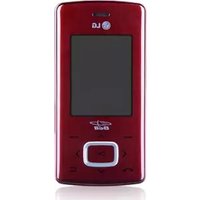
KP100 - Cellphone LG - Free user manual and instructions
Find the device manual for free KP100 LG in PDF.


User questions about KP100 LG
0 question about this device. Answer the ones you know or ask your own.
Ask a new question about this device
Download the instructions for your Cellphone in PDF format for free! Find your manual KP100 - LG and take your electronic device back in hand. On this page are published all the documents necessary for the use of your device. KP100 by LG.
USER MANUAL KP100 LG
Declaration of Conformity

LG Electronics
Suppliers Details
Kun
LG Ecoarks Inc.
Address
LG Elektronica Inc, LG Twin Towns 26, Yousko-dong, Yeongdeursgpo-gu, Seoul, Korea 150-721
Product Details
Prod5Nate
E-GSM 950/DCS 1100 Terminal Equipment
Model Number
T
LG
C∈0168
Applicable Standards Details
PATEDcive 1995EC
EN513602011 and EN513612011
CN60850-1:2001
EN30148-1:1.8.1andEN30148-7:1.3.1
EN301511:49.2
Supplementary information
The confority to above standards is verified by SAST.
Declaration
I thereby declare under our sole responsibility that the product mentioned above is which this declaration relates to, with the above mentioned standards and Directives.
European Standard Center
LG Electronic Logistics and Services B.V.
Yekncoom 15, 1327 AE Almene. The Nethenbdo
Tel:+31-35-547-8940Fax:+31-35-547-8704 email: jacob@tpa.com
HOT
Busing Hysn, 2.1 Dcber

Signature of representative
lanned One
27.0CT, 2007
IKP100I GUIDE DE L'UTILISATEUR
Declaration of Conformity

LQ Electronics
Suppliers Details
Name
LG Ecbarko
4
LG Elektronika Inc, LG Twin Towers 26, Yenko-dong, Yeongdeursungs-gu, Seoul, Korea 150-721
Product Details
Pn45Nn
E-GSM 950/DCS1100 Terminal Equipment
Model Name
KP108
Trade Name
LG
C∈0168
Applicabla Standards Deraa
RATE Drive 1995TC
EN50360.2001 and EN 50361-2001
EN60850-1:2001
EN30149-1:1.8.1andEN30149-7:1.3.1
EN 301511:49,2
Supplementary Information
The conlormity above standards is verified by EAST.
Declaration
I thereby declare under our sole responsibility that the product mentioned above is which this declaration relates to, with the above mentioned standards and Directives.
European Standard Center
LG Electronics Logistics and Services B.V.
Violete 15, 1327 AE Almans, The Netherlands
Tel.: +31-36-847-8945, Fax: +31-36-847-8704
email: jacob@lg.com
Note
Busing Hymns, 2.1 Director

Signature of representative
Issued Date
27,0CT.2007
| KP100 | MANUALE D'USO
Declaration of Conformity

LG Electronics
Suppliers Details
K
LG Ecbarks
Address
LG Elektronica Inc, LG Twin Towns 26,
Yesuko-dong, Yeongdearsgps-gu, Seoul, Korea 150-721
Product Details
Prodn
E-GSM 950/DCS 1100 Terminal Equipment
Model Name
1
LG
C∈0168
Applicable Standards Details
PATED DInovc 1995TC
EN9360.2001 and EN 59361.2001
EN60350-1:2001
Supplementary Information
The conlormity above standards is verified by SAST.
Declaration
I thereby declare under our sole responsibility that the product mentioned above is which this declaration relates complies with the above mentioned standards and Directives.
European Standard Center
LG Electronics Logistics and Services B.V.
Violete 15, 1327 AE Almere, The Netherlands
Tel.: +31-36-847-8945, Fax: +31-36-847-8704
email: jacob@lg.com
图8
Busing Hymen, 2.1 Director

Signature of representative
lnded 0
27,0CT.2007
|KP100| USER GUIDE
This manual may differ from the phone depending on the phone software version and service provider used.

Disposal of your old appliance
- When this crossed-out wheeled bin symbol is attached to a product it means the product is covered by the European Directive 2002/96/EC.
- All electrical and electronic products should be disposed of separately from the municipal waste stream via designated collection facilities appointed by the government or the local authorities.
- The correct disposal of your old appliance will help prevent potential negative consequences for the environment and human health.
- For more detailed information about disposal of your old appliance, please contact your city office, waste disposal service or the shop where you purchased the product.
Contents
Installing the SIM Card and Charging the Battery 3
Installing the SIM Card 3 Illustrations 3
Phone Components 4
Turning Your Phone On and Off 5
Making a Call 5
Answering a Call 5
Making an international call 5
Menu and Options 6
Entering Text 7
T9 Mode 7
ABC Mode 7
123 Mode (Numbers Mode) 7
Symbol Mode 7
How to set the tone 8
Ringtone 8
Ringtone/Keypad/Message/
Call alert tones and volumes 8
Menu tree 9
Quick feature reference 10
Contacts 10
Messaging 11
Call history 11
Tools 12
Settings 13
SIM Service 14
Guidelines for safe and efficient use
15
Technical Data 20
Installing the SIM Card and Charging the Battery
Installing the SIM Card
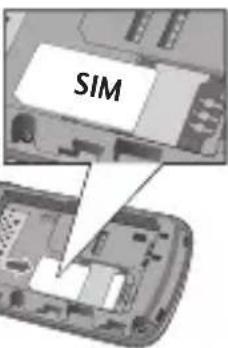
When you subscribe to a cellular network, you are provided with a plug-in SIM card loaded with your subscription details, such as your PIN, any optional services available and many others.
Illustrations
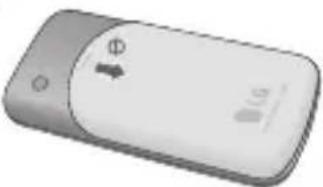
12 Open battery cover
3 Insert your SIM
4 Close the battery cover
5 Charge your battery
Important!
The plug-in SIM card and its contacts can be easily damaged by scratches or bending, so be careful when handling, inserting or removing the card. Keep all SIM cards out of the reach of small children.
USIM is not supported in a phone.
0
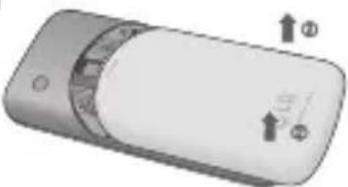
2
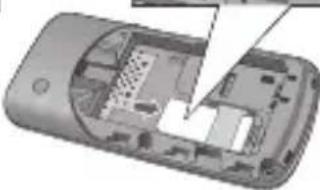
3
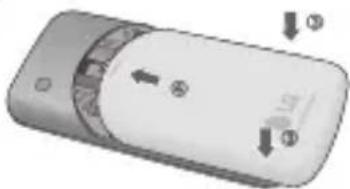
4
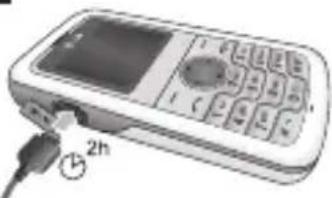
5
Fully charge the battery before using it for the first time.
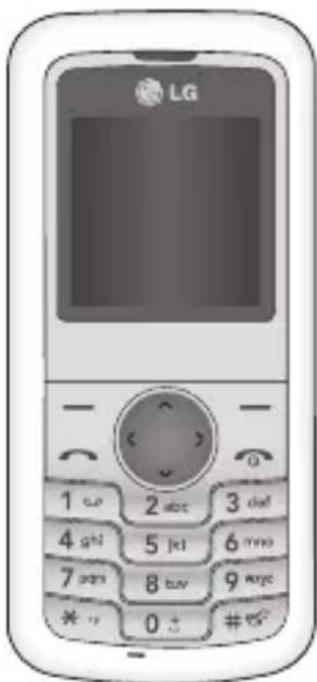
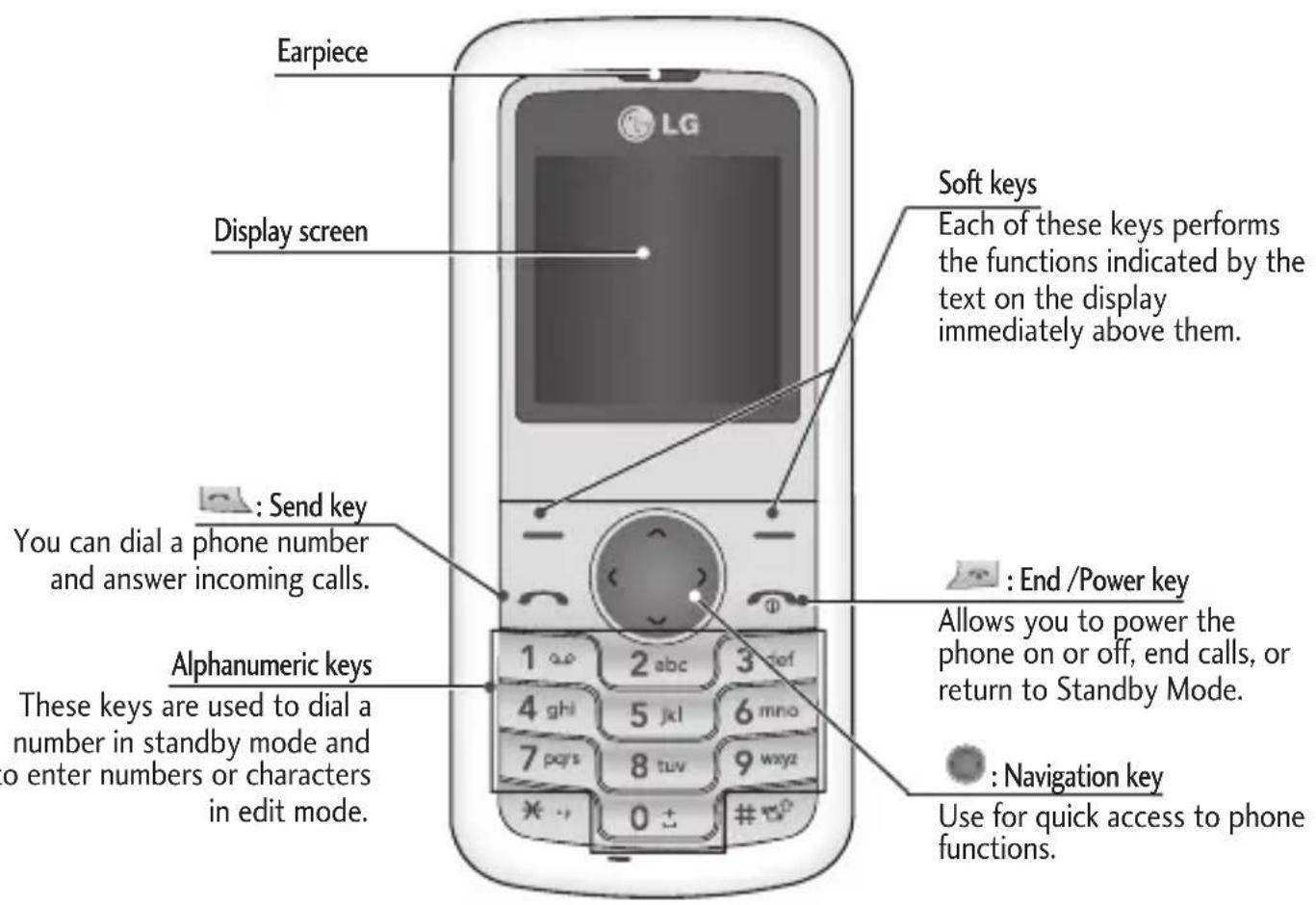
Phone Components
Turning Your Phone On and Off
- Hold down the [END] key until the phone switches on.
- To switch the phone off, hold down the [END] key until the power-off image displays.
Making a Call
- Enter a phone number including the area code.
- Press the [SEND] key to call the number.
- When finished, press the [END] key.
Answering a Call
- When the phone rings and the phone icon flashes on the screen, press the key or the left soft key to answer.
- End the call by pressing the [END] key.
Note
After the call ends, the phone will go back to standby mode.
Making an international call
- Press and hold the key for the international prefix. The +^ character automatically selects the international access code.
- Enter the country code, area code, and the phone number.
- Press [send] key to call the number.
Menu and Options
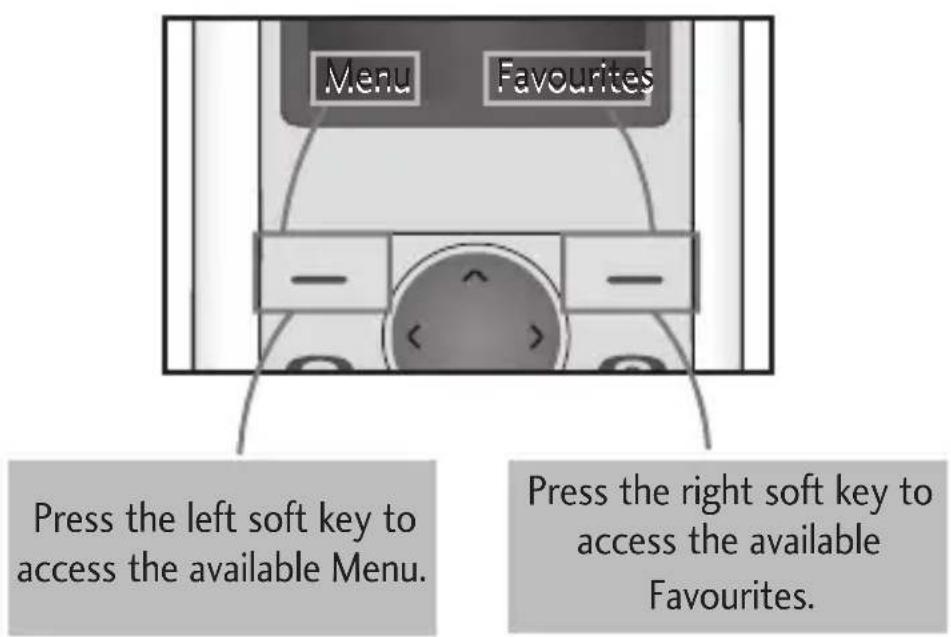
Your phone offers a set of functions that allow you to customize it. These functions are arranged in menus and sub-menus, accessed via the left and right soft keys.
The label on the bottom of the display screen immediately above the soft keys indicates their current function.
Entering Text
You can enter alphanumeric characters by using the phone's keypad. To change modes, press the key.
T9 Mode
This mode allows you to enter words with only one keystroke per letter. Each key on the keypad has more than one letter. The T9 mode automatically compares your keystrokes with an internal linguistic dictionary to determine the correct word, thus requiring far fewer keystrokes than the traditional ABC mode.
ABC Mode
This mode allows you to enter letters by pressing the key labeled with the required letter once, twice, three or four times until the letter is displayed.
123 Mode (Numbers Mode)
Type numbers using one keystroke per number.
Symbol Mode
This mode allows you to enter special characters by pressing key.
How to set the tone
Ringtone
- Press the left soft key [Menu] and select [Settings - Profiles] using the up/down navigation keys.
- Select [Personalise] and choose Ringtones menu.
- Press the left soft key [OK] and then you can set the desired ringtone by pressing Select.
Tip
If you want to change your ringer to vibrate, select Vibrate mode or press and hold the key in idle menu.
Ringtone/Keypad/Message/Call alert tones and volumes
You can select Ringtone/Keypad/Message/Call alert tones and volumes.
You can change the sound that will occur when a key is pressed, or volume level.
[Menu - Settings - Profiles - Personalise]
Menu tree
1. Contacts
1.1 Search
1.2 New contact
1.3 Speed dials
1.4 Copy all
1.5 Delete all
1.6 Memory status
1.7 Information
2. Messaging
2.1 New message
2.2 Inbox
2.3 Drafts
2.4 Outbox
2.5 Sent
2.6 Listen voice mail
2.7 Info messages
2.8 Templates
2.9 Settings
3. Call history
3.1 All calls
3.2 Missed calls
3.3 Dialled calls
3.4 Received calls
3.5 Call duration
4. Tools
4.1 Alarm
4.2 Games
4.3 Calendar
4.4 Memo*
4.5 Calculator
4.6 Stopwatch
4.7 Unit Converter
4.8 World clock
- Depending on the inserted SIM-card, these items might be listed in main-menu "Organizer" instead.
5. Settings
5.1 Profiles
5.2 Date & Time
5.3 Language
5.4 Display
5.5 Call
5.6 Auto keylock
5.7 Security
5.8 Power save
5.9 Network selection
5.0 Reset settings
5.*Memory status
6. SIM Service (Organiser)
Quick feature reference
This section provides brief explanations of features on your phone.
| Contacts | Menu 1 |
| Search | You can Search for contacts in Phonebook. Note: Instant searching is available by inputting the initial letter of the name you want to search. |
| New contact | You can add phonebook entries by using this menu. |
| Speed dials | Assign contacts to any of keys from to: |
| Copy all | You can copy all entries from SIM card memory to Phone memory and also from Phone memory to SIM card memory. |
| Delete all | You can delete all entries from SIM card memory or Phone memory. |
| Memory status | You can check free space and memory usage. |
| Information | Service dial numbers: Access the list of service numbers assigned by service provider safely. Own number: You can save and check your own numbers in SIM card. Business card: This option allows you to create your own business card featuring your name, mobile phone number and so on. |
Messaging Menu 2
This menu includes functions related to SMS (Short Message Services).
| New message | This menu includes functions related to SMS (Short Message Services). |
| Inbox | You will be alerted when you have received a message. |
| Drafts | This menu shows the preset message list. |
| Outbox | This menu allows to view the message which is about to be sent or has failed to be sent. |
| Sent | This menu allows you to view the messages which have already been sent, including time and content. |
| Listen voice mail | This menu provides you with a quick way of accessing your voice mailbox (if provided by your network). |
| Info messages | Info service messages are text messages delivered by the network to your handset. |
| Templates | There are pre-defined messages in the list. You can view and edit the template messages or create new messages. |
| Settings | This menu allows you to set features of your network service provide |
Call history Menu 3
You can check the record of missed, received, and dialed calls only if the network supports the Calling Line Identification (CLI) within the service area. The number and name (if available) are displayed together with the date and time at which the call was made. You can also view call durations.
| Call history | Menu 3 (Continued) |
| All calls | Displays all the lists of three types (Received/Dialled/Missed calls) by time. |
| Missed calls | This option lets you view the last 20 unanswered calls. |
| Dialled calls | This option lets you view the last 20 outgoing calls (called or attempted). |
| Received calls | This option lets you view the last 20 incoming calls. |
| Call duration | Allows you to view the duration of your incoming and outgoing calls. |
| Tools | Menu 4 |
| Alarm | Allows you to set one of three alarms. The current time is displayed at the top of the screen when you select an alarm to set. At the alarm time, the Alarm icon will be displayed on the LCD screen and the alarm will sound. |
| Games | Has List of default games available in the phone. |
| Calendar | When you enter this menu you will be able to view the calendar. |
| Memo | You can create a list of tasks. |
| Calculator | This contains the standard functions such as+, -, x, ÷: Addition, Subtraction, Multiplication and Division. |
Tools Menu 4 (Continued)
Stopwatch Stopwatch is available just as common stopwatches we see and use in daily life.
Unit Converter This converts any measurement into a unit you want.
World clock Allows you to determine the current time in another time zone or country.
Settings Menu 5
You can set the following menus for your convenience and preferences.
Profiles You can adjust and customize the phone tones for different events, environments or caller groups.
Date & Time You can set functions relating to the date and time.
Language You can change the language for the display texts in your phone. This change will also affect the Language Input mode.
Display You can change settings for the phone display.
Call You can set the menu relevant to a call.
Auto keylock When this feature is enabled, the phone keypad is locked.
Security This menu allows you to set the phone safely.
PIN code request: You can set the phone to ask for the PIN code of your SIM card when the phone is switched on.
Phone lock: You can use a security code to avoid unauthorized use of the phone.
Settings Menu 5 (Continued)
Security (Continued)
Call barring : The Call barring service prevents your phone from making or receiving a certain category of calls. This function requires the call barring password.
Fixed dial number (SIM dependent): You can restrict your outgoing calls to selected phone numbers. The numbers are protected by your PIN2 code. The numbers you wish to allow access to once this service has been enabled, must be added to the Number list after enabling Fixed dial number.
Change codes : PIN is an abbreviation of Personal Identification Number to prevent use by unauthorized persons. You can change the access codes: Security code, PIN code, PIN2 code.
Power save
If you set this to On, you can save the power.
Network selection
You can select a network that will be registered either automatically or manually. Usually, the network selection is set to Automatic.
Reset settings
You can initialize all setting values as defaults. You need a Security code to activate this function.
Memory status
You can check free space and memory usage of each repository.
SIM Service Menu 6
Guidelines for safe and efficient use
Please read these simple guidelines. Ignoring them may be dangerous or illegal. Further detailed information is given in this manual.
Warning
For your safety, use ONLY specified ORIGINAL batteries and chargers.
Switch off the phone in any area where required by special regulations, e.g. in a hospital where it may affect medical equipment.
Batteries should be disposed off in accordance with relevant legislation.
Product care and maintenance
WARNING! Only use batteries, chargers and accessories approved for use with this particular phone model. The use of any other types may invalidate any approval or warranty applying to the phone, and may be dangerous.
Do not disassemble this unit. Take it to a qualified service technician when repair work is required.
The unit should be kept away from heat sources such as radiators or cookers.
Use a dry cloth to clean the exterior of the unit. (Do not use any solvents.)
Do not keep the phone next to credit cards or transport tickets; it can affect the information on the magnetic strips.
Guidelines for safe and efficient use (Continued)
Electronic devices
All mobile phones may get interference, which could affect performance.
Do not use your mobile phone near medical equipment without requesting permission. Avoid placing the phone over a pacemaker, i.e. in your breast pocket.
Road safety
Check the laws and regulations on the use of mobile phones in the areas when you drive.
Do not use a hand-held phone while driving.
Use a hands-free kit, if available.
Pull off the road and park before making or answering a call if driving conditions so require.
Guidelines for safe and efficient use (Continued)
Blasting area
Do not use the phone where blasting is in progress. Observe restrictions, and follow any regulations or rules.
Potentially explosive atmospheres
Do not use the phone at a refueling point. Do not use near fuel or chemicals.
In aircraft
Wireless devices can cause interference in aircraft.
Turn off your mobile phone before boarding any aircraft.
Children
Keep the phone in a safe place out of children's reach. It includes small parts which if detached may cause a choking hazard.
Emergency calls
Emergency calls may not be available under all cellular networks. Therefore, you should never depend solely on the phone for emergency calls. Check with your local service provider.
Guidelines for safe and efficient use (Continued)
Battery information and care
You do not need to completely discharge the battery before recharging. Unlike other battery systems, there is no memory effect that could compromise the battery's performance.
Use only LG batteries and chargers. LG chargers are designed to maximize the battery life.
Do not disassemble or short-circuit the battery pack.
Replace the battery when it no longer provides acceptable performance. The battery pack may be recharged hundreds of times before it needs to be replaced.
Do not expose the battery charger to direct sunlight or use it in high humidity, such as the bathroom.
Risk of explosion if battery is replaced by an incorrect type.
Dispose off used batteries according to the manufacturer's instructions.
Guidelines for safe and efficient use (Continued)
Exposure to radio frequency energy
Radio wave exposure and Specific Absorption Rate (SAR) information
This mobile phone model KP100 has been designed to comply with applicable safety requirement for exposure to radio waves. This requirement is based on scientific guidelines that include safety margins designed to ensure safety of all persons, regardless of age and health.
The radio wave exposure guidelines employ a unit of measurement known as the Specific Absorption Rate, or SAR. Tests for SAR are conducted using standardized methods with the phone transmitting at its highest certified power level in all used frequency bands.
While there may be differences between the SAR levels of various LG phone models, they are all designed to meet the relevant guidelines for exposure to radio waves.
The SAR limit recommended by the international Commission on Non-lonizing Radiation Protection (ICNIRP) is 2W / kg averaged over ten (10) gram of tissue.
The highest SAR value for this model phone tested by DASY4 for use at the ear is 0.600W / kg (10g).
SAR data information for residents in countries/regions that have adopted the SAR limit recommended by the Institute of Electrical and Electronics Engineers (IEEE) is 1.6W / kg averaged over one (1) gram of tissue.
Technical Data
General
Product name:KP100
System: GSM 900/DCS 1800
Ambient Temperatures
Max. : + 55^
Min: -10°C
Declaration of Conformity

LG Electronics
Suppliers Details
Kan
LG Ecbarko
Address
LG Elektronika Inc, LG Twin Towns 26,
Yesuko-dong, Yeongdeursungs-gu, Seoul, Korea 150-721
Product Details
Prod5Nate
E-GSM 950/DCS 1100 Terminal Equipment
Model Number
Trade Name
LG
C∈0168
Applicable Standards Details
PATEDcive 1995EC
EN50360.2001 and EN 50361-2001
EN60850-1:2001
EN30149-1:1.8.1andEN30149-7:1.3.1
EN301511:49.2
Supplementary Information
The conlormity above standards is verified by EAST.
Declaration
I thereby declare under our sole responsibility that the product mentioned above is which this declaration relates to, with the above mentioned standards and Directives.
European Standard Center
LG Electronics Logistics and Services B.V.
Violete 15, 1327 AE Almans, The Netherlands
Tel.: +31-36-847-8945, Fax: +31-36-847-8704
email: jacob@lg.com
Note
Busing Hymns, 2.1 Director

Signature of representative
Issued Date
27,0CT.2007