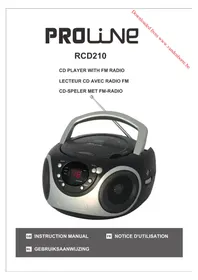
RCD210 - Cd player/recorder PROLINE - Free user manual and instructions
Find the device manual for free RCD210 PROLINE in PDF.


| Product type | CD player/recorder |
| Brand | Proline |
| Model | RCD210 |
| Power supply | Mains 230 V~ 50 Hz, 12 W or batteries 6 x UM-2 (9 V) |
| Radio frequency band | FM 87.5 - 108 MHz |
| CD functions | Play, pause, stop, track selection, search, repeat (1 track/all), random, program (20 tracks) |
| Radio functions | FM stereo with telescopic antenna |
| Auxiliary input | AUX IN socket (3.5 mm) |
| Headphone output | Headphone socket (3.5 mm) |
| Speakers | Built-in |
| Display | Screen with indicators (PROG, PLAY/PAUSE, REPEAT, FM ST., etc.) |
| Controls | Volume knob, function selector, tuning, CD buttons (play, pause, stop, repeat, random, program) |
| Safety | Double insulation, Class 1 laser product, do not expose to water or heat |
| Maintenance | Clean with a soft cloth, do not use solvents |
| Supplied accessories | Power cord, user manual |
| Intended use | Household use only |
| Auto shut-off | After 15 minutes of inactivity in CD/AUX mode |
| Disc compatibility | Audio CD, CD-R, CD-RW finalized |
| Disposal | Follow local regulations, recycle batteries |
Frequently Asked Questions - RCD210 PROLINE
User questions about RCD210 PROLINE
0 question about this device. Answer the ones you know or ask your own.
Ask a new question about this device
Download the instructions for your Cd player/recorder in PDF format for free! Find your manual RCD210 - PROLINE and take your electronic device back in hand. On this page are published all the documents necessary for the use of your device. RCD210 by PROLINE.
USER MANUAL RCD210 PROLINE
IMPORTANT SAFETY INSTRUCTIONS 4
CONTROLS 7
BATTERY OPERATION (NOT SUPPLIED) 8
MAINS OPERATION 8
This appliance is intended for domestic household use only and should not be used for any other purpose or in any other application, such as for non domestic use or in a commercial environment.
Ventilation
Allow at least a 10 cm gap all around the product.
The ventilation should not be impeded by covering the ventilation openings with items, such as newspapers, tablecloths, curtains, etc.
No naked flame sources, such as lighted candles, should be placed on the apparatus.
Attention should be drawn to the environmental aspects of battery disposal.
This apparatus is not suitable for use in a tropical climate.
The apparatus shall not be exposed to dripping or splashing and that no objects filled with liquids, such as vases, shall be placed on the apparatus.
Batteries (battery pack or batteries installed) shall not be exposed to excessive heat such as sunshine, fire or the like.
Where the MAINS plug or an appliance coupler is used as the disconnect device, the disconnect device shall remain readily operable.
IMPORTANT SAFETY INSTRUCTIONS
Symbols

This equipment is double insulated
and an earth connection is not required.
C E
This mark is applied to show the
equipment conforms to European safety
and electromagnetic compatibility
standards.
3
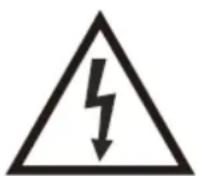
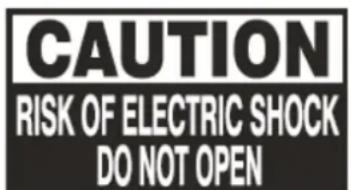
Dangerous voltage constituting a
risk of electric shock is present inside
this equipment.
!
There are important operating and
maintenance instructions in the
literature accompanying this equipment.
Class 1 laser product
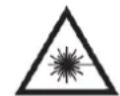
This apparatus contains a low
power laser device. Invisible laser radiation when the enclosure is opened and interlocks are defeated. Avoid exposure to beam.

This digital disc player employs a laser system. Use of controls, adjustments, or the performance of procedures other than those specified herein may result in hazardous radiation exposure.
To prevent direct exposure to laser beam, do not open the enclosure. Never stare directly into the laser beam. Do not install this apparatus in a confined space such as a book case or similar unit.
BATTERY WARNING: Only adults should handle the batteries. Do not allow a child to use this product unless the Battery Cover is securely attached to the Battery Compartment.
The battery type used in this product is six UM-2 size batteries. These batteries are located internally and are readily accessible.
Remove the battery cover on the bottom of the product to remove the batteries.
These batteries must be disposed of at your local recycling point.
CONTROLS
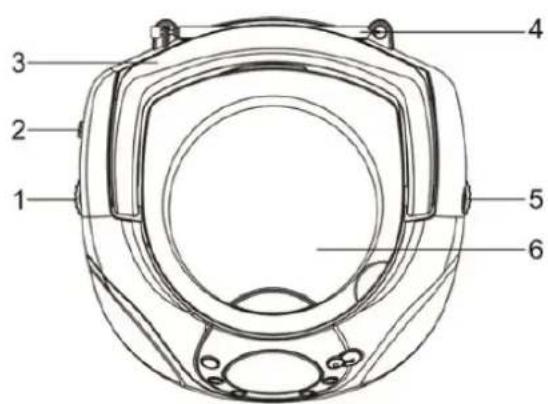
Top
- VOLUME control knob
- FUNCTION switch: RADIO-OFF-CD/AUX
- Handle
- Telescopic aerial
- TUNING knob
- CD door
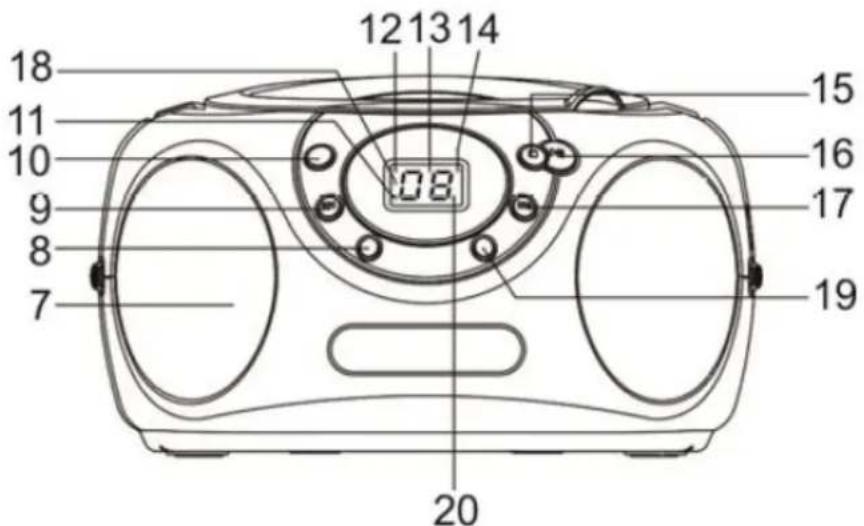
Front
- Speakers
- REPEAT button
- RANDOM button
11.PROG.indicator light - POWER indicator light
-
Display
-
FM ST. indicator light


- REPEAT indicator light
19.PROG.button - PLAY/PAUSE indicator light
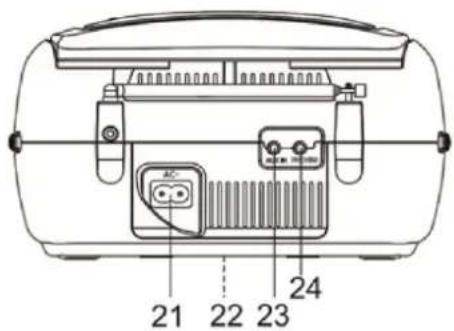
Rear and Bottom
21.AC~jack
22. Battery cover (on the bottom)
23.AUX IN jack
24. PHONES jack
Earphones: Insert standard 3.5 mm earphones into the microphone jack.
EARPHONE VOLUME WARNING
Connect earphones with volume set low and increase it if required. Prolonged listening through some earphones at high volume settings can result in hearing damage.
Earphones or headphones must comply with EN50332-1 / EN50332-2 to ensure continued protection from excessive sound pressure.

To prevent possible hearing damage, do not listen at high volume levels for long periods.
BATTERY OPERATION (NOT SUPPLIED)
The unit can be operated using batteries alone.
- Remove the battery cover.
-
Insert six UM-2 size batteries into the battery compartment.
-
Make sure all batteries are inserted with the correct polarity as shown on the inside of the battery compartment.
-
Replace the battery cover.

If the unit is not to be used for a prolonged period of time, remove the risks to avoid damage by battery leakage.
MAINS OPERATION
- Place the player on a flat stable surface.
- Plug the mains lead into the AC~ jack located on the rear of the player ensuring that the plug is pushed fully into the jack.
- Plug the other end of the mains lead into the mains socket.

The mains socket used for the player must remain accessible during normal order to disconnect the player from the mains, the mains plug should be fed from the mains power socket completely.
SWITCHING ON THE UNIT
- Set the FUNCTION switch to the RADIO or CD/AUX position to turn on the unit.
- If there is no operation within about 15 minutes when the FUNCTION switch is set, the CD/AUX position, the unit will turn off automatically.
- Press and hold to switch on the unit again.
FM RADIO OPERATION
- Extend the telescopic aerial.
- Note: Fully extend and reposition the aerial for optimum reception.
- Set the FUNCTION switch to the RADIO position.
- The POWER indicator light will illuminate.
- Turn the VOLUME control knob to a comfortable volume level.
- Turn the TUNING knob to tune in to the desired FM station.
- The FM ST. indicator light will illuminate for a stereo signal.
- Turn off the radio by setting the FUNCTION switch to the OFF position.
DISCS OPERATION
Compact discs
Use only Digital Audio CDs with the COMPACT DIGITAL AUDIO symbol.
Never write on a CD or attach any sticker to the CD. Always hold the CD at the edge and store it in its box after use with the label facing up.
To remove dust and dirt, breathe on the CD and wipe it with a soft, lint free cloth in a straight line from the centre towards the edge.
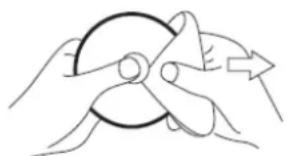
Cleaning agents may damage the CD.
Do not expose the CD to rain, moisture, sand or to excessive heat.
CD-R/CD-RW discs
The player can playback CD-R/CD-RW discs that have been finalised upon completion of recording.
The player may fail to playback some CD-R/CD-RW discs due to poor recording and wide variation in quality of the CD-R/CD-RW discs.
Inserting a CD
- Lift the right corner of the CD door to open it.
- Insert a disc on the disc tray with the label side facing up.
- Close the CD door.
Playing a CD
-
Set the FUNCTION switch to the CD/AUX position.
-
The player will scan the contents of the CD. The total number of tracks will then be displayed.
-
The player will start by pressing /
-
Playback will start from the first track and the display will show the current track number.
-
The PLAY/PAUSE indicator light will illuminate on the display.
-
Adjust the volume by turning the VOLUME control knob.
-
To interrupt playback, I / 山
-
The PLAY/PAUSE indicator light will flash on the display.
- To resume playback, press / again.
- The PLAY/PAUSE indicator light will stop flashing.
- To stop playback, press
- The PLAY/PAUSE indicator light will go out.
Note:
The CD door should only be opened when the CD is in stop mode.
- If no disc is loaded into the compartment or the disc is placed upside down, the display will show "No".
Selecting a track
While the CD is playing, repeatedly press / to play the desired track.
Note:
- You can also repeatedly press 14 / 15 to select the desired track when the player is in stop mode. Press 16 play the selected track.
Search function
While the CD is playing, press and hold / . Release the button when the desired point (passage) of the track is reached.
Playback will start again from this point.
CD repeat mode
While the CD is playing, repeatedly press REPEAT to select the desired repeat mode.
REPEAT indicator light status
Description
Flashing
To repeat a single track
Stop flashing
To repeat all tracks
Go out
Normal playback
Random play
Press RANDOM. Playback will start from any track (not in the order of the disc).
The current track number and the symbol "--" will appear alternately on the display.
Programmed play
By programming the player you can play up to 20 tracks in any desired order.
-
While the CD is in stop mode, press PROG.
-
The PROG. indicator light and the number "01" will flash on the display.
- Repeatedly press / to select the desired track number.
- Press PROG. again to store the track.
- Repeat the above steps until you have completed your program.
-
Press to commence play of selected tracks.
-
Playback will start from the first programmed track.
You can repeatedly press / to select the desired track programmed.
To cancel the program play, press twice and the PROG. indicator light will go out.
HEADPHONE JACK
A PHONES jack is provided on the rear of the player so that you can listen without disturbing others. To use this jack, plug in the headphones/earphones (not supplied) and adjust the volume to a preferred level.
Note: When headphones/earphones are connected, the speakers of the player will be muted.
AUX IN
Connect an audio cable (not supplied) to the AUX IN jack on the rear of the unit.
Connect the other end to a suitable output socket on your auxiliary device.
Set the FUNCTION switch to the CD/AUX position.
You can play music from an auxiliary device through the speakers of the player.
TROUBLESHOOTING
| Problem | Possible Cause | Possible Solution |
| The player will not play. | 1. Unit not in CD mode. 2. CD is not installed or installed incorrectly. | 1. Select CD mode. 2. Load a CD with label side up. |
| CD skips while playing. | Disc is dirty or scratched. | Wipe the disc with a cloth or use another disc. |
| Radio sound distorted. | 1. The station is not tuned in. 2. There is interference. | 1. Fine tune the station. 2. Reposition the unit. |
| No radio sound. | 1. The unit is not in radio mode. 2. The volume is on the minimum setting. | 1. Select radio mode. 2. Adjust the volume level. |
SPECIFICATIONS
| Power Source: | AC 230V~50Hz 12W or DC 9V —— UM-2 X 6 batteries |
| Radio Frequency Range: | FM 87.5 – 108 MHz |
Disposal
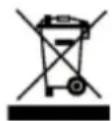
As a responsible retailer we care about the environment. As such we urge you to follow the correct disposal procedure for the product, packaging materials and if applicable, accessories and batteries. This will help conserve natural resources and ensure that the materials are recycled in a manner that protects health and the environment. You must follow laws and regulations about disposal. Waste electrical products and batteries must be disposed of separately from household waste when the product reaches the end of its life.
Contact the store where you bought the product and your local authority to learn about disposal and recycling.
The batteries must be disposed of at your local recycling point. See the operating instructions to find out how to remove the batteries for disposal.
We apologize for any inconvenience caused by minor inconsistencies in the operating instructions, which may occur as a result of product improvement and development.
Darty Holdings SNC © 14 route d'Aulnay 93140 Bondy, France 08 / 06 / 2015
Table des matieres
AVERTISSEMENTS 2
CONSIGNES DE SECURITE IMPORTANTES 4
COMMANDES 7
UTILISER DES PILES (NON FOURNIES) 8
INSTALLER L'APPAREIL 8
UTILISER LA RADIO FM 9
UTILISER DES DISQUES 9
PRISE ECOUTEURS 11
UTILISER L'ENTREE AUX 11
DEPANNAGE 12
SPECIFICATIONS 12
AVERTISSEMENTS
Satut duvoyant REPEAT [Repeter]
Clignote
Arrête de clignoter
S'eteint
Description
PROBLEEMOPLOSSING 12
BATTERIJWAARSCHUWING: Alleen
WAARSCHUWING OVER VOLUME VAN OORTELEFOON
- Ventilation
- IMPORTANT SAFETY INSTRUCTIONS
- Symbols
- C E
- 3
- !
- Class 1 laser product
- CONTROLS
- EARPHONE VOLUME WARNING
- BATTERY OPERATION (NOT SUPPLIED)
- MAINS OPERATION
- SWITCHING ON THE UNIT
- FM RADIO OPERATION
- DISCS OPERATION
- Compact discs
- CD-R/CD-RW discs
- Inserting a CD
- Playing a CD
- Note:
- Selecting a track
- Search function
- CD repeat mode
- REPEAT indicator light status
- Description
- Random play
- Programmed play
- HEADPHONE JACK
- AUX IN
- SPECIFICATIONS
- Disposal
- Table des matieres
- AVERTISSEMENTS
- Satut duvoyant REPEAT [Repeter]
- BATTERIJWAARSCHUWING: Alleen
- WAARSCHUWING OVER VOLUME VAN OORTELEFOON
Brand : PROLINE
Model : RCD210
Category : Cd player/recorder