BCR115 PB - Alarm Clock BRANDT - Free user manual and instructions
Find the device manual for free BCR115 PB BRANDT in PDF.



| Brand | Brandt |
| Model | BCR115 PB |
| Product type | Clock radio |
| Power supply | DC 4.5V / 500mA mains adapter (not included) and backup batteries 2 x AAA (not included) |
| FM frequency range | 87.5 MHz - 108 MHz |
| AM frequency range | 522 kHz - 1620 kHz |
| Number of presets | 20 FM stations and 20 AM stations |
| Main functions | FM/AM radio, dual alarm, time projection, snooze function, sleep timer, clock setting |
| Wake-up mode | Buzzer, FM or AM radio (selectable) |
| Time projection | Projected time display for 30 seconds after pressing a button |
| Backup batteries | 2 AAA batteries (not included) to save settings in case of power failure |
| Care and cleaning | Unplug the device before cleaning. Do not expose to dripping or splashing. Do not block the ventilation openings. |
| Safety | Double insulation (no earth connection). Do not place any naked flame sources or objects filled with liquids. For household use only. |
| Climate compatibility | Not intended for use in tropical climates |
Frequently Asked Questions - BCR115 PB BRANDT
User questions about BCR115 PB BRANDT
0 question about this device. Answer the ones you know or ask your own.
Ask a new question about this device
Download the instructions for your Alarm Clock in PDF format for free! Find your manual BCR115 PB - BRANDT and take your electronic device back in hand. On this page are published all the documents necessary for the use of your device. BCR115 PB by BRANDT.
USER MANUAL BCR115 PB BRANDT
This appliance is intended for domestic household use only and should not be used for any other purpose or in any other application, such as for non-domestic use or in a commercial environment.
Prior to cleaning or other maintenance, the appliance must be disconnected from the supply mains.
The ventilation should not be impeded by covering the ventilation openings with items, such as newspapers, table-cloths, curtains, etc.
No naked flame sources, such as lighted candles, should be placed on the apparatus.
The apparatus shall not be exposed to dripping or splashing and that no objects filled with liquids, such as vases, shall be placed on the apparatus.
Ventilation
Allow at least a 10cm gap all around the product.
This apparatus is not suitable for use in a tropical climate.
Batteries (battery pack or batteries installed) shall not be exposed to excessive heat such as sunshine, fire or the like.
To protect the environment, use local recycling facilities for battery disposal.
Where the MAINS plug or an appliance coupler is used as the disconnect device, the disconnect device shall remain readily operable.
IMPORTANT SAFETY INSTRUCTIONS
Symbols

This equipment is double insulated and an earth connection is not required.

This mark is applied to show the equipment conforms to European safety and electro-magnetic compatibility standards.
Battery handling and usage
Only adults should handle battery. Do not allow a child to use this apparatus unless the battery cover is securely attached to the unit.
The battery type used in the unit is 2 size AAA batteries which are accessible and can be replaced.
Remove the battery cover located at the bottom of the unit to remove the batteries.
CONTROLS
Top View
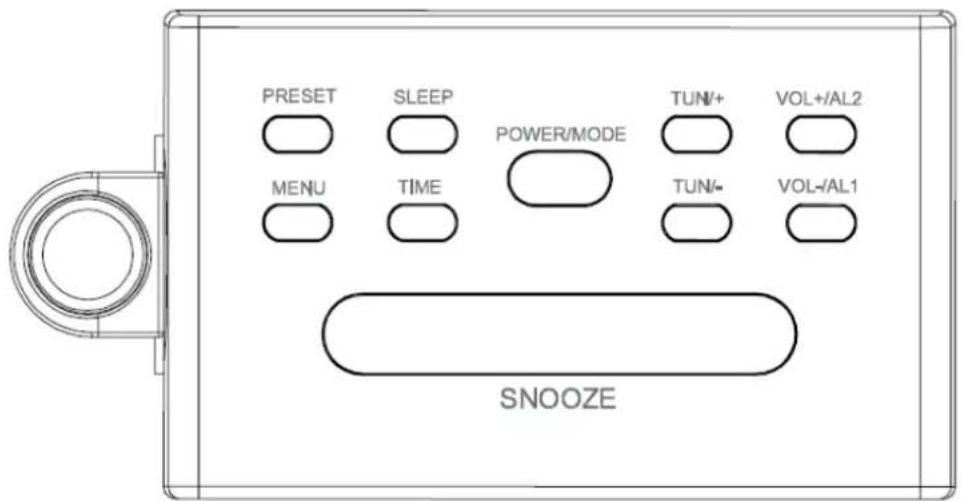
Buttons:
POWRE/MODE Turn the unit on or make the unit enter the standby state / Switch the unit to radio FM/AM mode
TUN/+ Tune-+/time setting
TUN/- Tune-/time setting
VOL-/AL1 Volume -/alarm 1 setting
VOL+/AL2 Volume +/alarm 2 setting
PRESET Listen to preset radio stations
SNOOZE Temporarily turn off alarm
SLEEP Sleep timer setting
MENU Preset radio stations
TIME Clock setting
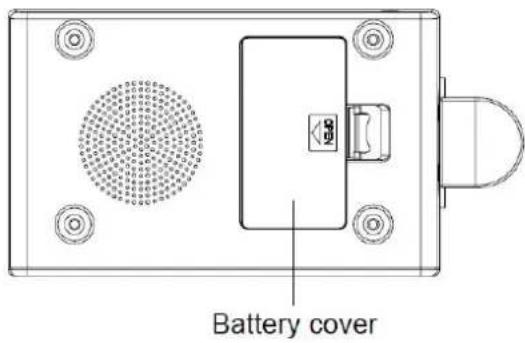
Bottom View
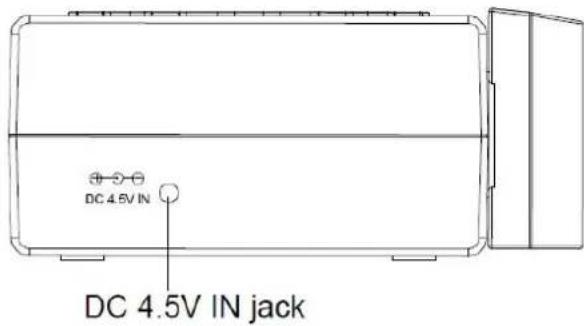
Rear View
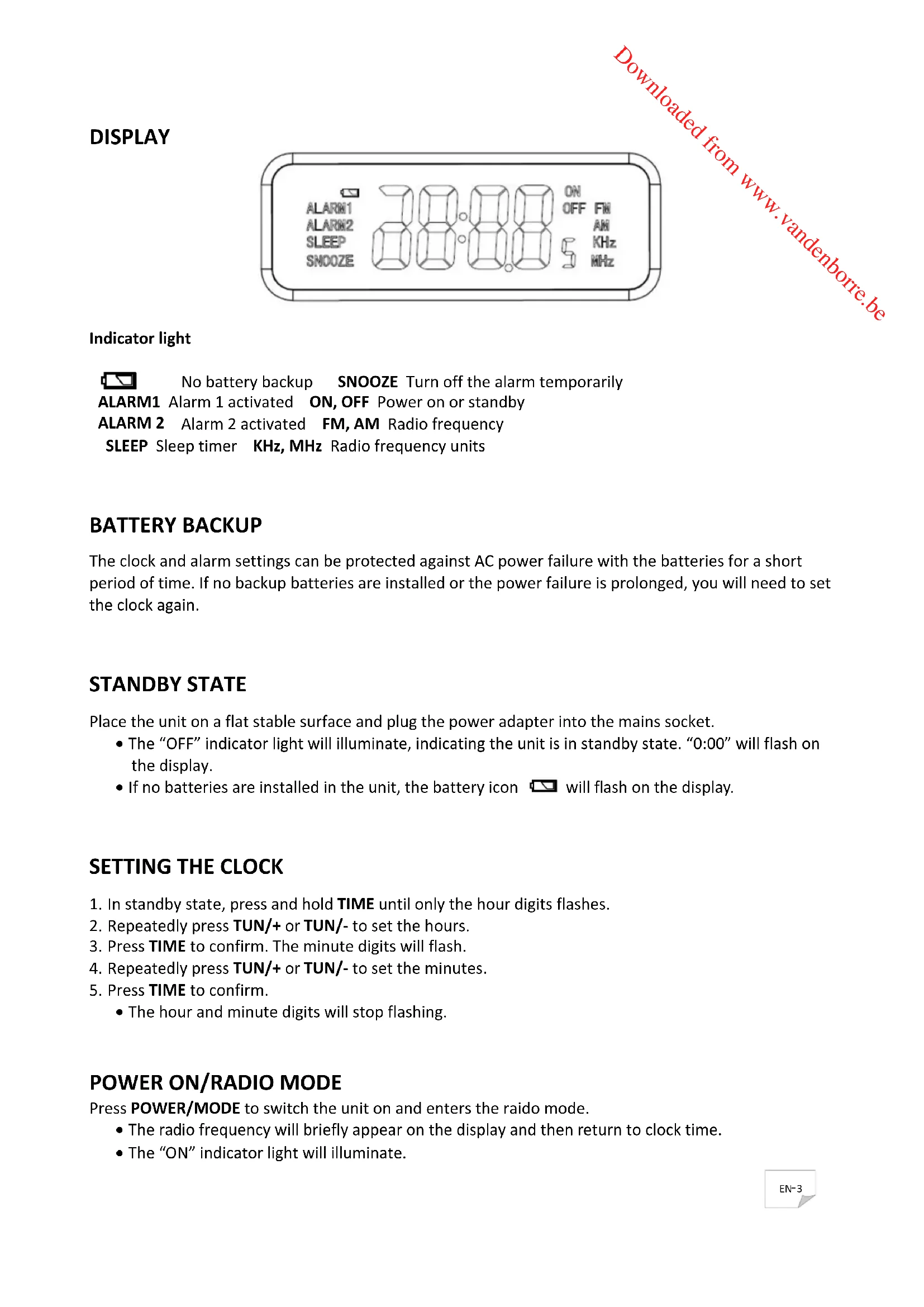
DISPLAY
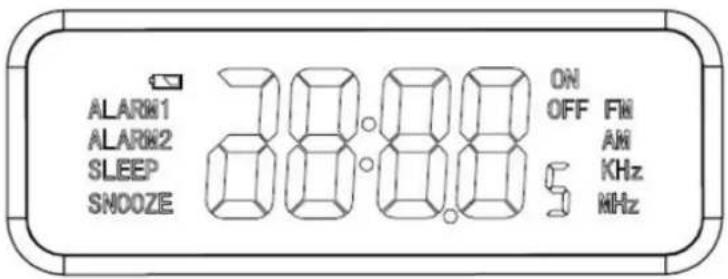
Indicator light

No battery backup
SNOOZE Turn off the alarm temporarily
ALARM1 Alarm 1 activated ON, OFF Power on or standby
ALARM 2 Alarm 2 activated FM, AM Radio frequency
SLEEP Sleep timer KHz, MHz Radio frequency units
BATTERY BACKUP
The clock and alarm settings can be protected against AC power failure with the batteries for a short period of time. If no backup batteries are installed or the power failure is prolonged, you will need to set the clock again.
STANDBY STATE
Place the unit on a flat stable surface and plug the power adapter into the mains socket.
- The "OFF" indicator light will illuminate, indicating the unit is in standby state. "0:00" will flash on the display.
- If no batteries are installed in the unit, the battery icon will flash on the display.
SETTING THE CLOCK
- In standby state, press and hold TIME until only the hour digits flashes.
- Repeatedly press TUN/+ or TUN/- to set the hours.
- Press TIME to confirm. The minute digits will flash.
- Repeatedly press TUN/+ or TUN/- to set the minutes.
- Press TIME to confirm.
The hour and minute digits will stop flashing.
POWER ON/RADIO MODE
Press POWER/MODE to switch the unit on and enters the raido mode.
The radio frequency will briefly appear on the display and then return to clock time.
- The "ON" indicator light will illuminate.
RADIO OPERATION
- Press POWER/MODE to turn on the radio.
The default FM radio frequency is 87.5 MHz.
- Repeatedly press POWER/MODE to select the radio frequency AM or FM.
The corresponding indicator lights ("AM" and "KHz" or "FM" and "MHz") will illuminate. - Adjust the volume by repeatedly pressing VOL-/AL1 or VOL+/AL2.
- Repeatedly press TUN/+ or TUN/- to tune into the desired station.
- Press and hold TUN/+ or TUN/- for auto forward or backward radio station searching.
NOTE:
- For the best FM reception, extend the FM aerial to its full length.
- For the best AM reception, rotate the unit slowly and horizontally.
PRESETTING YOUR FAVOURITE RADIO STATION
Up to 20 FM and 20 AM radio stations can be preset.
- Follow steps in "RADIO OPERATION" and tune in to the station that you wish to preset.
- Press MENU, "P01" will flash on the display.
- Repeatedly press TUN/+ or TUN/- to select the desired memory slot.
- Press MENU again to store the station.
- Repeat steps above to store desired stations.
To listen to preset radio stations, repeatedly press PRESET to select the desired radio station.
Before setting the alarm time, make sure the Clock has been set.
Setting Alarm 1 or Alarm 2
- In standby state, press and hold VOL-/AL1 or VOL+/AL2 for 2 seconds.
"bu" will flash. - Repeatedly press TUN/+ or TUN/- while "bU" is flashing to select the wake-up mode (Buzzer, AM or FM radio).
- Press VOL-/AL1 or VOL+/AL2 to confirm.
The hour digits will flash.
- While the hour digits are flashing, set the hours by repeatedly pressing TUN/+ or TUN/-
- Press VOL-/AL1 or VOL+/AL2 to confirm.
The minute digits will flash.
- While the minute digits are flashing, set the minutes by repeatedly pressing TUN/+ or TUN/-
- Press VOL-/AL1 or VOL+/AL2 to confirm.
Checking alarm time
Press VOL-/AL1 or VOL+/AL2, the alarm time will briefly appear on the display.
To cancel the alarm, press VOL-/AL1 or VOL+/AL2 until the alarm indicator light goes out on the display.
Snoopze function
This function can be used to stop the alarm temporarily for about 9 minutes once the alarm is activated. When the snooze button is pressed, the buzzer alarm sounds will stop and sound again after about 9 minutes.
The alarm and "SNOOZE" indicator lights will flash.
SLEEP TIMER
The sleep function is designed to automatically turn off the Radio.
In the Radio mode, repeatedly press SLEEP select the desired sleep time from 120, 90, 60, 45, 30 or 15 minutes.
The radio will be turned off after the set sleep time has elapsed.
To check remaining sleep time, press SLEEP.
To turn off the radio before the sleep time has elapsed, press and hold POWER/MODE until the "OFF" indicator light illuminate on the display.
TIME PROJECTOR
Press any button to light up projection lamp, after 30 seconds it will automatically turn off.
SPECIFICATIONS
FM:87.5 MHz -108 MHz
AM:522KHz-1620KHz
Input: DC 4.5V-500mA
Backup batteries: DC 3V-2x AAA
Power consumption: 2.25 W
We apologise for any inconvenience caused by minor inconsistencies in these instructions, which may occur as a result of product improvement and development.
AVERTISSEMENTS
Puisance absorbee:2.25 W
Kesa Electricals © UK: EC1N 6TE 27/08/2013
WAARSCHUWINGEN
ON, OFF Inschakelen of stand-by
FM, AM Radiofrequentie
KHz, MHz Radiofrequentie-eenheden
BATTERIJBACK-UP
WERKING VAN HET DUBBEL ALARM
Kesa Electricals © UK: EC1N 6TE 27/08/2013
ADVERTENCIAS
FM: 87.5 MHz - 108 MHz
AM:522KHz-1620KHz
Tensión de entrada: DC 4.5V-500mA
Kesa Electricals © UK: EC1N 6TE 27/08/2013
VAROVÁNÍ
Kesa Electricals © UK: EC1N 6TE 27/08/2013
VAROVANIA
Pristroj je urceny na pouzitie v domacosti a nesmie sa pouzivat' na ziadne ine uceley ani inym sposobom, napr. na ine nez domace pouzitie alebo na komercné uceley.
Kesa Electricals © UK: EC1N 6TE 27/08/2013
- IMPORTANT SAFETY INSTRUCTIONS
- Symbols
- Battery handling and usage
- CONTROLS
- DISPLAY
- Indicator light
- BATTERY BACKUP
- STANDBY STATE
- SETTING THE CLOCK
- POWER ON/RADIO MODE
- RADIO OPERATION
- NOTE:
- PRESETTING YOUR FAVOURITE RADIO STATION
- Setting Alarm 1 or Alarm 2
- Checking alarm time
- Snoopze function
- SLEEP TIMER
- TIME PROJECTOR
- SPECIFICATIONS
- AVERTISSEMENTS
- WAARSCHUWINGEN
- BATTERIJBACK-UP
- WERKING VAN HET DUBBEL ALARM
- ADVERTENCIAS
- VAROVÁNÍ
- VAROVANIA
Brand : BRANDT
Model : BCR115 PB
Category : Alarm Clock