DEH1800UBA - Car stereo PIONEER - Free user manual and instructions
Find the device manual for free DEH1800UBA PIONEER in PDF.


User questions about DEH1800UBA PIONEER
0 question about this device. Answer the ones you know or ask your own.
Ask a new question about this device
Download the instructions for your Car stereo in PDF format for free! Find your manual DEH1800UBA - PIONEER and take your electronic device back in hand. On this page are published all the documents necessary for the use of your device. DEH1800UBA by PIONEER.
USER MANUAL DEH1800UBA PIONEER
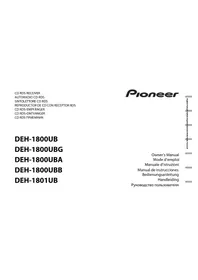
REPRODUCTOR DE CD CON RECEPTOR RDS
CD RDS-EMPFÄNGER
CD RDS-ONTVANGER
CD RDS IPIEMHVK
DEH-1800UB
DEH-1800UBG
DEH-1800UBA
DEH-1800UBB
DEH-1801UB

Owner's Manual
Mode d'emploi
Before You Start. 2
Getting Started. 3
Radio. 5
CD/USB/AUX. 6
Using Pioneer AR APP. 7
Settings 8
FUNCTION settings 8
AUDIO settings. 8
SYSTEM settings 9
ILLUMINATION settings. 10
Connections/Installation. 10
Additional Information. 12
About this manual:
- In the following instructions, a USB memory or USB audio player are referred to as "USB device".
Before You Start
Thank you for purchasing this PIONEER product
To ensure proper use, please read through this manual before using this product. It is especially important that you read and observe WARNINGs and CAUTIONs in this manual. Please keep the manual in a safe and accessible place for future reference.
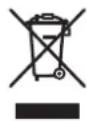
If you want to dispose this product, do not mix it with general household waste. There is a separate collection system for used electronic products in accordance with legislation that requires proper treatment, recovery and recycling.
Private households in the member states of the EU, in Switzerland and Norway may return their used electronic products free of charge to designated collection facilities or to a retailer (If you purchase a similar new one).
For countries not mentioned above, please contact your local authorities for the correct method of disposal.
By doing so you will ensure that your disposed product undergoes the necessary treatment, recovery and recycling and thus prevent potential negative effects on the environment and human health.

WARNING
- Do not attempt to install or service this product by yourself. Installation or servicing of this product by persons without training and experience in electronic equipment and automotive accessories may be dangerous and could expose you to the risk of electric shock, injury or other hazards.
- Do not attempt to operate the unit while driving. Make sure to pull off the road and park your vehicle in a safe location before attempting to use the controls on the device.

CAUTION
- Do not allow this unit to come into contact with moisture and/or liquids. Electrical shock could result.
Also, damage to this unit, smoke, and overheating could result from contact with liquids.
Always keep the volume low enough to hear outside sounds.
The CarStereo-Pass is for use only in Germany. - This product is evaluated in moderate and tropical climate condition under the Audio, video and similar electronic apparatus - Safety requirements, IEC 60065.
CAUTION
This product is a class 1 laser product classified under the Safety of laser products, IEC 60825-1:2007.
CLASS 1 LASER PRODUCT
If you experience problems
Should this unit fail to work properly, please contact your dealer or nearest authorized PIONEER Service Station.
Getting Started
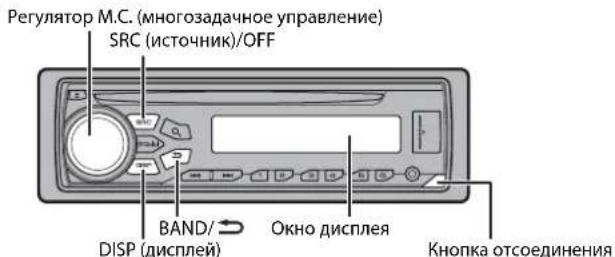
Basic operation
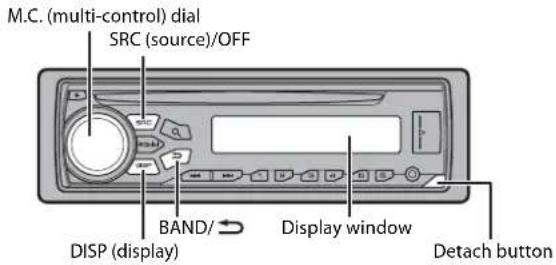
DEH-1800UB/1800UBG/1800UBA/1800UBB/1801UB
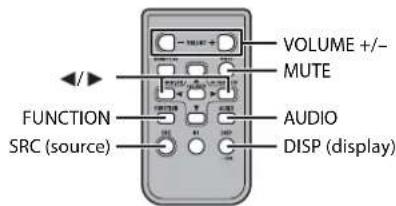
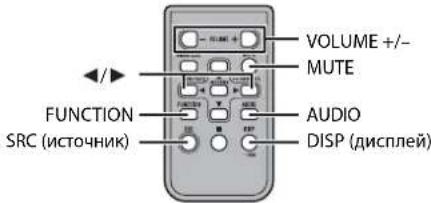
Remote Control
NOTE
Remote control is supplied only for DEH-1801UB.
Frequently used operations
The available buttons vary depending on the unit.
| Purpose | Operation | |
| Head Unit Remote Control | ||
| Turn on the power* Press SR | C/OFF to turn on the power. Press and hold SRC/OFF to turn off the power. | Press SRC to turn on the power. Press and hold SRC to turn off the power. |
| Adjust the volume Tum the M. | C. dial. | Press VOLUME + or -. Press MUTE to mute the unit. Press again to unmute. |
| Select a source Press SR | C/OFF repeatedly. | Press SRC repeatedly. |
| Change the display information | Press DISP repeatedly. | Press DISP repeatedly. |
| Return to the previous display/list | Press BAND/ | Press ↓/▶ to select the next/previous folder. |
| Return to the normal display from the menu | Press and hold BAND/ | - |
- When this unit's blue/white lead is connected to the vehicle's auto-antenna relay control terminal, the vehicle's antenna extends when this unit's source is turned on. To retract the antenna, turn the source off.
Display indication
| Indication Description | |
| ↓ | Appears when a lower tier of the menu or folder exists. |
| P | Appears when the button is pressed. |
| LOC | Appears when the local seek tuning function is set (page 8). |
| TP | Appears when a traffic program is received. |
| TA | Appears when the TA (traffic announcements) function is set (page 8). |
| SRTV | Appears when the sound retriever function is set (page 8). |
| XX | Appears when random play is set. |
| ← | Appears when repeat play is set. |
Detaching the front panel
Detach the front panel to prevent theft. Remove any cables and devices attached to the front panel and turn off the unit before detaching it.
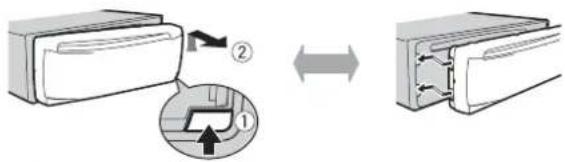
Detach Attach
Important
- Avoid subjecting the front panel to excessive shock.
- Keep the front panel out of direct sunlight and high temperatures.
Always store the detached front panel in a protective case or bag.
Preparing the remote control
Remove the insulation sheet before use.
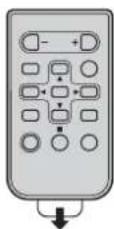
How to replace the battery
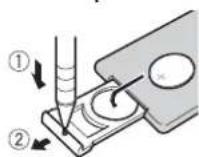
Insert the CR2025 (3 V) battery with the plus (+) and minus (-) poles orientated properly.
WARNING
- Do not ingest the battery, Chemical Burn Hazard.
- This product, including the supplied remote control, contains a coin/button cell battery. If the coin/ button cell battery is swallowed, it can cause severe internal burns in Just two hours and can lead to death.
- Keep new or used batteries out of the reach of children. If the battery is swallowed or placed inside any part of the body, consult a doctor immediately.
-
If the battery compartment does not close securely, stop using the product and keep it away from children.
-
Do not expose the battery or remote control to excessive heat such as direct sunlight or fire.
CAUTION
- There is a potential danger of explosion if the battery is incorrectly replaced. When replacing the battery, replace it with the same type.
- Do not handle or store the battery with metallic tools or objects.
- If the battery leaks, remove the battery and wipe the remote control completely clean. Then install a new battery.
- When disposing of used batteries, please comply with governmental regulations or environmental public institutions' rules that apply in your country/area.
Important
- Do not store the remote control in high temperatures or direct sunlight.
- Do not let the remote control fall onto the floor, where it may become jammed under the brake or accelerator pedal.
Setup menu
When you turn the ignition switch to ON after installation, [SET UP:YES] appears in the display.
1 Press the M.C. dial.
The setup menu disappears after 30 seconds of no operation. If you prefer not to set at this time, turn the M.C. dial to select [NO], then press to confirm.
2 Turn the M.C. dial to select the options, then press to confirm.
To proceed to the next menu option, you need to confirm your selection.
| Menu Item Description | |
| LANGUAGE Select the language to display the text information from a compressed audio file. | |
| [ENG](English), [PVC](Russian), [TUR](Turkish) | |
| CLOCK SET Set the clock. | |
| FM STEP Select the FM tuning step from 100 kHz or 50 kHz. | |
| [100], [50] | |
3[QUT:YES] appears when all the settings have been made.
To return to the first item of the setup menu, turn the M.C. dial to select [QUIT:NO], then press to confirm.
4 Press the M.C. dial to confirm the settings.
NOTES
- You can cancel the menu setting by pressing SRC/OFF.
These settings can be made at any time from the SYSTEM settings (page 9) and INITIAL settings (page 5).
Canceling the demonstration display (DEMO OFF)
1 Press the M.C. dial to display the main menu.
2 Turn the M.C. dial to select [SYSTEM], then press to confirm.
3 Turn the M.C. dial to select [DEMO OFF], then press to confirm.
4 Turn the M.C. dial to select [YES], then press to confirm.
INITIAL settings
1 Press and hold SRC/OFF until the unit turns off.
2 Press and hold SRC/OFF to display the main menu.
3 Turn the M.C. dial to select [INITIAL], then press to confirm.
4 Turn the M.C. dial to select an option, then press to confirm.
NOTE
The options vary depending on the unit.
| Menu Item Description | |
| FM STEP Select the FM [100], [50] | tuning step from 100 kHz or 50 kHz. |
| SP-P/O MODE Select wh [REAR/SUB.W] | when there is a full-range speaker connected to the rear speaker output leads and there is a subwoofer connected to the RCA output. |
| [SUB.W/SUB.W] Select | when there is a passive subwoofer connected directly to the rear speaker output leads and there is a subwoofer connected to the RCA output. |
| [REAR/REAR] Select | when there are full-range speakers connected to the rear speaker output leads and RCA output. If there is a full-range speaker connected to the rear speaker output leads, and the RCA output is not used, you may select either [REAR/SUB.W] or [REAR/REAR]. |
| SYSTEM RESET Select [YES], [CANCEL] | [YES] to initialize the unit settings. The unit will be restarted automatically. (Some of the settings may be retained even after resetting the unit.) |
Radio
The tuner frequencies on this unit are allocated for use in Western Europe, Asia, the Middle East, Africa and Oceania. Use in other areas may result in poor reception. The RDS (radio data system) function only works in areas that broadcast RDS signals for FM stations.
Receiving preset stations
1 Press SRC/OFF to select [RADIO].
2 Press BAND to select the band from [FM1], [FM2], [FM3], [MW] or [LW].
3 Press a number button (1/△ to 6/)。
TIP
The buttons can be also used to select a preset station when [SEEK] is set to [PCH] in the FUNCTION settings (page 8).
Best stations memory (BSM)
The six strongest stations are stored on the number buttons (1/ A to 6/ C).
1 After selecting the band, press the M.C. dial to display the main menu.
2 Turn the M.C. dial to select [FUNCTION], then press to confirm.
3 Turn the M.C. dial to select [BSM], then press to confirm.
To seek a station manually
1 After selecting the band, press /to select a station.
Press and hold then release to seek an available station. Scanning stops when the unit receives a station. To cancel seek tuning, press
NOTE
[SEEK] needs to be set to [MAN] in the FUNCTION settings (page 8).
To store stations manually
1 While receiving the station you want to store, press and hold one of the number buttons (1/ A to 6 / 4 ) until it stops flashing.
Using PTY functions
The unit searches for a station by PTY (program type) information.
1Press d@kingFM reception.
2 Turn the M.C. dial to select a program type from [NEWS/INFO], [POPULAR], [CLASSICS] or [OTHERS].
3 Press the M.C. dial. The unit begins to search for a station. When it is found, its program service name is displayed.
NOTES
To cancel the search, press the M.C. dial.
The program of some stations may differ from that indicated by the transmitted PTY.
- If no station is broadcasting the type of program you searched for, [NOT FOUND] is displayed for about two seconds and then the tuner returns to the original station.
PTY list
For more details about PTY list, visit the following site: http://www.pioneer.eu/eur/products/25/121/tech/CarAudio/PTY.html
CD/USB/AUX
Playing back
Disconnect headphones from the device before connecting it to the unit.
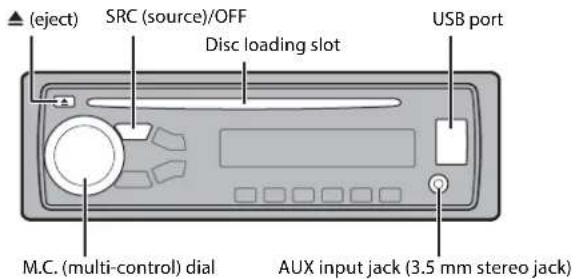
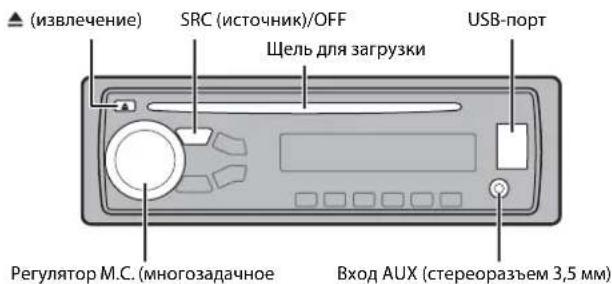
CD
1 Insert a disc into the disc loading slot with the label side up.
To eject a disc, stop playback first then press
USB devices (including Android™)
1 Open the USB port cover.
2 Plug in the USB device using an appropriate cable.
NOTE
To automatically switch to [USB] source when a USB device is connected to the unit, set [USB AUTO] to [ON] in the SYSTEM settings (page 9).

CAUTION
Use an optional Pioneer USB cable (CD-U50E) to connect the USB device as any device connected directly to the unit will protrude out from the unit, which could be dangerous.
Before removing the device, stop playback.
AOA connections
For details on AOA connection, see page 7.
MTP connection
A device installed with Android OS 4.0 or later can be connected to the unit via MTP, using the cable supplied with the device. However, depending on the connected device and the numbers of the files in the device, audio files/songs may not be able to be played back via MTP. Note that MTP connection is not compatible with WAV and FLAC file formats.
NOTE
If you use an MTP connection, [ANDROID WIRED] needs to be set to [MEMORY] in the SYSTEM settings (page 9).
AUX
1 Insert the stereo mini plug into the AUX input jack.
2 Press SRC/OFF to select [AUX] as the source.
NOTE
If [AUX] is set to [OFF] in the SYSTEM settings, [AUX] cannot be selected as a source (page 9).
Operations
You can make various adjustments in the FUNCTION settings (page 8). Note that the following operations do not work for an AUX device. To operate an AUX device, use the device itself.
| Purpose Operation | |
| Select a folder/album*1 | Press 1/ ▲ or 2/ √. |
| Select a track/song (chapter) | Press ▲ or ▲. |
| Fast forward or reverse*2 | Press and hold ▲ or ▲. |
| Search for a file from a list | 1 Press ▲ to display the list.2Tu m the M.C. dial to select the desired file (folder) name or category, then press to confirm.3Tu m the M.C. dial to select the desired file, then press to confirm.Playback starts. |
| View a list of the files in the selected folder/ category*1 | Press the M.C. dial when a folder/category is selected. |
| Play a song in the selected folder/ category*1 | Press and hold the M.C. dial when a folder/ category is selected. |
| Repeat play Press 6/. | → |
| Random play | Press 5/ ▲. |
| Pause/resume playback | Press 4/PA USE. |
| Sound retriever*1 | Press 3/S.Rtrv. [1]: Effective for low compression rates [2]: Effective for high compression rates |
| Return to root folder (CD/USB only)*1 | Press and hold ▲. |
| Switch between compressed audio and CD- DA (CD only) | Press BAND/ →. |
| Change drives in USB device(Devices that support the USB mass storage device class protocol only) | Press BAND/ →. |
+1 Compressed audio files only
*2 When you use the fast forward or reverse function while playing a VBR file, the playback time may be not correct.
Using Pioneer ARC APP
You can operate the unit from Pioneer ARC APP installed on an Android device. In some cases, you can control aspects of the application, such as source selection, pause, etc., by using the unit.
For details on what operations are available on the application, see the application's help section.
WARNING
Do not attempt to operate the application while driving. Make sure to pull off the road and park your vehicle in a safe location before attempting to use the controls on the application.
For Android device users
This function is compatible with devices that have Android OS 4.1 or later installed and also support AOA (Android Open Accessory) 2.0.
You can download Pioneer ARC APP on Google Play.
NOTE
Some Android devices connected via AOA 2.0 may not work properly or emit sounds due to their own software design, regardless of the OS version.
Making a connection with Pioneer ARC APP
1 Connect this unit with the mobile device.
Android device via USB (page 6)
2 Press the M.C. dial to display the main menu.
3 Turn the M.C. dial to select [SYSTEM], then press to confirm.
4 Turn the M.C. dial to select [ANDROID WIRED], then press to confirm.
5 Turn the M.C. dial to select [APP CONTROL] for an Android device connected via USB.
If [ON] is selected in [P.APP AUTO ON] (page 10), Pioneer ARC APP on the Android device starts automatically, and all the steps are finished.
NOTE
If Pioneer ARC APP has not been installed on your Android device yet, a message that prompts you to install the application will appear on your Android device. Select [OFF] in [P.APP AUTO ON] to clear the message (page 10).
6 Press SRC/OFF to select any source.
7 Launch Pioneer ARC APP on the mobile device.
Listening to music on Android
1 Press SRC/OFF to select [ANDROID].
Basic operations
| Purpose Operation | |
| Select a track Press or . | ▶▶▶ |
| Fast forward or reverse | Press and hold▶or▶. |
| Pause/resume playback | Press 4/PAUSE. |
| Sound retriever | Press 3/S.Rtrv. [1]: Effective for low compression rates [2]: Effective for high compression rates |
Settings
You can adjust various settings in the main menu.
Press the M.C. dial to display the main menu.
2 Turn the M.C. dial to select one of the categories below, then press to confirm.
FUNCTION settings (page 8)
- AUDIO settings (page 8)
SYSTEM settings (page 9)
ILLUMINATION settings (page 10)
3 Turn the M.C. dial to select the options, then press to confirm.
FUNCTION settings
The menu items vary according to the source.
Menu Item Description
FM SETTING RADIO
[TALK], [STANDARD], [MUSIC] Match the sound quality level with the broadcast
signal conditions of the FM band signal.
(Available only when FM band is selected.)
BSM RADIO
Store the six strongest stations on the number
buttons (1 / to 6 / 2) automatically.
| Menu Item Description | |
| REGIONAL RADIO [ON], [OFF] | Limit the reception to the specific regional programs when AF (alternative frequencies search) is selected. (Available only when FM band is selected.) |
| LOCAL RADIO FM: [OFF], [LV1], [LV2], [LV3], [LV4] MW/LW: [OFF], [LV1], [LV2] | Restrict the tuning station according to the signal strength. |
| TA RADIO [ON], [OFF] | Receive current traffic information if available. (Available only when FM band is selected.) |
| AF RADIO [ON], [OFF] | Allow the unit to retune to a different frequency providing the same station. (Available only when FM band is selected.) |
| NEWS RADIO [ON], [OFF] | Interrupt the currently selected source with news programs. (Available only when FM band is selected.) |
| SEEK RADIO [MAN], [PCH] | Assign or buttons to seek the stations one by one (manual tuning) or select a station from the preset channels. |
| S.RTRV CD USB ANDROID [1] (effective for low compression rates), [2] (effective for high compression rates), [OFF] | Enhance compressed audio and restore rich sound. Not available when: • CD-DA/CD-TEXT is played back. • The F LAC file is played back. |
AUDIO settings
Menu Item Description
FADER#1
Adjust the front and rear speaker balance.
Menu Item Description
BALANCE
Adjust the left and right speaker balance.
EQ SETTING
[SUPER BASS], [POWERFUL], [NATURAL], [VOCAL], [CUSTOM1], [CUSTOM2], [FLAT]
Select or customize the equalizer curve. [CUSTOM1] can be set separately for each source. However, each of the below combinations are set to the same setting automatically.
Select an equalizer band and level for further customizing. Equalizer band: [80HZ], [250HZ], [800HZ], [2.5KHZ], [8KHZ] Equalizer level: [+6] to [-6]
[CUSTOM2] is a shared setting used for all sources. You can also switch the equalizer by pressing EQ10 repeatedly.
LOUDNESS
[OFF], [LOW], [MID], [HI] Compensate for clear sound at low volume.
SUB.W*2
[NOR], [REV], [OFF] Select the subwoofer phase.
SUB.W CTRL23
Cut-off frequency: [50HZ],
[63HZ], [80HZ], [100HZ], [125HZ],
[160HZ], [200HZ]
Output level: [-24] to [+6]
Slope level: [-12], [-24]
Only frequencies lower than those in the selected range are output from the subwoofer.
BASS BOOST
[0] to [+6] Select the bass boost level.
HPF SETTING
Cut-off frequency: [0FF], [50HZ], [63HZ], [80HZ], [100HZ], [125HZ], [160HZ], [200HZ]
Slope level: [-12], [-24]
Only frequencies higher than the high-pass filter (HPF) cutoff are output from the speakers.
SLA
[+4] to [-4]
Adjust the volume level for each source except FM.
*1 Not available when [SUB.W/SUB.W] is selected in [SP-P/O MODE] in the INITIAL settings (page 5). *2 Not available when [REAR/REAR] is selected in [SP-P/O MODE] in the INITIAL settings (page 5). *3 Not available when [OFF] is selected in [SUB.W].
SYSTEM settings
You can also access to these menus when the unit is turned off.
Menu Item Description
LANGUAGE
Select the language to display the text information from a compressed audio file.
CLOCK SET
Set the clock (page 4).
12H/24H
[12H], [24H] Select the time notation.
AUTOPI
[ON], [OFF] Search for a different station with the same programming, even in
AUX
[ON], [OFF] Set to [ON] when using an auxiliary device connected to the u
USB AUTO
[ON], [OFF] Select [ON] to automatically switch to [USB] source when a USB device is connected to the unit. Select [OFF] when a USB device is being connected to the unit just for charging.
MUTE MODE (Not available for DEH-1800UBA)
[MUTE], [20dB ATT], [10dB ATT] Mute or attenuate sound automatically when a signal from equipment with a mute function is received.
PW SAVE* (Not available for DEH-1800UBA)
[ON], [OFF] Reduce the battery power consumption. Turning on the source is the only operation allowed when this function is on.
ANDROID WIRED
[MEMORY], [APP CONTROL] Select the appropriate connection method for an Android device.
Menu Item Description
P.APP AUTO ON
[ON], [OFF]
Select [ON] to automatically launch the car remote application when an Android device is connected to the unit via AOA. (Not available when [MEMORY] is selected in [ANDROID WIRED].)
- [PW SAVE] is canceled if the vehicle battery is disconnected and will need to be turned back on once the battery is reconnected. When [PW SAVE] is off, depending on connection methods, the unit may continue to draw power from the battery if your vehicle's ignition does not have an ACC (accessory) position.
ILLUMINATION settings
Menu Item Description
DIM SETTING
[SYNC CLOCK], [MANUAL] Change the display brightness.
BRIGHTNESS
[1] to [10] Change the display brightness.
The available setting ranges differ depending on [DIM SETTING].
Connections/Installation
Connections
Important
- When installing this unit in a vehicle without an ACC (accessory) position on the ignition switch, failure to connect the red cable to the terminal that detects operation of the ignition key may result in battery drain.


ACC position No ACC position
- Use of this unit in conditions other than the following could result in fire or malfunction.
-Vehicles with a 12-volt battery and negative grounding. - When speaker output is used by 4 channels, use speakers over 50 W (maximum input power) and between 4 Ω to 8 Ω (impedance value). Do not use 1 Ω to 3 Ω speakers for this unit.
- When rear speaker output is used by 2
Ω of subwoofer, use speakers over 70 W (maximum input power). - Please refer to connections for a connection method.
- To prevent a short-circuit, overheating or malfunction, be sure to follow the directions below.
-Disconnect the negative terminal of the battery before installation. - Secure the wiring with cable clamps or adhesive tape. Wrap adhesive tape around wiring that comes into contact with metal parts to protect the wiring.
-
Place all cables away from moving parts, such as the shift lever and seat rails.
-
Place all cables away from hot places, such as near the heater outlet.
-Do not connect the yellow cable to the battery by passing it through the hole to the engine compartment.
-Cover any disconnected cable
connectors with insulating tape.
-Do not shorten any cables. - Never cut the insulation of the power cable of this unit in order to share the power with other devices. The current capacity of the cable is limited.
-Use a fuse of the rating prescribed. - Never wire the negative speaker cable directly to ground.
-
Never band together negative cables of multiple speakers.
-
When this unit is on, control signals are sent through the blue/white cable.
Connect this cable to the system remote control of an external power amp or the vehicle's auto-antenna relay control terminal (max. 300mA 12 V DC). If the vehicle is equipped with a glass antenna, connect it to the antenna booster power supply terminal. - Never connect the blue/white cable to the power terminal of an external power amp. Also, never connect it to the power terminal of the auto antenna. Doing so may result in battery drain or a malfunction.
The black cable is ground. Ground cables for this unit and other equipment (especially, high-current products such as power amps) must be wired separately. If they are not, an accidental detachment may result in a fire or malfunction. - The graphical symbol marked on the product means direct current.
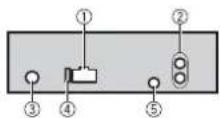
This unit
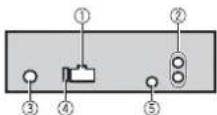
① Power cord input
Rear output or subwoofer output
Antenna input
Fuse (10 A)
⑤ Wired remote input (Not available for DEH-1800UBA)
Hard-wired remote control adapter can be connected (sold separately).
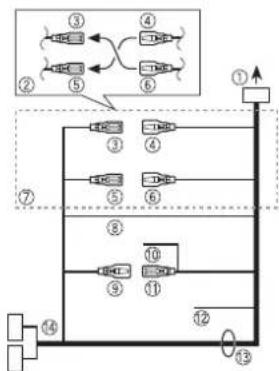
Power cord
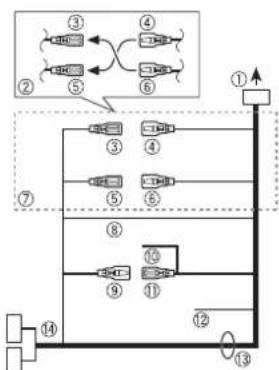
① To power cord input
② Depending on the kind of vehicle, the function of and may be different. In this case, be sure to connect to and to .
Yellow Back-up (or accessory)
④ Yellow
Connect to the constant 12 V supply terminal.
Red Accessory (or back-up)
Red Connect to terminal controlled by the ignition switch (12 V DC).
⑦ Connect leads of the same color to each other.
Black (chassis ground)
Blue/white The pin position of the ISO connector will differ depending on the type of vehicle. Connect and when Pin 5 is an antenna control type. In another type of vehicle, never connect and
Blue/white Connect to the system control terminal of the power amp (max. 300 mA 12 V DC).
Blue/white Connect to the auto-antenna relay control terminal (max. 300mA12VDC
Yellow/black (Not available for DEH1800UBA) If you use equipment with a Mute function, wire this lead to the Audio Mute lead on that equipment. If not, keep the Audio Mute lead free of any connections.
Speaker leads White:Front left White/black:Front left Gray:Front right Gray/black:Front right Green:Rear left or subwoofer Green/black:Rear left or subwoofer
Violet:Rear right or subwoofer Violet/black:Rear right or subwoofer
ISO connector In some vehicles, the ISO connector may be divided into two. In this case, be sure to connect to both connectors.
NOTES
- Change the initial menu of this unit. Refer to [SP-P/O MODE] (page 5). The subwoofer output of this unit is monaural.
- When using a subwoofer of 2 , be sure to connect the subwoofer to the violet and violet/black leads of this unit. Do not connect anything to the green and green/black leads.
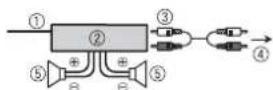
Power amp (sold separately)
Perform these connections when using the optional amplifier.
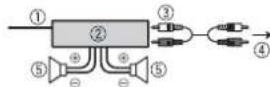
① System remote control
Connect to blue/white cable.
② Power amp (sold separately)
Connect with RCA cables (sold separately)
④ To rear output or subwoofer output
Rear speaker or subwoofer
Installation
Important
- Check all connections and systems before final installation.
- Do not use unauthorized parts as this may cause malfunctions.
- Consult your dealer if installation requires drilling of holes or other modifications to the vehicle.
- Do not install this unit where:
-it may interfere with operation of the vehicle.
-it may cause injury to a passenger as a result of a sudden stop.
- The semiconductor laser will be damaged if it overheats. Install this unit away from hot places such as near the heater outlet.
Optimum performance is obtained when the unit is installed at an angle of less than 60^ .
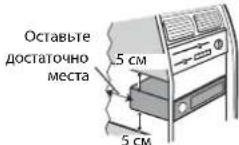
- When installing, to ensure proper heat dispersal when using this unit, make sure you leave ample space behind the rear panel and wrap any loose cables so they are not blocking the vents.
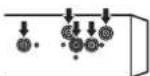
Leave ample space
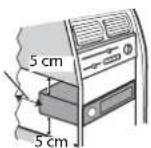
DIN mount installation
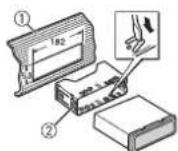
1 Insert the supplied mounting sleeve into the dashboard.
2 Secure the mounting sleeve by using a screwdriver to bend the metal tabs (90^) into place.
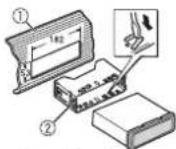
① Dashboard
② Mounting sleeve
- Make sure that the unit is installed securely in place. An unstable installation may cause skipping or other malfunctions.
When not using the supplied mounting sleeve
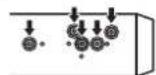
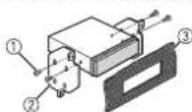
1 Determine the appropriate position where the holes on the bracket and the side of the unit match.
2 Tighten two screws on each side.
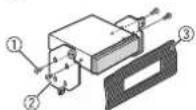
① Tapping screw (5mm× 9mm not supplied with product
② Mounting bracket ③ Dashboard or console
Removing the unit (installed with the supplied mounting sleeve)
1 Remove the trim ring.
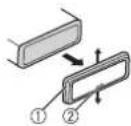
① Trim ring
Notched tab
- Releasing the front panel allows easier access to the trim ring.
- When reattaching the trim ring, point the side with the notched tab down.
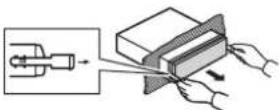
2 Insert the supplied extraction keys into both sides of the unit until they click into place.
3 Pull the unit out of the dashboard.
Additional Information
Troubleshooting
The display automatically returns to the normal display.
No operations have been made for about 30 seconds. Perform an operation.
The repeat play range changes unexpectedly.
Depending on the repeat play range, the selected range may change when another folder or track is being selected or during fast forwarding/reversing. Select the repeat play range again.
A subfolder is not played back. Sub folders cannot be played [FLD] (folder repeat) is select -Select another repeat play i
The sound is intermittent.
- You are using a device, such as a cellular phone, that may cause audible interference.
- Move electrical devices that may be causing the interference away from the unit.
Error messages
Common
AMP ERROR
This unit fails to operate or the speaker connection is incorrect.
The protective circuit is activated. Check the speaker connection. -Turn the ignition switch OFF and back to ON again.If the message remains, contact your dealer or an authorized Pioneer Service Station for assistance.
NO XXXX (NO TITLE, for example)
There is no embedded text information. Switch the display or play another track/file.
CD player
ERROR-07,11,12,17,30
→The disc is dirty.
Clean the disc
→The disc is scratched.
-Replace the disc.
ERROR-07,10,11,12,15,17,30,A0
There is an electrical or mechanical error.
Turn the ignition switch OFF and I to ON, or switch to a different sour then back to the CD player.
ERROR-15
→ The inserted disc is blank.
- Replace the disc.
ERROR-23
Unsupported CD format. Replace the disc.
FORMATREAD
Sometimes there is a delay between the start of playback and when you start to hear any sound.
- Wait until the message disappears and you hear sound.
NO AUDIO
The inserted disc does not contain any.
playable files.. Replace the disc.
SKIPPED
The inserted disc contains DRM protected files. -The protected files are skipped
PROTECT
All the files on the inserted disc are embedded with DRM.
- Replace the disc.
USB device
FORMATREAD
→ Sometimes there is a delay between the start of playback and when you start to hear any sound.
- Wait until the message disappears and you hear sound.
NO AUDIO
→There are no songs.
- Transfer the audio files to the USB device and connect.
→ The connected USB device has security enabled.
- Follow the USB device instructions to disable the security.
SKIPPED
The connected USB device contains DRM protected files.
- The protected files are skipped.
PROTECT
All the files on the connected USB device are embedded with DRM. Replace the USB device.
N/A USB
The connected USB device is not supported by this unit. - Disconnect your device and replace it with a compatible USB device.
HUB ERROR
→The USB device connected via a USB hub is not supported by this unit. Connect the USB device directly to this unit using a USB cable.
CHECK USB
→ The USB connector or USB cable has short-circuited.
-Check that the USB connector or USB cable is not caught in something or damaged.
The connected USB device consumes more than maximum allowable current. -Disconnect the USB device and do not use it. Turn the ignition switch OFF and back to ACC or ON. Connect only compliant USB devices.
ERROR-19
- Communication failed.
Perform one of the following operations, then return to the USB source. - Turn the ignition switch OFF and back to ON.
- Disconnect the USB device.
- Change to a different source.
ERROR-23
USB device was not formatted properly. -Format the USB device with FAT12, FAT 16 or FAT32.
STOP
There are no songs in the current list.
-Select a list that contains songs.
Handling guidelines
Discs and player
- Use only discs that feature either of the following two logos.


-
Use 12-cm discs.
-
Use only conventional, fully circular discs.
- The following types of discs cannot be used with this unit:
-DualDiscs
-8-cm discs: Attempts to use such discs with an adaptor may cause the unit to malfunction.
-Oddly shaped discs
Discs other than CDs
Damaged discs, including discs that are cracked, chipped or warped CD-R/RW discs that have not been finalized
- Do not write on or apply chemicals to the surface of the discs.
To clean a CD, wipe the disc with a soft cloth outward from the center.
- Condensation may temporarily impair the player's performance. Let it rest for about one hour to adjust to a warmer temperature. Also, wipe any damp discs off with a soft cloth.
- When using discs that can be printed on label surfaces, check the instructions and the warnings of the discs. Depending on the discs, inserting and ejecting may not be possible. Using such discs may result in damage to this equipment.
- Do not attach commercially available labels or other materials to the discs.
- The discs may warp making the disc unplayable.
The labels may come off during play back and prevent ejection of the discs, which may result in damage to the equipment.
USB storage device
- Connections via USB hubs are not supported.
- Firmly secure the USB storage device before driving. Do not let the USB storage device fall onto the floor, where it may become jammed under the brake or accelerator pedal.
- Depending on the USB storage device, the following problems may occur.
- Operations may vary.
-
The storage device may not be recognized.
-
Files may not be played back properly.
The device may cause audible interference when you are listening to the radio.
Compressed audio compatibility
- Only the first 32 characters can be displayed as a file name (including the file extension) or a folder name.
- The unit may not work properly depending on the application used to encode WMA files.
There may be a slight delay at the start of the playback of audio files embedded with image data, or audio files stored on a USB device with numerous folder hierarchies. -
Russian text to be displayed on this unit should be encoded in one of the following character sets: - Unicode (UTF-8, UTF-16)
-
A character set other than Unicode that is used in a Windows environment and is set to Russian in the multi-language setting
CAUTION
- Pioneer cannot guarantee compatibility with all USB mass storage devices, and assumes no responsibility for any loss of data on media players, smartphones, or other devices while using this product.
- Do not leave discs or a USB storage device in any place that is subject to high temperatures.
WMA files
| File extension .wma | |
| Bit rate 48 kbps to 320 | kbps (CBR), 48 kbps to 384 kbps (VBR) |
| Sampling frequency 32 kHz, 44.1 kHz, 48 kHz | |
| Windows Media™ Audio Professional, Lossless, Voice/DRM Stream/Stream with video | Not compatible |
MP3 files
| File extension.mp3 | |
| Bit rate 8 kbps to 320 kbps (CBR), VBR | |
| Sampling frequency 8 kHz to 48 kHz (32 kHz, 44.1 kHz, 48 kHz for emphasis) | |
| Compatible ID3 tag version | 1.0, 1.1, 2.2, 2.3, 2.4 (ID3 tag Version 2.x is given priority over Version 1.x.) |
| M3u playlist Not compatible | |
| MP3i (MP3 interactive), mp3 PRO | Not compatible |
WAV files
WAV file formats cannot be connected via MTP.
| File extension .wav | |
| Quantization bits 8 and | 16 (LPCM), 4 (MSADPCM) |
| Sampling frequency 16 kHz to 48 kHz (LPCM), 22.05 kHz and 44.1 kHz (M5 ADPCM) | |
FLAC files
- FLAC file formats cannot be connected via MTP.
- FLAC files may not be playable, depending on the encoder.
| File extension .flac | |
| Sampling frequency 8/1 | 1.025/12/16/22.05/24/32/44.1/48 kHz |
| Quantization bit rate 16 | bit |
| Channel mode 1/2 ch |
Disc
- Regardless of the length of the blank section between the songs from the original recording, compressed audio discs play with a short pause between songs.
| Playable folder hierarchy | Up to eight tiers (A practical hierarchy is less than two tiers.) |
| Playable folders Up to 99 | |
| Playable files Up to 999 | |
| File system ISO 9660 Level 1 and 2, Romeo, Joliet | |
| Multi-session playback | Compatible |
| Packet write data transfer | Not compatible |
USB device
There may be a slight delay when starting playback of audio files on a USB storage device with numerous folder hierarchies.
| Playable folder hierarchy | Up to eight tiers (A practical hierarchy is less than two tiers.) |
| Playable folders Up to 500 | |
| Playable files Up to 15 000 | |
| Playback of copyright-protected files | Not compatible |
| Partitioned USB device | Only the first partition can be played. |
Sequence of audio files
The user cannot assign folder numbers and specify playback sequences with this unit. Sequence of audio file depends on the connected device.
Note that the hidden files in a USB device cannot be played back.
Example of a hierarchy
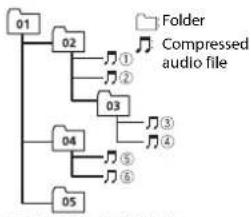
Level 1 Level 2 Level 3 Level 4
01 to 05: Folder number
① toPlayback sequence
Russian character chart
D:Display C:Character
Copyright and trademark
WMA
Windows Media is either a registered trademark or trademark of Microsoft Corporation in the United States and/or other countries. This product includes technology owned by Microsoft Corporation and cannot be used or distributed without a license from Microsoft Licensing, Inc.
FLAC
Copyright © 2000-2009 Josh Coalson
Copyright © 2011-2013 Xiph.Org Foundation
Redistribution and use in source and binary forms, with or without modification, are permitted provided that the following conditions are met:
Redistributions of source code must retain the above copyright notice, this list of conditions and the following disclaimer.
- Redistributions in binary form must reproduce the above copyright notice, this list of conditions and the following disclaimer in the documentation and/or other materials provided with the distribution.
- Neither the name of the Xiph.org Foundation nor the names of its contributors may be used to endorse or promote products derived from this software without specific prior written permission.
THIS SOFTWARE IS PROVIDED BY THE Copyright Holders AND Contributors "AS IS" AND ANY EXPRESS OR IMPLIED WARRANTY, INCLUDING, BUT
NOT LIMITED TO, THE IMPLIED WARRANTY OF MERCHANTABILITY AND FITNESS FOR A PARTICULAR PURPOSE ARE DISCLAIMED. IN NO EVENT SHALL THE FOUNDATION OR COLNTRIBUTORS BE LIABLE FOR ANY DIRECT, INDIRECT,
INCIDENTAL, SPECIAL, EXEMPLARY, OR CONSEQUENTIAL DAMAGES (INCLUDING, BUT NOT LIMITED TO, PROCEDURE OF SUBSTITUTE GOODSOR SERVICES;LOSS OF USE,DATA,OR PROFITS;OR BUSINESS INTERRUPTION)HOWEVERCAUSED AND ON ANY THEORYOF LIABILITY,WHETHER INCONTRACT,STRICTLIABILITY,ORTORT (INCLUDING NEGLIGENCEOROTHERWISE) ARISING IN ANY WAY OUT OF THE USE OF THIS SOFTWARE, EVEN IF ADVISED OF THE POSSIBILITY OF SUCH DAMAGE.
Android & Google Play Android, Google Play, and the Google Play logo are trademarks of Google Inc.
Specifications
General
Power source: 14.4 V DC (10.8 V to 15.1 V allowable)
Grounding system: Negative type Maximum current consumption: 10.0A
Dimensions (W× H× D) DIN
Chassis: 178mm× 50mm× 165mm Nose: 188mm× 58mm× 17mm D
Chassis: 178mm× 50mm× 165mm Nose: 170mm× 46mm× 17mm
Weight: 1 kg
Audio
Maximum power output:
- 50 ~W × 4 ch / 4 (for no subwoofer)
- 50 ~W × 2 ch / 4 + 70 ~W × 1 ch / 2 (for subwoofer)
Continuous power output:
22 W × 4 (50 Hz to 15 000 Hz, 5 %)
HD. 4 O load, both channels drive
Load impedance: 4 Ω (4 Ω to 8 Ω allowable)
Preout maximum output level: 2.0 V
Loudness contour: +10 dB (100 Hz), +6.5 dB (10 kHz) (volume: -30 dB)
Equalizer (5-Band Graphic Equalizer):
Frequency:80 Hz/250 Hz/800 Hz/2.5 kHz/8 kHz
Equalization range: ±12 dB (2 dB step)
Subwoofer (mono):
Frequency: 50 Hz/63 Hz/80 Hz/100
Hz/125 Hz/160 Hz/200 Hz
Slope: -12 dB/act, -24 dB/act
Gain: +6 dB to -24 dB
Phase: Normal/Reverse
CD player
System: Compact disc audio system
Usable discs: Compact disc
Signal-to-noise ratio: 94 dB (1 kHz) (IEC-A network)
Number of channels: 2 (stereo)
MP3 decoding format: MPEG-1 & 2 Audio Layer 3
WMA decoding format:Ver.7,7.1,8,9,10
11, 12 (2 ch audio) (Windows Media Player)
WAV signal format: Linear PCM & MS
ADPCM (Non-compressed)
USB
USB standard specification: USB 2.0 full speed
Maximum current supply: 1 A
USB Protocol:
MSC (Mass Storage Class)
MTP (Media Transfer Protocol)
AOA (Android Open Accessory) 2.0
File system: FAI12, FAI16, FAI32
MP3 decoding format: MPEG-1 & 2 Audio Layer 3
WMA decoding format:Ver.7,7.1,8,9,10 11,12 (2 ch audio) (Windows Media Player)
FLAC decoding format: v1.3.0 (Free
Lossless Audio Codec)
WAV signal format: Linear PCM & MS
ADPCM (Non-compressed)
FMtuner
Frequency range: 87.5 MHz to 108.0 MHz
Usable sensitivity: 11 dBf (1.0 μV/75 Ω, mono, S/N: 30 dB)
Signal-to-noise ratio: 72 dB (IEC-A network)
MWtuner
Frequency range: 531 kHz to 1602 kHz
Usable sensitivity: 25 V (S/N: 20 dB)
Signal-to-noise ratio: 62 dB (IEC-A network)
LWTuner
Frequency range: 153 kHz to 281 kHz
Usable sensitivity: 28 V (S/N: 20 dB)
Signal-to-noise ratio: 62 dB (IEC-A network)
NOTE
Specifications and the design are subject
to modifications without notice.
Table des matieres
Raccordements/Installation 11
Raccordements/Installation
Raccordements

Important
| D: C | D: C | D: C |
| R:A | B:B | B:B |
| F:Γ | J:A | E:E,E |
| I:X | J:3 | H:N,I,N |
| K:K | J:N | H:M |
| H:H | Q:O | N:I |
| P:P | C:C | T:T |
| Y:Y | Φ:Φ | X:X |
| U:U | Y:Y | U:U,U |
| J:b | H:bI | b:b |
| J:θ | H:HO | R:R |
D: Affichage C: Caractere
Protocol USB: MSC (Mass Storage Class) MTP (Media Transfer Protocol) AOA (Android Open Accessory) 2.0
Best stations memory (BSM)
Copyright © 2000-2009 Josh Coalson
Copyright © 2011-2013 Xiph.Org
Foundation
Specifica standard USB:USB 2.0 full speed
MSC (Mass Storage Class)
MTP (Media Transfer Protocol)
AOA (Android Open Accessory) 2.0
Copyright © 2000-2009 Josh Coalson
Copyright © 2011-2013 Xiph.Org Foundation
Curva: -12 dB/oct, -24 dB/oct
Ganancia: +6 dB a -24 dB
(Windows Media Player)
Formato de senal WAV:PCM linealy MS ADPCM (sin comprimir)
USB
(Windows Media Player)

m = 311 ;
AOA (Android Open Accessory) 2.0
KLASSE 1 LASERPRODUCT
Bij problemen
Best stations memory (BSM)
Accessaire (of reserve)
| D: C | D: C | D: C |
| R:A | B:B | B:B |
| F:Γ | J:Д | E:E,E |
| Z:X | Z:3 | H:N, N |
| K:K | I:N | M:M |
| H:H | Q:O | N:N |
| P:P | C:C | T:T |
| Y:Y | Φ:Φ | X:X |
| U:U | Y:Y | U:U, U |
| J:b | H:bl | b:b |
| J:θ | H:IO | η:Я |
D:Display C:Token
Copyright en handelsmerken
WMA
Copyright © 2000-2009 Josh Coalson
Copyright © 2011-2013 Xiph.Org
Foundation
MSC (Mass Storage Class)
MTP (Media Transfer Protocol)
AOA (Android Open Accessory) 2.0
Bestandsystem:FAT12,FAT16,FAT32
MP3-decoderingsformaat: MPEG-1 & 2 Audio Layer 3
WMA-decoderingformataat:Versie7,7.1,8, 9,10,11,12(2-kanaalsaudio) (Windows Media Player)
FLAC-decoderingformataat:v1.3.0(Free Lossless Audio Codec)
WAV-signaialformata:Lineaire PCM & MS ADPCM (niet-gecomprimeed)
FM-tuner
Frequentiebereik: 87,5 MHz tot 108,0 MHz Bruibbare geoveligheid: 11 dBf (1,0 μV/
75Ω, mono, S/R: 30 dB)
JIa3EPHbI IPOyKT KJACC 1
PnB03HKnKHOBeHHn npo6neM
ПИЗ ИЕОДКАЖ B равotingу сюлдам CBKNTECB T COТROBIM pIeDCTaBHTENEM KOMTAHNIH PNOB3DHTJIEN N CбнIHAIIM CEBPCHSbIM bYHKTOM PIONEER.
Hauano pa60tbl
OchOBhble onepaun
DEH-1800UB/1800UBG/1800UBA/1800UBB/1801UB
NyblT dy
ПИМЕЧАНЕ
TnybT Dy BxOaHT B KOMnEeK TNOCTaBKn TOnbKO yCTpoiCTBa DEH-1801UB.
Yacto nCnoB3yeMbIe onepaun
IOCTyINHbE KONIKM OMYT OTNIHATbCBA 3aBNCMOCTNOTYCTPOIcTBa.
1 HauKMMTe u dyepKmbaite SRC/OFF, noka yctpoiCTBO He OTKnIOHTcR.
2 Haxmte u yedeKbAte SRC/OFF nOTo6paKeHn rnaBHO MeHIO.
3 NobePHTe M.C. nra Bb6opa [INITIAL], 3aTeMaHKeMnTe dna noDTBePKeDeHnA.
4 NobePHTe M.C. nIy BbI6pa napameTpA, 3aTeMaHKeMITE nIIOITBePExDeHHN.
ПИМЕЧАНО
NapametpbMOrtyOTJINuAHTbCRB3ABNCMOCTnOTyCTPOjCTBA.
| 3nemeHT MeHNo OOhCaHHe | |
| FM STEP Bb60 w8a NaCTPouK IN FM-DInaIa3OHe (100 KfU nII 50 KfU). | |
| [100], [50] | |
| SP-P/O MODE IcnoBlyetC, KOrJa pIoNHOuCArTOThB dInHaMnK pIoKlIoUeH K | |
| [REAR/SUB.W] | pIOBOvDAM BbVbOda 3aJdHero DInHAMnKa, a Ca6Byepe pIoKlIoUeH K BbVbOdu RCA. |
| [SUB.W/SUB.W] | IcnoBlyeTc, KOrJa naccBnBn bCa6Byepe pIoKlIoUeH HEnoCpeDCTBeHHo K pIOBOvDAM BbVbOda 3aJdHero DInAMnKa, a Ca6Byepe pIoKlIoUeH K BbVbOdu RCA. |
| [REAR/REAR] IcnoBlyeTc, KOrJa pIoNHOuCArTOThB dInHAMmK pIoKlIoUeH K | |
| [REAR/REAR] | pIOBOvDAM BbVbOda 3aJdHero DInAMnKa BbVbOdu RCA Ecsn PIoNHOuCArTOThB dINAMMn PIoKlIoUeH K npROBDA m BbVbOda 3aJdHero DInAMnKa n BbVbOdu RCA He IcnoBlyeTc, Bb6epiTe [REAR/SUB.W] nII IN [REAR/REAR]. |
| SYSTEM RESET [YES], [CANCEL] | Bb6epeRite YES) Iqra IInHnIaIaIa3aIqin NactPoE k UcToPoiCTBa. YcToPoiCTBo 6yed Tepe3aIpPyKeH aBTOMaTIueckn. (HekOTopBle NaCTPouK 6ydt CoXpaHEhbl DaJIke NoCe c6pOca napAmETPOB yctpoiCTBa.) |
Papno
PaHIOACToTb DaHHOrO yCTpOHTBa npEHa3HaeHbI dNcIOnb3oBAnHb B 3aNaHOH Ebpone, A3nH, CpeDhem BoKTeO, AOpKnU OKeAHm. BpyrTHx o6NaCTHX pNMeM KOET 6bTy HeyDoBtBOPTeHbHM. ΦYHKUaRD (CtceApaDnAahbX) pa60Taet ToIbKo B 6bNaCTx, rge BblONHraTcB Eaahme CnRanOB RDS dN FM-CTauH.
Ppne m npedBapnteIbHO yCTaHOBnHHbIX cTaHcui
1 Haxmnte SRC/OFF dny Bb6opa [RADIO].
2 HaxMMTe BAND/ ДЯ Вьбoga посbl [FM1], [FM2], [FM3], [MW] wln [LW].
3 HaxMMTE YMCNOBByo KHOHkOy (ot 1/△do 6/)。
COBET
KHOIKI KIOHIO TAKKE IcNb3oBaT dnn Bb6opa npedapntenho yctahobneHHO tAHUM,ecn nI npaMeTpA [SEEK]yCTAOBHe OAnHe N [PCH] bHaCtpoKaX FONction (cTp.9).
3anomHaHHe lyuux cTaHcun(BSM)
3aKaKdoIuCIOBOKHOKNKoIcOxpaHeHaOHaN3WeCTn paDIOCTaHm C HAnJyUHM KauCTBOM npema(c1/NO6/)
1 Pocne Bb6opa nonocbi haxmte perynatoM.C. nna oTo6paKeHraIabHO mHeIO.
2 NopBepHnTe M.C. nIy BbIbopa [FUNCTiON], 3aTeM hAkmTe IIN NOITBepKxDnH.
3 NOBEPHNTe M.C. nIa Bb6opa [BSM], 3aTeM hAaMHTe nIa NODTBePckDcHn.
Ponck ctaunn Bpyuhyo
1 Nocne Bb6opa nonocbi haxmte /dIyBb6opcaTahn. Haxmite u ydepexbae /,3aTeM OTNCTMe dNIOKCA DOCTYNHO CTAHNI. NOCCK OCTaHOBITc, KOrda YcTPOINCTBO BbINONHT npHem CTAHNI. DnO TMEHb NOnKa HAXMITE
ПРМЕЧАНЕ
Дяnapametpa [SEEK] Heo6xOdmo yctaHOBnTb 3aHaeHne [MAN] B HacTpOaKaX FUnction (cTp.9).
CoxpaHHe cTaHcMn BpyHyu
1 Bo BpMa npMa CTaHmK, KOTOpyTOpe6yeTc CoXPaHnTB, HaxMMTe uYdePkmBaTe Ody N3 YncNoBbIX KHOHOK (c 1/ANo 6/),Noka MrraHMe He npekpaNTCA.
IcnoJIb3OBAHnE yHKnIe PTY
YCTPOINCTBO BbONNAETNNCK TAHUNN NO INHOPMAUPTPY (TNnporpaMbbl).
1Haxmte B@Bpemr FM-npnema.
2 Nobeprnne M.C. nBb6opa Tnna nporpaMmbi H3 [NEWS/INFO], [POPULAR], [CLASSICS] nn [OTHERS].
3 Haxmte perynTop M.C.. UcpoiCTBO HAuHTI ONCK CTAHUIN. Nocne HAXOXJEHN CHaUNO OTO6paNTCA HaBaHMe npOrpAMMHO Cnyk6bl.
DPMMEAHN
-4TO6bIOTMeHHTB NOCK, HAKMNTe M.C.
IporpammbHEKOTOPBIX pAdIOCTaHcIM MOYr OTNIHYCbTcO I porpamM, yka3aHHbX B nepedacbOM KOJE PTY.
ECNnH OJHa H3 CTaHmH Nepeaet NporpAmmbHyHKHO TmTa,To Ha DcNneB TteHMe npimepnoDyBX cekyhd Byet nok3aHo [NOT FOUND], H 3aTeM ToHeP nepeHET B pKHM npHema TaHcH, C KOTOP bHbH aHT NoNNK.
Cnncok PTY
Dnno nonyenna doonnnntelbno nnhfoepmaun o cncke PTY nocentte cneyuouu cnatt: http://www.pioneer.eu/eur/products/25/121/tech/CarAudio/PTY.html
KomnakT-ДИСК/USB/AUX
Bocnpon3BeDHe
OTKIOHTTEOTyCTPOINCTBaHayuHnKNIpeepNoqKnIOueHeHMeKo6OpOyOBaHNIO.
Komnakt-Dnck
1 BCTaBtBe DnCK B 3eJIb 3arpy3Kn DnCKa MapKnipoBaHHo CTopoHOH BBepx.
Yro6bI 3BNeueHnCK,OCaHOBOte BOcPOn3BeHeHne,3aTe HAXMnTe
UcTpoNCTBa USB (BKNIOyA AndroidTM)
1 OtkpoTe KpbIshky npTa USB.
2 Pnoknoute yctpoctbo USB c nomooio cooTberctbyuioe ka6ena.
ПОНМЕЧАНЕ
ДЯгАТМУССКОЕпеклочен� ha nctochnk [USB], kordya yctpoCTBO USB noKIOUHO K rAhabOMY yctpoCTbY, yctahOBITE dNRA [USBAUTO] 3HauhenE [ON ] B hactpoKax SYSTEM (crt.10).

BHUMAHVE
Ncnonb3yIte doonnHmthbI Ka6nb Pioneer USB (CD-UsOE) dnn oKIOuOHeHH yctpoiCTBa USB, NOckOBKy IIOo6e YcTPOICTBO, noKIOUQHeHHoe HncOpECTBHeHO K IaBHOMy yctpoiCTBy, 6yed BStYnTu, 10K MoTe npEcdTabrblb OAnOCh6T.
IpeHn3BneHem yctpoINCTBA OCTaHOINTE BOCnpOn3BeHeHne.
IopknoueHHA OAA
ДяпolyeндаононтelenbixсбededиnoPkioeHnAOAcTp.8.
NoeknueHne no MTP
YCTPOBTO C ONEAHOH C HTEMO Android 4.0 IIN60eI NO3HMeK MOKNO NOKIOUHTB NO PNPOTOKYO MTP C nOOMBOK KABEIN, pnpnaAeroM K YCPTOBCTY. OJDAKO B ABCHNMOCTN TO NOKIOHNHO TcPOTCTBA M KOINHECTBA FAIOIOB ayIDofoaI/KOMIOANMOI MTOT BtB HeDCTNYH DnBcPONBACDEHNE Hpe3 MTP. OApATINE BHNMAHNE, NTQ NOKIOHNEOH MTP HECOBEMTCMO C OPOMATAM AINO WAV IN FLAC.
ПРМЕЧАНЕ
ПИЗ ИСТЮВОДАМИN NOДКIOΥЕНИ MTP 对啪ametра [ANDROWD WIEDR] Heo6xodmIo UCTAHOBITb 3HAUHENE [MEMORY] b HSTCPOKAX SYSTEM (ctp.10).
AUX
1 BCTabTe MUHN-CTepeopaaBem BxOJHOH pa3bEm AUX.
2 HaxMMTE SRC/OFF nIy BbIbOpa[AUX]B KaueCTBe NcToHnKa.
IPMMEAHNE
EcnIy naPamETa[AUX] yCTAHOBIEHO zHAUEHNE [OFF] B hACTPOBkAX SYSTEM, 6yDet HeBOA3MOKHO b6BP4b[AUX] B KCAETBE TcHIOHNIA (ctp, 10).
Onepaun
Bb MoKTeHnactpoTb PAaHnHHe napametbI b HacpToaX FAnction (cTp.9).
06paTHe BmHaMaHe,TO cneJyoune opeaun He paOaTaiOT Ha yctpoCTBE AUX. Jna
paTObTc YcPOrTcBOM AUX nncNbByte Uy cypoCTBO HenoCpeCTBeHo.
[TALK], [STANDARD], [MUSIC] HactpoKa yPoBHa KaueCTBa CnHana B
COOTBECTBNI CYNOBYAMN CINHANA BEUaHNA NOOCh FM. (DcToynHO TOnbKO npn BbOpe NonoCmFM.)
BSM RADIO
ABTOMATHECCKE COXPAHENHE IeCTNI PAHIOCTAHCHI CHAHUYIM KauCTBOM PnEma NOI JCNOBIMKHNKAMN (c1/A No 6/)。
REGIONAL RADIO
[ON],[OFF]OrpahnueHne npneMa onpepeHHbIMN
pernoHaIbHbIMn nporpaMMMaMn, cInn Bbl6paHO
AF (NONCK aIbTePHaTHBbIX YactO1).DocTyHNO
MW/LW: [CFF], [LV1], [LV2]
COOTBETCTBNN CMOUHOCTbIO CNHana.
TA RADIO
[ON],[OFF]IOnyuHHe INΦOpMaUNO TeKyuEM TpaΦnke,
ecnndoctynno.(OoctynnToNbko npn BbIbope
noocbFM.)
AF RADIO
[ON], [OFF] NpehAcTpoKa Ha pyryu yacToTy, Ha KoTopo
BeeaetraTaXeCTaHua.(OocTyHOTbko
npu Bb6pe noocbl FM.)
NEWS RADIO
[ON], [OFF]Перрьване Вьбранно ectouнka
nporpaammaHOBoCTe.(OocTyHOToIbKo np
BbIbOpne nonocbi FM.)
3nemrMeHIOOnncHne
SEEK RADIO
[MAN], [PCH]
Ha3HaeHHe KhoNOKnIe DnA
NOOepeHnO NOCKA CTAHm (HaCTpoKa
BpyHyIO) NIN BbIbOp CTAHN I3 CNNCKA
npedyctaHOBneHHbIX KaHaNoB.
S.RTRV
D U
AUYHO 00H3KHX
ynyuueHnE KaueCTBa CkaTOrO aytno n
(1) (lipid, insulin, test)
BOcCTaHOBHeHne HacbIeHHoCTn 3Byka.
[2]:(PpeHa3HaueHo nla
- BbINONHReTcBOcnpOn3BeHeHnE CD-DA/CD
BbKOKNX CKOPOCTe CKaTNA),
TEXT.
[OFF]
Bocpon3bOaNTcAaNFLAC.
Hactpoikn AUDIO
3nemHT MeHIO Onncahme
FADER\*1
[SYNC CLOCK], [MANUAL] N3MeHeHHe RpkOCTn DnCnIeA.
BRIGHTNESS
OT[1]D0[10]N3MeHeHnE npKoCTn DnCnpe.
Habop hactpoek 3aBNCNT OT TORO, BKNIOueHa nn
fHKn [DIM SETTING].
Поdkлюець/Yctановka
NopdknoueHna

BaxkHo
-Пиу уетановке дан Horo yctpoiCTBaВ abTomobOuIne, KOrDa KNoU 3aJxMraHnHe HaxoDntC Br NOnoKeHHAcc (akceccay), oTCyTCTBne noKnIOueHHcPacHO rKaBeIaK TepMHAnly, KOTOpbI hKICUPyET nONoKeHHe KNoUa 3aJxMraHn, MoKet npBecTeN KaPzPrdKe aKKMyJITopA.

B noJIOKeHHN
ACC

BHe noIOxKeHn
ACC
- NcnoB30BaHHe DaHHoro yCtpoCTBa YcBOHnX,OTNIuHbXOTYkA3aHHbIX, MOKET npINBECTN KNOKPAPy INHNCNPABHOCTN.
ABTOMO6NI CAKKYMIHTOPHO 6aapeen 12 B N OTPNATeNbHbIM 3a3cMNEHcM
EcnIbVbO,IINHAMnK IcNtbn3yETcr4 KAnAHMn, INCtbn3yTe NdHAMnK MoHocTb6 0oJe5 0Bt
(MAKCIMAbhBxOJHMAOuHOCTb) IN cponTOBHeMOT 4 Oo8O (3aueHe cponTOBHeH). HcNcONbEyIe IaDHaHOyCTPOHCTBa DnHAMKc C cponTOBHeHm1-3O.
-Korda BixoJ3aHrero DnHaMnka
ncOJb3yETcra6bBypePOMC
conPOTBHeHem 2Ω, nCIOb3yIte
DnHaMnK 60oe 70 BT (MAcKImaJIbHa)
BXOHNaMoHOCtB).
- CM. NOdKIOUeHnI IIN BbIbOpa COOTBcETBHyIeero CnOcO6a NOdKIOUeHnI.
Bo m36ekahne KopoTko 3aMbKaHnna, neperpeBa nn HncnpaBHOCTN
cooiouaite cieyioiyeykazaihny. -Ipeep yctahnoKBOTKIOUHTe OTNIUEbHyIO KEMMYBatape.
-3akpenHTE npoBDA c NOMOUBIO 3aJHMOB dABKEBENI INN KNEKOJI IeHTb.ObEPnHE KNEKUYIeHTy BOKpynpoDB, KOtOpBE kacaIoT OMetaJIINueCKHX YAcTeI, DJIa 3auNTBI npoDB.
-86epnre BCE kabeni noaJIbwe ot D BmKUxCA TaCteT, KaNX KAc pbYar npeKeKnOJeHn nepeday n HaprabNIOue CmDhen.
- Y6ePnTe K6eNl NOaIbSe OT MecC n OBiueHNOI TEMpeHApTyO, HANIPMep NeyK.
-He noKnIouaTe JeNtbl KaBeIb K batape nYteM npocobBaHnra erO uepe3 OTBepCTne B DnRatEnbHbN OTcEk.
-3aKaJIeHHeNOpKInouChEnHbIpaBcMbI Ka6EJI IaOJeHToN.
-HeykopauuBaTeKa6enni. He npuyuaIe nOaunIO Ka6eBnTahmN daHnHO yCTpoIcTBa dInn mTuAnHpyrXyCTpoIcTB,EMKoctb Ka6eBnABnRETC orpAunHcHNO.
-ncnonb3yntne nabkni
P npdoxpaHntb COOTBCTCYKoUcero HOMHnHa.
-He 3aMkaTe OtpnAteBnHbKabEnbI INAMKOB HenoCpeCTBeHHo HA 3emIO.
- He CBN3bAaBte MBEcTe OtnpuatEnbHe bKa6enE HECKONBkX NHaHAMKOB.
KgraYCTPOINBBOKIOUEOHcMnABJIy npaBnHEnoTnPAbIOTCNO CnHEMy/6OBmyKaBenO.PoDKnIOHTe DaHHNkabEnb K ydaENHOMy npaBnHEnoCtEMoB BHeNErO yCmITeRnIIM TepMNHaNy peneHOrO npaBnHEno
ABTOMTNECKOHTAHENHbABTOMO6NIA (mKc.300MA,12BNoCT.Toka).Ecn ABTOMO6NIOB OCHAUEH ANTEHOH BCTPOCHHO B NOBOOE CTKNO, NOKIOVHTe e K TEPMNHAJ NITAHNA AHTEHORO YCNNTNRA.
HnKoHa De NoKnIOuayte CnHm/6bnI npOBD K TepMNHNy NtTAHN BHeuHero ycNHTeA. TaKHe NOKnIOuayte erO K TepMNHNy NtTAHn ABOTMATHueCKoA HTeHHb. B npOTNBOM cNyae 30 MoKet nPBEcTN K npoteKaHNO bTaapee nn ee HncnpabHOCTn.
YePbHbKa6eB3a3eMEnH.Ka6eN 3a3eMEnHnIraDnAHHORoYCTPOCTBn A DpyRoE O6OpOBOHnE (OC6eHHO YCTPOCTBa BcIOKOrO HAnpIXeHnHnAmpIMep ycINTeN) Heo6XoDMo NODKnOHTa OTdEhBO.BipOTNbHOM Cnyae CnyaHoe OTKJNoHeMeOKeT NPvBCCTN K NOkApYnn HmEcnPbaBOHcTn.
「paaueeckn CmBOL 13213denn O3naHaeT NOCTOHNBHIOK TOK
DaHHoe yctpoiCTBO
① Bxod uHpya nHTaHn
3aHnBbXoNmBbXoCa6Byepa
BxOaIaHTeHHb
④ PnpdoxpaHntelb (10A)
Bxod npoBOHOro nybTa DY (HeOCTyHNO JnDEH-1800UBA) CIOda MoXHO NOKINOHpnoBOHn 1aanTep DY (npno6peTaetcra OTdenHo).
Hyp nntaan
①Bo BXOJ uHvpa NHTAHM
2B3aBNCIMOCHTOTTINABTOMO6yINPAHKUNMOMYOTIINMAHbCN.BTOMCNYAeNIOKNIOHTE 4K5N K
③ XeIbIy PeBepBHH (nH onOpua)
4KentbB BInonHnTne NoKnIOeHnE K TepmHaNcNoCToHHbIM HAnpKeHem 12B.
5KpaChnOnpna(wnpeepbH)
KpaChbB BInonHnAte NoKnIOHeMe K TepMnAny,ynpAbReMOMy KIOHOM 3aKurHnA (12 B noct. toka).
7BnIOHNAIE NOKNIHOENHEPOBOOBApyrK DpyrY ODHORO Zeta.
⑧ Yephbln ("Macca")
CINHn/6enbl
NoJoxHeNE KOtAKTa pa3bema ISO
6ydt OTOnuHaTcBa B 3aBNCmOCTn OT
TIna ABTOMO6N. POKnIOHnTe
1,ecn5 KOHTAKOTBeuaet 3a
ynpaBneHn e aHTeHHo. EcnnNCNb3yeTcABTOMO6Inb npyrTO Tmna, HNKOrda He nOdkHouaTe 9 n11
CnHn/6enbl BbnoHnAte NoDknOueHne K TepmHany ynpaBHeHn CnCTeMoY ycHnTeRn (MaKc.300 Ma, 12 B noct. ToKa).
CnH/HenBb BbnoHHTne noKnIOueHe K TePMHanypeHNOHOynpaBNEHH AOBMATHECKO aHTHeHbMaKc 300MA,12BnoCT.toka).
JHtB/uehbl(HeOCTynHO DnDEH-1800UBA)PnncnoIb3oBAHN OOpyOBaHnCpHKnEOTKIOHEn 38yKaNOKnIOHTe DaHHN pOBoD KnpOBoD OTKIOHEn 38yKaOOpYOBaHn.B pOToBHOM CInyae He NoKnIOuHaTe PPOBOr OTKIOHEn 38yKa.
10poOda DAHAMKAbenb:PepeHn neBb+ BnBn/uePbI:PepeHn neBb Cepb:PepeHn npabB Cepb/pePbI:PepeHn npabB 3eneHb:3aHnnpBnn ca6byepe + 3eneHb/HePbI:3aHnnpBn 4nn ca6byepe + FnoTeTOBb:3aHnnpabB nn ca6byepe + FnoTeTOBb/HePbI:3aHnnpabB nn ca6byepe
Pa3bEM ISO BHKOTOBpIX ABTOMO6nIaX pa3bEM ISO MOKET 6bITb pa3dENeH Na DBA. B ATOM CNYae BbINONHRe Tne NkIOUeHne K O60HM pa3bEmAM.
PIMMEAHN
- MNEHITAE IXCNOHOE MEOI DAHORO yCTPOJCHBa.CM.[SP-P/O MODE] (ctp. 5).
BbXoD ca6Byepa daHHoro yCTPOHCTBA HJIHTCH MOHOOHHECKM.
PnncnoB30aHnn cab6yepa conpoTbeneHm 2 O npKnHuaTe ca6byep K nofONTOBOMy HnOeTOBOMy/yePHOMy npBOoDAM yCTPOCTBA. He noKKnHOaHE MHeO R ZeneHOMy nn ZeneHOMy/yePHOMy npBOoDAM.
Ycunntenb (npno6petaetc0TneBHO)
BbOnnHtne daHhHe noKnHcHnE HnnncnB3OBaHHn DOnONHHTeBHOYcUNNTeHa.
1IyntbI DY CNTTEMIOB BnONHITNE NOKINQUCHNE K CINHEMY/ 6eNoMgKa6EIO.
②Ycnnntenb (npno6peTaetcraTdeNbHo)
3BbONHnMe NOKJIOHcN C NOMOHBc RPA (nnp06betaTcN Otienbho)
④ K3adHemy BbXOyI IINBbXOyI ca6Byepa
3aHnDnHaMnKn nncab6byeep
YcTaHOBKa
Baxho
- Pered yctahOBK npoBepBe BCE PNDKIOHENH N CHTeMb.
HeNcNoB3yTe HeOpnTHAHbHbIe 3aHaCTN, TAK KAK TO MOKET PnBECTN K HENCPnABHOCTM.
-06patntecbKdnppey,ecnDnnyCTAHOBKnTreBpyOTcRdoNOnHNTeBHeOTBepCTNRIMMOINKauINBBABTOMOHNIE.
Hcye7aHbAAIe daHnoe yCTPOHTBO B cIyouHOx CIyauhX.
-eCNI OHO MOKET HApuTb paObyT abOMoTOB
ecnno OHO MOXETnpuHHTb TpaBMy naccxNpy Bcnyae pe3KOJ OCTAHOBK.
-NoynpOoBnKOBbNna3ep bSyedT NOBpcxHEn BcIyae nepepeBa. BbONHHaTe YcTAHOBY DaHORO YcTOPOCTBA BdaIMOT McET C NOBbIeHHoTEMepaTpyo,HaNPmEp neHK.
OnTImaIbHn npIN3BODInTeNbHOCTb DOCTnAeTc npn yCTaHOBKe yCTpOHTBa nD yTNOM MeHe 60°
YTo6bI Oe6CneHTb Heo6xoJHmOe
pacnpedEnHe Tnla npn
HCNoNtB0aHNH yctpoTbA, npn
yCTaHOBeOCTaBte Cbo6OHOme Mcto 3a
3aDHeN NaHEbIO KcPyrITae Ka6enl,
yTO6bI OHn HE 6KnipOBaIN
BEHTNNNHOHHbe OTBepTn.
YcTaHOBKa KpennneHn DIN
1 yctaHOBITE Ha npnboHyIO naHeIb BXdoIyIO B KOMnNEKytCAHOBOHHyIO uaxTy.
2 3akpeniye tceAtoHOObyu xaxty, oTOrHyB c nmoosbIOtBEpTKM metanmmeckne naNK (90^)
①Pn6OpHna naHeNb
② YCTAHOBOCHHAAxTaY6dmtcB,OTyCPoHCTBOYCTAHOBHEnoPPOHNo. HENpOHaYCTAHOBKaMOKETPNBECTN KBOHnHOHEHNOPNOPNYCKOBnBOCPON3BeEHIN INpyTHNHENPDAHOBCTE.
EcnBxOJaA B KOMnNeKT yCTaHOBOuHaa WaxTa He NCNoJIb3yETCa
1 OnpeDenTe noloxHHe, npn KOTOPOM C0BnAdAOT OTBepCTN B KPOHHTeNE COTBepCTMNmC60ky yCTPoiCTBA.
23aTnHTe no 6OKam DBA BHTA.
① Camope3(5MM×9MM, He npinnaaraTcK yctpOCTBy,
Kpenexhbl KPOHHTeH
③ PnpbOpHnHaHEnb mN KOHcOnB
N3BLeueHHe yCTpoCTBa (yCTaHOBEnHOrO C NOMoUsbIO npnaraemOn yCTaHOBOUHOH uaxTbI)
UctpaHHeH HeCnpaBHOCTe
Icnnney abOTOMATMueckn BO3BpaauetcR BWCDOH DEPKHM.
→Bteuehe30cekyHneBbIIO BbIIOJIHEHO HnIKAKHXonepauN。 -BbIIONJNTeOpeaNuO.
HnanaaON nobtopHO BOCPON3BedeHcAMOPON3BOJbHO NMMEHTCA.
B3ABNCUMOCTNOT Bb6paHHORO
HnanaaONaHO NOBTOPHO
BOcPNOBBeDEHN OH MOKET
HmEHNbCn PnB b6ope DpyrO nnKn
NNDpOoKKn, a TaKKe Pn NepcMOTKe
Bpepe/Ha3d.
-Bb6peRte HnanaaOH NOBTOPHORO
BOcPOnB3eDEHN eEe pa3.
BloxenHHa nanka He Bocnpn3Bodntc. BloxenHbne nankn H Bocnpn3BODATC, ccnn Bbipan dnaanaon [FLD] (noBtropHe Bocnpn3BedeHne nankn). -Bb6epte npryo nnana3oh noBTOPHORo BOCNPn3BedeHN.
MNEOTCA NOMEX 3BNYA. MCnOlbEyetcYcTpoCTBO,HanpIMep, COOTbB TLEnEOH,KOTOpoe MOKeT Bb3bBaTb YmMbOBIE NOMEXN.
-Y6epHTe npHbOpb,Bb3bBAIOUJIOMEXN,OT STTOF OyCTPOCTB4
Coo6eHn8 o6oW6kax
067ne
AMP ERROR
→YCTPOICTBOHe paOtaeTnn HENPAIBNbNOcOeINHEINHAMNK. →CpaO7aTaeNB TaunHb. -PIOBepBeTe, NOKIOUeHNnINHAMNK. -PIOBepHNTe KIOU 3aXinraHNA B nONOKeHHe OFF N BEpHNTe B nonoXeHne ON.EcNI COooEHe He NCHe3AeT,CBAKITecCB DInpePKM NcHTPOM INAABTOPI3OBAHBM CEPBNCbHM PYNKTM PIONE.
NO XXXX (NO TITLE, Hang
→HETBCTPOEHHOYTEKCTOBONHΦOPMaunn.一PepeKnIOHTeNcIINeNNB OOCNPON3BEdNTeDpyTIO DOpoxKy/
Ipnurpbibateb KOMnakT- DnCKOB
ERROR-07,11,12,17,30
DnCK 3aqrpaHEH. OuNTIe DnCK
DnCK nOaapanA
-3aMeHNTE dnCK
ERROR-07,10,11,12,15,17,30,A0
→3neKtpnueckaIIMexHaHueckar HeNCpRAPBHOCTb. -YcTaHOBnEeKIOU3JxRnAuaB nOnOKeHHe OFF,a 3aTeM-B nOnOKeHHe ONnnNEpeKIOuHTecb HaDpyoNmTOCHNkCirHana,a 3aTeM o6paTHo HApnpOrpBbAteBkOMnKaT DnCKOB.
ERROR-15
→BCTABENH NPTOYDNCK. -3AmeHNITE DNCK.
ERROR-23
→OFOMATMNCKHe NOIeDPKJNBAeTc8. 3aHNEHTe NCK.
FORMATREAD
→HOrdaIPOnCXoJTH3aepKKaMeKdy HauAOM BOCPONBEdENH NIOBAAHEHM 3bYk -3ByK IOABNTCA NOcNE TOR KA K dncnnnerueehet COOeHne.
NO AUDIO
→HaNCKeOTCYCTCTBYOTfAaJIb, KOTOpBHe MOKHO BOCPOM3BcTn. -3AMEHNTeDMCK.
SKIPPED
→Duxk cOepjxnt faiIbI, 3auiuHHeHNBeTexHONrEm DRM.
-3auiuHHeHne faIbI npOnyCaIOrTcN.
PROTECT
->BceaaihnaHcke3aunienbteXHoHnreDRM.一3AmEHHTeNCK
USB-yctpoIcTBo
FORMATREAD
→HOrJa npOnCKoJr3aJePckKa MeKny HauJOM BOCnPOB3BeHEnu N OaRbHeHm 3ByKa. -3Byk NOBHTcN POcNE TOrO KAc C dncnnerNCHe3ET COo6eHne.
NO AUDIO
→KMO3NIOAOTCYTCTBYOT.
- PpeHecnTe aymofoaIbHa
3anOMHaJooee yctpoINCTBO USB n
noKnIOUHTeERO.
→Ha noKlnIOHENHom yctpoINCTBE USB BKNIOHEHAaHTa.
-Cneyte INCHpKUNHM yctpoINCTBa USB DnA CHRTMAaHTb.
SKIPPED
→IpaKIOUHoeYCTPOIECTBOUSB
codePKNTfoaIbI,3aunuHneHHbe
TeXHOONHeDRM.
-3auuHnHHbefoJIbnpOnyCa
PROTECT
Bce faaihna Hn noKnioyHOM yctpoiCTBe USB 3aunueHb no texHoNOrn DRM. -3aMeHHTe yctpoiCTBO USB
N/A USB
→NoKIOHHe yCTPOCTBO USB He NOIeDPKHBaeTcAHHbIM YCTPOCTBOM. -OTKNOHTE yCTPOCTBO 3aMeHnTe ERO COBMECTHMbIM YCTPOCTBOM USB
HUB ERROR
YCTPOINCTBOUSB,NOKIIIOUENHHOeC nOMOsbIO KOIeHTPaTOpA USB,HE NOIDEPKIBAETCAJAHBM YCTPOINCTBOM. -NIOKIOHITYE CTOPTcBO USB HNEOCpeCTBeHHo K DaHHomy YCTPOINCTCB NOMOsbIO Ka6enu U
CHECK USB
→KopoTKe 3aMbKaHHe Ha pa3bEme USB
n nn KaBene USB.
-y6dEnTeCb, 1TO pa3bEm USB nnn Kaeb USB He 3aueMne H ne
nopeKeJen.
→PioknOHe 3aONMaHauOe yctpoIcTBo USB nopTe6bnet 60nbue
MAkCMmAbHo DO npOyCTMoN Cnbl ToKa.
-OTcoEHHInTe 3aONMaHauOe e
ycToPcTBo USB He nCnOlb3yTe
ero.YCTaONBte KIOH 3aXKurAHN B
nonoxehne OFF, 3aTeM-B
nonoxehne ACC nIN ON.
PioknOuayTe TOnbKO CoBMecTmble
3anOMHaHauOE yctpoIcTBa USB.
ERROR-19
→C60HCB3N.
- BbONHNTe cndyoune onepaun, 3aTEM cHOb bBbepute USB bKaueCTBE NCTOCHNA.
ПовернITE КИОТ Загдограда B побожени OFF и Велинite NB побожени ON.
-OTKJIOHTyeCTPOINCTBOUSB
BbONNHMTNEpeKNIQUEHNEHa DpyTOICTNOHKA.
ERROR-23
YctpoiCTBO USB oTphiMaTHPOBaHO HebeHo. -OTphiMaTHpyTe yctpoiCTBO USB FAT12,FAT16mmFAT32
STOP
B Tekyuem CINCKE OTCYTCTBYHOT KOMNO3IUN.
- Bb6BepTe CnCkO, cOpEpaaunm My3b4kHbIe KOMONIaun.
PekomeHdaunno 06paueHIOcN3dennem
Dnckn npOnrpblBaTeIb
McnoIb3yIeTOnBkoDnCKN,ImeOuMe OINH NcpeyUoxNlorOTnOB.


-ⅢnOJIb3yIe12-cmDnCKn.
- IcnoIb3yIte TlboKo OobHbIe KpyIbIe dIckn.
CnEpyoune TnBb DnCKOB Heh3a nCNoB3OBAb Ha daHHOM yCTpoCTBE:
-ДиСКИ ФОМАТA DualDisc
-8-CM DKKN: NOnblTKN INCNOB3OBAbTaKHe NDCKN C NOMOsbIO aDANTepaMOY TnpMBCTN K HENCPnABHCTNYCTPOHCTBa.
HHe0bHbixOpM
Dnckn npynx fopmatOB, kpone CD
-ПоврждньныеДСКИ,В.T.H.C Tpeшима,COTKOLOTbIM KpaRM NIII DepePMAPOBaHnBHe
Дикз CD-R/RW,Зларь с НКOTobpIx He 6baHa 3aBepueHa
He HINHITNE HNHCNOHBZyHTe XIMUeCKNE BEEcCTBa HNOBepXHOCTN DnKOB.
ДИМОСТКOMNAKT-ДСКАРOTРINE DKC MARKΚΟΥΚΤΑΚΗΟΥΟΥΤΑΚΚΑΚΑΟΚΑ
KOHJENHCAIA MOKET APMEHNO yxuunb paoty npoirpbaTea. OCTabte erfo daanTnK 60nee BbOCKO TmepnAType npmepHO Ha cac.Takke ydaanite bnaIc y cNCKOB C NOMOUBIO MRKTOKHIN
PnncnoB3OBAHN DnCKOB,Ha NOBepxHOCTb KOTOpBXMOTy HNAHOCNtCA TNTKETKN, N3UYMTe NHCtpyKcunm INpeDynpEckdeneHH dTINX DnCKOB. YCTAOHOBKa N3BNEueHne HEKOToBPbX DnCKOB MOrTy 6blTb HEBO3MOKbH. VcNOBtBO3AbeHae TAKNX DnCKOB MOKeT pNBECTn K NOBpEckdHIO O60pyoBAHn. He npNKLeBaIte Ha nDCckn 3TNkETKn v APNYe MATEpAaBn.
-ToMOKTeDeOpMPOBAtbHCKN,Bpe3yIbTaTe rOeHX BCnPONBBeHeHNE6yET HeBO3MOXHBHm.
-3TnKekTKM MOrTy OTKLeHbCra BO BpeMaBocPnOu3BeHEnN H 3aTpYdHtB N3bIeHHeNe DmCKOB, a TaKoke NOBpeDnTb O60pyDobAHne.
3aONMHaIOoee yCTpoiCTBO USB
- Плковские чepsу заres 3USB-KOHUCHTpatoT Н подоржьаетс.
- He nojknouaTe npyrne yctpoiCTBa, kPOMe 3anomnHaouxuXyctpoiCTB USB. He onnyckai Te naedHmYyctpoiCTBa USB Ha non, rge OHO MOKET 3aCtprTb nO peaalbo rataa HIN TOPMO3a.
B 3aBcIMMOCTN OT TINA 3aONMHaKoero yctpoctBa USB MOrTb O3nHKnHyt b Cneyoume np6nembl.
- YnpaBneHene FyHKUNRMMOKET OTNIWATCb.
-3aONMnOuIeueyctPOrOCTBO MOKeT He pacNo3HABATcB.
-Фаны могут Б Heocpon3BQmntbC KOPeKTHO.
-UCTPOINCTBO MOKET COZADABTa
YUMOBIE NOMEXI BO BPEM
PNOCSNUHBAHNRA PADIO.
PndepkKa cKaTbIX aydnofoaiNoB
B KauchteBaHbAHnA PhaIIa IIINI pAnIKM MOryT OTo6paKaHcTaCToJIbKOpeBle 32 CmBBoLA (BkIOUaYacPauHepne)
3To yctpoHCTBO MOKET pa60TaTB HekoppeKTHO B 3A8BMCMOCTM OT npnIOKeHHN, INCNb3oBaAHbIx DnA KOINPOBAHN WMA.
-Пиннане ВОСРОНБЕДENH YAДNOHЯИОВ,СоDEРКAZIMN 3ИБОРБЕДENH,ИФАДON 3ANOMINHAJOUEROYCTPOIcTBAUSB, COPEPKEAJOERoPABETBENEHbIE Hepepaxn nANOK,МOTeN pOcXODITb He6OBJIaH 3AEDPKKa.
PyCckn TeKCT pJNA OTOpBpaKeHNA HaanHom yCTPOINCTBE DOJKeH 6bItb 3aIINΦpObaH B OHNOM n3 cneYIOUHX φOpMATOB:
-Unicode (UTF-8, UTF-16)
-Dyroу φόρma, OTMнчьгд оТunicode, KOTOPBинэпьүүсвс B сөдөд Windowsинэхрэн hyрскняыk.
BHIMAHHE
Pioneer He rapaHTnpyET CoMBcTeMIOCTb CO BcEMN YcPTOBNAMB US H He Hecet OTBeTCTBEHOCTH 3a IIO6y0 Notepio daHHbNs Ha MeidanpOnrPbBaIatenhX,
cMapToHax nDpynx yCtpoCTbax npn NCIOINb3OBAHN 3TOTO INdEINIA.
He octabnnte nckn Wn3aONMHaoucyeCTpoCTBO USB BMeTax C BbOCOKI TEmpeAtpoB03Dyxa.
Daunbl WMA
| Paciiipenije .wma | |
| СкорOSTь перацупднгьх | ot 48 K6nIT/cdo320 K6nIT/c (CBR), ot48 K6nIT/cdo384 K6nIT/c (VBR) |
| ЧастOTAДиСКретиЗAUПИ | 32 кГц, 44, 1 кГц,48 кГц |
| Windows MediaTM Audio Professional,Lossless, Voice/DRMStream/Stream cnodperЖКо Виdeo | He подержIMBaETcR |
Фаиь MP3
| D: C | D: C | D: C |
| R:A | B:B | B:B |
| Γ:Γ | J:Д | E:E,E |
| I:X | J:3 | H:N, N |
| K:K | I:N | M:M |
| H:H | Q:O | N:Π |
| P:P | C:C | T:T |
| Y:Y | Φ:Φ | X:X |
| U:U | Y:Y | U:U, U |
| J:b | H:bl | b:b |
| J:θ | H:IO | η:η |
ABTopckoe npabo ToBapHbIe 3HaKU
WMA
Windows Media - 3TO
3aerntpnpobanhnaTropobarMapkainnToprobarMapka Microsoft Corporation B CUSA w/wnn dpryixcstpaohak
BdHAnHom HJEniN cNoNb3yOToTcTexHOnnM, npnHaDnKaeuie KopnpaonuMscroft, KOTOpue hpaepaaetcaN cNoNb3oBaTb INPpncipocptpanht b6eImuEHNmOT MicrosoftLsoring, Inc.
FLAC
© 2000-2009 Josh Coalson
2011-2013 Xiph.Org.Foundation Pacnpoctpaehne HcncnloBbAme B bIe NcxOndhKoOBHn6HApHbIX faIOB, cMOdNpKaUqMaHm Hn6be3, paepaaetCn npCo6NoJeHN CNeyuOyXycNOB:
- B paoipnoctpaHREM IOxODHM KOJe O nKHO 6bItc CoXPaHEO yBeOMJHeMe 6 abTOPCKOM Ipabe, HACToHNI CNiCCK YCOINB IN YCIOBNI 60fOPAHUHENI OTBETCTBCHOCTN.
Pnpaacnpocptpahm6bnapbHex
08OB63aTeBHOBOCpOu3BeHeH
BbIeYOMrHYTOyBEoDMHeH 06
ABTOpckOM pabe,HaCTOJIero CnCKA
ycNoBnN nPbEbeHHbx Hnke ycNoBn
06 ORPAHueH NtEBCTBEHOCnB
DOKyMeHTaunn Hn/nn Dpynx
CONPOBdntBbHxMaTePMnax.
-HaMeHOBAnHe Xiph.org Foundation
mMeHa yUacTHNIOB He DoJIKNHb
HCIOIb3OaTbCBA JIN NOdepKKn NNI
npoDBKeHnTOBaPob,CoOJAHNbXc
npIMeHHeHem DaHnHO npOrpaMMHO
06ecneueHH,63 npEbpantEnbHO
ncMbHeHHo paopeHsHH
npaboo6Naadatena.
DAHHO NO NPEIOCTABJETCA
PAPBOO6JIADATEJIMN COABTOPAMN
"KAK ECTb" IN HE IPEIOCTABJRET
HNAKNXRBHBIXNIN
IOJPA3yMEBAEMbIXTAPAHNTI
PnFOHOCTN DnIPODAKIN
KOHKPETHOFO NCIONb3OBAHN.HN
PNI KAKNX OBCCTOATENBCTBAX
YIPABJIIOUINE I COABTOPI HE HECYT
OTBETCTBEHHOCTN3AIPRMBIE,
KOCBEHHbIE,CLYAHHbIE,LITPAΦHbIE
BO3MOXHOCTINNCIOB3OBAHIN
NOTEPEN DAHHbIX, YNUEHHHO
BbIIObI INIObIMN YbBITKAMN B
PE3yNbTATE NPNOCTAHOBKN
DAETENbHOCTN),BO3HnKAIOUHE HA
OCHOBE COFIIAWEHNA,HECEHNA
OTBETCTBEHHOCTN NIM HAPYSEHNA
OB3ATEJIbCTB(BKIOUAR
HE6PEXHOCTb)PNNIOJIb3OBAHIM
DAHHOTPOPTPAMMHOTO
OBECNEUEHNA,DAXKE ECINKOMPAHNA
BbINA NPEyNPEKDEHA O
BO3MOXHOCTN TAKOTO UUEP5A.
Android & Google Play
Android, Google Play n nororun Google
Play ABJIOCTOBaPbIM3HaKaMn
Google Inc.
CepnHbI Homep
Ha 10m pncyHke nokazha HhOpmaun O meCHe I roge wroToBnEnH yctpoCTBa.

Data n3rotoblenno60pyoDBAHn
P1-ΓoIaIaIaIaIaIaIaIaIaIaIaIaIaIaIaIaIaIaIaIaIaIaIaIaIaIaIaIaIaIaIaIaIaIaIaIaIaIaIaIaIaIaIaIaIaIaIaIaIaIaI
| Год 2001 2002 2003 2004 2005 | 2006 2007 2008 | 2009 2010 | |||
| СимBERгICAL |
| Год 20 | 1 | 2012 | 2013 | 2014 | 2015 | 2016 | 2017 | 2018 | 2019 | 2020 | |||
| Симв养老金 | КLMN | ОРERT |
P2-Mecua3roToBneHn
| Месу 1 | 2345 | 6789 | 10 | 1112 | |||||||
| Симбон | A | B | C | D | E | F | G | H | I | J | K |
TexHnueckne xapakTepuCTI
067ne
NCTOCHIKIITAHIN:14,8BNOCT.TOKA (DonyCTMmbldnaH3OHOT 10,8Bdo 15,1B)
CINCTMA3a3eMJIHNEA 3a3eMOTPIAUATEbHORO NOIOHC
MaKcMnAblbHnNtpe6BnEMbYTOK: 10.0 A
-50BTX4KaHana/4Ω(6e3
ca68byfepepa)
-50BTX2KaHana/4Ω+70BT×1
VcnoB3yeMbIe DNCKN:KOMNaKT-DnCK
OTOHWEHNE cHTAN/7yM:94 AB (1 kU) (cETB IEC-A)
YHcNo KaHaNoB:2(cTepeo)
Ctahdapthnchneuqkaun USB:USB2.0
NOHOCKOPOCTHO
MaKcMaNbHaA CnTa TOKa:1A
PpotoKoI USB:
MSC (Mass Storage Class)
MTP (Media Transfer Protocol)
AOA (Android Open Accessory) 2.0
DaimnoBa CxTeMa: FAT12, FAT16, FAT32
ΦopMaTДeKoIupOBaHnA ΦaIIOB MP3:
MPEG-1 u 2 Audio Layer 3
OpMaT DeKoMDroBaHmHa faiNoB WMA:
Bepn7,7.1,8,9,10,11,12(2K
ayno) (PponpbybateB Windows
Media)
ΦopMaTДeKoДиРОВаHЯFLAC:v1.3.0(Free
Lossless Audio Codec)
Φopmat cnrhana WAV; Linear PCM u MS
ADPCM(6e3KoMnpeccnn)
Tiohep FM
Dnana3OH qacto:ot 87,5Mfdo
108,0Mg
Pone3Har yBCTBnTeNbHOCTb:11d5
(1,0MKB/75Ω,MOHO,OTHOWeHHe
CnHnAn/7yM:30D6)
OTHOWeHHe CnHn/7uM:72d5(cetb
IEC-A)
Tiohep MW
Huaanaoh qacto:ot 531 KfUdo 1602KfU
Pone3HnA yBCTbNTeNbHOcTb:25 MKB
(oTHOWEHNcURHAN/WM:20D5)
OTHOWEHnCnHn/WM:62D6 (cTeb
IEC-A)
TIOHEp LW
Dnana3oh yactot:OT 153 KfUdo 281 KfU
Pone3HaayBCTBnTeNbHocTb:28MKB
(OTHOWEHNE CnHAN/WHM:20D5)
OTHOWEHnE CnRHaN/WM:62d5 (cETb
IEC-A)
Приимechanical:
B COOTBECTBUN CO CTaTbeN S 3aKoHa
PoccnckoΦeepaunn «O 3aunnt npab
notpeBteneN NOCTAHOBNEHEM
npabntbCTBaPccnckoEepaunN
720 ot 16.06.97 komnnaHs Pioneer Eure
orobapnbaet cneyioouncpok cnjxkb
n3denn,0OuHnHO NOCTaBnEmbIXHa
pocchickn pihok.
ABTMOOBHbA 3nEeKtpoHMka:6 net
IpOue N3dEINH (HayuHNK, MKNKPOoHbI
T.n.;5net
ПРИМЕЧАНО
XapakTepeNTKUN KOHCTpyKUNMOYT
6bITb 3MHeHbI 6e3 npeBapNTelbHorO
yBcDOMnEHNA
-Данhoe yctpoICTBO npOu3BeHEno B
TaanHne.
http://www.pioneer.eu
Visit www.pioneer.co.uk (or www.pioneer.eu) to register your product.
Pioneer CarStereo-Pass
Please fill out immediately after purchase.
© 2015 PIONEER CORPORATION. All rights reserved.
PIONEER CORPORATION, 2015. Bce npaba zaunuehbl.
PIONEER CORPORATION
1-1, Shin-ogura, Saiwai-ku, Kawasaki-shi,
Kanagawa 212-0031, JAPAN
Kopnpaia NaiOHnp
1-1, CnH-Orpya, CaBaa-Ky, r. Kabacakn,
npeΦekTpya KaHaraba,
212-0031,Anonn
HmnpTeP OOO "NHOHEP PYC"
105064, Pocca, r. MockBa, HxKHH CycaIbHbI nepeynok,
DOM5,CTPoeHne19
Ten: +7(495) 956-89-01
PIONEER EUROPE NV
Haven 1087, Keetberglaan 1, B-9120 Melsele, Belgium/Belgique
TEL: (0) 3/570.05.11
PIONEER ELECTRONICS (USA) INC.
P.O.Box 1540, Long Beach, California 90801-1540,U.S.A.
TEL: (800) 421-1404
PIONEER ELECTRONICS OF CANADA, INC.
340 Ferrier Street, Unit 2, Markham, Ontario L3R 2Z5, Canada
TEL:1-877-283-5901
TEL:905-479-4411
PIONEER ELECTRONICS ASIACENTRE PTE. LTD.
2 Jalan Kilang Barat, #07-01, Singapore 159346
TEL:65-6378-7888
PIONEER ELECTRONICS AUSTRALIA PTY. LTD.
5 Arco Lane, Heatherton, Victoria, 3202 Australia
TEL: (03) 9586-6300
PIONEER ELECTRONICS DE MEXICO, S.A. de C.V.
Blvd. Manuel Avila Camacho 138 10 piso
Col.Lomas de Chapultepec, Mexico, D.F. 11000
TEL:55-9
先鋒股份有限公司
台北市內湖區瑞光路407號8樓