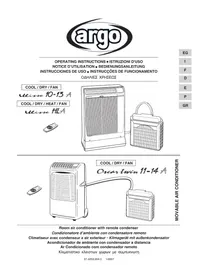
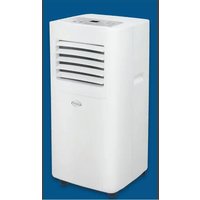
Oscar Twin 1114A - Air Conditioning ARGO - Free user manual and instructions
Find the device manual for free Oscar Twin 1114A ARGO in PDF.



| Brand | ARGO |
| Model | Oscar Twin 1114A |
| Product type | Mobile air conditioner with outdoor air condenser (split) |
| Power supply | 220-240 V, single phase |
| Operating modes | Cooling, heating (reversible), dehumidification, ventilation, automatic |
| Remote control | Infrared with integrated I FEEL sensor, AAA batteries (2 x 1.5V) |
| Adjustable temperature range | 16°C to 32°C (cooling and heating) |
| Fan speed | Auto, high, medium, low |
| Programming | 24h on/off timer, 1 hour timer, night mode |
| Temperature sensor | Integrated in remote control (I FEEL) or indoor unit |
| Air filter | Washable, check every 2 weeks |
| Air purification filter | Optional (shown model), collects dust and deodorizes |
| Condensate alarm | Yes, flashing indicator with stop if drainage fails |
| Compressor protection | Automatic restart after 3 minutes (overload protection) |
| Power failure | Automatic restart after restoration |
| Certifications | CE (Low Voltage Directive 2006/95/EC and Electromagnetic Compatibility) |
| Installation | Outdoor unit on sill, basket or wall bracket |
| Transport and storage | Keep vertical, clean filter, drain condensate |
| Manual | 88 pages, available in multiple languages |
Frequently Asked Questions - Oscar Twin 1114A ARGO
User questions about Oscar Twin 1114A ARGO
0 question about this device. Answer the ones you know or ask your own.
Ask a new question about this device
Download the instructions for your Air Conditioning in PDF format for free! Find your manual Oscar Twin 1114A - ARGO and take your electronic device back in hand. On this page are published all the documents necessary for the use of your device. Oscar Twin 1114A by ARGO.
USER MANUAL Oscar Twin 1114A ARGO
OPERATING INSTRUCTIONS • ISTRUZIONI D'USO
Room air conditioner with remote condenser
-
How to install batteries 6
-
Temperature sensor selector 6
Operation with the remote control unit 6
REMOTE CONTROL UNIT 7
HOW TO SET THE PRESENT TIME. 8
COOLING-HEATING 8
ADJUSTING THE AIR FLOW DIRECTION 10
OPERATION WITHOUT THE REMOTE CONTROL UNIT 10
CARE AND CLEANING 11
ACCESSORIES (SUPPLIED ON REQUEST) 12
TIPS FOR ENERGY SAVING 13
TROUBLESHOOTINGS 13
ELECTRIC WIRING DIAGRAMS' SYMBOLS 14
PRODUCT INFORMATION
If you have problems or questions concerning your Air Conditioner, you will need the following information. Model and serial numbers are on the nameplate on the bottom of the air conditioner.
Model No.
Serial No.
Date of purchase
Dealer's address
Phone number
ALERT SYMBOLS
The following symbols used in this manual, alert you to potentially dangerous conditions to users, service personnel or the appliance:

WARNING
This symbol refers to a hazard or unsafe practice which can result in severe personal injury or death.

CAUTION
This symbol refers to a hazard or unsafe practice which can result in personal injury or product or property damage.
NOTE
This air conditioner is equipped with cooling, drying and fan functions COOL/DRY/FAN , cooling, drying, heating and fan functions COOL/DRY/HEAT/FAN . Details on these functions are provided here following; refer on these descriptions when using the air conditioner.
DECLARATION OF CONFORMITY
This product is marked as it satisfies Directives.
- Low voltage no. 2006/95/CE.
Electromagnetic compatibly no. 89/336/CEE, 92/31/CEE and 93/68/CEE.
This declaration will become void in case of misuse and/or non observance though partial of Manufacturer's installation and/or operating instructions.
| OPERATING LIMITS | ||
| COOLING | ||
| MAXIMUM CONDITIONS | OUTDOOR TEMPERATURE | 46°C D.B. |
| ROOM TEMPERATURE | 32°C D.B./23°C W.B. | |
| MINIMUM CONDITIONS | OUTDOOR TEMPERATURE | 19°C D.B. |
| ROOM TEMPERATURE | 19°C D.B./14°C W.B. | |
| HEATING | ||
| MAXIMUM CONDITIONS | OUTDOOR TEMPERATURE | 24°C D.B./18°C W.B. |
| ROOM TEMPERATURE | 27°C D.B. | |
| MINIMUM CONDITIONS | OUTDOOR TEMPERATURE | 8°C D.B.-9°C W.B. |
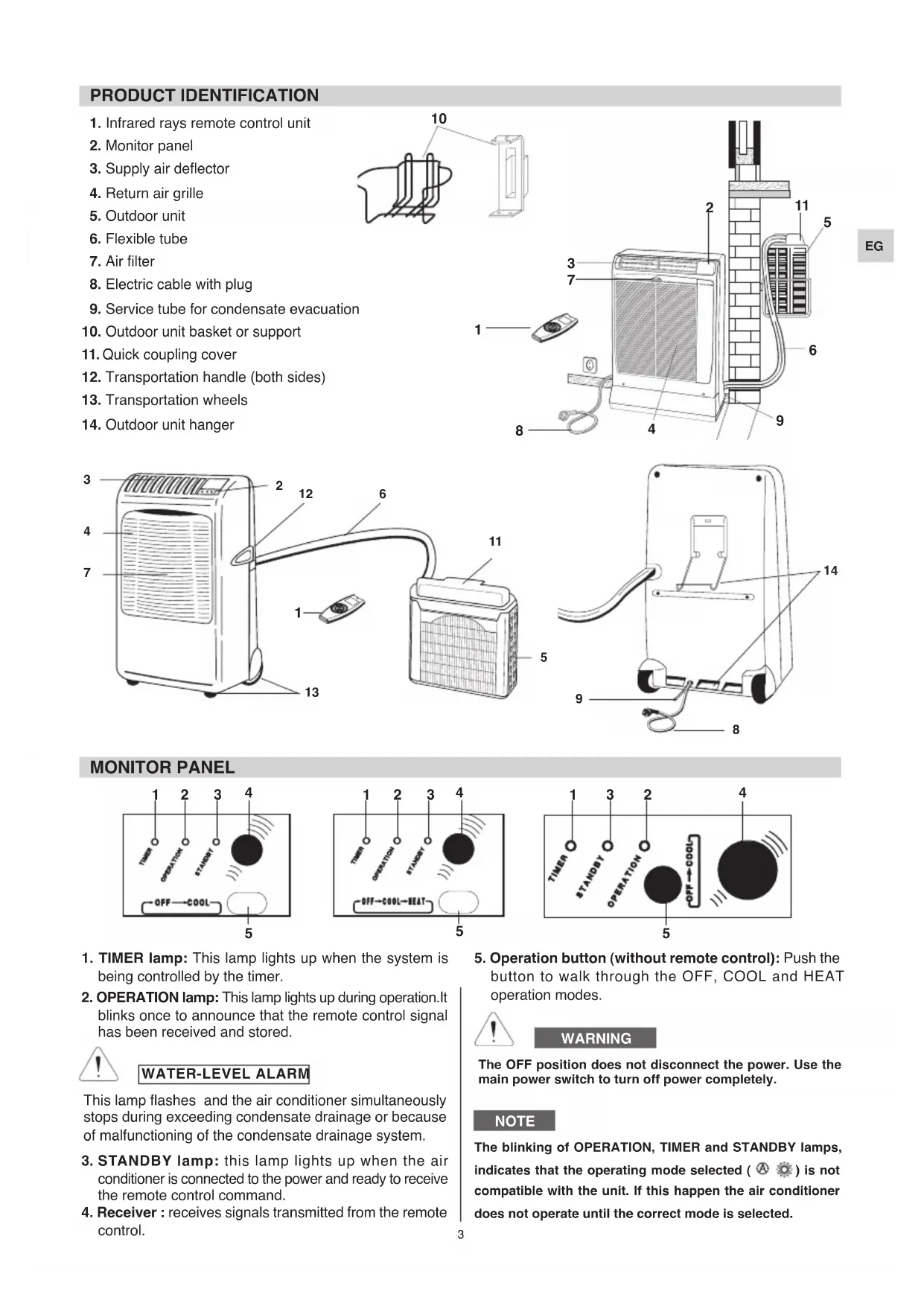
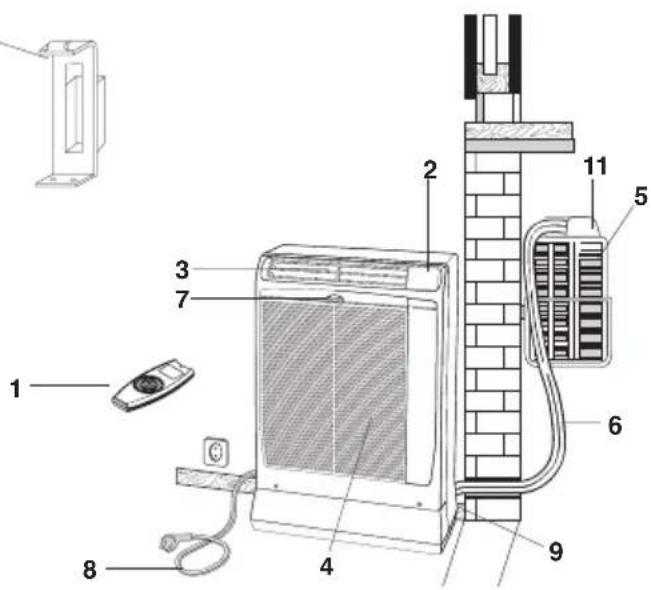
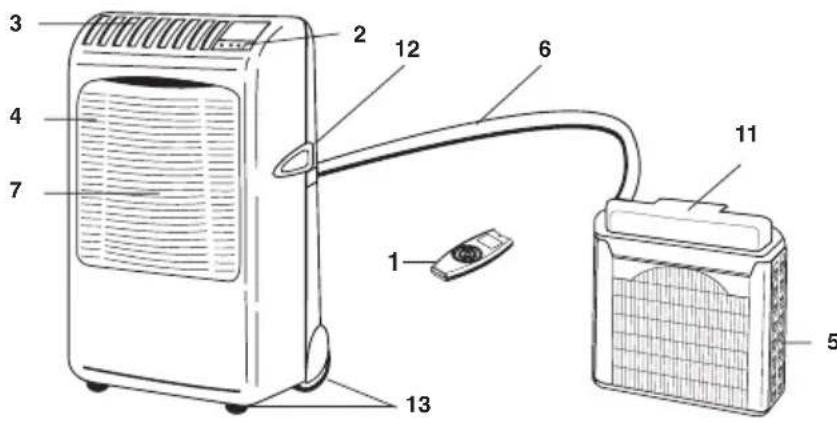
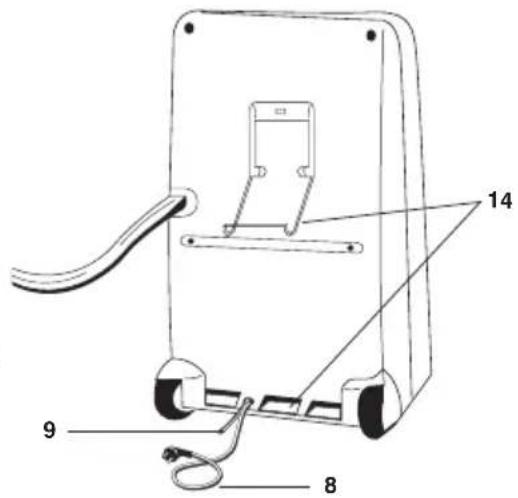
PRODUCT IDENTIFICATION
- Infrared rays remote control unit
- Monitor panel
- Supply air deflector
- Return air grille
- Outdoor unit
- Flexible tube
- Air filter
- Electric cable with plug
- Service tube for condensate evacuation
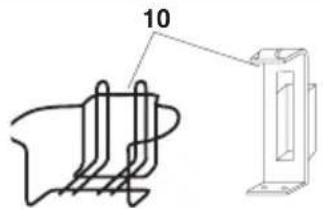
- Outdoor unit basket or support
- Quick coupling cover
- Transportation handle (both sides)
- Transportation wheels
- Outdoor unit hanger
MONITOR PANEL
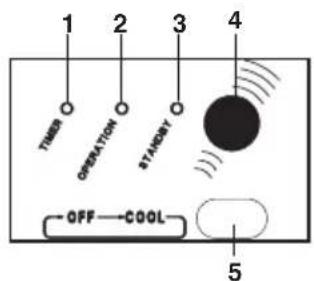
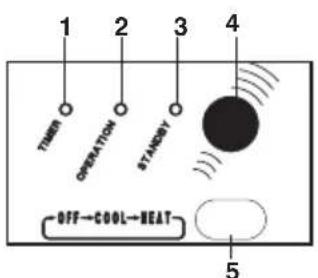
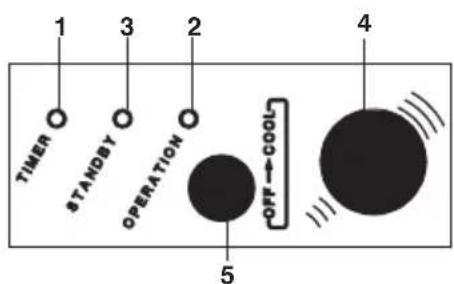
- TIMER lamp: This lamp lights up when the system is being controlled by the timer.
- OPERATION lamp: This lamp lights up during operation.It blinks once to announce that the remote control signal has been received and stored.

WATER-LEVEL ALARM
This lamp flashes and the air conditioner simultaneously stops during exceeding condensate drainage or because of malfunctioning of the condensate drainage system.
- STANDBY lamp: this lamp lights up when the air conditioner is connected to the power and ready to receive the remote control command.
-
Receiver : receives signals transmitted from the remote control.
-
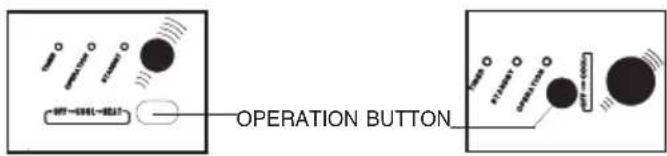
Operation button (without remote control): Push the button to walk through the OFF, COOL and HEAT operation modes.

WARNING
The OFF position does not disconnect the power. Use the main power switch to turn off power completely.
NOTE
The blinking of OPERATION, TIMER and STANDBY lamps, indicates that the operating mode selected (A) is not compatible with the unit. If this happens the air conditioner does not operate until the correct mode is selected.
INSTALLATION LOCATION

WARNING
- Do not install this air conditioner where there are fumes or flammable gases, or in an extremely humid space such as a green house.
- Do not install the air conditioner where excessively high heat-generating objects are placed.
- Do not install the air conditioner where the atmosphere is extremely damp or humid (e.g. greenhouse or laundry) it could be wetted by drops of water (i.e. in laundries).
Avoid:
To protect the air conditioner from heavy corrosion, avoid installing the outdoor unit where salty sea water can splash directly onto it or in sulphurous air near a spa.
- Make sure that there are no obstacles around the indoor unit affecting the free circulation of air. Do not block the air intake and outlet of the unit with curtains or other. Never put objects on the top of the unit.
ELECTRICAL REQUIREMENTS
Before using the appliance
- Check that the power supply at the location where the air conditioner is going to be used is 220/240 volt, single phase.
- The electrical connection of the unit is X type with cable prepared in a special way; in case you should notice any damage due to usage, call the nearest After Sale Service to get the cable replaced.
- Before connecting the air conditioner to a power socket, make sure that the socket is provided with an earth connection.
-
Verify that the available power supply is sufficient for running other electrical domestic appliances in use simultaneously from the same supply. See the data plate on the unit showing the max. absorbed powers.
Install a double - pole switch, protected fuses of the delayed type, upstream the electricity wall socket 10A. -
Make sure that circuit breakers, fuses, etc. are of sufficient capacity to handle start-up current (normally for no longer than a second).
- All wiring must conform to the local electrical codes. Consult your dealer or a qualified electrician for details.
WARNING!
The air conditioner is provided with a time-guard system, which does not allow re-starting of compressor until after 3 minutes from a previous stop.
SAFETY INSTRUCTIONS
- Read this booklet carefully before using this air conditioner. If you still have any difficulties or problems, consult your dealer for help.
- This air conditioner is designed to give you comfortable room conditions. Use this only for its intended purpose as described in this Instruction Manual.

WARNING
- Never use or store gasoline or other flammable vapour or liquid near the air conditioner. It is very dangerous. Moreover, never install electrical equipment, which is not protected with IPX1 protection (protection against vertical water drop), under the unit.
The manufacturer assumes no responsibilities if the safety regulations or local codes are not observed.

CAUTION
- Never use neither the power main switch or the power plug to start or stop the air conditioner. Always use the ON/OFF button.
- Do not stick anything into the air outlet of the air conditioner. This is dangerous because the fan is rotating at high speed.
- Do not let children play with the air conditioner.
- Do not cool the room too much if babies or invalids are present.
IMPORTANT ADVICE
INDOOR UNIT (ONLY FOR THE MODEL IN THE FIGURE)
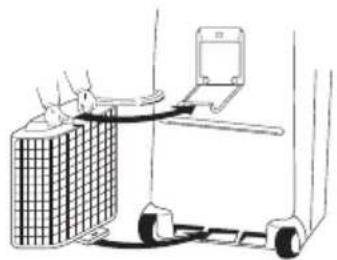
- When you move the air conditioner around your house, hang the outdoor unit to the rear of the indoor unit. Be careful not to twist nor kink the flexible tube.
OUTDOOR UNIT
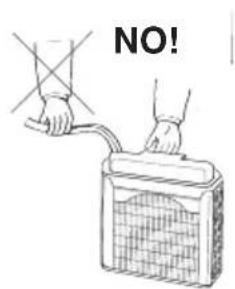
- When you move the outdoor unit, always hold it by the handle, never pull it by the flexible tube.
2.Never let the outdoor unit hang on the flexible tube.
3.When you recover the outdoor unit after operation, drain away any remaining condensate by tilting the unit.
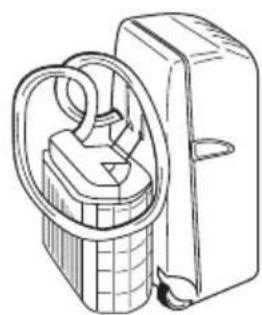
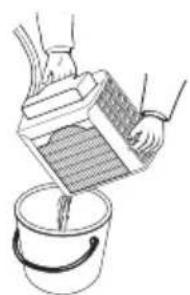
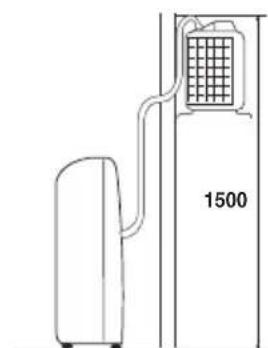
LIMIT OF ELEVATION DIFFERENCE
The air conditioner is made of two units interconnected by a flexible tube. The indoor unit must be placed in the room to be air conditioned, near a window, a balcony-door or a perimeter wall. The outdoor unit, that provides to the disposal of heat and condensation, must be located outside, on a window sill, on a balcony or hanged to the wall.
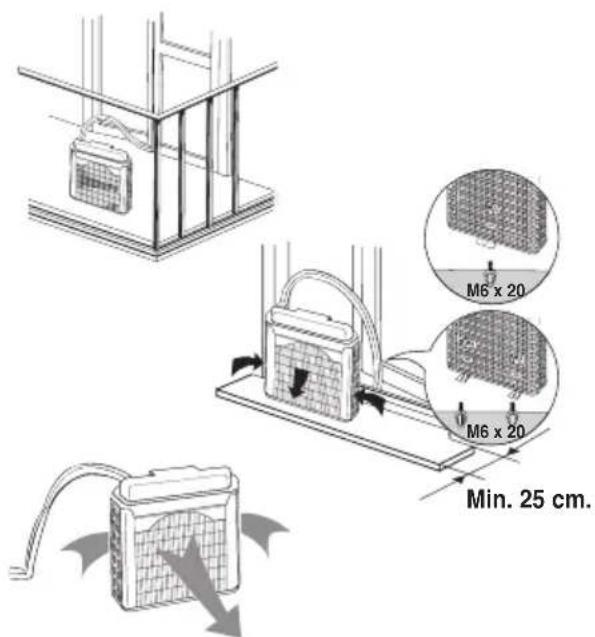
TYPE A
POSITIONING OF OUTDOOR UNIT
The outdoor unit must always be kept in vertical position and levelled. Make sure that there are no obstacles around the unit affecting the free circulation of air. A lug at the rear bottom of the unit ensures the minimum distance from the wall (3 cm). The unit must be kept at a minimum distance of cm. 15 (sidewise) and cm. 80 (frontally) from any walls.
INSTALLATION TYPE A
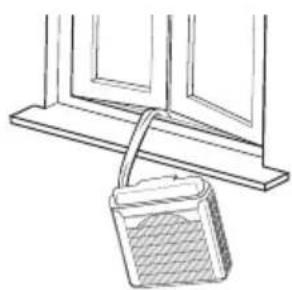
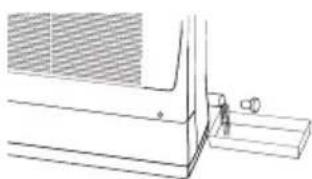
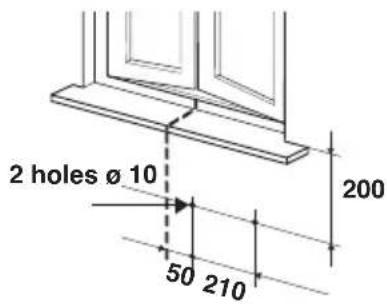
If your room has a balcony or a window-sill of sufficient depth (min. 25 cm) you may rest the unit freely onto it. For safety's sake, you may anchor the unit to the window-sill using one M6 x 20 expansion bolt in the slot of the lug at the rear bottom of the unit.
The flexible tube may easily pass through the balcony door or window shutters set ajar.
TYPE B
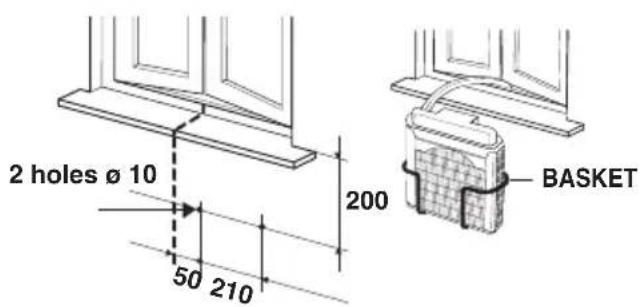
INSTALLATION TYPE B (USING THE BASKET)
- Fix the basket to the wall below the window sill.
- Place the unit in the basket and check that it is levelled.
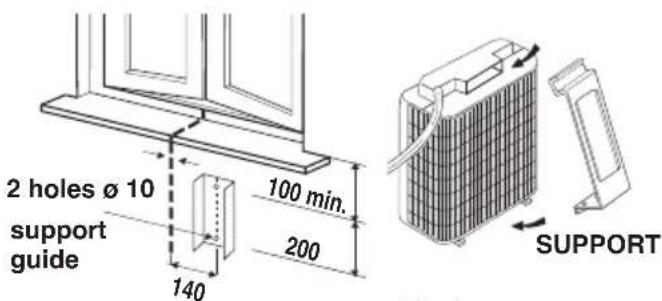
INSTALLATION TYPE C (USING THE SUPPORT)
- Fix the support guide to the wall below the window sill.
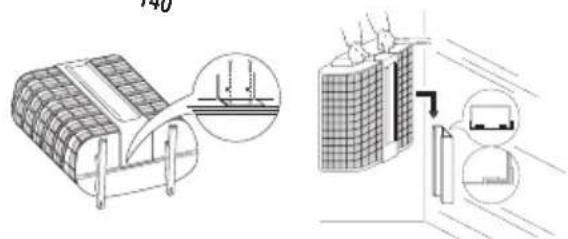
- Insert the support in the handle of outdoor unit, and turn the outdoor unit upside down as shown in the picture.
- Place the support and secure it at the edge of the unit, using the screws.
- Insert the support, fixed on the unit, at the guide fixed to the wall. Make sure it is levelled.
TYPE C
USING THE REMOTE CONTROL UNIT
HOW TO INSTALL BATTERIES
- Remove the lid in the rear part of the remote control unit and check that DIP SWITCH is set as shown in the picture:
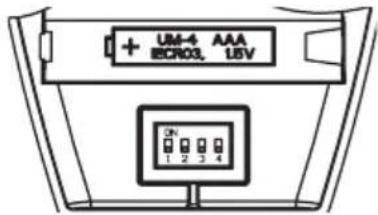
- Insert two AAA alkaline batteries of 1,5 V-DC making sure that point in the direction marked in the battery compartment. The displayed time flashes. Press the SEL TYPE button.
Remote controller is now ready for operation.
- The batteries last about six months. Depending on how much you use the remote control unit.
Remove the batteries if you do not use the remote control unit for more than one month.
Replace the batteries when the remote control unit lamp fails to light, or when the air conditioner does not receive the remote control unit signals.
- The batteries of the remote control contain polluted substances exhausted batteries must be disposed according to the laws in force.
TEMPERATURE SENSOR SELECTOR
- Under normal conditions the room temperature is detected and checked by the temperature sensor placed in the remote controller (I FEEL icon displayed). This function is designed to provide a personalised environment by transmitting the temperature control command from the location next to you. Therefore, when using this option, the remote control should always be aimed, without obstruction, at the air conditioner.
- It is possible to disable the remote controller room sensor pressing the I FEEL button. In this case the I FEEL icon on the remote controller display lights off and the sensor placed in the air conditioner becomes active.
NOTE
The remote control unit sends the temperature signal at any key pressing and automatically every five minutes. If, due to some troubles, the signal from the remote is no longer detected, the air conditioner keeps operating using the temperature sensor of the indoor unit to control the room temperature. In this case, the temperature around the remote control unit may differ from the temperature detected in the air conditioner position.
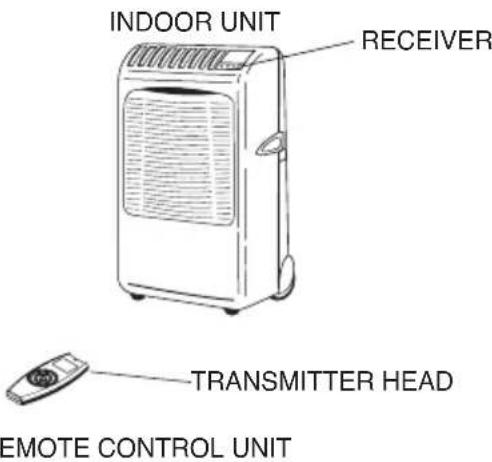
When using the remote control unit, always point the unit transmitter head directly at the air conditioner receiver.

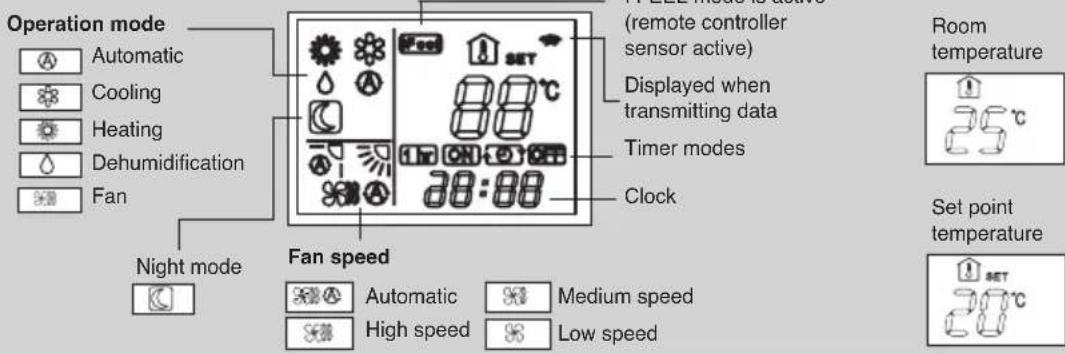
DISPLAY
Information is displayed when the remote controller is switched on. If switched off, only the operating mode, the room temperature and the clock are shown LEFEEL mode is active.
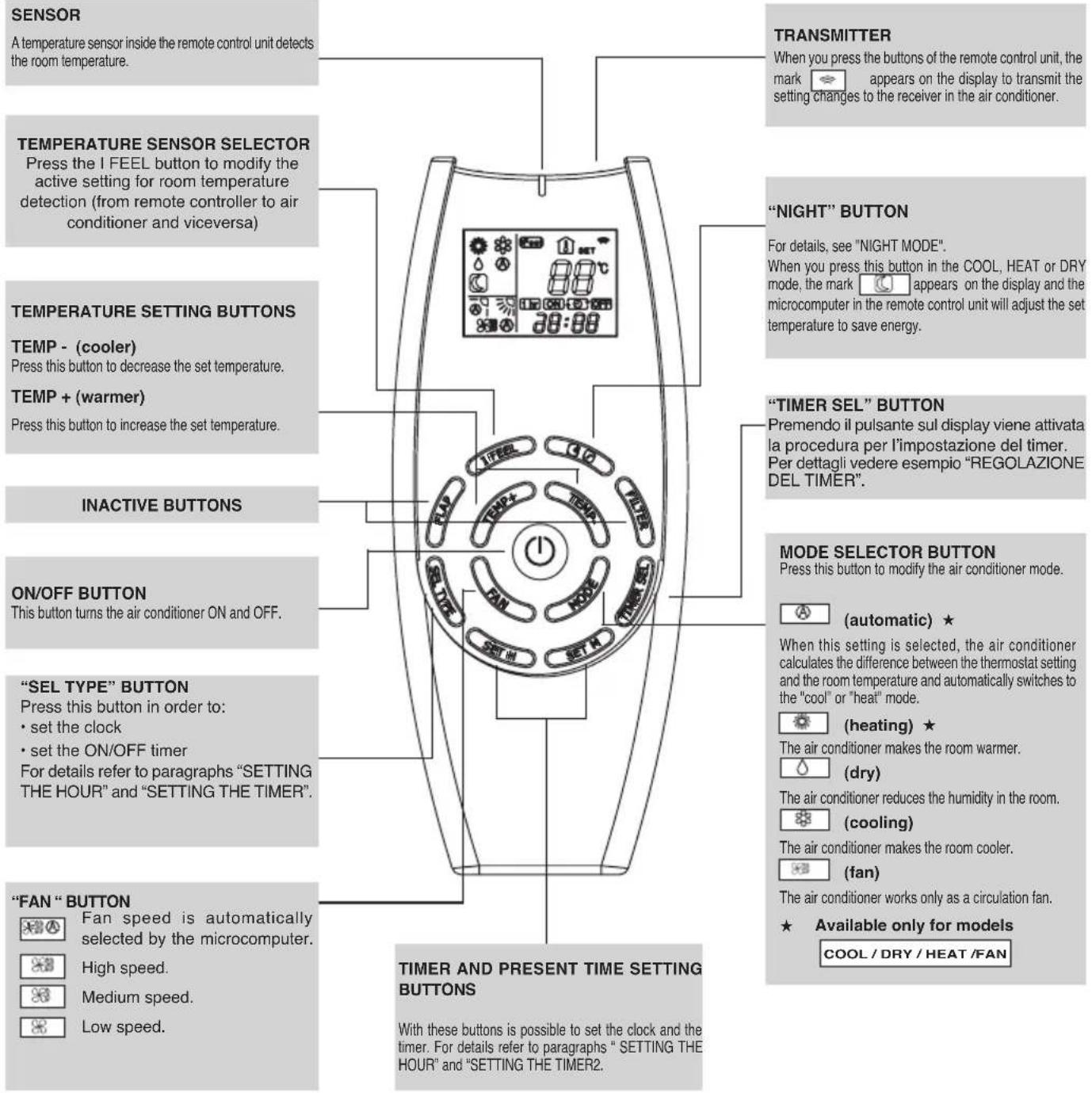
EG
HOW TO SET THE PRESENT TIME
- Press the button SEL TYPE three times. The time indication alone flashes.
- Press the SET H button until the present time hour is displayed. Press the SET M button until the present time minutes are displayed. The display will automatically stop flashing.
COOLING
NOTE
Verify that the unit is connected to the main power and the STANDBY lamp is light up.
1.Set the MODE selector to COOL.
2. Press the ON/OFF button and switch the air conditioner ON.
3. Press the TEMP. buttons to set the desired temperature (the temperature range is between 32^ max. and 16^ min.).
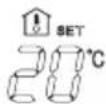
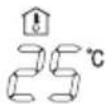
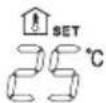
THE DISPLAY SHOWS THE SELECTED TEMPERATURE.
AFTER 5 SECONDS FROM THE REQUIRED TEMPERATURE SETTING THE DISPLAY WILL SHOW THE ROOM TEMPERATURE AGAIN.
- Press the FAN button to select the fan speed.
HEATING
1.Set the MODE selector to HEAT.
2. Press the ON/OFF button and switch the air conditioner ON.
3. Press the TEMP. buttons to set the desired temperature (the temperature range is between 32^ max. and 16^ min.).
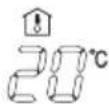
THE DISPLAY SHOWS THE SELECTED TEMPERATURE.
AFTER 5 SECONDS FROM THE REQUIRED TEMPERATURE SETTING THE DISPLAY WILL SHOW THE ROOM TEMPERATURE AGAIN.
- Press the FAN button to select the fan speed.
NOTE
For several minutes after the start of heating operation, the indoor fan will stop until the indoor heat exchanger coil has warmed up sufficiently. This is because the COLD DRAFT PREVENTION SYSTEM is operating. During this period, the STANDBY lamp remains lit.
DEFROSTING OF HEAT EXCHANGER OUTDOOR UNIT "STANDBY"
When the outdoor temperature is low, frost or ice may appear on the heat exchanger coil, reducing the heating performance. When this happens, a microcomputer defrosting system operates. At the same time, the fan in the indoor unit stops and the STANDBY lamp remains lit until defrosting is completed. Heating operation restarts after several minutes. (This interval will vary slightly depending on the room and outdoor temperature).
HEATING PERFORMANCE
A heat pump conditioner heats a room by taking heat from outside air. The heating efficiency will fall off when the outdoor temperature is very low. If enough heat is not obtained with this air conditioner, use another heating appliance in conjunction with it.
AUTOMATIC OPERATION
1.Set the MODE selector to AUTO.
2. Press the ON/OFF button and switch the air conditioner ON.
3. Press the TEMP. buttons to set the desired temperature (the temperature range is between 32^ max. and 16^ min.).
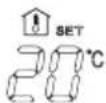
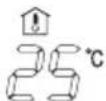
THE DISPLAY SHOWS THE SELECTED TEMPERATURE.
AFTER 5 SECONDS FROM THE REQUIRED TEMPERATURE SETTING THE DISPLAY WILL SHOW THE ROOM TEMPERATURE AGAIN.
When this setting is selected, the air conditioner calculates the difference between the thermostat setting and the room temperature and automatically switches to the COOL or HEAT mode as appropriate.
- Press the FAN selector button to the setting you want.
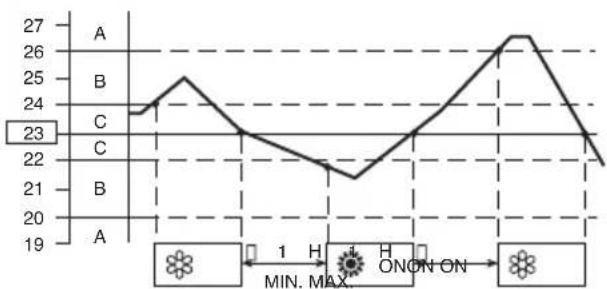
Example of operation diagram in the (Auto) mode with the set room temperature at 23^
NOTE
The air conditioner changes the operation mode (from cool to heat or vice versa, if one of the following conditions occurs:
- ZONE A: changes if the difference between the room temperature and the temperature set on the remote control unit is at least 3^
- ZONE B: changes if the difference between the room temperature and the temperature set on the remote control unit is at least 1^ , one hour after the compressor stop.
- ZONE C: never changes if the difference between the room temperature and the temperature set on the remote control unit is no more than 1^ .
DEHUMIDIFYING (DRY)
- Set the MODE button to DRY. The icon is displayed.
- Press the ON/OFF button and switch the air conditioner ON.
- Press the TEMP. buttons to set the desired temperature (the temperature range is between 32^ max. and 16^ min.).
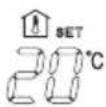
THE DISPLAY SHOWS THE SELECTED TEMPERATURE.
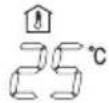
AFTER 5 SECONDS FROM THE REQUIRED TEMPERATURE SETTING THE DISPLAY WILL SHOW THE ROOM TEMPERATURE AGAIN.
NOTE
- Use DRY operation when you want to reduce the humidity in the room.
-Once the room temperature reaches the set level, the unit repeats the cycle of turning on and off automatically.
During DRY operation, the fan speed is automatically set to or stops to prevent overcooling. - Dry operation is not possible if the indoor temperature is 15 °C or less.
FAN ONLY
If you want to make air circulate without any temperature control, follow these steps:
- Press the ON/OFF operation button and switch the air conditioner ON.
- Press MODE button until only the fan sign appears on the display.
ADJUSTING THE FAN SPEED
AUTOMATIC
Simply set the FAN selector to the position.A microcomputer automatically controls the fan speed when the AUTO mode is selected. When the air conditioner starts operating, the difference between the room temperature and the set temperature is detected by the microcomputer which then automatically switches the fan speed to the most suitable level.
| WHEN DIFFERENCE BETWEEN ROOM TEMPERATURE AND SET FAN TEMPERATURE IS | N SPEED | |
| Cooling and 2 °C and dehumidifying Bet modes: Below 1 °C | and over High | |
| teen 2 and 1 °C Medium | ||
| Low | ||
| Heating mode: | 2 °C and over High | |
| Below 2 °C Medium | ||
NOTE
The above mentioned data make reference to the conditioner operating when the sensor on the remote control unit is ON. (Refer to temperature sensor selector). If the sensor on the indoor unit is being used then actual operation will slightly differ from that described in the above tables. The automatic speed is not active in FAN ONLY mode.
MANUAL
If you want to manually adjust speed just set the FAN selector as desired.

High speed Medspeed Low speed

NIGHT MODE
The NIGHT mode enables you to save energy.
1. Set the MODE selector to cool, dry or heat.
2. Press the NIGHT button.
3. The mark appears on the display. Press the NIGHT button again to release the NIGHT function.
What does the NIGHT mode mean?
In this mode, the air conditioner will cool or heat the room to the set temperature, and then the thermostat will make the unit pause. After about 1 hour, the air conditioner will automatically reset the set temperature as follows (also refer to graphs).
| OPERATING MODE SET | TEMPERATURE CHANGE |
| Heating | Lowered by 1 °C |
| Cooling and Dehumidifying | Raised by 1 °C |
When the room temperature reaches the new set value, the thermostat will cause the unit to pause. After about 1 hour the temperature will be raised by 1^ in cooling, or lowered by 1^ in heating. This enables you to save energy without sacrificing your comfort.
COOLING AND DEHUMIDIFYING
Setting temperature Room temperature
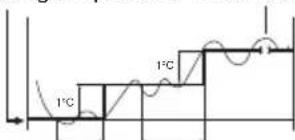
1 hour
1 hour TIME
HEATING
Setting temperature Room temperature
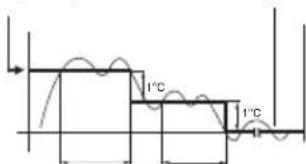
1 hour
1 hour TIME
SETTING THE TIMER
- Press the SEL TYPE button once. The ON and time indications flash.
- Press the SET H button until the designed hour is displayed. Press the SET M button until the designed minutes are displayed. The display will change automatically back to show the present time after 10 sec.
- Press the ON/OFF button to start the air conditioner.
- Press the TIMER SEL button to activate the ON timer.
-
Press the SEL TYPE button twice. The OFF and time indications flash.
-
Press the SET H button until the designed hour is displayed. Press the SET M button until the designed minutes are displayed. The display will change automatically back to show the present time after 10 sec.
-
Press the ON/OFF button to start the air conditioner.
-
Press the TIMER SEL button two times to activate the OFF timer.
C) HOW TO SET A PROGRAM FOR DAILY ON/OFF OPERATION (OR VICEVERSA)
- Set the timer ON/OFF as shown in A) and B).
- Press the ON/OFF button to start the air conditioner.
- Press three times the TIMER SELECT button to activate the DAILY timer.
NOTE
After timer setting, press PROGRAM button in order to check the ON/OFF setting time.
SETTING THE 1 HOUR TIMER
This function causes the unit to operate for one hour at the set conditions, regardless of whether the unit is on or off.
TIMER SETTING PROCEDURE.
- Press four times the TIMER SEL button. The 1 HOUR TIMER mark will appear on the display.
CANCELLATION PROCEDURE
- Press the ON/OFF button to turn the air conditioner off.
- Wait for the indoor unit to stop operating.
- Press the ON/OFF button again to turn the air conditioner on.
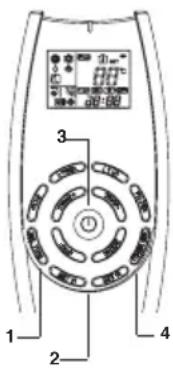
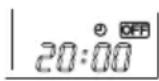
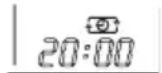
ADJUSTING THE AIR FLOW DIRECTION
VERTICAL
Hold the end of the flap and move it up and down to adjust the vertical air flow.
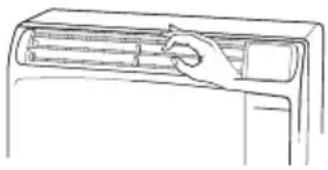
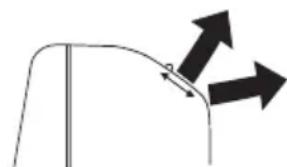
HORIZONTAL
The horizontal air flow can be adjusted by moving the vertical blades to the left or right, as indicated in the following figure.
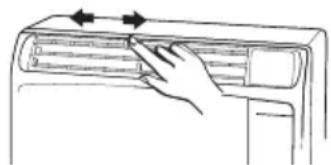

CAUTION
Set vertical blades to the front position during COOLING/DRY operation if humidity is high.
If the vertical blades are set to the left-most or right-most position, condensation will form around the air outlet and drip off.
OPERATION WITHOUT THE REMOTE CONTROL UNIT
If you have lost the remote control unit or it has troubles, follow the steps below.
1. WHEN THE AIR CONDITIONER IS STOPPED
If you want to turn on the air conditioner push the OPERATION BUTTON to select the desired mode:
COOL or HEAT for heat pump models
COOL for cooling only models
NOTE
The air conditioner will start in HIGH fan speed. The temperature setting is 25^ for cooling mode and 21^ for heating mode.
2. WHEN THE AIR CONDITIONER IS RUNNING
If you want to turn off the air conditioner push the OPERATION BUTTON until the OPERATION lamp is turned off.
NOTE
Power failure during operation. In the event of power failure, the unit will stop. When the power is resumed, the unit automatically restarts after 3 minutes.
CARE AND CLEANING

CAUTION
For safety, be sure to turn the air conditioner off and also to disconnect the power before cleaning.
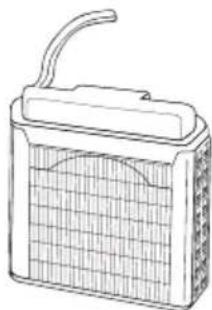
OUTDOOR UNIT (CASING AND CONDENSING COIL)
Some metal edges and the condenser fins are sharp and may cause injury if handled improperly; special care should be taken when you clean these parts.
Periodically check the outdoor unit to see if the air outlet or air intake are clogged up with dirt or soot.
The condenser and other components of the outdoor unit must be cleaned periodically. Consult your DEALER or AFTER SALES SERVICE.
INDOOR UNIT
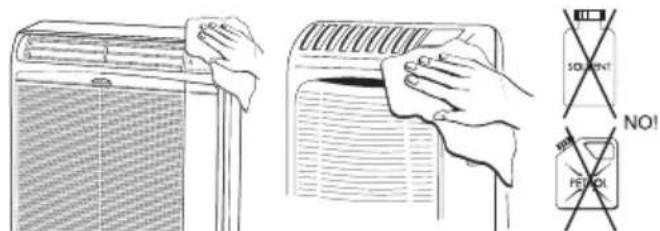
- Do not pour water on the unit to clean it. This will damage the internal components and cause an electric shock hazard.
- Never use solvents, or chemical agents when cleaning the indoor unit. Do not wipe the plastic casing using very hot water.
Casing and Grille
Clean the casing and grille of the indoor unit with a vacuum cleaner brush, or wipe them with a clean, soft cloth. If these parts are stained, use a clean cloth moistened with a mild liquid detergent. When cleaning the grille, be careful not to force the blades out of place.
AIR FILTER
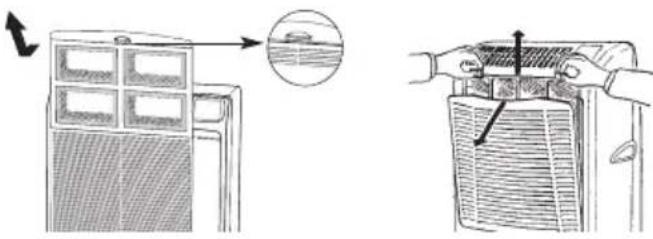
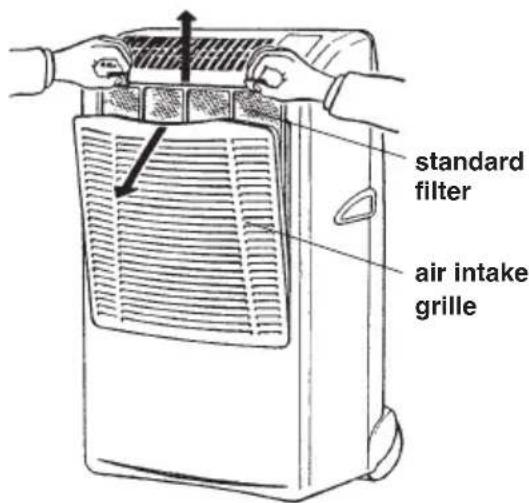
The air filter must be cheked at least once every two weeks operation. Operation with a dirty filter always causes a lower efficiency of the air conditioner and severe product damage. The filter is located at the back of the intake grille in the front of the air-conditioner and shall be removed from the upper side of the unit.
HOW TO REMOVE THE FILTER
FILTER CLEANING
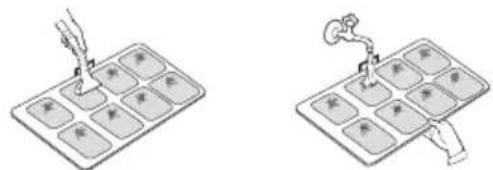
Use a vacuum cleaner to remove light dust. If there is sticky dust on the filter, wash the filter in lukewarm, soapy water, rinse it in clean water, and dry it.
TRANSPORT
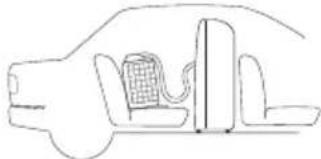
Preferably keep the air conditioner in the vertical position during transportation. If this is not possible, then lay it on one side; when at destination put the air conditioner back in the vertical position and wait at least 10 minutes before using it for cooling.
STORAGE
If you are not going to use the air-conditioner for a long period, clean the air filters, evacuate the condensate from the indoor unit through the drain hose at the unit back side. Do not disconnect the flexible tube, unless you are obliged to do it: in that case protect the open halves of the couplings with the plugs supplied as accessories, that must be tightened with a spanner. Do not put heavy objects on the top of the unit, and protect it with a cloth or a plastic bag.
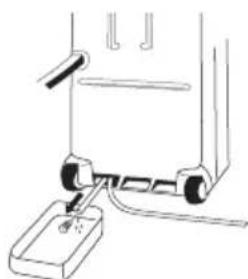
CONDENSATE DRAIN PIPE
SUPPLEMENTARY BASKET OR SUPPORT GUIDE KIT FOR OUTDOOR UNIT
If you want to utilise the air conditioner in several rooms, it is possible to buy varies baskets or support guides for the installation of outdoor unit.
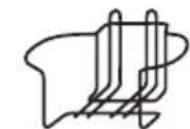
BASKET
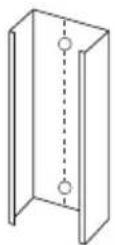
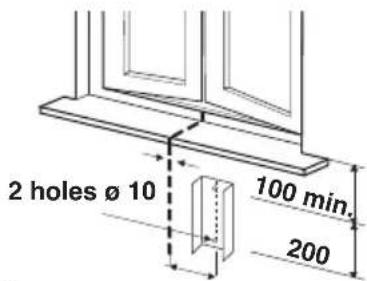
SUPPORT GUIDE
AIR CLEAN FILTER (ONLY FOR THE MODEL IN THE FIGURE)
- Read these instructions before starting replacement work.
- This "Air Clean Filter" collects dust as well as deodorizes.
NOTE
- This carton box contains an air clean filter, a spring and a label "Color gauge for filter replacement".
- Open the bag just before installing the air clean filter. If not, the deodorization effect durability of the filter may be decreased.
1
Filter installation procedure:
Open the air intake grille and remove the standard filter. Stick the label "Color gauge for filter replacement" in an easy-to-see position (inside of control panel cover).
2
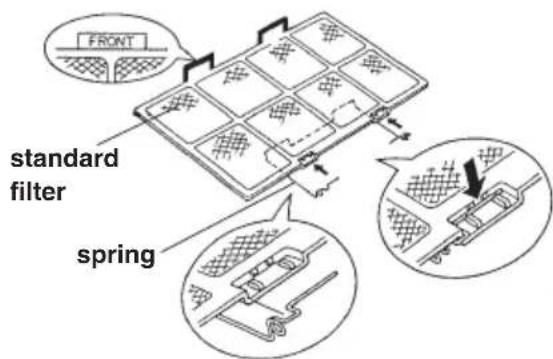
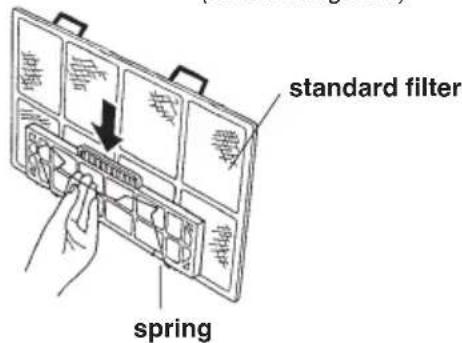
Attach the spring onto the standard filter:
Hook the spring onto the air filter from its rear side and engage it into the groove on the "FRONT" mark side (use of a standard screwdriver is recommended for easy setting).
3
Secure the "air clean filter" onto the standard filter by the spring attached before in step 2.
4
Set the standard filter in the air conditioner with its "FRONT" mark towards you and close the air intake grille.
Replacement of air clean filter
The air clean filter is disposable.
- Do not throw away the filter frame and sping.
The used filter cannot be reused even after cleaning up.
- Buy the air clean filter for replacement at your nearest dealer.
- Check the state of dirtiness at least once every two weeks and replace the filter when it changes to be so dirty as the color of the label "Color gauge for filter replacement".
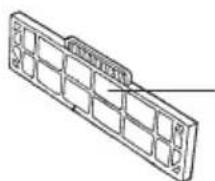
"Air clean filter"
standard filter side:
white
(dust collecting filter)
Spring side: black
(deodorizing filter)
TIPS FOR ENERGY SAVING
DO NOT:
- Block the air intake and outlet of the unit. If they are obstructed, the unit will not work well, and may be damaged.
- Let direct sunlight into the room. Use sunshades, blind or curtain.
DO:
Always try to keep the air filter clean. A clogged filter will impair the performance of the unit.
- To prevent conditioned air from escaping, keep windows, doors and any other openings closed.
TROUBLESHOOTING

WARNING
- The use of portable telephones near the air-conditioner may cause disturbance to its normal operation and must be avoided. In case abnormal operation is noticed, (OPERATION lamp lights but outdoor unit will not run) to restore normal operation turn-off electric supply for 60 seconds at least, by disconnecting the main switch or the wall plug, then start again the air-conditioner.
- The blinking OPERATION lamp, together with the stop of the air conditioner for a short time are due to the exceeding condensate drainage.
If the OPERATION lamp goes on blinking and the air conditioner definitely stops means that the condensate pump is not working or that the condensate drain pipe in the flexible connection pipe is obstructed; in this case contact the AFTER SALE SERVICE.
In case of emergency the air conditioner can work by draining the condensate from the back little pipe into a rather short container: extract the little pipe and remove the cap.
- If your air conditioner does not work properly, first check the following points before requesting service.
If it still does not work properly, contact your dealer or service center.
Trouble: the air conditioner does not run at all.
Possible cause:
- Power failure.
- Leakage breaker tripped.
- Line voltage is too low.
- Operation button is OFF.
- Batteries in remote control unit have run down.
Remedy:
- Restore power.
- Contact service center.
- Consult your electrician or dealer.
- Press the button again.
- Replace batteries.
Trouble: The air conditioner does not operate and STANDBY lamp flashes.
Possible cause:
- Air conditioner room sensor defective.
Remedy:
- Contact service centre.
Trouble: STANDBY and OPERATION lamps flash and the air conditioner does not operate.
Possible cause:
- Air conditioner coil sensor defective.
Remedy:
- Contact service centre.
Trouble: Compressor runs but soon stops.
Possible cause:
- Obstruction in front of condenser coil.
Remedy:
- Remove obstruction.
Trouble: Poor cooling or heating performance.
Possible cause:
- Dirty or clogged air filter.
- Heat source or many people in room.
- Doors and/or windows are open.
- Obstacle near air intake or air discharge port.
- Thermostat is set too high (for cooling) or too low (for heating).
- Outdoor temperature is too low (heat pump version).
- Defrosting system does not work (heat pump version).
Remedy:
- Clean air filter to improve airflow.
- Eliminate heat source if possible.
- Shut them to keep the heat or cold out.
- Remove it to ensure good airflow.
- Set the temperature lower (or higher).
- Try to use a back-up heater (heat pump version).
- Consult your dealer (heat pump version).
Trouble: Clicking sound is heard from the air conditioner. Possible cause:
- In heating or cooling operation, any plastic parts may expand or shrink due to a sudden temperature change. In this event, a clicking sound may occur.
Remedy:
- This is normal, and the sound will disappear when an even temperature is settled.
NOTE
The blinking of OPERATION, TIMER and STANDBY lamps, indicates that the operating mode selected (A) is not compatible with the unit. If this happens the air conditioner does not operate until the correct mode is selected.
IL PRODOTTO 3
PANNELLO SEGNALAZIONI 3
TEMPERATURA INTERNA 32^ B.S./23°C B.U.
CONDIZIONI MINIME
TEMPERATURA ESTERNA 19°C B.S.
TEMPERATURA INTERNA 19^ B.S./14°C B.U.
RISCALDAMENTO
COOL/DRY/HEAT/FAN
CONDITIONI MASSIME
TEMPERATURA ESTERNAR 24°C B.S./18°C B.U. TEMPERATURA INTERNA 27°C B.S.
CONDITIONI MINIME
TEMPERATURA ESTERNA -8°C B.S.-9°C B.U.
IL PRODOTTO
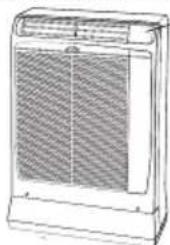
UNITÀ INTERNA
RICEVITORE
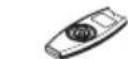
TESTINA DEL TRASMETTITORE
TELECOMANDO

UNITÀ INTERNA
RICEVITORE
TESTINA DEL TRASMETTITORE
TELECOMANDO
INFORMATIONS SUR LE PRODUIT
NYXTEPINO IPOI PAMMA 9
PYEMIEH TOY XPONOIAKONTH 10
PYOMIEH TOY XPONOIAKONTTH 1 OPA. 10
PYOMIEH THPOHS TOY AEPA 10
AEITOYPIIA XOPIZ THAEXEIPIHTPHIO 10
SYNTHPHSH KAI PONTIa 11
IIPOAIPETIKA EAPTHMATA (KATOIN IAPATGEIAIa) 12
EAKPIB0sH KAI AYsH IPOBAHMATON AEITOYPIAI 13
NYXTEPINO IPOIPTAMMA
To yuxepivo npoypauma xonoueui yia tvv Eoikovounn nAekptknc Evpyiac.
1. Nahtote to noutov MODE yia va npodiataeteto Klaatotko otny uexn, apuypavon n eepavon.
2. FlatnoTe to noutov NIGHT.
3.To OuMuBoLo EmuaviCetai OTny oOvN. Ia va Byeite ano to npoypauma natnoTE EK VEOU TO moutov NIGHT.
Ti eivai to npoypa ma vuxepinac Aetoupyia?
TnV apxN TO KLImuATIOKIO U E n 0epuAveI eXp va oTaOeI OTNV 0epuOKpaia Nou exEi EuaExEi ETOV Euaoyea 3 kai eT a Otaata. MTea ano 1 npa nepinou n 0epuOKpaia Nou exEi EuaExEi eTaaalaaTai ETOV akolouTo Tpno.
INFORMATION FOR CORRECT DISPOSAL OF THE PRODUCT IN ACCORDANCE WITH THE EUROPEAN DIRECTIVE 2002/96/EC
At the end of its working life this equipment must not be disposed of as an household waste.
It must be taken to special local community waste collection centres or to a dealer providing this service.
Disposing of an electrical and electronic equipment separately avoids possible negative effects on the environment and human health deriving from an inappropriate disposal and enables its components to be recovered and recycled to obtain significant savings in energy and resources.
In order to underline the duty to dispose of this equipment separately, the product is marked with a crossed-out dustbin.

- PRODUCT INFORMATION
- ALERT SYMBOLS
- WARNING
- CAUTION
- NOTE
- DECLARATION OF CONFORMITY
- PRODUCT IDENTIFICATION
- MONITOR PANEL
- WATER-LEVEL ALARM
- INSTALLATION LOCATION
- Avoid:
- ELECTRICAL REQUIREMENTS
- Before using the appliance
- WARNING!
- SAFETY INSTRUCTIONS
- IMPORTANT ADVICE
- INDOOR UNIT (ONLY FOR THE MODEL IN THE FIGURE)
- OUTDOOR UNIT
- POSITIONING OF OUTDOOR UNIT
- INSTALLATION TYPE A
- INSTALLATION TYPE B (USING THE BASKET)
- INSTALLATION TYPE C (USING THE SUPPORT)
- USING THE REMOTE CONTROL UNIT
- HOW TO INSTALL BATTERIES
- TEMPERATURE SENSOR SELECTOR
- DISPLAY
- HOW TO SET THE PRESENT TIME
- COOLING
- HEATING
- DEFROSTING OF HEAT EXCHANGER OUTDOOR UNIT "STANDBY"
- HEATING PERFORMANCE
- AUTOMATIC OPERATION
- DEHUMIDIFYING (DRY)
- FAN ONLY
- ADJUSTING THE FAN SPEED
- AUTOMATIC
- MANUAL
- NIGHT MODE
- What does the NIGHT mode mean?
- COOLING AND DEHUMIDIFYING
- SETTING THE TIMER
- C) HOW TO SET A PROGRAM FOR DAILY ON/OFF OPERATION (OR VICEVERSA)
- SETTING THE 1 HOUR TIMER
- TIMER SETTING PROCEDURE.
- CANCELLATION PROCEDURE
- ADJUSTING THE AIR FLOW DIRECTION
- VERTICAL
- HORIZONTAL
- OPERATION WITHOUT THE REMOTE CONTROL UNIT
- WHEN THE AIR CONDITIONER IS STOPPED
- WHEN THE AIR CONDITIONER IS RUNNING
- CARE AND CLEANING
- OUTDOOR UNIT (CASING AND CONDENSING COIL)
- INDOOR UNIT
- Casing and Grille
- AIR FILTER
- HOW TO REMOVE THE FILTER
- FILTER CLEANING
- TRANSPORT
- STORAGE
- SUPPLEMENTARY BASKET OR SUPPORT GUIDE KIT FOR OUTDOOR UNIT
- AIR CLEAN FILTER (ONLY FOR THE MODEL IN THE FIGURE)
- Filter installation procedure:
- Attach the spring onto the standard filter:
- Replacement of air clean filter
- "Air clean filter"
- white
- TIPS FOR ENERGY SAVING
- DO NOT:
- DO:
- TROUBLESHOOTING
- Possible cause:
- Remedy:
- RISCALDAMENTO
- COOL/DRY/HEAT/FAN
- IL PRODOTTO
- INFORMATIONS SUR LE PRODUIT
- NYXTEPINO IPOIPTAMMA
- INFORMATION FOR CORRECT DISPOSAL OF THE PRODUCT IN ACCORDANCE WITH THE EUROPEAN DIRECTIVE 2002/96/EC
Brand : ARGO
Model : Oscar Twin 1114A
Category : Air Conditioning