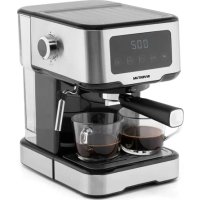
PK502 - Coffee machine INVENTUM - Free user manual and instructions
Find the device manual for free PK502 INVENTUM in PDF.


User questions about PK502 INVENTUM
0 question about this device. Answer the ones you know or ask your own.
Ask a new question about this device
Download the instructions for your Coffee machine in PDF format for free! Find your manual PK502 - INVENTUM and take your electronic device back in hand. On this page are published all the documents necessary for the use of your device. PK502 by INVENTUM.
USER MANUAL PK502 INVENTUM
natural_image
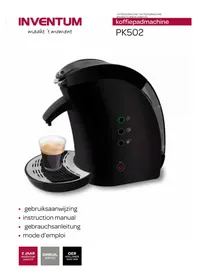
Black electric water heater with a glass of coffee being dispensed, no visible text or symbols on the device itself.- safety instructions page 8
- appliance description page 10
- before first use page 10
- preparing coffee page 10
- cleaning & maintenance
- tips & faqs
Guarantee & After sales service
page 11
page 11
page 23
Deutsch
text_image
Labeled diagram of a black coffee maker with numbered parts for identification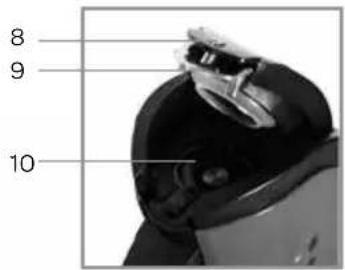
text_image
8 9 10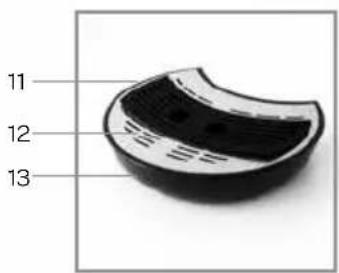
text_image
11 12 13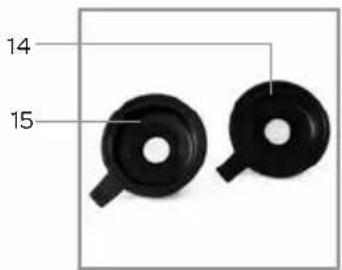
text_image
14 151 safety instructions
- Please read these instructions before operating the appliance and retain for future use.
- The appliance is intended solely for domestic use within the home.
- Attention! Avoid touching hot surfaces, especially the outside of the appliance when the appliance is in use.
- Before plugging into a socket, check that the voltage in your home corresponds with the voltage printed on the bottom of the appliance.
- The appliance operates with a pressure of 2.5 bar. Leave the appliance to cool down completely before opening the lid in case of a malfunction. There is a risk of skin burns when getting in contact with the hot steam of the safety instructions are not followed.
- Never let the power cord of the appliance hang over the edge of a table or counter, touch hot surfaces or become knotted.
- Never place this appliance on or near a hot gas or electric burner or where it could touch a heated oven or microwave. Do not allow this appliance to touch curtains, wall coverings, clothing, dishtowels or other flammable materials during use.
• Always use the appliance on a secure, dry, level surface. - Never leave the appliance unattended when in use.
- Always carry out regular checks of the power cord to ensure no damage is evident. Should there be any signs that the cord is damaged in the slightest degree, the entire appliance should be returned to the Customer Service Department. For your own safety, only use the accessories and spare parts from the manufacturer which are suitable for the appliance.
- For your own safety, only use the accessories and spare parts from the manufacturer which are suitable for the appliance.
- Always return the appliance after a malfunction, or if it has been damaged in any manner to the Customer Service Department for examination, repair or adjustment as special purpose tools are required.
- Never unplug it from the socket by pulling on the cable.
- Always ensure that your hands are dry before handling the plug, switch or power cord.
- The appliance is not intended to be operated by means of an external timer or a separate remote-control system.
- This appliance shall not be used by children from 0 to 8 years. This
appliance can be used by children over the age of 8 and above if they are continuously supervised. This can be used by people with reduced physical, sensory or mental capabilities or lack of experience or knowledge, if they have been given supervision or instruction concerning use of the appliance in a safe way and understand the hazards involved. Keep the appliance and its cord out of reach of children aged less than 8 years.
- Cleaning and maintenance shall not be made by children.
• Children must not play with the appliance. - Unplug the appliance as soon as you have finished using it and when you are cleaning it.
- If an extension cord is used, check the marked electrical rating of the extension cord to the electrical rating on the appliance. Make sure that it can not be pulled on by children or tripped over unintentionally.
- Should you decide not to use the appliance anymore, make it inoperative by cutting the power cord after removing the plug from the socket. We also recommend making all potentially dangerous parts of the appliance harmless, particularly for children who might be tempted to play with it.
- Never use the appliance if it is not working properly, or if it has been damaged. Any intervention other than cleaning and normal maintenance by the customer must be carried out by an approved service centre.
- Never immerse the appliance, power cord and plug in water or any other liquid to protect against electrical hazards.
- If the appliance is used for other purposes than intended, or is it not handled in accordance with the instruction manual, the full responsibility for any consequences will rest with the user. Any damages to the product or other things are not covered by the warranty.
- Legislation requires that all electrical and electronic equipment must be collected for reuse and recycling. Electrical and electronic equipment marked with the symbol indicating separate collection of such equipment must be returned to a municipal waste collection point.
2 appliance description
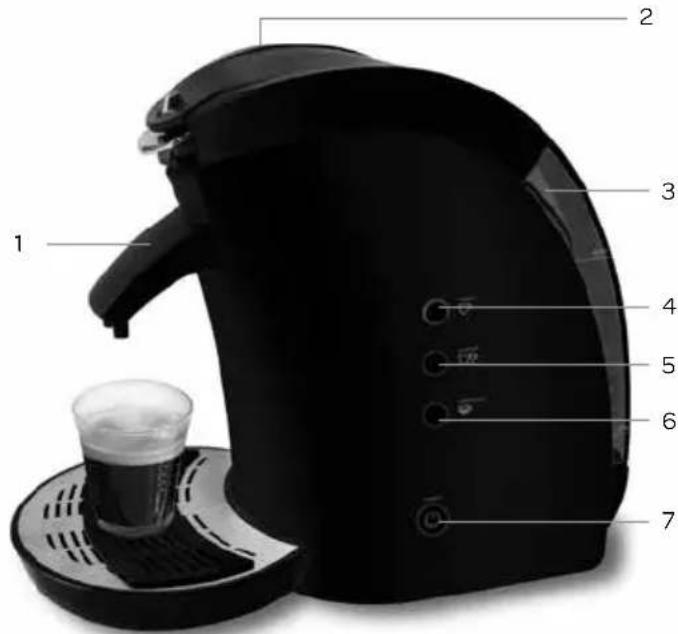
- Coffee-outlet
- Lid
- Water reservoir
- Button for 1 cup of coffee -
- Button for 2 cups of coffee -
- Button for MANUAL -
- On/off button
- Safety pin
- Lever for lid
- Padholder
- Anti-slip mat
- Grid
- Driptray
- Coffeepadholder 1 pad
- Coffeepadholder 2 pads

text_image
Labeled diagram of a black coffee maker with numbered parts for identification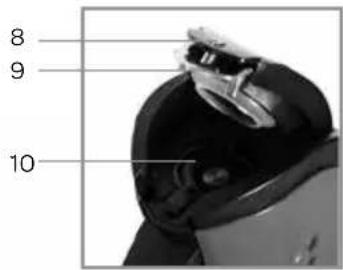
text_image
8 9 10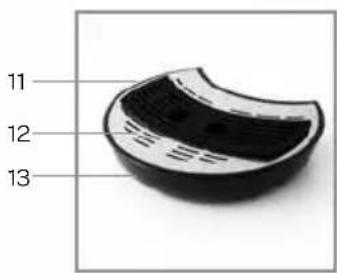
text_image
11 12 13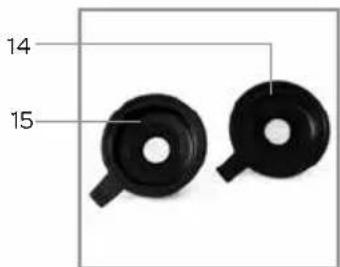
text_image
14 153 before the first use
Before you use the appliance for the first time, please do as follows: Carefully unpack the appliance and the accessories and remove all the packaging material. Keep the material (plastic bags and cardboard) out of reach of children. Check the appliance after unpacking for any visible damage, possible from transportation. Place the appliance on a stable and heat resistant surface.
Clean both coffeepadholders, the driptray, the grid, the anti-slip mat and the coffee-outlet mixer with warm soapy water. Dry the parts thoroughly. Make sure that the parts are completely dry.
Wipe the exterior with a soft damp cloth and dry thoroughly. The appliance is only suitable for preparing warm drinks with soft pads. Never fill the water reservoir with other fluids than water. Rinse the coffeepadmachine for the first use 2-3 times with clean water.
Slide the drip tray onto the bottom of the coffeepadmachine. When not in place, slide the coffee-outlet in the opening on the front of the coffeepadmachine. Carefully pull the reservoir by the handle from the coffeepadmachine. Fill the reservoir to the maximum indication. Replace the water reservoir. Check that the voltage in your home corresponds with the voltage printed on the bottom of the appliance and plug the appliance in.
4 preparing coffee
Press the ON/OFF button. The control light will blink, indicating the water is heating. As soon as the control light is constantly lit, the coffeepadmachine is ready for preparing coffee.
Press on the lid with your thumb and open the lever for the lid with your finger. The lid is now unlocked and opens. Place the correct coffeepadholder for 1 or 2 coffeepads, depending of the number of cups you want to prepare. Place the right amount of coffeepads in the padholder - one coffeepad for the coffeepadholder for 1 coffeepad or two coffeepads in the coffeepadholder for 2 coffeepads.
Close the lid by pressing it down firmly. You should hear a 'click' and the safety pin should lower. If you don't hear the click, check whether the coffeepadholder is placed correctly.
Place one or two coffeecups on the grid under the coffee-outlet. Press the button corresponding the number of cups you want to make, 1 or 2 CUPS or press the button for MANUAL.
When using the button MANUAL you must stop the water flow yourself by pressing the button MANUAL again when your cup is filled with the desired amount of coffee. If you don't, the cup will overflow.
You can turn the coffeepadmachine off yourself by pressing the ON/OFF button. If you don't, the coffeepadmachine will turn itself off after 10 minutes to save energy.
5 cleaning & maintenance
We advise to clean the coffeepadmachine on a regular bases. Regular cleaning will prolong the life of your appliance and will guarantee optimal brewing results.
Before cleaning always unplug the appliance and let it cool down completely.
CLEANING
Clean the outside of the coffeepadmachine with a soft damp cloth. Clean the separate parts such as both coffeepadholders, the coffee-outlet, the driptray and the grid with warm soapy water. Dry the parts thoroughly.
Never use any aggressive or abrasives cleaning agents or sharp objects that could damage the appliance! Never immerse the appliance, the power cord or plug in water or other liquids.
If you haven't used the coffeepadmachine for a while, for instance if you have been away on a holiday, you should remove all the separate parts for cleaning and rinse the coffeepadmachine with fresh water. Place the cleaned parts in the machine. This prevents an additional taste.
DESCALING
We advise to descale your coffeepadmachine on a regular bases. The period depends on the condition of your water and the frequency of use. We advise to descale the coffeepadmachine approx. every three months. You can use a special descaling product for coffeepadmachines.
When you use a descaling product especially for coffeepadmachines, you will have to follow the instructions on the package of the descaling product accordingly.
- Switch the coffeepadmachine off by pressing the ON/OFF button.
- Fill the water reservoir according the instructions on the package of the descaling product.
- Place a large mug or bowl under the coffee-outlet to collect the descaling mixture.
- Open the lid and place a new or used coffeepad. The coffeepadmachine will be better descaled when you do this and it cannot be clogged with descalingbits.
- Close the lid and switch the coffeepadmachine on with the ON/OFF button.
- Press the button for 1 or 2 CUPS. Repeat this until the water reservoir with the descaling mixture is empty.
- Rinse out the water reservoir and rinse the coffeepadmachine by filling the water reservoir with clean water and keep pressing the button for 1 or 2 CUPS until there is no residue left of the descaling mixture to avoid a bad taste to the coffee.
Never descale the coffeepadmachine with vinegar or a descaler made with mineral acids such as sulfuric acid, hydrochloric acid or acetic acid. These products can damage the internal parts of your coffeepadmachine and cause leakage.
Not descaling regularly of the coffeepadmachine can cause damage to your appliance and create excessing steam caused by limescale.
6 tips & faqs
- Never fill the water reservoir above the maximum indication.
- Never use holders for grounded coffee. The appliance will get blocked.
- Do not remove the water reservoir while the appliance is preparing coffee.
- Never open the lid when the appliance is preparing coffee. Wait until the control light stops blinking.
- Remove after use the used coffeepads in order to prevent the coffeepadholder to get clogged.
- When the coffeepadmachine does not make coffee.
Check whether the water reservoir is place properly. - When the coffeepadmachine does not make coffee.
Switch the appliance off and wait 5 minutes before opening the lid. Otherwise you could get burned by the hot steam. Check whether the coffeepadholder is clogged. If so, clean under the warm tap.
- This product is guaranteed for a period of 2 years from the date of purchase against mechanical and electrical defect.
-
Guarantee can only be given if proof of purchase (e.g. till receipt) can be shown. Therefore keep it in a safe place. The guarantee period starts at date of purchase.
• Guarantee is not valid in case of: -
normal wear;
- damage through misuse use or when the instructions were not followed correctly;
- lack of maintenance;
- not following the operation- and safety instructions;
- incompetent montage or repairs made by yourself or others;
- using accessories and spare parts which are not suitable for the appliance;
for assessment by our technical department.
• The guarantee is not valid for:
- normal wear;
- external cables;
- (interchangeable) signal- and controllamps
for assessment by our technical department.
after sales service
Return to your supplier of send the appliance, including a copy proof of purchase and description of the complaint, stamped to:
When the guarantee is no longer valid or when the period of guarantee has passed, we will charge any costs that flow out of an assessment and/or repairing.
On request we will supply a statement before repairing. Without requesting a statement, we assume that you, by sending the appliance, automatically order to repair the appliance.
A guarantee period of two months is valid for repairs done by our technical department and the used spare parts, counting from the repairdate. When a malfunction occurs within this period which directly flows out of the repairs and the used spare parts, the consumer has the right of repairs without any costs.
Garantie
twitter.com/inventum1908
facebook.com/inventum1908
youtube.com/inventum1908