ManualGo.com
Popster M7012 - Aspirateur DIRT DEVIL - Free user manual and instructions
Find the device manual for free Popster M7012 DIRT DEVIL in PDF.


Download the instructions for your Aspirateur in PDF format for free! Find your manual Popster M7012 - DIRT DEVIL and take your electronic device back in hand. On this page are published all the documents necessary for the use of your device. Popster M7012 by DIRT DEVIL.
USER MANUAL Popster M7012 DIRT DEVIL
Cylinder vacuum cleaner
1 Overview and safety 1 Overview and safety 1.1 Re: Operating Manual Read this operating manual completely before working with the appliance. Keep the operating manual forreference. Include the operating manual if you pass the appliance on to someone else. Important notes for your safety are especially marked. Always observe these notices to avoid accidents anddamage to the appliance. Non-compliance with these instructions can lead to serious injuries or damage to the appliance.We take no responsibility for damages due to violations of these operating instructions. 1.2 Re: Children
This appliance is not intended to be used by persons (including children) with impaired physical, sensorial or mental abilities and/or insufficient experience or knowledge, unless they are supervised by a personresponsible for their safety or have been instructed in the proper use of the appliance by this person. Childrenshould be supervised in order to make sure that they don’t play with the appliance. Keep the appliance out ofreach of people of these groups. Packing material must not be used to play with. There is danger of suffocation. 1.3 Re: Appropriate Use
The cylinder vacuum cleaner is intended for home use only. It is not suitable for commercial use.
Only use the cylinder vacuum cleaner for cleaning dry, normally soiled floors, rugs and curtains. Any other use is considered inappropriate and is prohibited. It is especially forbidden: To vacuum-clean:- people and animals Parts of their body could be sucked in and injured.- clothing worn on people's bodies. They could be sucked in and cause injuries.- water and other fluids, especially damp carpet cleaning agents. Moisture inside the appliance can causea short circuit.- toner dust (for laser printers, copying machines, etc.). There is danger of fire or explosion.- hot ash, burning cigarettes or matches. This could cause a fire.- pointed objects, such as glass shards, nails, etc. They can damage the appliance.- rubble, plaster, cement, fine drilling-dust, makeup, etc. These might damage the appliance. To use the appliance near explosive or easily flammable substances. There is danger of fire or explosion. Outdoor use. There is danger of rain and dirt destroying the appliance. Sticking objects into the appliance's openings. There is a danger of injury. To modify or repair the appliance on your own. There is a danger of injury. 1.4 Re: Power supply
The appliance runs on electricity -- that means there is a general risk of electric shock. So please especially observe the following:- Never touch the plug with wet hands.- Always pull directly at the plug if you want to disconnect the appliance from the mains. Never pull thepower cord, it might break.- Take care that the power cord is not bent, pinched, rolled over or gets in contact with heat sources.- Only use extension cords of sufficient capacity for the power requirement of the appliance. - Never immerse the appliance in water or other liquids. Keep it away from rain and moisture. - Only operate the appliance if your mains voltage is the same as that indicated on the appliance's typeplate. Wrong voltage can destroy the appliance. 1.5 If the appliance is defective
Never use a defective appliance or operate an appliance with a defective power cord. If the power cord of this appliance is damaged it must be replaced by the manufacturers, their authorised service representative ora similarly qualified person to avoid danger. Refer a defective appliance to an authorised dealer or the Royal Appliance service for repair. Address:Zpage 40, „International Service“. WARNING: Warning concerning health hazards describing possible risks of injury. ATTENTION: Warning concerning possible dangers to the appliance or other objects. NOTE: Highlights tips and information for you. Thank you! Thank you for purchasing POPSTERand for your confidence in us. Overview
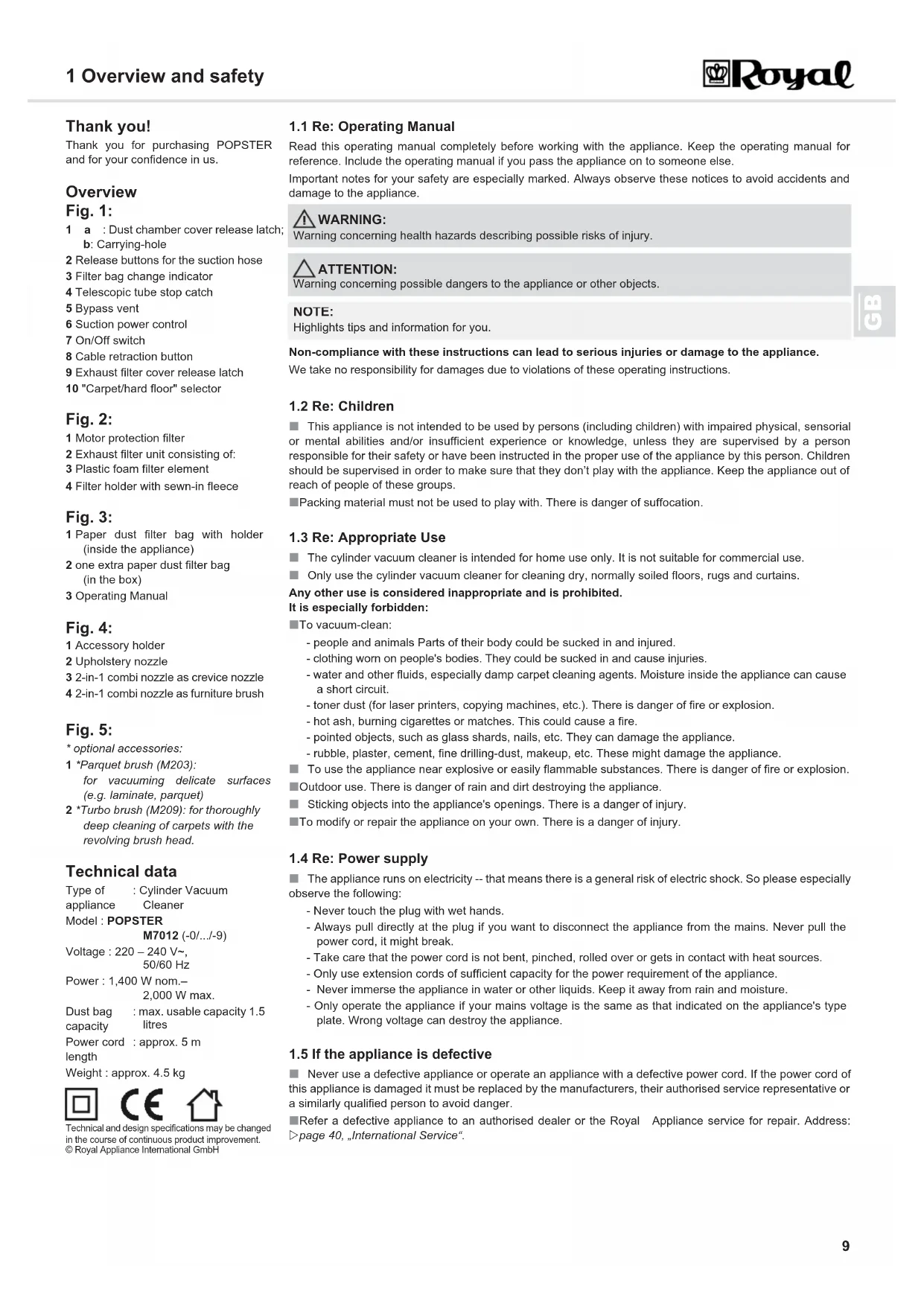
Fig. 1: 1a: Dust chamber cover release latch;b: Carrying-hole2 Release buttons for the suction hose3 Filter bag change indicator4 Telescopic tube stop catch5 Bypass vent6 Suction power control7 On/Off switch8 Cable retraction button9 Exhaust filter cover release latch10 "Carpet/hard floor" selector Fig. 2: 1 Motor protection filter2 Exhaust filter unit consisting of:3 Plastic foam filter element4 Filter holder with sewn-in fleece Fig. 3: 1 Paper dust filter bag with holder(inside the appliance)2 one extra paper dust filter bag(in the box)3 Operating Manual Fig. 4: 1 Accessory holder2 Upholstery nozzle3 2-in-1 combi nozzle as crevice nozzle4 2-in-1 combi nozzle as furniture brush Fig. 5: * optional accessories:1 *Parquet brush (M203):for vacuuming delicate surfaces(e.g. laminate, parquet)2 *Turbo brush (M209): for thoroughly deep cleaning of carpets with the revolving brush head. Technical data Technical and design specifications may be changedin the course of continuous product improvement. © Royal Appliance International GmbHType of appliance: Cylinder Vacuum CleanerModel : POPSTER M7012 (-0/.../-9)Voltage : 220 – 240 V~, 50/60 HzPower : 1,400 W nom.– 2,000 W max.Dust bag capacity : max. usable capacity 1.5 litresPower cord length: approx. 5 mWeight : approx. 4.5 kg POPSTER.book Seite 9 Freitag, 6. Mai 2011 1:32 1310
2 Operation 2Operation 2.1 Unpacking and
assembling 1. Unpack the appliance with all its accessories. 2. Check that the contents are complete and intact (Fig. 1–5). 3. Insert the end of the suction hose into the intake opening as shown until you hear and feel it lock into place (Fig. 6). 4. Insert the handle into the upper end of the telescopic tube (Fig. 7/A).
5. Push the desired nozzle onto the lower end of the telescopic tube (Fig. 7/B).
6. Adjust the length of the telescopic tube. Press down the release latch on the telescopic tube (Fig. 7/C) to do this. Then extend the telescopic tube to the desired length. Let go of the release latch while pulling untilit locks in place. You will hear a distinct click. 7. Attach accessories you don't need at the moment to the accessory holder (Fig. 7/C1).as shown. Your cylinder vacuum cleaner is now ready for use. 2.2 Vacuum cleaning 1. Attach the desired nozzle, (Fig. 8). 2. If using the floor nozzle, set the "carpet/hard floor" selector to suit the type of flooring:
- Carpet (Fig. 9/A): for short- and deep-pile carpets, runners, etc.
- Hard floor (Fig. 9/B): for laminate, tiles, PVC, etc.
3. Pull out the power cord by the plug up to the yellow mark (Fig. 10/3). 4. Insert the mains plug into a socket with ground/safety contact. 5. Switch on the cylinder vacuum cleaner with the on/off switch (Fig. 11/2).
6. Set the suction power control (Fig. 11/1) to suit the surface to be cleaned. 7. When working with the cylinder vacuum cleaner, pull if after you like a sleigh.
Immediately contact your dealer if you have found damage resulting from transport.
Always transport or ship the appliance in its original packaging to avoid damage. Keep the packaging forsuch an event.Dispose of no longer needed packaging material properly.
Danger of injury! Only assemble the appliance if it is not connected to the power supply. Otherwise themachine might start up and parts of your body, hair or pieces of clothing might be sucked in.
Danger of injury! A damaged appliance must never be used. Check the cylinder vacuum cleaner and thepower cord before each use.
Danger of injury! Especially when vacuum-cleaning stairs make sure that you are always on a higher levelthan the appliance.
Only use the cylinder vacuum cleaner with all filters intact, dry and correctly fitted. Make sure that noopenings are clogged. Otherwise the vacuum cleaner might be damaged.
Your cylinder vacuum cleaner is equipped with a safety switch to prevent overheating. It automatically cutsoff the power supply if the motor is overheated. In this case switch off the appliance and disconnect it fromthe mains. Remove the cause of the overheating. Wait for about 45 minutes. After it has cooled off, you mayuse the cylinder vacuum cleaner again.
Please follow the flooring manufacturers' recommendations if you are not sure which nozzle is suitable foryour flooring.
Danger of electric shock! If the red mark (Fig. 10/2) shows, retract the cord by pressing the retract button(Fig. 10/1) to pull in the cable up to the yellow mark (Fig. 10/3) again. Otherwise, the power cord may bedamaged.
With the bypass vent (Fig. 1/5) you can quickly reduce the suction power if less power is needed, e.g. torelease objects accidentally sucked in.
1. Switch off the cylinder vacuum cleaner with the on/off switch (Fig. 12/1) and pull the plug from the mains socket.2. Keep the plug in your hand. 3. Push the cord retracting button (Fig. 12/2) to retract the power cord.
2.4 Transportation and
To transport the appliance you can carry it by the carrying-hole (Fig. 13/B1).
When interrupting your work you can hang the parking-hook onto the parking bracket (Fig. 13/A).
For storing the appliance you can hook the storage hook onto the storage bracket (Fig. 13/B).
It is recommended to first retract the telescopic tube Zchapter 2.1, „Unpacking and assembling“, step 4.
Before storing it for a prolonged time remove the dust filter bag and disposeZchapter 2.5, „Changing the
dust filter bag“ of it properly. Always store the appliance in a cool, dry place and out of reach of children.
2.5 Changing the dust filter
Change the dust filter bag when the filter bag changing indicator (Fig. 14/1) shows "red," before prolonged storage or for re-shipment of the appliance. Change the dust filter bag at least every three months for hygienic reasons. 1. Switch off the appliance and pull the plug from the mains socket, Zchapter 2.3, „Switching off“.
2. Open the dust compartment cover by pushing the release latch (Fig. 14/2) and then lifting the cover.
3. Lift the dust compartment cover until it locks in the highest position and remains open by itself.
4. Pull the dust bag holder together with the dust filter bag up and out of the appliance (Fig. 15) as shown.
5. Pull the full dust filter bag up and out of the dust filter bag holder (Fig. 16).
6. Push the new dust filter bag into the filter bag holder as shown until it flushes exactly with the edge of the filter bag holder behind the two tabs, (Fig. 16, arrows).7. Remove any dust that may have collected in the dust compartment. 8. Also check the dual motor protection filter on this occasion. Change it if necessary, Zchapter 3.3, „Cleaning the motor protection filter“.9. Put the dust bag holder with the new dust filter bag back into the appliance:- Do this by inserting the dust bag holder into the respective guide-rails (Fig. 17/arrows).- Then push the dust bag holder down until it lies securely on its guide.10. Close the dust compartment cover. It snaps shut.
Danger of injury! During uncontrolled retraction the power cord can whip around, become an obstacle oroverthrow objects. Therefore keep the plug in your hand and guide it during retraction of the power cord.
Never store the appliance next to heat sources (e.g. stoves or radiators). Avoid exposing it to direct sunlight. Heat can damage the appliance.
Switch off the appliance before removing the dust filter bag. This will prevent dust from damaging theappliance.
If the dust compartment cover will not stay open by itself, we recommend to take off the suction hose. To dothis, push both release buttons (Fig. 14/3) and pull the suction hose out of the intake opening.
Be careful when removing the dust filter bag so that no dust escapes.
You can dispose of the dust filter bag with your regular domestic trash as long as it contains no wastematerials prohibited in domestic trash.
The dust chamber cover can only be closed if the dust filter bag is correctly fitted.
3 Maintenance 3 Maintenanc e 3.1 Overview of the filters
The filters can get dirty during use and therefore must be checked regularly:
The following filters are installed:
Motor protection filter (Fig. 18/1)
It prevents larger particles from damaging the motor in case the dust filter bag is defective.
- Changing: after each 5th change of the dust filter bag, at the latest every 6 months (Zchapter 3.3,
„Cleaning the motor protection filter“).
Exhaust filter unit (Fig. 18/2) consisting of:
- Foam plastic filter element (Fig. 18/3) and
- Filter holder with sewn-in fleece (Fig. 18/4)
The exhaust filter unit filters finest dust particles from the exhaust air stream.
- Changing: every 6 months (Zchapter 3.2, „Cleaning the exhaust filter unit“).
3.2 Cleaning the exhaust filter unit
1. Switch off the vacuum cleaner and pull the plug from the mains socket, Zchapter 2.3, „Switching off“.
2. Push down the release latch of the exhaust filter cover and fold down the exhaust filter cover (Fig. 19).
3. Remove the exhaust filter unit from its receptacle by the pulling the tab provided (Fig. 20).
4. Hold the exhaust filter unit low over a dustbin.
5. Remove the foam plastic filter element from the filter holder.
6. Thoroughly rinse both filter elements by hand with clear cold water.
7. If a filter element is damaged or deformed, replace it by a new one (Z chapter 3.4, „Accessories and Spare
8. Put the cleaned or new foam plastic filter element back into the filter holder.
9. Now put the filter holder with the freshly fitted filters back into its receptacle (Fig. 20). Make sure that the
tab for removing the filter holder shows towards the outside of the appliance.
10. Attach the exhaust filter cover at the bottom side first and then push in the upper side until you feel it locking
into place (Fig. 19).
3.3 Cleaning the motor protection filter
1. Switch off the appliance and remove the dust bag holder complete with the dust filter bag, Zchapter 2.5,
„Changing the dust filter bag“, steps 1–4.
2. Remove the motor protection filter by pulling it upwards out of its guiderails (Fig. 21).
3. Thoroughly rinse the motor protection filter by hand with clear cold water.
4. If the motor protection filter is damaged or deformed, replace it with a new one.(Zchapter 3.4, „Accessories
5. Push the motor protection filter back into its respective guiderails (Fig. 22/arrows).
6. Insert the dust bag holder with the dust filter bag and close the dust compartment cover. It snaps shut.
3.4 Accessories and Spare
Further information is available at http://www.dirtdevil.de
Y05 dust filter bags with MicroPor
filtration Swirl , MicroPor and "Y05" are registered trade marks of a company of the Melitta group and used with their permission.
The filter elements of the exhaust filter unit are washable, but not suitable for cleaning in washing machines
or dishwashers. Also, do not use cleansers for cleaning the filters. Then leave the filter elements to dry
(approx. 24 hours at room temperature). Only put them back into the appliance when they are completely dry.
The motor protection filter is washable, but not suitable for cleaning in washing machines or dishwashers.
Also, do not use cleansers for cleaning the filter. Then leave the motor protection filter to dry (approx. 24
hours at room temperature). Only put it back into place when it is completely dry.
Item number Description
7010022 Set of 5 dust filter bags and 1 motor protection filter
7011002 1 exhaust filter unit (incl. Foam plastic filter element (Fig. 18/3) and filter holder (Fig. 18/4))
M203 1 parquet brush
Insert bag in direction "C."
POPSTER.book Seite 12 Freitag, 6. Mai 2011 1:32 1313
4 Troubleshooting 4 Troubleshooting 4.1 Before you send in the appliance
Before contacting your authorised Royal dealer, Royal service partner or appliance market, first follow the procedure in the following table to check if you can handle the problem yourself 4.2 Disposal The filters used are made of environment-friendly materials and can de disposed of with your domestic trash.When the appliance has reached the end of its usefulness, especially if dysfunctions recur, disable the uselessappliance by pulling the mains plug out of the socket and cutting off the power cord. Dispose of the appliancein compliance with the environmental protection laws of your country. Electrical waste may not be disposed oftogether with domestic waste. Consult your local authorities or your dealer for advice on recycling. 4.3 Conditions of warranty We grant the legally required 24 months warranty from the date of purchase for the appliancedistributed by us. Within this period we will either repair or replace the appliance or accessory (damages to accessories do not automatically cause a replacement of the complete appliance) all defects due to manufacturing or materials atno cost. The warranty does not cover damage due to improper use (operating on the wrong power type/voltage,connecting to unsuitable power sources, breakage, etc.), normal wear and defects that only insignificantlyaffect the value or the serviceability of the appliance. Intrusions by unauthorised parties and the use of spareparts not supplied by Royal Appliance invalidate the warranty. Consumable parts are not included in thewarranty and must be paid for! The warranty is only valid if the date of purchase has been acknowledged bythe dealer's stamp and signature on the warranty card or if a copy of the invoice or sales slip is included withthe sent-in appliance. Warranty work does not extend the warranty period nor does it constitute a claim for anew warranty! 4.4 In case of a warranty
claim Send us the appliance without dust filter bag and a short description of the fault in printed letters. Head your accompanying letter with the notice "warranty claim". Send it to the address on the back page (Zpage 40,
„International Service“) of this operating manual, including the warranty card or a copy of the purchase slip.
Danger of injury! Never use a defective appliance! Always switch off the appliance and disconnect it from the mains before starting troubleshooting Zchapter 2.3, „Switching off“.Problem Possible cause SolutionThe appliance will not start. The power cord is not plugged in. Insert the plug into a mains socket and switch on the appliance Zchapter 2.2, „Vacuum cleaning“.The socket does not carry current. Test the cylinder vacuum cleaner at another socket which you are sure carries current.Power cord is damaged. Have the power cord replaced by Royal Appliance Customer Service, address, Zpage 40, „International Service“.The vacuum cleaner stops suddenly.The overheating protection has tripped (possibly due to blocked suction channels, filters, or similar).Switch the appliance off and pull the plug out of the socket. Eliminate the cause of overheating (e.g. blocked suction channels, filters, etc.). Wait for about 45 minutes. After the appliance has cooled off, you may switch it on again.Dust filter changing indicator shows "red". The dust container is full. Change the dust filter bag Zchapter 2.5, „Changing the dust filter bag“ Nozzle, telescopic tube or suction hose are clogged.Remove the obstacle. If necessary, use a long wooden stick (e.g. a broomstick) to do this. The filter is dirty. Clean the respective filter, Zchapter 3.2, „Cleaning the exhaust filter unit“ or Zchapter 3.3, „Cleaning the motor protection filter“.The results are unsatisfactory in spite of the appliance working correctly.Bypass vent (Fig. 1/5) is open. Close the bypass vent (Fig. 1/5). The dust container is full. Change the dust filter bag Zchapter 2.5, „Changing the dust filter bag“ Nozzle, telescopic tube or suction hose are clogged.Remove the obstacle. If necessary, use a long wooden stick (e.g. a broomstick) to do this. The filter is dirty. Clean the respective filter, Zchapter 3.2, „Cleaning the exhaust filter unit“ or Zchapter 3.3, „Cleaning the motor protection filter“.The appliance's noise is unusually loud. Sucked-in objects are obstructing the air stream. Remove the objects. If necessary, use a long wooden stick (e.g. a broomstick) to do this.