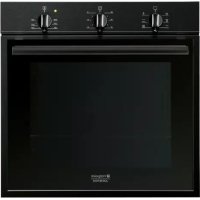
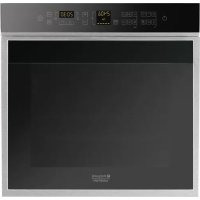
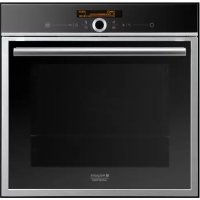
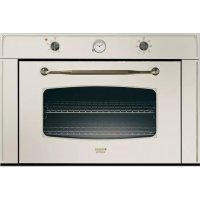
USER MANUAL FK 61 (AN)HA HOTPOINT-ARISTON
Electrical connection
Data plate
Description of the appliance, 18
Overall view
Control panel
Start-up and use, 19
Starting the oven
Using the minute minder
Concealed handle
Analogue programmer, 20-21
Setting the minute minder
Setting the time
Programming cooking
The electronic cooking programmer, 22
Setting the clock
Setting the minute minder
Programming cooking
Modes, 23-24
Cooking modes
Practical cooking advice
Cooking advice table
Precautions and tips, 25
General safety
Disposal
Respecting and conserving the environment
Care and maintenance, 26-27
Switching the appliance off
Cleaning the appliance
Cleaning the oven door
Replacing the light bulb
Sliding rack kit assembly
Assistance
GB
! Please keep this instruction booklet in a safe place for future reference. If the appliance is sold, given away or moved, please make sure the booklet is also passed on to the new owners so that they may benefit from the advice contained within it.
! Please read this instruction manual carefully: it contains important information concerning the safe operation, installation and maintenance of the appliance.
Positioning
! Do not let children play with the packaging material; it should be disposed of in accordance with local separated waste collection standards (see Precautions and tips).
! The appliance must be installed by a qualified professional in accordance with the instructions provided. Incorrect installation may damage property or cause harm to people or animals.
Built-in appliances
Use an appropriate cabinet to ensure that the appliance operates properly:
- The panels adjacent to the oven must be made of heat-resistant material.
- Cabinets with a veneer exterior must be assembled with glues which can withstand temperatures of up to 100°C.
- To install the oven under the counter (see diagram) or in a kitchen unit, the cabinet must have the following dimensions:
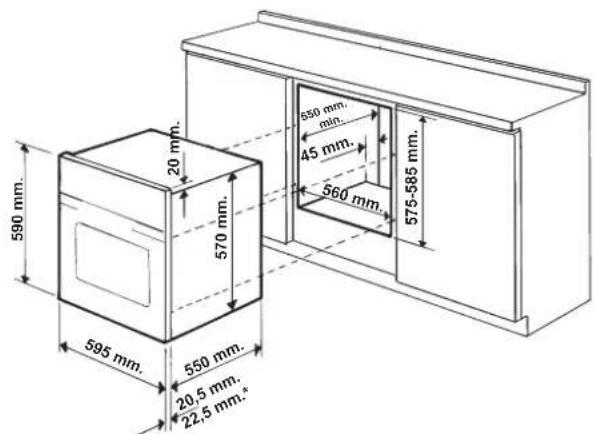
* Stainless steel models only
! The appliance must not come into contact with electrical parts once it has been installed. The indications for consumption given on the data plate have been calculated for this type of installation.
Ventilation
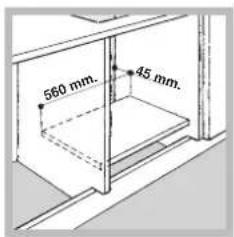
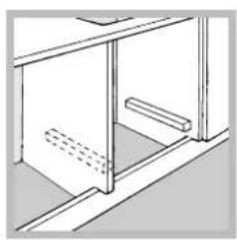
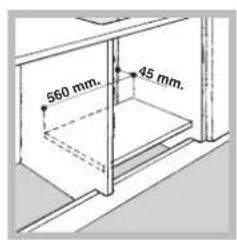
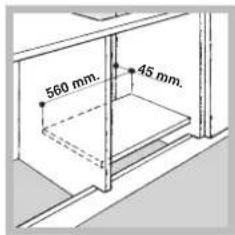
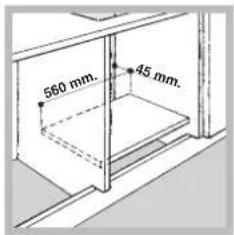
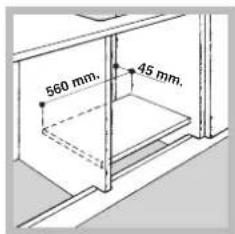
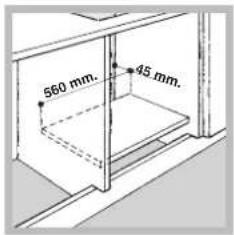
To ensure adequate ventilation is provided, the back panel of the cabinet must be removed. It is advisable to install the oven so that it rests on two strips of wood, or on a completely flat surface with an opening of at least 45 x 560 mm (see diagrams).
Centring and fixing
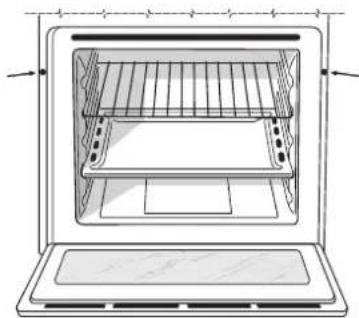
Secure the appliance to the cabinet:
- Open the oven door.
- Remove the 2 rubber plugs covering the fixing holes on the perimeter frame.
- Fix the oven to the cabinet using the 2 wood screws.
- Replace the rubber plugs.
! All parts which ensure the safe operation of the appliance must not be removable without the aid of a tool.
Electrical connection
! Ovens equipped with a three-pole power supply cable are designed to operate with alternating current at the voltage and frequency indicated on the data plate located on the appliance (see below).
Fitting the power supply cable
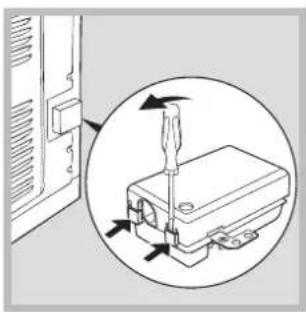
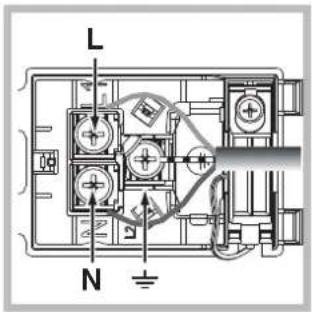
-
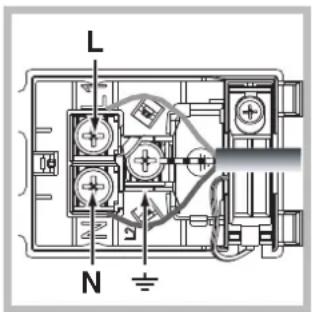
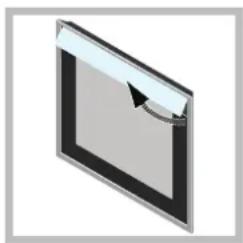
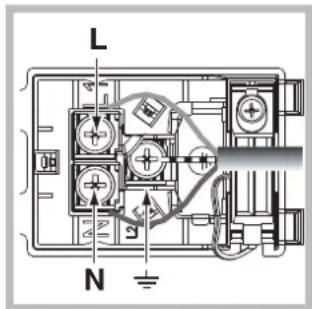
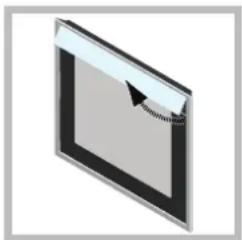
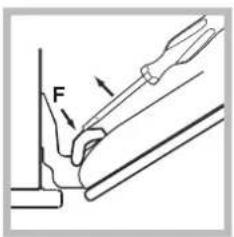
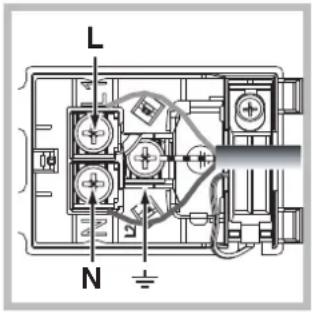
Open the terminal board by inserting a screwdriver into the side tabs of the cover. Use the screwdriver as a lever by pushing it down to open the cover (see diagram).
-
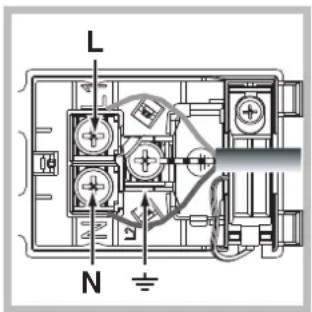
Install the power supply cable by loosening the cable clamp screw and the three wire contact screws L-N-
Connect the wires to the corresponding terminals: the Blue wire to the terminal marked (N), the Brown wire to the terminal marked (L) and the Yellow/Green wire to the terminal marked 1/2 (see diagram).
- Secure the cable by
fastening the clamp screw.
- Close the cover of the terminal board.
Connecting the electricity supply cable to the mains
Install a standardised plug corresponding to the load indicated on the data plate (see table).
The appliance must be directly connected to the mains using an omnipolar switch with a minimum contact opening of 3 mm installed between the appliance and the mains. The switch must be suitable for the charge indicated and must comply with current electrical regulations (the earthing wire must not be interrupted by the switch). The supply cable must be positioned so that it does not come into contact with temperatures higher than 50°C at any point.
! The installer must ensure that the correct electrical connection has been performed and that it is fully compliant with safety regulations.
Before connecting the appliance to the power supply, make sure that:
- the appliance is earthed and the plug is compliant with the law;
- the socket can withstand the maximum power of the appliance, which is indicated on the data plate (see below);
- the voltage is in the range between the values indicated on the data plate (see below);
- the socket is compatible with the plug of the appliance. If the socket is incompatible with the plug, ask an authorised technician to replace it. Do not use extension cords or multiple sockets.
! Once the appliance has been installed, the power supply cable and the electrical socket must be easily accessible.
! The cable must not be bent or compressed.
! The cable must be checked regularly and replaced by authorised technicians only (see Assistance).
! The manufacturer declines any liability should these safety measures not be observed.
| APPLIANCE SPECIFICATIONS |
| Dimensions | width 43.5 cmheight 32 cmdepth 41.5 cm |
| Volume | 58 l |
| Electrical connections | Voltage at 220-240 V~ 50/60 Hz or 50 Hz (see data plate)maximum power absorbed 2800 W |
| ENERGY LABEL | Directive 2002/40/EEC on the label of electric ovens.Standard EN 50304Energy consumption for Natural convection – heating mode: —Traditional mode —Declared energy consumption Forced convection class - heating mode:Baking. |
| This appliance conforms to the following EEC Directives:2006/95/EEC dated 12/12/06(Low Voltage) and subsequent amendments - 2004/108/EEC dated 15/12/04 (Electromagnetic Compatibility) and subsequent amendments - 93/68/EEC dated 22/07/93 and subsequent amendments. 2002/96/EEC and subsequent amendments. |
Description of the appliance
GB
Overall view
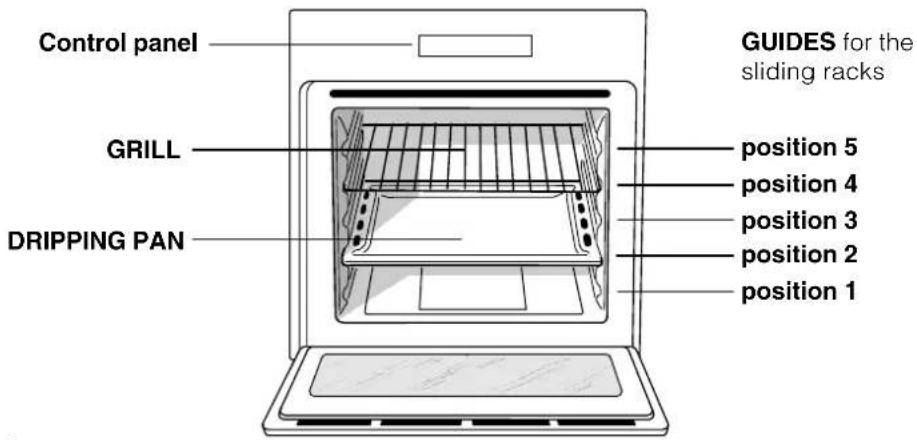
Control panel
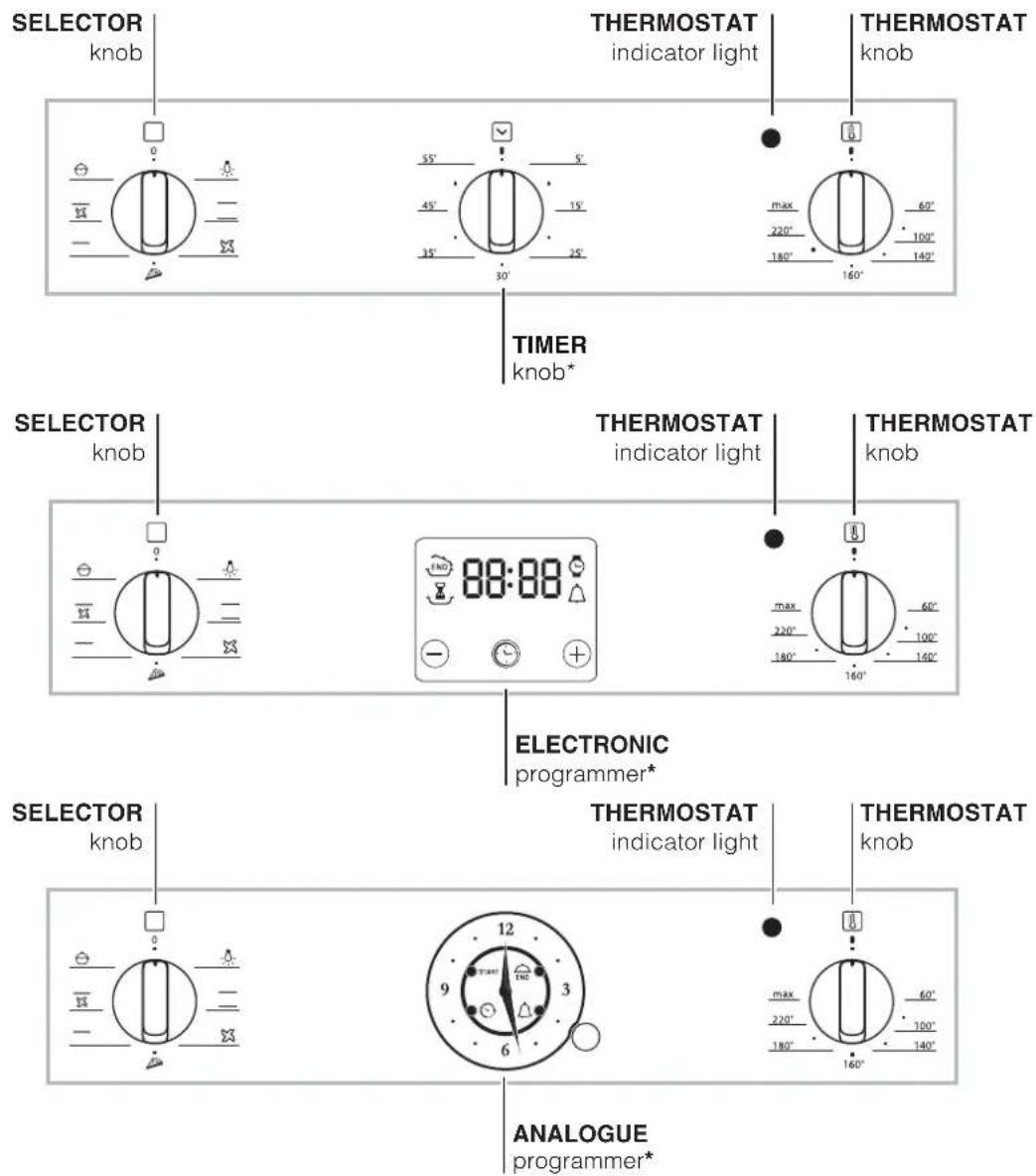
* Only available in certain models.
! The first time you use your appliance, heat the empty oven with its door closed at its maximum temperature for at least half an hour. Make sure that the room is well ventilated before switching the oven off and opening the oven door. The appliance may emit a slightly unpleasant odour caused by protective substances used during the manufacturing process burning away.
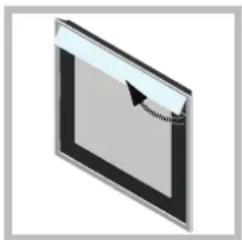
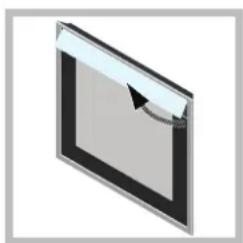
Some models are equipped with a system of hinges which allows the door to close slowly, without the user having to follow the movement through with his/her hand. To use the system correctly, before closing the door:
- Open the door fully.
- Do not force the closing movement manually.
Starting the oven
- Select the desired cooking mode by turning the SELECTOR knob.
- Select the desired temperature using the THERMOSTAT knob. A list detailing cooking modes and suggested cooking temperatures can be found in the Cooking advice table (see Cooking modes).
- The THERMOSTAT indicator light indicates that the oven is heating up to the temperature set.
-
During cooking it is always possible to:
-
change the cooking mode by turning the SELECTOR knob;
- adjust the temperature by turning the THERMOSTAT knob;
- stop cooking by turning the SELECTOR knob to the "0" position.
! Never put objects directly on the bottom of the oven; this will prevent the enamel coating from being damaged.
! Always place cookware on the rack(s) provided.
Cooling ventilation
In order to cool down the external temperature of the oven, a cooling fan blows a stream of air between the control panel and the oven door, as well as towards the bottom of the oven door.
! Once cooking has been completed, the cooling fan continues to operate until the oven has cooled down sufficiently.
Oven light
When selecting -with the SELECTOR knob the oven light goes on. It remains lit when a cooking mode is selected.
Using the minute minder*
- To set the buzzer, turn the TIMER knob clockwise almost one complete revolution.
- Turn the knob anticlockwise to set the desired time: align the notch on the TIMER knob with the time marked on the control panel.
- The timer operates in minutes: when the selected time has elapsed, a buzzer will sound.
! The timer does not switch the oven on or off.
Concealed handle
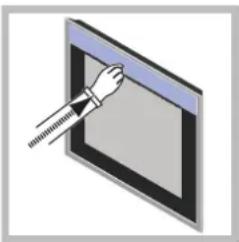
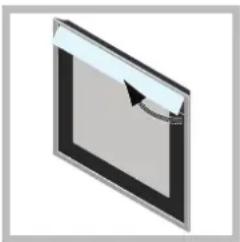
Some models have a concealed handle built into the oven door. Simply press lightly and the push/push opening will improve your grip when opening and closing the oven. When you have finished using it, close it again by applying light pressure.
* Only available in certain models.
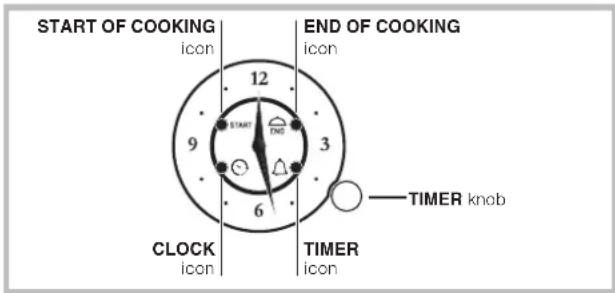
! All settings are only possible if the oven is connected to the electricity mains. If the power supply fails for longer than 10 seconds, the programmer stops: when power is restored, the CLOCK icon flashes to indicate that there has been a powercut and that the time needs to be adjusted again.
If the powercut occurs during a set cooking programme, the programmed time begins again from the point at which it was stopped (e.g. if a cooking duration of 1 hour is programmed and a powercut lasting 30 minutes takes place, the programme will finish after 1 hour and 30 minutes). In this case too, the CLOCK icon flashes and the time will need to be reset.
MANUAL COOKING
If no programming has been activated, the oven can be operated manually, using the SELECTOR and THERMOSTAT knobs.
Setting the minute minder
! This function does not interrupt cooking and does not affect the oven; it is simply used to activate the buzzer when the set amount of time has elapsed. The minute minder can only be used when no set programming is underway.
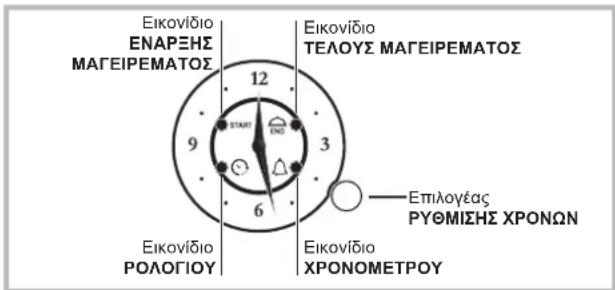
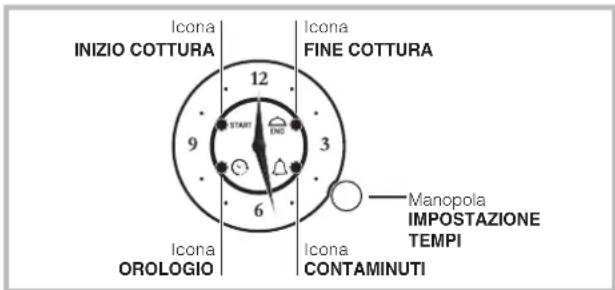
To activate the minute minder, briefly press the knob 3 times until the MINUTE MINDER icon begins to flash. The minute minder is set in exactly the same way as the cooking end time (see corresponding paragraph).
Setting the time
To adjust the time indicated by the pointers, briefly press the knob 4 times until the CLOCK icon begins to flash.
Then, to increase or decrease the displayed time value in steps of 1 minute, turn the knob clockwise or anticlockwise; the minutes pointer moves clockwise or anticlockwise accordingly, in steps of 1 minute.
Once 10 seconds have elapsed since the most recent adjustment, the programmer automatically exits adjustment mode.
* Only available in certain models.
Programming cooking
Programming the cooking end time makes it possible to begin cooking immediately and end automatically in accordance with the programmed time.
To programme the cooking end time, briefly press the knob twice until the END OF COOKING icon begins to flash.
To increase or decrease the cooking time in steps of 1 minute, turn the knob clockwise or anticlockwise; the minutes pointer moves clockwise or anticlockwise accordingly, in steps of 1 minute.
The END OF COOKING icon flashes continuously for 10 seconds after the most recent rotation. The programme can be confirmed by pressing the knob or letting the 10 seconds elapse, provided that a cooking time of at least 1 minute has been programmed.
The END OF COOKING icon lights up to confirm programming has taken place successfully.
Select the desired cooking mode using the SELECTOR knob.
The oven switches on immediately and switches off at the set end of cooking time.
To view the set programme, briefly press and release the knob; the pointers and icons will display the set programme.
At the end of cooking, the END OF COOKING icon flashes and the alarm sounds for 1 minute (to silence it, briefly press the knob).
Turn the SELECTOR knob to the "0" position.
- For example: it is 9:00 and the cooking end time is set to 10:15. The programme begins immediately and stops automatically at 10:15, with a duration of 1 hour 15 minutes.
Programming a cooking duration with delayed start
Programming the cooking start time makes it possible to end cooking automatically in accordance with the programmed time.
To programme the cooking start time, briefly press the knob once until the START OF COOKING icon begins to flash.
To increase or decrease the cooking start time in steps of 1 minute, turn the knob clockwise or anticlockwise; the minutes pointer moves clockwise or anticlockwise accordingly, in steps of 1 minute.
The START OF COOKING icon flashes continuously for 10 seconds after the most recent rotation. If the knob is not turned or pressed within this period, the pointers automatically revert to displaying the time and the programme is cancelled. After setting the cooking start time (START OF COOKING icon lit steadily), pressing the knob again will begin the cooking end time setting process (the END OF COOKING icon begins to flash),
as long as at least one minute has been programmed; otherwise the programming will be lost.
To programme the cooking end time, follow the above instructions.
Select the desired cooking mode using the SELECTOR knob. The oven will switch on at the set start time and will switch off at the selected cooking end time.
- For example: it is 9:00, the cooking start time is set to 11:00 and the cooking end time is set to 12:15. The programme begins automatically at 11:00 and stops at 12:15, with a duration of 1 hour 15 minutes.
! To cancel a programme, press and hold the knob for 3 seconds: programming will be cancelled and the programmer will revert to manual cooking mode.
Setting the clock
! The clock may be set when the oven is switched off or when it is switched on, provided that a the end time of a cooking cycle has not been programmed previously. After the appliance has been connected to the mains,
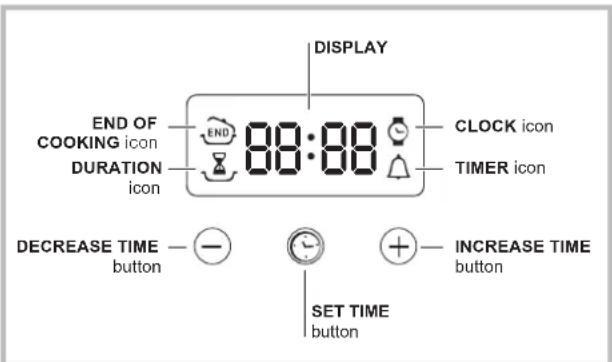
or after a blackout, the 📋 icon and the four numerical digits on the DISPLAY will begin to flash.
- Press the ⏻ button several times until the 📖 icon and the four digits on the display begin to flash.
- Use the "+" and "-" buttons to adjust the time; if you press and hold either button, the display will scroll through the values more quickly, making it quicker and easier to set the desired value.
- Wait for 10 seconds or press the ⏻ button again to finalise the setting.
Setting the timer
! This function does not interrupt cooking and does not affect the oven; it is simply used to activate the buzzer when the set amount of time has elapsed.
- Press the ⏻ button several times until the 🔊 icon and the three digits on the display begin to flash.
- Use the "+" and "-" buttons to set the desired time; if you press and hold either button, the display will scroll through the values more quickly, making it quicker and easier to set the value.
- Wait for 10 seconds or press the ⏻ button again to finalise the setting.
The display will then show the time as it counts down. When this period of time has elapsed the buzzer will be activated.
Programming cooking
! A cooking mode must be selected before programming can take place.
Programming the cooking duration
- Press the ⏻ button several times until the 📁con and the three digits on the DISPLAY begin to flash.
-
Use the "+" and "-" buttons to set the desired duration; if you press and hold either button, the display will scroll through the values more quickly, making it quicker and easier to set the value.
-
Wait for 10 seconds or press the ⏻ button again to finalise the setting.
- When the set time has elapsed, the text END appears on the DISPLAY, the oven will stop cooking and a buzzer sounds. Press any button to stop it.
- For example: it is 9:00 a.m. and a time of 1 hour and 15 minutes is programmed. The programme will stop automatically at 10:15 a.m.
Setting the end time for a cooking mode
! A cooking duration must be set before the cooking end time can be scheduled.
- Follow steps 1 to 3 to set the duration as detailed above.
- Next, press the ⏻ button until the 📋 on and the four digits on the DISPLAY begin to flash.
- use the "+" and "-" buttons to adjust the cooking end time; if you press and hold either button, the display will scroll through the values more quickly, making it quicker and easier to set the desired value.
- Wait for 10 seconds or press the ⏻ button again to finalise the setting.
- When the set time has elapsed, the text END appears on the DISPLAY, the oven will stop cooking and a buzzer sounds. Press any button to stop it.
Programming has been set when the ⏻ and ⏻️ buttons are illuminated. The DISPLAY shows the cooking end time and the cooking duration alternately.
- For example: It is 9:00 a.m. and a duration of 1 hour has been programmed. 12:30 is scheduled as the end time. The programme will start automatically at 11:30 a.m.
Cancelling a programme
To cancel a programme:
- press the ⏻ button until the icon corresponding to the setting you wish to cancel and the digits on the display are no longer flashing. Press the “-” button until the digits 00:00 appear on the display.
- Press and hold the "+" and "-" buttons; this will cancel all the settings selected previously, including timer settings.
* Only available in certain models.
Cooking modes
! A temperature value between 60° C and MAX can be set for all cooking modes except the following:
• GRILL (recommended: set only to MAX power level)
• GRATIN (recommended: do not exceed 200°C).

TRADITIONAL OVEN mode
Both the top and bottom heating elements will come on. When using this traditional cooking mode, it is best to use one cooking rack only. If more than one rack is used, the heat will be distributed unevenly.

MULTILEVEL mode
All the heating elements (top, bottom and circular) switch on and the fan begins to operate. Since the heat remains constant throughout the oven, the air cooks and browns food in a uniform manner. A maximum of two racks may be used at the same time.

PIZZA OVEN mode
The circular heating elements and the elements at the bottom of the oven are switched on and the fan is activated. This combination heats the oven rapidly by producing a considerable amount of heat, particularly from the element at the bottom. If you use more than one rack at a time, switch the position of the dishes halfway through the cooking process.

GRILL mode
The top heating element and the rotisserie (where present) come on.
The high and direct temperature of the grill is recommended for food which requires a high surface temperature. Always cook in this mode with the oven door closed.

GRATIN mode
The top heating element and the rotisserie (where present) are activated and the fan begins to operate. This combination of features increases the effectiveness of the unidirectional thermal radiation provided by the heating elements through forced circulation of the air throughout the oven. This helps prevent food from burning on the surface and allows the heat to penetrate right into the food. Always cook in this mode with the oven door closed.

BAKING mode
The rear heating element and the fan are switched on, thus guaranteeing the distribution of heat in a delicate and uniform manner throughout the entire oven. This mode is ideal for baking temperature sensitive foods (such as cakes, which need to rise) and for the
* Only available in certain models.
preparation of "bitesize pastries" on 3 shelves simultaneously.
Rotisserie*
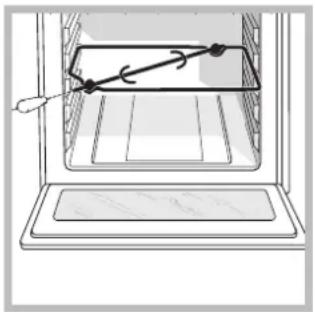
To activate the rotisserie function (see diagram) proceed as follows:
- Place the dripping pan in position 1.
- Place the rotisserie support in position 3 and insert the spit in the hole provided on the back panel of the oven.
- Start the rotisserie
using the knob to select MODES
Practical cooking advice
! Do not place racks in position 1 or 5 during fan-assisted cooking. Excessive direct heat can burn temperature sensitive foods.
! In the GRILL and GRATIN cooking modes, place the dripping pan in position 1 to collect cooking residues (sauce and/or grease).
MULTILEVEL
- Use positions 2 and 4, placing the food which requires more heat on the rack in position 2.
- Place the dripping pan on the bottom and the rack on top.
GRILL
- Place the rack in position 3 or 4. Make sure the food is in the centre of the rack.
- We recommend that the power level is set to maximum. The top heating element is regulated by a thermostat and may not always operate constantly.
PIZZA OVEN MODE
- Use a lightweight aluminium pizza pan. Place it on the rack provided.
For a crispy crust, do not use the dripping pan as this extends the total cooking duration and prevents the crust from forming.
- If the pizza has a lot of toppings, we recommend adding the mozzarella cheese to the top of the pizza halfway through the cooking process.
Cooking advice table
| Modes Foods | | Weight (in kg) | Rack position | Preheating time (minutes) | Recommended temperature | Cooking duration (minutes) |
| Traditional | Duck | 1 | 3 | 15 | 200 | 65-75 |
| Roast veal or beef | 1 | 3 | 15 | 200 | 70-75 |
| Roast pork | 1 | 3 | 15 | 200 | 70-80 |
| Biscuits (shortcrust pastry) | - | 3 | 15 | 180 | 15-20 |
| Tarts | 1 | 3 | 15 | 180 | 30-35 |
| Multilevel | Pizza (on 2 racks) | 1 | 2 and 4 | 15 | 230 | 15-20 |
| Lasagne | 1 | 3 | 10 | 180 | 30-35 |
| Lamb | 1 | 2 | 10 | 180 | 40-45 |
| Roast chicken + potatoes | 1+1 | 2 and 4 | 15 | 200 | 60-70 |
| Mackerel | 1 | 2 | 10 | 170-180 | 30-35 |
| Sponge cake made with yoghurt | 1 | 2 | 10 | 170 | 40-50 |
| Cream puffs (on 2 racks) | 0.5 | 2 and 4 | 10 | 190 | 20-25 |
| Biscuits (on 2 racks) | 0.5 | 2 and 4 | 10 | 180 | 10-15 |
| Sponge cake (on 1 rack) | 0.5 | 2 | 10 | 170 | 15-20 |
| Sponge cake (on 2 racks) | 1 | 2 and 4 | 10 | 170 | 20-25 |
| Savoury pies | 1.5 | 3 | 15 | 200 | 30-40 |
| Pizza | Pizza | 0.5 | 3 | 15 | 220 | 15-20 |
| Focaccia bread | 1 | 2 or 3 | 10 | 200 | 15-20 |
| Grill | Sole | 1 | 4 | 5 | MAX | 8-10 |
| Squid and prawn kebabs | 1 | 4 | 5 | MAX | 6-8 |
| Cod fillet | 1 | 4 | 5 | MAX | 10 |
| Grilled vegetables | 1 | 3 or 4 | 5 | MAX | 10-15 |
| Veal steak | 1 | 4 | 5 | MAX | 15-20 |
| Cutlets | 1 | 4 | 5 | MAX | 15-20 |
| Hamburgers | 1 | 4 | 5 | MAX | 7-10 |
| Mackerel | 1 | 4 | 5 | MAX | 15-20 |
| Toast | no. 4 | 4 | 5 | MAX | 2-3 |
| With rotisserie spit (where present) | | | | | |
| Spit-roast veal | 1.0 | - | - | 100% | 80-90 |
| Spit-roast chicken | 1.5 | - | - | 100% | 70-80 |
| Spit-roast lamb | 1.0 | - | - | 100% | 70-80 |
| Gratin | Grilled chicken | 1.5 | 2 | 5 | 200 | 55-60 |
| Cuttlefish | 1.5 | 2 | 5 | 200 | 30-35 |
| With rotisserie spit (where present) | | | | | |
| Spit-roast veal | 1.5 | - | 10 | 200 | 70-80 |
| Spit-roast lamb | 1.5 | - | 10 | 200 | 70-80 |
| Chicken (on the spit) + potatoes (on the dripping pan) | - | 2 | 10 | 200 | 70-75 |
| 200 | 70-75 |
| Baking | Tarts | 0.5 | 3 | 15 | 180 | 20-30 |
| Fruit cakes | 1 | 2 or 3 | 15 | 180 | 40-45 |
| Sponge cake made with yoghurt | 0.7 | 3 | 15 | 180 | 40-50 |
| Sponge cake | 0.5 | 3 | 15 | 160 | 25-35 |
| Stuffed pancakes (on 2 racks) | 1.2 | 2 and 4 | 15 | 200 | 30-35 |
| Small cakes (on 2 racks) | 0.6 | 2 and 4 | 15 | 180-190 | 20-25 |
| Cheese puffs (on 2 racks) | 0.4 | 2 and 4 | 15 | 200-210 | 15-20 |
| Cream puffs (on 3 racks) | 0.7 | 1, 3 and 5 | 15 | 180 | 20-25 |
| Biscuits (on 3 racks) | 0.7 | 1, 3 and 5 | 15 | 180 | 20-25 |
| Meringues (on 3 racks) | 0.5 | 1, 3 and 5 | 15 | 90 | 180 |
! The cooking times listed above are intended as guidelines only and may be modified according to personal tastes.
! This appliance has been designed and manufactured in compliance with international safety standards. The following warnings are provided for safety reasons and must be read carefully.
General safety
- The appliance was designed for domestic use inside the home and is not intended for commercial or industrial use.
- The appliance must not be installed outdoors, even in covered areas. It is extremely dangerous to leave the appliance exposed to rain and storms.
- When moving or positioning the appliance, always use the handles provided on the sides of the oven.
- Do not touch the appliance when barefoot or with wet or damp hands and feet.
- The appliance must be used by adults only for the preparation of food, in accordance with the instructions outlined in this booklet. Any other use of the appliance (e.g. for heating the room) constitutes improper use and is dangerous. The manufacturer may not be held liable for any damage resulting from improper, incorrect and unreasonable use of the appliance.
- Do not touch the heating elements or certain parts of the oven door when the appliance is in use; these parts become extremely hot. Keep children well away from it and do not touch the hot parts yourself.
- Make sure that the power supply cables of other electrical appliances do not come into contact with the hot parts of the oven.
- The ventilation and heat dispersal openings must never be obstructed.
- Always grip the oven door handle in the centre: the ends may be hot.
- Always use oven gloves when placing cookware in the oven or when removing it.
- Do not use aluminium foil to line the bottom of the oven.
- Do not place flammable materials in the oven: if the appliance is switched on accidentally, the materials could catch fire.
- Always make sure the knobs are in the “●”/“○” position when the appliance is not in use.
- When unplugging the appliance, always pull the plug from the mains socket; do not pull on the cable.
- Do not perform any cleaning or maintenance work without having disconnected the appliance from the electricity mains.
- If the event of malfunctions, under no circumstances should you attempt to perform the repairs yourself. Contact an authorised Service Centre (see
Assistance).
- Do not rest heavy objects on the open oven door.
- The appliance should not be operated by people (including children) with reduced physical, sensory or mental capacities, by inexperienced individuals or by anyone who is not familiar with the product. These individuals should, at the very least, be supervised by someone who assumes responsibility for their safety or receive preliminary instructions relating to the operation of the appliance.
- Do not let children play with the appliance.
Disposal
- When disposing of packaging material: observe local legislation so that the packaging may be reused.
- The European Directive 2002/96/EC relating to Waste Electrical and Electronic Equipment (WEEE) states that household appliances should not be disposed of using the normal solid urban waste cycle. Exhausted appliances should be collected separately in order to optimise the cost of re-using and recycling the materials inside the machine, while preventing potential damage to the atmosphere and to public health. The crossed-out dustbin is marked on all products to remind the owner of their obligations regarding separated waste collection.
For further information relating to the correct disposal of exhausted household appliances, owners may contact the relevant public service or their local dealer.
Respecting and conserving the environment
- You can help to reduce the peak load of the electricity supply network companies by using the oven in the hours between late afternoon and the early hours of the morning.
- Always keep the oven door closed when using the GRILL and GRATIN modes: this will achieve improved results while saving energy (approximately 10%).
- Check the door seals regularly and wipe them clean to ensure they are free of debris so that they adhere properly to the door, thus avoiding the dispersal of heat.
Care and maintenance
GB
Switching the appliance off
Disconnect your appliance from the electricity supply before carrying out any work on it.
Cleaning the appliance
- The stainless steel or enamel-coated external parts and the rubber seals may be cleaned using a sponge that has been soaked in lukewarm water and neutral soap. Use specialised products for the removal of stubborn stains. After cleaning, rinse and dry thoroughly. Do not use abrasive powders or corrosive substances.
- The inside of the oven should ideally be cleaned after each use, while it is still lukewarm. Use hot water and detergent, then rinse well and dry with a soft cloth. Do not use abrasive products.
- All accessories - with the exception of the sliding racks - can be washed like everyday crockery, and are even dishwasher safe.
! Never use steam cleaners or pressure cleaners on the appliance.
Cleaning the oven door
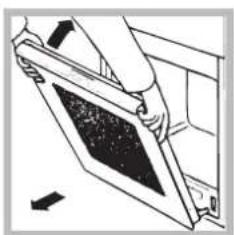
Clean the glass part of the oven door using a sponge and a non-abrasive cleaning product, then dry thoroughly with a soft cloth. Do not use rough abrasive material or sharp metal scrapers as these could scratch the surface and cause the glass to crack. For more thorough cleaning purposes, the oven door may be removed:
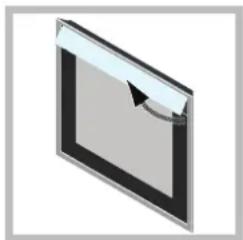
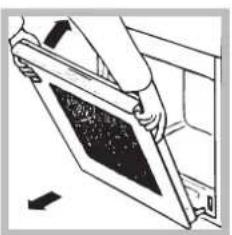
- Open the oven door fully (see diagram).
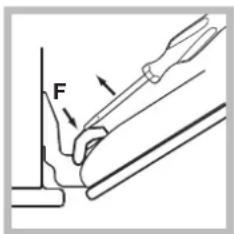
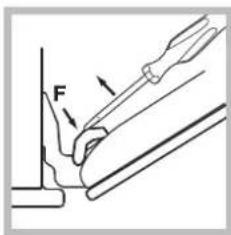
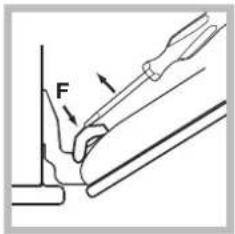
- Use a screwdriver to lift up and turn the small levers F located on the two hinges (see diagram).
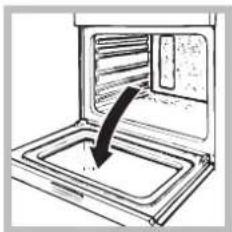
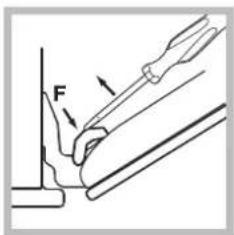
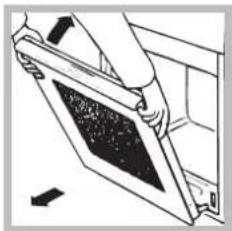
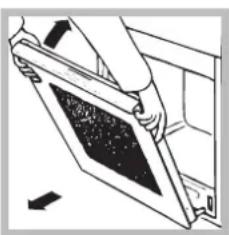
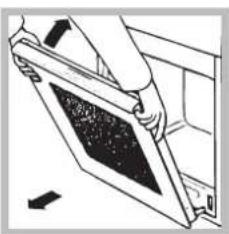
- Grip the door on the two outer sides and close it approximately half way. Pull the door towards you, lifting it out of its slot (see diagram). To replace the door, reverse this sequence.
Inspecting the seals
Check the door seals around the oven regularly. If the seals are damaged, please contact your nearest Service Centre (see Assistance). We recommend that the oven is not used until the seals have been replaced.
Replacing the light bulb
To replace the oven light bulb:
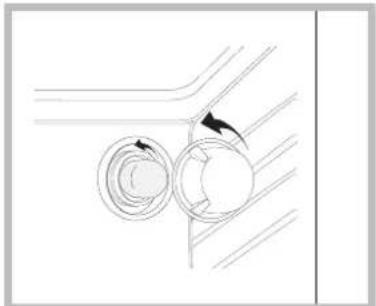
diagram).
- Remove the glass cover of the lamp-holder.
- Unscrew the light bulb and replace it with a similar one:
Wattage 25 W, cap E 14.
- Replace the glass cover (see
Sliding rack kit assembly
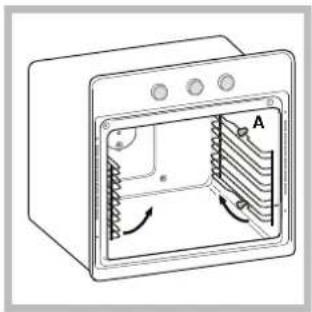
To assemble the sliding racks:
- Remove the two frames, lifting them away from the spacers A (see figure).
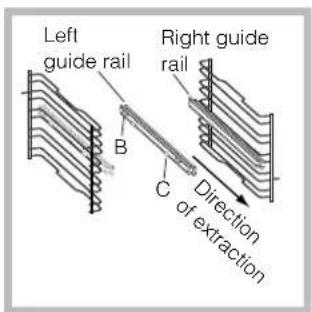
- Choose which shelf to use with the sliding rack. Paying attention to the direction in which the sliding rack is to be extracted, position joint B and then joint C on the frame.
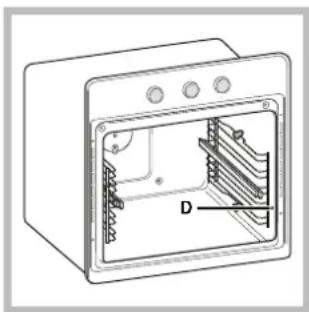
- Secure the two frames with the guide rails using the holes provided on the oven walls (see diagram). The holes for the left frame are situated at the top, while the holes for the right frame are at the bottom.
- Finally, fit the frames on the spacers A.
! Do not place the sliding racks in position 5.
Side and rear catalytic liners*
These are panels coated with a special enamel, which is able to absorb the fat released by food as it cooks. This enamel is quite strong, so that the various accessories (racks, dripping pans, etc.) can slide along them without damaging them. White marks may appear on the surfaces; these are not a cause for concern.
Nevertheless, the following should be avoided:
- scraping the enamel with sharp objects (a knife, for example);
- using detergents or abrasive materials.
Assistance
! Never use the services of an unauthorised technician.
- The type of problem encountered.
• The appliance model (Mod.).
• The serial number (S/N).
This information can be found on the data plate located on the appliance and/or on the packaging.

Italiano, 1

English,15

Français, 28

Espanol, 41 Portuges, 54

ortuges, 54

Ελληνικά, 67
FK 61 X /HA
FK 63J X /HA
FK 65 X /HA
FK 61 /HA
FK 63 /HA
FK 65 /HA
FKQ 61 /HA
FKQ 63S C/HA
FK 63S C X /HA
FK 63S C /HA
FK 63C X /HA
FKQ 63C /HA
FK 63C /HA
7OFK 637J X RU/HA
7OFK 637J RU/HA
7OFK 638J X RU/HA
7OFK 638J RU/HA
7OFK 637JC X RU/HA
7OFK 637JC RU/HA
UT 63SC X /HA
UT 63SC /HA
UTQ 63SC /HA
FK 619J X /HA
FK 619J /HA
FKQ 616J /HA
FK 63 X /HA
FK 736JC X /HA
FK 736JC /HA
FKQ 73C /HA
UT 63 C X/HA
UT 63 C/HA
FKS 610 X /HA
FKS 610 /HA
Sommaire
Installation, 29-30
Positionnement
Centrado y fijación
Colocar no centro e prender
Para montar as guias corrediças:
κουτιού ακροδεκτών.