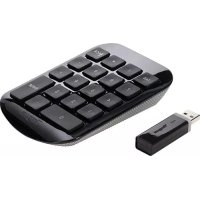
AKP11CA - Keyboard TARGUS - Free user manual and instructions
Find the device manual for free AKP11CA TARGUS in PDF.


| Product type | Wireless numeric keypad |
| Brand | Targus |
| Model | AKP11CA |
| Power supply | 1 AAA battery (included) |
| Connectivity | Wireless via USB receiver, frequency 27.96-27.28 MHz |
| Approximate range | 10 meters |
| System compatibility | Windows 2000/XP/Vista/7, Mac OS X 10.4 or later |
| Plug & Play | Yes |
| LED indicator | Communication and low battery |
| Number of keys | 17 (estimate) |
| Dimensions (L x W x H) | Approximately 85 x 140 x 15 mm |
| Weight | Approximately 100 g |
| Warranty | 1 year (limited) |
| Receiver storage | In the battery compartment |
| Care and cleaning | Turn off when not in use; clean with a soft dry cloth |
| Safety | Do not expose to water; do not open the device |
| Spare parts and repairability | Battery replaceable; other parts not repairable |
Frequently Asked Questions - AKP11CA TARGUS
User questions about AKP11CA TARGUS
0 question about this device. Answer the ones you know or ask your own.
Ask a new question about this device
Download the instructions for your Keyboard in PDF format for free! Find your manual AKP11CA - TARGUS and take your electronic device back in hand. On this page are published all the documents necessary for the use of your device. AKP11CA by TARGUS.
USER MANUAL AKP11CA TARGUS
Thank you for your purchase of the Targus Wireless Numeric Keypad. This keypad is designed with a storable USB receiver, providing ease of use when travelling.
Contents
- Targus Wireless Numeric Keypad
- 1 x AAA Battery
- 1 x USB Receiver
- User Guide
System Requirements
Hardware
- USB port
Operating System
Microsoft Windows® 2000
- Microsoft Windows® XP
- Microsoft Windows Vista®
Microsoft Windows7
Mac OS X 10.4 or later
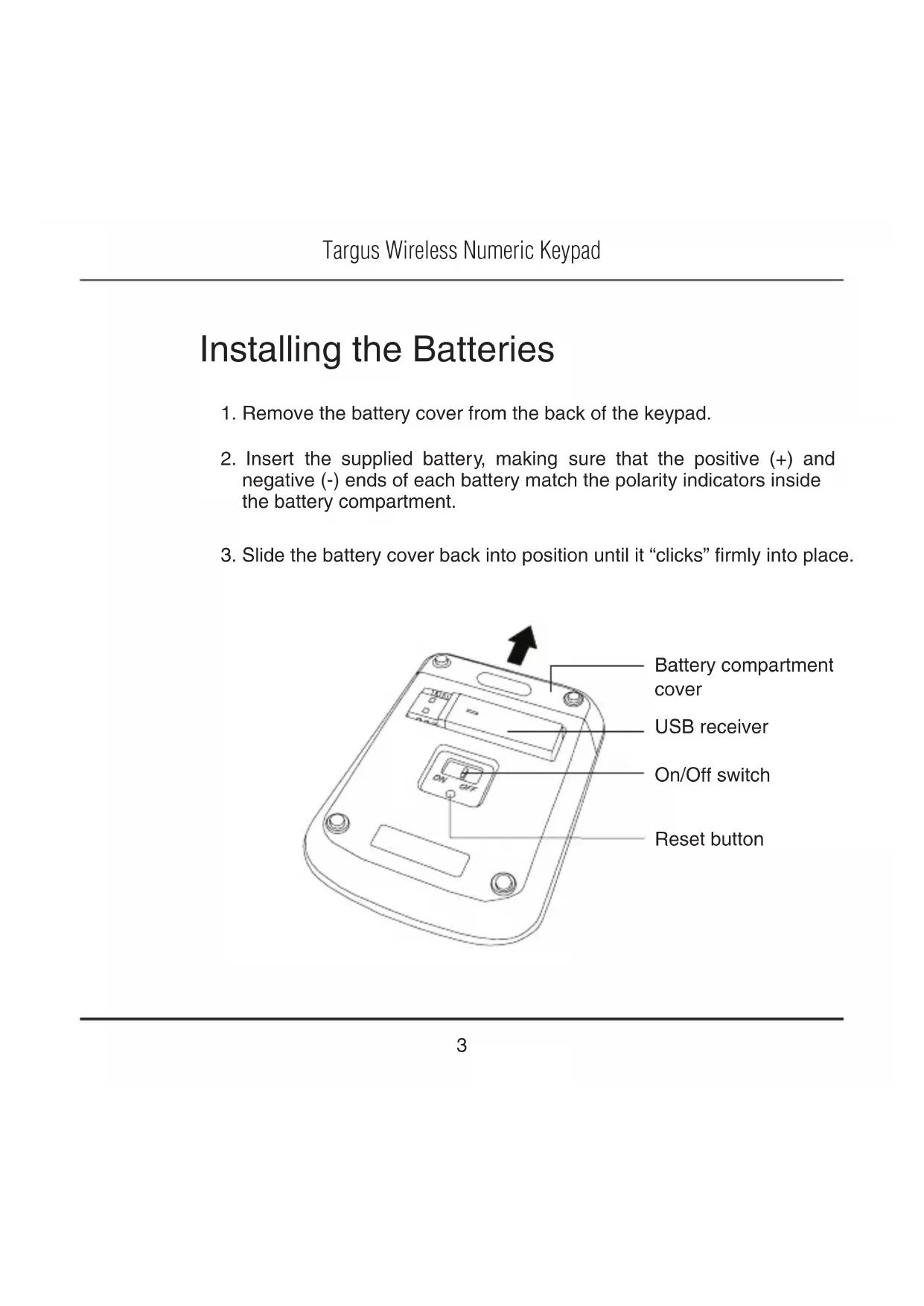
Installing the Batteries
- Remove the battery cover from the back of the keypad.
- Insert the supplied battery, making sure that the positive (+) and negative (-) ends of each battery match the polarity indicators inside the battery compartment.
- Slide the battery cover back into position until it "clicks" firmly into place.
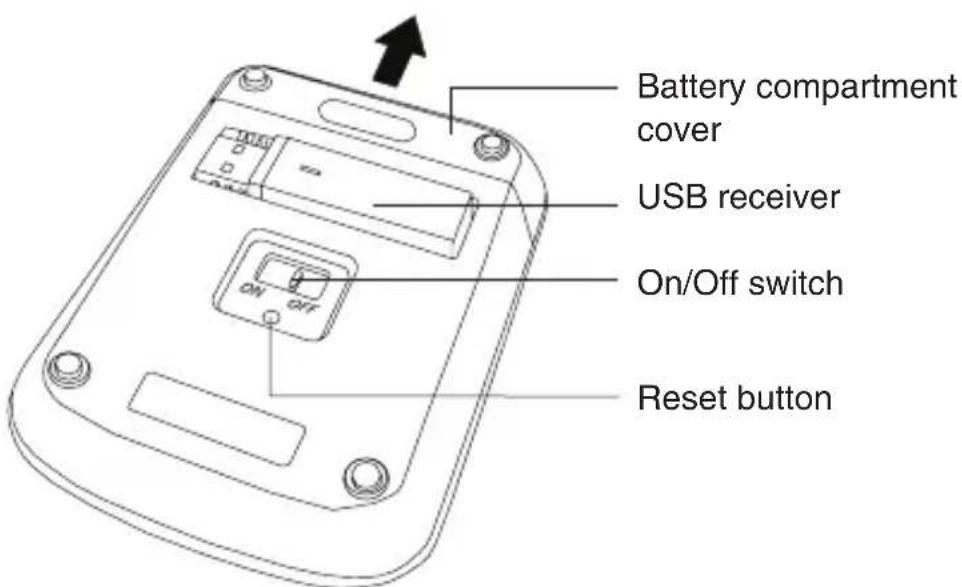
Connecting to Your Computer
- Remove the USB receiver from the back of the keypad.
- Plug the USB receiver into an available USB port on your computer.
- Power on the keypad by using the On/Off switch located on the back of the keypad.
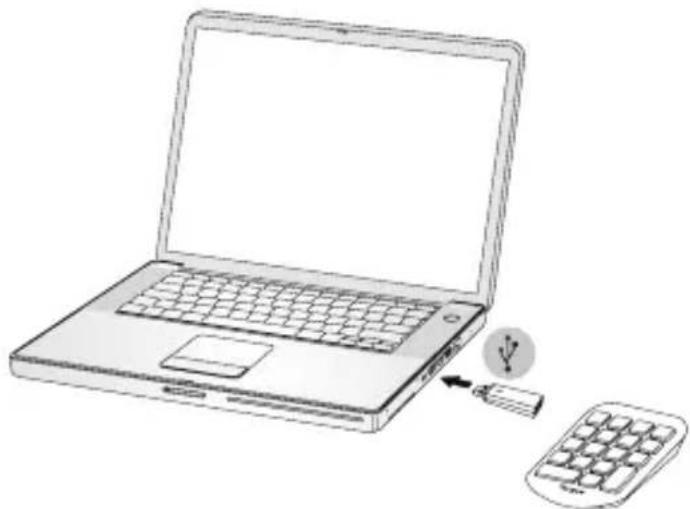
This keyboard is a plug and play device. It should automatically operate when the USB receiver is connected to the computer.

NOTE: WHEN THERE IS COMMUNICATION BETWEEN THE KEYPAD AND THE RECEIVER, THE LED ON THE RECEIVER WILL FLASH.
Re-Establishing a New Connection
If the response time of the keypad is slow or it intermittently stops working:
- Unplug the USB receiver from the computer.
- Plug the USB receiver into another available USB port and the LED indicator will flash for 1 minute to indicate pairing mode is activated.
- Power on the keypad and press the reset button to re-establish a new connection.
Battery Life Indicator
The light will turn on when the power is low and batteries need to be replaced.
Power Management
- To extend the life of your battery, turn off the keypad while travelling or when you're not using it.
Technical Support
For technical questions, please visit:
Internet: www.targus.com/support.asp
Email: info.cn@targus.com
Product Registration
Targus recommends that you register your Targus accessory shortly after purchasing it. Go to:
http://www.targus.com/registration.asp
You will need to provide your full name, email address, country of residence and product information.
Warranty
Targus warrants this product to be free from defects in materials and workmanship for one year. If your Targus accessory is found to be defective within that time, we will promptly repair or replace it. This warranty does not cover accidental damage, wear and tear, or consequential or incidental loss. Under no conditions is Targus liable for loss of, or damage to devices; nor loss of, or damage to, programs, records, or data; nor any consequential or incidental damages, even if Targus has been informed of their possibility. This warranty does not affect your statutory rights.
Regulatory Compliance
This device complies with Part 15 of the FCC Rules. Operation is subject to the following two conditions: (1) This device may not cause harmful interference, and (2) This device must accept any interference received, including interference that may cause undesired operation.
This device has carrier frequency within 27.96-27.28MHz. This device is in compliance to RSS-310 with maximum field strength lower than 10 millivolts/m measured at 3 metres.
FCC Statement Tested to Comply
This equipment has been tested and found to comply with the limits of a Class B digital device, pursuant to Part 15 of the FCC Rules. These limits are designed to provide reasonable protection against harmful interference in a residential installation. This equipment generates, uses, and can radiate radio frequency energy and if not installed and used in accordance with the instructions, may cause harmful interference to radio communications. However, there is no guarantee that interference will not occur in a particular installation. If this equipment does cause harmful interference to radio or television reception, which can be determined by turning the equipment off and on, the user is encouraged to try to correct the interference by one or more of the following measures:
Reorient or relocate the receiving antenna;
- Increase the separation between the equipment and receiver;
- Connect the equipment into an outlet on a circuit different from that to which the receiver is connected;
- Consult the dealer or an experienced radio/TV technician for help.
Changes or modifications not authorized by the party responsible for compliance could void the user's authority to operate this product.
Microsoft, Windows, and Windows Vista are either registered trademarks or trademarks of Microsoft Corporation in the United States and/or other countries. All trademarks and registered trademarks are the properties of their respective owners. All rights reserved.
Introduction
1 YEAR LIMITED WARRANTY: We pride ourselves on the quality of our products. For complete warranty details and a list of our worldwide offices, please visit www.targus.com. Features and specifications are subject to change without notice. Microsoft, Windows, Windows Vista, Excel and Access are registered trademarks or trademarks of Microsoft Corporation in the United States and/or other countries. Mac is a trademark of Apple Inc., registered in the U.S. and other countries. Intuit QuickBooks and Intuit TurboTax are registered trademarks of Intuit Inc. All trademarks and registered trademarks are the property of their respective owners. ©2009 Targus Group International, Inc.

Brand : TARGUS
Model : AKP11CA
Category : Keyboard