
AMP17CA - Wireless pointer TARGUS - Free user manual and instructions
Find the device manual for free AMP17CA TARGUS in PDF.


User questions about AMP17CA TARGUS
0 question about this device. Answer the ones you know or ask your own.
Ask a new question about this device
Download the instructions for your Wireless pointer in PDF format for free! Find your manual AMP17CA - TARGUS and take your electronic device back in hand. On this page are published all the documents necessary for the use of your device. AMP17CA by TARGUS.
USER MANUAL AMP17CA TARGUS
natural_image
Abstract black-and-white logo with circular and curved elements (no text or symbols)Targus®
USER GUIDE
MANUEL DE
L'UTILISATEUR
Table of Contents
English
Wireless Presenter with Cursor Control 2
Français
text_image
LASER RADIATION DO NOT STARE INTO BEAM CLASS 2 LASER PRODUCTComplies with EN 60825-1: 1994+A1+A2 and Complies with 21 CFR 1040,10 and 1040,11 except for deviation pursuant to Laser Notice No.50,dated July 26,2001.
AVOID EXPOSURE--HAZARDOUS ELECTROMAGNETIC RADIATION EMITTED FROM THIS APERTURE.
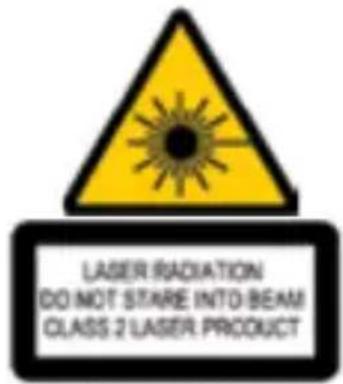
LASER RADIATION. DO NOT STARE INTO THE BEAM OR VIEW DIRECTLY WITH OPTICAL INSTRUMENTS. CLASS 2 LASER PRODUCT.
NEVER POINT A LASER BEAM INTO A PERSON'S EYES OR VIEW A LASER BEAM DIRECTLY, AS PROLONGED EXPOSURE CAN BE HAZARDOUS TO THE EYES. MOMENTARY EXPOSURE FROM A LASER POINTER, SUCH AS AN INADVERTENT SWEEP OF THE LIGHT ACROSS A PERSON'S EYES, MAY CAUSE TEMPORARY FLASH BLINDNESS SIMILAR TO THE EFFECT OF A CAMERA FLASH BULB. ALTHOUGH THIS CONDITION IS TEMPORARY, IT CAN BECOME MORE DANGEROUS IF THE EXPOSED PERSON IS ENGAGED IN A VISION-CRITICAL ACTIVITY SUCH AS DRIVING.
CAUTION: ANY CHANGES OR MODIFICATIONS NOT EXPRESSLY APPROVED BY THE PARTY RESPONSIBLE FOR COMPLIANCE COULD VOID THE USER'S AUTHORITY TO OPERATE THE EQUIPMENT.
THIS DEVICE AND ITS ANTENNA(S) MUST NOT BE CO-LOCATED OR OPERATING IN CONJUNCTION WITH ANY OTHER ANTENNA OR TRANSMITTER. YOUR DEVICE CONTAINS A LOW POWER TRANSMITTER. WHEN DEVICE IS TRANSMITTED IT SENDS OUT RADIO FREQUENCY (RF) SIGNAL. NOTE: THE MANUFACTURER IS NOT RESPONSIBLE FOR ANY RADIO OR TV INTERFERENCE CAUSED BY UNAUTHORIZED MODIFICATIONS TO THIS EQUIPMENT. SUCH MODIFICATIONS COULD VOID THE USER'S AUTHORITY TO OPERATE THE EQUIPMENT.
WIRELESS PRESENTER WITH CURSOR CONTROL
Introduction
Congratulations on your purchase of the Targus wireless presenter with cursor control. This presenter is a combination remote control mouse and laser pointer. With this presenter you can control cursor movement anywhere within 15m (50 feet) of its receiver and project a red laser pointer beam.
Contents
- Wireless presenter with Cursor Control
- Ultra-Slim Wireless Receiver
- 1 x AAA battery
- User guide
System Requirements
Hardware
- USB interface
Operating System
- Microsoft Windows® 2000
- Microsoft Windows® XP
- Microsoft Windows Vista®
Setting Up Your Wireless Presenter
Installing The Battery
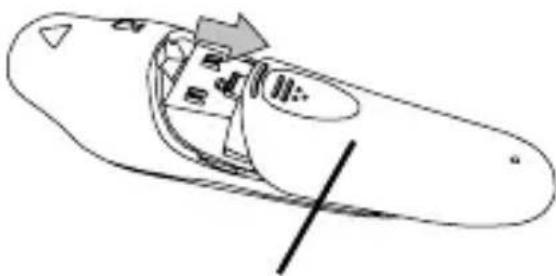
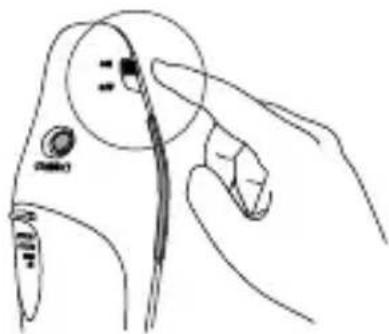
If the presenter is on, slide the on/off switch located on the side of the presenter to the "off" position.
natural_image
Simple line drawing of a boat hull with an arrow indicating direction (no text or symbols)Battery
Cover
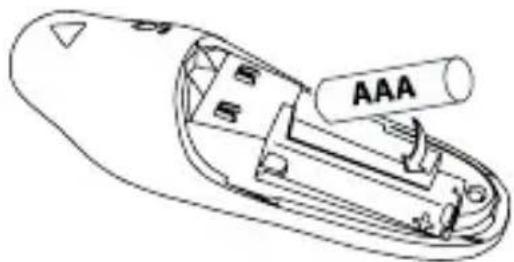
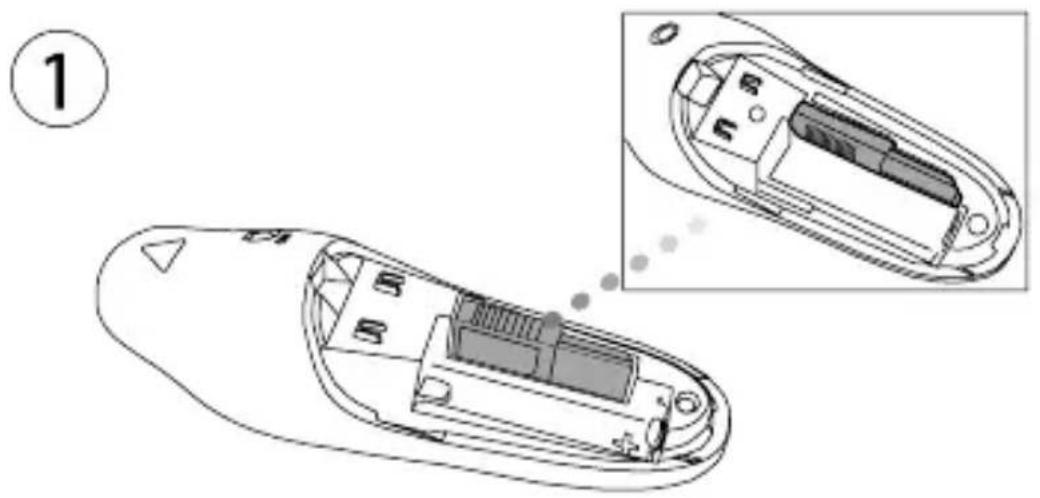
Insert the supplied battery, making sure the positive (+) and negative (-) ends of the battery match the polarity indicators inside the battery compartment.
natural_image
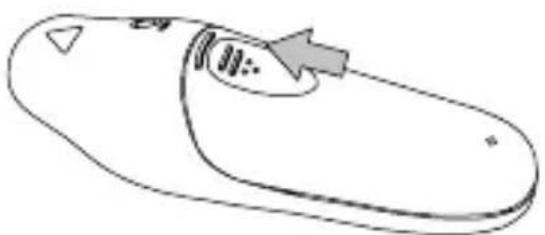
Line drawing of a remote control device with labeled ports (no text or symbols beyond 'AAA' label)Slide the battery cover back into position until it "clicks" firmly into place.
natural_image
Simple line drawing of a computer mouse with an arrow pointing to the button (no text or symbols)Turn on the presenter.
natural_image
Line drawing of a hand holding a tool near a circular component (no text or symbols)Connecting The Receiver
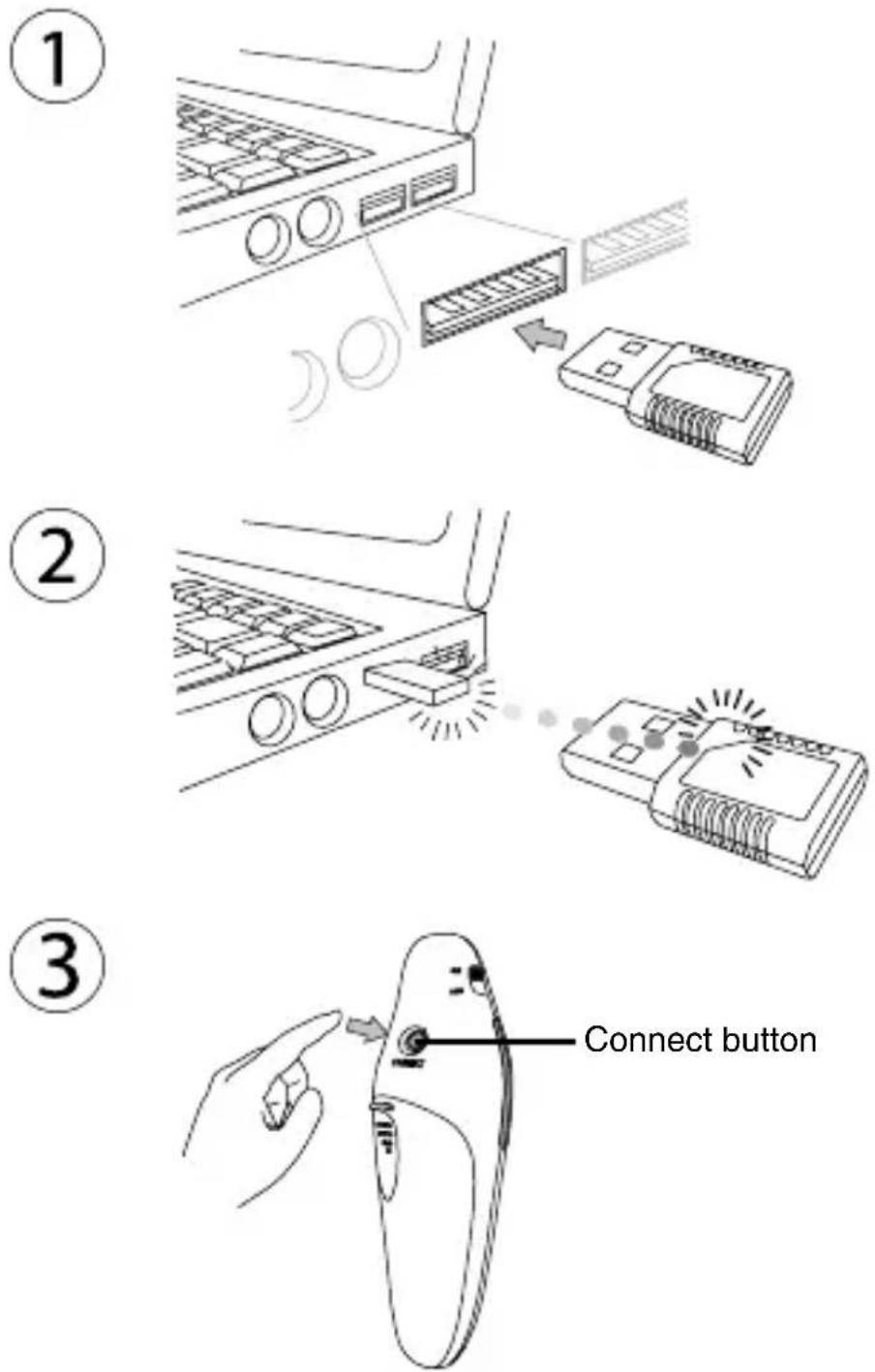
Plug the USB receiver into an open USB port on your computer. Your computer's operating system will identify the receiver and install the default driver.
natural_image
Technical diagram of a remote control device showing internal components and housing (no text or labels)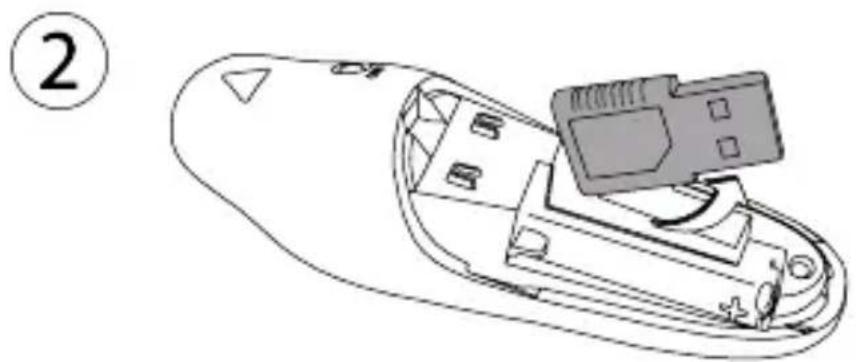
natural_image
Line drawing of a remote control device with a USB port and cable connector (no text or symbols)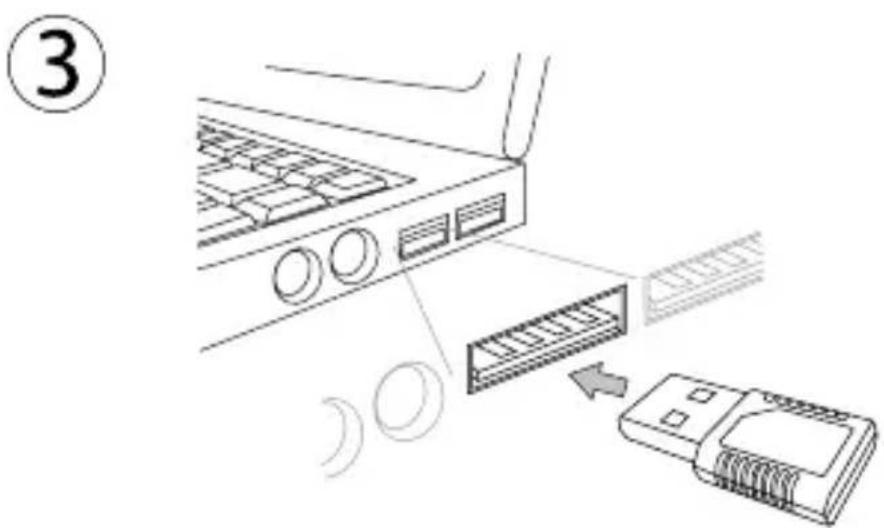
text_image
Diagram showing a device connection with labeled parts and directional arrows indicating file or transfer flow.Synchronizing Your Wireless Presenter
The receiver and presenter should synch up automatically.
However, in some cases they may not synchronize properly due to environmental interference or other causes. If this is the case, you must re-establish the link.
Using Your Wireless Presenter
text_image
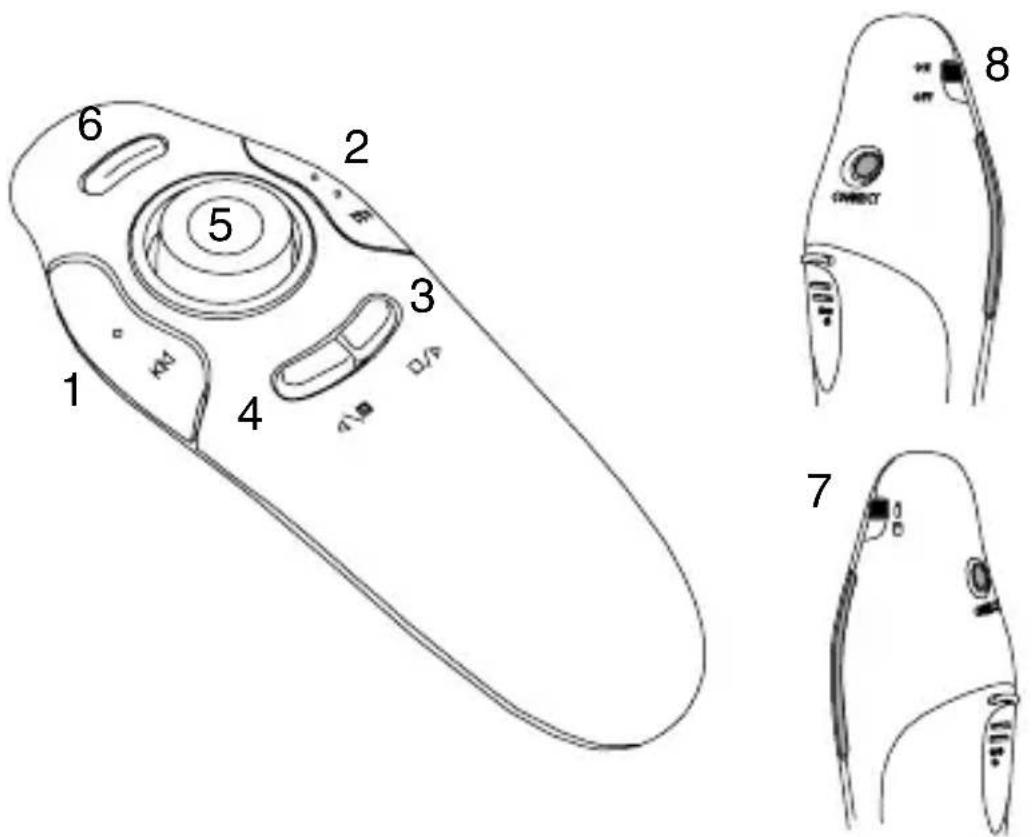
Diagram of a device with labeled parts, including a control panel and three views (1-8), likely illustrating a mechanical or electronic component layout.| Button | Mouse Mode Presentation | Mode |
| 1 | Left click Page up | |
| 2 | Right click Page down | |
| 3 | Internet page forward Start/Stop | |
| 4 | Internet page backward Screen goes dark | |
| 5 | Cursor control No function | |
| 6 | No function Laser Pointer | |
| 7 | = Mouse mode = Presentation mode | |
| 8 | On / Off On / Off |
Safety Measures
- To avoid possible eye damage, never point the presenter's laser at people, especially their faces, or look directly into the presenter's laser beam.
- Avoid pointing the presenter's laser beam at a mirror or other highly-reflective surface.
- Keep the presenter away from young children.
- Never view the presenter's laser beam using telescopic devices, such as a microscope or binoculars.
- Any attempt to disassemble, adjust or repair the presenter may result in exposure to laser light or other safety hazards.
Troubleshooting
What do I do if the response time of the presenter is slow or it intermittently stops working?
- Make sure that the presenter is within 15m (50 feet) of its receiver.
- Increase the distance between the presenter's receiver and the base units of other wireless devices.
- Turn off any wireless devices and their base units that are near the presenter's receiver.
- Replace the battery.
- Synchronize the receiver and presenter. See “Synchronizing Your Wireless Presenter”
Technical Support
For technical questions, please visit:
Internet: www.targus.com/support.asp
Email: info.cn@targus.com
Product Registration
Targus recommends that you register your Targus accessory shortly after purchasing it. To register your Targus accessory, go to:
www.targus.com/registration.asp
You will need to provide your full name, email address, country of residence and product information.
Warranty
Targus warrants this product to be free from defects in materials and workmanship for one year. If your Targus accessory is found to be defective within that time, we will promptly repair or replace it. This warranty does not cover accidental damage, wear and tear, or consequential or incidental loss. Under no conditions is Targus liable for loss of, or damage to a computer; nor loss of, or damage to, programs, records, or data; nor any consequential or incidental damages, even if Targus has been informed of their possibility. This warranty does not affect your statutory rights.
Regulatory Compliance
This device complies with Part 15 of the FCC Rules. Operation is subject to the following two conditions: (1) This device may not cause harmful interference, and (2) This device must accept any interference received, including interference that may cause undesired operation.
This Class B digital apparatus complies with Canadian ICES-003. This device has carrier frequency within 27.96-27.28MHz. This device is in compliance to RSS-310 with maximum field strength lower than 10 millivolts/m measured at 3 metres.
FCC Statement Tested to Comply
This equipment has been tested and found to comply with the limits of a Class B digital device, pursuant to Part 15 of the FCC Rules.
These limits are designed to provide reasonable protection against harmful interference in a residential installation. This equipment generates, uses, and can radiate radio frequency energy and if not installed and used in accordance with the instructions, may cause harmful interference to radio communications. However, there is no guarantee that interference will not occur in a particular installation. If this equipment does cause harmful interference to radio or television reception, which can be determined by turning the equipment off and on, the user is encouraged to try to correct the interference by one or more of the following measures:
- Reorient or relocate the receiving antenna;
- Increase the separation between the equipment and receiver;
- Connect the equipment into an outlet on a circuit different from that to which the receiver is connected;
- Consult the dealer or an experienced radio/TV technician for help.
Changes or modifications not authorized by the party responsible for compliance could void the user's authority to operate this product.
Microsoft, Windows® are either registered trademarks or trademarks of Microsoft Corporation in the United States and/or other countries. All trademarks and registered trademarks are the properties of their respective owners. All rights reserved.
Product Specification
Transmitter
| RF 2.400GHz-2.483GHz | |
| Battery Type AAA battery | |
| Effective RF Communication Range | 15 meters max |
| RF output power 1 mW max | |
| Power Consumption 30 mA max |
Receiver
| RF 2.400GHz-2.483GHz | |
| Interface USB 1.1 | |
| Power USB Bus Powered 5V DC | |
text_image
LASER RADIATION DO NOT STARE INTO BEAM CLASS 2 LASER: PRODUCTComplies with EN 60825-1: 1994+A1+A2 and Complies with 21 CFR 1040,10 and 1040,11 except for deviation pursuant to Laser Notice No.50,dated July 26,2001.
ÉVITEZ L'EXPOSITION - RADIATION ÉLECTROMAGNÉTIQUE DANGEREUSE ÉMISE DE CETTE OUVERTURE.
RADIATION LASER. NE REGARDEZ PAS LE RAYON - DIRECTEMENT OU A L'AIDE D'INSTRUMENTS OPTIQUES. PRODUIT LASER DE CLASSE 2.
NE DIRIGEZ JAMAIS UN RAYON LASER VERS LES YEUX D'UNE PERSONNE ET NE REGARDEZ PAS UN RAYON LASER DIRECTEMENT, CAR L'EXPOSITION PROLONGÉE PEUT ÊTRE DANGEREUSE POUR LES YEUX.
L'EXPOSITION MOMENTANÉE A UN INDICATEUR LASER, TELLE QU'UN PASSAGE INATTENDU DE LUMIÈRE À TRAVERS LES YEUX D'UNE PERSONNE, PEUT CAUSER LA CÉCITÉ PROVISOIRE SEMBLABLE À L'EFFET D'UN FLASH D'APPAREIL PHOTO. BIEN QUE CETTE CONDITION SOIT PROVISOIRE, ELLE PEUT DEVENIR PLUS DANGEREUSE SI LA PERSONNE EXPOSÉE EST ENGAGÉE DANS UNE ACTIVITÉ CRITIQUE DE VISION COMME LA CONDUITE.
AVERTISSEMENT : CHAQUE CHANGEMENTS OU MODIFICATIONS NON EXPRESSÉMENT APPROUVÉES PAR LA PARTIE RESPONSABLE DE LA CONFORMITÉ POURRAIT ANNULER L'AUTORISATION DE L'UTILISATEUR DE FAIRE FONCTIONNER L'ÉQUIPEMENT.
CE DISPOSITIF ET SON ANTENNE(S) NE DOIVENT PAS ÊTRE PLACÉS OU EXPLOITÉS ENSEMBLE AVEC UNE AUTRE ANTENNE OU UN ÉMETTEUR.
VOTRE DISPOSITIF CONTIENT UN ÉMETTEUR A BASSE PUISSANCE. QUAND LE DISPOSITIF EST EN TRANSMISSION IL ENVOIE UN SIGNAL DE FRÉQUENCE RADIO (FR). NOTE : LE FABRICANT N'EST PAS RESPONSABLE D'AUCUNE RADIO OU TV L'INTERFÉRENCE CAUSÉE PAR DES MODIFICATIONS NON AUTORISÉES DE CET ÉQUIPEMENT. DE TELLES MODIFICATIONS PEUVENT ANNULER L'AUTORISATION DE L'UTILISATEUR DE FAIRE FONCTIONNER L'ÉQUIPEMENT.
PRÉSENTATEUR SANS FIL AVEC COMMANDE CURSEUR
Introduction
natural_image
Simple line drawing of a boat hull with a marked section and directional arrow (no text or symbols)Couvercle des piles
natural_image
Line drawing of a remote control device with labeled ports (no text or symbols beyond 'AAA' label)natural_image
Simple line drawing of a curved object with an arrow pointing to a circular feature (no text or symbols)natural_image
Line drawing of a hand holding a tool with a circular component and pointer (no text or symbols)natural_image
Technical diagram of a remote control device showing internal components and housing (no text or labels)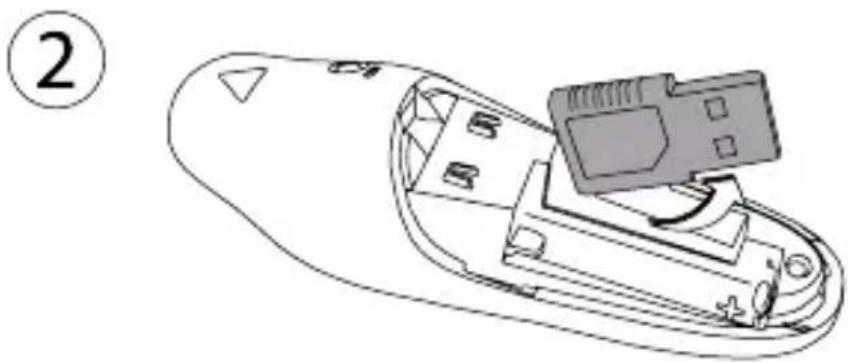
natural_image
Line drawing of a remote control device with a USB port and connector (no text or symbols)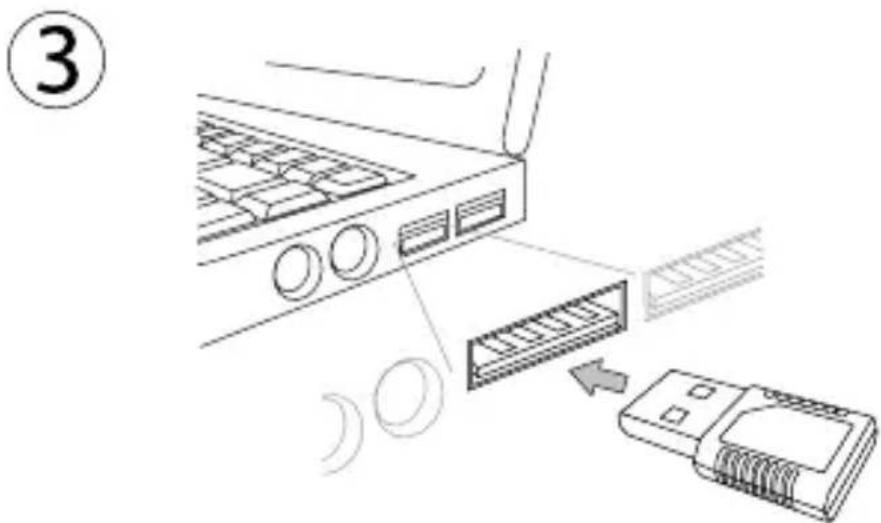
text_image
Diagram showing a device connection with labeled parts and directional arrow, likely illustrating a system or data transfer process.text_image
Diagram of a device with labeled parts, including a control panel and three views (1-8), likely illustrating a mechanical or electronic component layout.Visit our website at www.targus.com/ca
Features and specifications are subject to change without notice.
©2008 Targus Group International, Inc. and Targus, Inc.
Visitez notre site: www.targus.com/ca