CD1567 - Cd player/recorder AudioSonic - Free user manual and instructions
Find the device manual for free CD1567 AudioSonic in PDF.



| Product Type | CD Player/Recorder |
| Brand | AudioSonic |
| Model | CD1567 |
| Power Supply | AC/DC adapter (mains) or 6 C-type batteries (LR14) |
| CD Playback Modes | Track repeat, all repeat, intro, random, program |
| Radio | FM with automatic and manual search, station memory |
| Auxiliary Input | Aux-in socket (3.5 mm jack) |
| Headphone Output | 3.5 mm jack socket (cuts speakers) |
| Speakers | Built-in (cut when using headphones) |
| Power Indicator | Yes (LED indicator) |
| Auto Standby Mode | Yes (mains operation only) |
| Warranty | 24 months, subject to proper use and proof of purchase |
| After-Sales Service | Online service: service.tristar.eu |
| Safety Instructions | Do not expose to water, unplug before cleaning, do not open the casing |
| Recycling | Do not dispose of with household waste, take to WEEE recycling center |
Frequently Asked Questions - CD1567 AudioSonic
User questions about CD1567 AudioSonic
0 question about this device. Answer the ones you know or ask your own.
Ask a new question about this device
Download the instructions for your Cd player/recorder in PDF format for free! Find your manual CD1567 - AudioSonic and take your electronic device back in hand. On this page are published all the documents necessary for the use of your device. CD1567 by AudioSonic.
USER MANUAL CD1567 AudioSonic
By ignoring the safety instructions the manufacturer can not be hold responsible for the damage.

EXCLAMATION POINT - within an equilateral triangle, is used to indicate that a specific component shall be replaced only by the component specified in that documentation for safety reason.

LIGHTNING FLASH WITH ARROWHEAD SYMBOL - within an equilateral triangle, is intended to alert the user to the presence of uninsulated dangerous voltage within the products enclosure that may be of sufficient magnitude to constitute a risk of electric shock to persons.
The AC/DC adaptor and main unit shall not be exposed to dripping or splashing; no objects filled with liquids, such as vases, shall be placed on the apparatus.
The AC/DC adaptor of the apparatus should not be obstructed or should be easily accessed during the intended use.
To completely disconnect the power input, the AC/DC adaptor of the apparatus should be disconnected from the mains, as the disconnected device is the AC/DC adaptor of apparatus.
- If the supply cord is damaged, it must be replaced by the manufacturer, its service agent or similarly qualified persons in order to avoid a hazard.
Warning:
To reduce the risk of electric shock, do not remove cover (or back). No user-serviceable parts inside. Refer servicing to qualified service personnel.
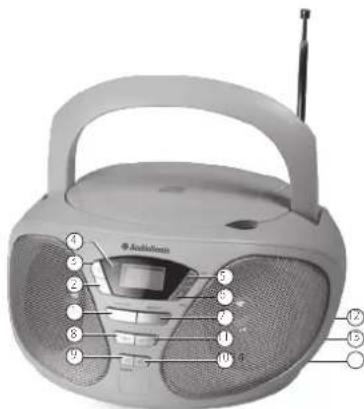
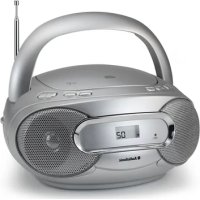
PARTS DESCRIPTION
- Mem./Prog.
- Skip
- Skip +
- Power indicator
- Play/pause/ch+ button
- Stop/ch- button
- Repeat button
- Volume - button
- Source/mode button
- On/standby button
- Volume + button
- DC in jack
- Phone jack
- Aux-in Jack
BEFORE THE FIRST USE
Take the appliance and accessories out the box. Remove the stickers, protective foil or plastic from the device.
POWER SOURCES
AC power
- You can power your portable system by plugging the detachable AC power cord into the DC inlet at the back of the unit and into a wall AC power outlet. Check that the rated voltage of your appliance matches your local voltage. Make sure that the AC power cord is fully inserted into the appliance.
- This set has a built-in power saving system which will automatically put the set into a "standby mode" when it detects that the set is not in use. Note: this function is only available during AC operation.
Battery power
Insert 6 × "C" size batteries into the battery compartment. Be sure that the batteries are inserted correctly to avoid damage to the appliance. Always remove the batteries when appliance will not be used for a long period of time, as this will cause leakage to the batteries and subsequently damage to your appliance.
Notes: Use batteries of the same type. Never use different types of batteries together. When using the appliance with batteries, disconnect the AC powercord.
USE
Play a disc
- Press the SOURCE/MODE button repeatedly to switch to CD mode if necessary.
- Press the PLAY/PAUSE/CH+ button once to start or halt music playback, press this button again to resume the normal playback; press the STOP/CH- button to cease music playback.
- Press the SKIP/SEARCH UP or DOWN button to skip to the next or previous track.
Playback modes
During playback, press the REPEAT button repeatedly to choose the following playback modes: repeat one track > repeat all tracks > introduction play mode > random play mode > exit.
Programmed play
In stop mode, press the MEMORY/PROGRAM button once, the program's icon shows with a program sequence indication "P-01". Select the designated track and confirm with the Mem. button. Press PLAY/PAUSE/CH+ button to start your programmed list.
FM RADIO
Tuning the FM radio
- Press the SOURCE/MODE button repeatedly to switch the unit to the FM radio mode if necessary.
To launch the auto-searching, press and hold the SKIP/SEARCH DOWN button or SKIP/SEARCH UP button for a little while and then release it.
- Press the SKIP/SEARCH DOWN button or SKIP/SEARCH UP button to tune the radio stations manually.
Storing a radio station
- Tune to your favorite station first; press the MEMORY/PROGRAM button. Use the STOP/CH- button or the PLAY/PAUSE/CH+ button to select the corresponding memory cell. Confirm by pressing the MEMORY/PROGRAM button.
- During radio playback, press the STOP/CH- button or the PLAY/PAUSE/CH+ button repeatedly to recall the preset stations.
Auxin
- Connect the AUX IN jack on the unit to an audio source.
- Press the SOURCE/MODE button repeatedly to switch to AUX mode.
- Use the controls on the connected audio device to begin playing music.
Stereo phone jack
- Plug in the headphones/earphones (Not included) and adjust the volume level to a preferred level.
NOTE: When external headphones/earphones are connected, the speakers will be muted. - CAUTION: Listening at high power for a long moment could damage users' ears.
GUARANTEE
- This product is guaranteed for 24 months granted. Your warranty is valid if the product is used in accordance to the instructions and for the purpose for which it was created. In addition, the original purchase (invoice, sales slip or receipt) is to be submitted with the date of purchase, the name of the retailer and the item number of the product.
- For the detailed warranty conditions, please refer to our service website: www.service.tristar.eu
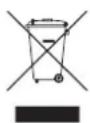
GUIDELINES FOR PROTECTION OF THE ENVIRONMENT
This appliance should not be put into the domestic garbage at the end of its durability, but must be offered at a central point for the
on the appliance, instruction manual and packaging puts your attention to this
important issue. The materials used in this appliance can be recycled. By recycling of used domestic appliances you contribute an important push to the protection of our environment. Ask your local authorities for information regarding the point of recollection.
Support
You can find all available information and spare parts at service.tristar.eu!
VEILIGHEIDSVOORSCHRIFTEN
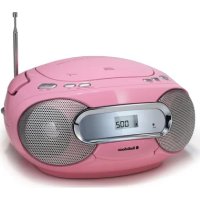
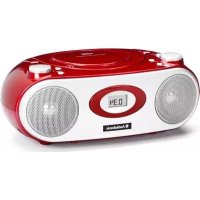
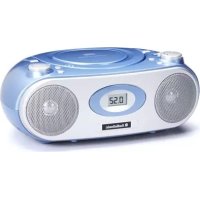
Brand : AudioSonic
Model : CD1567
Category : Cd player/recorder