 ManualGo.com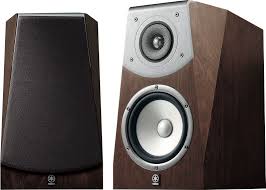
SOAVO-2 - Speaker YAMAHA - Free user manual and instructions
Find the device manual for free SOAVO-2 YAMAHA in PDF.



Download the instructions for your Speaker in PDF format for free! Find your manual SOAVO-2 - YAMAHA and take your electronic device back in hand. On this page are published all the documents necessary for the use of your device. SOAVO-2 by YAMAHA.
USER MANUAL SOAVO-2 YAMAHA
Thank you for selecting this Yamaha product. PRECAUTIONS Read this before using the speaker.
- Install the speaker in a cool, dry, clean place - away from windows, heat sources, sources of excessive vibration, dust, moisture and cold. Avoid sources of humming (transformers, motors). To prevent fire or electrical shock, do not expose the speaker to rain or water.
- Do not place the following objects on the speaker: Glass, china, etc. - If glass etc. falls by vibrations and breaks, it may cause personal injury. A burning candle etc. - If the candle falls by vibrations, it may cause fire and personal injury. A vessel with water in it - If the vessel falls by vibrations and water spills, it may cause damage to the speaker, and/or you may get an electric shock.
- Do not place the speaker where foreign objects such as water drips might fall. It might cause a fire, damage to the speaker, and/or personal injury.
- Never put a hand or a foreign object into the port located on the rear of the speaker as this might cause personal injury and/or damage to the speaker.
- When moving the speaker, do not hold the port as it might cause personal injury and/or damage to the speaker.
- Any time you note distortion, reduce the volume control on your amplifier to a lower setting. Never allow your amplifier to be driven into “clipping”. Otherwise the speaker may be damaged.
- When using an amplifier with a rated output power higher than the nominal input power of the speaker, care should be taken never to exceed the speaker’s maximum input.
- Do not attempt to clean the speaker with chemical solvents as this might damage the finish. Use a clean, dry cloth.
- Do not attempt to modify or fix the speaker. Contact qualified Yamaha service personnel when any service is needed. The cabinet should never be opened for any reasons.
- Secure placement or installation is the owner’s responsibility. Yamaha shall not be liable for any accident caused by improper placement or installation of the speaker.
- Do not place the speaker where it is liable to be knocked over or struck by falling objects. Stable placement will also ensure better sound performance. 1 En Español
- To prevent the enclosure from warping or discoloring, do not place the speaker where it will be exposed to direct sunlight or excessive humidity.
- Placing the speaker on the same shelf or rack as the turntable can result in feedback. Deutsch
- To assure the finest performance, please read this manual carefully. Keep it in a safe place for future reference. English UGET
PLACING THE SPEAKERS
Place the speakers on a sturdy, vibration-free surface, or on a well-built stand. ■ Using as 2ch stereo speakers Better stereo images will be obtained when the speakers are slightly angled in towards the listeners. Yamaha speaker stand SPS-900 (option) You can use this unit as a floor stand speaker when installing on an SPS-900. In this case, use screw holes on the bottom of this unit.
- For details about installing, refer to the assembly instruction of SPS-900. Bottom view (Front side) 135 mm (5-5/16”) ■ Using as front speakers in a multi channel system Position the speakers on both sides of the TV. The positioning of speakers is important, because it controls the whole sound quality of a multi channel system. Set up the speakers on the basis of your listening position by following the owner’s manual supplied with your amplifier. Speaker layout image Yamaha speaker stand SPS-900 Soavo-2 Subwoofer Center Surround Note Placing this unit too close to a TV set might impair picture color or create a buzzing noise. Should this happen, move the speaker away (more than 20 cm (7-7/8”)) from the TV set. 2 En Notes
- To avoid accidents resulting from tripping over loose speaker cables, fix them to the floor.
- Do not fasten the speaker on the stand with nails or adhesives, etc. Long time use and vibrations may cause this unit to fall down.
- Do not pinch the cables between the speaker and the stand. English
CONNECTING TO YOUR AMPLIFIER
This speaker system is capable of standard connections and bi-wired connections. Before making connections, make sure that the amplifier is switched off. ■ CONNECTIONS <Standard connections> You need a commercially available speaker cable. When connecting the speaker cable, leave the jumper cables in place.
The size and/or material of a speaker cable affects on the sound quality. Therefore, we recommend you purchase a high-quality speaker cable to exert the performance of this unit.
- Connect the screw-type terminals at the rear of the speakers to the speaker terminals on the amplifier with a speaker cable (sold separately).
- Connect the + terminals on the amplifier and the speakers using one side of the cable. Connect the – terminals on both components using the other side of the cable.
- Connect one speaker to the left (L) terminals of your amplifier, and another speaker to the right (R) terminals, making sure not to reverse the polarity (+, –). If one speaker is connected with reversed polarity, the sound will be unnatural and lack bass. Amplifier Speaker terminals of the amplifier SPEAKERS
How to connect: 1 Loosen the knob. 2 Twist the exposed wires of the cable together. Good No Good 10 mm (3/8”) Soavo-2 (R) Connect the + speaker cable to the upper red terminal and then – speaker cable to the lower black terminal. Soavo-2 (L) Loosen Tighten Black (–) 3 Insert the bare wire into the hole. 4 Tighten the knob and secure the cable. Red (+) Jumper cable Test the firmness of the connection by pulling the cable lightly at the terminal. Notes
- Do not let the bare speaker wires touch each other as this could damage the speaker and/or the amplifier.
- Do not insert the insulation coating into the hole. The sound may not be produced. Terminal hole* Bare wire Insulation coating
- The terminal hole is 5 mm (3/16”) in diameter. 3 En <Bi-wired connections> When connecting the speaker cable, you must remove the jumper cable. To connect the speaker to the output When your amplifier has only one terminals of the amplifier, two pairs set of speaker output terminals. of cables for each of the woofer and the tweeter are used instead of standard connections. This type of connection decreases the modulation distortion caused by Amplifier electric resistance of the cables and driving current of the speakers. Consequently, purer sound quality can be expected. SPEAKERS
When your amplifier has two sets of speaker output terminals. Both SPEAKERS A and B should be connected. Amplifier SPEAKERS
Soavo-2 (R) Soavo-2 (L) Tweeter terminals Black (–) Red (+) Jumper cable Woofer terminals 1 Unscrew the terminal knob. 2 Remove the cover by pulling it toward you.
4 En 3 Tighten the terminal knob. 4 Simply insert the banana plug into the terminal.
SPECIFICATIONS The speaker and the front cover are packed separately. To attach the front cover, line up the four salients (magnet) on the reverse side of the front cover with the four corresponding pegs. Notes
- When the cover is not attached, take care not to touch the speaker units with your hands or to exert excessive force with tools.
- There are magnets on the reverse side of the front cover. Do not place the front cover close to objects that might be affected by magnets, such as TVs, clocks, magnetic cards, diskettes etc. when you don’t attach it.
ABOUT THE PORT PLUG
The port on the back of this unit has a port plug to adjust the bass level. When you want to increase the bass level, detach the port plug.
- Specifications are subject to change without notice due to product improvements.
- Care should be taken not to exceed the input power values noted above.
- A speaker cable is not included with this model. Taking care of the speaker When you wipe this unit, do not use chemical solvents (ex. alcohol or thinners etc.); this might damage the finish. Use a clean, dry cloth. For heavy dirt, dampen a soft cloth in detergent diluted with the water, wring it out, and then clean this unit up with the cloth. Rear side Port plug Port Bass range characteristics: without port plug
FIXATION DU COUVERCLE AVANT
Soavo-2 SPEAKER SYSTEM ZUR BEACHTUNG 05Zh_00_book_Soavo-2_UGET.book Page 1 Friday, December 22, 2006 4:13 PM All rights reserved. Printed in Indonesia WJ90120