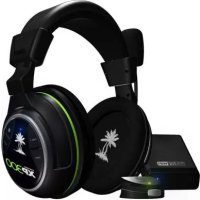
Ear Force XP300 - Earphones TURTLE BEACH - Free user manual and instructions
Find the device manual for free Ear Force XP300 TURTLE BEACH in PDF.


| Product Type | Wireless Gaming Headset |
| Brand | Turtle Beach |
| Model | Ear Force XP300 |
| Connectivity | Bluetooth, 2.4 GHz Wireless RF |
| Battery Life | Approximately 10 hours |
| Battery Type | Rechargeable Lithium-ion via USB |
| Weight | Approximately 300 g |
| Dimensions (L x W x H) | 200 x 180 x 80 mm (estimated) |
| Microphone | Detachable, with mute function |
| Audio Features | Dolby Surround Sound via DSS2 (optional), sound field expander, 4-preset equalizer |
| Controls | Volume, microphone mute, tone, sound field, Bluetooth |
| Compatibility | Xbox 360, PS3, PC, Bluetooth mobile phones |
| Included Accessories | USB transmitter, USB cable, audio adapter cable, microphone |
| Maintenance | Clean with a soft, dry cloth |
| Safety | Listen at moderate volume to preserve hearing |
| Warranty | Check Turtle Beach website for details |
Frequently Asked Questions - Ear Force XP300 TURTLE BEACH
User questions about Ear Force XP300 TURTLE BEACH
0 question about this device. Answer the ones you know or ask your own.
Ask a new question about this device
Download the instructions for your Earphones in PDF format for free! Find your manual Ear Force XP300 - TURTLE BEACH and take your electronic device back in hand. On this page are published all the documents necessary for the use of your device. Ear Force XP300 by TURTLE BEACH.
USER MANUAL Ear Force XP300 TURTLE BEACH
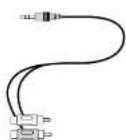
CBA Splitter Cable / Cable diviser RCA

Turtle Beach Sticker/ Autocollard Turtle Beach
XP300 Headset - Left View / Casque XP300 - Gauche
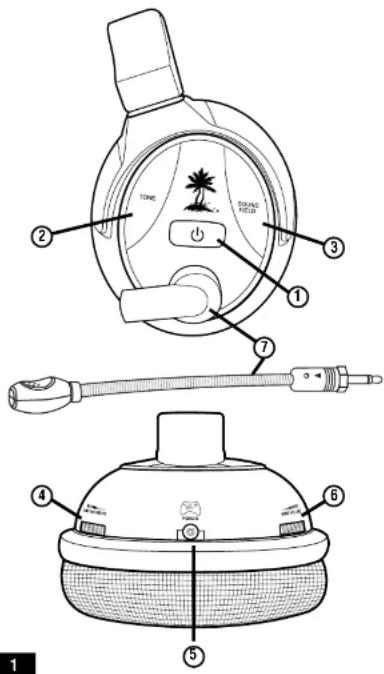
- Power Button:
ON/OFF: press and hold for 3 seconds.
Pairing Transmitter: press and hold for 6 seconds
Z.Tane Button: (pg.33)
-
Sound Field Button: (pg. 35)
-
Variable Mic Monitor
-
Xbox 360 Controller Jack
-
Game Volume
-
Removable Microphone
FRANCAIS
Casque XP300-Gauche
-
Bluetooth Volume
-
Bluetooth LED
- Bluetooth Button (BT MFB): (pg. 27)
- Mic Mute Button
- Headset Charging Port: (pg. 31)
- Charging LED
FRANCAIS
Casque XP300-Droite
1. Volume Bluetooth
2. DEL Bluetooth
3. Bouton multi-function Bluetooth: [page 27]
4. Bouton de désactivation du micro
5. Port de chargement du casque: {page 31}
6.DEL de chargement
DEUTSCH
Solid ON: communicating with the Headset.
Slowly Pulsing: cannot communicate with Headset (pg 7).
Flashing Rapidly: pairing mode
-
Game Audio Inj 3. Amplitudes
-
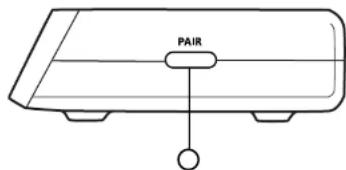
Pairing Button (log 7)
FRANÇAIS
Emetteur XP300
Lysidiode till strom/Link:
Konstant IENDI (UNF: communikater med hondert
- Vocding/Link LED-lampjc:
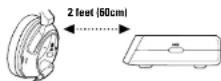
- Make sure the headset and transmitter are off and at least 2 feet (60cm) away from each other.
- Press and hold the PAIR button on the transmitter until the LED flashes rapidly.
- Press and hold the PAIR button on the transmitter until the LED flashes rapidly. 3. Press and hold the POWER button on the headset for 6 seconds until the LED f
- Wait for the headset and transmitter to pair. This process could take up to 30 seconds.
After a few seconds, the Transmitter LED will be solid and the Headset will be paired.
If pairing fails, repeat steps 1-4. It may take up to 5 attempts to pair successfully.
FRANÇAIS
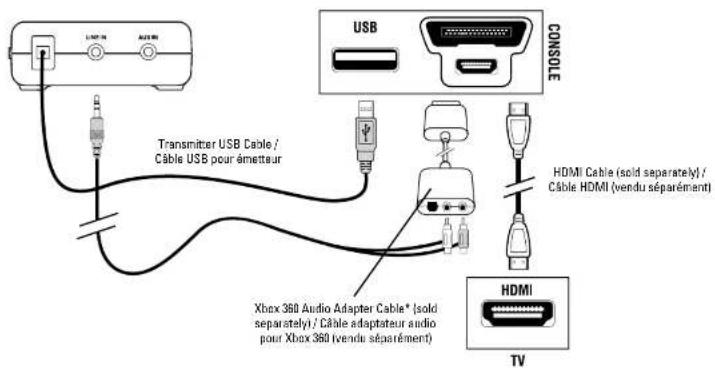
- Connect the transmitter USB cable to a USB port on the Xbox 360.
- Connect the RCA splitter cable to the Xbox 360 audio adapter cable*.
- Connect the HDMI cable (solid separately).
Xbox 360 audio adaptor cable required (sold separately)
FRANÇAIS
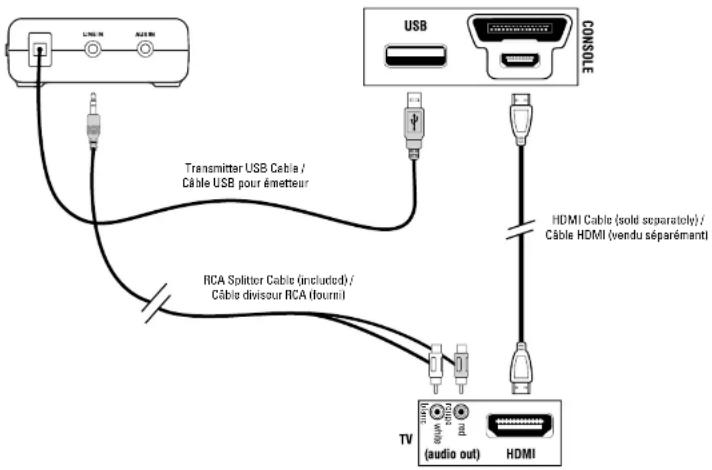
- Connect the transmitter USB cable to a USB port on the Xbox 360.
- Connect the RCA splitter cable to the HDTV Audio Output jacks*.
- Connect the HDMI cable.
*Most HDTVs have red/white RCA Audio Output jackets for HDMI audio setup if
you do not have the Xbox 360 audio adapter cable.
FRANÇAIS
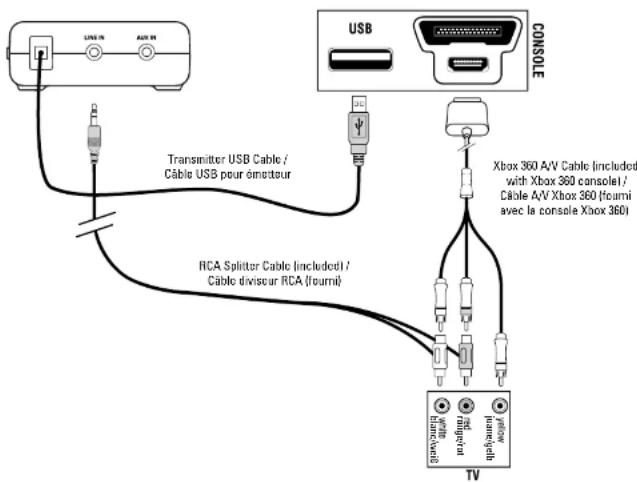
- Connect the transmitter USB cable to a USB port on the Xbox 360.
- Connect the RCA splitter cable to the Xbox 360 A/V cable, then connect it to the TV.
FRANÇAIS
Configuration de la Xbox 360 (RCA)
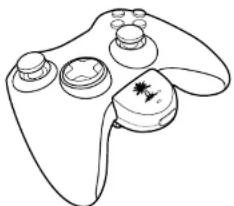
- Turn on the Xbox 360 controller and plug the XBA into the controller headset jack.
- XBA powered-Off: press and hold the button on the XBA for 4 seconds. The LED will begin to blink rapidly, then release.
- XP300 owarod-ON: press and hold the Bluetooth button until the Bluetooth LED flashes blue and red, then release.
After a few seconds, the XBA and the XP300 will be paired.
XBA Functions
| Function Button Press LED | ||
| Power ON Single | 1 blink/sec | |
| Power OFF Hold 3 | secs OFF | |
| MIC MUTE Double | SolidON | |
| MIC UNMUTE Do | blio1 blink/sec | |
| Pairing Mode (paired) | Hold 4 secs | 2 blinks/sec |
| (not paired) | 1 blink/sec | |
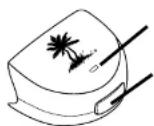
XBA LED / DEL XBA Button / Bauton XBA
FRANCAIS
Configuration vocale sans fil de la Xbox 360
In cases where the XBA Bluetooth Chat Adapter cannot be used, such as with third-party controllers and the Xbox Chat Pad, an optional talkback cable is available for a wired chat connection between the headset and controller. The Xbox 360 Talkback Cable is required for this setup and is sold separately at www.TurtleBeach.com.
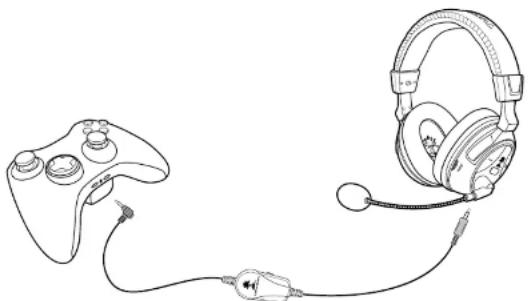
FRANCAIS DEUTSCH
Settings > Preferences > Voice > Voice Output = Play
Output = Play Through Headset
ESPANOL
Settings > Preferences > Voice > Voice Output = Play
Through Headset
PS3TM Setup / Configuration de la PS3
(HDMI Cable / Cable HDMI)
- Connect the transmitter USB cable to a USB port on the PS3.
- Connect the BCA splitter cable to the PS3 AV cable.
- Connect the HDMI cable.
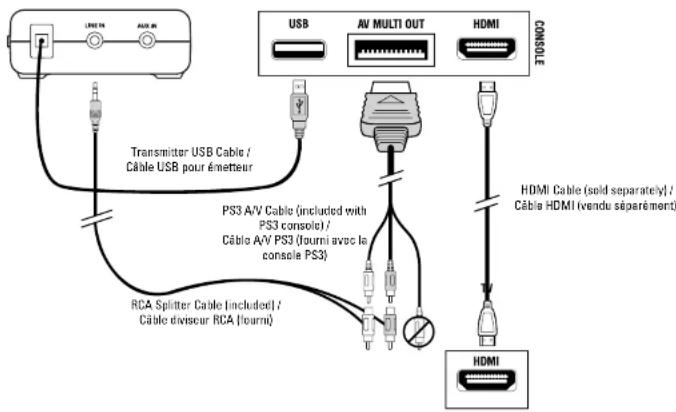
PS3TM Setup / Configuration de la PS3
(HDMI Cable / Cable HDMI)
FRANÇAIS
Configuration de la PS3 (Cable HDMI)
- Connect the transmitter USB cable to a USB port on the PS3.
- Connect the RCA splitter cable to the PS3 AV cable, then connect it to the TV.
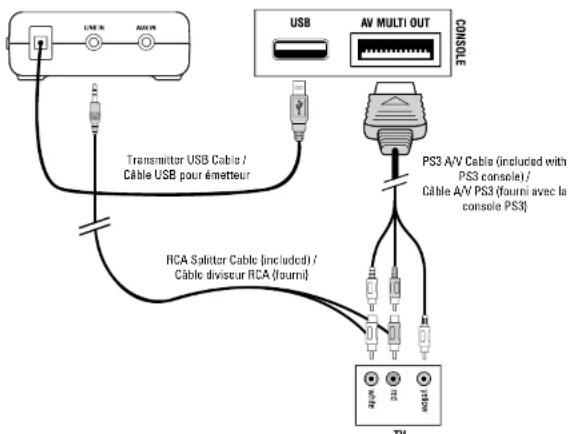
PS3TM Setup / Configuration de la PS3
(RCA)
FRANCAIS
PS3-installation (RCA)
Opsacting at PS3 (RCA)
- Sat radiosenderens USB-kabel en USB-port pa PS3.
2.ordir RCA splitter kabit mad AV-kabit, og ordir dot sa mad ov'
NEDERLANDS
Installatie PS3 (RCA)
-
PS3 Settings > Accessory Settings > Manage Bluetooth Devices. (XP300 Bluetooth OFF).
-
Scan for Bluetooth devices
-
XP300 powered-ON: press and hold the Bluetooth button until the Bluetooth LED flashes blue and red, then release.
-
Select "TURTLE BEACH BLUEYOUTH CHAT" from 5. Enter "0000" as the Pass Key.
The Bluetoth LED on the headset will flash blue about once per second, indicating that the Bluetooth has paired to your PS3.
FRANCAIS
Configuration de la PS3 Bluetooth
PS3 Bluetooth-installation
PS3 Settings > "Accessories Settings" > "Audio Device Settings" > set the "input" and "Output" to "TURTLE BEACH BLUETOOTH CHAT"
FRANCAIS
Pairing Bluetooth Enabled Mobile Phones
- XP300 powered-ON: press and hold the Bluetooth button
until the Bluetooth LED flashes blue and red, then re2. Mobile phone on the Bluetooth and eooth for - Website phone: turn on the Bluebox and search to device on described in the phone's user guide
Devices as described in the phone's user guide. 2.Selcat "THRT 5 REACH BLUETOOTH CHAT" - Enter "0000" as the Pass Key.
Bluetooth Functions
Power Bluetooth ON Press BT MFB for 3 seconds
Power Bluetooth OFF Press BT MFB for 4 sec
Microphone mute: During a call, press
Adjust volume: Press the +cr - buttons
Ansser cai: Pess BT MFB
Reject call: Press and note BT MFB for 2 seconds. E-mail: Press BT MFB
Cancel outgoing salt: Press BT MFB
Redial:Double-clickBT MFB
FRANÇAIS
Bluetooth
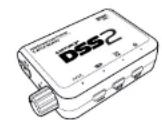
The XP300 can be upgraded to Dolly Digital surround sound by adding the DSS2 surround sound processor Isold separately! Visit www.turtlebeach.com/DSS2 to learn more.


FRANÇAIS
Turtle Beach DSS2 surround sound processor (scales separate). Besen www.turtlebeach.com/DSS2 for at least here.
NEDERLANDS
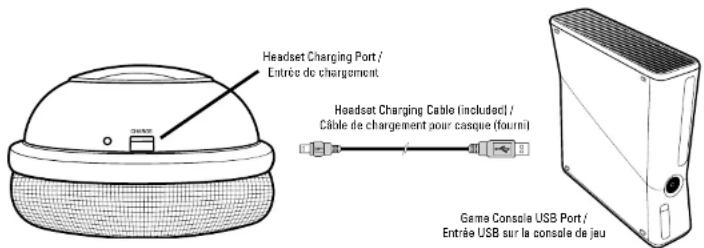
Recharging the Headset / Recharger le Casque
The XP300 features a rechargeable battery that provides more than 10 hours of continuous game play. When your headset battery power is low, a tone will begin to sound every 10 seconds until the headset powers off. You can recharge your headset while still gaining with the included Headset Charging Cable as shown.
FRANCAIS
Recharger le casque
Le XP300 compreendepile rechargeablee quifloreplusde 10heures dejeus sansirtrapolution.Lesapeileoforescausorsaftableun seforerentrendoutelles10secodendusjueaocoulocasque s'estagnue.Vouspuevazrechargeurvocaseausansarrerdero jourgracauleofchargementdecasque,comoindique.
DEUTSCH
Headset aufladen
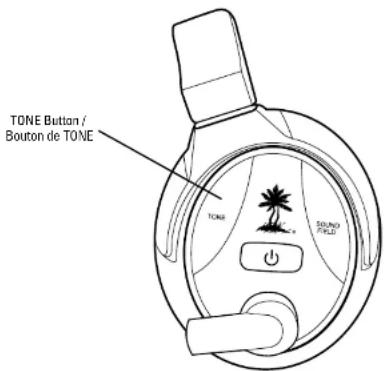
Press the TONE Button to cycle through the equalizer prosets:
- Flat
- Bass Boost
- Trable Boost
- Bass and Treble Boost
FRANCAIS
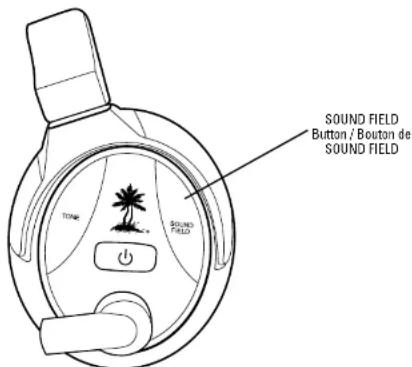
The Sound Field Expander lets you boosts the sounds on the left and the right for better directional accuracy. Press the SOUND FIELD Button to cycle through the Sound Field Expander prcesses:
- Normal
- Narrow
- Wide
- Normal
- Limitated
- Amplitude
SVENSI
XP300 Headset Technical Specifications
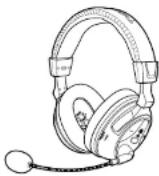
50mm diameter speakers with neodymium magnets
Game audio frequency response: 20Hz - 20kHz, >120dB SPL @ TRHZ Candence microfrequency frequency: 50Hz - 15Hz
Conduense Microphone Frequency Response. 2013: 1.3kHz Game audio Dual Band WiFi Digital 2.4-2.46GHz/5.0-8.6GHz
Bluetooth radio with dual-pairing mode
Headphone amplifier: Stereo 27mW/ch, THD <1%
Rechargeable Li-Po Battery (1000 mAh)
Automatic shut down after approx 5 minutes of carrier loss or audio silence to conserve
battery power
Battery booster circuit extends battery life for up to 15 hours
XP300 Transmitter Technical Specifications
Dual Band WiFi Digital 2.4-2.495GHz/5.0-5.8GHz RF wireless transmission
with up to 30 foot range
Frequency response: 20Hz - 20kHz
Stereo 3.5mm line input je
Stereo 3.5mm aux input jack
Maximunl anthy mlt plet 2vpp100mV htp USB Power - (5V DC @180mA max)
Troubleshooting
No sound.
- Check that the headset volume control is turned up.
- Check that the transmitter USB power and Line In cables are properly connected.
Check that the headset is powered on. The LED on the left ear cup should be flashing. - Check if the LED on the front of the transmitter is on solid. If the LED is slowly pulsing, it indicates that the transmitter isn't
communicating with the headset. If the headset is on solid and the transmitter LED is slowly pulsing, then the headset and transmitter need to be "paired" as described in the section "Pairing the Headset and Transmitter".
Audio Drops, Popping or Clicking Sounds
Audio dropouts, papping or clicking sounds on the headset are caused by poor reception. This can occur when:
The headset and transmert are out of range, for best performance, stane within 20 feet from the transmitter.
There's a wall or other large object between the headset and transmitter. The transmitter is in a bad location that is interfering with the antenna.
A wireless base station or wireless router is causing a lot of RF activity that's blocking the RF signal from the transmitter.
Voice Chat Drops
- Most in-game voice chat drops are simply caused by network performance or "lag". Usually they subside after a few moments so please
be patient. In extreme cases, you may have to leave a game and return to reset the chat function
If you use a wireless internet connection, low signal strength from your modem/rodter can make the voica chat malfunction.
Mobile Phone Bluetooth Issues
Some models of mobile phones may experience issues with the Bluetooth performance:
Nokia6500s: Sometimes the Bluetooth link will disconnect automatically and may need to be paired again.
Moto V8: Sometimes there is no audio on headset when there is an active call. This issue happens rarely. The Moto V8 doesn't initiate SCO
link when there is an active call. Single press the BT MFB button on the headset to initiate SCO link with the phone.
- HTC Hero: Sometimes the headset Bluetooth will fail to reconnect with PS3 after having connected with HTC Hero. This issue happens
rarely. The user must reconnect the headset Bluetooth from PS3 Bluetooth system settings to fix this issue.
Force Shutdown
In the unlikely case that the headset becomes unresponsive and the main power button cannot be used to turn off the headset, the MUTE button on the headset can be used to force shutdown. Press and hold the MUTE button on the headset for 10 seconds to initiate a forced shutdown.
To avoid potential damage to the device, always disconnect all cables before transporting it.
WARNING: Permanent hearing damage can occur if a headset is used at high volumes for extended periods of time, so it is important to keep the volume at a safe level. Over time, your ears adapt to load volume levels, so a level that may not cause initial discomfort can still damage your hearing. If you experience ringing in your ears after listening with the headset, it means the volume is set too loud.
The louder the volume is set, the less time it takes to affect your hearing. So, please take care to listen at moderate levels.
Before placing a headset on your ears, turn the volume down completely.
then slowly increase it to a comfortable level.
- Turn down the volume if you can't hear people speaking near you.
- Avoid turning up the volume to block out noisy surroundings.
FRANCAIS
Gn 140
EC Declaration of Conformity
Manufacturer: Voyetra Turde Beach
Product Name: Ear Force XP300
Type of Product: Wireless Headset
Model Number(s): TBS-2260-01
Year of Manufacture: 2011
We, Voyetra Tdle Beach, Inc. of Elmsford, New York,declare under our own responsibility that the above-referenced product complies
with the following directives and standards:
Low Voltage Directive 2006/95/EC
EN50332-2:2003
EN 60950-1:2006+A11:2009
Electromagnetic Compatibility Directive 1999/5/EC
ESTI EN 301 489-1 V1.8.1 (2008)
ESTIEN301489-3V1.4.1(2002)
ESTI EN 301489-17 V2.1.1 (2009)
R&TTE Directive 1999/5/EC
ESTEN300328V1.7.1[2006-10]
ESTI EN 300 440-1 V1.4.1 (2008-05)
ESTIEN300440-2V1.2.1(2008-05)
All test reports have been reviewed and approved with a Positive Opinion from the following Notified Bodies:
Bay Area Compliance Laboratories, Corp (Shenzhen)
6/F, the 3rd Phase of WanLi Industrial Building
ShiHua Road, FuTian Free Trade Zone, Shenzhen, Guangdong, China
Tel: +86-755-33320018, Fax: +86-755-33320008, Web: baclcorp.com
The technical documentation required by this Directive is maintained at the corporate headquarters of Voyetra Turtle Beach,
150 Clearbrook Road. Suite 162, Elmsford, New York, 10562.
Authorized Person:

Printed Name: Frederick Romano
Title: Executive Vice President
D.
11/12/11
FCC Declaration of Conformity
Product Name: Ear Force XP300
Model Number(s): TBS-2260-D1
FCC Rules: FCC CFR Title 47 Part 15 Subpart B: 2009 CLASS B
FCC CFR Title 47 Part 15 Subpart C: 2008
Operating Environment: GENERAL OFFICE AND HOME USE
FCC COMPLIANT STATEMENT
This device complies with part 15 of the FCC rules. Operation is subjected to the following conditions:
(1) This device may not cause harmful interference, and
(2) This device must accept any interference received including interference that may cause undesired operation.
INFORMATION TO USER
This equipment has been tested and found to comply with the limits for a Class B digital device, pursuant to Part 15 of FCC rules.
These limits are designed to provide reasonable protection against harmful interference in a residential installation. This equipment
generates, uses and can radiate radio frequency energy and, if not installed and used in accordance with the instructions, may cause hazardous interference to radio communications. However, there is no guarantee that interference will not occurring in part or in installation
h harmful interference to radio communications. However, there is no guarantee that interference will not occur in a particular installation. If this equipment does cause harmful interference to radio or television reception, which can be determined by turning the equipment off and on, the user is encouraged to try to correct the interference by one or more of the following measures:
1) Reorient or relocate the receiving antenna.
2) Increase the separation between the equipment and receiver.
3) Connect the equipment into an outlet on a circuit different from that to which the receiver is connected.
4) Consult the dealer or an experienced radio/TV technician for help.
The user's manual or instruction manual for an intention or unintentional radiator shall caution the user that the changes or modifications not expressly approved by the party responsible for compliance could void the user's authority to operate the equipment.
WARNING: Changes or modifications made to this equipment not expressly approved by VOYETRA TURTLE BEACH, INC. may void user's authority to operate this equipment.
EC Declaration of Conformity FCC Declaration of Conformity
Manufacturer: Voyetra Turtle Beach
Product Name: Ear Force XBA
Type of Product: Bluetooth Dongle
Model Number(s): TBS-2275-01
Year of Manufacture: 2011
Manufacturers Address:
150 Clearbrook Rd. Suite 162, Elmsford, NY 10523
We, Voyetra Turtle Beach, Inc. of Elmsford, New York, declare under our own responsibility that the above-referenced product complies with the essential requirements of Article 3 of the RRTTE1999/S/EC Directive and standards:
Electromagnetic Compatibility 2004/108/EC [Article 3.1(b) of the R&TTE Directive] comprising the harmonized standards
ESTI EN 301485-1V1.8.1(2008-04)
ESTIEN301489-17V2.1.1(2009)
EN 6100-4-2:2001
EN 61000-4-3:2006
EN 55022:2006
All test reports have been reviewed and approved with a Positive Opinion from the following Notified Body:
SGS Taiwan Limited
No.134.Wu Kung Road.Wuku Industrial Zone
Taipei County, Taiwan 248
Tel: +886-2-2299-3279
Fax: +886-2-2298-2698
The technical documentation required by this Directive is maintained at the corporate headquarters of Voyetra Turtle Beach, 150 Clearbrook Road. Suite 162, Elmsford, New York, 10562.
Authorized Person:

Printed Name: Frederick Romano
Title: Executive Vice President
7/13/11
Product Name: Far Force XBA
Model Number(s): TBS-2275-01
FCC Rules: FCC CFR Title 47 Part 15 Subpart B: 2009
FCC CFR Title 47 Part 15 Subpart C: 2008
Operating Environment: GENERAL OFFICE AND HOME USE
FCC COMPLIANT STATEMENT
This device complies with part 15 of the FCC rules. Operation is subjected to the following conditions:
(3) This device may not cause harmful interference, and
(4) This device must accept any interference received including interference that may cause undesired operation.
INFORMATION TO USER
This equipment has been tested and found to comply with the limits for a Class B digital device, pursuant to Part 15 of FCC rules. These limits are designed to provide reasonable protection against harmful interference in a residential installation. This equipment generates, uses and can radiate radio frequency energy and, if not installed and used in accordance with the instructions, may cause harmful interference to radio communications. However, there is no guarantee that interference will not occur in a particular installation. If this equipment does cause harmful interference to radio or television reception, which can be determined by turning the equipment off and on, the user is encouraged to try to correct the interference by one or more of the following measures:
5) Reorient or relocate the receiving antenna.
6) Increase the separation between the equipment and receiver.
7) Connect the equipment into an outlet on a circuit different from that to which the receiver is connected.
8) Consult the dealer or an experienced radio/TV technician for help.
The user's manual or instruction manual for an intention or unintentional radiator shall caution the user that the changes or modifications not expressly approved by the party responsible for compliance could void the user's authority to operate the equipment.
WARNING: Changes or modifications made to this equipment not expressly approved by VDYETRA TURTLE BEACH, INC. may void user's authority to operate this equipment.
Limited Warranty for Turtle Beach Products
Voyetra Turtle Beach, Inc. ("VTB") warrants to the original end-user purchaser ("Purchaser") that the retail Turtle Beach hardware product herein ("Product") will be free of defects in materials and workmanship for a period of one year from the date of purchase by the Purchaser ("Warranty Period"). Any Extended Warranty or Service Plans purchased through a Retail store are not honored by VTB. The Warranty refers to the repair/replacement of a defective product during this period and not a refund.
This limited warranty extends only to the Purchaser and is not transferable or assignable to any subsequent purchaser. This limited warranty is applicable only in the country or territory where the Product was purchased from an authorized VTB retailer and does not apply to a Product that has been purchased as used or refurbished [except refurbished by VTB] or was included as part of a non-VTB product.
WARRANTY SERVICE
In the USA and CANADA Warranty Service is provided by our TURTLE BEACH OFFICES and in all other Countries it is provided by our local International Distributors.
VTB does not warrant uninterrupted or error-free operation of the Product and is under no obligation to support the Product for all computer operating systems or future versions of such operating systems.
If a defect should occur during the Warranty Period, Purchaser must contact VTB to obtain a Return Merchandise Authorization (RMA) number. Purchaser will be responsible for shipping costs incurred in returning the defective Product to an authorized VTB service center, or to the repair facility located at VTB's corporate headquarters. A copy of the dated proof of purchase and a description of the problem must be included with the defective Product. VTB will not be responsible for other products or accessories included with the defective Product sent to VTB. The RMA number must be clearly indicated on the outside of the package. Packages without an RMA number will be refused by VTB or its representatives and returned to sender at the sender's expense.
In the event of a defect, Purchaser's sole and exclusive remedy, and VTB's sole liability, is expressly limited to the correction of the defect by adjustment, repair, or replacement of the Product at VTB's sole option and expense. VTB owns all Products it has replaced and all parts removed from repaired Products. VTB uses new and reconditioned parts made by various manufacturers in performing warranty repairs and building replacement products. If VTB repairs or replaces a product, the original Warranty Period is not extended, however, VTB warrants that repaired or replacement parts will be free from defects in material and workmanship for a period of thirty (30) days from the date of repair or replacement, or for the remainder of the Warranty Period, whichever is greater.
This warranty does not apply to any Product that has had its serial number altered, removed or defaced, or any Product damage caused by shipping, improper storage, accident, problems with electrical power, abuse, misuse, neglect, ordinary wear, acts of God (e.g. flood), failure to follow directions, improper maintenance, use not in accordance with product instructions, unauthorized modification or service of the Product or damage resulting from the use of the Product with hardware, software or other products not provided by or specifically recommended by VTB.
THIS LIMITED WARRANTY IS PURCHASER'S SOLE AND EXCLUSIVE REMEDY AND IS IN UIEU OF ALL OTHER WARRANTYES, EXPRESS OR IMPLIED. TO THE EXTENT PERMITTED BY APPLICABLE LAW, VTB HEREBY DISCLAIMBS THE APPLICABILITY OF ANY IMPLIED WARRANTY OF MERCHANTABILITY, FITNESS FOR A PARTICULAR PURPOSE OR USE FOR THE PRODUCT. IF SUCH A DISCLAIMER IS PROHIBITED BY APPLICABLE LAW, THE IMPLIED WARRANTY IS LIMITED TO THE DURATION OF THE FOREGOING LIMITED WRITTEN WARRANTY.
IN NO EVENT SHALL VTB BE LIABILITY FOR ANY INDIRECT, INCIDENTAL, SPECIAL, PUNITIVE OR CONSEQUENTIAL DAMAGES, OR DAMAGES, INCLUDING BUT NOT LIMITED TO ANY LOSST PROFITS, DATA, OR LOSS OF USE, ANY THIRD PARTY CLAIMS, AND ANY INJURY TO PROPERTY OR BODILY INJURY (INCLUDING DEATH) TO ANY PERSON, ASRIRING FROM OR RELATING TO THE USE OF THIS PRODUCT OR ASRIING FROM BREACH OF THE WARRANTY, BREACH OF CONTRACT, NEGENCE, TORT, OR STRICT LIABILITY, EVEN IF VTB HAS BEEN ADVISED OF THE POSSIBILITY OF SUCH DAMAGES.
This warranty supersedes all prior agreements or understandings, oral or written, relating to the Product, and no representation, promise or condition not contained herein will modify these terms. Some states do not allow the exclusion or limitation of incidental or consequential damages, so the above exclusion or limitation may not apply to you. This warranty gives you specific legal rights. You may also have other rights, which vary from state to state. Any action or lawsuit for breach of warranty must be commenced within eighteen (18) months following the purchase of the Product.
EXCLUSIONS FROM LIMITED WARRANTY:
This Limited Warranty shall not apply and VTB has no liability under this Limited Warranty if the Turtle Beach Product
- is used for commercial purposes such as 'LAN Centers' (including rental or lease);
- is modified or tampered with;
- is damaged by Acts of God, power surge, misuse, abuse, negligence, accident, wear and tear.
mishandling, misapplication, or other causes unrelated to defective materials or workmanship; - serial number is defaced, altered or removed;
- is not used in accordance with the documentation and use instructions; or
- is repaired, modified or altered by other than authorized repair centers.
product is no longer available because it was discarded.
Federal Communications Commission Interference Statement
This equipment has been tested and found to comply with the limits for a Class 8 digital device, pursuant to part 3(b) of the FCC Rules. These limits are designed to provide reasonable protection against harmful interference in a residential installation. This equipment generates, uses and can radiate radio frequency energy and, if not transmitted and used in accordance with the instructions, may cause harmful interference to radio communication. However, there is no guarantee that interference will not occur in a particular installation. The equipment is intended to be used in an industrial or commercial television station, which can be determined by turning the equipment off and on; the user is encouraged to try to correct the interference by one or more of the following measures:
Reorient or reineate the receiving antenna.
Increase the separation between the equipment and receiver.
- Connect the equipment into an outlet on a circuit different from that to which the system is connected.
Consul the sealer or an expehenoped raiy tv technician for heig
Ceron:
Any changes or modifications not expressly approved by the grantee of this device could void the user's authority to operate the equipment.
RF Exposure Warning
The equipment complies with FCC RF exposure limits set forth for an uncontrolled environment. The equipment must set his or her located or reporting in conjunction with any other antenna or transmitter.
Transmitter Box
This equipment must be installed and operated in accordance with provided instructions as the antenna used for this transmitter must be installed to provide a separation distance at least 20cm from all persons and must not be co-located or operating in conjunction with any other antenna or transmitter. End users and installers must be provided with antenna installation instructions and transmitter operating conditions for satisfying PF exposure compliance.
CANADA.INDUSTRY CANADA (C)NOTICES
This Case B digital apparatus complies with Cerradan (CES-003) and ISSS-218 Operation is subject to the following two conditions: (i) this device may not cause interference, and (ii) this device must accept any interference, including interference that may cause undesired operation of the device.
Radio Frequency (RF) Exposure Information:
headset
The radiated output power of the Wireless Device is below the Industry Canada (IC) radio frequency exposure limits. The Wireless Device should be used in such a manner such that the potential for human contact during normal operation is minimized. This device has also been shown to be suitable for use in wireless devices under parable noise conditions. Antennas are less than 20~cm of a person's body.
Transitive.
The irradiated output power of the Wireless Device is below the Industry Canada (IC) radiofrequency exposure limits. The Wireless Device should be used in such a manner such as
the potential for human contact during hormone exposure is minimized. This device has also been used to measure the amount of time that a person can spend in bed under mobile exposure conditions. Latentus are greater than 20min from a person's body.
This website has been certified for use in Canada. Status of the listing in the Industry Canada REI/ Radio Equipment Ltd can be found at the following web address: http://www.ic.gc.ca/en/approductivity.html/wk/3640.pdf. Additional Canadian information on this website also can be found at the following web address: http://www.ic.gc.ca/en/sites/gut.ni-mang@st672.com
Canada, vvis d'Industry Canada [IC]
This product is CE marked according to the provisions of the Low Voltage Directive (2006/EC), IEC 7857 (Directive 1996/EC) and EMC Directive HE185/EC (Directive 7.3.14). The EN 10000-2 (ISO 10000) is a standard for the European Union.
-Grantee Code/Reg Number: X3B/GC229855 -Voyetra Turtle Desch, Inc.
IC:3B79A-2260
1C:38794-2266
IC:3879A-2275
DESIGNED AND ENGINEERED BY TURTLE BEACH IN NEW YORK, USA
Copyright © 2012 Voyeva Turtle Beach, Inc. (VTB, Inc.) All rights reserved. No part of this guide may be reproduced without permission. Turtle Beach, the Turtle Beach Logo, Voyeva, Ear Force, Chat Boost, Engineered For Gaming and the Dual Band logo are either trademarks or registered trademarks of VTB, Inc. Xbox, Xbox 360 and Xbox LIVE are registered trademarks of Microsoft Corporation. PlayStation is a registered trademark and PS3 is a trademark of Sony Computer Entertainment. Bluetooth and the Bluetooth logo are registered trademarks of Bluetooth SIG Inc. All other trademarks are properties of their respective companies and are hereby acknowledged. Assembled in China. PATENTS PENDING

For more products, accessories and general product information, please visit TurdeBeach.com
For warranty information and product support, please visit
TurtleBeach.com/support
FRANÇAIS





- XP300 Headset - Left View / Casque XP300 - Gauche
- FRANÇAIS
- FRANCAIS
- Configuration vocale sans fil de la Xbox 360
- FRANCAIS DEUTSCH
- ESPANOL
- PS3TM Setup / Configuration de la PS3
- (HDMI Cable / Cable HDMI)
- (RCA)
- PS3-installation (RCA)
- Opsacting at PS3 (RCA)
- NEDERLANDS
- Installatie PS3 (RCA)
- Configuration de la PS3 Bluetooth
- PS3 Bluetooth-installation
- Pairing Bluetooth Enabled Mobile Phones
- Bluetooth Functions
- Bluetooth
- Recharging the Headset / Recharger le Casque
- Recharger le casque
- DEUTSCH
- Headset aufladen
- SVENSI
- XP300 Headset Technical Specifications
- XP300 Transmitter Technical Specifications
- Troubleshooting
- No sound.
- Audio Drops, Popping or Clicking Sounds
- Voice Chat Drops
- Mobile Phone Bluetooth Issues
- Force Shutdown
- EC Declaration of Conformity
- FCC Declaration of Conformity
- FCC COMPLIANT STATEMENT
- INFORMATION TO USER
- EC Declaration of Conformity FCC Declaration of Conformity
- Limited Warranty for Turtle Beach Products
- WARRANTY SERVICE
- EXCLUSIONS FROM LIMITED WARRANTY:
- Federal Communications Commission Interference Statement
- Ceron:
- CANADA.INDUSTRY CANADA (C)NOTICES
- Canada, vvis d'Industry Canada [IC]
- DESIGNED AND ENGINEERED BY TURTLE BEACH IN NEW YORK, USA
Brand : TURTLE BEACH
Model : Ear Force XP300
Category : Earphones