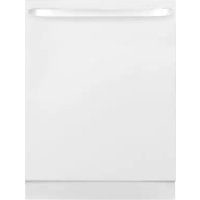
GLDT690DWW - Dishwasher GE - Free user manual and instructions
Find the device manual for free GLDT690DWW GE in PDF.


| Product Type | Dishwasher |
| Brand | GE |
| Model | GLDT690DWW (Series GLDT690, GLDT696) |
| Power Supply | 120 V, 60 Hz, grounding required |
| Recommended Water Temperature | 49 °C to 65 °C (120 °F to 150 °F) |
| Rinse Aid Dispenser Capacity | 99.4 ml (3.5 oz) |
| Wash Cycles | Sanitize, Heavy, Normal, Light, Glasses, Speed, Rinse |
| Delay Start Option | Up to 24 hours |
| Water Consumption per Cycle (approximate) | Sanitize: 18.2 L; Heavy: 25.4 L; Normal: 14.4 L; Light: 18.2 L; Glasses: 14.8 L; Speed: 22 L; Rinse: 7.2 L |
| Cycle Duration (approximate) | Sanitize: 130 min; Heavy: 125 min; Normal: 140 min; Light: 78 min; Glasses: 76 min; Speed: 78 min; Rinse: 26 min |
| Recommended Detergent Type | Automatic dishwasher detergents, powder, liquid, or tablets (Cascade® approved) |
| Filter Maintenance | Monthly cleaning recommended |
| Rack Type | Upper rack, lower rack, 3-piece cutlery basket with removable cover |
| Status Lights | Sanitized, Clean |
| Warranty (Canada) | 1 year parts and labor in-home |
| Interior Tub | Stainless steel |
Frequently Asked Questions - GLDT690DWW GE
User questions about GLDT690DWW GE
0 question about this device. Answer the ones you know or ask your own.
Ask a new question about this device
Download the instructions for your Dishwasher in PDF format for free! Find your manual GLDT690DWW - GE and take your electronic device back in hand. On this page are published all the documents necessary for the use of your device. GLDT690DWW by GE.
USER MANUAL GLDT690DWW GE
Safety Instructions.... 2 - 5
Operating Instructions
Control Panels and Settings .... 6,7
Loading the
Dishwasher Racks 10
Using the Dishwasher .....8, 9
Care Instructions
Care and Cleaning ..... 1 1, 1 2
Troubleshooting Tips ... 13-15
Consumer Support
Consumer Support 16
Warranty 15
Write the model and serial numbers here:
Model # ____
Serial #
You can find them on a label on the tub wall just inside the door.
Owner's Manual
GLDT690 Series
GLDT696 Series
▲ WARNING!
For your safety, the information in this manual must be followed to minimize the risk of fire, explosion, electric shock, and to prevent property damage, personal injury, or death.

▲ WARNING! WATER HEATER SAFETY
Under certain conditions, hydrogen gas may be produced in a water heater that has not been used for two or more weeks. HYDROGEN GAS IS EXPLOSIVE.
If the hot water has not been used for two or more weeks, prevent the possibility of damage or injury by turning on all hot water faucets and allow them to run for several minutes. Do this before using any electrical appliance connected to the hot water system. This simple procedure will allow any built-up hydrogen gas to escape. Since the gas is flammable, do not smoke, use an open flame, or use the appliance during this process.
PROPER INSTALLATION AND MAINTENANCE
This dishwasher must be properly installed and located in accordance with the Installation Instructions before it is used. If you did not receive an Installation Instructions sheet with your dishwasher, you can receive one by visiting our website at GEAppliances.com.
■Connect the dishwasher/appliance to a grounded metal, permanent wiring system; or run an equipment-grounding conductor with the circuit conductors and connect to the equipment-grounding terminal or lead of the appliance.
■Improper connection of the equipment-grounding conductor can result in a risk of electric shock. Check with a qualified electrician or service representative if you are in doubt whether the appliance is properly grounded.
■ Dispose of discarded appliances and shipping or packing material properly.
■Do not attempt to repair or replace any part of your dishwasher unless it is specifically recommended in this manual. All other servicing should be referred to a qualified technician.
■To minimize the possibility of electric shock, disconnect this appliance from the power supply before attempting any maintenance.
NOTE: Turning the dishwasher off does not disconnect the appliance from the power supply. We recommend having a qualified technician service your appliance.
▲CAUTION: To prevent minor injury or property damage
■ Contents washed in Anti-bacterial mode, if available, may be hot to the touch. Use care before handling.
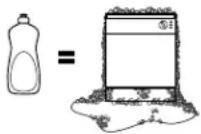
■ Using a detergent that is not specifically designed for dishwashers will cause the dishwasher to fill with suds.
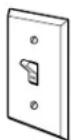
■ If your dishwasher is connected to a wall switch, ensure that the switch is on prior to use.
■ On dishwashers with electronic controls, if you choose to turn the wall switch off between wash cycles, allow 5–10 seconds after turning the switch on before touching ON/OFF to allow the control to reboot.
■ Non-Dishware Items: Do not wash items such as electronic air cleaner filters, furnace filters and paint brushes in your dishwasher. Damage to dishwasher and discoloration or staining of dishwasher may result.
■ Close supervision is necessary if this appliance is used by or near children.
- Load light, plastic items so they will not become dislodged and drop to the bottom of the dishwasher—they might come into contact with the heating element and be damaged.
¡ADVERTENCIA!
PROPER DISPOSAL OF THE DISHWASHER
Junked or abandoned dishwashers are dangerous... even if they will sit for "just a few days." If you are getting rid of your old dishwasher, please follow the instructions below to help prevent accidents.
Before You Throw Away Your Old Dishwasher:
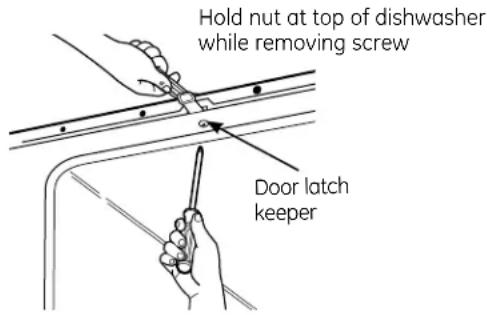
■ Take off the door of the washing compartment or remove the door latch keeper (as shown).

▲ WARNING!
When using your dishwasher, follow basic precautions, including the following:
■ Use this appliance only for its intended purpose as described in this Owner's Manual.
■ Use only powder, tabs, liquid detergents or rinse agents recommended for use in a dishwasher and keep them out of the reach of children. Cascade®, Cascade® Complete Automatic Dishwashing Detergents, and and Cascade Crystal Clear® rinse agents) have been approved for use in all GE dishwashers.
- Locate sharp items so that they are not likely to damage the door seal.
■ Load sharp knives with the handles up to reduce the risk of cut-type injuries.
■ Do not wash plastic items unless marked "Dishwasher Safe" or the equivalent. For plastic items not so marked, check the manufacturer's recommendations.
■ Do not touch the heating element during or immediately after use.
■ Do not operate your dishwasher unless all enclosure panels are properly in place.
■ Do not tamper with controls.
■ Do not abuse, sit on or stand on the door or dish rack of the dishwasher.
■ Do not allow children to play around dishwasher when opening or closing door due to the possibility of small fingers being pinched in door.
■ Do not discard a dishwasher without first removing the door of the washing compartment or the door latch.
■ Do not store or use combustible materials, gasoline or other flammable vapors and liquids in the vicinity of this or any other appliance.
■ Do not allow children to play with, on or inside this appliance or any discarded appliance.

READ AND FOLLOW THIS SAFETY INFORMATION CAREFULLY.
SAVE THESE INSTRUCTIONS
READ AND FOLLOW THIS SAFETY INFORMATION CAREFULLY.
SAVE THESE INSTRUCTIONS
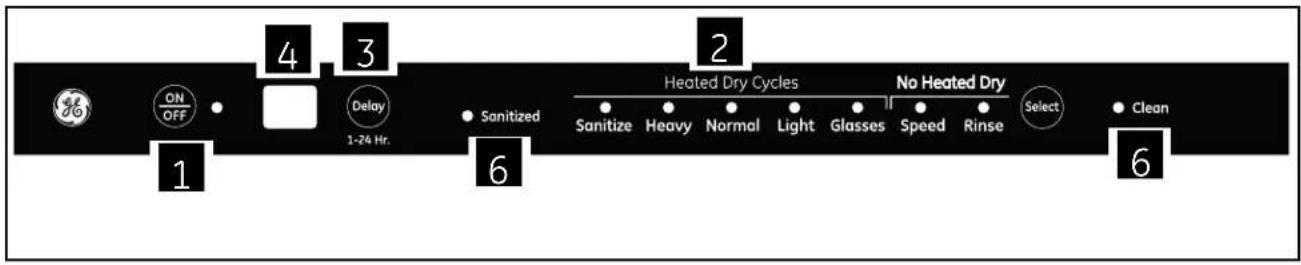
About the dishwasher control panel.
flowchart
graph LR
    A["ON/OFF"] --> B["Delay 1-24 Hr."]
    B --> C["Sanitized"]
    C --> D["Heated Dry Cycles"]
    D --> E["Sanitize"]
    D --> F["Heavy"]
    D --> G["Normal"]
    D --> H["Light"]
    D --> I["Glasses"]
    D --> J["Speed"]
    D --> K["Rinse"]
    D --> L["Select"]
    L --> M["Clean"]
Control Settings
1 ON/OFF
With door open, press ON/OFF button to turn the unit ON to begin operation and OFF at the end of a wash cycle. The ON/OFF light is displayed when the dishwasher is ON.
2 Wash Cycle Selections
Press SELECT button to choose wash cycle. The light under the cycle name will display to indicate which cycle has been selected.
NOTE: All cycle times and water usage information contained in this section are approximate values. Actual results will depend on several factors including, but not limited to, inlet water temperature and household water pressure.
SANITIZE 4.8 gallons, 130 minutes
This cycle is meant to sanitize dishes and glasses with added heat. If you select sanitize cycle, at the end of this cycle, the sanitized indicator will turn on.
HEAVY 6.7 gallons, 125 minutes
This cycle is meant for heavily soiled dishes or cookware with dried-on or baked-on soils. This cycle may not remove burned-on foods. Everyday dishes are safe to be used in this cycle.
NORMAL 3.8 gallons, 140 minutes
This cycle is meant for loads of everyday dishes, glasses and cookware with medium soils that have not been pre-rinsed.
LIGHT 4.8 gallons, 78 minutes
This cycle is meant for loads of everyday dishes, glasses and cookware with light soils that have been pre-rinsed.
GLASSES 3.9 gallons, 76 minutes
This cycle is meant for lightly soiled glassware. This cycle has less heating during the wash and rinse to protect your glassware. This cycle also has a lower temperature heated dry.
SPEED 5.8 gallons, 78 minutes
This cycle is meant for loads of everyday dishes, glasses and cookware with medium soils that have not been pre-rinsed. This cycle features reduced wash times to allow for faster cycle completion. This cycle also has a reduced time heated dry.
RINSE 1.9 gallons, 26 minutes
For rinsing partial loads that will be washed later. Do not use detergent with this cycle. This cycle does not include heated dry.
3 Delay Start Option
This option allows you to delay the start of a wash cycle for up to 24 hours.
With the door open, turn the dishwasher ON by pressing the ON/OFF button; then press the DELAY button to choose the number of hours you want to delay the start of the wash cycle. The hours will show in the display window.
NOTE: To cancel the DELAY HOURS option before the start of the cycle, repeatedly press the DELAY HOURS button until the display is blank or reads "00."
4 2 Digit Display
This display is used for DELAY START and cycle time countdown.
When a cycle is selected, this display is populated with the total number of minutes in the cycle (up to 99 minutes). For cycle times above 99 minutes the display will read "99".
5 Starting a Cycle
After selecting the wash cycle (Step 2) and DELAY START (Step 3), if desired, close the door of the dishwasher to start the cycle or begin the DELAY START countdown. When the door is closed, there will be a 5-second delay followed by a 60 second pump out before the water fill begins.
6 Status Indicators
SANITIZED If the SANITIZE cycle is selected, the sanitized indicator light will be turned on at the end of the cycle. If the NSF requirements for sanitization are not reached, the light will not turn on.
CLEAN
The green light will display and a beep will sound to alert you that the wash cycle is complete.
If the door is NOT opened, the beep will sound 4 times.
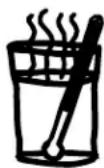
Check the Water Temperature
The entering water should be at least 120^ F and not more than 150^ F for effective cleaning and to prevent dish damage. Check the water temperature with a candy or meat thermometer.
Turn on the hot water faucet nearest the dishwasher, place the thermometer in a glass and let the water run continuously into the glass until the temperature stops rising.

Use Cascade Crystal Clear® Rinse Agent
Cascade Crystal Clear® rinse agent removes spots and prevents new film buildup on your dishes, glasses, flatware, cookware and plastic.
Filling the Dispenser
The rinse agent dispenser holds 3.5 oz. of rinse agent. Under normal conditions, this will last approximately one month. Try to keep it full, but do not overfill.
1 Make sure the dishwasher door is fully open.
2 Turn the dispenser cap to the left and lift it out.
3 Add rinse agent until the indicator window looks full.
4 Clean up any spilled rinse agent with a damp cloth.
5 Replace the dispenser cap.
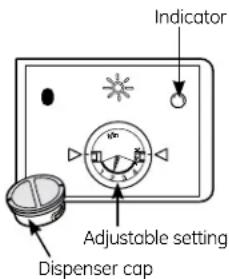
Rinse Aid Setting
The amount of rinse agent released into the final wash can be adjusted. The factory setting is at the midpoint. If there are rings of calcium (hard water) spots on dishes, try a higher setting. If you observe foam in the final rinse, try a lower setting.
To adjust the setting
Remove the dispenser cap; then turn the adjuster counterclockwise to increase the amount of rinse agent or clockwise to reduce the amount of rinse agent dispensed.
Dish Preparation Prior to Loading
■ No prerinsing of normal food soil is required if using Heavy, Normal or Speed wash cycles.
■ Scrape off hard soils, bones, toothpicks, skins and seeds.
■ Remove large quantities of any remaining food.
■ Remove leafy vegetables, meat, trimmings and excessive amounts of grease or oil.
■ Remove acidic food soils that can discolor stainless steel.

Proper Use of Detergent
Use only detergent specifically made for use in dishwashers. Cascade® Automatic Dishwashing Detergent has been approved. Keep your detergent fresh and dry. Don't put detergent into the dispenser until you're ready to wash dishes.
The amount of detergent to use depends on whether your water is hard or soft. With hard water, you need extra detergent. With soft water, you need less detergent.
Protect your dishes and dishwasher by contacting your water department and asking how hard your water is. Twelve or more grains is extremely hard water. A water softener is recommended. Without it, lime can build up in the water valve, which could stick while open and cause flooding. Too much detergent with soft water can cause a permanent cloudiness of glassware, called etching.
Use the information in the table below as a guideline to determine the amount of automatic dishwasher detergent to place in the dispenser.
When using automatic dishwasher detergent tablets, simply place one tablet in the dispenser and close the cover.
| Number of Grains | Detergent Cups to Fill |
| Less than 4 | 15 cup |
| 4 to 8 | 25 cup |
| 8 to 12 | 15 and 25 cups |
| Greater than 12 | 15, 25 cups and the open cup |
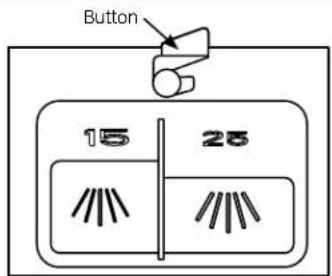
To open the wash cover, press the button and the cover will flip back.
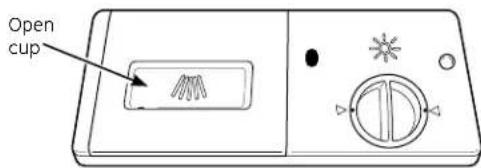
For heavily-soiled loads, use the HEAVY wash cycle and add a little extra detergent.
DO NOT USE HAND DISH DETERGENT
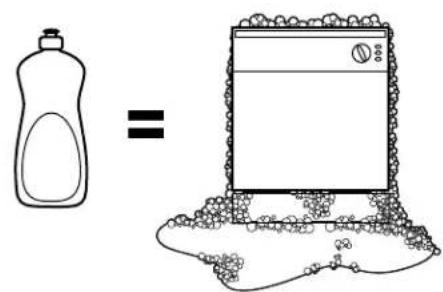
NOTE: Using a detergent that is not specifically designed for dishwashers will cause the dishwasher to fill with suds. During operation, these suds will spill out of the dishwasher vents, covering the kitchen floor and making the floor wet.
Because so many detergent containers look alike, store the dishwasher detergent in a separate space from all other cleaners. Show anyone who may use the dishwasher the correct detergent and where it is stored.
While there will be no lasting damage to the dishwasher, your dishes will not get clean using a dishwashing detergent that is not formulated to work with dishwashers.

Forget to Add a Dish?
A forgotten dish can be added any time before the main wash.
1 Unlatch the door to interrupt the cycle. Pull the door handle to release the door.
2 Do not open the door until the water spray action stops. Steam may rise out of the dishwasher.
3 Add forgotten dishes.
4 Close the door and push it in to relatch.
Loading the dishwasher racks.
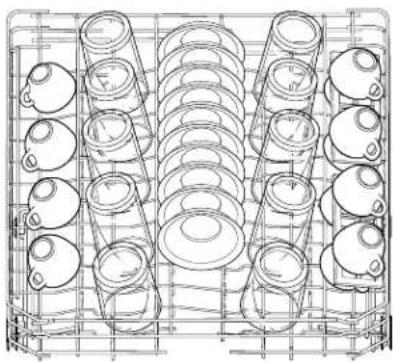
For best dishwashing results, follow these loading guidelines. Features and appearance of racks and silverware baskets may vary from your model.
natural_image
Technical line drawing of a mechanical assembly with multiple cylindrical components arranged in a grid (no text or symbols)Upper Rack
The upper rack is for glasses, cups and saucers. This is also a secure place for dishwasher-safe plastics. A cup shelf may be placed in the up or down position to add flexibility. The upper rack is good for all kinds of odd-shaped utensils. Saucepans, mixing bowls and other items should be placed face down.
Secure larger dishwasher-safe plastics over two tines when possible.
Make sure small plastic items are secure so they can't fall onto the heater.
Be sure that items do not protrude through the bottom of the rack and block rotation of the middle spray arm. This could result in poor wash performance for items in the upper rack.
natural_image
Technical line drawing of a mechanical component with coiled spring-like structures and mounting brackets (no text or symbols)Lower Rack
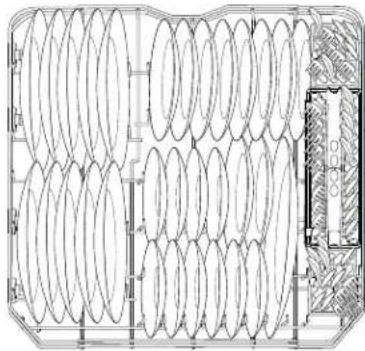
When loading the lower rack, do not load large platters or trays in the front left corner. They may prevent detergent from circulating during the wash cycle.
The lower rack is best used for plates, saucers and cookware. Large items should go along the sides. Load platters, pots and bowls along the sides, in corners or in the back. The soiled side of items should face the center of the rack.
Be careful not to let a portion of any item such as a pot or dish handle extend through the bottom rack. This could block the wash arm and cause poor washing results.
Three-piece basket
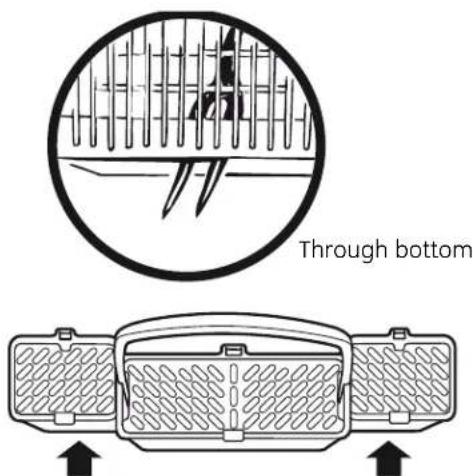
To remove end baskets, grasp the basket at opposite corners and slide apart.
Silverware Basket
The silverware basket may be used without the topper for quick loading. With the topper, flatware is better positioned for the dishwasher to thoroughly wash and dry all pieces by preventing nesting.
Without the topper
Put the flatware in the removable basket with fork and knife handles up to protect your hands. Place spoons in the basket with handles down. Mix knives, forks and spoons so they don't nest together. Distribute evenly. Small plastic items, such as measuring spoons and lids from small containers, should go in the bottom of the silverware basket with silverware on top.
With the topper
Place small plastic items, such as measuring spoons and lids from small containers, in the bottom of the basket and snap the topper in place. Insert spoons and forks, handles first, through the holes in the topper. Place knives, blades first, through the holes in the topper.
To clean the control panel, use a lightly dampened cloth, then dry thoroughly. To clean the exterior, use a good appliance polish wax. Never use sharp objects, scouring pads or harsh cleaners on any part of the dishwasher.
Cleaning the Exterior
Cleaning the Door Panel
Before cleaning the front panel, make sure you know what type of panel you have. Refer to the last two letters of your model number. You can locate your model number on the left-hand tub wall just inside the door. If your model number ends with BB or WW, then you have a Painted Door panel. If your model number ends with SS, then you have a Stainless Steel Door panel.
Follow the instructions below for cleaning the door panel for your specific model.
Painted Door Panel (model numbers ending in BB-black or WW-white) Use a clean, soft, lightly dampened cloth, then dry thoroughly. You may also use a good appliance wax or polish.
Stainless Steel Door Panel (model numbers ending in SS)
The stainless steel panels can be cleaned with Stainless Steel Magic or a similar product using a clean, soft cloth. Do not use appliance wax, polish, bleach or products containing chlorine on Stainless Steel doors.
You can order Stainless Steel Magic #WX10X15 through GE Parts by calling 800.626.2002.
Do not wipe the dishwasher with a soiled dish cloth or wet towel. These may leave a residue. Do not use scouring pads or powdered cleaners because these products can scratch the finish.
Cleaning the Control Panel
To clean the control panel, use a lightly dampened cloth; then dry thoroughly. Do
not use sharp objects, scouring pads or harsh cleaners on the control panel.
Stainless Steel Interior Tub and Inner Door
The stainless steel used to make the dishwasher tub and inner door provides the highest reliability available in a GE
dishwasher. If the dishwasher tub or inner door is ever scratched or dented during during normal use, they will not rust or corrode. These surface blemishes will not affect their function or durability.
Cleaning the Spray Arms and the Filters
The dishwasher will flush away all normal food soils. However, objects (fruit pits, bones, etc.) may collect in openings and should be removed occasionally to avoid clogging the drain system.
▲ CAUTION
Personal injury hazard. Before cleaning the interior, wait at least 20 minutes after a cycle for the heating element to cool down. Failure to do so could result in burn injuries.
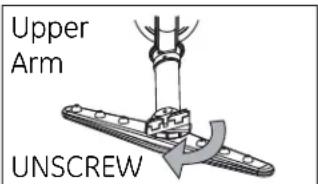
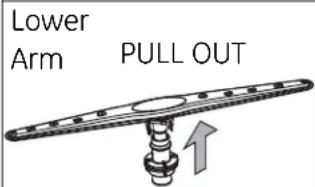
Cleaning the Spray Arms
Because hard water chemicals will clog the spray arm jets and bearings, it is necessary to clean the spray arms regularly. Wash the arms in soapy, warm water and use a soft brush to clean the jets. Replace them after rinsing thoroughly.
To remove the upper spray arm, unscrew the nut clockwise.
To remove the lower spray arm, pull upward.
Caring for the dishwasher.
Cleaning the Spray Arms and the Filters (Continued)
Cleaning the Filters
For best performance and results, the filter assembly must be cleaned once a month. The filter efficiently removes food particles from the wash water, allowing water to be recirculated during the cycle. For this reason, it is a good idea to remove the large food particles trapped in the filter frequently by rinsing the
main filter and cup under running water. To remove the filter assembly, follow the 3 steps shown below. To clean the main filter and fine filter, use a cleaning brush. The dishwasher must never be used without the filters. Improper replacement of the filter may reduce the performance level of the appliance and may damage dishes and utensils.
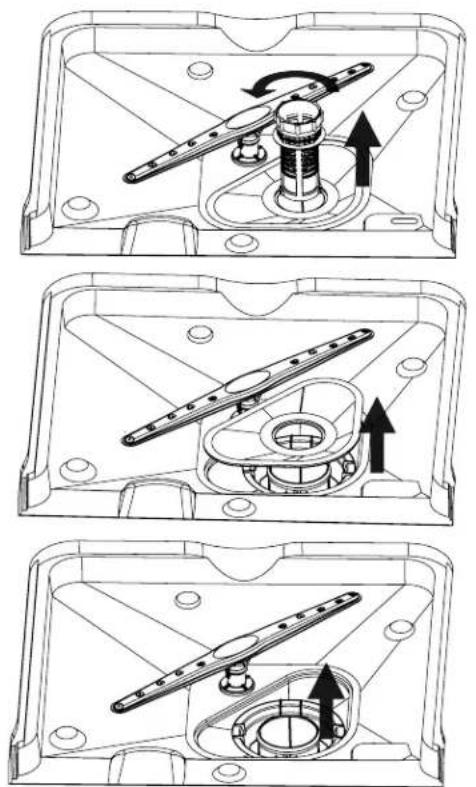
STEP 1: Turn the filter counter-clockwise and lift up.
STEP 2: Lift the main filter up
STEP 3: Lift the fine filter up
General Care Instructions
Protect Against Freezing
If your dishwasher is left in an unheated place during the winter, ask a service technician to:
1 Cut off electrical power to the dishwasher. Remove fuses or trip circuit breaker.
2 Turn off the water supply and disconnect the water inlet line from the water valve.
3 Drain water from the water inlet line and water valve. (Use a pan to catch the water.)
4 Reconnect the water inlet line to the water valve.
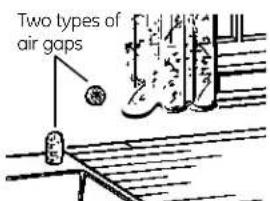
Check the air gap any time your dishwasher isn't draining well.
Does Your Dishwasher Have an Air Gap?
An air gap protects your dishwasher against water backing up into it if a drain clogs. The air gap is not a part of the dishwasher. It is not covered by your warranty. Not all plumbing codes require air gaps, so you may not have one.
The air gap is easy to clean.
1 Turn off the dishwasher and lift off the chrome cover.
2 Remove the plastic cap and clean with a toothpick.
Before you call for service...

Troubleshooting Tips - Save time and money! Review the charts on the following pages, or visit GEAppliances.com. You may not need to call for service.
Problem Possible Causes What To Do
| Noise start the dishwasher. | Some of the sounds you'll hear are normal | Detergent cup opening.The motor starting during the drying period.Water draining out of the tub immediately after you |
| Utensils are not secure in the rack or something small has dropped into the rack | Make sure everything is secured in dishwasher. | |
| Motor hums do not use your dishwasher often, set it to fill and pump out once every week. This will help keep the seal moist.of the desired cycle. Advance the control to the start of | Dishwasher has not been used on a regular basis. If youDishwasher control was not advanced properly to the start | |
| Detergent left in dispenser cups | Dishes are blocking the detergent cups | Reposition the dishes. |
| Water standing in the bottom of the tub | Drain is clogged you may need a plumber. | If you have an air gap, clean it.Check to see if your kitchen sink is draining well. If not,If the dishwasher drains into a disposer, run disposer clear. |
| This is normal | A small amount of clean water around the outlet of the tub bottom at the back of the tub keeps the water seal lubricated. | |
| Suds in the tub | Correct detergent wasn't used | Use only automatic dishwasher detergents to avoid sudsing.Dishwashing Detergent has been GE dishwashers.To remove suds from the tub, open the dishwasher and let suds evaporate. Add 1 gallon of cold water to the tub. Closeer. Repeat if necessary. |
| Rinse agent was spilled | Always wipe up rinse agent spills immediately. | |
| Stained dishwasher parts | Detergent with colorant was used detergent cup for signs of any discoloration. If cup is discolored, change to detergent without any colorant.Dishwashing Detergents has been approved for use in all GE dishwashers. | Some detergents contain colorant (pigment or dyes) that will discolor the tub interior with extended use. Check the |
| Some tomato-based foods can stain | Use of the RINSE ONLY cycle after adding the dish to the load can decrease the level of staining. | |
| Dishwasher won't run | Fuse is blown, or the circuit breaker tripped | Replace fuse or reset circuit breaker. Remove any other appliances from the circuit. |
| Power is turned off | In some installations, the power to the dishwasher is proved through a wall switch, often located next to the disposer switch. Make sure it is on. | |
| Reboot your control | Turn off power to the dishwasher (at circuit breaker or wall switch) for 30 seconds, then turn back on. | |
| Steam | This is normal | Steam comes through the vent during washing, drying and when water is being pumped out. |
| Beeping at the end of the cycle | This is normal | The dishwasher will beep 4 times (unless interrupted) and the CLEAN light will display at the end of the wash cycle. |
Before you call for service...
| Problem Possible Causes What To Do | ||
| Dishes and flatware not clean | Low inlet water temperature | Make sure inlet water temperature is correct (see page 6). |
| Water pressure is temporarily low | Turn on a faucet. Is water coming out more slowly than usual?If so, wait until pressure is normal before using your dishwasher. | |
| Air gap is clogged | Clean the air gap. | |
| Improper rack loading | Make sure large dishware does not block the detergent dispenser or the wash arms. | |
| No air gap or high drain loop | Verify that you have an air gap or a high drain loop. Refer to the Installation Instructions. | |
| Filter needs cleaning | The filter assembly must be cleaned regularly to allow the filter to efficiently remove food particles from the wash water. See Cleaning the Filter section on page 1. | |
| Spots and filming on glasses and flatware | Extremely hard water | Use Cascade Crystal Clear^® rinse agent to remove spots and prevent new film buildup. |
| Low inlet water temperature | Make sure water temperature is at least 120°F. | |
| Overloading the dishwasher / • Improper loading | Load dishwasher as shown in the Loading the Dishwasher Racks section. | |
| Old or damp powder detergent | Make sure detergent is fresh. | |
| Rinse agent dispenser emptyToo little detergent | If water is extremely hard, a water softener may be required. | |
| Cloudiness on glassware | Combination of soft water and too much detergent | This is called etching and is permanent. To prevent this from happening, use less detergent if you have soft water. Wash glassware in the shortest cycle that will get them clean. |
| Water temperature entering the dishwasher exceeds 150°F | Lower the water heater temperature. | |
| Black or gray marks on dishes | Aluminum utensils have rubbed against dishes | Remove marks with a mild, abrasive cleaner. |
| Yellow or brown film on inside surfaces | Tea or coffee stains | Remove the stain by hand, using a solution of 1/2 cup bleach and 3 cups warm water. WARNINGBefore cleaning interior wait at least 20 minutes after a cycle for the heating element to cool down. Failure to do so can result in burns. |
| An overall yellow or brown film can be caused by iron deposits in water | A special filter in the water supply line is the only way to correct this problem. Contact a water softener company. | |
| White film on inside surfaces | Hard water minerals | To clean the interior, apply dishwasher detergent to a damp sponge. Wear rubber gloves. Do not use any type of cleanser other than dishwasher detergent because it may cause foaming or sudsing. Cascade^® Automatic Dishwashing Detergent has been approved for use in all GE dishwashers. |
| Dishes don't dry | Low inlet water temperature | Make sure inlet water temperature is correct (see page 6). |
| Rinse agent dispenser is empty | Check the rinse agent dispenser. | |
| Control panel responded to input properly seated but dishwasher never filled with water | Door latch may not be | Make sure the door is firmly closed. |
| Water vale may be turned off | Make sure water valve (usually located under the sink) is turned on. | |
| Dishwasher beeps once every 15 seconds | This is normal | Close the door after opening it mid-cycle. |
| This is a reminder that the door has been left open during operation | Press ON/OFF to turn OFF the dishwasher. | |
GE Dishwasher Warranty.
All warranty service provided by our Factory Service Centers, or an authorized Customer Care® technician. To schedule service, on-line, visit us at GEAppliances.com, or call 800.GE.CARES (800.432.2737) in the United States. In Canada, call 1.800.561.3344. Please have serial number and model number available when calling for service.
Staple your receipt here. Proof of the original purchase date is needed to obtain service under the warranty.
For The Period Of: GE Will Replace:
| One Year | Any part of the dishwasher which fails due to a defect in materials or workmanship. During this |
| From the date of the original purchase | limited one-year warranty, GE will also provide, free of charge, all labor and in-home service to replace the defective part. |
What GE Will Not Cover:
| ■ Service trips to your home to teach you how to use the product.■ Improper installation, delivery or maintenance.■ Failure of the product if it is abused, misused, or used for other than the intended purpose or used commercially.■ Replacement of house fuses or resetting of circuit breakers. | ■ Damage to the product caused by accident, fire, floods or acts of God.■ Incidental or consequential damage caused by possible defects with this appliance.■ Cleaning or servicing of the air gap device in the drain line.■ Damage caused after delivery.■ Product not accessible to provide required service. |
EXCLUSION OF IMPLIED WARRANTIES—Your sole and exclusive remedy is product repair as provided in this Limited Warranty. Any implied warranties, including the implied warranties of merchantability or fitness for a particular purpose, are limited to one year or the shortest period allowed by law.
This warranty is extended to the original purchaser and any succeeding owner for products purchased for home use within the USA. If the product is located in an area where service by a GE Authorized Servicer is not available, you may be responsible for a trip charge or you may be required to bring the product to an Authorized GE Service location for service. In Alaska, the warranty excludes the cost of shipping or service calls to your home.
Some states do not allow the exclusion or limitation of incidental or consequential damages. This warranty gives you specific legal rights, and you may also have other rights which vary from state to state. To know what your legal rights are, consult your local or state consumer affairs office or your state's Attorney General.
Warrantor: General Electric Company. Louisville, KY 40225
What Is Not Covered (for customers in Canada):
■ Service trips to your home to teach you how to use the product.
■ Improper installation.
If you have an installation problem, contact your dealer or installer. You are responsible for providing adequate electrical, exhausting and other connecting failures.
■ Failure of the product if it is abused, misused, or used for other than the intended purpose or used commercially.
■ Replacement of house fuses or resetting of circuit breakers.
■ Damage to the product caused by accident, fire, floods or acts of God.
■ Damage caused after delivery.
EXCLUSION OF IMPLIED WARRANTIES—Your sole and exclusive remedy is product repair as provided in this Limited Warranty. Any implied warranties, including the implied warranties of merchantability or fitness for a particular purpose, are limited to one year or the shortest period allowed by law.
This warranty is extended to the original purchaser and any succeeding owner for products purchased in Canada for home use within Canada. In home warranty service will be provided in areas where it is available and deemed reasonable by Mabe to provide.
WARRANTOR IS NOT RESPONSIBLE FOR CONSEQUENTIAL DAMAGES.
Warrantor: MABE CANADA INC.
Consumer Support.
GE Appliances Website
In the U.S.: GEAppliances.com
Have a question or need assistance with your appliance? Try the GE Appliances Website 24 hours a day, any day of the year! For greater convenience and faster service, you can now download Owner's Manuals, order parts or even schedule service on-line. In Canada: www.GEAppliances.ca
Schedule Service
In the U.S.: GEAppliances.com
Expert GE repair service is only one step away from your door. Get on-line and schedule your service at your convenience 24 hours any day of the year! Or call 800.GE.CARES (800.432.2737) during normal business hours.
In Canada, call 1.800.561.3344

Real Life Design Studio
In the U.S.: GEAppliances.com
GE supports the Universal Design concept—products, services and environments that can be used by people of all ages, sizes and capabilities. We recognize the need to design for a wide range of physical and mental abilities and impairments. For details of GE's Universal Design applications, including kitchen design ideas for people with disabilities, check out our Website today. For the hearing impaired, please call 800.TDD.GEAC (800.833.4322).
Purchase a GE extended warranty and learn about special discounts that are available while your warranty is still in effect. You can purchase it on-line anytime, or call 800.626.2224 during normal business hours. GE Consumer Home Services will still be there after your warranty expires. In Canada, please visit our Website or contact your local extended warranty provider.
Parts and Accessories
In the U.S.: GEAppliances.com
Individuals qualified to service their own appliances can have parts or accessories sent directly to their homes (VISA, MasterCard and Discover cards are accepted). Order on-line today, 24 hours every day or by phone at 800.626.2002 during normal business hours.
Instructions contained in this manual cover procedures to be performed by any user. Other servicing generally should be referred to qualified service personnel. Caution must be exercised, since improper servicing may cause unsafe operation.
Customers in Canada should consult the yellow pages for the nearest Mabe service center, or call 1.800.661.1616.

Contact Us
In the U.S.: GEAppliances.com
If you are not satisfied with the service you receive from GE, contact us on our Website with all the details including your phone number, or write to: General Manager, Customer Relations
GE Appliances, Appliance Park
Louisville, KY 40225
In Canada: www.GEAppliances.ca, or write to: Director, Consumer Relations, Mabe Canada Inc
Suite 310, 1 Factory Lane
Moncton, N.B. E1C 9M3
Register Your Appliance
In the U.S.: GEAppliances.com
Register your new appliance on-line—at your convenience! Timely product registration will allow for enhanced communication and prompt service under the terms of your warranty, should the need arise. You may also mail in the pre-printed registration card included in the packing material.
In Canada: www.GEAppliances.ca