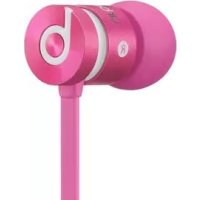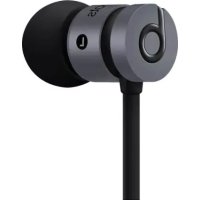
urBeats se - Earphones BEATS - Free user manual and instructions
Find the device manual for free urBeats se BEATS in PDF.



User questions about urBeats se BEATS
0 question about this device. Answer the ones you know or ask your own.
Ask a new question about this device
Download the instructions for your Earphones in PDF format for free! Find your manual urBeats se - BEATS and take your electronic device back in hand. On this page are published all the documents necessary for the use of your device. urBeats se by BEATS.
USER MANUAL urBeats se BEATS
natural_image
Red circular logo with white lowercase 'b' (no text or symbols)urbeats.
USER GUIDE
Table of Contents
EN Important Safety Information 3
Eartips and Maintenance 6
Using the 3-Button Remote Mic 10
Care and Storage 11
Select, Connect, Listen 12
To avoid hearing damage, make sure that the volume on your music player is turned down before connecting your headphones. After placing headphones in/on your ears, gradually turn up the volume until you reach a comfortable listening level. Noise levels are measured in decibels (dB); exposure to any noise at or above 85 dB can cause gradual hearing loss. Monitor your use; hearing loss is a function of loudness versus time. The louder it is, the less time you can be exposed to it. The softer it is, the more time you can listen to it.
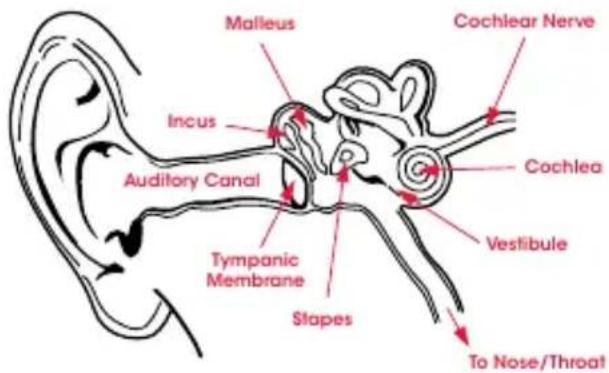
Physiology of the Ear
text_image
Malleus Cochlear Nerve Incus Auditory Canal Cochlea Vestibule Tympanic Membrane Stapes To Nose/ThroatThis decibel (dB) table compares some common sounds and shows how they rank in potential harm to hearing.
| SOUND NOISE LEVEL | (dB) | EFFECT |
| Whisper 30 Very quiet | ||
| Quiet Office 50-60 Comfortable hearing levels are under 60 dB | ||
| Vacuum Cleaner, Hair Dryer | 70 Intrusive; interferes with telephone conversations | |
| Food Blender 85-90 85 dB is the level at which hearing damage (8 hr) begins | ||
| Dustbin Lorry, Cement Mixer | 100 No more than 15 minutes of unprotected exposure recommended for sounds between 90-100 dB | |
| Power Saw, Drill/Jackhammer | 110 Regular exposure to sound over 100 dB of more than 1 minute risks permanent hearing loss | |
| Rock Concert (varies) | 110-140 | Threshold of pain begins around 125 dB |
* Chart information from http://www.nidcd.nih.gov/health/education/teachers/pages/common_sounds.aspx
UK English
“.... a typical person can safely listen to an (digital music player) for 4.6 hours per day at 70% volume.”
“.... knowing the levels one is listening to music at, and for how long, is extremely important.”
From http://www.cbc.ca/health/story/2006/10/19/music-earphones.html
Get the most out of your equipment and enjoy great audio performance even at safe levels. Our headphones will allow you to hear more details at lower volume levels than ever before.
Use Responsibly
Do not use headphones when it's unsafe to do so – while operating a vehicle, crossing streets, or during any activity or in an environment where your full attention to your surroundings is required. It is dangerous to drive while wearing headphones, and in many places illegal because it decreases your chances of hearing life-saving sounds outside of your vehicle, such as another car's horn and emergency vehicle sirens. Learn how to establish a safe listening level and review other important safety guidelines from the Consumer Electronics Association at www.ce.org and the Deafness Research Foundation at www.drf.org.
Eartips and Maintenance
Eartip Selection
natural_image
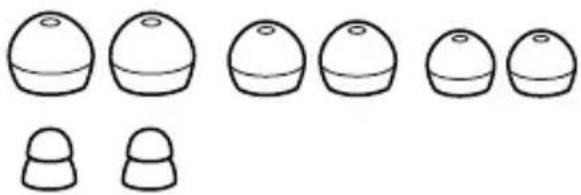
Simple line drawings of six dome-shaped objects with varying top caps, no text or symbols presentThe tips on the ends of urBeats™ headphones make the difference between good sound and great sound. With the right fit, you'll receive better isolation from unwanted outside noise, increased bass response, better tonal balance and the headphones will stay in your ears better. Of course, the right fit will also feel more comfortable. Because everyone's ears are unique, Beats supplies several sizes and designs of eartips. Finding the perfect fit with the correct tip is a matter of experimentation. Try out all the eartips included with your urBeats™ headphones to find the best fit for the size and shape of your ear canal. We recommend that you try the smallest tip first and work upwards in size until you find a comfortable fit which has a good seal and also stays in your ears without falling out. Also try different style tips to see which works best for you.
Eartip Fit Testing
A good way to gauge whether or not the eartip is sealing properly in your ear canal is by snapping your fingers right next to your ear. If the seal is correct, your ear will not feel "plugged", yet the snapping of your fingers will sound dull and distant. If you hear your finger snaps distinctly, the seal is probably not adequate. If the sound of your finger snapping is dull and distant, but your ear feels plugged up, like you're on an airplane preparing to land, then you've over-inserted the eartip.
Proper Insertion and Removal of Eartips
-
You may wish to lightly moisten your eartips for easier insertion.
-
Using your right hand, grasp the right headphone.
-
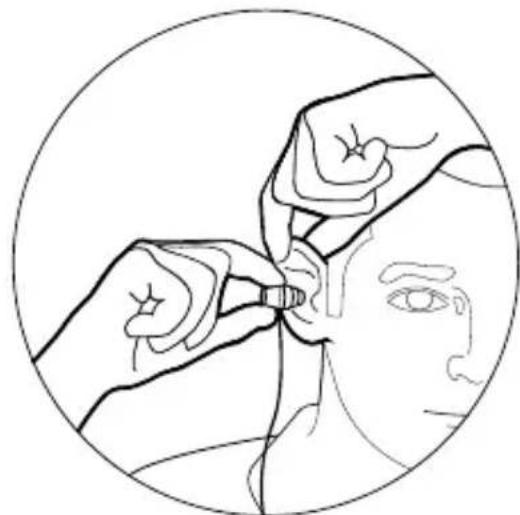
With your left hand, pull up and back on your right ear to straighten your ear canal.
-
Carefully insert your right headphone, rubber eartip first, so that it seals completely and comfortably in your ear. DO NOT insert the eartip so deeply that your ear canal feels completely "plugged".
-
Repeat this procedure for your left ear.
-
When you've finished your listening session, remove your in-ear headphones slowly with a twisting motion to gradually break the seal.
natural_image
Line drawing of a medical procedure on a patient's head, showing hands adjusting a tool near the ear (no text or symbols present)Eartip Cleaning
Keeping urBeats™ eartips clean is essential for safe, hygienic use. IMPORTANT: DO NOT attempt to clean the eartips without first removing them from the headphones. Getting the delicate circuitry inside your UrBeats™ headphones wet may cause permanent damage.
- Firmly grip the eartip with one hand and the headphone with the other. Carefully remove the eartip from the ear tube.
- Use warm water and mild soap on a damp cloth to remove dirt and earwax from the eartip. Do NOT use harsh cleaning agents.
- Rinse and completely dry your eartips before placing them back on your headphones.
- Carefully push the eartips back onto the urBeats™ headphones, making sure they are on the ear tube completely.
Using the 3-Button Remote Mic
The in-line remote controls are perfectly matched to your HTC phone. You can do everything you want to do from this functionally designed control strip. Unlike other in-line controllers, every function on this device is clearly marked with familiar icons and controls are separated by function.
Functions include
• In-line Mic with Controls for HTC phones
- Track Up/Track Down
-Forward/Rewind
-Play
- Pause II
-Answer
- End Call
- Voice Command
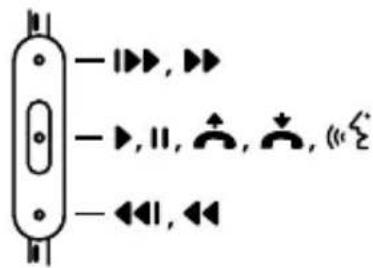
text_image
-▶▶,▶▶ -▶,11,▲,▲,◀◀,◀◀For HTC Phones
Note: Functionality varies by device.
Care and Storage
- Keeping urBeats' headphones clean is essential for safe, hygienic use.
- Never wear in-ear headphones if they appear dirty.
- When not in use, always store your urBeats™ headphones in the protective case provided.
- Keep case closed, and store in a clean, dry environment.
- Do not store other items in the case, as this may result in contamination.
- Avoid storage in extreme heat or cold.
- Avoid exposure to liquids, temperature extremes and high humidity.
- Never pull on the cable to disconnect urBeat®s headphones from your music player. Grasp the plug at the end of the cable and pull to disconnect.
Select, Connect, Listen
Select
Beats ^® in-ear headphones feature multiple pairs of ear tips, designed to fit securely and block out external sound. Choose the pair which fits most comfortably and best seals out noise.
Connect
Plug the urBeats™ cable into the 1/8" (3.5 mm) stereo plug on your music player.
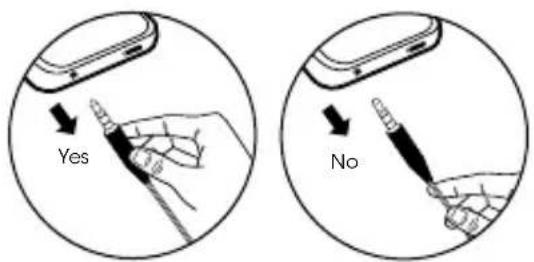
text_image
Yes NoListen
Turn down the volume on your music player before inserting urBeats™ headphones. IMPORTANT: Left and Right Headphone: Having the correct headphone side in the correct ear does affect the listening experience. Note the "L" and "R" markings on the side of each headphone. "L" is for the left ear. "R" is for the right ear. Excessive listening levels can cause permanent hearing damage. Avoid loud listening, especially for extended periods of time.
Register Your Beats® Today
www.beatsbydre.com/register

* Tableau provenant de http://www.nidcd.nih.gov/health/education/teachers/pages/common_sounds.aspx
Français
natural_image
Simple line drawings of various dome-shaped objects with varying top and bottom shapes (no text or symbols)natural_image
Line drawing of a person receiving medical or surgical procedures from a tool, enclosed in a circular frame (no text or symbols)Français
De http://www.cbc.ca/health/story/2006/10/19/music-earphones.html
natural_image
Simple line drawings of various dome-shaped objects with varying top and bottom shapes (no text or symbols)natural_image
Line drawing of a medical procedure on eye anatomy, showing hands performing a procedure (no text or symbols)Español
http://www.cbc.ca/health/story/2006/10/19/music-earphones.html
natural_image
Simple line drawings of six dome-shaped objects with varying top caps, no text or symbols presentnatural_image
Line drawing of a medical procedure on a patient's head, showing hands adjusting a tool near the ear (no text or symbols present)Italiano
*Quelle:http://www.nidcd.nih.gov/health/education/teachers/pages/common_sounds.aspx
Deutsch
Quelle: http://www.cbc.ca/health/story/2006/10/19/music-earphones.html
natural_image
Simple line drawings of six dome-shaped objects with varying top caps, no text or symbols presentnatural_image
Line drawing of a person receiving an injection from a medical device (no text or symbols)Deutsch
Van http://www.cbc.ca/health/story/2006/10/19/music-earphones.html
natural_image
Simple line drawings of six dome-shaped objects with varying top caps, no text or symbols presentnatural_image
Line drawing of a person receiving medical or surgical procedures from a tool, enclosed in a circular frame (no text or symbols)Nederlands
De oordopjes reinigen
text_image
-▶▶, ▶▶ -▶, 11, ↑, ↓, (←) ∈Voor HTC-telefoons
Beats Electronics, LLC
1601 Cloverfield Blvd
Suite 5000N
Santa Monica
CA 90404
beats by dr. dre.
© 2012 HTC Corporation. All rights reserved. HTC is a trademark of HTC Corporation. "Beats by Dr. Dre.," "Beats", "urBeats", and the "B" logo are trademarks of Beats Electronics LLC.
771-00022-03-C