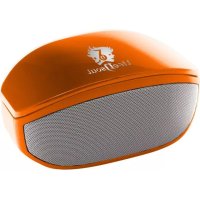
BM208 - Docking station Life N Soul - Free user manual and instructions
Find the device manual for free BM208 Life N Soul in PDF.


| Product Type | Bluetooth Speaker |
| Brand | Life N Soul |
| Model | LnS-BM208 |
| Dimensions | 58 × 73 × 120 mm |
| Power Supply | Built-in lithium battery, USB 5V charging |
| Output Power | 3 W × 2 (stereo) |
| Connectivity | Bluetooth V2.1 + EDR, 3.5mm AUX input |
| Bluetooth Transmission Distance | ≤ 10 meters |
| Frequency Response | 90 Hz - 20 kHz |
| Signal-to-Noise Ratio (SNR) | ≥ 76 dB |
| Sensitivity | 80 dB ± 2 dB |
| Main Functions | Bluetooth playback, hands-free, AUX mode, volume and track control |
| Included Accessories | 3.5mm audio cable, USB cable, user guide / warranty card |
| Maintenance and Cleaning | Soft dry cloth. Do not use chemicals. |
| Safety | Do not expose to rain or moisture. Do not disassemble. |
| Spare Parts and Repairability | Built-in battery not replaceable by user. No spare parts provided. |
| General Information | Auto-pairing on startup. Auto-off after 5 minutes without connection. |
Frequently Asked Questions - BM208 Life N Soul
User questions about BM208 Life N Soul
0 question about this device. Answer the ones you know or ask your own.
Ask a new question about this device
Download the instructions for your Docking station in PDF format for free! Find your manual BM208 - Life N Soul and take your electronic device back in hand. On this page are published all the documents necessary for the use of your device. BM208 by Life N Soul.
USER MANUAL BM208 Life N Soul
User's Manual for the Bluetooth Speaker LnS-BM208
Distinguished Customers,
Thank you for purchasing this Bluetooth speaker LnS-BM208. Before getting started, please read the user's manual carefully so as to ensure proper operation and optimized performance of this product. With stylish outer appearance, compact structure, high fidelity sound and multi-functionality, it has obtained patents concerning its outer appearance and adopted advanced electric and sound technology in the industry. This ultimately creates the best choice to hook up with your devices such as a tablet, cell phone and digital music player etc. perfectly by presenting you with exceptional stereo effects whether you are at home, on vacation or at work.
1. Precautions
Please store and use this product at the ambient temperature;
Do not expose this product to the rain or damp surroundings;
Prevent this product from falling, as this could result in serious damage;
Do not dismantle, repair or modify this product on your own;
In order to avoid any risk, do not dispose this product inappropriately or toss it into the fire as there is a built-in lithium battery.
II. Considerate Hints
1) Do not constantly turn up the volume to a fairly high level as this could shorten the service life of this product or impair your hearing;
2) When encountering any fault during operation, please cut off the power supply and disconnect the USB cable to prevent further damage to the speaker or other components;
3) The Bluetooth transmission range or connectivity could be affected by low battery power. In this case, please recharge immediately.
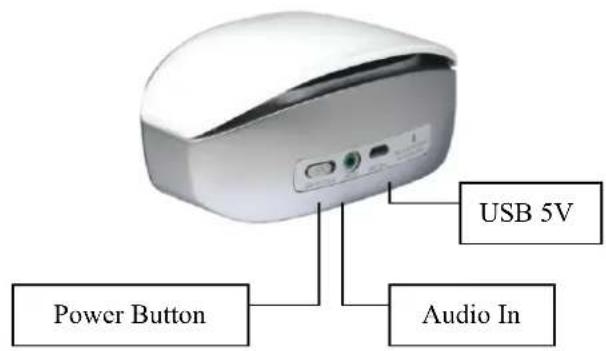
III. Outer Appearance and Function Buttons
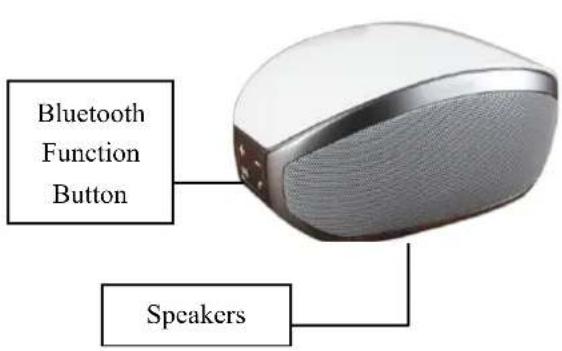
/Jump to the last track/Turn down the volume: Press this button to select tracks or press and hold it to bring down the volume in the Bluetooth playback mode.
V+ /Jump to the next track/Turn up the volume: Press this button to select tracks or press and hold it to bring up the volume in the Bluetooth playback mode.
- /Pause/Play/Pick up the call: Press this button to pause, to resume normal operation or pick up the incoming calls in the Bluetooth playback mode.
IV. Product Parameters
Product Model: LnS-BM208
Bluetooth Specifications: Bluetooth V2.1+EDR
Transmission Distance: ≤ 10M (depending upon operation environment and devices to which it connects)
USB Recharge Voltage: DC 5V
Built-in Battery: Lithium battery
Output Power: 3W× 2
Frequency Response: 90Hz-20KHz
Sensitivity: 80db± 2db
Signal to Noise Ratio (SNR): ≥ 76dB
Product Dimensions: 58 × 73 × 120mm
V. System Composition
1) Speaker 1set
2)3.5 Audio Cable 1piece
3)USB Power Cable 1piece
4) User's Manual/Warranty Card 1copy
VI. Common Function Description
Power-on Status: Press the Power Button to turn the speaker on and it beeps simultaneously with the blue indicator flashing. The volume is set to 60% by default.
Bluetooth Connection: Once switched on, the speaker starts searching for other Bluetooth devices automatically and at the same time, the blue indicator goes on and off. When a Bluetooth device is found, the speaker prompts whether to pair up or not. If selected Yes, it pairs up with the device and meanwhile, the blue indicator flashes slowly and a beep is also generated by the speaker. If failed to detect any other Bluetooth device within 5minutes, the speaker will shut itself down. Turn it back on again to start search. All the paired devices will engage in automatic connection when the speaker is turned on. Hints: Please recharge when the battery loses its power considerably or the connection is failed.
Bluetooth Music Playback: When connected, the speaker plays music immediately. Press V^- and V^+ to select tracks upwards or downwards. Press and hold V^- and V^+ to adjust the volume. While playing music, press to pause and to resume.
Call Pick-up: After successfully connected with the cell phone, the speaker beeps when a call comes in. Press to pick it up and to terminate conversation, press one more time.
AUX Playback: Use the supplied audio cable to connect the speaker to another music player such as computer by plugging one end to the speaker's AUX port and the other end to the music player's audio port. When the music player starts playing music, the speaker sounds right away. Tracks can be selected and volume adjusted only by the music player.
Hints: 3 buttons of V - ,V + and V are functionless in the AUX playback mode and the volume is controlled by the music player.
Intelligent Quick Recharge: Recharge can be performed in the standby mode or power-off situation. Before recharging, plug the mini-USB end of the supplied USB cable to the speaker's USB port and the other end to the USB port of the computer or the USB recharger. When fully recharged, the red indicator goes off.
VII. Compatibility
Wireless: Devices configured with Bluetooth 2.1+EDR or higher version such as IPAD, IPHONE (at least the second generation IPHONE installed with the IPHONE software 3.1), IPOD TOUCH and MAC as well as a majority of intelligent phones or computers that support Bluetooth.
Bluetooth V2.1+EDR consists of protocols like A2DP, AVRCP and HFP and so on.
VIII. Toubleshooting
| Faults Phenomena | Solutions |
| Unable to pair up with other devices | 1. Check whether the speaker is still in the process of search or switch it off and then on. 2. There are too many Bluetooth devices in the proximity that cause difficulty in connection. Please turn them off. |
| The sound is rather low or distorted | 1. Check the Bluetooth device's volume and then adjust it to a proper level. 2. Recharge the battery |
| The music stops from time to time | 1. Check whether the speaker's effective transmission range is exceeded or there is an obstacle standing between the speaker and other Bluetooth devices. |
| The Bluetooth indicator remains off | 1. It suggests the battery power drops quite low and retry once being recharged. 2. Turn it on again. |