MaxTwist - Docking station ALBRECHT - Free user manual and instructions
Find the device manual for free MaxTwist ALBRECHT in PDF.



| Product type | Bluetooth docking station |
| Brand | ALBRECHT |
| Model | MaxTwist |
| Power supply | Built-in rechargeable battery 3.7V via USB cable (charger not included) |
| Connectivity | Bluetooth 3.0 + EDR, class 2; auxiliary input (AUX) 3.5mm |
| Bluetooth range | Approximately 10 meters (without obstacles) |
| Functions | Hands-free (calls), play/pause, volume control, multipoint pairing |
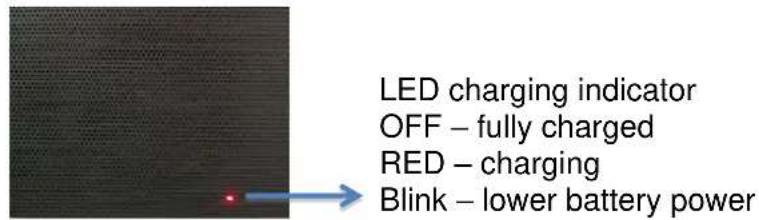
| LED indicators | Solid red (charging), Flashing red (low battery), Flashing blue/red (pairing), Solid blue (Bluetooth connected), Solid green (AUX mode) |
| Care and cleaning | Wipe with a soft, dry cloth. Do not use abrasive cleaners. |
| Safety | Do not open the device. Use only the recommended USB adapter. Avoid moisture. |
| Repairability | Entrust any repairs to an authorized service center. Contact ALBRECHT after-sales service. |
| Warranty | 2 years (European compliance). Keep the invoice or receipt. |
| Compatibility | Smartphones, tablets, PC, Mac (Bluetooth); any audio player via AUX |
Frequently Asked Questions - MaxTwist ALBRECHT
User questions about MaxTwist ALBRECHT
0 question about this device. Answer the ones you know or ask your own.
Ask a new question about this device
Download the instructions for your Docking station in PDF format for free! Find your manual MaxTwist - ALBRECHT and take your electronic device back in hand. On this page are published all the documents necessary for the use of your device. MaxTwist by ALBRECHT.
USER MANUAL MaxTwist ALBRECHT
PST professional support technologies GmbH Breitscheider Weg 117a 40885 Ratingen
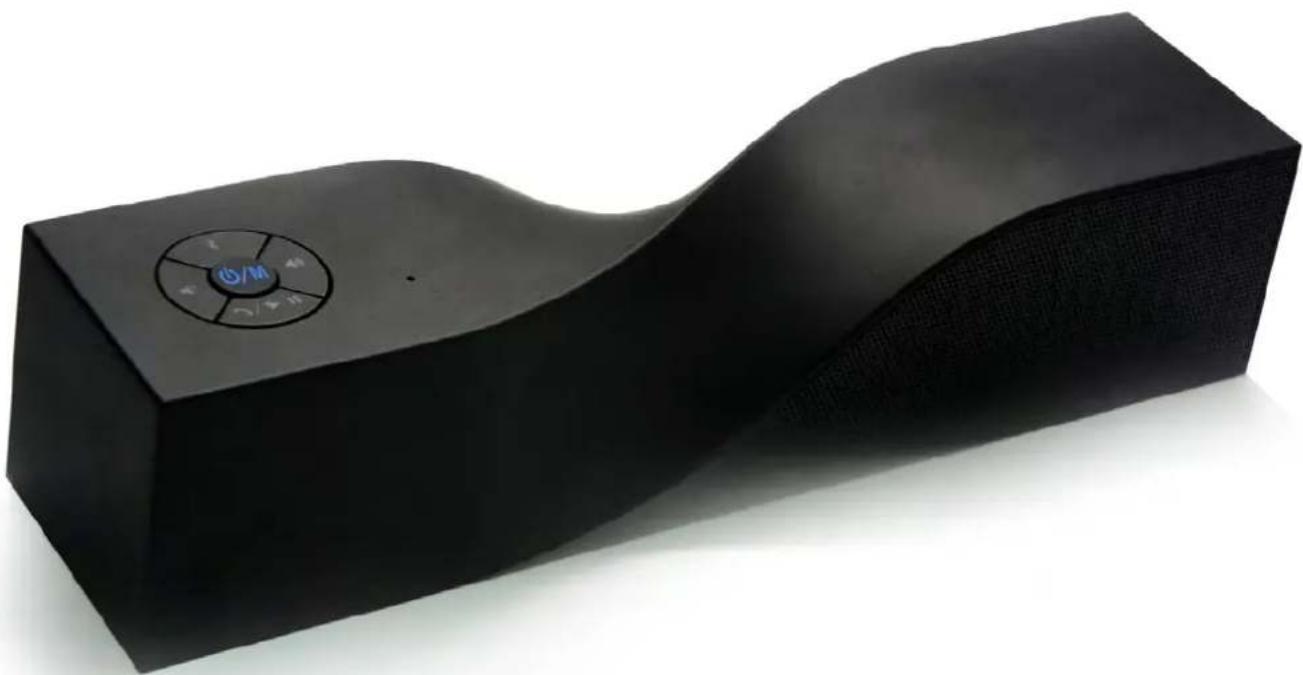
1 x MAX-twist Bluetooth speaker
1 x Mini USB charge cable
1 x Users manual
1 x AUX cable
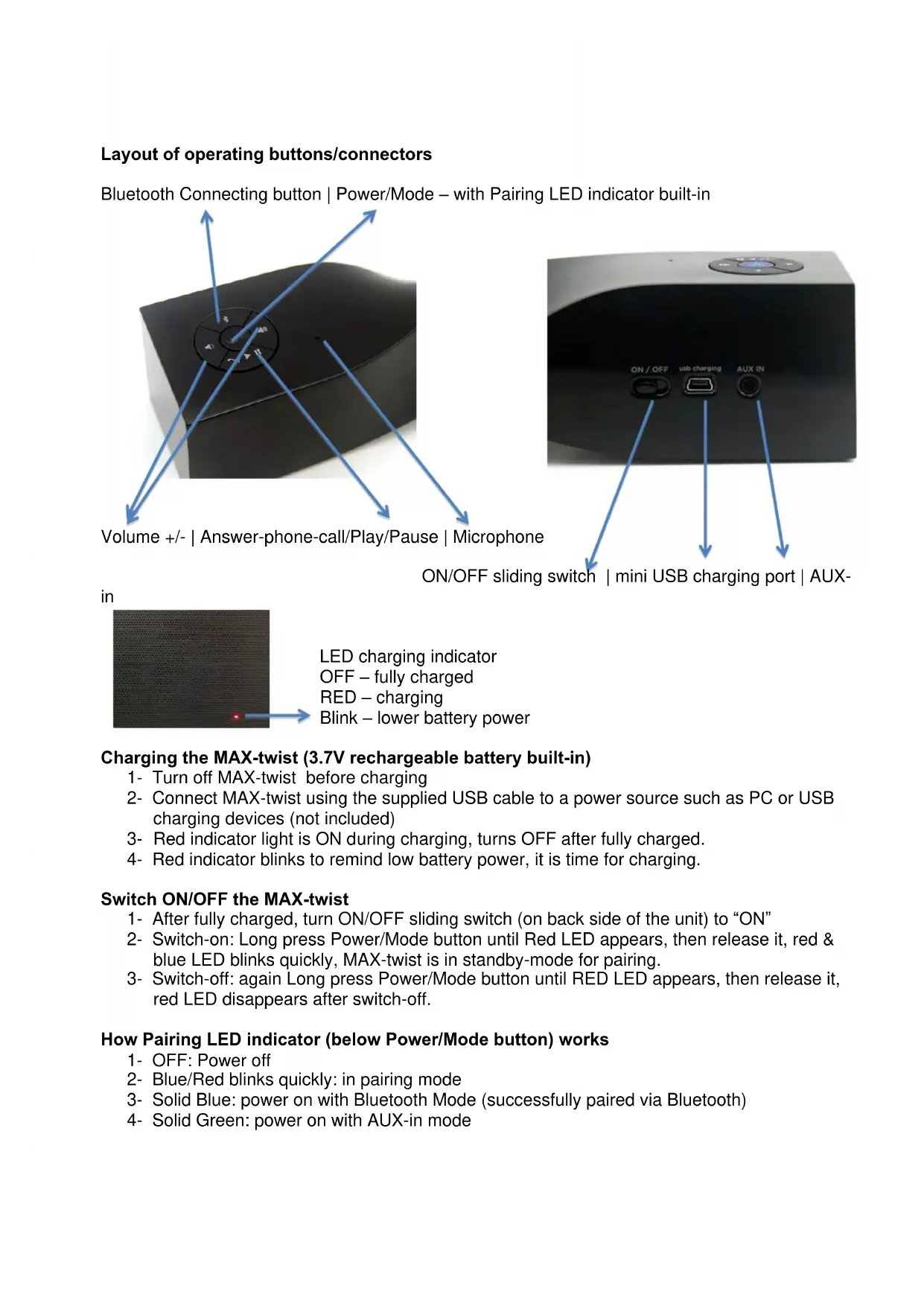
Layout of operating buttons/connectors
Bluetooth Connecting button | Power/Mode - with Pairing LED indicator built-in
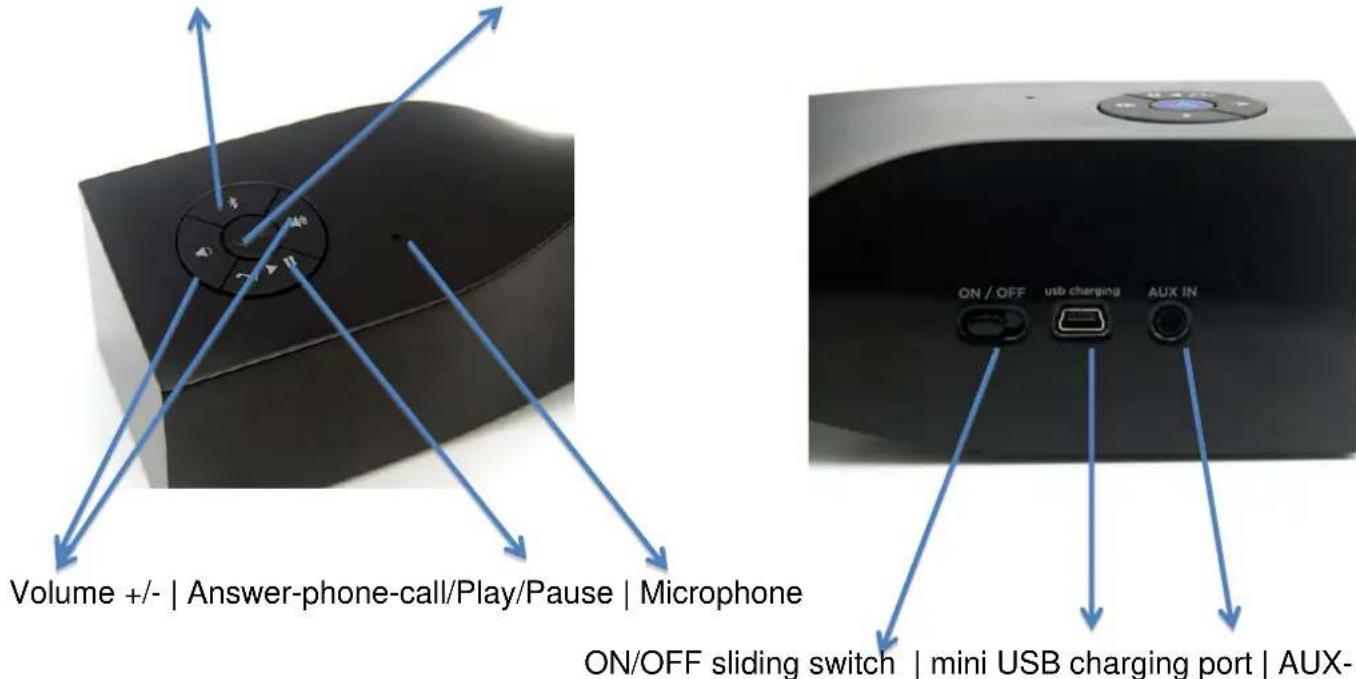
in
Charging the MAX-twist (3.7V rechargeable battery built-in)
1- Turn off MAX-twist before charging
2- Connect MAX-twist using the supplied USB cable to a power source such as PC or USB charging devices (not included)
3- Red indicator light is ON during charging, turns OFF after fully charged.
4- Red indicator blinks to remind low battery power, it is time for charging.
Switch ON/OFF the MAX-twist
1- After fully charged, turn ON/OFF sliding switch (on back side of the unit) to "ON"
2- Switch-on: Long press Power/Mode button until Red LED appears, then release it, red & blue LED blinks quickly, MAX-twist is in standby-mode for pairing.
3- Switch-off: again Long press Power/Mode button until RED LED appears, then release it, red LED disappears after switch-off.
How Pairing LED indicator (below Power/Mode button) works
1- OFF: Power off
2- Blue/Red blinks quickly: in pairing mode
3- Solid Blue: power on with Bluetooth Mode (successfully paired via Bluetooth)
4- Solid Green: power on with AUX-in mode
Pairing MAX-twist with mobiles (Bluetooth enabled) and Tablets.
1- Please keep the speaker and mobile within 1 meter
2- Turn on MAX-twist, blue & red LED blinks quickly, the unit is standby for pairing.
3- Start the Bluetooth function of mobile and search the Bluetooth devices, after searched, select "MAX-twist" in the Bluetooth device list.
4- If required, enter password or PIN N0: "0000", and press the key of "Yes" or "Confirm". Some mobiles don't need password; it depends on Bluetooth setting and version.
5- After successful pairing, select "MAX-twist" in the Bluetooth device list, and press "connect"
6- LED turns to solid blue indicating MAX-twist is paired with devices via Bluetooth.
Note:
1: If the pairing is not successful, please turn off speaker firstly, and then re-pair again.
2: After pairing is successful, paired devices will remember each other. Unless pairing information is deleted because of new pairing, no need to pair when use next time. If you want to pair the speaker with other devices, please turn off Bluetooth function of existing source device, and pair MAX-twist with the new device according to steps 1-6 mentioned above.
Paring MAX-twist with iPhone, iPad
1- Please keep MAX-twist and iPhone (iPad) in the range of 1 meter when pairing
2- Turn on MAX-twist, blue & red LED blinks quickly, the unit is standby for pairing.
3- In iPhone (iPad) General > Bluetooth, tap on Bluetooth function, search the Bluetooth devices and MAX-twist will be identified quickly.
4- Select MAX-twist ST to complete pairing.
5- LED turns to solid blue indicating MAX-twist is paired with iPhone (iPad) via Bluetooth.
Paring MAX-twist with Bluetooth enabled PC or notebook
1- Please keep MAX-twist and PC in the range of 1 meter when pairing
2- Turn on MAX-twist, blue & red LED blinks quickly, the unit is standby for pairing.
3- Activate Bluetooth connectivity on your PC and begin SEARCH NEW DEVICE function.
4- After a short scanning period, PC will indicate that your MAX-twist speaker has been discovered and is ready for connecting/pairing.
5- If you are requested to enter a pin-code, use the code "0000"
6- Click to pair MAX-twist and PC.
7- LED turns to solid blue indicating MAX-twist is paired with devices via Bluetooth.
Pairing MAX-twist with Mac OS X 10 or above
1- Please keep MAX-twist and Mac in the range of 1 meter when pairing
2- Turn on MAX-twist, blue & red LED blinks quickly, the unit is standby for pairing.
3- Pair it with Mac - choose setup Bluetooth Device from the Bluetooth status menu in the menu bar, and follow the onscreen instructions to pair with the speaker. If the Bluetooth status menu is not available, open Bluetooth Preference and select the "Show Bluetooth status in the menu bar" checkbox. As per of the pairing process, you may need to enter a passkey (0000)
4- Open System Preferences and click Sound
5- Click Output and select the Bluetooth speaker
6- Click Input and select your speaker. Adjust the Input and Output volume.
7- LED turns to solid blue indicating MAX-twist is paired with devices via Bluetooth.
Note: Some applications, including iChat AV, allow you to select the audio device from within the application (independently of the default audio input and output selected on the Sound pane of System Preferences). To use a Bluetooth speaker with iChat AV, select the Bluetooth speaker for audio input and output on the Video pane of iChat preferences.
Re-connecting to a paired device
Each time MAX-twist is turned on, it will attempt to connect to the last device it was paired with automatically (the source device must be turned on). MAX-twist will do as below 2 options
1- connect to last connected devices automatically, then just start music playback.
2- be listed in the screen of devices as a output channel, then please select HR800 as output channel and play music.
Note: in some cases, the speaker may need to be manually selected from your operating system sound or hardware output list.
Pairing with other device without switch-off MAX-twist
When MAX-twist is paired with one device already, press "Bluetooth Connecting Button" to break existing pair, then pair MAX-twist with other device.
Reconnecting
When MAX-twist is in standby mode, it will not be able to connect to any device. To "wake" the speaker and re-connect to the previously used device, press the POWER/MODE twice to reconnect automatically.
Hand-free: Answer the phone call via MAX-twist
1- When have a coming call, short press "Answer phone call" button 1 time to answer via speaker.
2- Press it again to end a call.
3- When no coming call, "Answer phone call" button will work as "Play/Pause" to control music. Press it to start music, press again to pause.
Note: MAX-twist will not work as loudspeaker if answering the phone calls by mobile itself.
Volume control
1- Control volume via the Bluetooth device itself
2- Control volume via the volume + / - buttons located on top of MAX-twist.
AUX port
1- You can connect AUX port to any music devices via the AUX cable included.
2- Short press Power/Mode button to change the mode between AUX and Bluetooth.
3- LED turns to solid green in AUX mode.
CE Declaration of Conformity
European laws require that the manufacturer of any transmitting device must add his declaration of Conformity with the European standards and regulations. This device is a 2,4GHz DIGITAL SHORT RANGE DEVICE with Bluetooth compatible Class 2 V 3.0 + EDR protocol for use together with

Bluetooth or compatible phones or other BT-master-devices for office, home or other private use in all European countries free of any license or charges.
This device shall only be sold in countries, where the user manual is available in the country specific language. We confirm herewith, that the system is constructed according to following standards:
EN 300 328 V 1.7.1; EN 301 489-1 V 1.9.2; EN 301 489-17 V 2.1.1; EN 60 950-1:2006/A12:2011; EN 50371:2002; EN 62311:2008; EN 55013: 2001 + A1:2003 + A2:2006, EN 55020:2007
Recycling of no more used electronic items
All electronic items shall be properly recycled after their lifetime cycle. It is no more allowed to throw not any more used electronic items into any household trash. In all communities you will find now collecting stations, where your electronic items will be accepted free of charge for recycling. The recycling procedures are financed by the manufacturers, so please use this offer as contribution to the environment protection. The crossed trash symbol on all electronic items shall remember to the correct recycling.
European warranty regulations and service hints
All electronics items are covered by the European 2 years warranty regulations. If a product should have a problem, please contact the distributor where you have bought the product. The distributor will repair the product, exchange it or send it to an authorized service partner. In case where the distributor is not available, please send to the authorized repair service, but please do not forget to attach a problem description and a copy of the invoice or sales receipt. No warranty is granted if a product has been modified or not used as intended. The product shall not be opened by anybody for repair, who is not qualified.
For units sold in Germany, please call our German repair & service hotline for further repair details, or if you should have any technical questions under 01805-012204 (0.14 Euro per minute from German fixed network; from mobile phones the costs may be different).
Our e-mail support service can be reached from all countries and is free of charge.
alan-service@ps-tech.de
Our technical webserver supports all user manuals and technical documentations for free download from
www.service.alan-electronics.de
MAX-twist
Enceinte Bluetooth
Contenu du coffret
1 Enceinte Bluetooth MAX-twist
1 cable de charge mini USB
1 guide d'utilisation
1 cable auxiliaire
OFF - completeness carico
ROSSO - in carica

- PST PROFESSIONAL SUPPORT TECHNOLOGIES GMBH BREITSCHEIDER WEG 117A 40885 RATINGEN
- LAYOUT OF OPERATING BUTTONS/CONNECTORS
- CHARGING THE MAX-TWIST (3.7V RECHARGEABLE BATTERY BUILT-IN)
- SWITCH ON/OFF THE MAX-TWIST
- HOW PAIRING LED INDICATOR (BELOW POWER/MODE BUTTON) WORKS
- PAIRING MAX-TWIST WITH MOBILES (BLUETOOTH ENABLED) AND TABLETS
- NOTE
- PARING MAX-TWIST WITH IPHONE, IPAD
- PARING MAX-TWIST WITH BLUETOOTH ENABLED PC OR NOTEBOOK
- PAIRING MAX-TWIST WITH MAC OS X 10 OR ABOVE
- RE-CONNECTING TO A PAIRED DEVICE
- PAIRING WITH OTHER DEVICE WITHOUT SWITCH-OFF MAX-TWIST
- RECONNECTING
- HAND-FREE: ANSWER THE PHONE CALL VIA MAX-TWIST
- VOLUME CONTROL
- AUX PORT
- CE DECLARATION OF CONFORMITY
- RECYCLING OF NO MORE USED ELECTRONIC ITEMS
- EUROPEAN WARRANTY REGULATIONS AND SERVICE HINTS
- CONTENU DU COFFRET
Brand : ALBRECHT
Model : MaxTwist
Category : Docking station