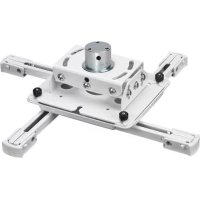
RPEUW - Flat screen mount Chief - Free user manual and instructions
Find the device manual for free RPEUW Chief in PDF.



| Product Type | Flat panel mount (universal) |
| Brand | Chief |
| Model | RPEUW |
| Maximum Load Capacity | 22.7 kg (50 lb) |
| Mounting Compatibility | Threaded column 1-1/2" NPT/NPSM; 2x4 wood joists; 1/4-20 threaded rods |
| Material | Steel |
| Adjustments | Tilt, Roll, Yaw |
| Included | RPE mount, M6x16 security screws (x4) |
| Power Supply | None (passive mount) |
| Usage | Indoor only |
| Maintenance | Clean with a soft, dry cloth. Do not use abrasive products. |
| Safety | Respect maximum load; the structure must support 5x the total weight; do not use if damaged. |
| Repairability | Spare parts available; contact Chief technical service for repair. |
Frequently Asked Questions - RPEUW Chief
User questions about RPEUW Chief
0 question about this device. Answer the ones you know or ask your own.
Ask a new question about this device
Download the instructions for your Flat screen mount in PDF format for free! Find your manual RPEUW - Chief and take your electronic device back in hand. On this page are published all the documents necessary for the use of your device. RPEUW by Chief.
USER MANUAL RPEUW Chief
Milestone AV Technologies and its affiliated corporations and subsidiaries (collectively "Milestone"), intend to make this manual accurate and complete. However, Milestone makes no claim that the information contained herein covers all details, conditions or variations, nor does it provide for every possible contingency in connection with the installation or use of this product. The information contained in this document is subject to change without notice or obligation of any kind. Milestone makes no representation of warranty, expressed or implied, regarding the information contained herein. Milestone assumes no responsibility for accuracy, completeness or sufficiency of the information contained in this document.
Chief® is a registered trademark of Milestone AV Technologies. All rights reserved.

IMPORTANT SAFETY INSTRUCTIONS
WARNING: A WARNING alerts you to the possibility of serious injury or death if you do not follow the instructions.

CAUTION: A CAUTION alerts you to the possibility of damage or destruction of equipment if you do not follow the corresponding instructions.

WARNING: Failure to read, thoroughly understand, and follow all instructions can result in serious personal injury, damage to equipment, or voiding of factory warranty! It is the installer's responsibility to make sure all components are properly assembled and installed using the instructions provided.

WARNING: Failure to provide adequate structural strength for this component can result in serious personal injury or damage to equipment! It is the installer's responsibility to make sure the structure to which this component is attached can support five times the combined weight of all equipment. Reinforce the structure as required before installing the component.

WARNING: Exceeding the weight capacity can result in serious personal injury or damage to equipment! It is the installer's responsibility to make sure the combined weight of all components attached to the RPE does not exceed 50 lbs (22.7 kg).
- The weight capacity of the RPE may be LIMITED to the lowest weight capacity of any other components located between the RPE and the supporting structure!

WARNING: Use this mounting system only for its intended use as described in these instructions. Do not use attachments not recommended by the manufacturer.

WARNING: Never operate this mounting system if it is damaged. Return the mounting system to a service center for examination and repair.

WARNING: Do not use this product outdoors.
IMPORTANT ! : The RPE mounts are designed to be :
- mounted to a 1-1/2" NPT or NPSM steel or aluminum threaded extension column rated for 50 lbs or greater (not included); or
- mounted to a 2'' × 4'' wood joist with a maximum drywall covering of 5/8'' ; or
- suspended from four steel 1/4-20 threaded rods (not included) which are secured to a 1 - 5 / 8'' x 1 - 5 / 8'' 12ga metal framing strut channel (spanning a maximum of 4 feet--not included) by steel 1/4-20 channel nuts (not included).
--SAVE THESE INSTRUCTIONS--
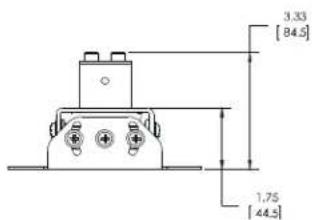
DIMENSIONS
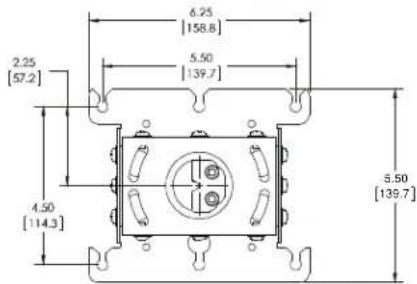
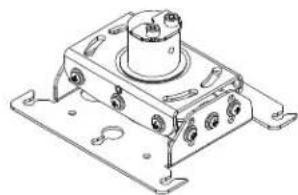
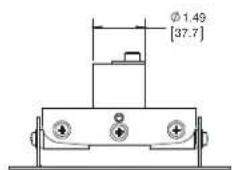
DIMENSIONS: INCHES
LEGEND
| Tighten Fastener Apretar elemento de fijación Befestigungsteil festziehen Apertar fixador Serrare il fissaggio Bevestiging vastraiaen Serrez les fixations | Adjust Ajustar Einstellen Ajustar Regolare Afstellen Ajuster |
| Loosen Fastener Aflojar elemento de fijación Befestigungsteil lõsen Desapertar fixador Allentare il fissaggio Bevestiging losdraaien Desserrez les fixations | Security Wrench Llave de seguidad Sicherheitsschlüssel Chave de segurança Chiave di sicurezza Veiligheidssleutel Clé de sécurité |
| Phillips Screwdriver Destornillador Phillips Kreuzschlitzschraubendreher Chave de fendas Phillips Cacciavite a stella Kruiskopschroevendraiaer Tournevis à pointe cruciforme | Hex-Head Wrench Llave de cabeza hexagonal Sechskantschlüssel Chave de cabeza sextavada Chiave esagonale Zeskantsleutel Clé à tête hexagonale |
| Open-Ended Wrench Llave de Boca Gabelschlüssel Chave de bocas Chiave a punte aperte Steeksleutel Clé à fourche | Socket Wrench Clé à douilles Steckschlüssel Chave de caixa Chiave a brugola Dopsleutel Clé à douilles |
TOOLS REQUIRED FOR INSTALLATION / PARTS
| 7/16" (wood) | Hardware required - not included DEPENDENT on installation method 1. Install to threaded extension column • 1-1/2" NPT or NPSM steel or aluminum threaded extension column rated for 50 lbs or greater 2. Install to wood ceiling joists • 1/4" x 2" (minimum length) lag bolts (Qty. 4) • 1/4" steel washers (Qty. 4) 3. Install to threaded rod • 1/4-20 steel threaded rods (Qty. 4) • 1/4-20 steel channel nuts (Qty. 4) • 1/4-20 steel jam nuts (Qty. 8) • 1/4" steel washers (Qty. 8) | A(1) [RPE] B(1) [Example of SLB bracket] C(4) M6x16mm D(4) M6x16mm (security) |
PREPARATION
Locate Mounting Site

WARNING: IMPROPER INSTALLATION MAY LEAD TO PROJECTOR MOUNT FALLING CAUSING SEVERE PERSONAL INJURY OR DAMAGE TO EQUIPMENT! It is the installers responsibility to make certain the structure to which the projector mount is being mounted is capable of supporting five times the weight of the projector mount and all attached equipment. Reinforce the structure as required before installing the projector mount.
- Determine required position of the RPE projector mount.
- Determine required distance of the projector mount from the screen using the lens-to-screen distance information.
NOTE: Proceed to Installing to a CPA pipe, Installing to 1- 1 / 2 Threaded Extension Column, Installing to Wood Framework (Joists), or Installing to Threaded Rod section, as appropriate.
INSTALLATION
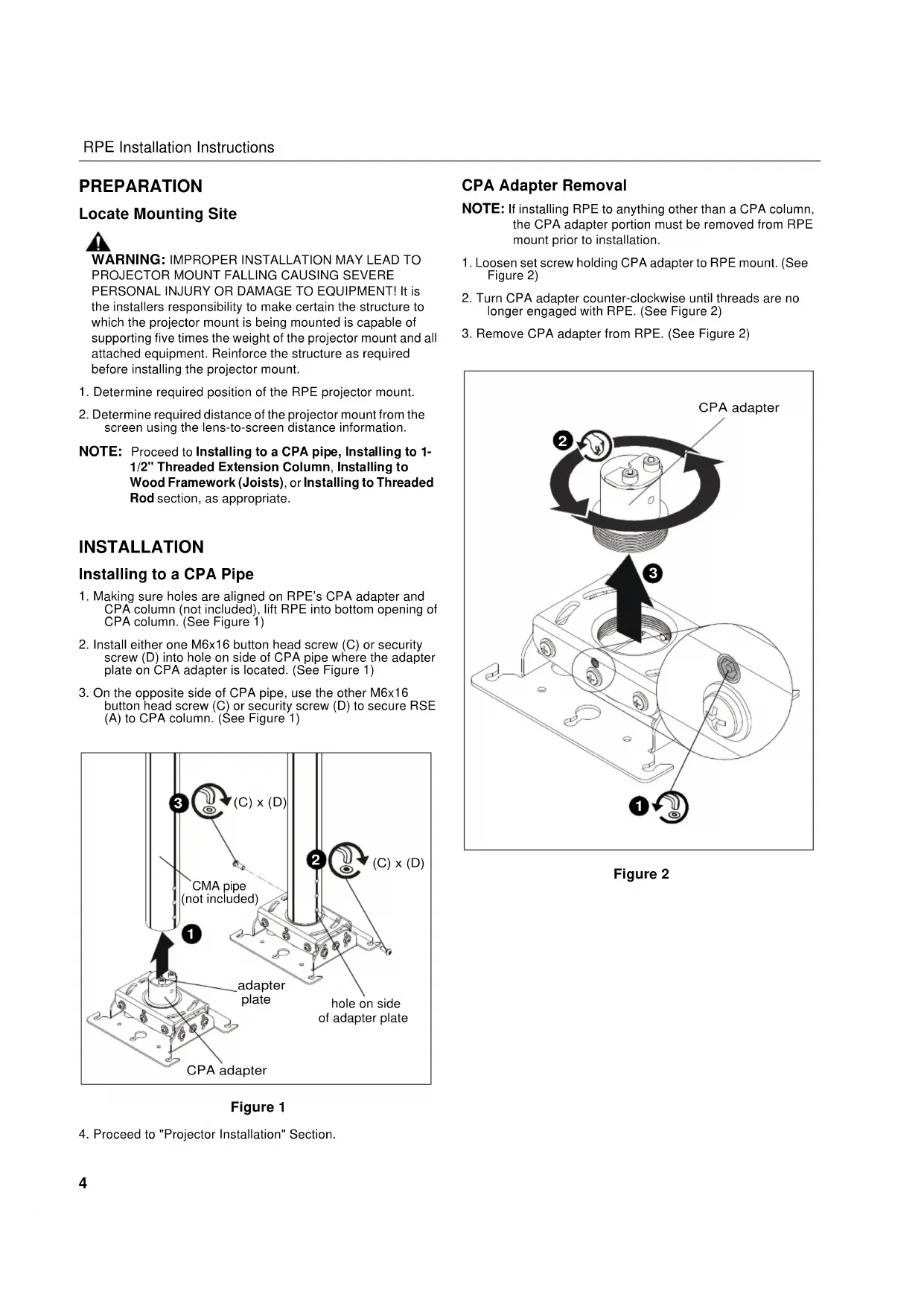
Installing to a CPA Pipe
- Making sure holes are aligned on RPE's CPA adapter and CPA column (not included), lift RPE into bottom opening of CPA column. (See Figure 1)
- Install either one M6x16 button head screw (C) or security screw (D) into hole on side of CPA pipe where the adapter plate on CPA adapter is located. (See Figure 1)
- On the opposite side of CPA pipe, use the other M6x16 button head screw (C) or security screw (D) to secure RSE (A) to CPA column. (See Figure 1)
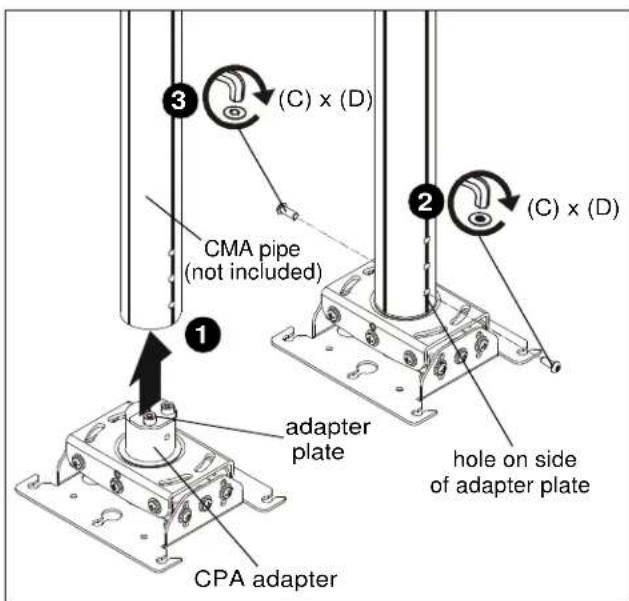
Figure 1
- Proceed to "Projector Installation" Section.
CPA Adapter Removal
NOTE: If installing RPE to anything other than a CPA column, the CPA adapter portion must be removed from RPE mount prior to installation.
- Loosen set screw holding CPA adapter to RPE mount. (See Figure 2)
- Turn CPA adapter counter-clockwise until threads are no longer engaged with RPE. (See Figure 2)
- Remove CPA adapter from RPE. (See Figure 2)
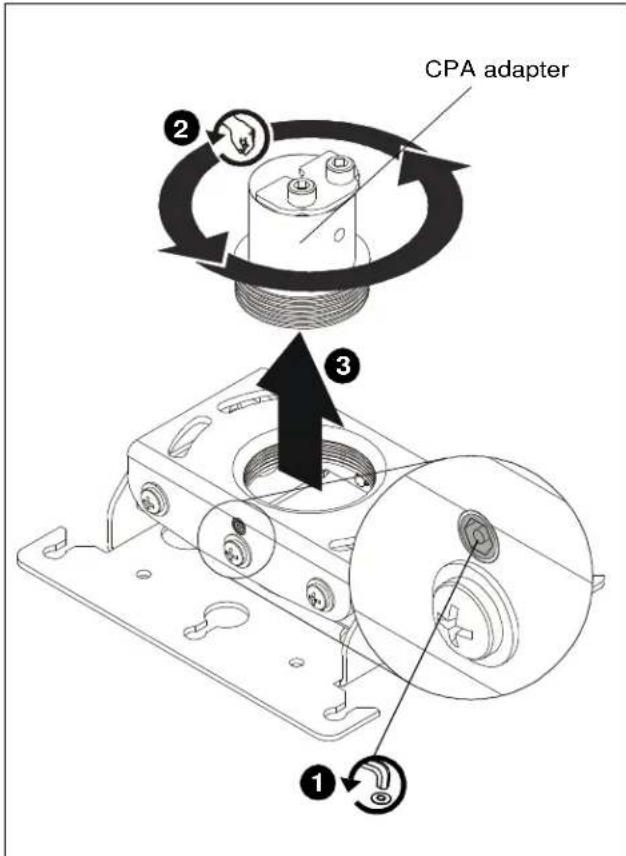
Figure 2
Installing to 1-1/2" Threaded Extension Column
NOTE: CPA adapter must be removed prior to installing RPE to threaded pipe. See CPA Adapter Removal Section for details.
- Install 1-1/2" NPT or NPSM steel or aluminum threaded extension column (not included) into threaded collar until tight, with a minimum of four threads engaged. (See Figure 3)
- Thread RPE projector mount (A) onto the threaded extension column (not included) until hand tight, with a minimum of four threads engaged. (See Figure 3)
- Turn RPE clockwise or counter-clockwise until front of mount is facing target. (See Figure 3)
IMPORTANT! : When RPE is properly positioned, the set screw access hole should be pointing directly at target, or 180° AWAY from target.
- Secure RPE to pipe by turning set screw until tight. (See Figure 3)

CAUTION: DO NOT OVERLIGHTEN! Overtightening of set screw can damage threads on pipe.
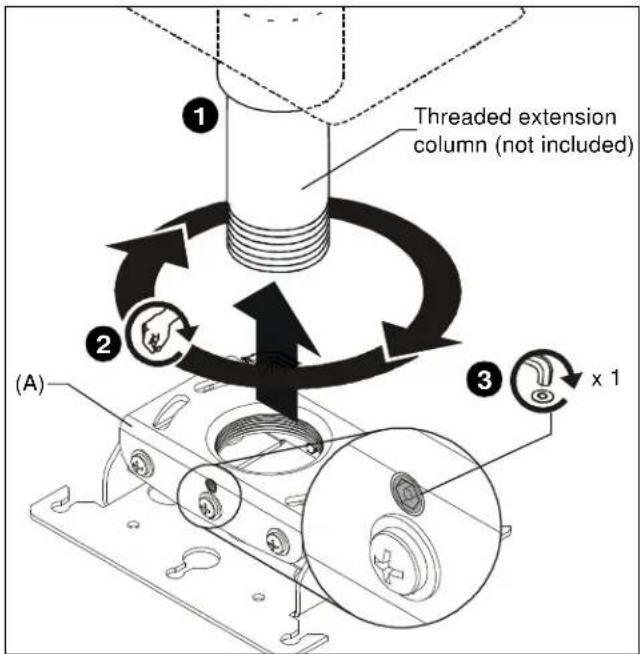
Figure 3
- Proceed to Installing Projector with Interface Bracket section.
Installing to Wood Framework (Joists)
- Using the RPE as a guide, mark four mounting hole locations. (See Figure 4)
- Drill four 1/8 x 1-1/2 deep (minimum depth) pilot holes (See Figure 4)
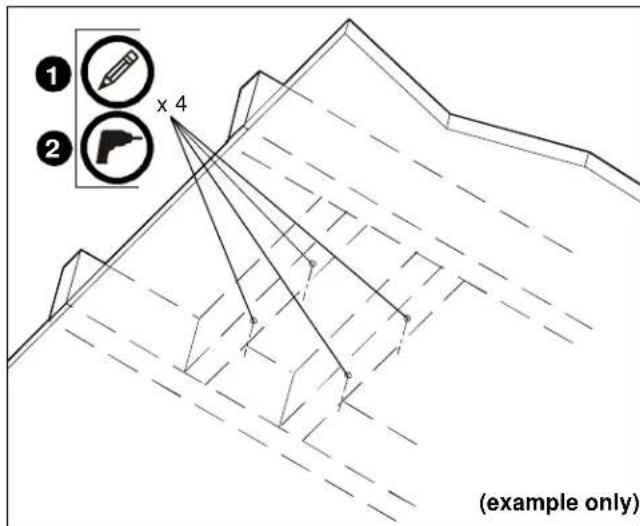
Figure 4
- Align four mounting holes in RPE with four pilot holes.
IMPORTANT ! : When RPE is properly positioned, the set screw access hole should be pointing directly at target, or 180° AWAY from target.
- Secure RPE to structure using four 1/4'' x 2'' minimum length lag bolts (not included) and four 1/4'' flat washers (not included). (See Figure 5)
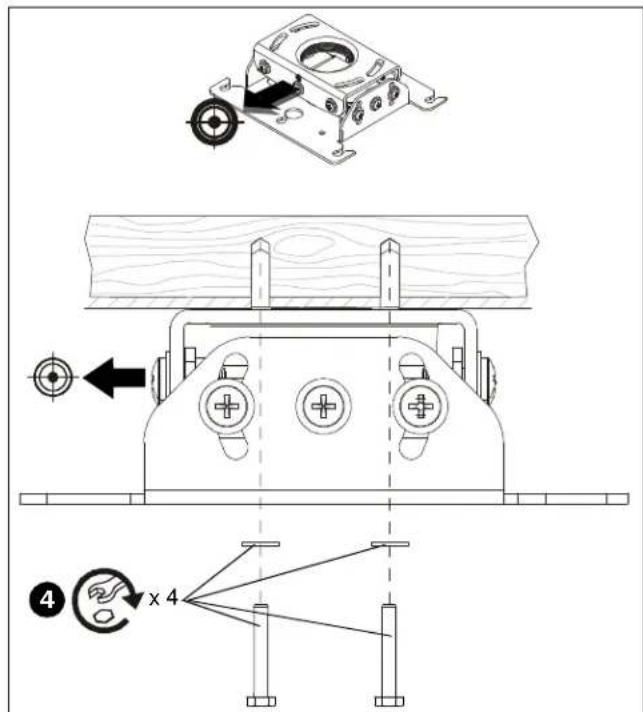
Figure 5
- Proceed to Installing Projector with Interface Bracket section.
Installing to Threaded Rod
NOTE: CPA adapter must be removed prior to installing RPE to threaded pipe. See CPA Adapter Removal Section for details.
NOTE: The RPE projector mount may be suspended from four steel 1/4-20 threaded rods (not included) which are secured to unistrut, angle or channel assembly overhead structural members (trusses or I-beams) by steel 1/4-20 channel nuts (not included).
- Secure one end of each of the four threaded rods (not included) to the structural member. (See Figure 6)
- Install one 1/4-20 jam nut (not included) and one 1 / 4 washer (not included) onto each threaded rod. (See Figure 6)
- Install RPE onto threaded rods, inserting the rods into the four slots on top of the RPE. (See Figure 6)
NOTE: Hole in the RPE allows socket wrench access without unit disassembly.
4. Secure the threaded rods to the RPE with one 1/4-20 jam nut (not included) and one 1 / 4'' washer (not included) on each threaded rod. (See Figure 6)
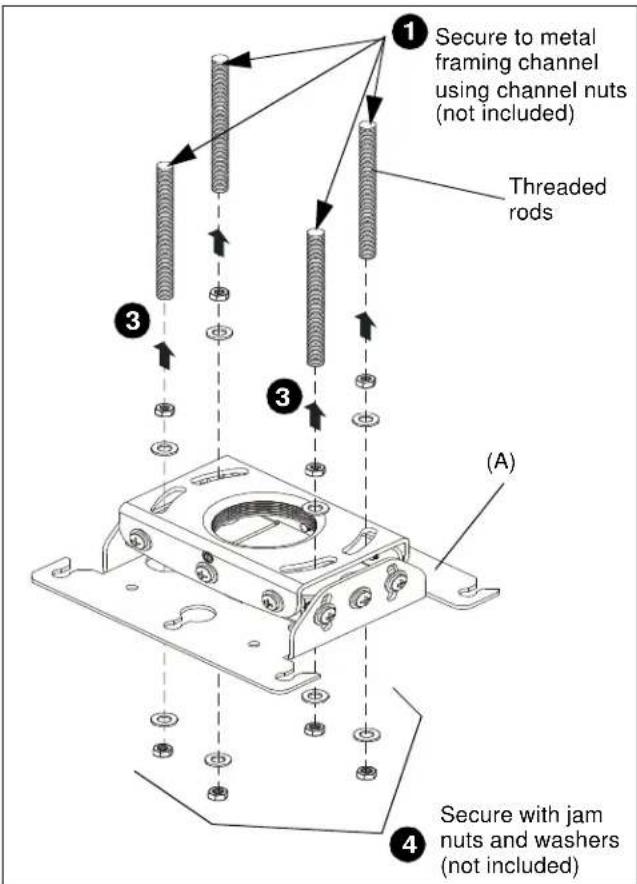
Figure 6
- Proceed to Installing Projector with Interface Bracket section.
PROJECTOR INSTALLATION
IMPORTANT ! : Model RPE uses optional Chief "SLB" Series interface brackets. See Parts drawing.
- Attach projector to interface bracket (B) using installation instructions and hardware included with the interface bracket.
NOTE: Security screws can be substituted when mounting interface bracket to projector by using the hardware and installation instructions in the All-Points Security Kit (included with interface bracket).
Installing Projector with Interface Bracket
- Orient projector with interface bracket.
- Loosen (but do not remove) thumb nuts on the interface bracket. (See Figure 7)
- Raise projector with attached interface bracket to RPE projector mount (A). (See Figure 7)
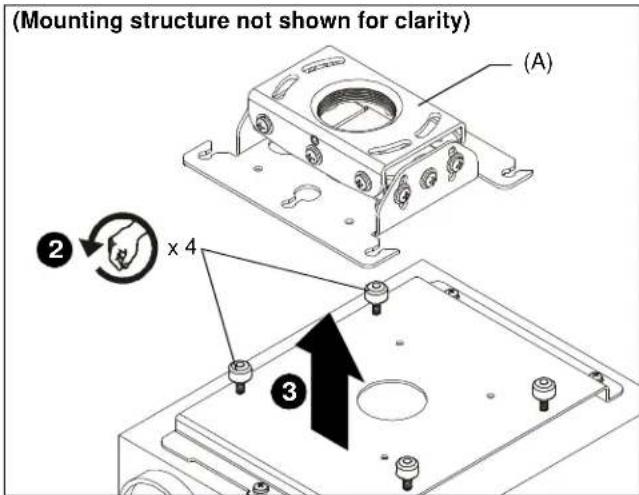
Figure 7
- Align the thumb nuts on the interface bracket with the locating slots on the RPE projector mount. (See Figure 8)
- Slide the interface bracket with attached projector to the limit of the locating slots. (See Figure 8)

WARNING: IMPROPER INSTALLATION CAN LEAD TO PROJECTOR FALLING RESULTING IN SERIOUS PERSONAL INJURY OR DAMAGE TO EQUIPMENT. Make certain mounting slots in RPE projector mount base slide under thumb screws and that screws are seated in the back of locating slots.
- Tighten thumb nuts to secure projector in place.
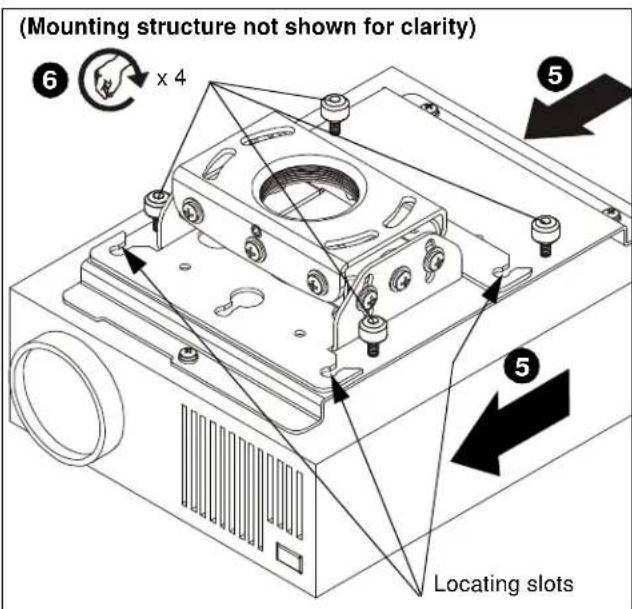
Figure 8
- Route all cables as required.
ADJUSTMENTS
The RPE projector mount can be adjusted for pitch (vertical elevation), roll (horizontal tilt), and yaw (rotation).

WARNING: OVER-LOOSENING OR REMOVAL OF HARDWARE MAY RESULT IN PERSONAL INJURY OR SERIOUS DAMAGE TO EQUIPMENT! RPE projector mount and hardware is to be loosened only enough to allow for necessary movement.
Pitch (Vertical Elevation)
Adjust pitch using the two pitch adjustment screws located on each end of the RPE.
- Loosen two pitch adjustment screws located on each end of the RPE.
- Adjust projector angle to desired pitch. (See Figure 9)
- Tighten two pitch adjustment screws located on each end of the RPE.
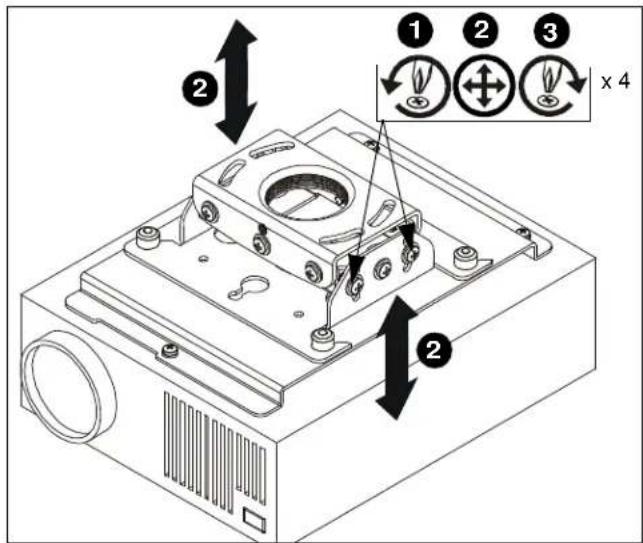
Figure 9
Roll (Horizontal Tilt)
Adjust roll using the four roll adjustment screws, two on front and two on the back of the RPE.
- Loosen two roll adjustment screws on each side of the RPE.
- Adjust projector to desired position. (See Figure 10)
- Tighten two roll adjustment screws on each side of the RPE.
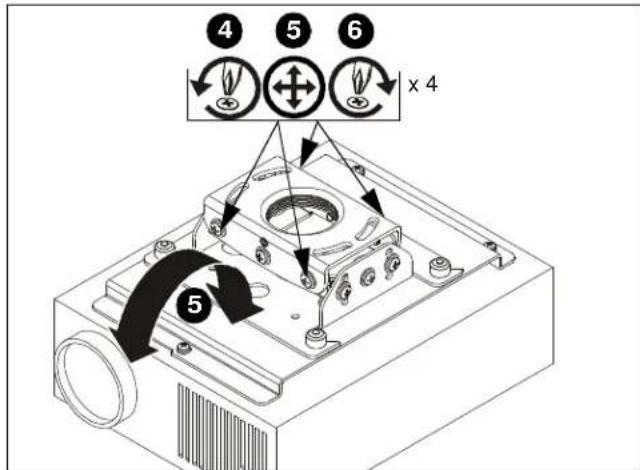
Figure 10
Yaw (Rotation)
Adjust yaw by threading or unthreading the RPE projector mount on the threaded extension column (not included).
- Loosen set screw. (See Figure 11)

WARNING: IMPROPER ADJUSTMENT CAN LEAD TO PROJECTOR FALLING RESULTING IN SERIOUS PERSONAL INJURY OR DAMAGE TO EQUIPMENT. Do NOT unthread RPE to the end of pipe threads!
- Adjust projector by turning RPE projector mount on the extension column to the desired yaw position.
- Tighten set screw.
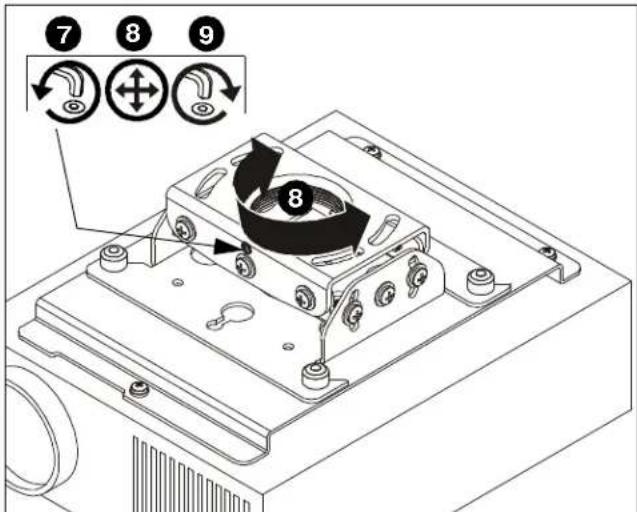
Figure 11
CLAUSES DE NON-RESPONSABILITÉ
- IMPORTANT SAFETY INSTRUCTIONS
- DIMENSIONS
- LEGEND
- TOOLS REQUIRED FOR INSTALLATION / PARTS
- PREPARATION
- LOCATE MOUNTING SITE
- INSTALLATION
- INSTALLING TO A CPA PIPE
- CPA ADAPTER REMOVAL
- INSTALLING TO 1-1/2" THREADED EXTENSION COLUMN
- INSTALLING TO WOOD FRAMEWORK (JOISTS)
- INSTALLING TO THREADED ROD
- PROJECTOR INSTALLATION
- INSTALLING PROJECTOR WITH INTERFACE BRACKET
- ADJUSTMENTS
- PITCH (VERTICAL ELEVATION)
- ROLL (HORIZONTAL TILT)
- YAW (ROTATION)
- CLAUSES DE NON-RESPONSABILITÉ
Brand : Chief
Model : RPEUW
Category : Flat screen mount