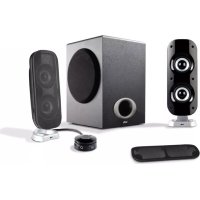
CA3810 - Loudspeaker Cyber Acoustics - Free user manual and instructions
Find the device manual for free CA3810 Cyber Acoustics in PDF.



| Product Type | 2.1 Audio System (3 speakers) |
| Brand | Cyber Acoustics |
| Model | CA3810 |
| Configuration | 2 satellite speakers + 1 subwoofer |
| Subwoofer | Amplified, high-excursion, for powerful bass |
| Satellites | High-efficiency drivers |
| Amplifier | Built-in, low distortion |
| Power Supply | AC adapter (included) |
| Power On/Off Control | On wired remote |
| Main Volume Control | On wired remote (MAX/MIN) |
| Bass Volume Control (Bass) | On wired remote (Bass vol) |
| Headphone Output Jack | Yes, automatically cuts speaker output |
| Auxiliary Input | 3.5mm jack on satellite speaker side |
| Source Compatibility | Computer, CD/DVD player, iPod, MP3 player, game console (adapter required) |
| Included Cables | 3.5mm audio cable, DIN cable, AC adapter |
| Included Accessories | MP3 cradle |
| Power Indicator | Blue LED |
| Cleaning | Only dry soft cloth |
| Safety Class | Class II (double insulation) |
| Water Protection | Do not expose to rain or moisture |
Frequently Asked Questions - CA3810 Cyber Acoustics
User questions about CA3810 Cyber Acoustics
0 question about this device. Answer the ones you know or ask your own.
Ask a new question about this device
Download the instructions for your Loudspeaker in PDF format for free! Find your manual CA3810 - Cyber Acoustics and take your electronic device back in hand. On this page are published all the documents necessary for the use of your device. CA3810 by Cyber Acoustics.
USER MANUAL CA3810 Cyber Acoustics
Amplified Speaker System
Owners guide CA-3810
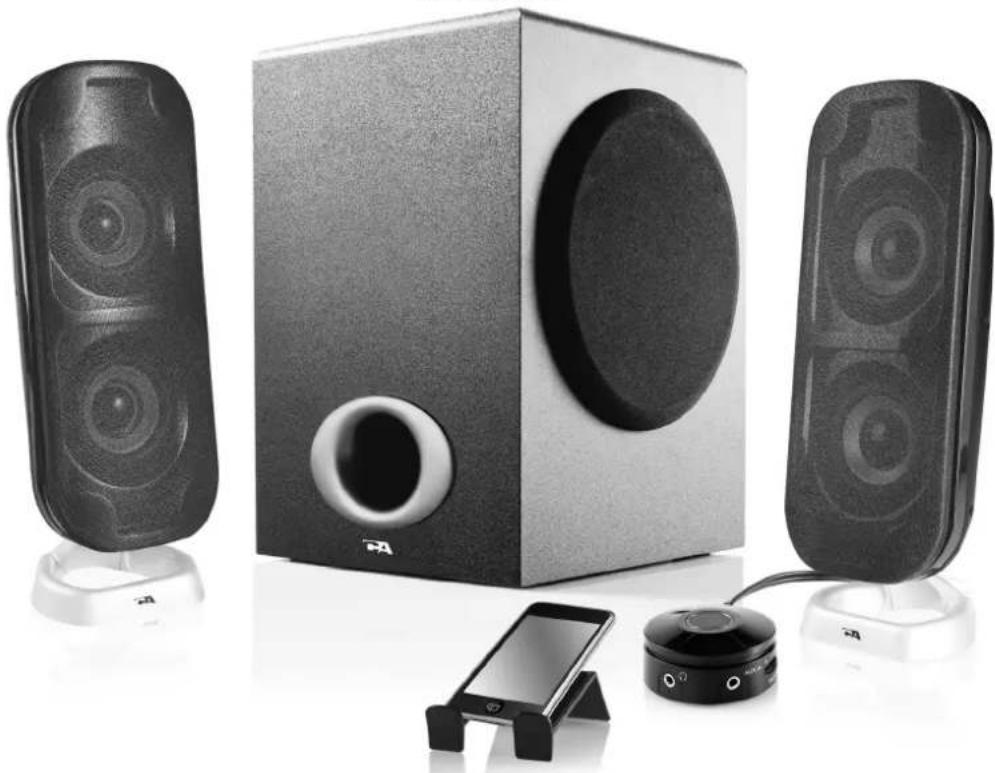
3 Piece System
2.1
performance
ca 3810 manu 12 new 2012/5/2 2:44 PM , 2


To video Vers video
1
fXf
WARNING
TO PREVENT FIRE OR SHOCK HAZARD, DO NOT USE THE PLUG WITH AN EXTENSION CORD, RECEPTACLE OR OTHER OUTLET UNLESS THE BLADES CAN BE FULLY INSERTED TO PREVENT BLADE EXPOSURE. TO REDUCE THE RISK OF FIRE OR ELECTRIC SHOCK, DO NOT EXPOSE THIS APPLIANCE TO RAIN OR MOISTURE. TO PREVENT ELECTRICAL SHOCK, MATCH WIDE BLADE PLUG TO WIDE SLOT, FULLY INSERT.

The lightning flash with arrowhead symbol, within an equilateral triangle, is intended to alert the user to the presence of uninsulated "dangerous voltage" within the product's enclosure that may be of sufficient magnitude to constitute a risk of electric shock to persons.
CAUTION
RISK OF ELECTRIC SHOCK DO NOT OPEN
WARNING: TO REDUCE THE RISK OF ELECTRIC SHOCK, DO NOT REMOVE COVER (OR BACK). NO USER SERVICEABLE PARTS INSIDE. REFER SERVICING TO QUALIFIED SERVICE PERSONNEL.

The exclamation point within an equilateral triangle is Intended to alert the user to the presence of important operating and maintenance (servicing) instructions in the literature accompanying the appliance.
See the bottom of the set
IMPORTANT SAFETY INSTRUCTIONS
- Read these instructions - All the safety and operating instructions should be read before this product is operated.
- Keep these instructions - The safety and operating instructions should be retained for future reference.
- Heed all warnings - All warnings on the appliance and in the operating instructions should be adhered to.
- Follow all instructions All operating and use instructions should be followed.
- Do not use this apparatus near water The appliance should not be used near water or moisture for example, in a wet basement or near a swimming pool, and the like.
- Clean only with dry cloth.
- Do not block any ventilation openings. Install in accordance with the manufacture's instructions.
- Do not install near any heat sources such as radiators, heat registers, stoves, or other apparatus (including amplifiers) that produce heat.
- Do not defeat the safety purpose of the polarized or grounding plug. A polarized plug has two blades with one wider than the other. A grounding plug has two blades and a third grounding prong. The wide blade or the third prong is provided for your safety. If the provided plug does not fit into your outlet, consult an electrician for replacement of the obsolete outlet.
- Protect the power cord from being walked on or pinched particularly at the plugs, convenience receptacles, and at the point where they exit from the apparatus.
- Only use attachments/accessories specified by the manufacturer.


- Use only with the cart, stand, tripod, bracket, or table specified by the manufacturer, or sold with the apparatus. When a cart or rack is used, use caution when moving the cart/apparatus combination to avoid injury from tip-over

-
Unplug the apparatus during lightning storms or when unused for long periods of time.
-
Refer all servicing to qualified personnel. Servicing is required when the apparatus has been damaged in any way, such as power supply cord or plug is damaged, liquid has been spilled or objects have fallen into the apparatus has been exposed to rain or moisture, does not operate normally, or has been dropped.
-
Please keep the unit in a good ventilation environment.
-
CAUTION: These servicing instructions are for use by qualified service personnel only. To reduce the risk of electric shock, do not perform any servicing other than that contained in the operating instructions unless you are qualified to do so.
-
WARNING: Please refer the information on exterior bottom enclosure for electrical and safety information before installing or operating the apparatus.
-
WARNING: To reduce the risk of fire or electric shock, do not expose this apparatus to rain or moisture. The apparatus shall not be exposed to dripping or splashing and that no objects filled with liquids, such as vases, shall not be placed on apparatus.
-
WARNING: The mains plug is used as disconnect device, the disconnect device shall remain readily operable.
-
This is CLASS II apparatus with double insulation, and no protective earth Provided.
-
Correct Disposal of this product. This marking indicates that this product should not be disposed with other household wastes throughout the EU. To prevent possible harm to the environment or human health from uncontrolled waste disposal, recycle it responsibly to promote the sustainable reuse of material resources. To return your used device, please use the return and collection systems or contact the retailer where the product was purchased. They can take this product for environmental safe recycling.
-
Do not install this equipment in a confined space such as a book case or similar unit. The ventilation should not be impeded by covering the ventilation openings with items such as newspaper, table-cloths, curtains etc.
-
No naked flame sources, such as lighted candles, should be placed on the apparatus.
-
Attention should be drawn to environmental aspects of battery disposal.
25.Use of the apparatus in moderate climates.
AVERTISSEMENT
NE JAMAIS UTILISER UN CABLE DE RALLYNGE, OU UNE PRISE OU AUTRES RACCORDS QUI EMPECHENT LE BRANCHEMENT COMPLET DE LA FICHE AFIN D'EVITER TOUT RISQUE DE FEU OU CHOC DANGEREUX. NE JAMAIS LAISSER CET APPAREIL SOUS LA PLUIE OU L'HUMIDITE POUR EVITER TOUT DANGER DE FEU OU CHOC ELECTRIQUE, LA FICHE DOIT TOUJOURS ETRE BRANCHEE COMPLETEMENT SUR UNE PRISE LUI CONVENANT.

Three-Piece Audio System
INTRODUCTION
Welcome to the Cyber Acoustics CA-3810 speaker system.
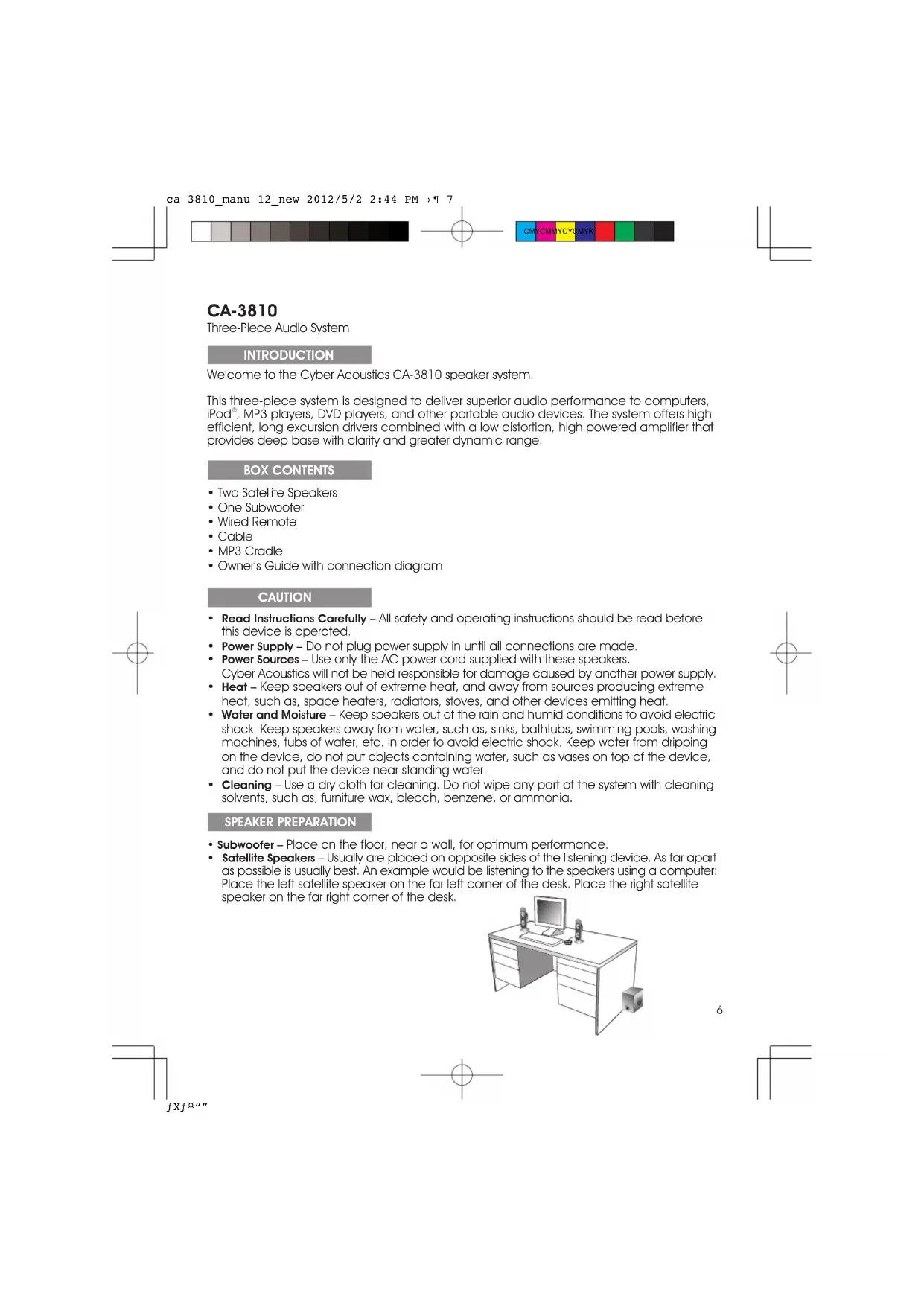
This three-piece system is designed to deliver superior audio performance to computers, iPod® MP3 players, DVD players, and other portable audio devices. The system offers high efficient, long excursion drivers combined with a low distortion, high powered amplifier that provides deep base with clarity and greater dynamic range.
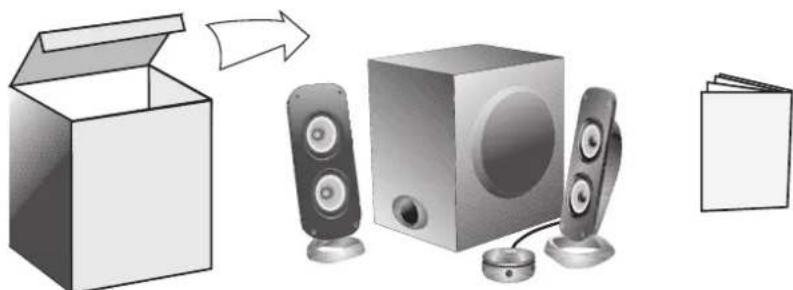
BOX CONTENTS
- Two Satellite Speakers
One Subwoofer
Wired Remote - Cable
MP3 Cradle - Owner's Guide with connection diagram
CAUTION
- Read Instructions Carefully - All safety and operating instructions should be read before this device is operated.
- Power Supply - Do not plug power supply in until all connections are made.
- Power Sources - Use only the AC power cord supplied with these speakers. Cyber Acoustics will not be held responsible for damage caused by another power supply.
- Heat - Keep speakers out of extreme heat, and away from sources producing extreme heat, such as, space heaters, radiators, stoves, and other devices emitting heat.
- Water and Moisture - Keep speakers out of the rain and humid conditions to avoid electric shock. Keep speakers away from water, such as, sinks, bathtubs, swimming pools, washing machines, tubs of water, etc. in order to avoid electric shock. Keep water from dripping on the device, do not put objects containing water, such as vases on top of the device, and do not put the device near standing water.
- Cleaning - Use a dry cloth for cleaning. Do not wipe any part of the system with cleaning solvents, such as, furniture wax, bleach, benzene, or ammonia.
SPEAKER PREPARATION
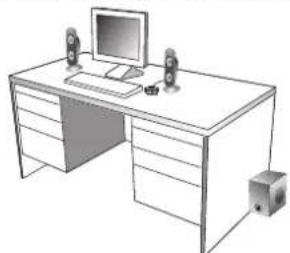
- Subwoofer - Place on the floor, near a wall, for optimum performance.
- Satellite Speakers - Usually are placed on opposite sides of the listening device. As far apart as possible is usually best. An example would be listening to the speakers using a computer: Place the left satellite speaker on the far left corner of the desk. Place the right satellite speaker on the far right corner of the desk.


SPEAKER CONNECTION
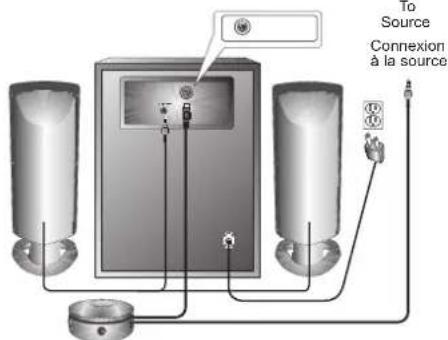
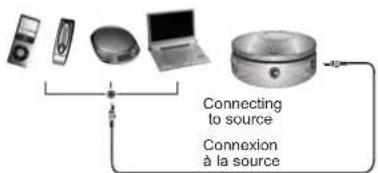
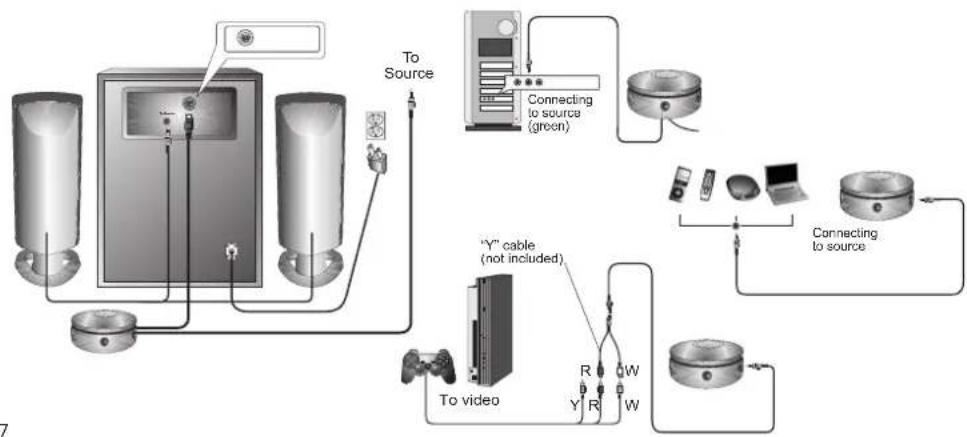
There are a variety of devices these speakers can connect to, such as, CD players, iPod, DVD players, MP3 players and portable audio devices. Please read the step by step instructions along with the diagrams provided to identify which diagram most closely matches your source.
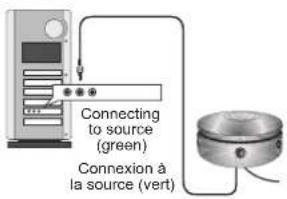
DesktopComputers
Take the cable with the green plug and plug this into the green output / source jack in the back or front of the computer tower, also referred to as the sound/audio out jack.
Take the gray plug to "To Speaker" jack on back of subwoofer
Take the red plug and plug this into the DIN jack on the back of subwoofer.
Take the AC power cord and plug into wall socket or power strip.
CD player, DVD player, MP3 player
Take the cable with the green plug and plug this into the green output / source jack of the audio device.
Take the gray plug to "To Speaker" jack on back of subwoofer
Take the red plug and plug this into the DIN jack on the back of subwoofer.
- Take the AC power cord and plug into wall socket or power strip.
Gaming System
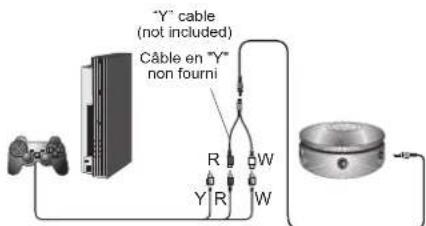
A Console Gaming Adapter, also known as, a "Y" adapter, has dual-RCA outputs and is needed to connect these speakers to a gaming system. The adapter is sold separately.
Turn off the power to your gaming system.
Take the end of the "Y" adapter with the dual-RCA outputs, one red, one white. Plug these outputs into the matching red and white RCA jacks on the gaming system.
Take the green stereo jack at the other end of the "Y" adapter and plug that into the cable with the green plug.
Take the gray plug to "To Speaker" jack on back of subwoofer.
Take the red plug and plug this into the DIN jack on the back of subwoofer.


CONTROLS & FEATURES
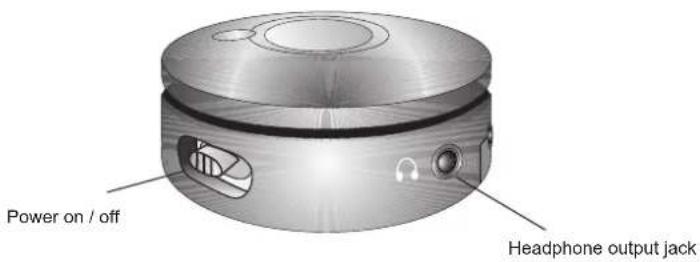
Power - The on/off button is on the wired remote. Slide to turn the speaker on or off.
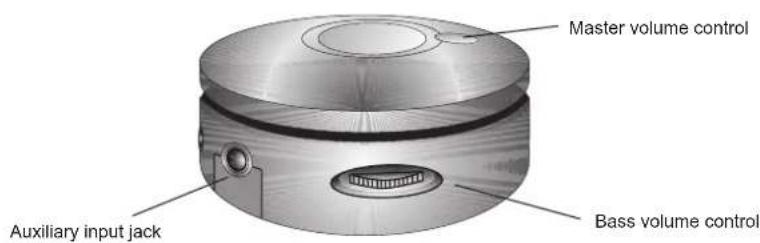
- Master Volume Control - This control is on the wired remote and is indicated by the word "MAX" "MIN". Rotate clockwise to turn volume up or counter-clockwise to turn volume down.
- Bass Volume Control - This control is on the wired remote and is indicated by the word "Bass Vol". Rotate clockwise to turn volume up or counter-clockwise to turn volume down.
- Headphone Output Jack - Connect your favorite headphones to this jack and they will mute the speaker system automatically. The master volume control can then be used to turn up or down the volume to your headphones.
- Auxiliary Input Connection - The auxiliary input jack allows connection of a second source. An example of this would be your speakers are connected to your computer, so the second 3.5mm input jack on the side of the speaker allows you to quickly connect an MP3 player and will override your computer source connection while it's plugged in.
TROUBLE SHOOTING
| Symptom Solution | |
| Speaker System Will Not Power On. | Power button is not turned on. Slide to turn on and check for blue LED indicator light to come on. |
| Verify the AC power cord is plugged into the wall outlet | |
| Check if the wall outlet or power strip you are using is actually getting power. | |
| Speaker Does Not Produce Sound. | Verify the speaker is getting power. Check above steps. |
| Make sure the volume is turned up to audible listening level. | |
| Verify that all cables are plugged into the correct jacks. | |
| Many times users believe the speakers are not working, when in fact they are having trouble with the sound source. The most common problem when connecting to a computer sound card is the connections are incorrect. Make sure you are connected to the audio output jack from your computer sound card. Many times it has a green color to it. Also, make sure your media device or CD/DVD device is playing and the volume settings are turned up and not muted. | |
| If you still have problems, disconnect the speaker source cable from your computer and connect to a MP3, CD player, or anything else with a 3.5mm headphone jack. If your speakers work on this other source, you know the speakers are okay and the problem lies with your computer or the connections. | |
| Sound Is Distorted. | Turn the volume down 1/4to 1/4levels. If this does not work, also check the computer operating system volume level and decrease it if necessary. |
| Adjust the computer's master volume control by balancing the volume until it's centered, then adjust the volume levels on the speakers. | |
If you have questions or need assistance with your speakers, please call or consult our website for further troubleshooting tips.
Telephone
[USA]3608234100
Website www.cyberacoustics.com
iPod is a trademark of Apple Inc., registered in the U.S. and other countries.


CA-3810
Amplified Speaker System



- Amplified Speaker System
- Piece System
- 2.1
- performance
- WARNING
- CAUTION
- RISK OF ELECTRIC SHOCK DO NOT OPEN
- IMPORTANT SAFETY INSTRUCTIONS
- AVERTISSEMENT
- INTRODUCTION
- BOX CONTENTS
- SPEAKER PREPARATION
- SPEAKER CONNECTION
- DesktopComputers
- CD player, DVD player, MP3 player
- Gaming System
- CONTROLS & FEATURES
- CA-3810
Brand : Cyber Acoustics
Model : CA3810
Category : Loudspeaker