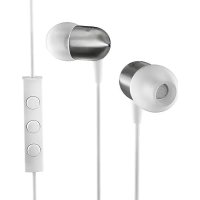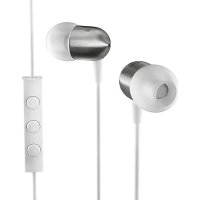
NS400 - Earphones Nocs - Free user manual and instructions
Find the device manual for free NS400 Nocs in PDF.


| Brand | Nocs |
| Model | NS400 |
| Product Type | In-ear headphones with remote and microphone |
| Compatibility | iPod, iPhone, iPad (latest Apple models) |
| Speaker Type | Dynamic driver |
| Recommended burn-in time | 10 to 20 hours for optimal sound quality |
| Remote Functions | Volume +, Volume -, Play/Pause, Answer/Hang up, Next track, Previous track |
| Recommended audio format | 320 kbps or VBR |
| Warranty | 1 year against manufacturing and material defects |
| Maintenance and cleaning | Regularly clean the eartips with a soft cloth; avoid dirt and earwax |
| Usage precautions | Do not listen at high volume; do not use in traffic; avoid heat, cold, humidity, magnetic fields, cable pulling |
| Storage | Avoid extreme temperatures (hot or cold) for long periods |
| Recycling | Contact local recycling center for disposal |
| Spare parts | Eartips of different sizes provided |
| Repairability | Contact point of purchase or Nocs for warranty repairs |
Frequently Asked Questions - NS400 Nocs
User questions about NS400 Nocs
0 question about this device. Answer the ones you know or ask your own.
Ask a new question about this device
Download the instructions for your Earphones in PDF format for free! Find your manual NS400 - Nocs and take your electronic device back in hand. On this page are published all the documents necessary for the use of your device. NS400 by Nocs.
USER MANUAL NS400 Nocs
EARPHONES WITH REMOTE AND MIC
HÖRLURAR MED FJÄRR OCH MICK
INEAR KOPFHÖRER MIT FERNBEDIENUNG UND MIKROFON
ÉCOUTEURS AVEC TÉLÉCOMMANDE ET MICRO
AURICULARES CON CONTROL REMOTO Y MICRÓFONO
AURICOLARI CON TELECOMANDO E MICROFONO
Nocs offers audio products and accessories for portable multimedia devices. We believe in lasting design and moderate pricing.
CONTACT
For further information about the Nocs brand and line-up, please visit our web at www.nocs.se or send us an e-mail at info@nocs.se.
2 - GENERAL INTRODUCTION
TECHNICAL SPECIFICATIONS
Speaker 8.0 mm dynamic
Sensitivity ......106 dB SPL @ 1 kHz
Impedance 16 Ohm @ 1 kHz
Frequency 20 Hz - 20 kHz
Housing......Titanium
Cord length 1.2 m
Sleeves Silicone
Y-Split ....Thermoplastic Elastomers - TPE
Cords ....Kevlar, Copper, TPE
Cord holder TPE
Strain Reliefs TPE
SOUND CHARACTERISTICS
The dynamic speaker is designed for the best possible listening experience. The earphones deliver a clear and powerful sound throughout the entire sonic spectrum, backed by natural bass.
MATERIALS & DESIGN
Every part, from the strong lightweight titanium housings and noise isolating silicone sleeves to the Kevlar reinforced cables, have been carefully designed to offer great durability.
ENGLISH
INTRODUCTION
NS400 Earphones with Remote and Mic supports control of the latest models of Apple iPod, iPhone and iPad. It is important that you read the manual before using your Nocs.
WARNING
Never listen to music at an uncomfortably high volume, this may permanently damage your hearing.
Never use the earphones in traffic or in other places where your hearing is needed to perceive dangers.
Do not expose the earphones to heat, cold, > moisture, magnetism or abnormal wear and tear.
Never pull the cord to remove the earphones, pull directly on the 3.5 mm connector instead.
RECOMMENDATIONS
NS400 features dynamic membranes, which require 10-20 hours of usage before reaching optimal sound quality.
Always lower the volume before you connect > the earphones.
Make sure you put the earphones in the right ear. See the labeling L/R.
Choose a pair of sleeves with a comfortable and >tight fit. Change the size if you experience external noise or poor bass.
Clean your sleeves regularly. Dirt and wax impairs > both sound quality and the life of the product.
Avoid storing the products in extreme heat or cold > for long periods.
Always use good source material. We recommend > 320 kbps or VBR.
SUPPORT
As the owner of a pair of Nocs you are welcome to contact us with your questions. Please visit our website which is continuously updated with information about our products.
RECYCLING
Think about the environment! Contact your local recycling centre if you are unsure how to proceed when it is time to discard your product.
WARRANTY
Nocs guarantees that this product is free from manufacturing and material defects at the time of purchase and during the coming year. This warranty does not limit binding legislation or consumer's rights towards the seller. The warranty is valid provided that the party selling the product does not issue other warranties and that the following conditions are met:
That the customer can provide a receipt with the > date and place of purchase.
That the product can be identified as the product, it is claimed to be.
That the product is not damaged due to > improper treatment such as heat, cold, humidity, magnetism, abnormal wear and tear, modification or force majeure.
That the product is not damaged as a result > of misinterpretation of the instructions.
That manufacturing and/or material defects > concern the main product, namely the earphones.
Always contact the point of purchase first regarding warranty issues.
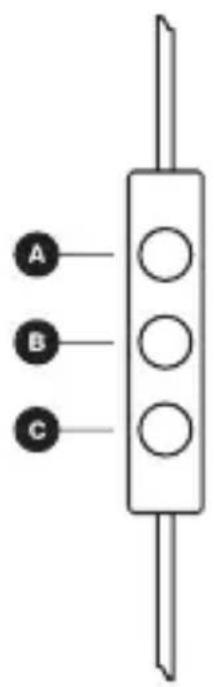
USING THE REMOTE AND MIC
Press A x1 to adjust volume up >
Press B x1 to answer and end calls >
Press B x1 to pause/resume playback >
Press B x2 to select the next track >
Press B x3 to select the previous track >
Press C x1 to adjust volume down >
See page 61 for a list of supported Apple iPod, iPhone and iPad models, and don't forget to always use the latest software from Apple.
SVENSKA
INTRODUKTION
“Made for iPod,” “Made for iPhone,” and “Made for iPad” mean that an electronic accessory has been designed to connect specifically to iPod, iPhone, or iPad, respectively, and has been certified by the developer to meet Apple performance standards. Apple is not responsible for the operation of this device or its compliance with safety and regulatory standards. Please note that the use of this accessory with iPod, iPhone, or iPad may affect wireless performance.
The remote and mic are supported only by iPod nano (4th generation and later), iPod classic (120GB, 160GB), iPod touch (2nd generation and later), iPhone 3GS, iPhone 4, iPhone 4S, iPad and iPad 2.
The remote is supported by iPod shuffle (3rd generation and later).
Audio is supported by all iPod models.
Requires the latest iPod software.
Made for

iPod

iPhone

iPad



© 2012 Nocs AB. All rights reserved.
Nocs ^® and the Nocs logo are trademarks of Nocs AB.
iPad, iPhone, iPod, iPod classic, iPod nano, iPod shuffle, and iPod touch are trademarks of Apple Inc., registered in the U.S. and other countries.