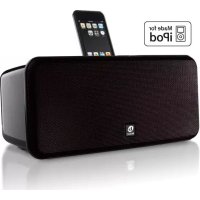
BAIDS2BEU - Docking station BOSTON ACOUSTICS - Free user manual and instructions
Find the device manual for free BAIDS2BEU BOSTON ACOUSTICS in PDF.


| Brand | Boston Acoustics |
| Model | BAIDS2BEU (Horizon i-DS²) |
| Product type | iPod docking station with amplified speakers |
| Main functions | iPod audio playback, iPod charging, iTunes synchronization via USB, auxiliary input for other players, composite video output, remote control included |
| Audio technology | 9 cm (3.5") speakers in individual acoustic chambers, BassTrac processing for deep bass |
| Power supply | Built-in, power cord (no external adapter) |
| Included iPod adapters | 7 adapters compatible with iPod photo, nano, 5G, classic, touch (models listed in manual) |
| Connectivity | USB port (type B), 3.5 mm auxiliary input, composite video output (yellow RCA) |
| Compatible devices | iPod with dock connector, other audio players via auxiliary input |
| Remote control | Infrared, CR2025 button cell battery, max range 6 m, max angle 45° |
| Maintenance and cleaning | Clean the cabinet with a soft dry cloth; inspect connections once a year |
| Safety | Do not expose to water or humidity; maintain a distance of 50 mm around the device for ventilation; do not block vents |
| Warranty | One-year limited warranty on parts and labor (excluding misuse) |
| After-sales service | Contact the retailer or visit www.bostonacoustics.com/dealers |
Frequently Asked Questions - BAIDS2BEU BOSTON ACOUSTICS
User questions about BAIDS2BEU BOSTON ACOUSTICS
0 question about this device. Answer the ones you know or ask your own.
Ask a new question about this device
Download the instructions for your Docking station in PDF format for free! Find your manual BAIDS2BEU - BOSTON ACOUSTICS and take your electronic device back in hand. On this page are published all the documents necessary for the use of your device. BAIDS2BEU by BOSTON ACOUSTICS.
USER MANUAL BAIDS2BEU BOSTON ACOUSTICS
Speaker System for iPod
Makes your iPod sound great - out loud!
Espanol
Horizon i-DS²
IMPORTANT SAFETY INSTRUCTIONS

This symbol found on the apparatus indicates hazards arising from dangerous voltages.

This symbol found on the apparatus indicates the user should read all safety statements found in the user manual.

This symbol found on the apparatus indicates double insulation.

Warning! To reduce the risk of fire or electrical shock, do not expose this apparatus to rain or moisture.

This symbol found on the apparatus indicates that the apparatus must be placed in a separate collection facility for electronic waste and not disposed with household waste.
-
Read these instructions.
-
Keep these instructions.
-
Heed all warnings.
-
Follow all instructions.
-
Do not use this apparatus near water.
-
Clean only with dry cloth.
-
Do not block any ventilation openings. Install in accordance with the manufacturer's instructions.
-
Do not install near any heat sources such as radiators, heat registers, stoves, or other apparatus (including amplifiers) that produce heat.
-
Do not defeat the safety purpose of the polarized or grounding type plug. A polarized plug has two blades with one wider than the other. A grounding-type plug has two blades and a third grounding prong. The wide blade or the third prong is provided for your safety. If the provided plug does not fit into your outlet, consult an electrician for replacement of the obsolete outlet.
-
Protect the power cord from being walked on or pinched particularly at plugs, convenience receptacles, and the point where they exit from the apparatus.
-
Only use attachments/accessories specified by the manufacturer.
-
Unplug this apparatus during lightning storms or when unused for long periods of time.
-
Refer all servicing to qualified service personnel. Servicing is required when the apparatus has been damaged in any way, such as power-supply cord or plug is damaged, liquid has been spilled or objects have fallen into the apparatus, the apparatus has been exposed to rain or moisture, does not operate normally, or has been dropped.
-
Maintain a minimum distance of 2^ (50mm) around the front, rear, and sides of the apparatus for sufficient ventilation. The ventilation should not be impeded by covering the ventilation openings or placing on or around the apparatus items such as newspapers, tablecloths, curtains, etc.
-
No open flame sources, such as lighted candles, should be placed on the apparatus.
-
The apparatus shall not be exposed to dripping or splashing. No objects filled with liquids, such as vases, shall be placed on the apparatus.
-
Either the power inlet connector on the rear of the apparatus or the power plug at the wall must remain accessible, to be able to disconnect power from the apparatus.
- To completely disconnect this apparatus from the AC Mains, disconnect the power supply cord plug from the AC receptacle.
- The mains plug of the power supply cord shall remain readily operable.
American Users:

Note: This equipment has been tested and found to comply with the limits for a Class B digital device, pursuant to part 15 of the FCC Rules. These limits are designed to provide reasonable protection against harmful interference in a residential installation. This equipment generates, uses, and can radiate radio frequency energy and, if not installed and used in accordance with the instructions, may cause harmful interference to radio communications. However, there is no guarantee that interference will not occur in a particular installation. If this equipment does cause harmful interference to radio or television reception, which can be determined by turning the equipment off and on, the user is encouraged to try to correct the interference by one or more of the following measures:
Reorient or relocate the receiving antenna.
- Increase the separation between the equipment and receiver.
- Connect the equipment into an outlet on a circuit different from that to which the receiver is connected.
- Consult the dealer or an experienced radio/TV technician for help.
Caution: Unauthorized changes or modifications to the receiver could void user's authority to operate the equipment.
Canadian Users

This class B digital apparatus complies with Canadian ICES-003.
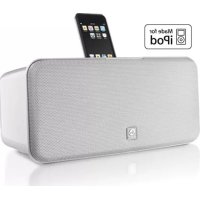
Thank you for choosing Boston Acoustics and congratulations on your purchase of the i-DS² Speaker System for iPod. If you own other Boston products, the outstanding audio performance and ease-of-use of the i-DS² should come as no surprise. If you're new to Boston, welcome – we think you've made a great choice. The i-DS² is a high performance amplified speaker system – perfect for when you want to use your iPod at home or share your music with others. In addition the i-DS² serves as a charging station for your iPod. There is also a USB port so you can connect it to your computer and sync your iPod while it is docked. Read through this manual to learn about all the capabilities of the i-DS². We know you'll enjoy it for years to come.
Features
- Outstanding audio performance from dual 3/2-inch speakers in separate acoustic chambers, vented for extended bass response
- BassTrac® audio processing for satisfying bass at any volume
- Intuitive, easy to use controls
Remote control to operate your iPod while it is docked
Make it your own! Customize your i-D with optional grilles available atBostonacoustic.com/POP
USB port for connecting with iTunes
Auxiliary input lets you connect other portable media players
Composite video output lets you play videos stored on your iPod through a television - iPod is charged while placed in the dock
Internal power supply - no bulky external adapter needed
Unpacking and Setting Up Your i-DS²
Carefully unpack the i-DS². If there is any sign of damage from transit, report it immediately to your dealer and/or delivery service. Keep the shipping carton and packing materials for future use. Be sure to keep your purchase receipt in a safe place, as it may be required for warranty purposes.
In the box you should find the i-DS², the remote control, power cord, and seven iPod dock adapters.
Placement
Your Horizon i-DS² will sound great just about anywhere. But if you put it near a wall or corner the bass response will be enhanced. Don't block the bass port on the rear of the cabinet. Avoid placing the i-DS² where it will be in direct sunlight.
Power Connection
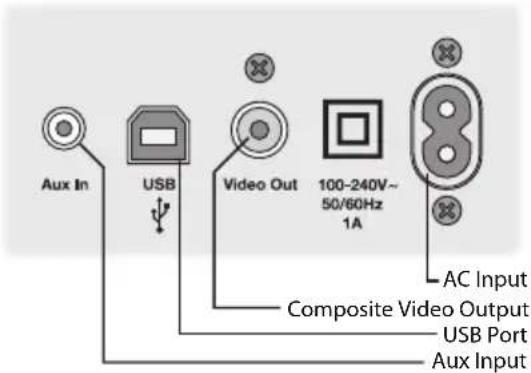
Just connect the power cord to the back of the Horizon i-DS² and plug it into the wall power outlet.
Docking Your iPod
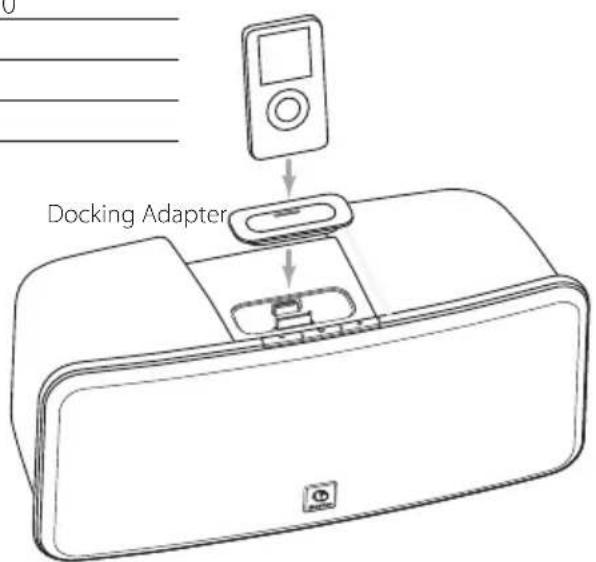
The Horizon i-DS² is supplied with seven docking adapters. These fit in the docking well in the top of the i-DS² to support various iPod models. The table below lists the iPod models and the docking adapters to use with them. The number of the docking adapter is molded into the back of the part. Place the appropriate adapter in the docking well and plug your iPod into the dock.
| iPod Model (Capacity) Adapter Number | |
| iPod photo (40 / 60GB), iPod with color display (60GB) | 7 |
| iPod nano (2 / 4GB) 8 | |
| 5G and U2 iPod (30 GB with video), iPod classic (80GB) | 9 |
| 5G iPod with video (60GB / 80GB), iPod classic (160GB) | 10 |
| iPod nano - 2nd generation (2 / 4 / 8GB) 11 | |
| iPod nano - 3rd generation (4 / 8GB) 13 | |
| iPod touch 8GB, 16GB and 32 GB 14 | |
The i-DS2 Controls
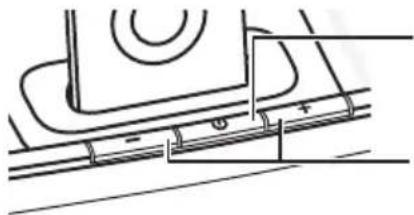
Turns the Horizon i-DS ^2 on and off. The button is lit when the i-DS ^2 is on. The button blinks when the sound is muted.
-1+ Increases or decrease the volume level.
When your iPod is docked in the i-DS² the jog wheel does not change the volume. The iPod navigation controls - ▶, ▶ and ▶ work as they normally do.
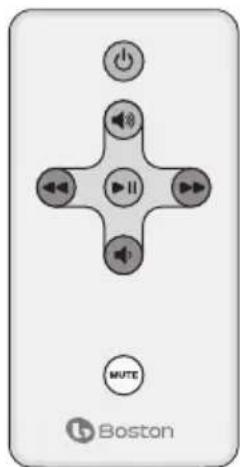
About the Remote Control
The supplied remote control is usually the most convenient way to operate the i-DS2.

Press to turn the i-DS ^2 on or off.

Press to start play or pause play.

Press to increase sound volume. Press and hold for faster adjustment.

Press to decrease sound volume. Press and hold for faster adjustment.

Press to mute, or un-mute, the sound. When the sound is muted the light in the main power button blinks.

Press once to skip to the next track. Press and hold to scan forward within a track.

Press once to return to the beginning of the current track. Press twice to skip to the beginning of the previous track. Press and hold to scan backward within a track.
Note: When you unpack your remote control there will be a plastic insulation tab extending from the battery compartment. Pull out this tab before using the remote control.
There must be an unobstructed line of sight to the front of the i-DS² when using the remote control. Point the remote control at the front panel of the i-DS², when pressing the buttons. For best results you should be within 20 feet of the unit and no more than 45^ off axis. Being in a brightly lit room can reduce the sensitivity of the i-DS² to remote control commands.
note: Eventually you'll need to replace the remote battery. If the remote doesn't reliably operate the i-DS², put in a new CR2025 3V lithium coin type battery.
Connecting Other Equipment
USB Port Connection
The USB port lets you sync your iPod with iTunes while it is docked in the i-DS². Connect the i-DS² to the USB port on your computer. Typically this is done with a USB-A to USB-B type cable, the kind used to connect most printers.
Using Aux Inputs
Other audio equipment, such as a portable CD player or older iPod models that do not have the universal docking adapter, can be connected to the i-DS² through the rear panel Aux input. You'll need a cable that has a stereo 1/8-inch plug on one end to connect to the i-DS² Aux input. The other end of the cable could have another stereo 1/8-inch plug or two RCA plugs depending on the type of output jacks on the other unit.
Using the Video Output
If your iPod can store video or photos you can view them on an external television when it is docked to the i-DS². Connect a standard RCA plug cable between the Video output of the i-DS² and the composite video input of your television. Typically the composite video input of a television is color coded yellow. Refer to the manual for your television for information on this input and how to use it.
Maintenance and Service
The i-DS2 enclosures may be cleaned using a soft cloth to remove fingerprints or to wipe off dust. All wiring connections should be inspected and remade at least once a year.
In the event that your speakers ever need service, contact your local Boston Acoustics dealer or visit www.bostonacoustics.com/dealers for a list of dealers in your area.
Limited Warranty
Boston Acoustics warrants to the original purchaser of the Horizon i-DS² that it will be free of defects in materials and workmanship in its mechanical parts for a period of one year from the date of purchase.
Your responsibilities are to install and use the i-DS² according to the instructions supplied, to provide safe and secure transportation to an authorized Boston Acoustics service representative, and to present proof of purchase in the form of your sales slip when requesting service.
Excluded from this warranty is damage that results from abuse, misuse, improper installation, accidents, shipping, or repairs/modifications by anyone other than an authorized Boston Acoustics service representative.
This warranty is limited to the Boston Acoustics product and does not cover damage to any associated equipment. This warranty does not cover the cost of removal or reinstallation. This warranty is void if the serial number has been removed or defaced. This warranty gives you specific legal rights, and you may also have other rights which vary from state to state.
If Service Seems Necessary
First, contact the dealer from whom you purchased the product. If that is not possible, write to:
Boston Acoustics, Inc.
300 Jubilee Drive
Peabody, MA 01960 USA
Or contact us via e-mail at:
US: support@bostona.com
Japan: ba_info@dm-holdings.com
Asia Pacific: service@dm-singapore.com
We will promptly advise you of what action to take. If it is necessary to return your Horizon i-DS² to the factory, please ship it prepaid. After it has been repaired, we will return it freight prepaid in the United States and Canada.

For EU Customers Only
This symbol found on the product indicates that the product must not be disposed of with household waste. Instead, it may be placed in a separate collection facility for electronic waste or returned to a retailer when purchasing similar product. The producer paid to recycle this product. Doing this contributes to reuse and recycling, minimizes adverse effects on the environment and human health and avoids any fines for incorrect disposal.
IMPORTANT INSTRUCCIONES DE SEGURIDAD

Boston Acoustics, Inc.
300 Jubilee Drive
Peabody, MA 01960 USA
O envientos un e-mail a::
Estados Unidos: support@bostona.com
Japon: ba_info@dm-holdings.com
Asia Pacífico: service@dm-singapore.com
Boston Acoustics, Inc.
300 Jubilee Drive
Peabody, MA 01960 USA
Japon: ba_info@dm-holdings.com
Asie Pacifique: service@dm-singapore.com
Boston Acoustics, Inc.
300 Jubilee Drive
Peabody, MA 01960 USA
Asia pacifico: service@dm-singapore.com
Boston Acoustics, Inc.
300 Jubilee Drive
Peabody, MA 01960 USA
Ellerkontaktaossviae-postpa:
USA: support@bostona.com
Japan: ba_info@dm-holdings.com
Boston Acoustics, Inc.
300 Jubilee Drive
Peabody, MA 01960 USA
Japan: ba_info@dm-holdings.com

- Espanol
- IMPORTANT SAFETY INSTRUCTIONS
- American Users:
- Canadian Users
- Features
- Unpacking and Setting Up Your i-DS²
- Placement
- Power Connection
- Docking Your iPod
- The i-DS2 Controls
- About the Remote Control
- Connecting Other Equipment
- USB Port Connection
- Using Aux Inputs
- Using the Video Output
- Maintenance and Service
- Limited Warranty
- If Service Seems Necessary
- For EU Customers Only
- IMPORTANT INSTRUCCIONES DE SEGURIDAD
Brand : BOSTON ACOUSTICS
Model : BAIDS2BEU
Category : Docking station