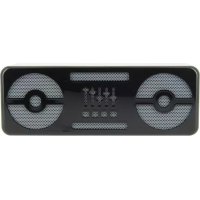
BBS305 - Docking station BEEWI - Free user manual and instructions
Find the device manual for free BBS305 BEEWI in PDF.



| Product type | Docking station / Bluetooth stereo speaker |
| Brand | BeeWi |
| Model | BBS305 |
| Dimensions | 156 x 56 x 51.5 mm |
| Weight | 380 g |
| Power supply | Rechargeable lithium-polymer battery 2000 mAh, charging via micro USB (5V) |
| Battery life | Up to 25 hours of talk or music playback (15 hours at 100% volume) |
| Bluetooth technology | Bluetooth V2.1+EDR, profiles HSP, HFP, A2DP, AVRCP, range up to 10 m |
| Audio power | 2 x 2.5 W (1 kHz, THD < 3%) |
| Frequency response | 60 Hz - 20 000 Hz |
| Microphone | Built-in with DSP noise reduction and echo cancellation |
| Auxiliary input | 3.5 mm jack |
| Main functions | Hands-free, voice command, play/pause, track control, volume, last number redial (on HFP phone) |
| LED indicators | Blue/Red LED for charging status, connection, call, low battery |
| Box contents | Speaker, USB cable, silicone protective cover, 3.5 mm audio cable, quick start guide |
| Wired use | Yes, via 3.5 mm audio cable (disables Bluetooth) |
| Care and cleaning | Clean with a soft, dry cloth. Avoid abrasive products and moisture. |
| Safety | Comply with applicable regulations for vehicle use. Do not expose to extreme temperatures. |
| Spare parts / Repairability | The battery is not user-replaceable. For any repairs, contact after-sales service. |
| General information | Indoor/outdoor use with protection. Bluetooth certified. |
Frequently Asked Questions - BBS305 BEEWI
User questions about BBS305 BEEWI
0 question about this device. Answer the ones you know or ask your own.
Ask a new question about this device
Download the instructions for your Docking station in PDF format for free! Find your manual BBS305 - BEEWI and take your electronic device back in hand. On this page are published all the documents necessary for the use of your device. BBS305 by BEEWI.
USER MANUAL BBS305 BEEWI
BLUETOOTH STEREO SPEAKER BBS305
BBS305

User's guide
ENGLISH 4
FRANCAIS 8
DEUTSCH 12
ITALIANO 16
ESPAñOL 20
PORTUGUES 24
NEDERLANDS 28
БылгAPСКИ 32
ROmàN 36
PUCCKN 40
日本語 44
中文 48
Thank you for purchasing BBS305 Blaster Bee Stereo Speaker from BEEWI. Please read the following instructions to learn how to configure and use more effectively your product.
INTRODUCTION
The Stereo Speaker BBS305 is a high performance wireless speaker allowing both music streaming and hands-free communication. It includes advanced built-in microphone and a pair of 2.5 Watt speakers with Digital Sound Processor (DSP) for echo cancellation and noise reduction that gives a loud and clear full duplex sound quality. The Stereo Speaker is Bluetooth 2.1+EDR compliant and it is compatible with all Bluetooth compliant devices using HSP, HFP and A2DP profiles such as mobile phones and music players.
Warning: always obey local legislation regarding the use of mobile phones in vehicles.
1. PRODUCT DESCRIPTION
1.1. Package Content
- Bluetooth stereo speaker
- USB charging cable
- Silicone like protective case (TPU : Thermoplastic polyurethane)
- Audio stereo jack 3.5mm cable for wired use
- Quick Start Guide
1.2. Features
- Wireless music streaming and hands-free communication
-Excellent sound - Powerful 2 x 2.5W stereo speakers
- High quality microphone
- Full Duplex, background noise reduction with CVC Digital Signal Processor (DSP)
- Auto connect to the last connected device
- Auxiliary jack input to be used as a regular speakers
- Up to 25 hours continuous talk or music streaming time
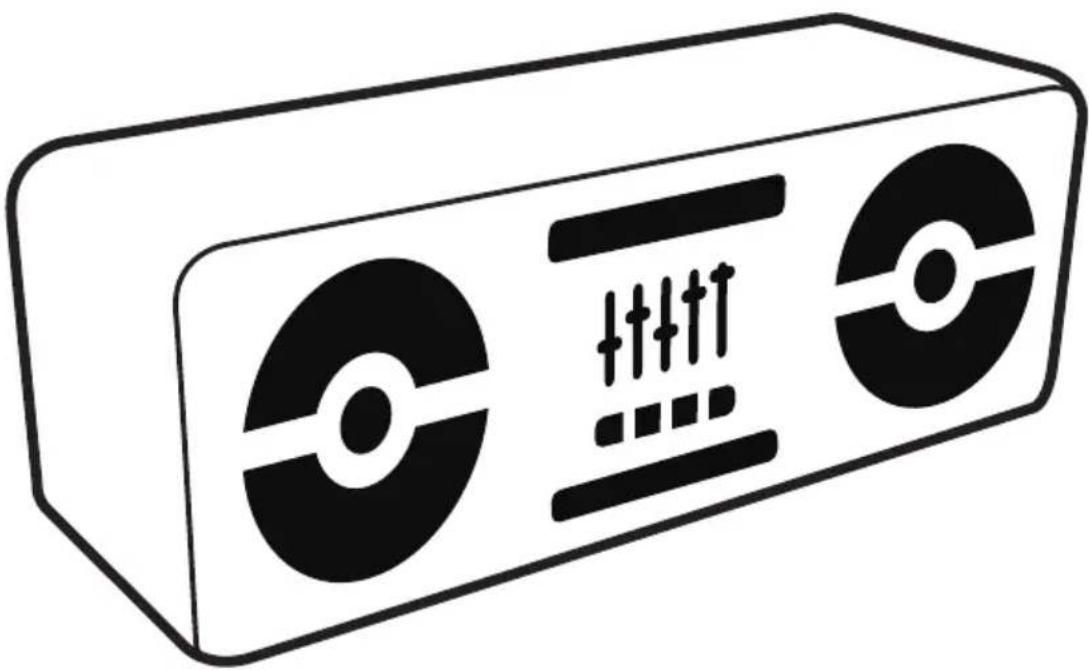
1.3. Product Overview
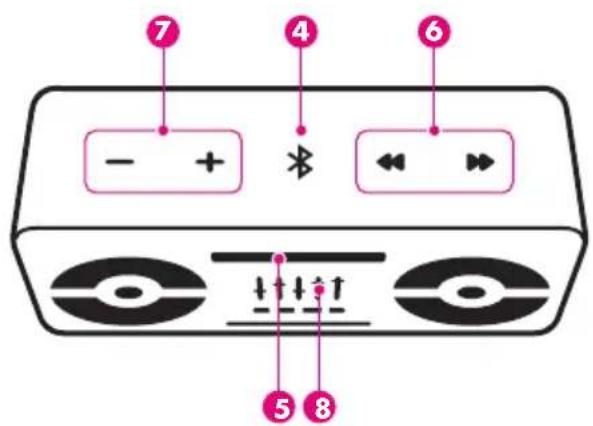
On/Off: Power switch
Charge connector (micro USB compliant)
- Jack 3.5mm connector : auxiliary audio input
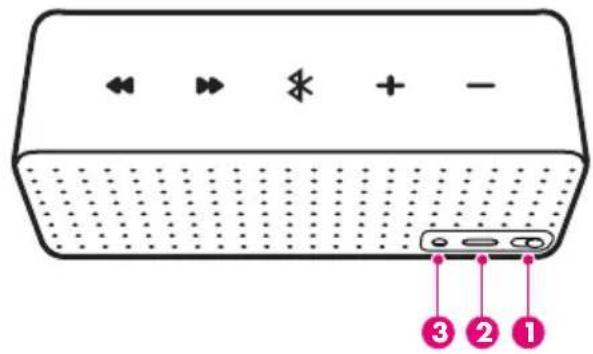
Music and Call functions
Light indicator
Track control &
Volume Control VOL- / VOL+
microphone
1.4. Product Specification
| Bluetooth Specification Bluetooth V2.1+EDR | |
| Bluetooth Profiles HSP, HFP, A2DP, AVRCP | |
| Frequency Band 2.4GHz~2.4835GHz ISM Band | |
| Working Distance Class 2, Up to 10 meters | |
| Audio Output Power 2 x 2.5W (1kHz, THD<3%) | |
| Frequency Response 60 Hz to 20 000 Hz | |
| Talking Time Up to 25 hours (15 hours at 100% volume) | |
| Playing Time Up to 25 hours (15 hours at 100% volume) | |
| Battery | 2000mAh Li-Polymer rechargeable battery |
| Dimensions | 156*56*51.5mm |
| Weight | 380g |
2. USING THE PRODUCT
2.1. Power Supply and Charging
Fully charge the device using the included USB cable at least 4 hours before first time use or after a long storage period. The red LED indicator will stay on while charging and will be off as soon as it is completed. It takes approximately 4 hours to re-charge every time. When battery is empty, during the last 15 minutes you will hear 3 bips every 3 minutes.
2.2. Power On / Power Off
Power On: slide the On/Off switch right, the blue LED indicator will blink 3 times.
Power Off: slide the power switch left, the LED indicator will turn off.
2.3. Pair and connect
Refer to the Bluetooth pairing procedures in the mobile phone or music player user manual. When the device is on, long press the button for about 6 seconds until the blue indicator blinks red/blue alternatively, then release the button. The product is in the pairing mode. Search for Bluetooth devices in the phone, select the device name "BeeWi BBS305" displayed on the phone and eventually enter the pass key "0000" to add the device to the pair list and establish the connection.
Check the connection by placing a call or playing the music from your phone.
2.4. Connection
The speaker will automatically connect to the last connected device when it will be turned on. If it is not the case, just connect the speaker from the mobile phone.
When using both Hands-Free and Music profiles, hands-free will always have the priority, the music being muted in case of incoming or outgoing calls. As soon as the call has been hung up, the music rebounds afterwards.
Note: If the mobile phone supports only Headset profile, the connection will be established automatically when a call is made (refer to the phone user manual).
2.5.Wired mode :
When you plug the jack stereo cable included, the speaker switches to wired mode and Bluetooth will automatically switch off. You have to launch music from your phone, tablet, music player...
Hands-free communication function is no longer active. You will have to answer your calls from your phone and use the phone's microphone.
2.6.Status indicators
| Status LED Descriptions | ||
| Turn On Blue Blinking 3 times | ||
| Pairing Blue & Red Blinking alternatively | ||
| Standby Mode/Connected Blue Blinking once every 5 seconds | ||
| Standby Mode/Not connected Blue Blinking twice every 3 seconds | ||
| During Communication Blue Blinking once every 5 seconds | ||
| Playing Music Blue Blinking once every 5 seconds | ||
| Low Battery Red Blinking once every 5 seconds | ||
| Charging | Red Light on | |
| Charging Completed | Red Light off |
3. FUNCTION MATRIX
| Feature Key Conditions Operation | ||
| Power On On/Off Power Off Switch up | ||
| Power Off On/Off Power on Switch down | ||
| Pairing Bluetooth Power on Long press 6 seconds | ||
| Answer a call Bluetooth Incoming Call Short press | ||
| Terminate a call Bluetooth Talking Short press | ||
| Reject incoming call* | Bluetooth Incoming Call Long press 3 seconds | |
| Voice dial* | Bluetooth Standby / Music Long press 3 seconds | |
| Last number redial* | Bluetooth Standby / Music 2 short presses | |
| Switch call audio to phone | In call | Long press 3 seconds |
| Switch call audio to speaker | In call | Long press 3 seconds |
| Mute / Un-mute | In call | Long press 6 seconds |
| Volume Up | Talking / Music Playing | Short press |
| Volume Down | Talking / Music Playing | Short press |
| Play/Pause | Music Stopped/Playing | Short press |
| Previous Track | Music Playing | Short press |
| Next Track | Music Playing | Short press |
| Rewind | Music Playing | Long press |
| Fast forward | Music Playing | Long press |
- Mobile phone supporting HFP only


Brand : BEEWI
Model : BBS305
Category : Docking station