Sibia Bassinet - Audio monitor MAXI-COSI - Free user manual and instructions
Find the device manual for free Sibia Bassinet MAXI-COSI in PDF.


| Product type | Baby audio monitor |
| Brand | Maxi-Cosi |
| Model | Sibia Bassinet |
| Collection | Kindred |
| Power supply | AC adapter (included) |
| Connectivity | Bluetooth® |
| Audio function | Two-way audio listening |
| Bluetooth speaker | Music streaming from a smartphone |
| Vibration | Vibrating alert for parents |
| Nightlight | Built-in, adjustable |
| LED indicators | Connection and power status |
| Smartphone pairing | Via Maxi-Cosi app (not detailed) |
| Installation mode | On a flat surface or on the Sibia bassinet |
| Range | Approximately 100 meters in open field (estimated) |
| Material | EcoCare (fabric recycled from plastic bottles) |
| Maintenance | Clean with a soft, dry cloth |
| Safety | Keep cords out of reach of children (>0.9 m) |
| Spare parts | Replaceable AC adapter |
| Warranty | Refer to the manual for conditions |
| Intended use | Indoor only, does not replace parental supervision |
Frequently Asked Questions - Sibia Bassinet MAXI-COSI
User questions about Sibia Bassinet MAXI-COSI
0 question about this device. Answer the ones you know or ask your own.
Ask a new question about this device
Download the instructions for your Audio monitor in PDF format for free! Find your manual Sibia Bassinet - MAXI-COSI and take your electronic device back in hand. On this page are published all the documents necessary for the use of your device. Sibia Bassinet by MAXI-COSI.
USER MANUAL Sibia Bassinet MAXI-COSI
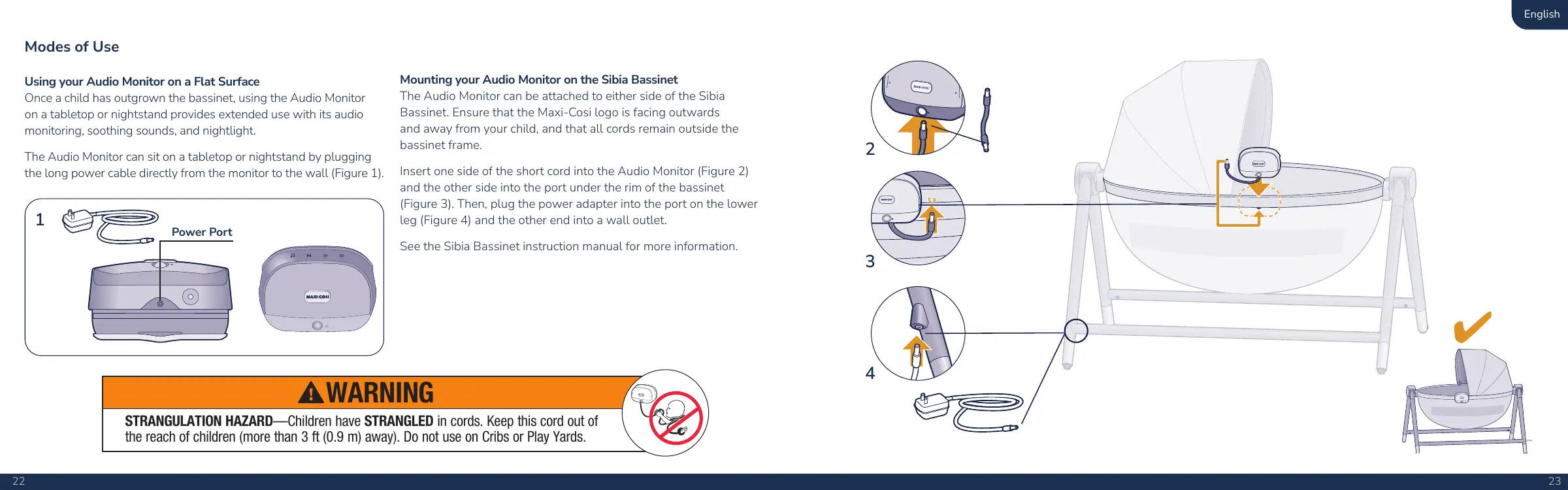
Using your Audio Monitor on a Flat Surface
Once a child has outgrown the bassinet, using the Audio Monitor on a tabletop or nightstand provides extended use with its audio monitoring, soothing sounds, and daylight.
The Audio Monitor can sit on a tabletop or nightstand by plugging the long power cable directly from the monitor to the wall (Figure 1)
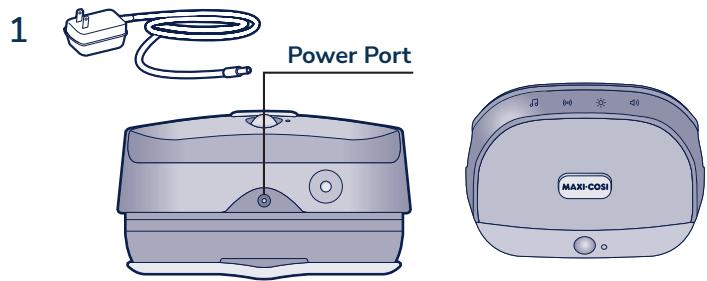
Mounting your Audio Monitor on the Sibia Bassinet
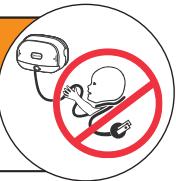
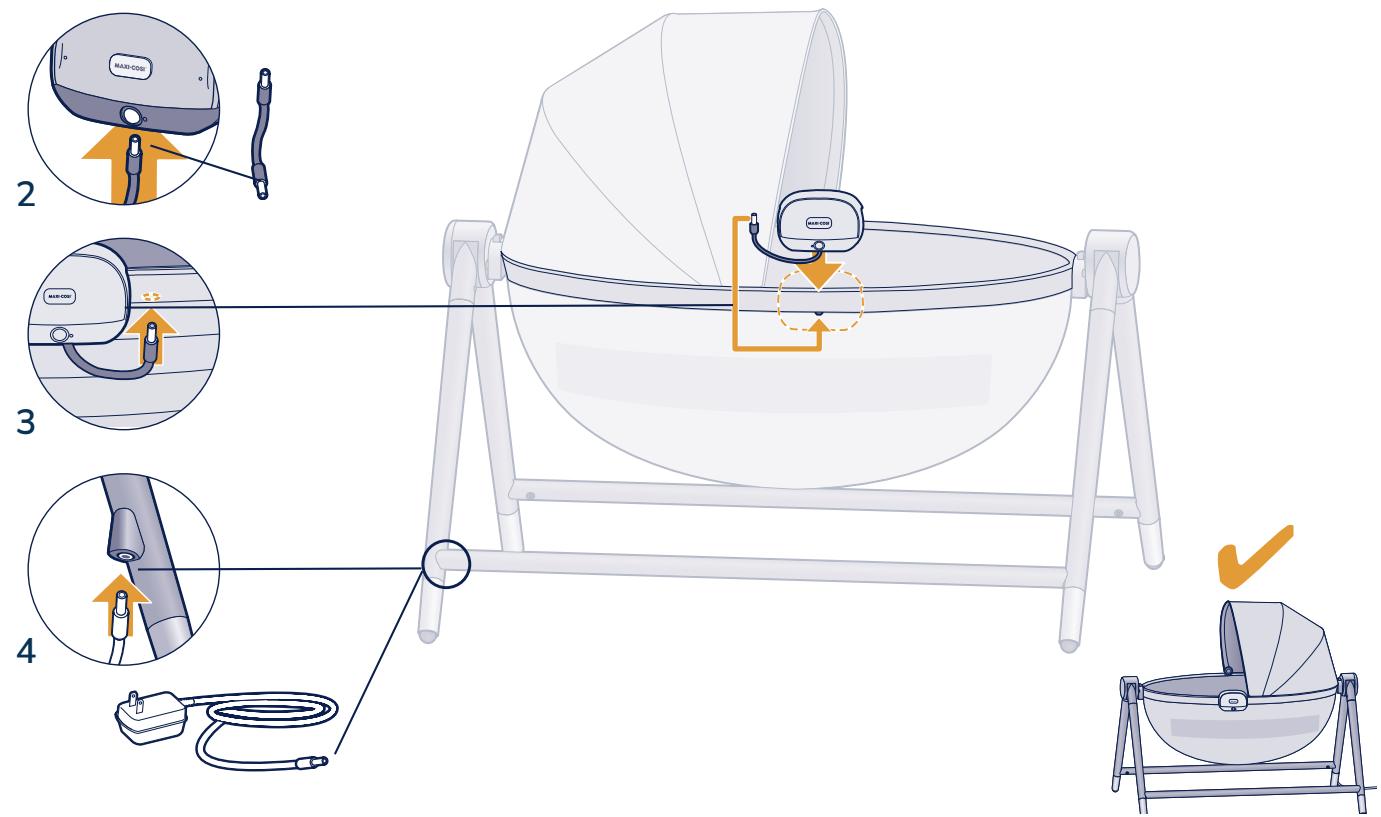
The Audio Monitor can be attached to either side of the Sibia Bassinet. Ensure that the Maxi-Cosi logo is facing outwards and away from your child, and that all cords remain outside the bassinet frame.
- Insert one side of the short cord into the Audio Monitor (Figure 2) and the other side into the port under the rim of the bassinet (Figure 3). Then, plug the power adapter into the port on the lower leg (Figure 4) and the other end into a wall outlet.
See the Sibia Bassinet instruction manual for more information.
WARNING
STRANGULATION HAZARD—Children have STRANGLED in cords. Keep this cord out of the reach of children (more than 3 ft (0.9m) away). Do not use on Cribs or Play Yards.
MAXI-COSI
Care and
Maintenance
Care and Maintenance
Clean product with a slightly damp cloth or with an anti-static cloth. ALWAYS unplug from electrical outlet before cleaning. NEVER USE cleaning agents or abrasive solvents. DO NOT clean any part of the product with thinners or other solvents and chemicals—this may cause permanent damage to the product, which is not covered by the warranty. Keep product away from hot, humid areas or strong sunlight, and do not let it get wet. Every effort has been made to ensure high standards of reliability of your product. However, if something does go wrong, please do not try to repair it yourself—contact Consumer Care for assistance.

Disposal
At the end of the product life cycle, you should not dispose of this product with normal household waste. Take this product to a collection point for the recycling of electronic equipment in accordance with your local laws. Some of the product materials can be reused if you take them to a recycling point. By reusing some parts or raw materials from used products, you make an important contribution to the protection of the environment. Please contact your recycling center for more information on the collection points in your area.
Prior to disposal of this device, make sure to reset the device to its factory state and remove the device from your account, which will help clear the device of personal data from the device. Remove or securely erase any storage media, such as MicroSD cards, which may contain personal data like videos, photos, and documents.
Replaceable Parts
Power cord
- Short cable
To order parts, call 1-800-544-1108 or text 1-812-203-4747. Have the model number ready (MO191), the product serial number (found at the bottom of the monitor), and a brief description of the part.
Two-Year Limited Warranty
Dorel Juvenile Group, Inc. warrants to the original purchaser that this product (CryAssist™ Audio Monitor) is free from material and workmanship defects when used under normal conditions for a period of two (2) years from the date of purchase. Should the product contain defects in material or workmanship Dorel Juvenile Group, Inc., will repair or replace the product, at our option, free of charge. Purchaser will be responsible for all costs associated with packaging and shipping the product to Dorel Juvenile Group Consumer Care Department at the address noted on the back cover and all other freight or insurance costs associated with the return. Dorel Juvenile Group will bear the cost of shipping the repaired or replaced product to the purchaser. Product should be returned in its original package accompanied by a proof of purchase, either a sales receipt or other proof that the product is within the warranty period. This warranty is void if the owner repairs or modifies the product or the product has been damaged as a result of misuse. This warranty excludes any liability other than that expressly stated previously, including but not limited to, any incidental or inconsequential damages.
SOMES TATES DO NOT ALLOW THE EXCLUSION OR LIMITATION OF INCIDENTAL OR CONSEQUENTIAL DAMAGES, SO THE ABOVE LIMITATION OR EXCLUSION MAY NOT APPLY TO YOU. THIS WARRANTY GIVES YOU SPECIFIC LEGAL RIGHTS, AND YOU MAY ALSO HAVE OTHER RIGHTS THAT MAY VARY FROM STATE TO STATE.
FCC Statement
This device complies with part 15 of the FCC Rules. Operation is subject to the following two conditions:
- This device may not cause harmful interference, and
- This device must accept any interference received, including interference that may cause undesired operation.
RADIO AND TELEVISION INTERFERENCE:
This equipment has been tested and found to comply with the limits for a Class B digital device, pursuant to part 15 of the FCC Rules. These limits are designed to provide reasonable protection against harmful interference in a residential installation. This equipment generates, uses and can radiate radio frequency energy and, if not installed and used in accordance with the instructions, may cause harmful interference to radio communications. However, there is no guarantee that interference will not occur in a particular installation. If this equipment does cause harmful interference to radio or television reception, which can be determined by turning the equipment off and on, the user is encouraged to try to correct the interference by one or more of the following measures:
- Reorient or relocate the receiving antenna.
- Increase the separation between the equipment and receiver.
- Connect the equipment into an outlet on a circuit different from that to which the receiver is connected.
- Consult the dealer or an experienced radio/TV technician for help.
Note: Changes or modifications not expressly approved by Dorel Juvenile Group can void your authority to operate this equipment under Federal Communications Commission's rules.
Use of other accessories may not ensure compliance with the FCC exposure guidelines.
CAUTION: This equipment complies with FCC/IC RSS-102 radiation exposure limits set forth for an uncontrolled environment. This equipment should be installed and operated with minimum distance 20 cm between the radiator and your body. This transmitter must not be co-located or operating in conjunction with any other antenna or transmitter. Restrictions declaration in the 5 GHz band: the device for operation in the band 5150-5250 MHz is only for indoor use to reduce the potential for harmful interference to co-channel mobile satellite systems.
IC Information
This device complies with Industry Canada license-exempt RSS standard(s). Operation is subject to the following two conditions: (1) this device may not cause interference, and (2) this device must accept any interference, including interference that may cause undesired operation of the device. Under Industry Canada regulations, this radio transmitter may only operate using an antenna of a type and maximum (or lesser) gain approved for the transmitter by Industry Canada. To reduce potential radio interference to other users, the antenna type and its gain should be so chosen that the equivalent isotropically radiated power (e.i.r.p.) is not more than that necessary for successful communication. This Class B digital apparatus complies with Canadian ICES-003.
Français