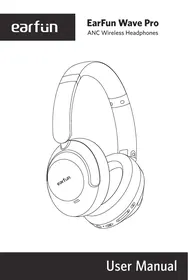
Wave Pro - Headphones EarFun - Free user manual and instructions
Find the device manual for free Wave Pro EarFun in PDF.


| Brand | EarFun |
| Model | Wave Pro (HP200) |
| Product Type | Bluetooth wireless headset |
| Weight | Approximately 250 g |
| Battery Life | Up to 40 hours |
| Charging Time | Approximately 2 hours |
| Charging Type | USB-C |
| Active Noise Cancellation | Yes, hybrid |
| Bluetooth Version | 5.0 |
| Supported Audio Codecs | SBC, AAC |
| Connectivity | Bluetooth wireless, 3.5mm jack |
| Built-in Microphone | Yes, with noise reduction |
| Controls | Touch and physical buttons |
| Care and Cleaning | Clean with a soft, dry cloth. Do not use chemical products. |
| Safety | Follow recommended listening levels to prevent hearing damage. |
| Replacement Parts | Not available separately |
| Repairability | Not user-repairable. Contact customer service. |
Frequently Asked Questions - Wave Pro EarFun
User questions about Wave Pro EarFun
0 question about this device. Answer the ones you know or ask your own.
Ask a new question about this device
Download the instructions for your Headphones in PDF format for free! Find your manual Wave Pro - EarFun and take your electronic device back in hand. On this page are published all the documents necessary for the use of your device. Wave Pro by EarFun.
USER MANUAL Wave Pro EarFun
Download the EarFun Audio app for an enhanced experience.
Equalizer tuning, customizing touch controls
Firmware updates, headphones battery status
Less data tracking, personalized device name
Built-in feedback, and more
EarFun Audio


Download on the Google Play

Download on the App Store

Please update your headphones firmware to the latest version via the EarFun Audio App for the best user experience. If headphones can't connect to the app, reinstall or update the app in the app store.

What's in the Box
EarFun Wave Pro
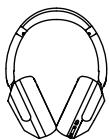
Travel Case
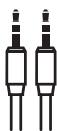
AUX Audio Cable
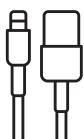
USB-C Cable
User Manual

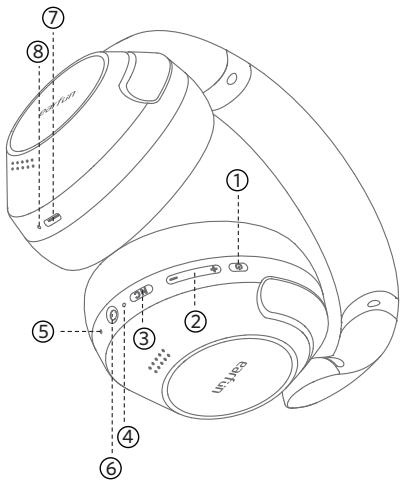
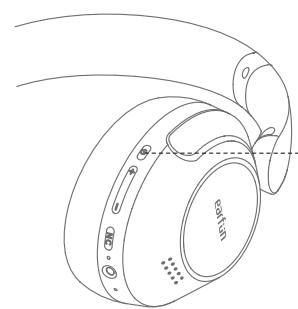
③ Product Diagram
① MFB Button
② Volume +/- Button
③ ANC Control Button
④ Headphone Status LED indicator
⑤ Microphone
⑥ 3.5mm AUX Audio Input Jack
⑦ USB-C Charging contactor
⑧ Charging LED indicator
4 Pairing Your Headphones
1. First-time Pairing with Device
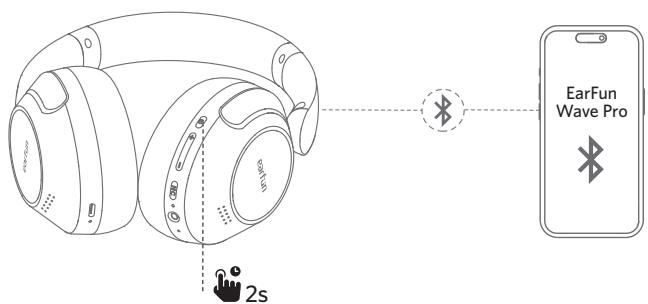
Step 1. Press and hold the MFB button for 2 seconds to power on the headphones. It will automatically enter into pairing mode.
Step 2. Activate Bluetooth on your Bluetooth-enabled device and search for other Bluetooth devices.
Step 3. Select "EarFun Wave Pro" from the list of Bluetooth devices shown. (if a password is needed, type '0000').
Notes:
The headphones will automatically connect with the previously paired device when power on again.
2. Connect to a New Device
Option A
Step 1. Unpair the headphones from the Bluetooth-enabled device that's connected. The headphones will disconnect from the current device and go into pairing mode to be paired again.
Step 2. Search on the new device and connect.
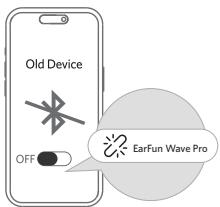
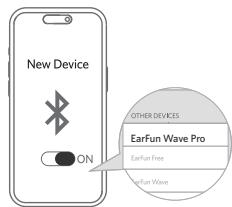
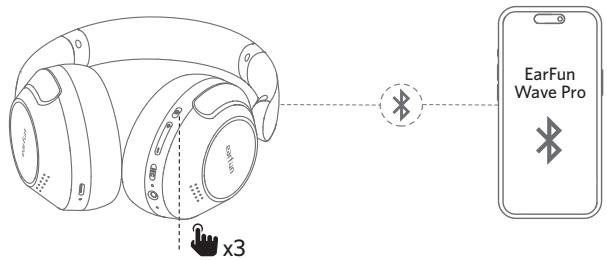
Option B
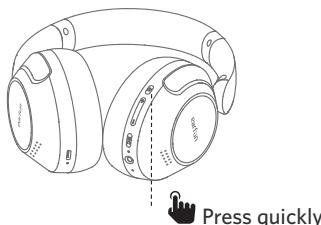
Step 1. Press triple MFB button quickly in connecting status. The headphones will disconnect from the current device and go into pairing mode.
Step 2. Search on the new device and connect.
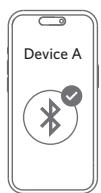
3. Pairing and Connecting two Bluetooth devices simultaneously
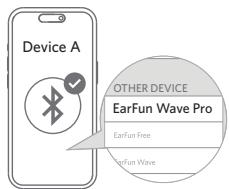
Step1. Pair with the first device and stay connected.
Step2. Press triple MFB button quickly. The headphones will enter pairing mode and will disconnected from the first device.
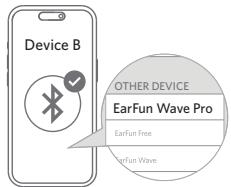
Step3. Search on the second device to connect the headphones.
Step4. Manually reconnect the headphones on the first device.
①
(2)
(3)
(4)
Notes:
The headphones will automatically connect to both devices after finishing setting up the multipoint connection.

Functions
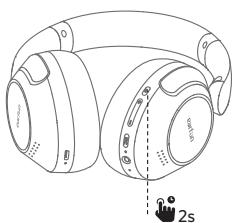
Power on:
Press and hold MFB button for 2 seconds
Power off:
Press and hold MFB button for 5 seconds
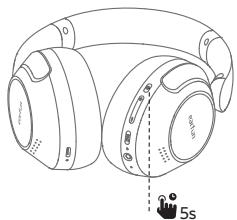
Note: If the headphones are not connected to any device, they will automatically power off after 30 minutes for saving the battery life.

Playing music
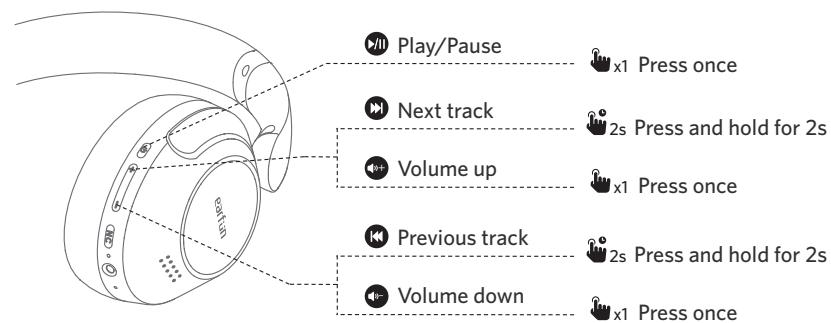
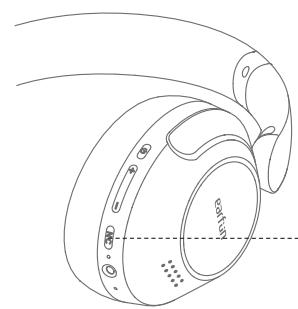

Noise cancelling / Normal/ Ambient sound

x1 Press once

Hands free conversation
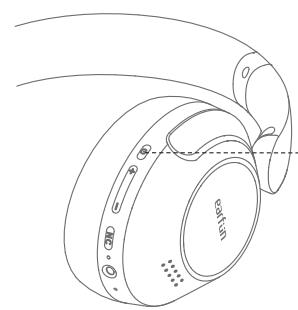

Answer/End a call

x1 Press once

Reject a call

2s Press and hold for 2s

Answer and transfer two calls

x2 Press twice

Activate the voice assistant

Voice assistant

x2 Press twice
⑥ Headphones Status LED Indicator
| Power on | White indicator turn on for 1 seconds |
| Power off | Red indicator turn on for 1 seconds |
| Pairing mode | Indicator flashes white |
| Successfully connected | Indicator turns off |
| Factory reset | Indicator turn on in pink for 3 seconds |
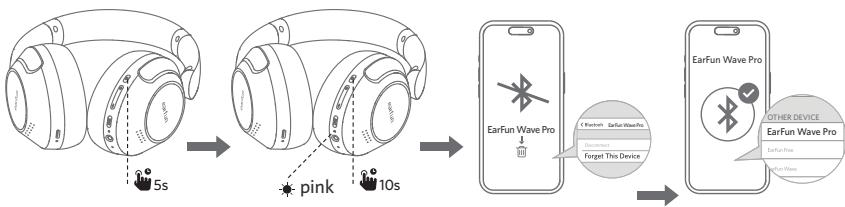
⑦ Reset and Reconnecting
If you fail to establish a connection between the headphones and Bluetooth devices, please try the following steps:
- Press and hold MFB button for 5 seconds to power off headphones.
- Press and hold the MFB button for at least 10s until headphones status LED indicate in pink, and then release the button. The Headphones have been reset successfully.
- Power on headphones again and then delete the previous connection from the Bluetooth device and reactivate Bluetooth to reconnect "EarFun Wave Pro".
Charging
- Please clean the USB-C charging port before charging.
- Fully charge the headphones before first use.
- You can check the headphones battery level from the Bluetooth device or EarFun Audio app.
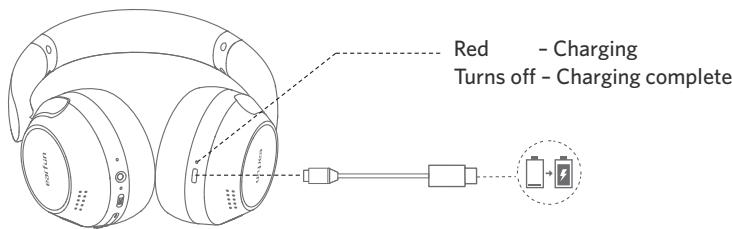
Connect USB-C cable for charging

AUX Input
- The headphones will power off and disconnect Bluetooth connection when plug-in the AUX audio cable.
- In AUX input mode, the audio will connect to the transducer directly that can't control the volume, play/pause by the headphones, and also can't be controlled by the EarFun Audio app. Please use the front-end device to adjust the volume and play/pause.
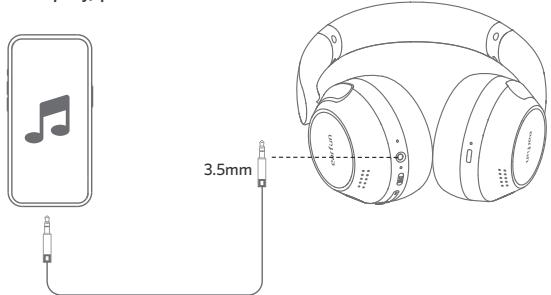
Note:
Please ensure that the volume of front-end device is turned down to minimum when connecting the AUX audio. Adjust the volume after putting on this headphones.

Specifications
| Connectivity | Bluetooth |
| Bluetooth frequency | 2.402GHz-2.480GHz |
| Bluetooth profile | A2DP, AVRCP, HFP, HSP |
| Bluetooth transmitted power | <7dBm (for EU) |
| Maximum working range | 15m(without obstacle) |
| Battery capacity | 800mAh |
| Charging time | 2 hours |
| Playtime | ANC OFF--Up to 80 hours (varies by volume level and audio content) ANC ON--Up to 55 hours (varies by volume level and audio content) |
| Input | 5V---1A |
| Dimentions | 159.7mm x82.4mm x 210.8mm |
| Weight | 268g |
11 Troubleshooting
Q: The headphones are turning on, but it doesn't connect to my device?
A: To connect the headphones to your device, please ensure headphone is power on, then check if the Bluetooth is enabled. If the Headphones still don't connect to your device, please perform a reset or contact our customer support.
Q: Why is the connection not stable and cuts out intermittently?
A: Please make sure there are no objects between the headphones and your Bluetooth device and make sure there is no radio or WIFI interference nearby.
Q: What is the range of Bluetooth headphones?
A: Bluetooth headphones have maximum range of 49 feet (15m, no obstacle). However, the actual range will depend on usage and environment.
Q: My headphones will not switch on.
A: Please recharge them and make sure they have enough battery power. If they are fully charged and still nothing happens or if you are not able to charge them, please contact our customer support.
Q: Will the headphones shut off automatically?
A: The headphones will stay on as long as they are connected to a device. If no audio is playing, they will enter power-saving mode and wake up once audio playback resumes. If the headphones are not connected to any devices they will automatically power off after 30 minutes.
Customer Service
For FAQs and more information:
Please send an email to: service@myearfun.com
www.myearfun.com
FCC Statement
Changes or modifications not expressly approved by the party responsible for compliance could void the user's authority to operate the equipment.
This equipment has been tested and found to comply with the limits for a Class B digital device, pursuant to Part 15 of the FCC Rules. These limits are designed to provide reasonable protection against harmful interference in a residential installation. This equipment generates uses and can radiate radio frequency energy and, if not installed and used in accordance with the instructions, may cause harmful interference to radio communications.
However, there is no guarantee that interference will not occur in a particular installation. If this equipment does cause harmful interference to radio or television reception, which can be determined by turning the equipment off and on, the user is encouraged to try to correct the interference by one or more of the following measures:
-- Reorient or relocate the receiving antenna.
-- Increase the separation between the equipment and receiver.
-- Connect the equipment into an outlet on a circuit different from that to which the receiver is connected.
-- Consult the dealer or an experienced radio/TV technician for help.
This device complies with part 15 of the FCC rules. Operation is subject to the following two conditions:
(1) This device may not cause harmful interference.
(2) This device must accept any interference received, including interference that may cause undesired operation.
RF Exposure Compliance
This equipment complies with FCC radiation exposure limits set forth for an uncontrolled environment. This transmitter must not be co-located or operating in conjunction with any other antenna or transmitter.
CAUTION
Risk of explosion if the battery is replaced by an incorrect type
Disposal of a battery into fire or a hot even, or mechanically crushing or cutting of a battery,
that can result in an explosion;
Leaving a battery in an extremely high temperature surrounding environment that can result in an explosion or the leakage of flammable liquid or gas;
A battery subjected to extremely low air pressure that may result in an explosion or the leakage of flammable liquid or gas.

To prevent possible hearing damage, do not listen at high volume levels for long periods.
BLUETOOTH
The Bluetooth word mark and logos are registered trademarks owned by Bluetooth SIG, Inc. and any use of such marks by Earfun Technology (HK) Limited is under license.
LDAC and LDAC logo are trademarks of Sony Corporation.
Hi-Res Audio Logo and Hi-Res Audio Wireless Logo is used under license from Japan Audio Society.
Other trademarks and trade names are those of their respective owners.
EU Declaration of Conformity
Earfun Technology (HK) Limited hereby declares that this equipment is in compliance with the essential requirements and other relevant provisions of Directive 2014/53/EU and RoHS 2011/65/EU Directive.
The declaration of conformity may be consulted in the support section of our Web site, accessible from www.myearfun.com
UK Declaration of Conformity
Hereby, [Earfun Technology (HK) Limited] declares that the radio equipment type [HP200] is in compliance with UK Radio Equipment Regulations (SI 2017/1206). The full text of the declaration of conformity is available at the following internet address: www.myearfun.com
This device contains licence-exempt transmitter(s)/receiver(s) that comply with Innovation, Science and Economic Development Canada's licence-exempt RSS(s). Operation is subject to the following two conditions:
(1) This device may not cause interference.
(2) This device must accept any interference, including interference that may cause undesired operation of the device.
HVIN:HP200,IC:25936-HP200



- What's in the Box
- ③ Product Diagram
- Pairing Your Headphones
- First-time Pairing with Device
- Notes:
- Connect to a New Device
- Option A
- Option B
- Pairing and Connecting two Bluetooth devices simultaneously
- Functions
- Power on:
- Power off:
- Playing music
- ⑥ Headphones Status LED Indicator
- ⑦ Reset and Reconnecting
- Charging
- AUX Input
- Note:
- Specifications
- Troubleshooting
- Customer Service
- FCC Statement
- RF Exposure Compliance
- CAUTION
- BLUETOOTH
- EU Declaration of Conformity
- UK Declaration of Conformity
Brand : EarFun
Model : Wave Pro
Category : Headphones