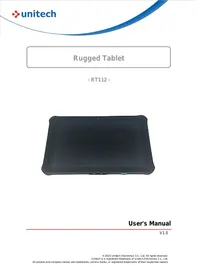
RT112 - Tablet Unitech - Free user manual and instructions
Find the device manual for free RT112 Unitech in PDF.

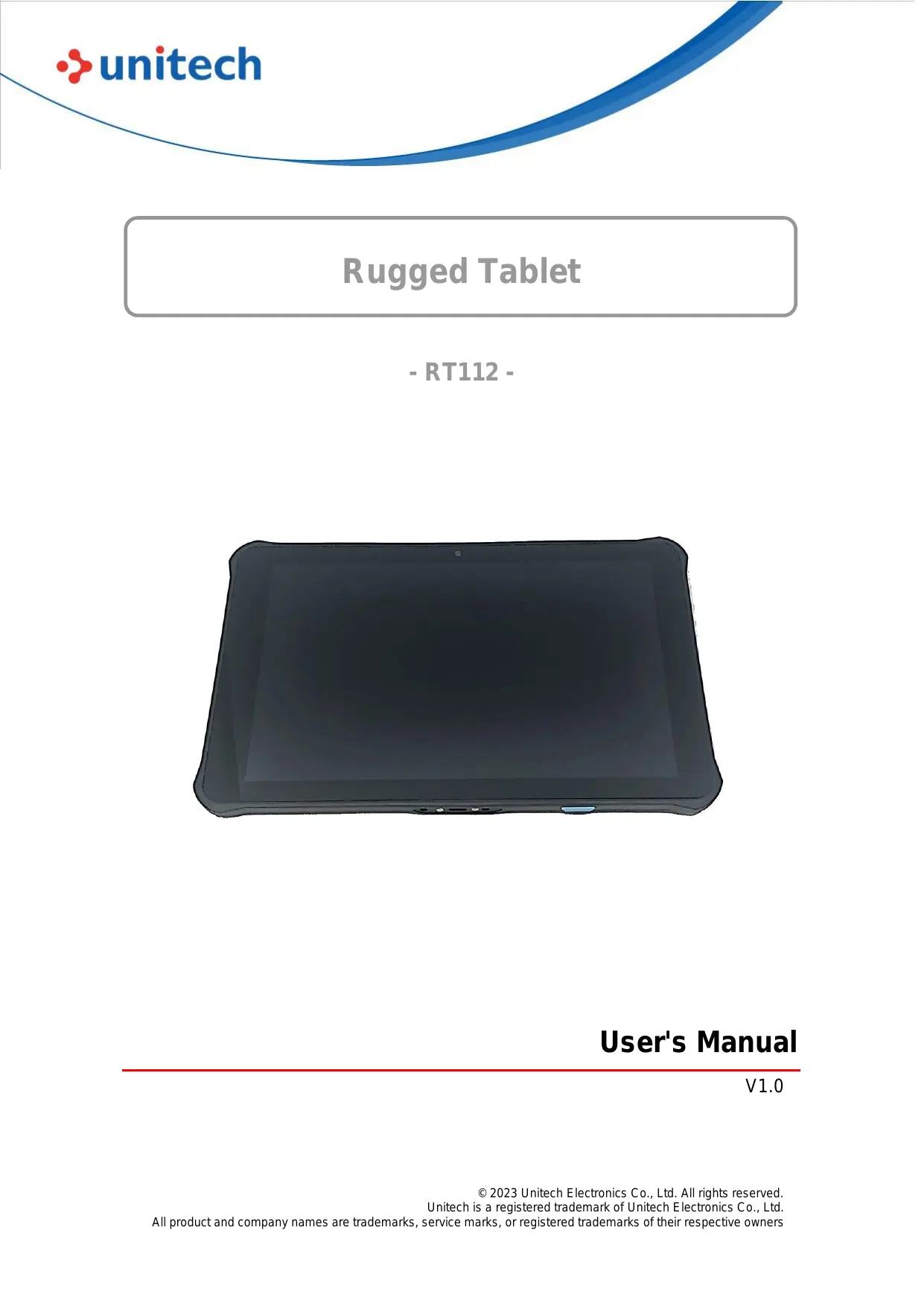

| Product Type | Tablet |
| Brand | Unitech |
| Model | RT112 |
| Screen | 10.1 inches, 1920x1200 pixels resolution |
| Processor | Quad-core 1.8 GHz |
| RAM Memory | 4 GB |
| Internal Storage | 64 GB expandable via microSD |
| Battery | Li-ion 8000 mAh |
| Connectivity | Wi-Fi 802.11 a/b/g/n/ac, Bluetooth 5.0, GPS |
| Rear Camera | 13 megapixels autofocus |
| Front Camera | 5 megapixels |
| Operating System | Android 11 |
| Dimensions | 267 x 180 x 15 mm |
| Weight | 700 g |
| Power Supply | AC adapter 5V/2A |
| Operating Temperature | 0°C to 40°C |
| Certifications | Compliant with Industry Canada RSS |
| Care and Cleaning | Wipe with a soft, dry cloth. Do not use abrasive products. |
| Safety | Minimum distance of 10 mm between the device and the body during use. |
| Spare Parts and Repairability | Battery and screen replaceable by an authorized professional. |
Frequently Asked Questions - RT112 Unitech
User questions about RT112 Unitech
0 question about this device. Answer the ones you know or ask your own.
Ask a new question about this device
Download the instructions for your Tablet in PDF format for free! Find your manual RT112 - Unitech and take your electronic device back in hand. On this page are published all the documents necessary for the use of your device. RT112 by Unitech.
USER MANUAL RT112 Unitech
| Date | Change Description | Version |
| 20231016 | First Published Version | V1.0 |
About This Manual
Thank you for purchasing the Unitech product.
This manual explains how to install, operate and maintain our product.
No part of this publication may be reproduced or used in any form, or by any electrical or mechanical means, such as photocopying, recording, or information storage and retrieval systems, without permission in writing from the manufacturer. The material in this manual is subject to change without notice.
Regulatory Compliance Statements
FCC Warning Statement
This device has been tested and found to comply with the limits for a Class B digital device, pursuant to part 15 of the FCC rules. These limits are designed to provide reasonable protection against harmful interference in a residential installation. This equipment generates, uses and can radiate radio frequency energy and, if not installed and used in accordance with the instructions, may cause harmful interference with radio communications. However, there is no guarantee that interference will not occur in a particular installation. If this equipment does cause harmful interference with radio or television reception, which can be determined by turning the equipment off and on, the user is encouraged to try to correct the interference by one or more of the following measures:
-Reorient or relocate the receiving antenna.
-Increase the separation between the equipment and receiver.
- Connect the equipment into an outlet on a circuit different from that to which the receiver is connected.
-
Consult the dealer or an experienced radio/TV technician for help.
-
This transmitter must not be co-located or operating in conjunction with any other antenna or transmitter.
- This device complies with FCC RF radiation exposure limits set forth for an uncontrolled environment. To maintain compliance with FCC RF exposure requirements, avoid direct contact to the transmitting antenna during transmitting.
- Any changes or modifications (including the antennas) made to this device that are not expressly approved by the manufacturer may void the user's authority to operate the equipment.
- Operation of transmitters in the 5.925-7.125 GHz band is prohibited for control of or communications with unmanned aircraft systems.
FCC Label Statement
This device complies with part 15 of the FCC rules. Operation is subject to the following two conditions:
- This device may not cause harmful interference.
- This device must accept any interference received, including interference that may cause undesired operation.
RF Radiation Exposure Statement
For body contact during operation, this device has been tested and meets FCC RF exposure guidelines when used with an accessory that contains no metal and that positions the handset a minimum of 1.0 cm from the body.
Use of other accessories may not ensure compliance with FCC RF exposure guidelines.
IC Statements
This device complies with Industry Canada licence-exempt RSS standard(s). Operation is subject to the following two conditions:
(1) this device may not cause interference, and
(2) this device must accept any interference, including interference that may cause undesired operation of the device.
Under Industry Canada regulations, this radio transmitter may only operate using an antenna of a type and maximum (or lesser) gain approved for the transmitter by Industry Canada. To reduce potential radio interference to other users, the antenna type and its gain should be so chosen that the equivalent isotropically radiated power (e.i.r.p.) is not more than that necessary for successful communication.
(i) the device for operation in the band 5150-5250 MHz is only for indoor use to reduce the potential for harmful interference to co-channel mobile satellite systems;
Devices shall not be used for control of or communications with unmanned aircraft systems
This EUT is compliance with SAR for general population/uncontrolled exposure limits in IC RSS-102 and had been tested in accordance with the measurement methods and procedures specified in IEEE 1528 and IEC 62209. This equipment should be installed and operated with minimum distance 10 mm between the radiator and your body. This device and its antenna(s) must not be co-located or operating in conjunction with any other antenna or transmitter.
European Conformity Statement
Unitech Electronics co., Ltd herewith declares that the Unitech product is in compliance with the essential requirements and all other provisions of the RED 2014/53/EU directive.
The declaration of conformity is available for download at:
https://portal.Unitech.eu/public/Safetyregulatorystatement
UK Declaration of Conformity (DoC)
Hereby, Unitech electronics co., Ltd. declares that the radio equipment type Rugged Handheld Computer is in compliance with UK Radio Equipment Regulations 2017(RER 2017 (SI 2017/1206)).
The full text of the UK declaration of conformity is available at the following internet address: https://www.ute.com
UKCA Mark Warning
UK
CA
CE RF Exposure Compliance
For body-worn operation, this device has been tested and meets the ICNIRP guidelines and the European Standard EN 62209-2, for use with dedicated accessories, SAR is measured with this device at a separation of 0.5cm to the body, while transmitting at the highest certified output power level in all frequency bands of this device. Use of other accessories which contain metals may not ensure compliance with ICNIRP exposure guidelines.
CE Mark Warning

RoHS Statement
unitech
Green Product

This device conforms to RoHS (Restriction Of Hazardous Substances) European Union regulations that set maximum concentration limits on hazardous materials used in electrical and electronic equipment.
Waste Electrical and Electronic Equipment (WEEE)
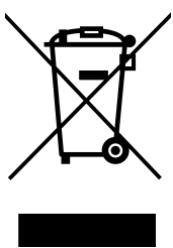
Unitech has set up a policy and process to meet the 2012/19/EU concerning electronic waste disposal.
For more detailed information of the electronic waste disposal of the products you have purchased from Unitech directly or via Unitech's resellers, you shall either contact your local supplier or visit us at:
https://portal.Unitech.eu/public/WEEE
Taiwan NCC Warning Statement
低功率電波輻射性電機管理辦法
Note: Within the 5.25-5.35 GHz band, U-NII devices will be restricted to indoor operations to reduce any potential for harmful interference to co-channel MSS operations.
Devices shall not be used for control of or communications with unmanned aircraft systems.
Laser Information
The Unitech product is certified in the U.S. to conform to the requirements of DHHS/CDRH 21CFR Subchapter J and to the requirements of IEC 60825-1. Class II and Class 2 products are not considered to be hazardous. The Unitech product contains internally a Visible Laser Diode (VLD) whose emissions do not exceed the maximum limits as set forth in the above regulations. The scanner is designed so that there is no human access to harmful laser light during normal operation, user maintenance or prescribed service operations.
The laser safety warning label required by the DHHS/IEC for the Unitech product's optional laser scanner module is located on the memory compartment cover, on the back of the unit.
- Laser information only applies to the products with laser components.
CAUTION! Use of controls or adjustments or performance of procedures other than those specified herein may result in hazardous laser light. Use of optical instruments with the scanner, including binoculars, microscopes, and magnifying glasses, with will increase eye damage. This does not include eyeglasses worn by the user.
LED Information
The Unitech product contains LED indicator(s) or LED ring whose luminance is not harmful to human eyes during normal operation, user maintenance or prescribed service operations.
*LED information only applies to the products with LED components.
Battery Notice
-
To guarantee optimal performance, it is recommended that rechargeable batteries be replaced every year, or after 500 charging cycles are completed. It is normal for the battery to balloon or expand after one year or 500 cycles. Although it does not cause damage, it cannot be used again and must be disposed of according to the location's safe battery disposal procedures.
-
If a battery performance decreases more than 20% , the battery is at the end of its life cycle. Stop use and ensure the battery is disposed of properly.
-
The length of time that a battery lasts depends on the battery type and how the device is used. Conserve the battery life by doing the following:
-
Avoid fully uncharging the battery because this places additional strain on it. Several partial uncharges with frequent charges are better than a fully uncharged battery. Charging a partially charged battery does not cause harm to the unit.
-
DO NOT leave the battery pack or in the device in a hot condition such as in the car with closed door on a hot day or similar environment, and/or under direct sunlight for an extended period of time. High-temperature conditions might cause the battery damaged for further safe usage. Keep the device with the battery within acceptable operating temperatures (please refer to the "specification" section for further details).
-
For long-term storage, it is recommended to charge the battery to at least 50% every six months to ensure optimal performance and longevity. Do not leave the battery uncharged and unused for an extended period of time, the battery will wear out and the longevity of the battery will be at least half of one with frequent charges. Despite Unitech's safety precautions, the battery pack may experience changes in shape or swelling. If so, stop using it immediately. Please check to see if you are
using a proper power adapter to charge the battery or contact your service provider for service.
- If you cannot charge the battery after it has been idle for an extended period of time and it begins to heat up, please do not try to charge it. It may not be functional anymore.
- Please only use the original battery from Unitech. Using a third party battery can damage our products. Please note that when such damage occurs, it is not covered by Unitech's warranty policy.
CAUTION!
Battery Charge Notice
It is important to consider temperature when the battery pack is charging. Charging is most efficient at normal room temperature or in a slightly cooler environment. It is essential that batteries are charged within the stated range of 0^ to 40^ . Charging batteries outside of the specified range could damage the batteries and shorten their life cycle.
CAUTION! Do not charge batteries at a temperature lower than 0^ . This will make the batteries unstable and dangerous. Please use a battery temperature detecting device for a charger to ensure a safe charging temperature range.
CAUTION! To ensure the unit working properly, please keep all connectors away from the contaminants staying inside of them such as dust, grease, mud, and water. The negligence may cause the unit with no communication, short circuited, overheated and so on.
CAUTION! If the connector is damaged, please ensure the connector is being fully repaired before use the unit to avoid causing short circuited.
Storage and Safety Notice
Although charged batteries may be left unused for several months, their capacity may be depleted due to build up of internal resistance. If this happens, they will require recharging prior to use. Batteries may be stored at temperatures between -20^ to 60^ , however they may deplete more rapidly at higher temperatures. It is recommended to store batteries at room temperature.
- The message above only applies to the usage of the removable batteries.
For the products with non-removable batteries / without batteries, please refer to the specification of each product.
Product Operation and Storage Notice
The Unitech product has applicable operation and storage temperature conditions. Please follow the limitation of suggested temperature conditions to avoid failure, damage or malfunction.
*For applicable temperature conditions, please refer to the specification of each product.
Adapter Notice
- Please do not leave the power adapter in the socket when it is not connected to your Unitech product for charging.
- Please remove the power adapter when the battery is fully recharged.
- The bundled power adapter that comes with your Unitech product is not meant to be used outdoors. An adapter exposed to water or rain, or a very humid environment can cause damage to both the adapter and the product.
- Please only use the bundled power adapter or same specification of adapter to charge your Unitech product. Using the wrong power adapter can damage your Unitech product.
Hearing Damage Warning
To prevent possible hearing damage, do not listen at high volume levels for long periods.
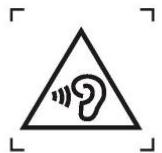
Figure 1 - Warning label (IEC 60417-6044)
Worldwide Support
Unitech's professional support team is available to quickly answer questions or assist with technical-related issues. Should an equipment problem occur, please contact the nearest Unitech regional service representative.
For complete contact information please visit the Web sites listed below:
| Taipei, Taiwan – Headquarters | Europe |
| Tel: +886-2-89121122 E-mail: info@hq.ute.com | Tel: +31-13-4609292 E-mail: info@eu.ute.com |
| Address: 5F, No. 136, Lane 235, Baoqiao Road, Xindian District, New Taipei City 231, Taiwan (R.O.C.) | Address: Kapitein Hatterasstraat 19, 5015 BB, Tilburg, the Netherlands |
| Website: http://www.ute.com | Website: http://eu.ute.com |
| China | Japan |
| Tel: +86-59-2310-9966 E-mail: info@cn.ute.com | Tel: +81-3-62310896 E-mail: info@jp.ute.com |
| Address: Room401C, 4F, RIHUA International Mansion, Xinfeng 3rd Road, Huoju Hi-tech District, Xiamen, Fujian, China | Address: Tosei Building 3F.,18-10 Nihonbashi-Hakozakicho, Cyouoku, Tokyo, 103-0015, Japan |
| Website: http://cn.ute.com | Website: http://jp.ute.com |
| Asia & Pacific / Middle East | Latin America |
| Tel: +886-2-27911556 E-mail: info@apac.ute.com | Tel: +52-55-5171-0528 E-mail: info@latin.ute.com |
| info@india.ute.com | Address: 17171 Park Row, Suite 210 Houston, TX 77084USA (Rep.) |
| info@mideast.ute.com | Website: http://latin.ute.com |
| Address: 4F., No. 236, ShinHu 2nd Rd., NeiHu District, 114, Taipei,Taiwan | |
| Website: http://apac.ute.com / http://mideast.ute.com | |
| North America | Please scan QR Code to visit us: |
| Tel: +1-714-8916400 E-mail: info@us.ute.com / info@can.ute.com | |
| Address: 6182 Katella Ave, Cypress, CA 90630, USA | |
| Website: http://us.ute.com |
Warranty Policy
The following items covered under the Unitech Limited Warranty are free from defects during normal use:
The warranty period is varied from each country. Please consult with your supplier or Unitech local office for actual length of warranty period to your purchased product.
Warranty becomes void if equipment is modified, improperly installed or used, damaged by accident or neglect, or if any parts are improperly installed or replaced by the user.
Table of Contents
Preface
Regulatory Compliance Statements
Laser Information . viii
LED Information . viii
Battery Notice ix
Adapter Notice. xii
Hearing Damage Warning. xiii
Worldwide Support xiv
Warranty Policy . XV
Chapter 1 - Overview
1.1 Package 1
1.2 Product Detail 2
1.3 Specifications 4
1.4 Getting Started 6
Chapter 1 - Overview
1.1 Package
Please make sure the following contents are in the RT112 gift box.
If something is missing or damaged, please contact your Unitech representative.
The Package Contents
- Tablet PC
Battery Pack
USB-C Power Adaptor (power cord optional)
Quick Start Guide
Optional Accessories
Rotatable Hand Strap
Shoulder Strap
Screen Protector
Capacitive Stylus Pen (5.5mm) with coil strap
Office Cradle
Vehicle Cradle
3-Pin EU Power Cord
3-Pin UK Power Cord
3-Pin US Power Cord
1.2 Product Detail
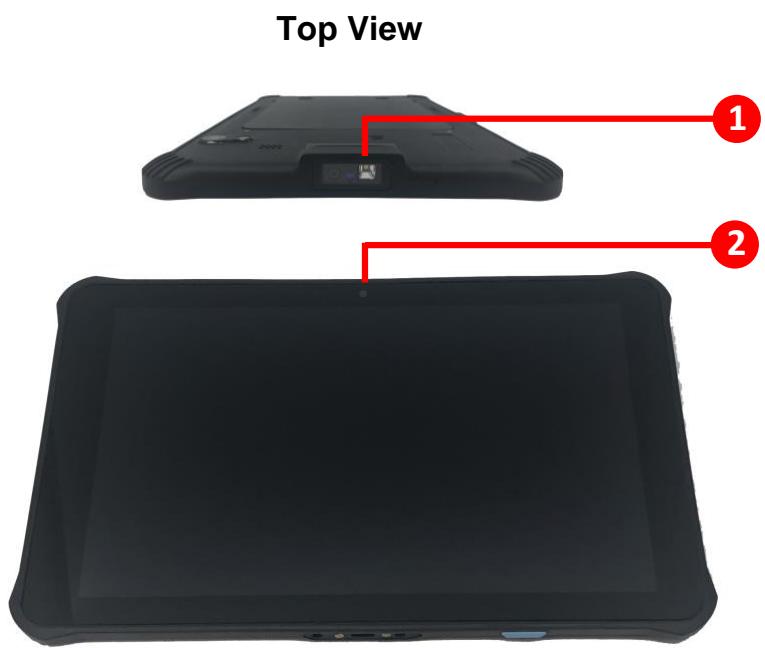
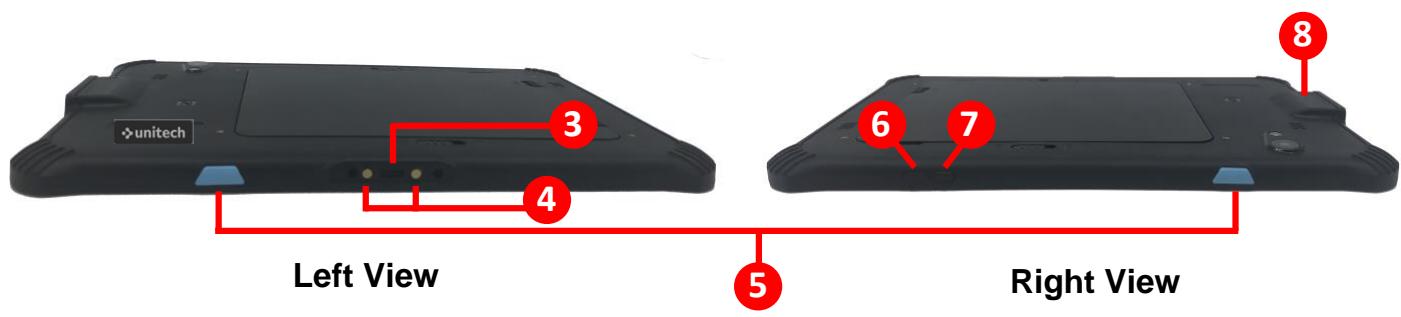
- Scan Lens
- Front Camera
- USB Type-C Connector
-
Pogo Pin (reserved)
-
Trigger Key
- Power Key
- Programming Key
- Scan Engine
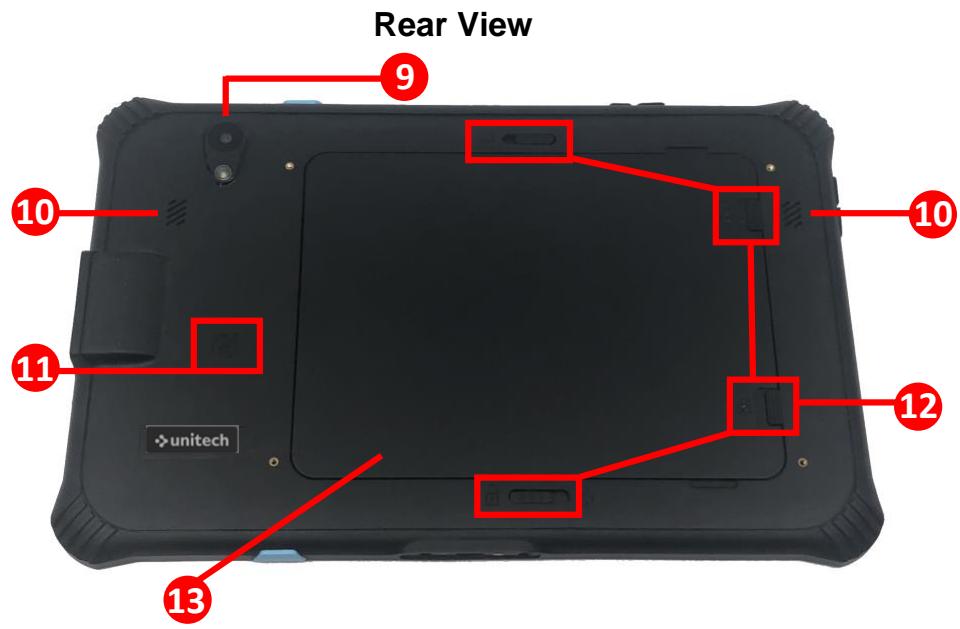
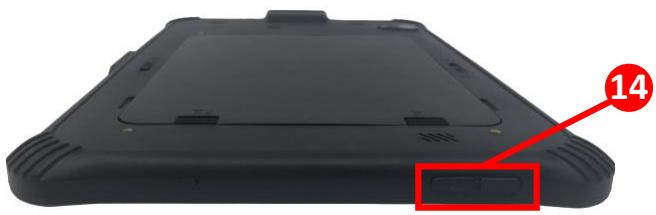
Bottom View
- Rear Camera
- Speaker
-
NFC
-
Battery Cover Lock
- Battery Cover
- Volume Key
1.3 Specifications
| System Features | ||
| CPU | Qualcomm®Snapdragon™ 5430 Hexa Core Processor, 64bits, 6x CPU, up to 2.1 GHz | |
| Memory | 6GB RAM / 128 GB Flash | |
| OS | Android 13 with GMS & AER Certified | |
| Languages support | Multiple languages | |
| Display | ||
| Screen Size | 10.1"(1920 x 1200) LCD Display 450nits | |
| Touch Panel | Gorilla®Glass, Multi-Touch User Interface with Capacitive, stylus, glove, wet-finger Compatibility | |
| Keypad | ||
| 6 Physical Buttons: Power key, Volume+/- key, programmable key and 2 scan keys | ||
| Camera | ||
| 5MP front camera (with fixed focus) | ||
| 13MP rear camera (with auto-focus and LED flash, Support Google Arcore & Depth API) | ||
| Indicator Type | ||
| LEDs, Vibrator | ||
| Symbologies | ||
| Support all major 1D & 2D barcodes | ||
| RFID | ||
| HF | Support HF/NFC ISO14443-4(Type A, Type B), ISO15693, Mifare, Felica (ISO/IEC18092) | |
| Power Source | ||
| Main Battery | 8800mAh (removable) | |
| Regulatory Approvals | ||
| CE, UKCA, FCC, IC, NCC, BSMI, VCCI, TELEC, CCC, SRRC, BQB, RoHS, REACH | ||
| Communication | ||
| Bluetooth® | Bluetooth® 5.2 | |
| WLAN | WLAN 6E, 2.4GHz & 5GHz & 6GHz IEEE 802.11a/b/g/n/ac/d/h/i/k/r/v/ax (MU-MIMO 2X2, Support DBS) | |
| Sensors | G-sensor(Accelerometer), Proximity + Light Sensor, E-Compass, Gyroscope sensor | |
| I/O Interfaces | ||
| USB | Single USB 3.1 (type-C) | |
| POGO PIN | POGO pin | |
| Expansion slot | Single Micro SD Card | |
| Audio | Dual-speakers, MIC x 2(noise cancelling & Background noise depression) | |
| Enclosure | ||
| Dimensions | 260 mm x 165 mm x 12 mm | |
| Weight | approx. 690g | |
| Environmental | ||
| Operating temperature | -20°C to 55°C | |
| Storage temperature | - 40°C to 70°C (without battery) | |
| Drop Specification | 1.5 meter | |
| Vibration/Tumble test | MIL-STD-810H, Method 516.8, Procedure IV | |
| Software | ||
| MDM Software | Support MDM Software Solutions and utilities such as Airwatch, SOTI, Ivanti Wavelink, and MoboLink | |
Android is a trademark of Google LLC.
Note: The device is restricted to indoor use only when operating in the 5250-5350 MHz / 5945 to 6425 MHz (for LPI) frequency range.
| AT | BE | BG | HR | CY | CZ | DK |
| EE | FI | FR | DE | EL | HU | IE |
| IT | LV | LT | LU | MT | NL | PL |
| PT | RO | SK | SI | ES | SE | UK(NI) |
| IS | LI | NO | CH | TR |
1.4 Getting Started
1.4.1 Remove the Battery
- Push the four battery cover locks upwards to the unlock position.
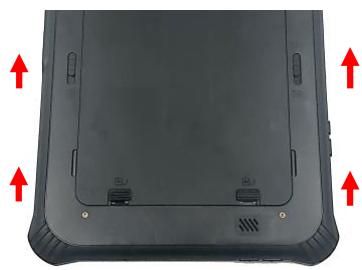
- Pick the battery cover from the groove on its side and lift upward to remove.
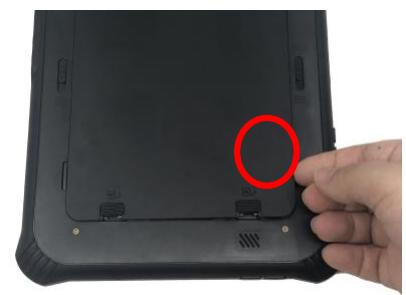

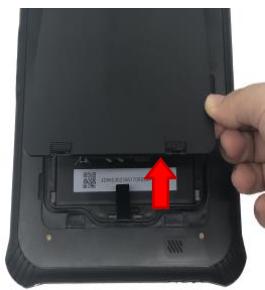
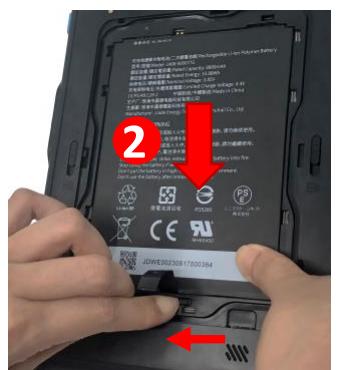
- Push the battery lock at the bottom to the left (unlock) and keep holding it, then pull the battery strap and lift upward to remove the battery.
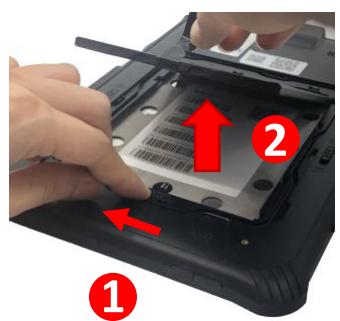
1.4.2 Install the Battery
- First, remove the battery. (please refer to step 1. & step 2. on P9 "Remove the Battery")
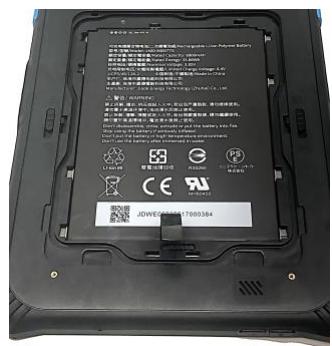
- Push the battery lock at the bottom to the left (unlock) and keep holding it, then align the battery with the battery slot and insert. Make sure you hear a "click" sound, and the battery should not fall off while the battery is being locked.
1

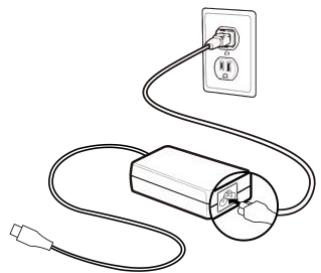
1.4.3 Charging the Battery
Before starting to use the tablet, we would like to suggest you follow the illustrations below to begin to use the tablet.


WARNING! There is a risk of fire and burns if the battery is handled improperly.
DO NOT disassemble, crush, puncture, short external contacts, or dispose the battery pack in fire or water.
DO NOT attempt to open or service the battery. Dispose of used batteries according to local recycling guidelines in your area.
CAUTION! To ensure the unit working properly, please keep all connectors away from the contaminants such as dust, grease, mud, and water.
Negligence may cause the unit to lose communication, short circuit, or overheated. If the connector is damaged, please ensure the connector is fully repaired before using the unit to avoid short circuiting.
1.4.4 Checking LED Status
| Terminal | LED | Description |
| Red Light | ■ Battery charging ■ Twinkling to indicate battery low status (less than 15%) | |
| Green Light | ■ Battery fully charged ■ Barcode scan good read | |
| Blue Light | Message |
Note: If scanner app is running, LED is controlled by scanner app. No LED (Red and Green) display when battery is out. (even AC IN)

- About This Manual
- Regulatory Compliance Statements
- FCC Warning Statement
- FCC Label Statement
- RF Radiation Exposure Statement
- IC Statements
- European Conformity Statement
- UK Declaration of Conformity (DoC)
- UKCA Mark Warning
- CE RF Exposure Compliance
- CE Mark Warning
- RoHS Statement
- Waste Electrical and Electronic Equipment (WEEE)
- Taiwan NCC Warning Statement
- 低功率電波輻射性電機管理辦法
- Laser Information
- LED Information
- Battery Notice
- CAUTION!
- Battery Charge Notice
- Storage and Safety Notice
- Product Operation and Storage Notice
- Adapter Notice
- Hearing Damage Warning
- Worldwide Support
- Warranty Policy
- Table of Contents
- Preface
- Chapter 1 - Overview
- Package
- The Package Contents
- Optional Accessories
- Product Detail
- Specifications
- Getting Started
- Remove the Battery
- Install the Battery
- Charging the Battery
- Checking LED Status
Brand : Unitech
Model : RT112
Category : Tablet