Arctis Nova Elite - Headphones STEELSERIES - Free user manual and instructions
Find the device manual for free Arctis Nova Elite STEELSERIES in PDF.


User questions about Arctis Nova Elite STEELSERIES
0 question about this device. Answer the ones you know or ask your own.
Ask a new question about this device
Download the instructions for your Headphones in PDF format for free! Find your manual Arctis Nova Elite - STEELSERIES and take your electronic device back in hand. On this page are published all the documents necessary for the use of your device. Arctis Nova Elite by STEELSERIES.
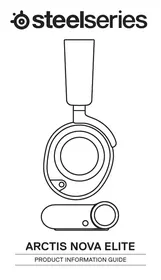
USER MANUAL Arctis Nova Elite STEELSERIES
PRODUCT INFORMATION GUIDE
TABLE OF CONTENTS
Table of Contents 2
General 3
Product Overview 5
Setup 6
Functions 7
Power on/off 8
8
Bluetooth 9
GameHub Operation 10
Audio Options 11
Audio Output Settings 12
Active Noise Cancellation 13
Microphone 14
Perfect Fit 15
Speaker Plates 16
Translations 18
Regulatory 48
PACKAGE CONTENTS
Arctis Nova Elite Headset
Wireless GameHub
Second Battery
USB-C to USB-A Cable (×3)
3.5mm Audio Cable
Microphone Pop Filter
Product Information Guide
SYSTEMCOMPATIBILITY
PC
PlayStation 5, PlayStation 4
Xbox Series X, Xbox
Series S, Xbox One
Nintendo Switch (TV Mode)
Mobile (with USB-C)
Mac
SOFTWARE

GG
Use Engine inside SteelSeries GG to set custom equalizer settings and control your mic.
GG also has other amazing apps like Sonar, a breakthrough in gaming sound, that allows you to hear what matters most, through cutting-edge audio tools.
DOWNLOAD NOW - steeleri.es/gg

Download the mobile app for iOS and Android devices for powerful headset control, custom game parametric EQ settings and more!
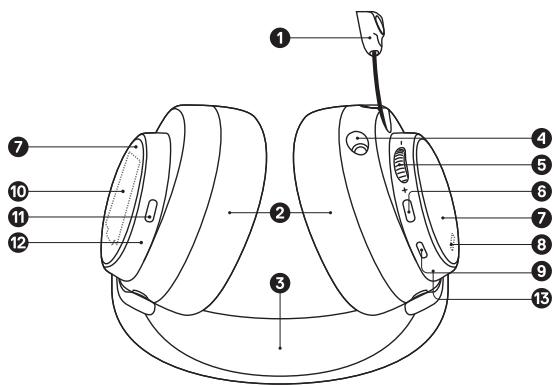
1 Retractable ClearCast Microphone
2 Premium Leatherette Ear Cushions
3 Elastic Headband
4 3.5mm Audio Jack
5 Volume/Control Wheel
6 Microphone Mute Button
7 Removable Speaker Plates
8 Mobile Charging Jack (Below the Speaker Plate)
9 Power Button
10 Swappable Battery (Below the Speaker Plate)
11 Bluetooth Button
12 Bluetooth LED Indicator
13 Power LED Indicator
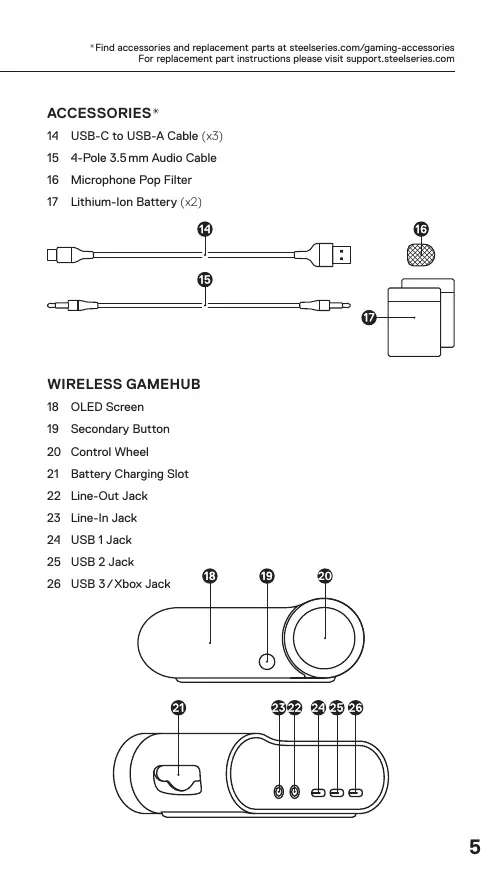
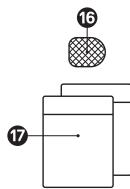
ACCESSORIES*
14 USB-C to USB-A Cable (x3)
15 4-Pole 3.5mm Audio Cable
16 Microphone Pop Filter
17 Lithium-Ion Battery (x2)


15
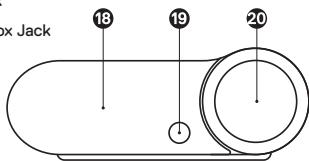
WIRELESS GAMEHUB
18 OLED Screen
19 Secondary Button
20 Control Wheel
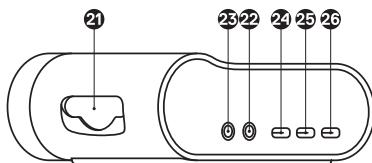
21 Battery Charging Slot
22 Line-Out Jack
23 Line-In Jack
24 USB1Jack
25 USB 2 Jack
26 USB 3/Xbox Jack
CONNECTIONS
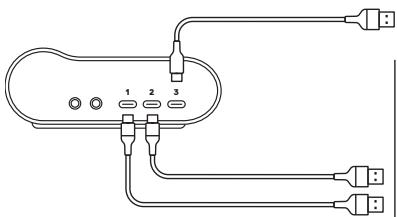
Plug one of the USB-C to USB-A Cables (14) into the USB 1
Jack (24), and connect the other end to your PC or console.
Optionally connect the second USB-C to USB-A Cable (14) from
the GameHub's USB 2 Jack (25) to a second PC or console.
Optionally connect the third USB-C to USB-A Cable (14) from
the GameHub's USB 3/Xbox Jack (26) to an Xbox or PC.
USB 3 can be set to either Xbox or PC support, by default it is set to Xbox. You can change this in the OLED Screen (18) menu.
Note: USB 1 audio is mixed with either USB 2 or USB 3 audio, by default USB 3 is selected. You can change this in the OLED Screen (18) menu.


Xbox Series X
Xbox Series S
Xbox One
PC
PlayStation 4
PlayStation 5
Switch (TV mode)
Mac
GAMEHUB CHARGING
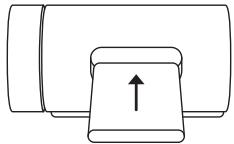
To charge the second Lithium-Ion Battery (17) place it in the Battery Charging Slot (21) of the GameHub.
CHANGING BATTERIES
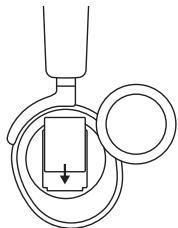
To change the battery, first remove the right-side Removable Speaker Plate (7) by lifting from the groove on the bottom. Then remove the Swappable Battery (10) by pushing downward and out to release.
MOBILE CHARGING
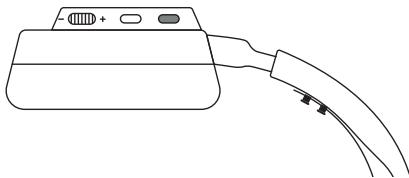
The USB-C to USB-A Cable (14) can be used to charge the headset while on the go. Remove the left-side Removable Speaker Plate (7), and connect the cable from the Mobile Charging Jack (8) to a USB power source.

POWER
To power the headset on or off press and hold the Power Button (9) for 1 second.
PAIRING
The headset is already paired to the GameHub when it arrives. In the event you need to re-pair, open the GameHub menu, and navigate to the following:
Wireless 2.4G 2.4G Pair
Next, while the headset is powered off, hold the power button for 6 seconds until you hear a beep and the light on the headset is flashing rapidly.
BLUETOOTH POWER
Bluetooth can be powered on or off independently of the 2.4G wireless by pressing and holding the Bluetooth Button (11) for 1 second
Note: Your Bluetooth audio and 2.4G audio will play simultaneously.
PAIRING
With Bluetooth off, press and hold the Bluetooth Button (11) for 4 seconds.
CONTROL

Answer/End Voice Call
Single - press the Bluetooth Button (11)

Play/Pause Music
Single - press the Bluetooth Button (11)

Skip Track
Double...press the Bluetooth Button (11)

Previous Track
Triple ... press the Bluetooth Button (11)
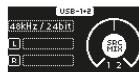
HOME SCREEN
1 Press and release the Control Wheel (20) or the Headset's Volume/ Control Wheel (5) to toggle between Volume, SourceMix and ChatMix (PC and Xbox only. Software install required for PC use). SourceMix allows you to change the level between USB 1 and either USB 2 or USB 3. You can change this in the OLED Screen (18) menu.
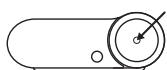
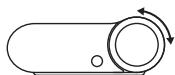
2 Rotate the Control Wheel (20) or the Headset's Volume/ Control Wheel (5) to adjust the selected parameter.
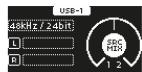
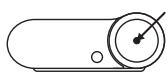
3 Press and hold the Control Wheel (20) or the Headset's Volume/Control Wheel (5) to bring up the main menu.

MAIN MENU
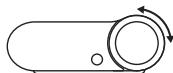
1 Rotate the Control Wheel (20) or the Headset's Volume/Control Wheel (5) to cycle menu items.

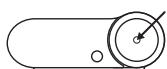
2 Press and release the Control Wheel (20) or the Headset's Volume/Control Wheel (5) to select.
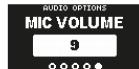
3 Press and release the Secondary Button (19) or the Headset's Power Button (9) to move back in the menu.

EQUALIZER 2.4G
Customize your 2.4G sound with included presets and adjustable 10-band EQ.
Get more fully parametric game EQ settings from GG or by downloading the mobile app!
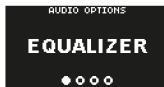
EQUALIZER BLUETOOTH
Customize your Bluetooth sound with included presets and adjustable 10-band EQ.
Get more EQ settings from GG or by downloading the mobile app!
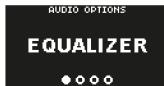
GAIN
Changes the maximum output level of the GameDAC
SIDETONE
Select the amount of your own voice you wish to hear in the headphones
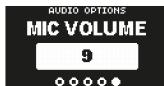
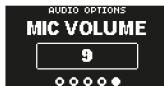
MIC VOLUME
Optimize the level of the microphone for your system
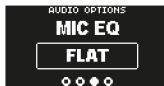
MIC EQUALIZER
Customize your mic sound with included presets or fully adjustable 10-band EQ
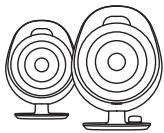
SPEAKERS
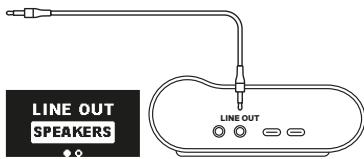
Play game and chat audio through a pair of external speakers.
1 Connect a 3.5mm cable (not included) from the GameHub's Line-Out Jack (22) to your speakers.
2 In the OLED Screen (18) Menu set the Line Out option to 'Speakers'.
STREAM
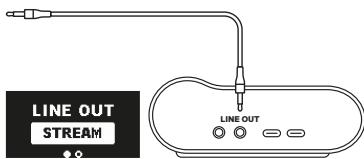
Mix your Main, Aux, and Mic audio together to send to a PC for streaming.
1 Connect a 3.5mm cable (not included) from the GameHub's Line-Out Jack (22) to your stream PC's Soundcard input.
2 In the OLED Screen (18) Menu set the Line Out option to 'Stream'.
3 Adjust your custom mix via the Stream Mixer on the OLED Screen (18).

ANC
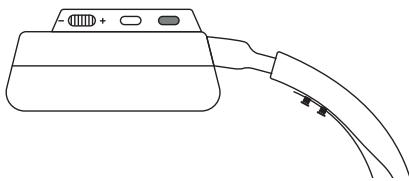
To toggle ANC on/off, single press the Headset's Power Button (9).
TRANSPARENCY
To enable transparency mode, double press the Headset's Power Button (9).
RETRACTABLE MICROPHONE
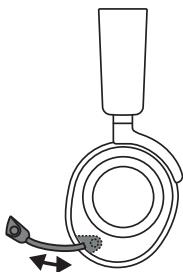
Out of the box, the Retractable ClearCast Microphone (1) is retracted. To use the microphone, slide it away from the headset until it reaches full extension.
POSITIONING
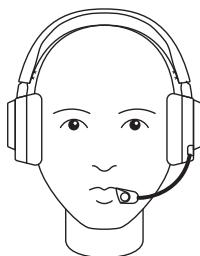
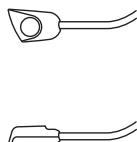
Position the Retractable ClearCast Microphone (1) close to the corner of your mouth with the front surface facing you.
Note: The microphone should not be used when retracted.
EARCUP ADJUSTMENT
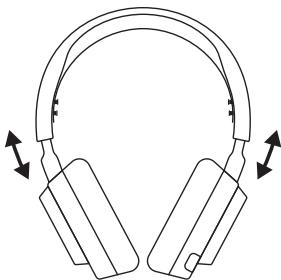
Slide the Earcups up or down to change the overall height.
HEADBAND ADJUSTMENT
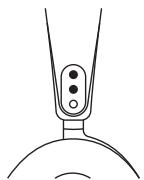
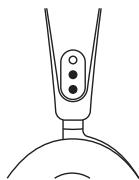
Change the position of the Elastic Headband (3) on one or both sides to achieve the desired tension and flex.
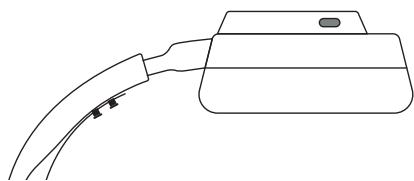
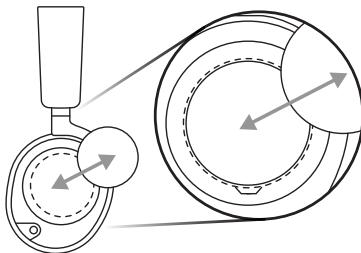
The Removable Speaker Plates (7) are attached with magnets. To remove for replacement, place your fingernail in the groove at the bottom of the plate and gently lift.
English
C E
DECLARATION
Hereby, GN Audio A/S, declares that the equipment which is compliance with directive RoHS 2.0 (2015/863/EU), R.E.D (2014/53/EU), EMC Directive (2014/30/EU), and LVD (2014/35/EU) which are issued by the Commission of the European Community.
The full text of the EU declaration of conformity is available at the following internet address: https://support.steelseries.com/hc/en-us/categories/350001256111-Other-Stuff
GN Audio A/S, hereby confirms, to date, based on the feedback from our suppliers indicates that our products shipping to the EU territory comply with REACH (Registration, Evaluation, Authorization, and Restriction of Chemicals - (EC) 1907/2006) compliance program. We are fully committed to offering REACH compliance on the products and posting accurate REACH compliance status for all of products.
Operating Temperature: 0 to +40°C
Frequency bands and Powers (Headset and Transceiver)
a. Frequency band(s) in which the radio equipment operates: 2.400 - 2.4835 GHz
b. Maximum radio-frequency power transmitted in the frequency band(s) in which the radio equipment operates:
EIRP: 8DPSK: 7.52 dBm (Headset)
EIRP: GFSK: 10.32 dBm (Headset)
EIRP: GFSK: 9.99 dBm (Transceiver)
c. Firmware Version: V1.10.15
Charge Care:
If product is charged with a USB cable, use only a suitable USB cable which is in good condition, and charge/power the product according to the instructions.
The power delivered by the charger shall be between min 0.25 Watts required by the radio equipment, and max 2.5 Watts in order to achieve the maximum charging speed.
AUDIO PRODUCT WARNING!
PERMANENT HEARING LOSS MAY RESULT FROM LONG-TERM EXPOSURE TO SOUND S AT HIGH VOLUMES. USE AS LOW A VOLUME AS POSSIBLE.
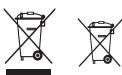
European Union: Product, Batteries, battery packs, and accumulators should not be disposed of as unsorted household waste.
Please use the public collection system to return, recycle, or treat them in compliance with the local regulations.
Safety Guideline for Using Lithium Battery Danger of explosion if battery is incorrectly replaced.
Replace only with the same or equivalent type recommended by the equipment manufacturer.
Discard used batteries according to manufacturer's instructions.
Read the safety instructions carefully and thoroughly. All cautions and warnings on the equipment or user's manual should be noted.
Keep this equipment away from humidity and high temperature.
- Do not leave the equipment in an unconditioned environment with a storage temperature above 60^ (140^) or below 0^ (32^) , which may damage the equipment.
- This unit should be operated under maximum ambient temperature of 40^ (104^) .
- To prevent explosion caused by improper battery replacement, use the same or equivalent type of battery recommended by the manufacturer only.
Always keep the battery in a safe place.
Caution: Do not continue using the battery if it is swollen.

UK Declaration of Conformity
Hereby, GN Audio A/S, declares that the following equipment, which is compliance with Electromagnetic Compatibility Regulations 2016, Electrical Equipment (Safety) Regulations 2016, Radio Equipment Regulations 2017 and The Restriction of the Use of Certain Hazardous Substances in Electrical and Electronic Equipment Regulations 2012 issued by the Department for Business, Energy& Industrial Strategy.
The full text of the UK declaration of conformity is available at the following internet address: https://support.steelseries.com/hc/en-us/categories/360001256111-Other-Stuff

Federal Communication Commission Interference Statement
This device complies with Part 15 of the FCC Rules. Operation is subject to the following two conditions:
- This device may not cause harmful interference, and
- this device must accept any interference received, including interference that may cause undesired operation.
This equipment has been tested and found to comply with the limits for a Class B digital device, pursuant to Part 15 of the FCC Rules. These limits are designed to provide reasonable protection against harmful interference in a residential installation. This equipment generates, uses and can radiate radio frequency energy and, if not installed and used in accordance with the instructions, may cause harmful interference to radio communications. However, there is no guarantee that interference will not occur in a particular installation. If this equipment does cause harmful interference to radio or television reception, which can be determined by turning the equipment off and on, the user is encouraged to try to correct the interference by one of the following measures:
Reorient or relocate the receiving antenna.
- Increase the separation between the equipment and receiver.
- Connect the equipment into an outlet on a circuit different from that to which the receiver is connected.
- Consult the dealer or an experienced radio/TV technician for help.
FCC Caution:
Any changes or modifications not expressly approved by the party responsible for compliance could void the user's authority to operate this equipment.
This transmitter must not be co-located or operating in conjunction with any other antenna or transmitter.
Need to double check with laboratory which sentence must be used after the test:
Radiation Exposure Statement:
The device has been evaluated to meet general RF exposure requirement, the device can be used in portable exposure condition without restriction.
The portable device is designed to meet the requirements for exposure to radio waves established by the FCC. These requirements set a SAR limit of 0.62 w/kg (Headset) and 0.14 w/kg (Transceiver) averaged over one gram of tissue. The highest SAR value reported under this standard during product certification for use when properly worn on the body.
FCC ID: ZHK-HS32 (Headset)
FCC ID: ZHK-HS32TX (Transceiver)
Product Name: Wireless Headset
Model No.: HS32
Rated:5.0V-,500mA
Accessories Information:
Product Name: Transceiver
Model No.: HS32TX
Rated:5V=,500mA
Product:: Rechargeable Lithium-Ion Battery
Model No.: NP-45, NP-45A, HT542836
Rated Voltage: 3.7V
Capacity: 700mAh
Energy:2.59Wh
Made in China
Industry Canada Statement:
This device complies with Industry Canada license-exempt RSS standard(s). Operation is subject to the following two conditions:
- this device may not cause interference, and
- this device must accept any interference, including interference that may cause undesired operation of the device.
This Class B digital apparatus complies with Canadian ICES-003.
The County Code Selection feature is disabled for products marketed in the US/ Canada.
The appliance must not be exposed to splashes or drops of water and it should not be used as a support for any object filled with liquid, such as a vase.
The portable device is designed to meet the requirements for exposure to radio waves established by the ISED. These requirements set a SAR limit of 0.62w / kg (Headset) and 0.14w / kg (Transceiver) averaged over one gram of tissue. The highest SAR value reported under this standard during product certification for use when properly worn on the body.
ACMA Compliance (Australia/ New-Zealand)
Complies with IMDA Standards DA 106032
Singapore approval (IMDA)

Malaysia Approval (SIRIM)
| Region | Contact information | |
| Asia | GN Audio Taiwan Ltd. 4F and 4F-4, No.186, Jian 1st Rd., Zhonghe Dist., New Taipei City 235, Taiwan (R.O.C.) | +886 2 8227 1999 |
| USA | GN Audio USA Inc., 656 W Randolph St., Suite 3E Chicago, IL 60661, USA | +1 312 258 9467 |
| Europe | SteelSeries A/S (GN Audio A/S) · Lautrupbjerg 7, 2750 Ballerup Denmark. · Havneholmen 8, 1st floor 2450 Copenhagen SV Denmark. | +45 702-500-75 |
More information and support from https://steelseries.com/
Français
Result for highest Simultaneous Transmission SAR value is 0.62 w/kg (Headset) and 0.14 w/kg (Transceiver).
IC:32199-HS32
IC:32199-HS32TX
Deutsch
AUDIO PRODUKTWARNUNG!
DAUERHAFT HOHE LAUTSTARKEN KONZU N U PERMANENTEM HÖRVERLUST FÜHREN.
BESCHRAKEN DIE SAHER DIE LAUTSTARKE AUF EIN MINIMUM.


WAARSCHUWING AUDIOPRODUCT!
PERMANENT GEHOORSA CHADE KAN HE VEGOLZ LUN VAN LANGOURIE BLOSTSELLING AAN GELUIDEN OP HOGE VOLUMES. GEBRUK EEN ZO LAAG MOGELIJK VOLUME.


ADVARSEL OM LYDPRODUKT!
PERMANENT TAB AF HQRELSE KAN KOMME AF LANGVARIG UDAETTALSE FOR HOJE LYDE. BENYT EN SA LAV LYDSTYRKE SOM MULIGT.


TCC Certified - Toward sustainable IT products A third-party certification according to ISO 14024
Say hello to a more sustainable product

IT products are associated with a wide range of sustainability risks throughout their life cycle. Human rights violations are common in the factories. Harmful substances are used both in products and their manufacture. Products can often have a short lifespan because of poor ergonomics, low quality and when they are not able to be repaired or upgraded.
This product is a better choice. It meets all the criteria in TCO Certified, the world's most comprehensive sustainability certification for IT products. Thank you for making a responsible product choice, that help drive progress towards a more sustainable future!
Criteria in TCO Certified have a life-cycle perspective and balance environmental and social responsibility. Conformity is verified by independent and approved verifiers that specialize in IT products, social responsibility or other sustainability issues. Verification is done both before and after the certificate is issued, covering the entire validity period. The process also includes ensuring that corrective actions are implemented in all cases of factory non-conformities. And last but not least, to make sure that the certification and independent verification is accurate, both TCO Certified and the verifiers are reviewed regularly.
Want to know more?
Read information about TCO Certified, full criteria documents, news and updates at tccertified.com. On the website you'll also find our Product Finder, which presents a complete, searchable listing of certified products.