ARCTIS NOVA 5X - Headphones STEELSERIES - Free user manual and instructions
Find the device manual for free ARCTIS NOVA 5X STEELSERIES in PDF.



User questions about ARCTIS NOVA 5X STEELSERIES
0 question about this device. Answer the ones you know or ask your own.
Ask a new question about this device
Download the instructions for your Headphones in PDF format for free! Find your manual ARCTIS NOVA 5X - STEELSERIES and take your electronic device back in hand. On this page are published all the documents necessary for the use of your device. ARCTIS NOVA 5X by STEELSERIES.
USER MANUAL ARCTIS NOVA 5X STEELSERIES
PRODUCT INFORMATION GUIDE
General 3
Product Overview 4
Quick Start Guide 6
Setup 7
Power 9
Dongle Pairing 10
Bluetooth 11
Multimedia Controls 11
QuickSwitchButtonControls 12
Microphone 13
Perfect Fit 14
Translations 16
Deutsch 16
Espanol 18
Francais 21
Italiano 24
Polski 27
Portugues 30
日本語 33
简体中文 35
繁體中文 38
40
Regulatory 44
PACKAGE CONTENTS
Arctis Nova 5X Wireless Headset
USB-C Wireless Dongle
USB-C to USB-A Adapter Cable (5ft/1.5m)
Charging Cable (5ft /1.5m)
Product Information Guide
SYSTEMCOMPATIBILITY
Xbox Series X|S
Xbox One
PC
PlayStation
Mobile
Nintendo Switch
Mac
SOFTWARE
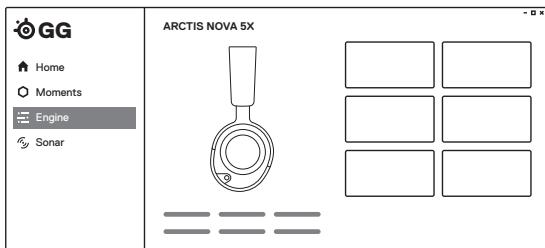
Use Engine inside SteelSeries GG to set custom equalizer settings and control your mic.
GG also has other amazing apps like Sonar, a breakthrough in gaming sound, that allows you to hear what matters most, through cutting-edge audio tools.

DOWNLOAD NOW
steelseri.es/gg
HEADSET
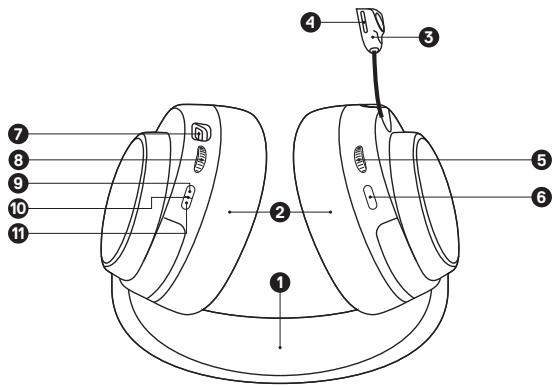
1 Elastic Headband
2 Airweave Ear Cushions
3 Retractable ClearCast Microphone
4 Microphone Mute LED
5 Volume Wheel
6 Microphone Mute Button
7 USB-C Charging Jack
8 ChatMix Dial
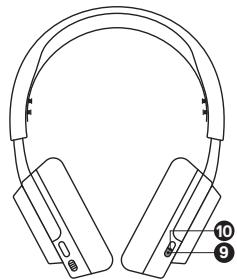
9 Power Button
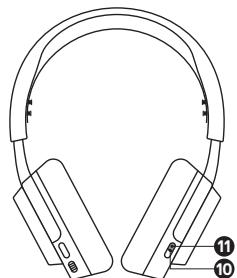
10 Power Indicator LED
11 Quick Switch Button
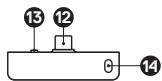
DONGLE
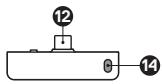
12 USB-C Wireless Dongle*
13 Wireless Mode Switch
14 Pairing Button
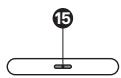
15 Status LED
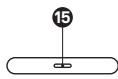
ACCESSORIES*
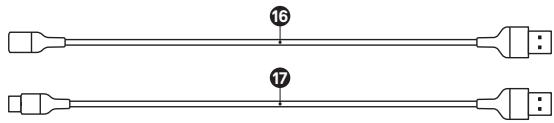
16 USB-C to USB-A Adapter Cable
17 Charging Cable
Arctis Nova 5X Wireless can easily switch between a dongle and Bluetooth connection for seamless usability. Need to take a call while you're gaming? Want to switch from your phone to your PC? Get started here.
2.4 MODE
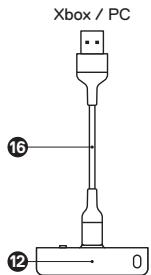
1 Connect the USB-C Wireless Dongle (12) into the USB-C to USB-A Adapter Cable (16)
2 Plug the USB-C to USB-A Adapter Cable (16) into your Xbox or computer directly
3 Once the headset is turned on you will hear the connected sound effect and the Power Indicator LED (10) on the headset will blink slowly
BLUETOOTH MODE
1 To switch to BT mode, press the Quick Switch Button (11) on the headset and you will enter pairing mode
2 Go to your main device's Bluetooth settings and pair to the "Nova 5X" device. Once successfully paired the blue Power Indicator LED (10) will go from fast blinking to blinking slowly
3 Now that you're setup you can switch between 2.4GHz mode and Bluetooth mode seamlessly with the press of the Quick Switch Button (11)
XBOX CONNECTION
Set the Dongle's Wireless Mode Switch (13) to "Xbox"
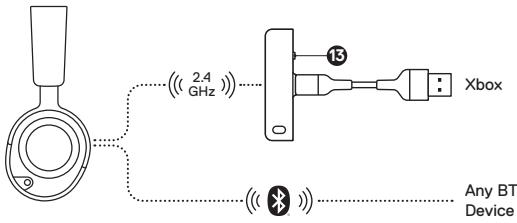
OTHER CONNECTIONS
Set the Dongle's Wireless Mode Switch (13) to "USB".
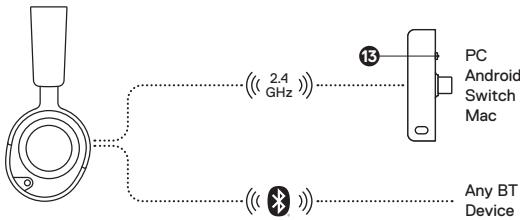
CONNECTION VIA USB-C
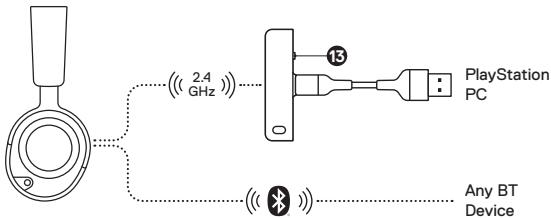
CONNECTION TO USB-A
PLAYSTATION 5 AUDIO SETTINGS
PS5 SETTING > AUDIO OUTPUT
| Output to Headphones | All Audio |
| PS5 SETTING > AUDIO OUTPUT > VOLUME | |
| Headphones | Set to Max |
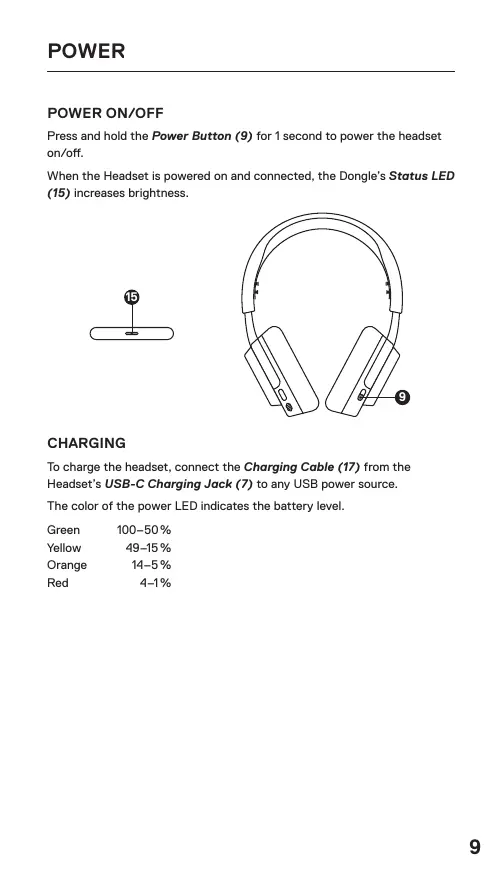
POWER ON/OFF
Press and hold the Power Button (9) for 1 second to power the headset on/off.
When the Headset is powered on and connected, the Dongle's Status LED (15) increases brightness.
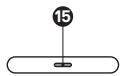
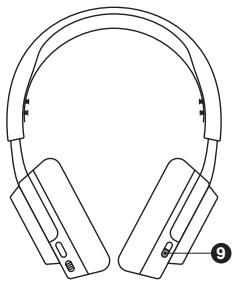
CHARGING
To charge the headset, connect the Charging Cable (17) from the Headset's USB-C Charging Jack (7) to any USB power source.
The color of the power LED indicates the battery level.
Green 100-50%
Yellow 49-15%
Orange 14-5%
Red 4-1%
Note: The headset and dongle come paired
If you need to re-pair:
1 Connect the USB-C Wireless Dongle (12) to your gaming device
2 Press and hold the Dongle's Pairing Button (14) for 4s until the Dongle's Status LED (15) blinks rapidly
3 Headset On - Press and hold the Quick Switch Button (11) for 2 seconds until you hear "Dongle Pairing Mode" and the Headset's Power Indicator LED (10) blinks rapidly
Headset Off - Press and hold the power button for 2s until the Headset's Power Indicator LED (10) blinks rapidly
4 When pairing is successful you will hear "Dongle Connected", and the Dongle's Status LED (15) will turn solid
Bluetooth can be used independently from 2.4GHz Wireless by pressing the Quick Switch Button (11) and hearing "Bluetooth Mode".
PAIRING
Headset on - Press & hold the Quick Switch Button (11) for 2 seconds until you enter pairing mode and the Headset's Power Indicator LED (10) blinks rapidly blue. To switch between dongle and BT pairing mode, press the QuickSwitch button.
Headset off - Press and hold the Power Button (9) for 2s until the Headset's Power Indicator LED (10) blinks rapidly. If the headset is in dongle pairing mode, press the Quick Switch Button (11) to switch to Bluetooth pairing mode.
MULTIMEDIA CONTROLS
Play/Pause Music Single·press the Power Button (9)
Skip Track Double...press the Power Button (9)
Previous Track Triple...press the Power Button (9)
Answer/End Voice Call Single · press the Quick Switch Button (11) (If call is answered in 2.4GHz mode, you will return back to 2.4GHz mode after the Bluetooth call is over.)
x Ignore Call Double...press the Quick Switch Button (11)
+ Increase Call Volume Single - press the Power Button (9)
Decrease Call Volume Double...press the Power Button (9)
MODE SWITCH
Switch between dongle & bluetooth mode by pressing the Quick Switch Button (11).
PAIRING MODE
Hold Quick Switch Button (11) for 2 seconds.
RETRACTABLE MICROPHONE
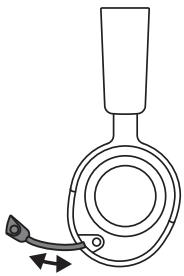
Out of the box, the Retractable ClearCast Microphone (3) is retracted. To use the microphone, slide it away from the headset until it reaches full extension.
POSITIONING
Position the Retractable ClearCast Microphone (3) close to the corner of your mouth with the front surface facing you.
Note: The microphone should not be used when retracted.
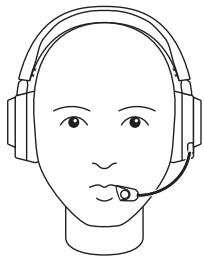
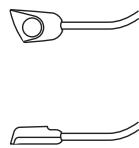
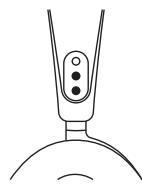
There are two ways to adjust the fit of your headset.
Slide the Earcups up or down to change the overall height.
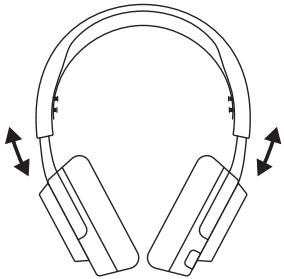
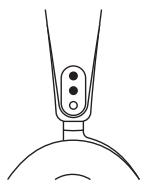
Change the position of the Elastic Headband (1) on one or both sides to achieve the desired tension and flex.
DEUTSCH
ALLGEMEIN
LIEFERUMFANG
Arctis Nova 5X Wireless Headset Ladekabel (1,5 m)
USB-C Wireless-Dongle Produkt-Informationshandbuch
Cable adaptor USB-C a
USB-A (5ft/1.5m)
Cable dearga(5ft/1.5m)
Dongle wireless USB-C
12 Dongle wireless USB-C*
Connession via USB-C
PC
Mac
Android
Qualsiasi dispositivo Bluetooth
SWITCH
Connessione a USB-A
PLAYSTATION
Qualsiasi dispositivo Bluetooth
PC
IMPOSTAZIONI AUDIO PLAYSTATION 5
*在 steeleries.com/gaming-accessories 查找配件和替换件
快速入门指南
*在 steelseries.com/gaming-accessories 查找配件和替换件
快速入門指南
Europe - EU Declaration of Conformity
Hereby, SteelSeries ApS, declares that the equipment which is compliance with directive RoHS 2.0 (2015/863/EU), R.E.D (2014/53/EU), EMC Directive (2014/30/EU), and LVD (2014/35/EU) which are issued by the Commission of the European Community.
The full text of the EU declaration of conformity is available at the following internet address: https://support.steelerseries.com/hc/en-us/categories/360001256111-Other-Stuff
SteelSeries ApS. hereby confirms, to date, based on the feedback from our suppliers indicates that our products shipping to the EU territory comply with REACH (Registration, Evaluation, Authorization, and Restriction of Chemicals - (EC) 1907/2006) compliance program. We are fully committed to offering REACH compliance on the products and posting accurate REACH compliance status for the all of products.
Frequency bands and Powers (Headset and Transceiver)
a. Frequency band(s) in which the radio equipment operates: 2.400 - 2.4835 GHz
b. Maximum radio-frequency power transmitted in the frequency band(s) in which the radio equipment operates:
EIRP: GFSK: GFSK: 9.81 dBm (Headset/ SRD)
EIRP: GFSK: 12.68 dBm (Headset/ BT)
n/4-DQPSK:10.22 dBm (Headset/ BT)
GFSK: 10.39 dBm (Transceiver/ SRD)
c. Firmware Version: V0033
UK CA
UK Declaration of Conformity
Hereby, SteelSeries ApS. declares that the following equipment which is compliance with Electromagnetic Compatibility Regulations 2016, Electrical Equipment (Safety) Regulations 2016, Radio Equipment Regulations 2017 and The Restriction of the Use of Certain Hazardous Substances in Electrical and Electronic Equipment Regulations 2012 issued by the Department for Business, Energy& Industrial Strategy.
The full text of the UK declaration of conformity is available at the following internet address:
https://support.steelerseries.com/hc/en-us/categories/360001256111-Other-Stuff

WEEE
This product must not be disposed of with your other household waste or treat them in compliance with the local regulations or contact your local city office, your household waste disposal service or the shop where you purchased the product.
Turkey RoHS Compliance
Republic of Turkey: In conformity with the EEE Regulation
Federal Communication Commission Interference Statement
Supplier's Declaration of Conformity: 47 CFR § 2.1077 Compliance Information
This device complies with Part 15 of the FCC Rules. Operation is subject to the following two conditions:
- This device may not cause harmful interference, and
- this device must accept any interference received, including interference that may cause undesired operation.
This equipment has been tested and found to comply with the limits for a Class B digital device, pursuant to Part 15 of the FCC Rules. These limits are designed to provide reasonable protection against harmful interference in a residential installation. This equipment generates, uses and can radiate radio frequency energy and, if not installed and used in accordance with the instructions, may cause harmful interference to radio communications. However, there is no guarantee that interference will not occur in a particular installation. If this equipment does cause harmful interference to radio or television reception, which can be determined by turning the equipment off and on, the user is encouraged to try to correct the interference by one of the following measures:
- Reorient or relocate the receiving antenna.
- Increase the separation between the equipment and receiver.
- Connect the equipment into an outlet on a circuit different from that to which the receiver is connected.
- Consult the dealer or an experienced radio/TV technician for help.
FCC Caution:
Any changes or modifications not expressly approved by the party responsible for compliance could void the user's authority to operate this equipment.
This transmitter must not be co-located or operating in conjunction with any other antenna or transmitter.
Radiation Exposure Statement:
The device has been evaluated to meet general RF exposure requirement; the device can be used in portable exposure condition without restriction.
The portable device is designed to meet the requirements for exposure to radio waves established by the FCC. These requirements set a SAR limit of 0.11 w/kg (FHSS_Headset), 0.09 w/kg (DTS_Headset) and 0.24 w/kg (Dongle) averaged over one gram of tissue. The highest SAR value reported under this standard during product certification for use when properly worn on the body.
FCC ID: ZHK-HS43(Wireless Headset)
FCC ID: ZHK-HS43TX(Transceiver)
Industry Canada Statement
This device complies with Industry Canada license-exempt RSS standard(s). Operation is subject to the following two conditions:
- this device may not cause interference, and
- this device must accept any interference, including interference that may cause undesired operation of the device.
This Class B digital apparatus complies with Canadian ICES-003.
This device and its antenna(s) must not be co-located or operating in conjunction with any other antenna or transmitter, except tested built-in radios.
The County Code Selection feature is disabled for products marketed in the US/ Canada.
The appliance must not be exposed to splashes or drops of water and it should not be used as a support for any object filled with liquid, such as a vase.
The portable device is designed to meet the requirements for exposure to radio waves established by the ISED. These requirements set a SAR limit of 0.11w / kg (FHSS_Headset), 0.09w / kg (DTS_Headset) and 0.24w / kg (Dongle) averaged over one gram of tissue. The highest SAR value reported under this standard during product certification for use when properly worn on the body.
Result for highest Simultaneous Transmission SAR value is 0.11 w/kg (FHSS_Headset), 0.09 w/kg (DTS_Headset) and 0.24 w/kg (Dongle).
Radiation Exposure Statement:
The device has been evaluated to meet general RF exposure requirement. The device can be used in portable exposure condition without restriction.
Restriction on Hazardous Substances statement (India)
This product complies with the "India E-waste Rule 2011" and prohibits use of lead, mercury, hexavalent chromium, polybrominated biphenyls or polybrominated diphenyl ethers in concentrations exceeding 0.1 weight % and 0.01 weight % for cadmium, except for the exemptions set in Schedule 2 of the Rule.
海達,用士,信
達當號早開信是華國國國國國國國國國國國國國國國國國國國國國國國國國國國國國國國國國國國國國國國國國國國國國國國國國國國國國國國國國國國國國國國國國國國國國國國國國國國國國國國國國國國
The RoHS test method is based on the standards JIS C 0950 and CNS 15663.
| 設備名稱:無線耳機型號(型式):HS43Equipment name: Wireless HeadsetType designation: HS43 | ||||||
| 單元Unit | 限用物質及其化學符號Restricted substances and its chemical symbols | |||||
| 鉛Lead(Pb) | 汞Mercury(Hg) | 镉Cadmium(Cd) | 六價鎘Hexavalentchromium(Cr²⁺) | 多溴聯苯Poly-brominatedbiphenyls(PBB) | 多溴二苯醚Poly-brominated diphenylethers(PBDE) | |
| 塑膠部件Plastic | ○ | ○ | ○ | ○ | ○ | ○ |
| 電路板及元件PCBA | - | ○ | ○ | ○ | ○ | ○ |
| 線材Cables | - | ○ | ○ | ○ | ○ | ○ |
| 金屬部件Metal | - | ○ | ○ | ○ | ○ | ○ |
| 備考1 “超出0.1 wt %”及“超出0.01 wt %”係指限用物質之百分比含量超出百分比含量基準值。Note 1 “Exceeding 0.1 wt %” and “exceeding 0.01 wt %” indicate that the percentage content of the restricted substance exceeds the reference percentage value of presence condition。備考2 '係指該項限用物質之百分比含量未超出百分比含量基準值。Note 2 'Indicates that the percentage content of the restricted substance does not exceed the percentage of reference value of presence。備考3 '係指該項限用物質為排除項目。Note 3 ' indicates that the restricted substance corresponds to the exemption | ||||||

欧盟
Batteries, battery packs, and accumulators should not be disposed of as unsorted household waste. Please use the public collection system to return, recycle, or treat them in compliance with the local regulations.
Safety Guideline for Using Lithium Battery
Danger of explosion if battery is incorrectly replaced. Replace only with the same or equivalent type recommended by the equipment manufacturer. Discard used batteries according to manufacturer's instructions.
Read the safety instructions carefully and thoroughly. All cautions and warnings on the equipment or user's manual should be noted. Keep this equipment away from humidity and high temperature.
- Do not leave the equipment in an unconditioned environment with a storage temperature above 60^ (140^) or below 0^ (32^) , which may damage the equipment.
-
This unit should be operated under maximum ambient temperature of 35^ C( 95^ F) .
-
To prevent explosion caused by improper battery replacement, use the same or equivalent type of battery recommended by the manufacturer only.
Always keep the battery in a safe place.

Unioneuropeanne
"The power delivered by the charger must be between min 0.25 Watts required by the radio equipment, and max 2.5 Watts in order to achieve the maximum charging speed"
European Union RED Compliance Statement
English
Hereby, Steelseries ApS, declares that all CE Marked Steelseries products incorporating Radio and Telecom Terminal Equipment functionality are in compliance with the essential requirements and other relevant provisions of Directive 2014/53/EU.
BbIarapckn
C ToctoanaTate, Steeleries Ap5. Dknapnepa,ue BcNCHMnEJIaHnna HSteleeries,MapKnpHnBa Cb3 hNaCE,BKIOUaBuaIeFHyNKuMOHaNHOCT3aTePMHnAHO NobOpOBAHe 3a PaNDiHo TEnkOMyHNKaauHnCBOTETCBTATb HA OCHOBHNTe NMCKBAHNn Hn ADPYr cBtEBTNH yLNOBHa JAnDpKTEPn4 2013/53/EC
Cestina
RISK OF EXPLOSION IF BATTERY PACK IS NOT REPLACE BY SAME TYPE AS SPECIFIED BY THE MANUFACTURER.
Please keep follow all listed important warnings and cautions below while using this battery pack to avoid any damage or hazard.
- The battery polarity (+) and (-) shall not be connected and charged reversely. Risk of explosion if the battery polarity (+) and (-) is reversed.
- Please keep this battery pack away from fire and high heat sources (Above 60^140^ ) due to the explosion that might happen. Do not place your battery pack close to any heater or hot location.
- This battery pack shall not be hit or impacted. This battery pack shall not be dealt with any sharp or keen objects either.
- This battery pack shall not be exposed to moisture, dripping or splashing.
- If any electrolyte flows out of this battery pack when touching the user's eyes and skin, please seek medical advice immediately.
"MISE EN GARDE!"
RISQUE D'EXPOSION SI LE BLOC-PILES N'EST PAS REMPLACÉ PAR LE MÈME TYPE QUE SPÉCIÉRÉ PAR LE FABRICANT.
More information and support from steeleries.com
Complies with IMDA Standards DA 106032
Singapore approval (IMDA)

ACMA Compliance
(Australia/ New Zealand)

Direct Current
Product Name (產品名稱/产品名称): Wireless Headset (無線耳機/无线耳机)