
BRC3800 - Electric bike system BOSCH - Free user manual and instructions
Find the device manual for free BRC3800 BOSCH in PDF.



User questions about BRC3800 BOSCH
0 question about this device. Answer the ones you know or ask your own.
Ask a new question about this device
Download the instructions for your Electric bike system in PDF format for free! Find your manual BRC3800 - BOSCH and take your electronic device back in hand. On this page are published all the documents necessary for the use of your device. BRC3800 by BOSCH.
USER MANUAL BRC3800 BOSCH
This manual contains important safety, performance and service information. Read and understand it along with the information provided to you by your bicycle manufacturer before using the product, and keep it for reference.
Table of contents
Introduction 2
AboutWarnings 2 GeneralWarnings 2 Using your Manual 3
Operating your Bosch Drive System 4
Safety instructions 4 Product Description and Specifications 7 Operation 9 Establishing a smartphone connection 13 Troubleshooting 15
Maintenance and Service 16 Maintenance/cleaning 16 After-sales service and advice on using products 16 Battery Recycling Program 16
Introduction
AboutWarnings
This manual contains many DANGER, WARNING, and CAUTION indicators concerning the consequences of failure to use, assemble, maintain, store, inspect and dispose of a Bosch-equipped eBike in a safe manner.
- The combination of the safety alert symbol and the word DANGER indicates a hazardous situation that, if not avoided, will result in death or serious injury.
- The combination of the safety alert symbol and the word WARNING indicates a hazardous situation that, if not avoided, could result in death or serious injury.
- The combination of the safety alert symbol and the word CAUTION indicates a hazardous situation that, if not avoided, could result in minor or moderate injury.
General Warnings

Read all safety warnings and all instructions. Failure to follow the warnings and instructions may result in death or serious injury.
Save all safety warnings and instructions for future reference.
The term eBike battery used in these operating instructions refers to all original Bosch eBike batteries from the system generation the smart system.
- Read ALL accompanying manuals before riding the bike for the first time. Your Bosch Drive System comes with additional manuals and documents provided by the manufacturer of the bicycle and other components. Failure to read and understand safety information can result in death or serious injury.
WARNING
This manual contains important safety, performance and service information. Read it before you take the first ride on your new bicycle, and keep it for reference. The manual can also be found online at www.bosch-ebike.com. This manual is intended to be read together with the separate user manual provided with your bicycle. Be sure to read all provided documents including labels on the product before your first ride.
Take responsibility for your own SAFETY. If you have any questions or do not understand something, consult with your dealer or the bicycle or component manufacturer. - Some eBike accessories may present a choking hazard to small children. Keep these accessories away from children.
CAUTION
The Bosch Drive System adds weight to your bicycle which you may not be used to lift. Avoid injury, use proper lifting techniques.
Using your Manual
In addition to the functions outlined here, changes to software relating to troubleshooting and functional modifications may be introduced at any time.
Graphics
The bicycle shown in this manual may differ slightly from your bicycle, but will be similar enough to help you understand our instructions.
RIGHT-HAND and LEFT-HAND sides are determined by facing in the direction the bicycle will travel when going forward. When you see a broken line (---), the item referred to is hidden from view.
Operating your Bosch Drive System Safety instructions

Read all the safety and general instructions. Failure to follow the warnings and instructions may result in electric shock,
fire and/or serious injury.
Save all safety warnings and instructions for future reference.
The term eBike battery used in these operating instructions refers to all original Bosch eBike batteries from the system generation the smart system.
The terms drive and drive unit used in these operating instructions refer to all original Bosch drive units from the system generation the smart system.
Read and observe the safety warnings and instructions in all operating instructions of the eBike system and your eBike. Do not attempt to fix display or remote control while riding! Do not allow yourself to be distracted by the control unit's display. If you do not concentrate exclusively on the traffic around you, you risk being involved in an accident. If you want to change settings on your control unit, beyond just changing the assistance level, stop cycling to do so. - Set the display brightness such that you can adequately see important information like speed or warning symbols. An incorrectly set display brightness can result in dangerous situations. - Do not use the control unit as a handle. If you lift up the eBike by the control unit, you may cause irreparable damage to the control unit. The push assistance function must only be used when pushing the eBike. There is a risk of injury if the wheels of the eBike are not in contact with the ground while using the push assistance. - When the push assistance is activated, the pedals may turn at the same time. When the push assistance function is activated, make sure that there
is enough space between your legs and the turning pedals to avoid the risk of injury.
- When using the push assistance, ensure that you can always control the eBike and hold it securely. The push assistance can be suspended under certain conditions (e.g. obstacle on the pedal or accidentally slipping off the button of the operating unit). The eBike can suddenly move backwards towards you or start to tip. This poses a particular risk for the user if there is an additional load. When using the push assistance on the eBike, do not place the eBike in situations in which you cannot hold the eBike by yourself. Do not activate push assistance function while riding on the bike. Only use push assistance function when pushing the eBike.
- Do not stand your eBike upside down on its handlebars and saddle if the operating unit or its holder protrude from the handlebars. This may irreparably damage the operating unit or the holder.
- Do not connect a charger to the eBike battery if the display of the operating unit or the on-board computer indicates that a critical error has occurred. This may result in damage to your eBike battery. The eBike battery may catch fire, thereby resulting in serious burns and other injuries. The control unit features a wireless interface. Local operating restrictions, e.g. in airplanes or hospitals, must be adhered to.
- Caution! When using the operating unit with Bluetooth®, this may cause interference that affects other devices and systems, airplanes and medical devices (e.g. pacemakers, hearing aids). Similarly, the possibility that this may cause damage to humans and animals in the immediate vicinity cannot be completely excluded. Do not use the operating unit with Bluetooth® in the vicinity of medical de
vices, gas stations, chemical plants, areas with a potentially explosive atmosphere or on blast sites. Do not use the operating unit with Bluetooth® in airplanes. Avoid using the device in close proximity to your body over an extended period of time.
- The Bluetooth® wordmark and its logos are the registered trademarks and property of Bluetooth SIG, Inc. Any use of this wordmark/these logos by Robert Bosch GmbH, Bosch eBike Systems is under license.
- Accessing other apps, reading pop up messages/other content, or otherwise using your mobile device while operating an eBike may be distracting. Distracted driving is a serious safety concern and can lead to accidents causing serious injury or death. In order to prevent distracted driving, most mobile devices come equipped with a "Do Not Disturb" mode. The "Do Not Disturb" mode should be used while operating an eBike. Please consult your device-specific instructions for more information. You, as the eBike operator, are fully responsible for ensuring that you pay attention to road conditions and comply with traffic laws at all times. Do not enter information or make selections while riding. Interacting with the display unit while riding can lead to accidents causing serious injury or death. You must observe road and traffic conditions, and comply with traffic laws at all times.
- Please note that certain State or local laws may require that class III eBikes must be equipped with a functioning speedometer that displays speed in miles per hour. Riders must be aware of any and all applicable rules and regulations related to the operation or use of class III eBikes in any applicable jurisdictions before operating or otherwise using this product. Observe all national regulations which set out the approved use of eBikes.
Safety warnings for charging the battery inside the remote control
- Only charge the remote control with USB power source (5 V, 600 mA max) and USB cable rated at least 600 mA. Using USB power source or USB cable not appropriately rated for the application may result in fire, explosion or personal injury.
- Charge the remote control in temperatures above +32 degrees F (0 degrees C) and below +104 degrees F (40 degrees C). Store the remote control in locations where temperatures will not exceed 104 degrees F (40 degrees C). This is important to prevent serious damage to the battery in the remote control. Do not expose the remote control to fire or excessive temperature. Exposure to fire or temperature above 212 degrees F (100 degrees C) may cause explosion.
- Do not recharge the remote control (via USB port) in damp or wet environments. Water entering the remote control may result in electric shock or fire.
- Never submerge the remote control in fluid of any kind or allow fluid to enter it. Corrosive or conductive fluid (such as seawater, industrial chemicals, or bleach-containing products) can cause a short circuit, which may result in fire, personal injury, and property damage.
- Battery leakage may occur under extreme usage or temperature conditions. Avoid contact with skin and eyes. The battery liquid is caustic and could cause chemical burns to tissues. If liquid comes in contact with skin, wash quickly with soap and water. If the liquid contacts your eyes, immediately flush eyes with water for a minimum of 15 minutes and seek medical attention. Before each use, check the remote control, cable, and plug. If damage is detected, do not use the remote control. Damaged remote controls, charging cables, and plugs increase the risk of fire, explosion, and personal injury.
- Do not disassemble the remote control. There are no user-serviceable parts inside. Incorrect reassembly or damage may result in fire or explosion.
NOTICE: This device complies with part 15 of the FCC Rules. Operation is subject to the following two conditions:
- This device must not cause harmful interference, and
- this device must accept any interference received, including interference that may cause undesired operation.
NOTICE: Changes or modifications made to this equipment not expressly approved by Robert Bosch GmbH may void the FCC authorization to operate this equipment.
NOTE: This equipment has been tested and found to comply with the limits for a Class B digital device, pursuant to Part 15 of the FCC Rules. These limits are designed to provide reasonable protection against harmful interference in a residential installation. This equipment generates, uses and can radiate radio frequency energy and, if not installed and used in accordance with the instructions, may cause harmful interference to radio communications. However, there is no guarantee that interference will not occur in a particular installation. If this equipment does cause harmful interference to radio or television reception, which can be determined by turning the equipment off and on, the user is encouraged to try to correct the interference by one or more of the following measures:
- Reorient or relocate the receiving antenna.
- Increase the separation between the equipment and receiver.
- Connect the equipment into an outlet on a circuit different from that to which the receiver is connected.
- Consult the dealer or an experienced radio/TV technician for help.
Radiofrequency radiation exposure Information:
The radiated output power of the device is far below the FCC radio frequency exposure limits. Nevertheless
the device shall be used in such a manner that the potential for human contact during normal operation is minimized.
This equipment complies with FCC radiation exposure limits set forth for an uncontrolled environment. This transmitter must not be co-located or operating in conjunction with any other antenna or transmitter.
ISED Notice (Canada)
This device contains licence-exempt transmitter(s)/ receiver(s) that comply with Innovation, Science and Economic Development Canada's licence-exempt RSS(s). Operation is subject to the following two conditions:
- this device may not cause interference, and
- this device must accept any interference, including interference that may cause undesired operation of the device.
This equipment complies with Canada radiation exposure limits set forth for an uncontrolled environment. This transmitter must not be co-located or operating in conjunction with any other antenna or transmitter.
Privacy notice
When connecting the eBike to the Bosch Diagnostic-Tool 3 or when exchanging eBike components, technical information about your eBike (e.g. manufacturer, model, bike ID, configuration data) as well as regarding the use of the eBike (e.g. total travel time, energy consumption, temperature) is transmitted to Bosch eBike Systems (Robert Bosch GmbH) for processing your request, in service cases and for the purposes of product improvement. More information on data processing can be found at www.bosch-ebike.com/privacy-full.
Product Description and Specifications
Product Features

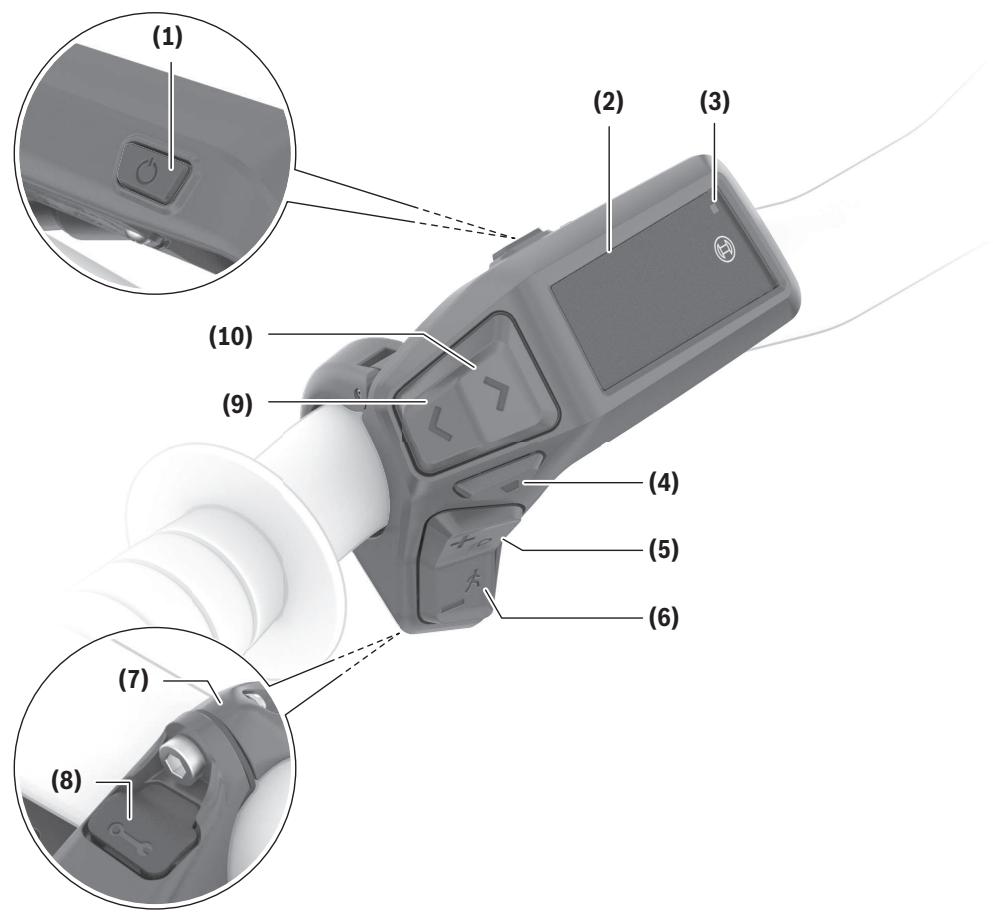
All illustrations of bike parts except for the drive unit, on-board computer including operating unit, speed sensor and the corresponding holders are schematic and may differ on your eBike.
(1) On/off button (2) Display (3) Ambient light sensor (4) Select button (5) Button for increasing assistance + / bicycle lights (6) Button for decreasing assistance -/ push assistance
(7) Holder (8) Diagnostics connection (for servicing purposes only) (9) Button to reduce brightness/ go back (10) Button to increase brightness/ go forward
Intended Use
The Purion 200 control unit is designed for controlling an eBike and, as an option, for controlling an additional on-board computer from the system generation the smart system. If you use your smartphone as an on-board computer, you can use
the Purion 200 control unit to change the assistance level in the eBike Flow app.
In order to be able to use the control unit to its fullest extent, a compatible smartphone with the eBike
Flow app is required.
You can connect the Purion 200 operating unit with your smartphone via Bluetooth®.
Depending on the operating system of the smartphone, the eBike Flow app can be downloaded free of charge from the Apple App Store or Google Play Store.
Scan the code with your smartphone to download the eBike Flow app.
Technical Data
| Control unit | Purion 200 | |
| Product code | BRC3800 | |
| Max. charging current of USB portA) | mA | 600 |
| USB port charging voltageA) | V | 5 |
| USB charging cableB) | USB Type-C®C) | |
| Charging temperature | °F | 32 to 113 |
| Operating temperature | °F | 23 to 104 |
| Storage temperature | °F | 50 to 104 |
| Diagnostic interface | USB Type-C®C) | |
| Internal lithium-ion battery | V | 3.7 |
| mAh | 75 | |
| Protection rating | IP55 | |
| Dimensions (without fastening) | in | 3.3 × 2.1 × 2.4 |
| Weight | lb | 0.11 |
| Bluetooth® Low Energy 5.0 | ||
| - Frequency | MHz | 2400–2480 |
| Control unit | Purion 200 |
| – Transmission power | mW |
| 1 |
A) Information for charging the Purion 200 operating unit; external devices cannot be charged. B) Not included with the product as standard. C) USB Type-C® and USB-C® are trademarks of USB Implementers Forum.
The license information for the product is available at the following Internet address: www.bosch-ebike.com/ licences
Certification information
FCC and IC ID (e-labels) can be found in the status screen under → → . Scroll through all e-labels by briefly pressing the scroll on button (10).
Note: If you wish to access information from the e-label of Purion 200, you may first have to remove any additional on-board computer or, if using a smartphone, close the ride screen in the eBike Flow app.
Operation
Requirements
The eBike can then only be switched on when the following requirements are met:
- A sufficiently charged eBike battery is inserted (see operating instructions for the eBike battery of the system generation the smart system).
- The speed sensor is connected properly (see operating instructions for the drive unit of the system generation the smart system).
Before setting off, make sure that you can easily reach the buttons on the operating unit. It is recommended to align the plus/minus buttons level so that it is almost perpendicular to the ground.
Control unit power supply
If a sufficiently charged eBike battery is inserted into the eBike and the eBike is switched on, the internal battery of the operating unit is powered and charged. If the state of charge of the internal battery of the operating unit is very low, you can charge it via the diagnostics connection (8) with a USB Type-C® cable using a power bank or another suitable power source (charging voltage 5 V; charging current max. 600 mA).
Always close the flap of the diagnostics connection (8) so that no dust or moisture can enter.
Switching the eBike on/off
To switch on the eBike, briefly press the on/off button (1). The eBike is ready to ride once the start-up animation is complete.
The display brightness is controlled by the ambient light sensor (3). Therefore, do not cover the ambient light sensor (3).
The drive is activated as soon as you start pedaling (except at assistance level OFF). The drive output depends on the settings of the assistance level.
As soon as you stop pedaling when in normal operation, or as soon as you have reached a speed of 20/28 mph, the drive switches off the assistance.
The drive is automatically re-activated as soon as you
start pedaling again and the speed is below 20/28 mph.
To switch off the eBike, press the on/off button (1) briefly (< 3 s).
If no power is requested from the drive for approx.
10 minutes (e.g. due to the eBike being stationary) and no button is pressed, the eBike switches off automatically.
Quick menu
Selected settings are displayed on the quick menu. These settings can also be changed while riding.
The quick menu can be accessed with a long press (>1 s) of the select button.
It cannot be accessed from the status page.
The following settings can be changed via the quick menu:
-
All data on the distance traveled so far is set to zero. (optional)
The settings are dependent on the respective gear-shifting.
Note: Depending on the configuration of your eBike, additional functions may be available.
Displays
Note: All interface displays and texts on the following pages correspond to the release status of the software. The interface displays and texts may change slightly following a software update.
If you did not select another page before the last time you switched off, you will be shown this page.
Start page
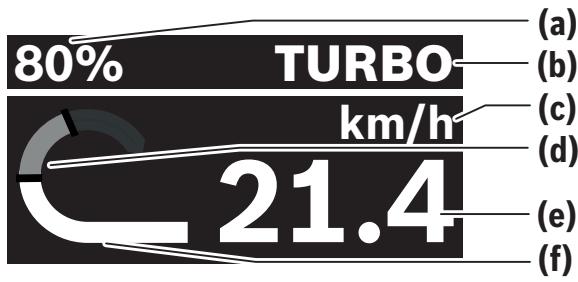
(a) State of charge of eBike battery (b) Assistance level (c) Unit of speed indicator (d) Your performance (e) Speed (f) Drive power
You can view other screens by pressing the \(\boxtimes\) or \(\boxtimes\) buttons.
The following additional screens are available for you to view:
- Status screen: The status of the connected devices is shown here.
- Distances screen
- Rides screen Range screen
- eBike battery screen
- Power screen Cadence screen Total distances screen
- ABS screen (optional)
Selecting the assistance level
You can set how much the eBike drive assists you while pedaling by pressing the increase assistance level + (5) and reduce assistance level - (6) buttons on the control unit. The assistance level can be changed at any time, even while cycling, and is displayed in color.
| Level | Notes |
| OFF | The drive support is switched off. The eBike can just be moved by pedaling, as with a normal bicycle. |
| ECO | Effective support with maximum efficiency, for maximum range |
| TOUR | Steady support, long range for touring |
| TOUR+ | Dynamic support for normal riding and biking sports |
| eMTB | Optimal support whatever the terrain, rapid acceleration when starting from a standstill, improved dynamics and top performance |
| SPORT | Powerful assistance, for mountain biking and for cycling in urban traffic |
| TURBO | Maximum support even at a high cadence, for sport cycling |
| AUTO | The assistance is adapted dynamically to the riding situation. |
| RACE | Maximum support on the eMTB race course; very direct response behavior and maximum "extended boost" for the best possible performance in competitive situations |
| CARGO | Steady, powerful support, to be able to transport heavy weights |
| SPRINT | Dynamic support depending on the ca-dence – for sport-based eGravel and eRoad riding with quick sprints and fre-quent ascents |
Note: The available modes are dependent on the respective drive unit.
The designations and configuration of the assistance levels can be preconfigured by the manufacturer and selected by the bicycle retailer.
Adjusting the assistance level
The assistance levels can be adjusted within certain parameters using the eBike Flow app. You therefore have the option of adjusting your eBike to your personal requirements.
Creating a mode that is totally your own is not possible. You can only adjust the modes that have been enabled on your system by the manufacturer or the dealer. This may even be fewer than 4 modes.
It may also be the case that a mode cannot be adjusted due to restrictions in your country.
The following parameters are available to you for adjustment:
- Support in relation to the basic value of the mode (within the legal specifications)
- Response behavior of the drive
- Throttling down speed (within the legal specifications)
- Maximum torque (within the framework of the drive limits)
Note: Please ensure that your changed mode retains the position, name and color on all on-board computers and operating elements.
Interaction of the drive unit with the gear-shifting
You should shift through gears on an eBike in the same manner as when using a normal bicycle (observe the operating instructions of your eBike with regard to this point).
Irrespective of the type of gear shifting, it is advisable that you briefly reduce the pressure on the pedals when changing gear. This will aid gear shifting and reduce wear on the powertrain.
By selecting the correct gear, you can increase your speed and range while applying the same amount of force.
Therefore, follow the gear-shifting recommendations that are displayed to you on your on-board computer.
Switching bike lights on/off
Before starting each journey, check that your bike lights are working correctly.
To switch on the bicycle lights, press the bicycle lights button (5) for more than 1 s.
Switching the push assistance on/off
The push assistance aids you when pushing your eBike. The maximum speed of the push assistance is 3.7 mph. The manufacturer's default setting can be lower and may need to be adjusted by the bicycle retailer.
The push assistance function must only be used when pushing the eBike. There is a risk of injury if the wheels of the eBike are not in contact with the ground while using the push assistance. If the selected gear is too high, the drive unit may not be able to move the eBike or activate the roll-away lock.
To start walk assistance, press the walk assistance (6) button for more than 1 s, keep it pressed and follow the instructions on the display.
To activate push assistance, one of the following actions must occur within the next 10 s:
- Push the eBike forward.
- Push the eBike backward.
- Perform a sideways tilting movement with the eBike.
After activation, the drive begins to push and the indicator on the display changes.
If you release the push assistance button (6), push assistance is paused. You can reactivate push assistance within 10 s by pressing the push assistance button (6).
If you do not reactivate push assistance within 10 s, push assistance automatically switches off.
Push assistance is always ended if:
- the rear wheel jams;
- the bicycle cannot move over ridges;
- a body part is blocking the bicycle crank;
- an obstacle continues to turn the crank;
- you start pedaling;
- the "Increase assistance" + /bicycle lights button (5) or on/off button (1) is pressed.
Push assistance has a roll-away lock, which means that even after successfully using push assistance, the drive actively brakes backward rolling for a few seconds and you cannot push the eBike backward or can only do so with difficulty.
The roll-away lock can be immediately deactivated by pressing the "Increase assistance" + /bicycle lights button (5).
The push assistance function is subject to local regulations; the way it works may therefore differ from the description above. It can also be deactivated.
ABS - Anti-lock braking system (optional)
If the eBike is fitted with a Bosch eBike ABS from the system generation the smart system, the ABS symbol lights up when the eBike system starts.
After moving off, the ABS internally checks its functionality and the ABS symbol goes off.
In the event of an error, the ABS symbol lights up and a message appears on the display. This means that the ABS is inactive. You can press the select button (4) to acknowledge the error and the ABS error message disappears. The ABS symbol appears in the statusbar to notify you that the ABS is still switched off.
For details on the ABS and how it works, please refer to the ABS operating instructions.
Establishing a smartphone connection
In order to be able to use the following eBike functions, a smartphone with the eBike Flow app is required.
Connection to the app occurs via a Bluetooth® connection.
Switch on the eBike without maneuvering it.
Begin Bluetooth® pairing by long pressing (> 3 s) the on/off button (1). When the status of the pairing process is displayed, release the on/off button (1).
Confirm the connection request in the app.
Activity tracking
In order to record activities, it is necessary to register and log into the eBike Flow app.
To record activities, you must consent to the storage of your location data in the app. Without this, your activities cannot be recorded in the app. For location data to be recorded, you must be logged in as the user.
eBike Lock
can be activated for all users via the eBike Flow app. A key to unlock the eBike is saved on the smartphone for this purpose.
is automatically active in the following cases:
- When switching off the eBike via the operating unit
- When automatically switching off the eBike
The eBike is unlocked when the eBike is switched on and the smartphone is connected with the eBike via Bluetooth®.
is connected to your user account.
Should you lose your smartphone, you can log in via another smartphone using the eBike Flow app, and unlock your user account and the eBike.
Warning! If you select a setting in the app that leads to disadvantages for the (e.g. deletion of your eBike or user account), then you will first be shown warning messages. Please read through these thoroughly and adhere to the warnings that
are issued (e.g. before deleting your eBike or user account).
In order to be able to set up the , the following conditions must be fulfilled:
- The eBike Flow app has been installed.
- A user account has been created.
- No update is currently being carried out on the eBike.
- The eBike is connected to the smartphone via Bluetooth®.
- The eBike is stationary.
- The smartphone is connected to the Internet.
- The eBike battery is sufficiently charged, and the charging cable is not connected.
You can set up in the eBike Flow app under the menu item.
You can deactivate the support of your drive unit with immediate effect by switching on in the eBike Flow app. Deactivation can only be canceled if your smartphone is nearby when switching on the eBike. Your smartphone must have Bluetooth® switched on for this, and the eBike Flow app must be active in the background. The eBike Flow app does not have to be opened. If is activated, you can also use your eBike without support from the drive unit.
Compatibility
is compatible with these Bosch eBike product lines from the system generation the smart system:
| Drive unit | Product line |
| BDU374x | Performance Line CX |
| BDU33xx | Performance Line Active Line Active Line Plus |
| BDU31xx | Performance Line SX |
How it works
In conjunction with , the smartphone works in a similar way to a key for the drive unit.
The is activated by switching off the eBike. As long as the is active after the function is switched on, this will be indicated by a padlock symbol on the Purion 200 control unit.
Note: alone does not provide adequate theft protection; it is simply a supplement to a mechanical lock. does not provide any form of mechanical lock for the eBike. Only the assistance from the drive unit is deactivated. As long as the smartphone is connected with the eBike via Bluetooth® , the drive unit is unlocked.
If you wish to give other users temporary or permanent access to your eBike or you want to take your eBike to a service, you will need to deactivate the in the eBike Flow app in the menu item. If you wish to sell your eBike, you will also need to delete the eBike from your user account in the eBike Flow app in the menu item.
When the eBike is switched off, the drive unit will emit a "Lock" sound (i.e. an audio signal that is played once) to indicate that the assistance from the drive unit is switched off.
Note: The audio signal will only be played if the eBike is switched on.
When the eBike is switched on, the drive unit will emit two "Unlock" sounds (i.e. an audio signal that is played twice) to indicate that the assistance from the drive unit is enabled again.
The "Lock" sound helps you to recognize whether the lock is activated on your eBike. The audio signal is activated by default, but it can be deactivated in the eBike Flow app in the menu item by selecting the lock symbol under your eBike.
Note: If you are no longer able to set up or switch off the lock, please contact your bicycle dealer.
Replacing eBike components and Replacing the smartphone
- Install the eBike Flow app on the new smartphone.
- Log in using the same account with which you activated the lock.
- The lock is displayed as set up in the eBike Flow app.
Replacing the drive unit
- The lock is displayed as deactivated in the eBike Flow app.
- Activate the lock by pushing the control unit to the right.
- If you are handing in your eBike to a bicycle dealer for maintenance, it is recommended that you temporarily deactivate the lock.
If you have activated the lock, you will be able to see this on the Purion 200.
More information about this can be found in the eBike Flow app or in the Help Center on the website www.bosch-ebike.com/en/help-center.
Software updates
Software updates must be started manually in the eBike Flow app.
Software updates are transferred from the app to the control unit in the background as soon as it is connected to the app. During the software update, keep watching the display on the control unit Purion 200. The eBike is then restarted.
You can control the software updates via the eBike Flow app.
Troubleshooting
The error messages are displayed in a pop-up on the Purion 200 control unit.
The operating unit shows whether critical errors or less critical errors occur on the eBike.
The error messages generated by the eBike can be read via the eBike Flow app or by your bicycle retailer.
Via a link in the eBike Flow app, information about the error and support for rectifying the error can be displayed.
Less critical errors
Errors are acknowledged by pressing the select button (4).
You can use the following table to rectify the errors yourself if necessary. Otherwise, please contact your bicycle retailer.
| Number | Troubleshooting |
| 523005 | The indicated error numbers show that there is interference when the sensors detect the magnetic field. See whether you have lost the magnet while riding. |
| 514001 | |
| 514002 | |
| 514003 | |
| 514006 | If you are using a magnet sensor, check that the sensor and magnet have been properly installed. Make sure too that the cable to the sensor is not damaged. If you are using a rim magnet, make sure that you do not have any magnetic field interference in the vicinity of the drive unit. |
Critical errors
If a critical error occurs, follow the handling instructions on the following table.
| Number | Handling instructions |
| 660002 | Please do not charge or use your battery any further. Please contact your specialist retailer. |
| 6A0004 | Remove the PowerMore battery and restart your eBike. |
| Number | Handling instructions |
| If the problem persists, please contact your specialist retailer. | |
| 890000 | - Acknowledge the error code. - Restart the eBike system. If the problem persists: - Acknowledge the error code. - Perform the software update. - Restart the eBike system. If the problem persists: - Please contact a Bosch eBike systems specialist retailer. |
Maintenance and Service Maintenance/cleaning

WARNING
Do not open any of the components. Service should only be carried out at an authorized Bosch eBike dealer. Failure to follow the above warning can cause death or serious injury. Refer to your bicycle manual or component manual for all non-Bosch drive system components. - Do not paint any components of the Bosch drive system as they may cause premature failure of the component. - Do not submerge your eBike components in water, or wash with a pressurized hose. Your Bosch drive unit is designed to be water tight to rain water or non-pressure hose washing.
Do not clean any of the components with pressurized water.
Keep the display of your control unit clean. Dirt can cause faulty brightness detection.
Clean your control unit using a soft cloth dampened only with water. Do not use cleaning products of any kind.
Have your eBike checked by an expert at least once a year (including mechanical parts, up-to-dateness of system software).
The bike retailer can also schedule the service based on a mileage and/or a time period. In this case, the control unit displays a message telling you when the service date is due each time it is switched on.
Please have your eBike serviced and repaired by an authorized bicycle dealer.
- Only have repairs performed by a certified bicycle dealer.
Note: If you hand over your eBike to a bicycle dealer for maintenance, it is recommended to temporarily deactivate and to avoid a false alarm.
After-sales service and advice on using products
If you have any questions about the eBike and its components, contact an authorized bicycle retailer.
For contact details of authorized bike dealerships, please visit www.bosch-ebike.com.
Please contact an authorized bicycle dealer if the eBike battery is no longer working.
Battery Recycling Program

The drive unit, on-board computer incl. operating unit, eBike battery, speed sensor, accessories and packaging should be disposed of in an environmentally correct manner.
Do not dispose of eBikes and their components with household waste.

You may recycle your Bosch battery pack by calling 1.800.822.8837.
- TABLE OF CONTENTS
- INTRODUCTION
- ABOUTWARNINGS
- GENERAL WARNINGS
- SAVE ALL SAFETY WARNINGS AND INSTRUCTIONS FOR FUTURE REFERENCE
- WARNING
- CAUTION
- USING YOUR MANUAL
- GRAPHICS
- OPERATING YOUR BOSCH DRIVE SYSTEM SAFETY INSTRUCTIONS
- SAFETY WARNINGS FOR CHARGING THE BATTERY INSIDE THE REMOTE CONTROL
- RADIOFREQUENCY RADIATION EXPOSURE INFORMATION
- ISED NOTICE (CANADA)
- PRIVACY NOTICE
- PRODUCT DESCRIPTION AND SPECIFICATIONS
- PRODUCT FEATURES
- INTENDED USE
- CERTIFICATION INFORMATION
- OPERATION
- REQUIREMENTS
- CONTROL UNIT POWER SUPPLY
- SWITCHING THE EBIKE ON/OFF
- QUICK MENU
- DISPLAYS
- START PAGE
- SELECTING THE ASSISTANCE LEVEL
- ADJUSTING THE ASSISTANCE LEVEL
- INTERACTION OF THE DRIVE UNIT WITH THE GEAR-SHIFTING
- SWITCHING BIKE LIGHTS ON/OFF
- SWITCHING THE PUSH ASSISTANCE ON/OFF
- ABS - ANTI-LOCK BRAKING SYSTEM (OPTIONAL)
- ESTABLISHING A SMARTPHONE CONNECTION
- ACTIVITY TRACKING
- EBIKE LOCK
- COMPATIBILITY
- HOW IT WORKS
- REPLACING EBIKE COMPONENTS AND REPLACING THE SMARTPHONE
- REPLACING THE DRIVE UNIT
- SOFTWARE UPDATES
- TROUBLESHOOTING
- LESS CRITICAL ERRORS
- CRITICAL ERRORS
- MAINTENANCE AND SERVICE MAINTENANCE/CLEANING
- AFTER-SALES SERVICE AND ADVICE ON USING PRODUCTS
- BATTERY RECYCLING PROGRAM
Brand : BOSCH
Model : BRC3800
Category : Electric bike system