Tab 30 WiFi Series - Tablet BLACKVIEW - Free user manual and instructions
Find the device manual for free Tab 30 WiFi Series BLACKVIEW in PDF.



User questions about Tab 30 WiFi Series BLACKVIEW
0 question about this device. Answer the ones you know or ask your own.
Ask a new question about this device
Download the instructions for your Tablet in PDF format for free! Find your manual Tab 30 WiFi Series - BLACKVIEW and take your electronic device back in hand. On this page are published all the documents necessary for the use of your device. Tab 30 WiFi Series by BLACKVIEW.
USER MANUAL Tab 30 WiFi Series BLACKVIEW
Blackview Enjoy Smart Life
Tab 30 WiFi Series

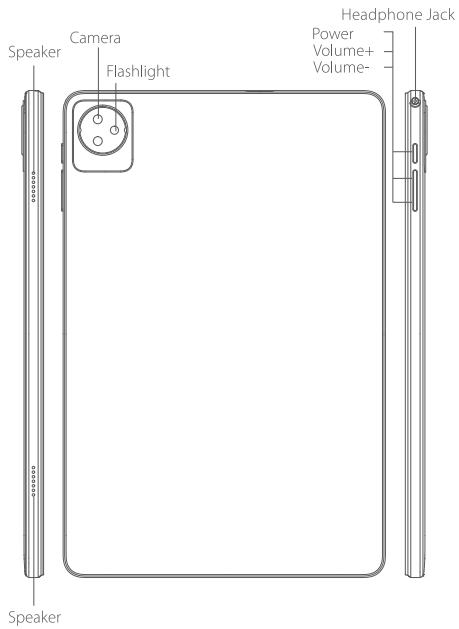
1 How to insert the card
put the TF card in the following order.
- Pry open the cartridge cap using the sharp corner of a card
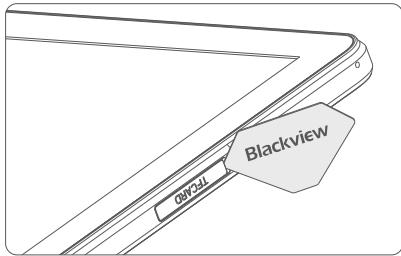
- Place the TF card as shown below. Make sure the cards are oriented the same way to avoid placement errors.
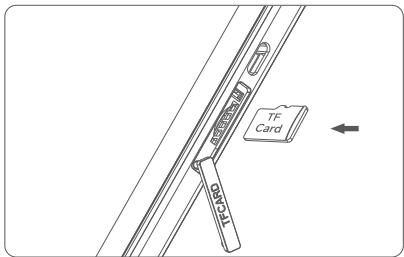
2 How to boot
Non-removable battery
Press the power button for 3-5 seconds to boot
Language switching settings
- Main menu--settings-system setting--language and input method
Language and input method-language-language adding - Select the language you need, the system will automatically jump back to the language interface
- Select the icon after the language bar and drag it to the first one.
SAR
- The maximum electromagnetic radiation absorption ratio (SAR) of this product is ≤ 2.0W / kg .
- In line with the requirements of the national standard GB 21288-2007.
Safety-In order to ensure safely using the product, you must strictly abide by the following rules
- The pad should be at least 15cm away from any medical implant or rhythm adjuster and never put the device in your coat pocket.
- Do not expose the device and other batteries together with the high temperatures or heat-generating equipment such as sunlight, heaters, microwave ovens, ovens or water heaters. Overheating of the battery can cause an explosion.
- When charging is complete or not charging, disconnect the charger from the device and unplug the charger from the power outlet.
- If the device is equipped with a non-removable battery, do not replace the battery yourself to avoid damaging the battery or device.
- Use of an unapproved or incompatible power source, charger or battery may cause fire, explosion or other hazards.
- Do not disassemble or reset the battery, insert other objects, immerse in water or other liquids to avoid battery leakage, overheating, fire or explosion.
- Do not drop, crush, scratch or puncture the battery to avoid subjecting the battery to excessive external pressure, resulting in internal short-circuit and overheating of the battery.
- The company does not bear the responsibility for accidents caused by non-standard related charging equipment.
- Hereby, Shenzhen DOKE Electronic Co., Ltd declares that this radio equipment type is in compliance with Directive 2014/53/EU. The full text of the EU declaration of conformity is available at the following internet address: http://www.blackview.hk/ce/
Maintenance
- Thoroughly understand the maintenance of this pad to use the pad more safely and effectively, and extend the service life of the pad as much as possible.
- Please follow the instructions in the manual to open the pad, disassemble the accessories, and do not try other methods.
- Please avoid falling, knocking or shaking your pad. Rough handling of the pad can cause the screen to rupture, damaging the internal circuit board and the delicate structure.
- Do not use chemical solvents or detergents to clean your pad. Wipe the pad case with a soft cotton cloth dampened with water or a mild soap.
Clean the lens with a clean, dry, soft cloth. (Example: camera lens) and display. - If you encounter an abnormal image such as a crash during use, the processing method is as follows: For a pad that cannot remove the battery, please press and hold the power button for more than 12 seconds, the pad will be forced to restart (unlock the pad when restarting) It can solve the general bug; for the pad that can remove the battery, please remove the battery, then insert the battery and restart it to solve the bug.
- When the charger is not in use, please unplug it from the power outlet. Do not connect the battery that has been fully charged to the charger for a long time, as overcharging will shorten the battery life.
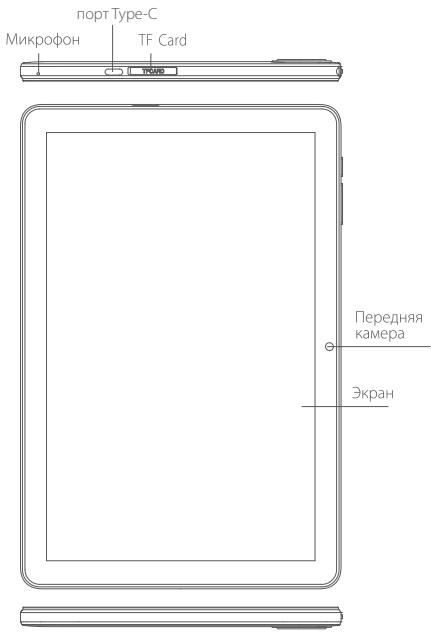
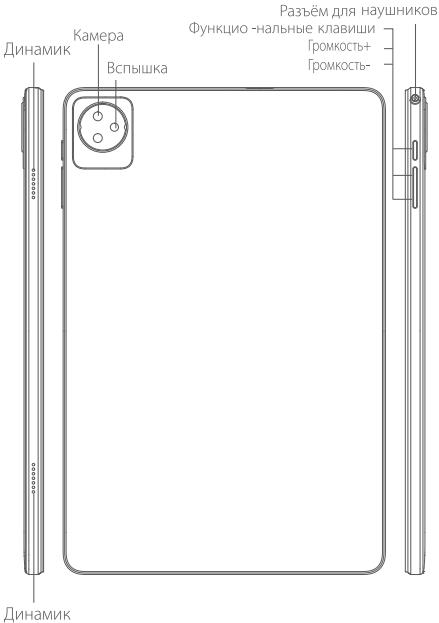
① Kač yctaHObUtb SIM-kapTy
nomecntte tf-kapTu B cneyuioe mnpaKe.
Press the power button for 3-5 seconds to boot
③Перекл dioуене HabtpoeKЯ3bika
TlAbHOe MHeIO-HaCTPOKIN-CnCTEMbIe HAcTOPOKIN- TaBkN MeTOD BBODa
-3bIK MEOI BBOda—3bIK—IO6aBnTb 3bIK
Bb6epITNe H6OxDMNbAM BAM 3a3bK, CNTcEMaABOTMATHECKNEPEKJIONHTCn HA Bb6PAHNbIb3k
BbEgePNI KIOKNYHKGHOIaBYka INepetauNTHa BEXHPNO N03nIuO
SAR
Ko3ΦDnUeHNT NfOLOUeHNA MAKcIMaJIbHaN 3JKeTpOMaHrHTHO nIyueHnE (SAR) 3TOrnpOdykTa aBnIeTc ≤ 2.0W / kr.
CooteBCTByeTpe6OBAHnIM HauNoHaIbHrOg CTAndpaTa I# 21288-2007.
Follow Blackview community, a place where you can share and discuss with Blackview user keep posted with most up-to-day news
RF Specification:
| Function | Operation Frequency | Max RF outputpower: |
| BT(BR+EDR) | 2402MHz-2480MHz | <10dBm |
| BLE | 2402MHz-2480MHz | <10dBm |
| WIFI 802.11b/g/n(HT20,HT40) | 802.11b/g/n(20MHz):2412~2472MHz;802.11n(40MHz):2422~2462MHz | <20dBm |
| Wi-Fi5.2G(802.11a/n20/n40/ac20/ac40/ac80) | 802.11aN20/ac20:5180MHz~5240MHz802.11n40/ac40:5190MHz~5230MHz802.11ac80:5210MHz | <20dBm |
| Wi-Fi5.8G(802.11a/n20/n40/ac20/ac40/ac80) | 802.11aN20/ac20:5745MHz~5825MHz802.11n40/ac40:5755MHz~5795MHz802.11ac80:5775MHz | <13.98dBm |
| FM | Rx(Downlink): 87.5MHz~108MHz | -- |
| GPS | Rx(Downlink): 1.57542GHz | -- |
Warning:
1.Use careful with the earphone maybe possible excessive sound pressurefrom earphones and headphones can cause hearing loss.
2. CAUTION: RISK OF EXPLOSION IF BATTERY IS REPLACED BYAN INCORRECT TYPE. DISPOSE OF USED BATTERIES ACCORDING TO THE INSTRUCTIONS.
3. The product shall only be connected to a USB interface of version USB2.0.
4. Adapter shall be installed near the equipment and shall be easily accessible.
5. Operation temperature: -10 40^ C .
6. The plug considered as disconnect device of adapter.
7. SAR: The device complies with RF specifications when the device used at 0.5cm from your body (SAR limit 2.0 W/Kg). The device is in compliance with the requirements.
Restrictions in the 5 GHz band:
According to Article 10 (10) of Directive 2014/53/EU, the packaging shows that this radio equipment will be subject to some restrictions when placed on the market in Belgium (BE), Bulgaria (BG), the Czech Republic (CZ), Denmark (DK), Germany (DE), Estonia (EE), Ireland (IE), Greece (EL), Spain(ES), France (FR), Croatia (HR), Italy (IT), Cyprus (CY), Latvia (LV), Lithuania(LT), Luxembourg (LU), Hungary (HU), Malta (MT), Netherlands (NL), Austria(AT), Poland (PL), Portugal (PT), Romania (RO), Slovenia (SI), Slovakia (SK), Finland (FI), Sweden (SE), Turkey (TR), Norway(NO), Switzerland (CH), Iceland (IS), and Liechtenstein (LI).
The WLAN function for this device is restricted to indoor use only when operating in the 5150 to 5250 MHz frequency range.
| ES | LU | RO | CZ | FR | HU | SI |
| DK | HR | BE | BG | DE | EE | IE |
| EL | IT | Cy | LV | LT | SK | MT |
| NL | AT | PL | PT | FI | SE | TR |
| NO | CH | IS | LI |
FCC Caution: Any changes or modifications not expressly approved by the party responsible for compliance could void the user's authority to operate this equipment.
This device complies with Part 15 of the FCC Rules. Operation is subject to the following two conditions:
(1) This device may not cause harmful interference, and
(2) this device must accept any interference received, including interference that may cause undesired operation.
This Product meets the government's requirements for exposure to radio waves. The guidelines are based on standards that were developed by independent scientific organizations through periodic and thorough evaluation of scientific studies. The standards include a substantial safety margin designed to assure the safety of all persons regardless of age or health.
FCC RF Exposure Information and Statement the SAR limit of USA (FCC) is 1.6 ~W / kg averaged over one gram of this Tablet PC
(FCC ID: 2A7DX-TAB30WIFI) has been tested against this SAR limit. SAR information on this can be viewed on-line at http://www.fcc.gov/oet/ea/fccid/.
Please use the device FCC ID number for search. The device has been evaluated to meet general RF exposure requirements. The device can be used in portable exposure conditions without restriction.
NOTE:
This equipment has been tested and found to comply with the limits for a Class B digital device, pursuant to Part 15 of the FCC Rules.
These limits are
designed to provide reasonable protection against harmful interference in a residential installation. This equipment generates, uses and can radiate radio frequency energy and, if not installed and used in accordance with the instructions, may cause harmful interference to radio communications.
However, there is no guarantee that interference will not occur in a particular installation.
If this equipment does cause harmful interference to radio or television reception, which can be determined by turning the equipment off and on, the user is encouraged to try to correct the interference by one or more of the following measures:
-- Reorient or relocate the receiving antenna.
-- Increase the separation between the equipment and receiver.
-- Connect the equipment into an outlet on a circuit different from that to which the
receiver is connected.
-- Consult the dealer or an experienced radio/TV technician for help.
FCC ID: 2A7DX-TAB30WIFI
IC Caution:
This device complies with Industry Canada licence-exempt RSS standard(s). Operation is subject to the following two conditions:
(1) this device may not cause interference,
(2) this device must accept any interference, including interference that may cause undesired operation of the device.
This Class [B] digital apparatus complies with Canadian ICES-003.
The device can be used in portable exposure conditions without restriction.
Caution:
Operating Frequency Range band 5150-5250 MHz "for indoor use only."
IC RF Exposure Information and Statement The SAR limit of Canada (C) is 1.6 W/kg averaged over one gram of tissue. Device types: (IC: 25768-TAB30WIFI) has also been tested against this SAR limit. According to this standard, the highest SAR value reported during product certification for head use is 0.796 W / kg, The device was tested for typical bodily operations where the product was kept 0 mm