Sofort 2 - Camera LEICA - Free user manual and instructions
Find the device manual for free Sofort 2 LEICA in PDF.



| Product type | Instant camera |
| Brand | Leica |
| Model | Sofort 2 |
| Dimensions (approx.) | 124 x 94 x 60 mm |
| Weight (approx.) | 300 g (without film) |
| Power supply | Built-in rechargeable lithium-ion battery |
| Battery charging | Via USB cable (included) |
| Film format | Fuji Instax Mini instant film |
| Number of shots per pack | 10 shots |
| Lens | Fixed lens, focal length 60 mm (35 mm equivalent: 34 mm) |
| Aperture | F/12.7 |
| Focus | Autofocus or manual adjustment (0.6 m to infinity) |
| Exposure | Automatic with +/- 1 EV compensation |
| Flash | Built-in flash, active by default, can be turned off |
| Self-timer | Yes, approx. 10 seconds |
| Shooting modes | Auto, scene (landscape, portrait, etc.), double exposure |
| Shot counter | Digital display on screen |
| Maintenance and cleaning | Clean with a soft dry cloth, do not use chemicals |
| Safety | Do not disassemble the built-in battery, do not expose to moisture |
| Spare parts and repairability | Strap and USB cable included. For repair, contact Leica customer service |
| General information | Compact instant camera, retro design, available in multiple colors |
Frequently Asked Questions - Sofort 2 LEICA
User questions about Sofort 2 LEICA
0 question about this device. Answer the ones you know or ask your own.
Ask a new question about this device
Download the instructions for your Camera in PDF format for free! Find your manual Sofort 2 - LEICA and take your electronic device back in hand. On this page are published all the documents necessary for the use of your device. Sofort 2 by LEICA.
USER MANUAL Sofort 2 LEICA
BEKNOPTE HANDLEIDING
GUIDA RAPIDA
INSTRUCCIONES ABREVIADAS
关于音用
KPATKAR INHCTPYKLIIN
ケイクスローガイド
简要说明
簡易說明書
PANDUAN RINGKAS



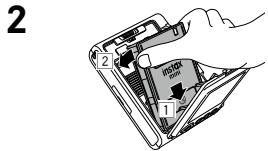
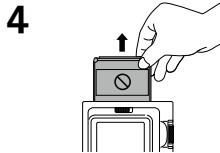
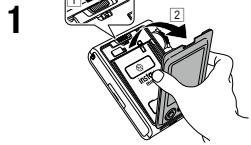
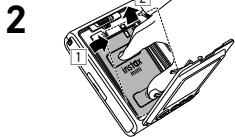
Vor der Verwendung
Before using the camera, check you have the following.
Supplied Accessories
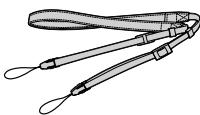
Shoulder strap (1)
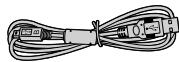
USB cable for charging (1) BO38A34001
- User's Guide (1)
Use the strap over your shoulder, not around your neck.
- Make sure the shoulder strap does not hang over the film ejection slot.
- The battery has not been fully charged at the factory, be sure to charge the battery before using the camera.
Download the full scope instruction manual here: leica-camera.com/en/downloads
Notes on Disposing of the Camera
CAUTION
Do not remove the built-in battery by yourself; this may cause you injury.

Disposal of Electrical and Electronic Equipers
Private Households
Disposal of used Electrical & Electronic Equipment (Applicable in the European Union and other
European countries with separate collection systems)
This symbol on the product, or in the manual and in the warranty, and/or on its packaging indicates that this product should not be treated as household waste. Instead it should be taken to an appropriate collection point for the recycling of electrical and electronic equipment. By ensuring this product is disposed of correctly, you will help prevent potential negative consequences to the environment and human health, which could otherwise be caused by inappropriate waste handling of this product. The recycling of materials will help to conserve natural resources. For more detailed information about recycling of this product, please contact your local city office, your household waste disposal service or the shop where you purchased the product. In Countries outside of EU: If you wish to discard this product, please contact your local authorities and ask for the correct method of disposal.

This Symbol on the batteries or accumulators indicates that those batteries should not be treated as household waste.
For customers in Turkey:
EEE Complies with Directive.
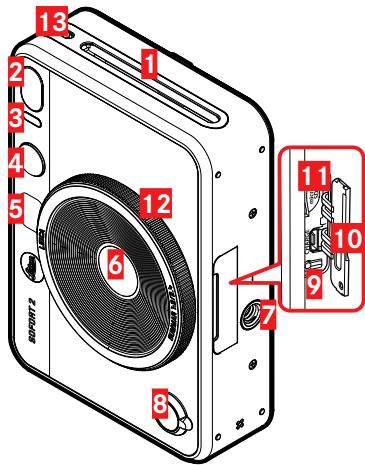
Front
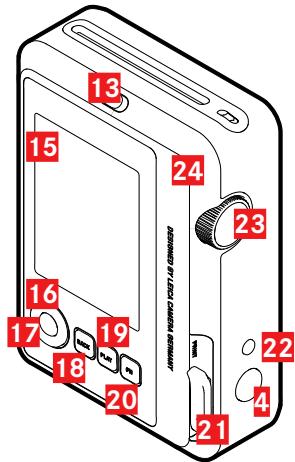
Rear
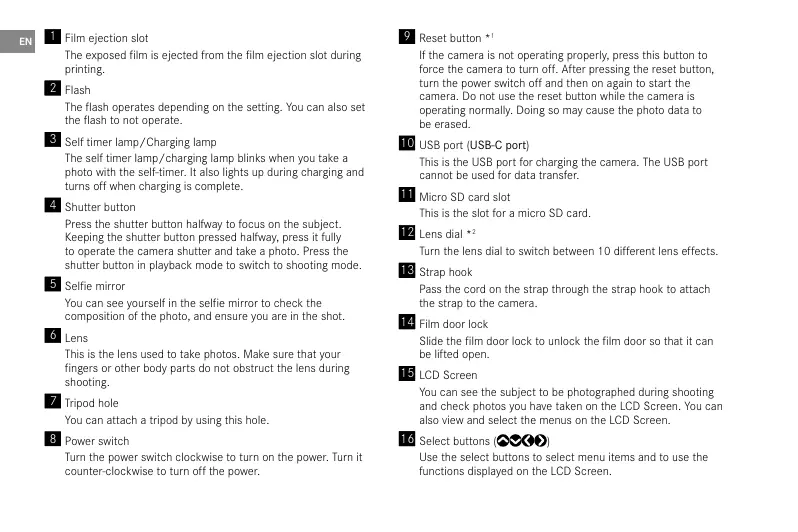
1 Film ejection slot
The exposed film is ejected from the film ejection slot during printing.
2 Flash
The flash operates depending on the setting. You can also set the flash to not operate.
3 Self timer lamp/Charging lamp
The self timer lamp/charging lamp blinks when you take a photo with the self-timer. It also lights up during charging and turns off when charging is complete.
4 Shutter button
Press the shutter button halfway to focus on the subject. Keeping the shutter button pressed halfway, press it fully to operate the camera shutter and take a photo. Press the shutter button in playback mode to switch to shooting mode.
Selfie mirror
You can see yourself in the selfie mirror to check the composition of the photo, and ensure you are in the shot.
6 Lens
This is the lens used to take photos. Make sure that your fingers or other body parts do not obstruct the lens during shooting.
7 Tripod hole
You can attach a tripod by using this hole.
8 Power switch
Turn the power switch clockwise to turn on the power. Turn it counter-clockwise to turn off the power.
9 Reset button *1
If the camera is not operating properly, press this button to force the camera to turn off. After pressing the reset button, turn the power switch off and then on again to start the camera. Do not use the reset button while the camera is operating normally. Doing so may cause the photo data to be erased.
10 USB port (USB-C port)
This is the USB port for charging the camera. The USB port cannot be used for data transfer.
11 Micro SD card slot
This is the slot for a micro SD card.
Lens dial *2
Turn the lens dial to switch between 10 different lens effects.
13 Strand hook
Pass the cord on the strap through the strap hook to attach the strap to the camera.
14 Film door lock
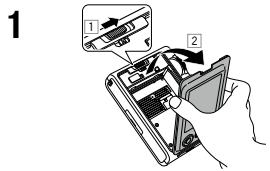
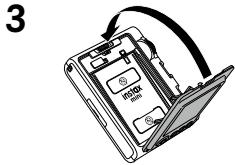
Slide the film door lock to unlock the film door so that it can be lifted open.
15 LCD Screen
You can see the subject to be photographed during shooting and check photos you have taken on the LCD Screen. You can also view and select the menus on the LCD Screen.
16 Select buttons (C)
Use the select buttons to select menu items and to use the functions displayed on the LCD Screen.
17 MENU/OK button
During shooting or playback, press the MENU/OK button to display the menu on the LCD Screen. This button is also used to confirm menu items.
18 (Back) button
Press the (Back) button to return to the previous screen. This button is also used to cancel photo printing.
19 (Playback) button
Press the (Playback) button to display the photos you have taken on the LCD Screen. When in shooting mode, this button is also used to switch to playback mode.
20 + (Function) button
Press the +( Function) button in shooting mode to check the current effect on the LCD Screen. You can also save and recall effects.
21 Print lever
Print the image displayed on the LCD Screen.
22 Effect reset button
Return both the lens and film effects to normal.
Film dial *3
Turn the film dial to switch between 10 different film effects.
24 Film door
When loading/unloading a film pack, slide the film door lock to unlock the film door and lift it open. Do not open the film door until you have used up the film.
1 If the camera is not working properly, press the reset button to reset it.
2 Lens effects are processed digitally.
*3 Film effects are processed digitally.
Charging the Battery
Turn off the camera before charging the battery. Battery will not charge if the camera is turned on.
Be careful to properly attach cable as indicated below.
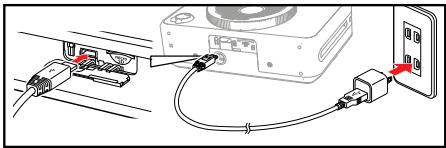
Connect the camera using the supplied USB-C cable to a USB AC adapter (supplied with your smartphone) then connect the USB AC adapter to an indoor power outlet.
Charging Status Indication
| While charging | Self timer lamp lights up. |
| Charging finished | Self timer lamp goes off. |
| Charging error | Self timer lamp flashes. |
Power On/Off
To turn the camera on, turn the power switch clockwise.
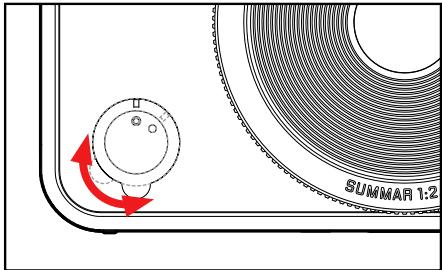
- If you do not operate the camera for a certain period of time, it will automatically turn off. If the camera turns off automatically, turn the power switch off and then on again to turn it on.
1 Press the (Playback) button.
2 Press or on the Select button to select the photo you want to print.
3 You have the option to add a frame, enlarge the photo, or make other edits.
4 Turn the print lever to print.
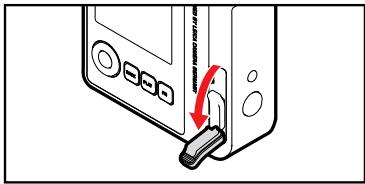
5 After the sound of the film ejecting stops, hold the tip of the ejected film and remove it.
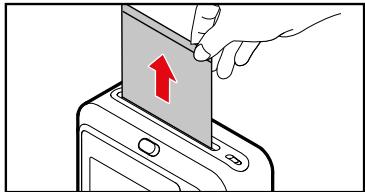
- Be careful not to let your fingers or the camera strap get caught in the film ejection slot.
IMPORTANT SAFETY NOTICE
This product has been designed to ensure the safety of the user when handled correctly in accordance with the User's Guide and the instructions provided. It is important that both the product and the "instax mini" film are handled properly and used only to print pictures as instructed in the User's Guide and in the "instax mini" film instructions. For future reference keep the User's Guide in a safe, easy place.
WARNING
This symbol indicates danger, which could result in injury or death. Please follow these instructions.
- If any of the following instances occur, immediately unplug the USB-C cable, turn the camera off and cease use.
- The camera becomes hot, emits smoke, emits a burnt smell or is functioning abnormally.
- The camera is dropped into water or any foreign objects enter the camera.
- This device contains a built-in battery. Do not subject it to heat, throw it into an open fire, drop or subject to impact. Doing so could cause the camera to explode.
-
Never attempt to take this product apart. You may be injured.
If the camera is not functioning correctly, to avoid injury do not attempt to repair yourself.
If this product is dropped or damaged so that the internals are visible, do not touch it. Contact your Leica Camera dealer. -
Do not touch any parts within the inside of the back cover. This may cause injury.
- Never get this product wet or handle it with wet hands. Doing so may result in an electric shock.
- Promptly unplug the USB-C cable once battery is fully charged.
- Keep out of the reach of small children. This product could cause injury in the hands of a child.
- Do not cover or wrap the camera or the AC power adapter in a cloth or blanket. This can cause heat to build up and distort the casing or cause a fire.
| CE | The "CE" mark certifies that this product satisfies the requirements of the EU (European Union) regarding safety, public health, environment and consumer protection. ("CE" is the abbreviation of Conformité Européenne.) |
| UKCA | The "UKCA" mark certifies that this product satisfies the requirements of Great Britain (England, Scotland, Wales) regarding safety, public health, environment and consumer protection. *UKCA: UK Conformity Assessed. |
Handling the Camera and Battery
- CAUTION - Do not expose to excessive heat such as sunshine, fire or the like, that can result in an explosion or the leakage of flammable liquid or gas during use, storage or transportation or disposal.
- CAUTION - Do not dispose of a battery into fire or a hot oven, or mechanically crush or cut the battery, as this may result in an explosion.
- CAUTION - Do not subject to extremely low air pressure at high altitude that may result in an explosion or the leakage of flammable liquid or gas.
Camera Care
- Do not open the film door until all film exposures have been used, doing so will prematurely expose the remaining film and render it unusable.
- Your camera is a fragile object. Do not expose it to water, sand or gritty materials.
- Do not use a strap made for cellular phones or other similar electronic products. These straps are usually too weak to hold your camera securely. For safety, only use straps designed for your camera, and use only as specifically intended and instructed.
- Do not use solvent such as thinner or alcohol to remove dirt.
- Do not leave your camera in direct sunlight or hot places such as the inside of a car. Do not leave the camera in damp places for prolonged periods.
-
Moth repellent gas such as naphthalene may affect your camera and prints. Take care to keep your camera and prints in a safe, dry place.
-
Note that the temperature range within which your camera can be used is +5^ to +40^ .
- Take great care to ensure that printed materials do not violate copyright, image rights, privacy or other personal rights and do not offend public decency. Actions that violate the rights of others, are contrary to public decency or constitute a nuisance may be punishable by law or otherwise legally actionable.
Handling the LCD Screen
- As the LCD Screen can be easily scratched or damaged by sharp or solid objects, we recommend you attach a protective sheet (commercially available) onto the LCD Screen.
Charging the Battery
- The battery has not been charged during manufacture. Please charge the battery fully before first use.
- Charge the battery using the supplied USB-C cable. Charging times will increase at ambient temperatures below +10^ or above +35^ . Do not attempt to charge the battery at temperatures above +40^ or at temperatu-res below +5^ as the battery will not charge.
Battery Life
- At normal temperatures, the battery can be recharged about 300 times. A noticeable decrease in the length of time the battery will hold a charge indicates that it has reached the end of its service life.
Caution: Handling the Battery
The battery and camera body may become warm to the touch after extended use. This is normal.
- Certification marks are located inside the film chamber.
- Cautions During Printing
- "instax mini" Film and Print Care
See FUJIFILM Instant Film "instax mini" packaging for film use instructions. Follow all instructions for safe and proper use. - Keep the film in a cool place. Do not leave the film in a place where the temperature is extremely high (e.g., in a closed car) for many hours.
- Do not puncture, tear, or cut the film. If film becomes damaged, do not use.
- When you load a film pack, use the film as soon as possible.
- If the film has been kept in a place where the temperature is extremely high or low, bring it to room temperature before starting to print pictures.
- Be sure to use the film before the expiration or "Use Before" date.
- Avoid airport checked luggage scanning and other strong X-ray exposure. The effect of fogging, etc., may appear on unused film. We recommend that you carry the camera and/or the film onto the aircraft as carry-on luggage. (Check with each airport for more information.)
- Avoid strong light, and keep the developed prints in a cool and dry place.
-
Do not puncture or cut the film as it contains a small amount of caustic paste (high alkaline). Never let children or animals put the film into their mouth. Also ensure that the paste does not come into contact with skin or clothes.
-
Should the paste inside the film comes into contact with skin or clothes, immediately wash off with plenty of water. If the paste comes into contact with the eyes or mouth, immediately wash the area with plenty of water and contact a doctor. Note that the alkaline inside the film remains active for about 10 minutes after the picture has been printed.
- Cautions on Handling the Film and Prints
For details, refer to the instructions and warnings on the packaging of the FUJIFILM Instant Film "instax mini".
Bluetooth® Devices: Cautions
IMPORTANT: Read the following cautions before using the product's built-in Bluetooth transmitter.
- Use only as part of a Bluetooth network.
- FUJFILM does not accept liability for damages resulting from unauthorized use. Do not use in applications requiring a high degree of reliability, for example in medical devices or other systems that may directly or indirectly impact human life. When using the device in computer and other systems that demand a greater degree of reliability than Bluetooth networks, be sure to take all necessary precautions to ensure safety and prevent malfunction.
- Use only in the country in which the device was purchased.
- This device conforms to regulations governing Bluetooth devices in the country in which it was purchased. Observe all location regulations when using the device. Leica Camera does not accept liability for problems arising from use in other jurisdictions.
- Wireless data (images) may be intercepted by third parties.
-
The security of data transmitted over wireless networks is not guaranteed.
-
Do not use the device in locations subject to magnetic fields, static electricity, or radio interference.
- Do not use the transmitter in the vicinity of microwave ovens or in other locations subject to magnetic fields, static electricity, or radio interference that may prevent reception of wireless signals. Mutual interference may occur when the transmitter is used in the vicinity of other wireless devices operating in the 2.4 GHz band.
- The Bluetooth transmitter operates in the 2.4 GHz band. The standard output is approximately 3.16 mW.
This device operates on the same frequency as commercial, educational, and medical devices and wireless transmitters. - It also operates on the same frequency as licensed transmitters and special unlicensed low-voltage transmitters used in radio-frequency identification tracking systems for assembly lines and in other similar applications.
- To prevent interference with the above devices, observe the following precautions.
- Confirm that the radio-frequency identification transmitter is not in operation before using this device. If you notice that this device causes interference in low-voltage radio-frequency identification tracing systems, contact a FUJIFILM representative.
The following may be punishable by law: - Disassembly or modification of this device.
- Removal of device certification labels.
Trademark Information - The Bluetooth® word mark and logos are registered trademarks owned by the Bluetooth SIG, Inc., and any use of such marks by Leica Camera is under license.
Information for traceability in Europe
Manufacturer: FUJIFILM Corporation
Address, City: 7-3, Akasaka 9-Chome, Minato-ku, Tokyo
Country: JAPAN
Authorized representative in Europe:
Leica Camera AG
Address, City: Am Leitz-Park 5, 35578 Wetzlar Country:
Germany
Authorized representative in United Kingdom :
LEICA CAMERA LIMITED
Adress, City: 6-8 James Street, London, UK, W1U
1ED Country:United Kingdom
The production date of your camera is printed on the packaging. The date format is year/month/day. Subject to changes in design and model type.
CE MARK
The CE mark on our products documents compliance with the fundamental requirements of applicable EU guidelines.
English
Declaration of Conformity (DoC)
Herby, "Leica Camera AG" declares that this product is in compliance with the essential requirements and other relevant provisions of Directive 2014/53/EU.
Customers can download a copy of the original DoC to our Radio Equipment products from our DoC server:
www.cert.leica-camera.com
Please contact Leica Camera AG, Am Leitz-Park 5, 35578 Wetzlar, Germany in case of any further questions
Depending on product (see technical data)
| Type | Frequency band (center frequency) | Maximum output (dBm E.I.R.P.) |
| Bluetooth® Wireless Technology | 2402-2480 MHz | 20 |
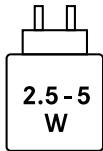
The power delivered by the charger must be between min 2.5 Watts required by the radio equipment, and max 5 Watts in order to achieve the maximum charging speed
TECHNICAL DATA
Designation
Leica Sofort 2
Camera type
Digitale Sofortbild-Kamera
Type-Nr.
8262
Order no.
XXX
Supply voltage/current
DC 5V,0,5A (USB)
Dimensions (WxHxD)
123× 44× 87mm
Weight
Approx. 320g (with battery)
FOR US ONLY:
FCC Note:
This equipment has been tested and found to comply with the limits for a Class B digital device, pursuant to Part 15 of the FCC Rules. These limits are designed to provide reasonable protection against harmful interference in a residential installation. This equipment generates, uses, and can radiate radio frequency energy and, if not installed and used in accordance with the instructions, may cause harmful interference to radio communications. However, there is no guarantee that interference will not occur in a particular installation. If this equipment does cause harmful interference to radio or television reception, which can be determined by turning the equipment off and on, the user is encouraged to try to correct the interference by one or more of the following measures:
- Reorient or relocate the receiving antenna.
- Increase the separation between the equipment and receiver.
- Connect the equipment into an outlet on a circuit different from that to which the receiver is connected.
- Consult the dealer or an experienced radio/TV technician for help.w
FCC Caution:
To assure continued compliance, follow the attached installation instructions and use only shielded interface cables with ferrite core when connecting to computer or peripheral devices. Any changes or modifications not expressly approved by the party responsible for compliance could void the user's authority to operate this equipment.
| Trade Name: | LEICA |
| Type No. | 8262 |
| Responsible party/Support contact: | Leica Camera Inc. 500 Frank W. Burr Blvd., Suite 570, Teaneck, NJ 07666 Tel.: +1 800 222 0118 |
Type No.: 8262

Tested To Comply
With FCC Standards
FOR HOME OR OFFICE USE
This device complies with Part 15 of the FCC Rules.
Operation is subject to the following two conditions:
(1) This device may not cause harmful interference, and
(2) this device must accept any interference received, including interference that may cause undesired operation.

A recyclable lithium ion/polymer battery.
powers this camera.
Please call 1-800-8-BATTERY for information on how to recycle this battery.
FCC ID: N5A8262
This transmitter must not be co-located or operated in conjunction with any other antenna or transmitter. This equipment complies with FCC radiation exposure limits set forth for an uncontrolled environment and meets the FCC radio frequency (RF) Exposure Guidelines.
For Canada only:
CANICES-003B)/NMB-003(B)
HMN:8262 IC:11245A-8262
This device complies with Industry Canada licence-exempt RSS standard(s). Operation is subject to the following two conditions:
(1) This device may not cause harmful interference,
(2) This device must accept any interference received,
including interference that may cause undesired operation of the device. This equipment complies with IC radiation exposure limits set forth for an uncontrolled environment and meets RSS-102 of the IC radio frequency (RF) Exposure rules.
For US AND Canada only:
This equipment is tested for specific absorption ratio (SAR) and complies with FCC/IC radiation exposure limits set forth for an uncontrolled environment. This device complies with FCC/IC SAR limit of 1.6W / kg . For body worn operation, this equipment has been tested and meets the FCC/IC RF exposure guidelines when used with the Leica Camera AG accessories supplied or designated for this product that have no metallic component in the assembly. Use of other accessories may not ensure compliance with FCC/IC RF exposure guidelines.
FOR UK ONLY

FOR SINGAPORE ONLY
Complies with IMDA Standards DA106734
Avant l'utilisation
- Vor der Verwendung
- Supplied Accessories
- Notes on Disposing of the Camera
- CAUTION
- Charging the Battery
- Power On/Off
- IMPORTANT SAFETY NOTICE
- WARNING
- Handling the Camera and Battery
- Camera Care
- Handling the LCD Screen
- Battery Life
- Caution: Handling the Battery
- Bluetooth® Devices: Cautions
- IMPORTANT: Read the following cautions before using the product's built-in Bluetooth transmitter.
- CE MARK
- English
- Declaration of Conformity (DoC)
- Depending on product (see technical data)
- TECHNICAL DATA
- Designation
- Camera type
- Type-Nr.
- Order no.
- Supply voltage/current
- Dimensions (WxHxD)
- Weight
- FOR US ONLY:
- FCC Note:
- FCC Caution:
- Type No.: 8262
- FCC ID: N5A8262
- For Canada only:
- For US AND Canada only:
- FOR UK ONLY
- FOR SINGAPORE ONLY
- Avant l'utilisation
Brand : LEICA
Model : Sofort 2
Category : Camera