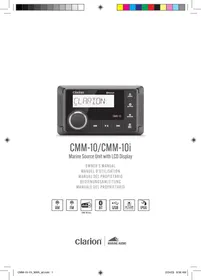
CMM-10 - Marine power unit CLARION - Free user manual and instructions
Find the device manual for free CMM-10 CLARION in PDF.



User questions about CMM-10 CLARION
0 question about this device. Answer the ones you know or ask your own.
Ask a new question about this device
Download the instructions for your Marine power unit in PDF format for free! Find your manual CMM-10 - CLARION and take your electronic device back in hand. On this page are published all the documents necessary for the use of your device. CMM-10 by CLARION.
USER MANUAL CMM-10 CLARION
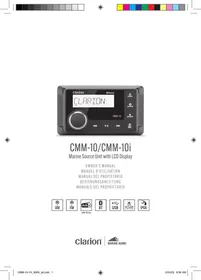
Marine Source Unit with LCD Display
OWNER'S MANUAL
MANUEL D'UTILISATION
MANUAL DEL PROPIETARIO
BEDIENUNGSANLEITUNG
MANUALE DEL PROPRIETARIO


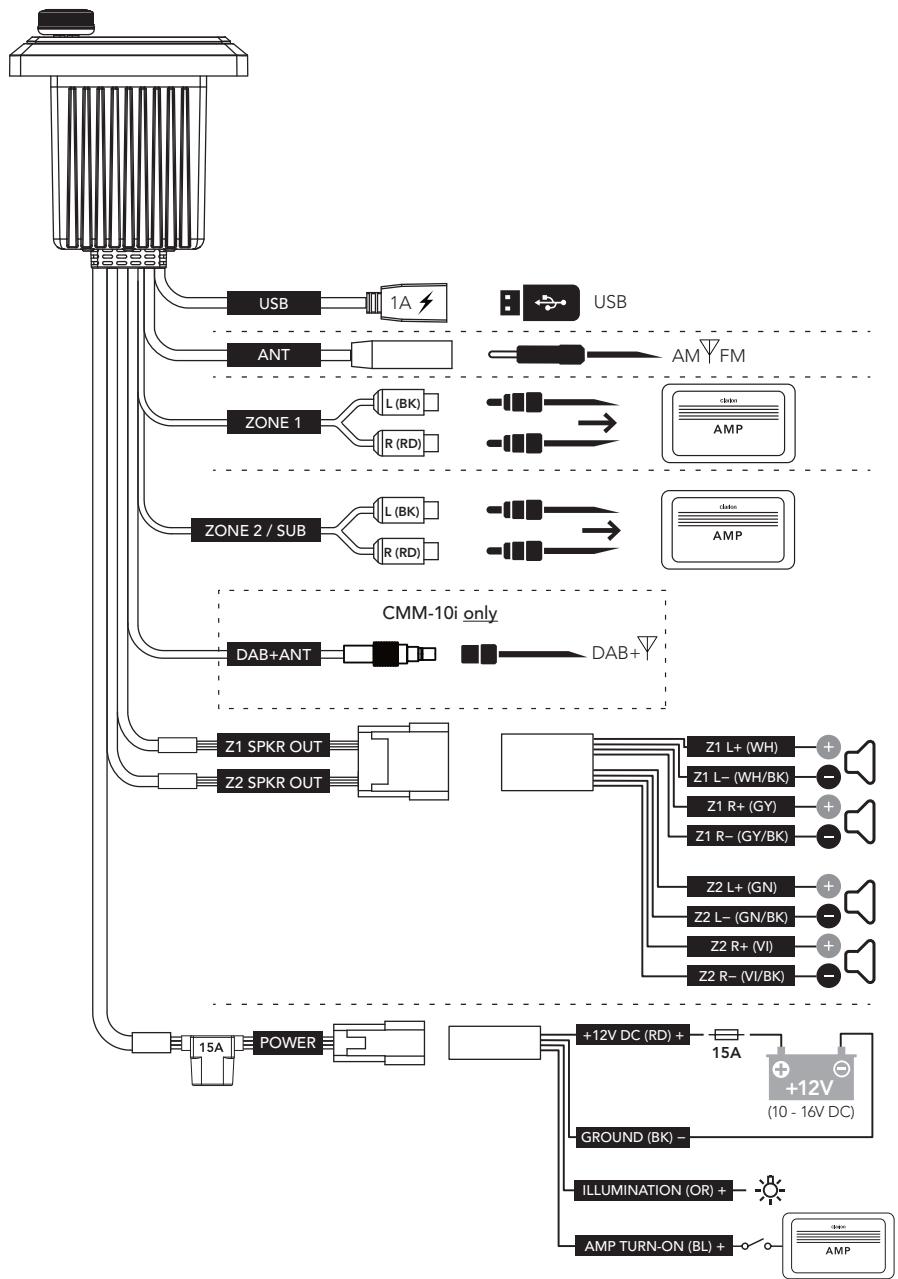
CMM-10i only
Clarion

FCC COMPLIANCE STATEMENT
This device complies with Part 15 of the FCC Rules. Operation is subject to the following two conditions: (1) this device may not cause harmful interference, and (2) this device must not accept any interference received, including interference that may cause undesired operation. These limits are designed to provide reasonable protection against harmful interference in a residential installation.
This equipment generates, uses and can radiate radio frequency energy and, if not installed in accordance with the instructions, may cause harmful interference to radio communications. However, there is no guarantee that interference will not occur in a particular installation. If this equipment does cause harmful interference to radio or television reception, the user is encouraged to try to correct the interference by one or more of the following measures:
- Reorient or relocate the receiving antenna.
- Increase separation between the equipment and the receiver.
- Connect the equipment to an outlet on a circuit different from that to which the receiver is connected.
- Consult the dealer or an experienced radio/TV technician for help.
Any changes or modifications not expressly approved by the party responsible for compliance could void the user's authority to operate this equipment.
SAFETY CONSIDERATIONS
- Only use this product in vehicles with 12 volt, negative-ground electrical systems. This product is not certified or approved for use in aircraft.
- Mount this product securely to prevent damage or injury in severe conditions.
- Do not replace the power wire fuse with one of a different value. Never bypass the fuse.
- Listen to your audio system at levels appropriate for operating conditions and hearing safety.
INSTALLATION CONSIDERATIONS
- Installation requires appropriate tools and safety equipment. Professional installation is recommended.
- This product is water-resistant. Do not submerge or subject to high-pressure water spray.
- Before installation, turn off the audio system and disconnect the battery system from the audio system.
- Install in a dry, well-ventilated location that does not interfere with your factory-installed systems. If a dry environment is not available, a location that is not exposed to heavy splashing may be used.
- Before cutting or drilling, check for potential obstacles behind mounting surfaces.
- Carefully route all system wiring away moving parts and sharp edges; secure with cable ties or wire clamps and use grommets and loom where appropriate to protect from sharp edges.
GENERAL CONTROL FUNCTIONS
Z

| Control | Function | |
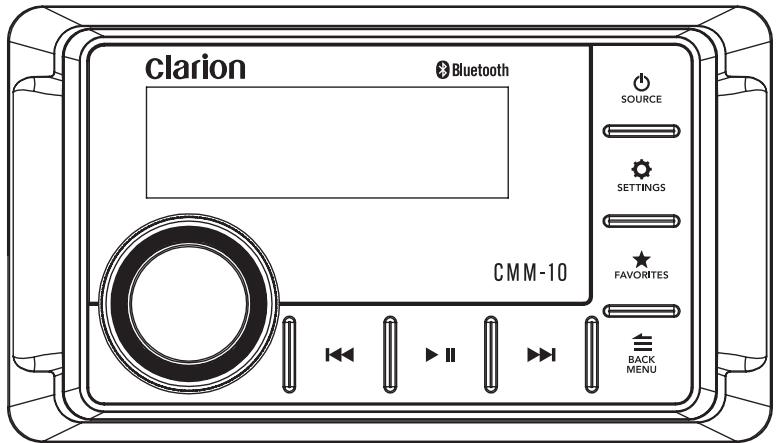
| Volume/Select | • Rotate to adjust volume • Rotate/press for navigation and making selections | |
| SOURCE | Source/Power | • Short press to turn ON; Long press to turn OFF • Short press to advance through available sources |
| SETTINGS | Settings | • Short press to access audio settings (Bass/Treble/Balance/Fader) • Long press to access system settings (Z2-Sub/Beep/Area/Dimmer/Diagnostic) |
| BACK MENU | Back/ Menu | • Short press to go back one step or access source specific menus |
| FAVORITES | Favorites | • Short press to access stored presets • Long press to store a frequency as a preset (up to 9 FM, 9 AM and 9 DAB+) |
| II | Mute/Pause | • Short press to mute/unmute audio (AM/FM/DAB+) or pause/resume the current selection (USB/Bluetooth) |
| Forward | Short press to: • Manually adjust tuner forwards (AM/FM/DAB++) • Select the next track (USB/Bluetooth) Long press to: • Seek to the next channel (AM/FM/DAB++) • Fast-forward (USB/Bluetooth) | |
| Backward | Short press to: • Manually adjust tuner backwards (AM/FM/DAB++) • Restart track/select the previous track (USB/Bluetooth) Long press to: • Seek to the previous channel (AM/FM/DAB++) • Fast-rewind (USB/Bluetooth) | |
SYSTEM MENU SETTINGS
| SETTINGS | • Long press to access settings |
| • Rotate to navigate • Press to make selections | |
| Setting | Function |
| Z2/SUB | Configs preamp outputs: Z2 (rear) or Subwoofer |
| BEEP | Audible button press confirmation: On or Off |
| AREA | Configs tuner region: USA, Europe, Australia or Other |
| DIMMER | Configs display and button brightness from 0 to +10 |
| DIAG | Displays software version for diagnostics |
AUDIO MENU SETTINGS
| SETTINGS | ·Short press to access settings |
| ·Rotate to navigate ·Press to make selections | |
| Setting | Function |
| BASS | Bass level control from -10 to +10 |
| TREBLE | Treble level control from -10 to +10 |
| BALANCE | Balance control from full left (L10) to full right (R10) |
| FADER | Fader control from full front (Z1: 10) to full rear (Z2: 10) |
| SUB | Subwoofer preamp level control from 0 to +10 (Z2/SUB must be set to SUB) |
FAVORITES MENU SETTINGS
| ★ FAVORITES | • Short press to access settings/stored presets • Long press to store a frequency as a preset (up to 9 FM, 9 AM and 9 DAB+) |
| • Rotate to navigate • Press to make selections | |
| Setting | Function |
| DELETE | Select from stored presets for removal |
| REPLACE | Permits replacement when all preset locations are occupied |
BLUETOOTH MENU SETTINGS
| BACK/MENU | • Short press to access settings |
| • Rotate to navigate • Press to make selections | |
| Setting | Function |
| PAIR NEW DEVICE | Initiates Pairing Mode (current connected devices will be disconnected) |
| CONNECT PAIRED DEVICE | Display all paired devices for connection |
| SET PRIMARY DEVICE | Assign priority to a paired device for automatic connection |
| DELETE PAIRED DEVICE | Select from paired devices for removal |
| DELETE ALL DEVICES | Removes all paired devices from memory |
Z
USB MENU SETTINGS
| BACK/MENU | ·Short press to access settings |
| ·Rotate to navigate ·Press to make selections | |
| Setting | Function |
| RANDOM | Random playback of all tracks within all folders: On or Off |
| REPEAT | Repeats playback of the current track: On or Off |
| PLAY ALL | Plays all tracks within all folders: On or Off |
| FOLDERS | Displays folders within the USB |
| TRACKS | Displays tracks not located within a folder |
SPECIFICATIONS
| Electrical | |
| Operating Voltage | 14.4V DC (10V – 16V) |
| Operating Temperature | -4° F to +95° F (-20°C to +35°C) |
| Current Draw / Fuse Value | 15 A (max) / 40 mA (standby) / 15 A |
| Remote Turn-On Output | 500 mA |
| Display | 2.09 in. TFT LCD backlit |
| Tuner | |
| FM Tuner | USA: 87.9 MHz to 107.9 MHz (0.2 MHz step) EUR: 87.50 MHz to 108.00 MHz (0.05 MHz step) AUS: 87.50 MHz to 108.00 MHz (0.10 MHz step) OTHER: 87.50 MHz to 108.00 MHz (0.05 MHz step) |
| AM Tuner | USA: 530 kHz to 1710 kHz (10 kHz step) EUR: 531 kHz to 1602 kHz (9 kHz step) AUS: 531 kHz to 1629 kHz (9 kHz step) OTHER: 531 kHz to 1629 kHz (9 kHz step) |
| Favorites | Up to 9 FM, 9 AM and 9 DAB+ |
| Bluetooth® | |
| Profile | 5.0 |
| Core Specification / Codec | Version 2.1 + EDR / SBC |
| Connection Range | Up to 35 ft / 11 m |
| USB | |
| Interface | USB 2.0 High Speed |
| Supported Audio Formats | MP3, WMA, FLAC, WAV |
| File Limits | Folders: 255 Files in a single folder: 3,000 Total Files: 9,999 |
| Charging Output | 1 A |
| Preamp Audio Outputs | |
| Output Channels | Two stereo pairs of RCA plugs (1.5V RMS) |
| Zone 2 Configuration | Z2 (Rear) or Subwoofer |
| Amplified Audio Outputs | |
| Rated RMS Power @ 14.4V | 20W x 4 @ 4 Ω |
| Audio Control Options | |
| Tone & Balance | Bass, Treble, Balance, Fader (Zone 1 / Zone 2 or Subwoofer) |
| Dimensions | |
| Unit W x H x D | 4.33 in. x 2.48 in. x 3.15 in. (110 mm x 63 mm x 80 mm) |
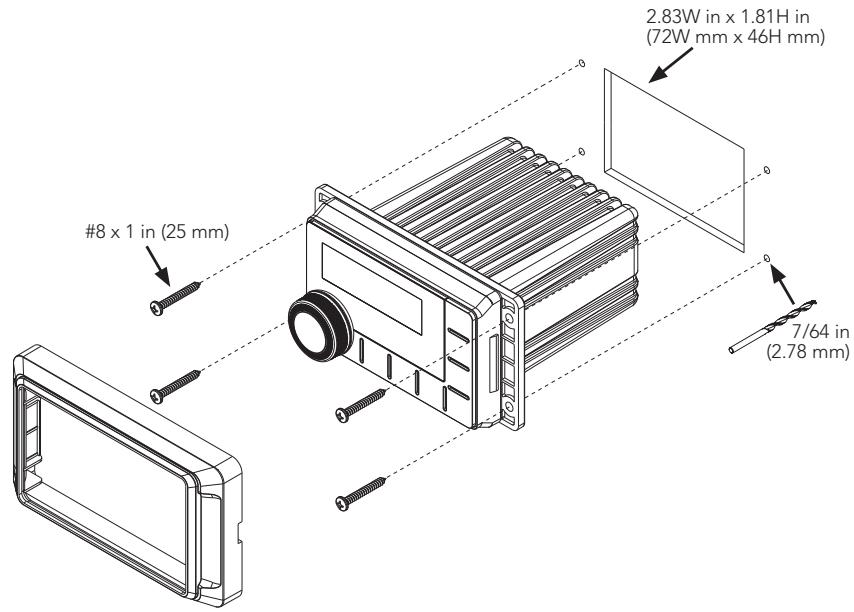
| Mounting Hole W x H | 2.83 in. x 1.81 in. (72 mm x 46 mm) |
RF exposure statement
This equipment complies with the FCC RF radiation exposure limits set forth for an uncontrolled environment. This equipment should be installed and operated with a minimum distance of 20cm between the radiator and any part of your body.
This equipment meets the exemption from the routine evaluation limits in section 2.5 of RSS-102. It should be installed and operated with a minimum distance of 20cm between the radiator and any part of your body.
This device contains licence-exempt transmitter(s) that comply with Innovation, Science and Economic Development Canada's licence-exempt RSS(s). Operation is subject to the following two conditions:
(1) This device may not cause interference.
(2) This device must accept any interference, including interference that may cause undesired operation of the device.
For the following equipment:
Product Name: Marine Source Unit
Brand Name: --
Model No.: CMM-10i, CMM-10
JL Audio, Inc.
E-mail: mphillipi@jlaudio.com
hereby declares that this [Name: Marine Source Unit, Model: CMM-10i, CMM-10] is in compliance with the essential requirements and other relevant provisions of Directive 2014/53/EU and Radio Equipment Regulations 2017 (SI 2017 No. 1206, as amended by SI 2019 No. 696).

This product is intended for sale and application in a business environment.
RED Article 10 2
-This product can be used across EU member states
RED Article 10 10
- The product is class 1 product, No restrictions
The RF distance between body and product is 0mm
Bluetooth
Bluetooth Version: Bluetooth V5.0(BR/EDR Mode)
Frequency Range: 2402MHz-2480MHz
Max.RF Output Power: 3.95dBm (EIRP)
AM
Frequency Range: 526.5-1606.5kHz Receiving
FM
Frequency Range: 87.5~108.0MHz Receiving
DAB
Frequency Range: 174-240MHz Receiving

DECLARATION DE COMPATIBILITE FCC
Brand : CLARION
Model : CMM-10
Category : Marine power unit