USER MANUAL MA710 JBL
Thank you for purchasing a JBL MA series AV Receiver. For over 75 years, JBL has been creating best in class audio equipment for concerts, studios, theaters, and homes around the world. JBL is the trusted choice of leading recording artists and sound engineers. The MA series AVRs are designed, engineered, and manufactured to the industry's highest quality standards and offer core features and fundamental connectivity for exceptional home cinema and music experiences.
For more information on the set-up and operation of this product refer to the product page on the jbl.com website. Should further assistance be required feel free to contact customer support at the numbers below.
Inside the US and Canada: +1 888.691.4171
Outside the US and Canada: +44 1707 668 012
Box Contents
1x JBL MA310, MA510 or MA710 AV Receiver
1x Quick-start guide and safety sheet
1x IR remote
2x AAA batteries for remote control
1x Antenna for Bluetooth
2x Antennas for Wi-Fi (MA510 and MA710)
1x Power Cord
Download the setup app:

GETITON
Google Play

(Appplies for MA510 and MA710 only)

Available on the
AppStore

Installation
PLACING THE UNIT
CAUTION: Before you begin, make sure your amplifier is disconnected from the power source.
- Place the AVR on a level, firm surface, avoiding direct sunlight and sources of heat or damp.
- Do not place the AVR on top of an amplifier or other source of heat.
Make sure the remote-control receiver to the left of the front panel display is unobstructed, otherwise this will impair the use of the remote-control.
Do not place your record deck on top of this unit. Record decks are very sensitive to the noise generated by mains power supplies which will be heard as a background 'hum' if the record deck is too close.
The normal function of the unit may be disturbed by strong electromagnetic interference. If this occurs, simply reset the unit with the power button, or move the unit to another location.
This product offers the user the option to deactivate power management functions. Note that doing this will increase energy consumption of the product.
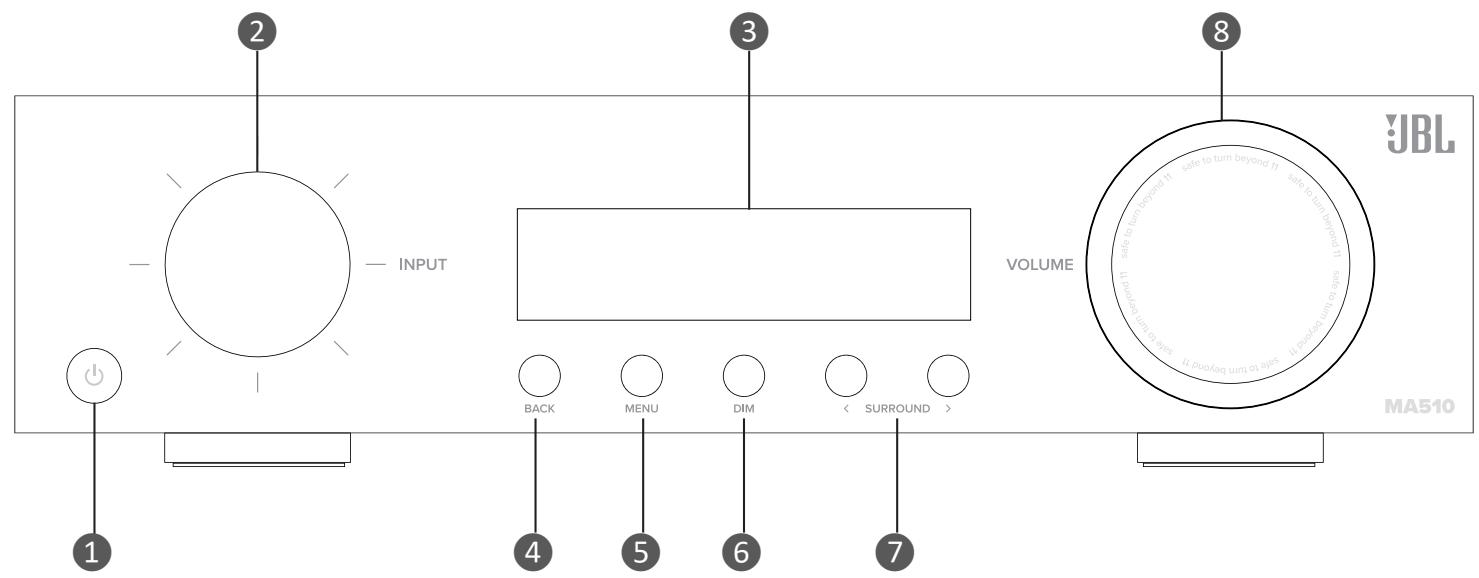
Front Panel
- Standby On/Off Button
- Input Dial/Menu Navigation/Press Select
- Unit Display
-
Back Menu Button
-
Show/Hide Menu Button
- Dim Button
- Surround Down/Up
-
Volume Dial/Menu Navigation/Press Mute
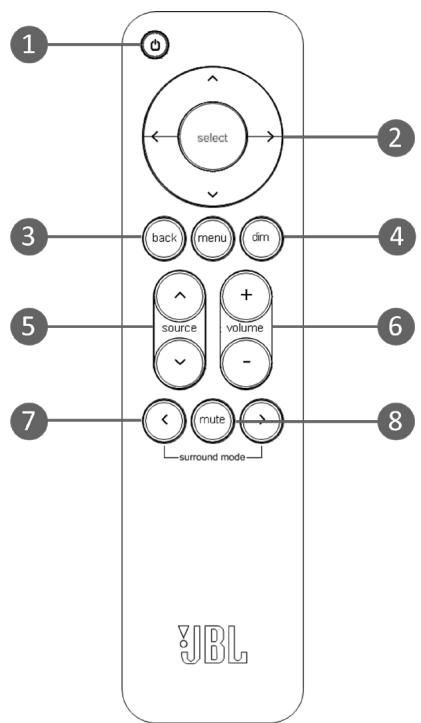
-
Standby On/Off Button
- Menu Navigation/Select and Transport Control*
- Menu Back & Menu On/Off
- Dim front panel display
- Source Up/Down
- Volume Up/Down
- Surround Mode Cycle
- Mute
Remote Control
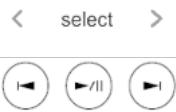
* Use Select, and Left/Right cursor buttons on the remote control as transport keys for Bluetooth and Network Audio Streaming sources
Rear Panel
MA310 and MA510
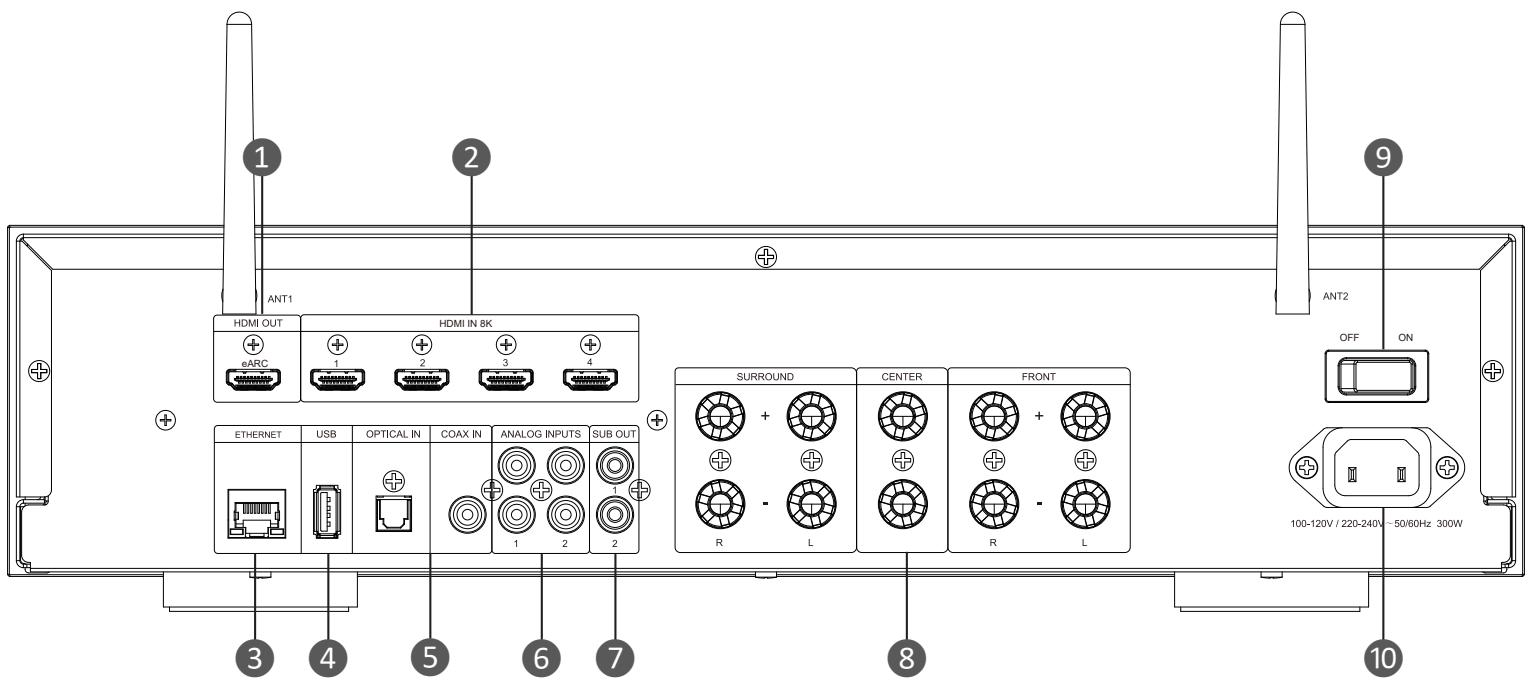
- HDMI Out
- HDMI Inputs
- Ethernet Socket (MA510 only)
- USB Input
-
Digital Inputs
-
Analog Inputs
- Subwoofer Outputs
- Speaker Level Output Connectors
- Power Switch
- Power Input
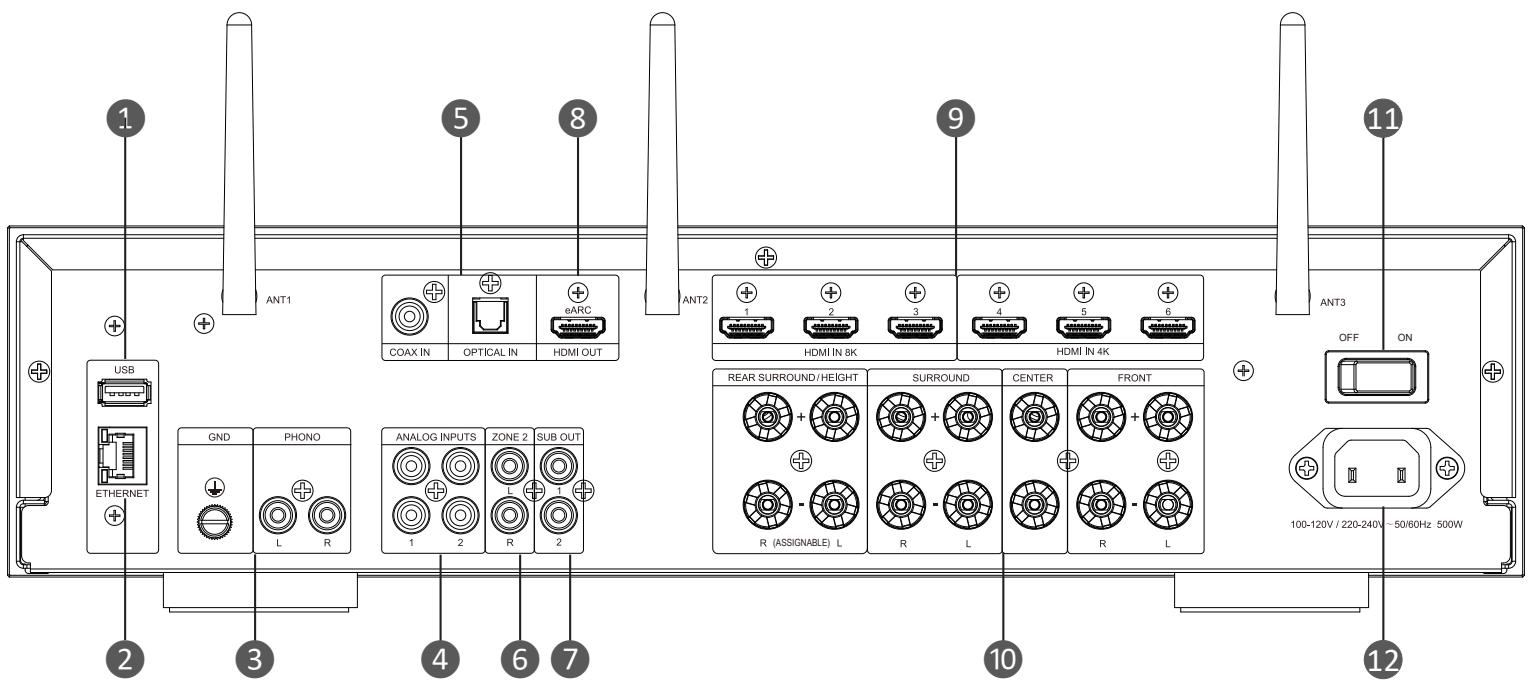
MA710
- USB Input
- Ethernet Socket
- Phono Input and Ground
- Analog Inputs
- Digital Inputs
-
Zone 2 "PARTY" Output
-
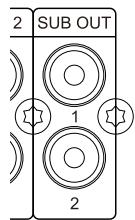
Subwoofer Outputs
- HDMI Outputs
- HDMI Inputs
- Speaker Level Output Connectors
- Power Switch
- Power Input
Wiring and Connections
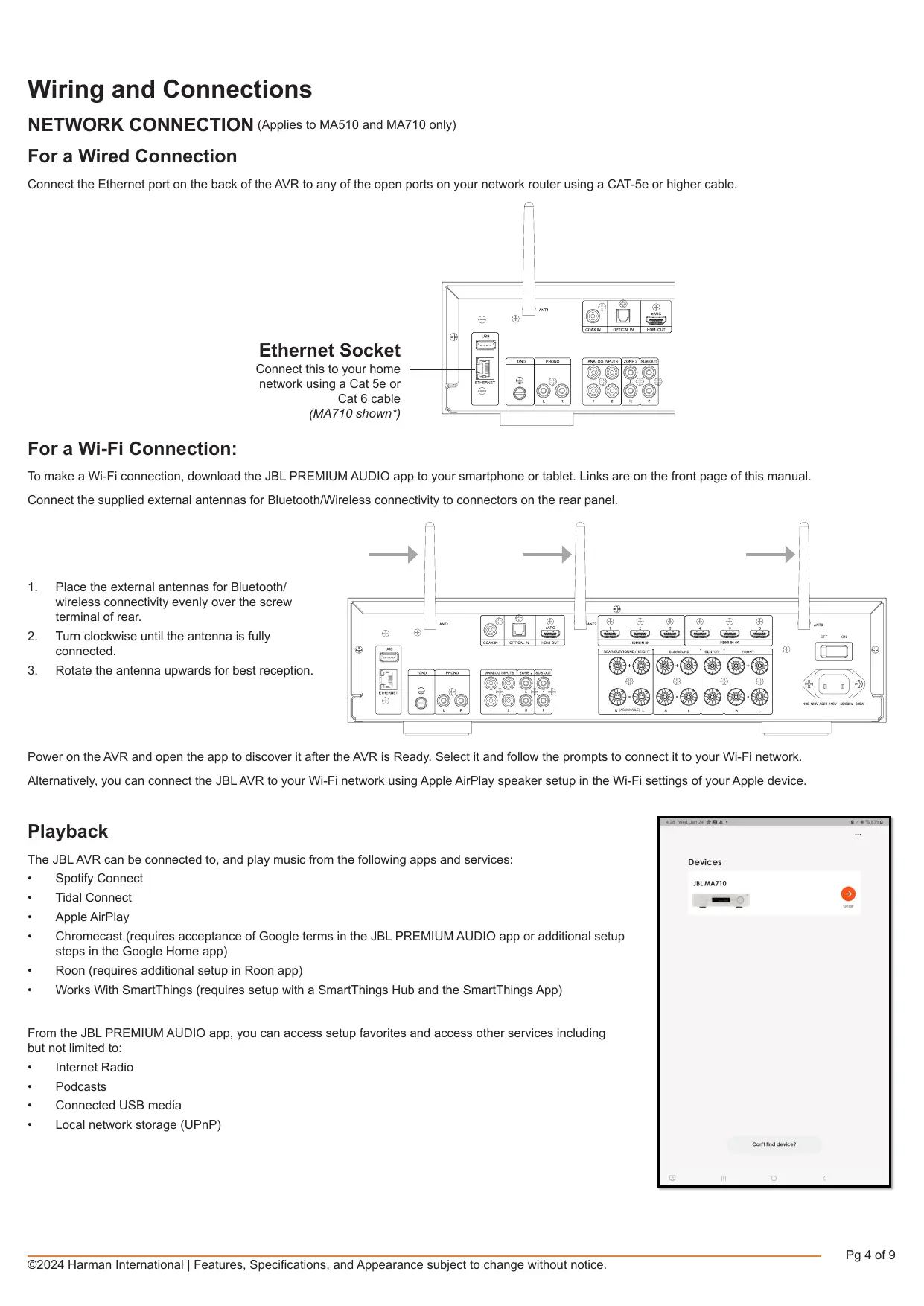
NETWORK CONNECTION (Applies to MA510 and MA710 only)
For a Wired Connection
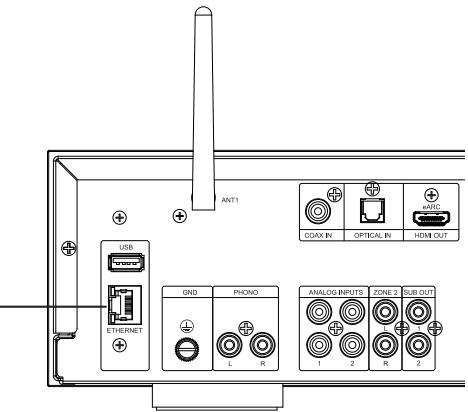
Connect the Ethernet port on the back of the AVR to any of the open ports on your network router using a CAT-5e or higher cable.
Ethernet Socket
Connect this to your home
network using a Cat 5e or
Cat 6 cable
(MA710 shown*)
For a Wi-Fi Connection:
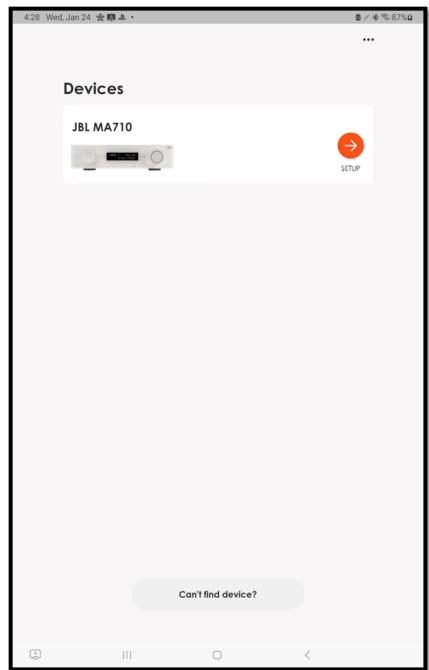
To make a Wi-Fi connection, download the JBL PREMIUM AUDIO app to your smartphone or tablet. Links are on the front page of this manual.
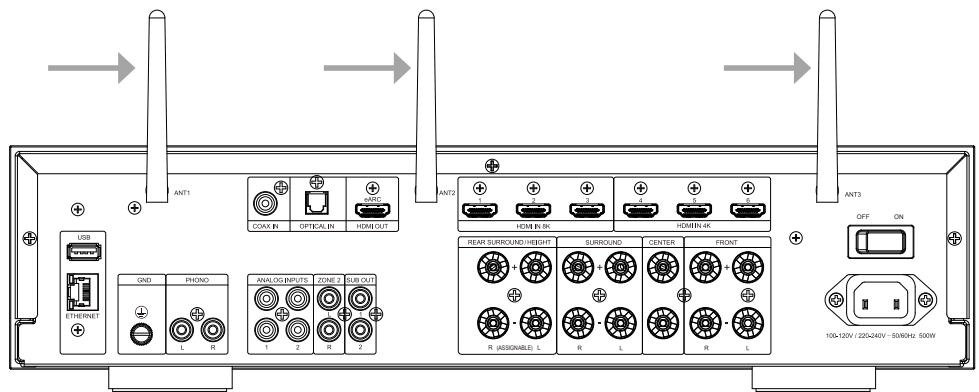
Connect the supplied external antennas for Bluetooth/Wireless connectivity to connectors on the rear panel.
- Place the external antennas for Bluetooth/ wireless connectivity evenly over the screw terminal of rear.
- Turn clockwise until the antenna is fully connected.
- Rotate the antenna upwards for best reception.
Power on the AVR and open the app to discover it after the AVR is Ready. Select it and follow the prompts to connect it to your Wi-Fi network.
Alternatively, you can connect the JBL AVR to your Wi-Fi network using Apple AirPlay speaker setup in the Wi-Fi settings of your Apple device.
Playback
The JBL AVR can be connected to, and play music from the following apps and services:
Spotify Connect
Tidal Connect
Apple AirPlay
- Chromecast (requires acceptance of Google terms in the JBL PREMIUM AUDIO app or additional setup steps in the Google Home app)
- Roon (requires additional setup in Roon app)
- Works With SmartThings (requires setup with a SmartThings Hub and the SmartThings App)
From the JBL PREMIUM AUDIO app, you can access setup favorites and access other services including but not limited to:
Internet Radio
Podcasts
Connected USB media
Local network storage (UPnP)
Bluetooth Operation
Connecting your phone or tablet:
- Select the Bluetooth input on the AVR for Bluetooth pairing of a source device. Push and Hold the Input knob to initiate Pairing Mode.
To pair your Bluetooth source device, open the Bluetooth settings on your source device and scan for MA310/MA510/MA710 #** from the list. Each product has a unique ID.
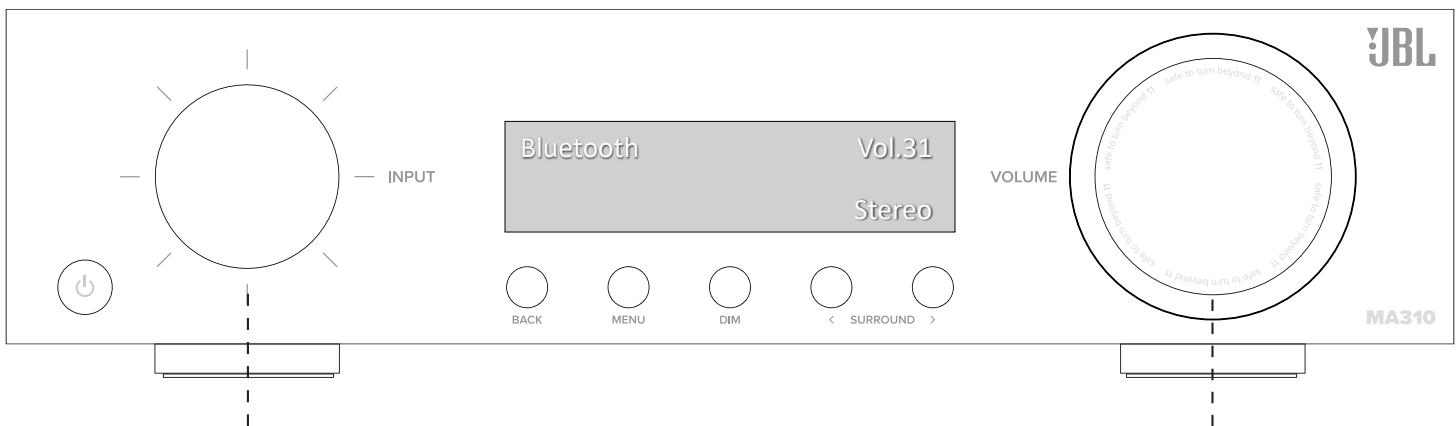
- Rotate Input Carousel
- Push to Select "Bluetooth"
- Push and Hold to activate Pairing Mode
- Open the Bluetooth settings on your phone/tablet. Scan for MA310/MA510/MA710 and select from the list. Each product has a unique ID.
Rotate to Control Volume
Push to Mute/Unmute
The AVR can recall 7 device pairings. If 7 are in memory already, the oldest will be replaced.
Because portable devices often have a volume slider. Upon pairing, there is a default volume setting in the amplifier to prevent excessive volume output being selected accidentally. The default is 20.
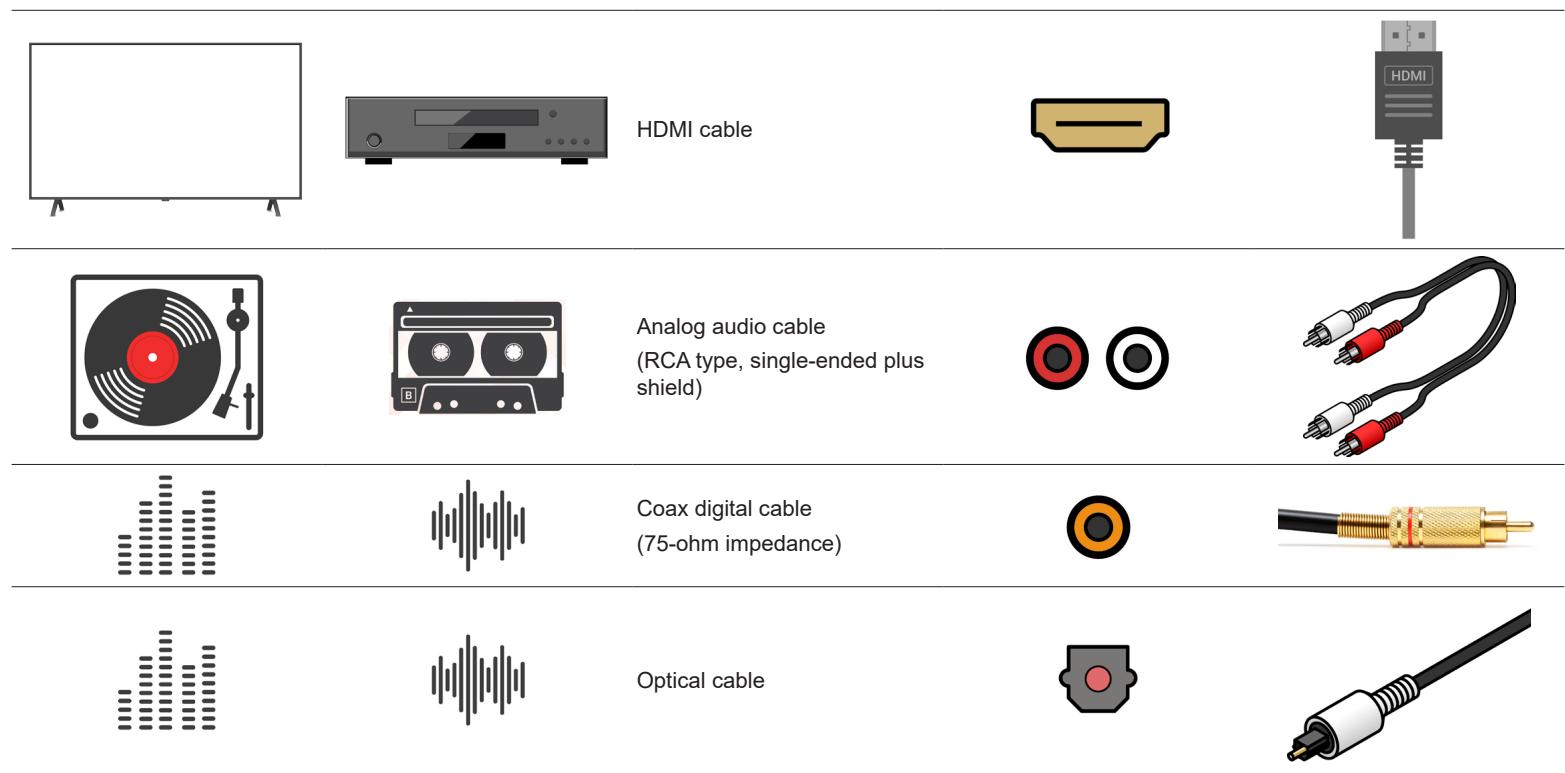
JBL recommends using pre-built or professionally wired cables.
Cables Used for Connections
WIRING OUTPUT CONNECTORS
Before making any output connections, ensure the power cord is disconnected from the amplifier and carefully review the total impedance for loudspeakers connected to each amplifier output.
JBL recommends using two-conductor or four-conductor, heavy gauge speaker wire up to 12 AWG.
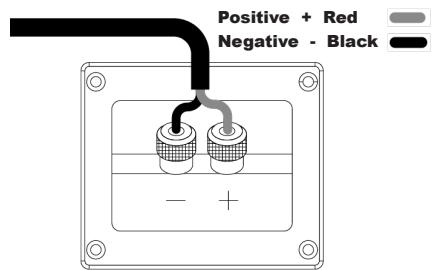
Speaker outputs provide connection to passive loudspeakers via binding post-type connectors that accept bare wire, spade or banana plug terminations. The connectors are grouped in pairs. Each pair consists of two wire terminations: positive (+) and negative (-)
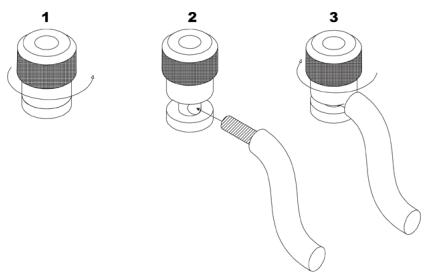
To attach speaker cables to a binding post using bare wire, strip approximately 3/8-inch (10 mm) of insulation from the end of the positive and negative leads of the cable and insert the bare ends into the corresponding binding post connector, tightening the screw terminals to secure the termination. Repeat this procedure for each speaker.
Note: Connect so that the speaker cable core wires do not protrude from the speaker terminal. The protection circuit may be activated if the bare wire touches the rear panel or if the + and - sides touch each other.
Binding post termination
Connection to speaker
Connecting a subwoofer
Use a subwoofer cable to connect the subwoofer. Two subwooers can be connected to this unit. The same signal is output from the respective subwoofer terminals.
Trademarks and Licenses
| Works withApple AirPlay | Apple®, AirPlay® and the AirPlay Logo™, iPod®, iPhone® and iPad® are trademarks of Apple Inc., registered in the U.S. and other countries. App Store is a service mark of Apple Inc. AirPlay 2 works with iPhone®, iPad®, and iPod touch® with iOS 11.4 or later, Mac with OS X® Mountain Lion or later, and PC with iTunes® 10.2.2 or later. |
| Spotify | The Spotify software is subject to third party licenses that can be found here: https://developer.spatify.com/legal/third-party- licenses/ |
| WiFi CERTIFIED | The Wi-Fi CERTIFIED™ logo is a registered trademark of Wi-Fi Alliance® |
| Chromecast built-in | Google, Google Play, Chromecast, and other related marks are trademarks of Google LLC. The Google Assistant requires an internet connection and is not available in certain countries and languages. Availability and react of certain features and services are device, service, and network-dependent and may not be available in all areas. Controlling certain devices in your home requires compatible smart devices. Subscriptions for services and applications may be required and additional terms, conditions and/or charges may apply. |
| HOMI | HDMI, the HDMI logo and High-Definition Multimedia Interface are trademarks or registered trademarks of HDMI Licensing LLC. |
| MP3 | MPEG Layer-3 audio decoding technology licensed from Fraunhofer IIS and Thomson multimedia. |
| Works withSmartThings | SmartThings® is a registered trademark of SmartThings, Inc. WWST is a Certification Mark of SmartThings, Inc. All other trademarks or registered trademarks are the property of their respective owners. |
| FLAC | FLAC Decoder Copyright © 2000, 2001, 2002, 2003, 2004, 2005, 2006, 2007, 2008 Josh Coalson
• Redistribution and use in source and binary forms, with or without modification, are permitted provided that the following conditions are met:
• Redistribution of source code must retain the above copyright notice, this list of conditions and the following disclaimer.
• Redistributions in binary form must reproduce the above copyright notice, this list of conditions and the following disclaimer in the documentation and/or other materials provided with the distribution.
• Neither the name of the Xiph.org Foundation nor the names of its contributors may be used to endorse or promote products derived from this software without specific prior written permission.
THIS SOFTWARE IS PROVIDED BY THE COPYRIGHT HOLDERS AND COLLECTORS 'AS IS' AND ANY EXPRESS OR IMPLIED WARRANTY, INCLUDING BUT NOT LIMITED TO, THE IMPLIED WARRANTY OF MERCHANTABILITY AND FITNESS FOR A PARTICULAR PURPOSE ARE DISCLAIMED. IN NO EVENT SHALL THE FOUNDATION OR COLLECTORS BE LIABLE FOR ANY DIRECT, INDIRECT, INCIDENTIAL, SPECIAL, EXEMPLARY, OR CONSEQUENTIAL DAMAGES (INCLUDING, BUT NOT LIMITED TO, PROCEDURE OF SUBSTITUTE GOODS OR SERVICES; LOSS OF USE, DATA, OR PROFITS; OR BUSINESS INTERVENTION) HOWEVER CAUSED AND ON ANY THEORY OF LIABILITY, WHETHER IN CONTRACT, STRICT LIABILITY, OR TORT (INCLUDING NEGLIGENCE OR OTHERWISE) ASING IN ANY WAY OUT OF THE USE OF THIS SOFTWARE, EVEN IF ADVISED OF THE POSSIBILITY OF SUCH DAMAGE. |
| Bluetooth® | The Bluetooth® word mark and logos are registered trademarks owned by Bluetooth SIG, Inc. and any use of such marks by HARMAN International Industries, Incorporated is under license.
Other trademarks and trade names are those of their respective owners. |
| dts HD(MA310/MA510) | For DTS patents, see http://patents.dts.com. Manufactured under license from DTS Licensing Limited. DTS, DTS-HD Master Audio, DTS-HD, and the DTS-HD logo are registered trademarks or trademarks of DTS, Inc. in the United States and other countries. © 2020 DTS, Inc. ALL RIGHTS RESERVED. |
| dts x(MA710) | For DTS patents, see http://patents.dts.com. Manufactured under license from DTS Licensing Limited. DTS, DTS:X, and the DTS:X logo are registered trademarks or trademarks of DTS, Inc. in the United States and other countries. © 2021 DTS, Inc. ALL RIGHTS RESERVED. |
| Dolby Audio(MA310/MA510) | Manufactured under license from Dolby Laboratories. Dolby, Dolby Audio, Pro Logic, and the double-D symbol are trademarks of Dolby Laboratories Licensing Corporation. |
| Dolby Atmos(MA710) | Dolby, Dolby Atmos, and the double-D symbol are registered trademarks of Dolby Laboratories Licensing Corporation. Manufactured under license from Dolby Laboratories. Confidential unpublished works. Copyright © 2012-2020 Dolby Laboratories. All rights reserved. |
Regulatory Communication
| Restrictions in the 5 GHz band: | According to Article 10 (10) of Directive 2014/53/EU, the packaging shows that this radio equipment will be subject to some restrictions when placed on the market in Belgium (BE), Bulgaria (BG), the Czech Republic (CZ), Denmark (DK), Germany (DE), Estonia (EE), Ireland (IE), Greece (EL), Spain(ES), France (FR), Croatia (HR), Italy (IT), Cyprus (CY), Latvia (LV), Lithuania(LT), Luxembourg (LU), Hungary (HU), Malta (MT), Netherlands(NL), Austria(AT), Poland (PL), Portugal (PT), Romania (RO), Slovenia (SI), Slovakia (SK),Finland (FI), Sweden (SE), the Turkey (TR), Norway(NO), Switzerland (CH), Iceland (IS), and Liechtenstein (LI), the United Kingdom in respect of Northern Ireland (UK(NI)). |
| Use Restriction: This device is restricted to indoor use when operating in the 5150 to 5350 MHz frequency range in following countries: |
| BE | EL | LT | PT |
| BG | ES | LU | RO |
| CZ | FR | HU | SI |
| DK | HR | MT | SK |
| DE | IT | NL | FI |
| EE | CY | AT | SE |
| IE | LV | PL | UK(NI) |
| Points de collecte sur www.quefairedesches.fr |
| ANATEL | Incorpora produito homologado pelaa ANATEL sob numero HHHHH-AA-FFFFF. Este equipamento não tem direito à proteção contra interferência prejudicial e não pode causar interferência em sistemas devidamente autorizados. Para maiis informações, consulte o site da Anatel: https://www.gov.br/anatel/pt-br |
| MA310 wireless specification | Bluetooth profile: a2dp, avrcp, avdtp, avctpBluetooth Max. transmitting power: < 3dBm (EIRP)Bluetooth:Bluetooth operation in 2402MHz to 2480MHz with max power 13dBm e.i.r.pBluetooth LE operation in 2402MHz to 2480MHz with max power 12dBm e.i.r.p |
| MA510 wireless specification | Bluetooth profile: SPP; A2DP; ARCPBluetooth Max. transmitting power: < 4 dBm (EIRP)Bluetooth:Bluetooth operation in 2402MHz to 2480MHz with max power 13dBm e.i.r.pBluetooth LE operation in 2402MHz to 2480MHz with max power 12dBm e.i.r.pWi-Fi:802.11b/g/n operation in 2412MHz to 2472MHz with max power 20 dBm e.i.r.p5GHz RLAN 802.11a/n/ac: operation in 5180MHz - 5240MHz with max power 23 dBm e.i.r.p; 5260MHz - 5320MHz;5500MHz - 5700MHz with max power: 20 dBm e.i.r.p5.8G RLAN operation in 5745MHz to 5825MHz with max power 14 dBm e.i.r.pNote: The device is restricted to indoor use when operated in the 5150-5350MHz frequency range |
| MA710 wireless specification | Bluetooth profile: a2dp, avrcp, avdtp, avctp, vcp, vcs, mcp, mcsBluetooth Max. Transmitting power: < 3dBm (EIRP)Bluetooth:Bluetooth operation in 2402MHz to 2480MHz with max power 13dBm e.i.r.pBluetooth LE operation in 2402MHz to 2480MHz with max power 12dBm e.i.r.pWi-Fi:802.11b/g/n operation in 2412MHz to 2472MHz with max power 20 dB m e.i.r.p5GHz RLAN 802.11a/n/ac: operation in 5180MHz - 5240MHz with max power 23 dBm e.i.r.p; 5260MHz - 5320MHz;5500MHz - 5700MHz with max power: 20 dBm e.i.r.p5.8G RLAN operation in 5745MHTo 5825MHz with max power 14 dBm e.i.r.pNote: The device is restricted to indoor use when operated in the 5150-5350MHz frequency range |
This equipment should be installed and operated with minimum distance 20cm between the radiator & your body
This equipment complies with European COMMISSION REGULATION (EU) 2023/826
Model: MA310
Power supply: 100-120V/220-240V~, 50/60Hz
Standby consumption: < 0.5W
Max. operating temperature: 35^
Model: MA510
Power supply: 100-120V/220-240V\~, 50/60Hz
Standby consumption (NET Off/NET On) :<0.5W / <2W
Max. operating temperature: 35^
Model: MA710
Power supply: 100-120V/220-240V~, 50/60Hz
Standby consumption (NET Off/NET On) :<0.5W / <2W
Max. operating temperature: 35^
Standby time
When there is no audio input and no user operation, after 20 minutes, unit will enter standby mode.
User can change the standby mode through the menu, "Setup" -> "System Setup" -> "General Setup" -> "Standby Mode".
User also can change the auto standby time through the menu, "Setup" -> "System Setup" -> "General Setup" -> "Auto Standby".
How to turn off the wireless network
The default network mode is set as 'Auto' mode, in this mode, wired connection will be used if network cable is plugged in, otherwise Wi-Fi will be used.
User can change the network mode from the product web interface.

Harman International Industries, Incorporated
8500 Balboa Blvd, Northridge CA 91329 United States.
European Representative: Harman International Industries, Incorporated.
EMEA Liaison Office, Danzigerkade 16G, 1013 AP Amsterdam, The Netherlands.
UK Business Address: Ground Floor, Westside 2, London Road, Apsley, Hemel Hempstead, Hertfordshire, HP3 9TD, United Kingdom.
© 2024 Harman International Industries, Incorporated. All Rights Reserved.
JBL is a trademark of Harman International Industries, Incorporated registered in the United States and other countries.
Features, Specifications, and Appearance subject to change without notice.

Présentation
Harman International Industries, Incorporated
8500 Balboa Blvd, Northridge CA 91329 United States.
Representant en Europe : Harman International Industries, Incorporated.
EMEA Liaison Office, Danzigerkade 16G, 1013 AP Amsterdam, The Netherlands.
Adresse commerciale au R.-U.: Ground Floor, Westside 2, London Road, Apsley, Hemel Hempstead, Hertfordshire, HP3 9TD, United Kingdom.

Available on the App Store
Instalacao
Harman International Industries, Incorporated.
8500 Balboa Blvd, Northridge CA 91329 United States.
Representante europeu: Harman International Industries, Incorporated.
EMEA Liaison Office, Danzigerkade 16G, 1013 AP Amsterdam, The Netherlands.
Endereço comercial do Reino Unido: Ground Floor, Westside 2, London Road, Apsley, Hemel Hempstead, Hertfordshire, HP3 9TD, United Kingdom.