
KIT DE 2 CAMéRAS SUR BATTERIE + HUB - Camera TP-LINK - Free user manual and instructions
Find the device manual for free KIT DE 2 CAMéRAS SUR BATTERIE + HUB TP-LINK in PDF.



| Product type | Kit of 2 battery cameras + hub |
| Brand | TP-Link |
| Model | Tapo (battery series) |
| Dimensions of each camera | Approximately 7.5 x 7.5 x 12 cm |
| Weight of each camera | Approximately 350 g |
| Power supply | Integrated lithium rechargeable battery (via micro USB cable) |
| Battery life | Up to 6 months in normal use |
| Video resolution | 1080p Full HD |
| Night vision | Infrared up to 10 meters |
| Viewing angle | 130° diagonal |
| Main features | Motion detection, two-way audio, push alerts, microSD recording, cloud, night vision |
| Local storage | microSD slot in the hub (card not included) |
| Connectivity | 2.4 GHz Wi-Fi (cameras) + Hub connected to router via Ethernet |
| Protection rating | IP65 (weather resistant) |
| Maintenance and cleaning | Clean with a soft, dry cloth; avoid solvents |
| Security | Data encryption, CE/EU compliance, electrical protections |
| Spare parts and repairability | Battery not user-replaceable; contact TP-Link support |
| General information | 2-year warranty; free Tapo app (iOS/Android) |
Frequently Asked Questions - KIT DE 2 CAMéRAS SUR BATTERIE + HUB TP-LINK
User questions about KIT DE 2 CAMéRAS SUR BATTERIE + HUB TP-LINK
0 question about this device. Answer the ones you know or ask your own.
Ask a new question about this device
Download the instructions for your Camera in PDF format for free! Find your manual KIT DE 2 CAMéRAS SUR BATTERIE + HUB - TP-LINK and take your electronic device back in hand. On this page are published all the documents necessary for the use of your device. KIT DE 2 CAMéRAS SUR BATTERIE + HUB by TP-LINK.
USER MANUAL KIT DE 2 CAMéRAS SUR BATTERIE + HUB TP-LINK
Visit www.tapo.com/support
for technical support, user guides, and more information
Quick Start Guide
Smart Wire-Free Security Camera System

Scan QR code or visit
https://www.tp-link.com/support/setup-video/#cloud-c Cameras
CONTENTS
1 / Mounting 2 / English 4 / Portugues Brasil 6 / Bulgarian 8 / Croatian 10 / Czech 12 / Danish 14 / Netherlands 16 / Finnish 18 / French 20 / German 22 / Greek 24 / Hungarian 26 / Bahasa Indonesia 28 / Italian 30 / Japanese 32 / Kazakh
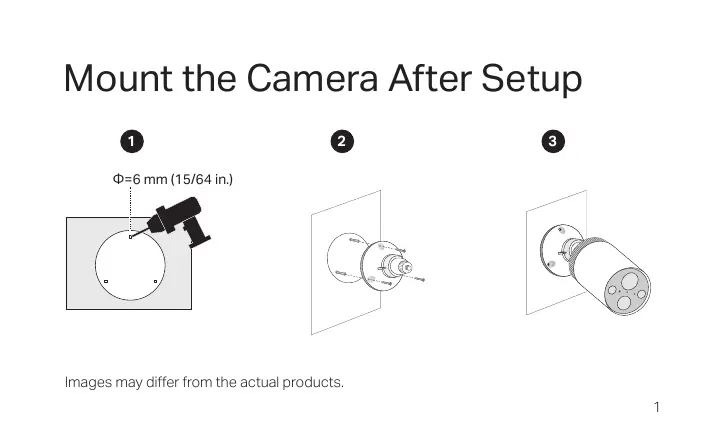
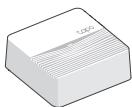
Mount the Camera After Setup

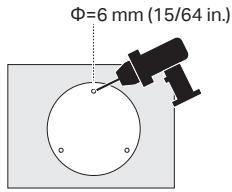

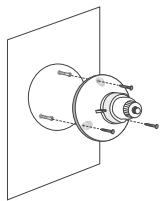

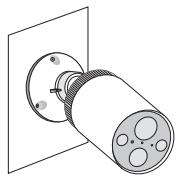
Images may differ from the actual products.
English
Note: Images may differ from the actual products.
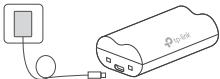
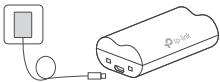
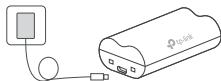
1 Charge the Battery
Method 1: Battery Itself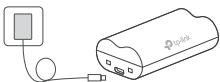
| LED indication | Charging: Steady orange |
| Fully charged: Steady green |
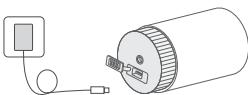
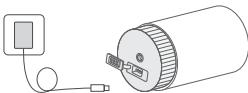
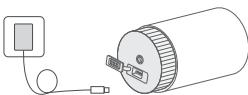
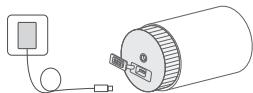
Method 2: Battery Inside Camera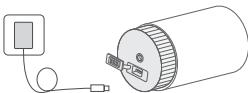
*Check battery status in the Tapo app after setup.
2 Set Up
- Get the Tapo app from the App Store or Google Play.

- Follow the app instructions to set up your hub and camera.
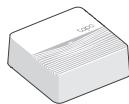
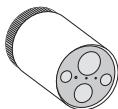
- Follow the app instructions to mount your camera.
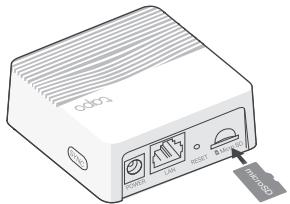
3 Local Recording
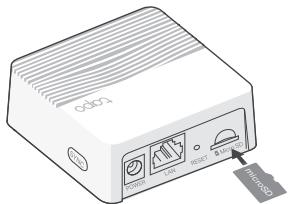
If you want the camera to record videos locally, insert a microSD card into your hub.
Initialize the microSD card within the Tapo app.
4 Reset
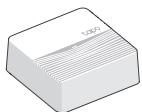
Reset Hub
Use a pin to press and hold the RESET button for about 5 seconds.
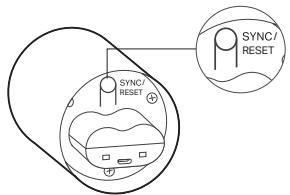
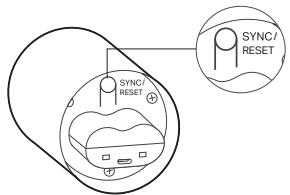
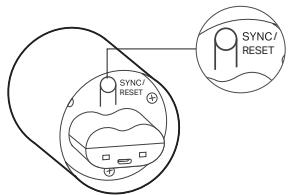
Reset Camera
Press and hold the SYNC/RESET button for about 5 seconds.
1 Charging the Battery
Download on the App Store

Method 1: Camera Charging
| LED INDINKAÇAÇA | 3aşewdàne: NoctoyHNO opaŋkèBéO |
| Hantylhno 3apeDéH. noctoyHNo 3eIeHNo |
Method 2: Battery Charging in Camera
*Check the battery level in the Tapo app.
Download on the App Store

GET IT ON Google Play

2-αic: Camera Battery Indicator
*Tapo app will notify you when the battery is low.
2 Formats
- Tapo app is available on the App Store and Google Play.

Download on the
App Store

GET IT ON
Google Play


- Xia nén Kaempa HBi OpaHTy UHIN KOJdaH6a HcckaynapbIH OpbIHDaHbI3.

- KaMepaHbI opHaTy yuHIN KOndaH6a HyCKaynapbIHOpbIHdaHbI3.
3 Keprinikti kaz36a
Erepci3 KamepaHbH 6eHneHxekprilnti Tpyde kazyyh Kanacahb3, microSD KapractbH xa6ka caIbH3.
Tapo KocbIMuaacbIHda microSD kapTaBH icke KocbIHbl3.
4 KaIIbHa KeJItipy
Xa6TbI KaIIbHa KeItrpy
RESET Tymecin Wamamem 5 ckynd 6acbln TypbHb3.
KamepaHbI KaIIbHa KeIltipy
SYNC/RESET Tymecin shamameh 5 ckynd 6acbln TpybIb3.
Download on the App Store

GETION Google Play


Tilbake still camera
3.ДоТуМУTeCb iHCTpyKuJi npOgPamN, 106 BCTaHOBtN KaMepy.
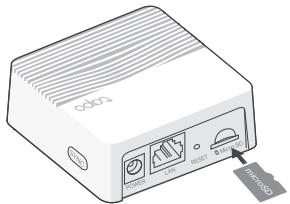
3 IokaJIbHn 3aIInc
To ensure the camera records video locally, insert a microSD card into the concentrator.
Initialize the microSD card in the program.
4 Reset
Reset the hub
Press and hold the RESET button for about 5 seconds.
Reset the camera
Press and hold the SYNC/RESET button for about 5 seconds.
1
1:
| Wuanshenzhe LED | yinshengzhuó: 贵阳市南区 |
| yinshengzhuó: 贵阳市南区 |
2:
*Pair
2
- Pair App Store Google Play

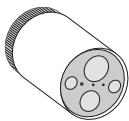
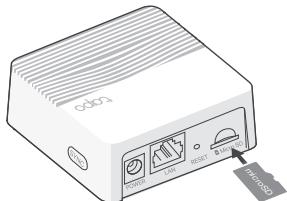
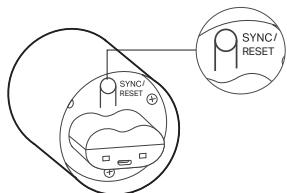
Vietnamese
Note: Images may differ from actual product.
1 Charging the battery
Method 1: Charging the battery directly
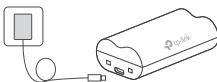

Download on the App Store

Get it on Google Play



- 1.
1
| الله�� الله�� الله�� | LED |
1ydslll 2
Tapo 1
English: Safety Information
- Do not attempt to disassemble, repair, or modify the device. If you need service, please contact us.
- Do not use damaged charger or USB cable to charge the device.
- Do not use any other chargers than those recommended.
- Do not use the device where wireless devices are not allowed.
- Keep the device away from fire or hot environments. DO NOT immerse in water or any other liquid.
- Adapter shall be easily accessible.
CAUTION!
Risk of fire or explosion if the battery is replaced by an incorrect type.
CAUTION!
Avoid replacement of a battery with an incorrect type that can defeat a safeguard. Avoid disposal of a battery into fire or a hot oven, or mechanically crushing or cutting of a battery; that can result in an explosion. Do not leave a battery in an extremely high temperature surrounding environment that can result in an explosion or the leakage of flammable liquid or gas; Do not leave a battery subjected to extremely low air pressure that may result in an explosion or the leakage of flammable liquid or gas.
Please read and follow the above safety information when operating the device. We cannot guarantee that no accidents or damage will occur due to improper use of the device. Please use this product with care and operate at your own risk.
| 單元 Unit | 限用物質及其化學符號 Restricted substances and its chemical symbols | |||||
| 鉛 Lead (Pb) | 汞 Mercury (Hg) | 鈉 Cadmium (Cd) | 六價鉻 Hexavalent chromium (Cr⁺) | 多溴聯苯 Polybrominated biphenyls (PBB) | 多溴二苯醚 Polybrominated diphenyl ethers (PBDE) | |
| PCB | ○ | ○ | ○ | ○ | ○ | ○ |
| 外殼 | ○ | ○ | ○ | ○ | ○ | ○ |
| 電源供應器 | - | ○ | ○ | ○ | ○ | ○ |
| 其他及其配件 | - | ○ | ○ | ○ | ○ | ○ |
| 備考1. “超出0.1 wt%”及“超出0.01 wt%”係指限用物質之百分比含量超出百分比含量基準值 Note 1: “Exceeding 0.1 wt %” and “exceeding 0.01 wt %” indicate that the percentage content of the restricted substance exceeds the reference percentage value of presence condition. 備考2. “○”係指該項限用物質之百分比含量未超出百分比含量基準值。 Note 2: “○” indicates that the percentage content of the restricted substance does not exceed the percentage of reference value of presence. 備考3. “-”係指該項限用物質為排除項目。 Note 3: The “-” indicates that the restricted substance corresponds to the exemption. | ||||||
English:
TP-Link hereby declares that the device is with compliance with the essential requirements and other relevant provisions of directives 2014/53/EU, 2009/125/EC, 2011/65/EU and (EU)2015/863.
The original EU Declaration of Conformity may be found at https://www.tapo.com/support/ce/.
TP-Link hereby declares that the device is in compliance with the essential requirements and other relevant provisions of the Radio Equipment Regulations 2017.
The original UK Declaration of Conformity may be found at https://www.tapo.com/support/ukca/.
Bulgarian:
TP-Link declares that the device complies with the essential requirements and other relevant provisions of Directives 2014/53/EU, 2009/125/EC, 2011/65/EU and (EU) 2015/863.
Declaration of Conformity. For more information, visit https://www.tapo.com/support/ce/.
Czech:
TP-Link hereby declares that this device complies with the essential requirements and other relevant provisions of Directives 2014/53/EU, 2009/125/EC, 2011/65/EU, and (EU)2015/863.
The original EU Declaration of Conformity may be found at https://www.tapo.com/support/ce/.
Croatian:
TP-Link hereby declares that the device complies with the essential requirements and other relevant provisions of Directives 2014/53/EU, 2009/125/EC, 2011/65/EU and (EU) 2015/863.
The original EU declaration of conformity can be found at https://www.tapo.com/support/ce/.
Danish:
TP-Link hereby declares that the device is in compliance with the essential requirements and other relevant provisions of Directives 2014/53/EU, 2009/125/EC, 2011/65/EU and (EU) 2015/863.
The original EU declaration of conformity can be found at https://www.tapo.com/support/ce/.
Dutch:
For TP-Link Branded Products Only. For more information about warranty, please visit https://www.tapo.com/support
THIS WARRANTY GIVES YOU SPECIFIC LEGAL RIGHTS, AND YOU MAY HAVE OTHER RIGHTS THAT VARY FROM STATE TO STATE (OR BY COUNTRY OR PROVINCE).
TO THE EXTENT ALLOWED BY LOCAL LAW, THIS WARRANTY AND THE REMEDIES SET FORTH ARE EXCLUSIVE AND IN LIEU OF ALL OTHER WARRANTIES, REMEDIES AND CONDITIONS.
TP-Link warrants the TP-Link branded hardware product contained in the original packaging against defects in materials and workmanship when used normally in accordance with TP-Link's guidelines for a period which depends on the local service from the date of original retail purchase by the end-user purchaser.
Danish
TP-Link Limited Product Warranty
Applies only to TP-Link branded products. For more information about warranty, please visit https://www.tapo.com/support
THIS WARRANTY GIVES YOU SPECIFIC LEGAL RIGHTS, AND YOU MAY ALSO HAVE OTHER RIGHTS WHICH VARY FROM STATE TO STATE (OR FROM COUNTRY OR PROVINCE).
WITHIN THE FRAMEWORK OF THE LAW, THE WARRANTY AND REMEDIES SET FORTH HEREIN ARE EXCLUSIVE AND IN LIEU OF ALL OTHER RIGHTS, REMEDIES, AND CONDITIONS.
TP-Link warrants that all TP-Link hardware products, in their original packaging, are free from defects in materials and workmanship when used as intended and in accordance with TP-Link's guidelines, for a period that depends on local service, from the date of purchase by the original end-user/buyer.
Dutch
https://www.tapo.com/support
THIS WARRANTY DOES NOT AFFECT ANY STATUTORY RIGHTS, BUT MAY BE SUBJECT TO OTHER RIGHTS, ACCORDING TO THE LEGISLATION OF THE COUNTRY (SOME OR ALL).
THIS WARRANTY AND ITS PROVISIONS ARE IN ADDITION TO - 20 THE MANDATORY PROVISIONS OF THE APPLICABLE LEGISLATION, AND THIS WARRANTY IS SUBJECT TO ALL OTHER WARRANTIES AND PROVISIONS.
TP-Link is not liable for any consequential or indirect damages arising from the use of the product, to the extent permitted by law, from the date of purchase of the product by the end user.
Italian
https://www.tapo.com/support
THIS WARRANTY GIVES YOU SPECIFIC LEGAL RIGHTS AND YOU MAY HAVE OTHER RIGHTS THAT VARY FROM STATE TO STATE (OR FROM

- VISIT WWW.TAPO.COM/SUPPORT
- QUICK START GUIDE
- CONTENTS
- MOUNT THE CAMERA AFTER SETUP
- ENGLISH
- CHARGE THE BATTERY
- SET UP
- LOCAL RECORDING
- RESET
- RESET HUB
- RESET CAMERA
- CHARGING THE BATTERY
- ΑIC: CAMERA BATTERY INDICATOR
- FORMATS
- KEPRINIKTI KAZ36A
- KAIIBHA KEJITIPY
- TILBAKE STILL CAMERA
- IOKAJIBHN 3AIINC
- RESET THE HUB
- RESET THE CAMERA
- VIETNAMESE
- ENGLISH: SAFETY INFORMATION
- CAUTION
- BULGARIAN
- CZECH
- CROATIAN
- DANISH
- DUTCH
- ITALIAN
Brand : TP-LINK
Model : KIT DE 2 CAMéRAS SUR BATTERIE + HUB
Category : Camera