
TL-WN751N - Network card / adapter TP-LINK - Free user manual and instructions
Find the device manual for free TL-WN751N TP-LINK in PDF.


Pick your language and provide your email: we'll send you a specifically translated version.
| Product Type | Wireless Network Adapter |
| Brand | TP-LINK |
| Model | TL-WN751N |
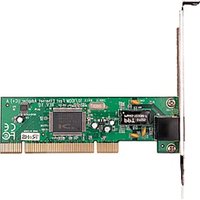
| Interface | PCI (32-bit) |
| Wireless Standards | IEEE 802.11n, IEEE 802.11g, IEEE 802.11b |
| Frequency Band | 2.4 GHz |
| Data Transfer Rate | Up to 150 Mbps |
| Antenna Type | 1 External Omni-directional Antenna |
| Wireless Security | WEP, WPA/WPA2-PSK, TKIP/AES |
| Receiver Sensitivity | 270M: -68dBm, 135M: -74dBm, 100M: -74dBm |
| Channel Bandwidth | 20/40 MHz |
| Modulation Technology | DBPSK, DQPSK, CCK, OFDM, 16-QAM, 64-QAM |
| Power Consumption | 3.3V / 5V PCI bus power |
| Dimensions (W x H x D) | 121 x 78 x 22 mm |
| Weight | 100 g |
| Operating Temperature | 0°C to 40°C |
| Operating Humidity | 10% to 90% non-condensing |
| Certifications | CE, FCC, RoHS |
| OS Support | Windows 2000/XP/Vista/7, Linux, Mac OS X |
| Package Content | TL-WN751N adapter, low-profile bracket, driver CD, quick installation guide |
Frequently Asked Questions - TL-WN751N TP-LINK
What operating systems are supported by the TP-LINK TL-WN751N adapter?
The TL-WN751N supports Windows 2000/XP/Vista/7, as well as Linux and Mac OS X. For optimal performance, install the latest drivers from the TP-LINK website.
How do I install the TL-WN751N into my computer?
First, ensure your computer is powered off and unplugged. Open the computer case and insert the adapter into an available PCI slot. Secure it with the screw and replace the cover. Then power on and install the drivers from the included CD or downloaded online.
How can I secure my wireless network with this adapter?
The TL-WN751N supports WEP, WPA/WPA2-PSK with TKIP/AES encryption. Configure security settings through your router or access point to ensure a secure connection.
What do I do if the adapter is not detected by my computer?
Check that the adapter is properly seated in the PCI slot. Try another slot if available. Ensure the drivers are correctly installed. Also, verify that the adapter is not disabled in the BIOS or device manager.
Can I use this adapter with a laptop?
The TL-WN751N is a PCI adapter, designed for desktop computers with an available PCI slot. For laptops, consider a USB wireless adapter instead.
What is the maximum data transfer rate of this adapter?
With IEEE 802.11n technology, the TL-WN751N can achieve data rates up to 150 Mbps, making it suitable for HD video streaming and online gaming.
How do I update the driver for my TL-WN751N?
Visit the TP-LINK website, find the TL-WN751N support page, and download the latest driver for your operating system. Uninstall the old driver, then run the downloaded installer.
Does the TL-WN751N support a 5 GHz WiFi band?
No, the TL-WN751N operates only in the 2.4 GHz band. It supports 802.11b/g/n standards but not the 5 GHz frequency.
Why is my wireless connection intermittent?
Intermittent connections can be caused by signal interference, distance from the router, or outdated drivers. Try changing the wireless channel on your router, reposition the antenna, or update the adapter's driver.
Can I use the TL-WN751N as a soft AP to share my internet connection?
Yes, if the driver supports Soft AP mode (depending on the driver version). You can configure it via the TP-LINK utility to create a virtual access point, sharing your wired internet connection with other devices.
User questions about TL-WN751N TP-LINK
0 question about this device. Answer the ones you know or ask your own.
Ask a new question about this device
No questions yet. Be the first to ask one.
Download the instructions for your Network card / adapter in PDF format for free! Find your manual TL-WN751N - TP-LINK and take your electronic device back in hand. On this page are published all the documents necessary for the use of your device. TL-WN751N by TP-LINK.
USER MANUAL TL-WN751N TP-LINK
Manual assistant
Powered by Anthropic
Waiting for your message
Product information
Brand : TP-LINK
Model : TL-WN751N
Category : Network card / adapter