
TL-WN781N - Network card / adapter TP-LINK - Free user manual and instructions
Find the device manual for free TL-WN781N TP-LINK in PDF.


Pick your language and provide your email: we'll send you a specifically translated version.
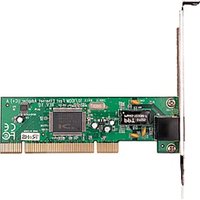
| Product Type | Wireless N150 PCI Express Adapter |
| Brand | TP-LINK |
| Model | TL-WN781N |
| Host Interface | PCI Express (PCIe) |
| Wireless Standards | IEEE 802.11b/g/n |
| Frequency Band | 2.4 GHz |
| Maximum Data Rate | 150 Mbps |
| Wireless Security | WEP, WPA/WPA2 |
| Antenna | 1 x Integrated Antenna |
| Dimensions (Approx.) | 120 x 80 x 22 mm |
| Weight (Approx.) | 35 g |
| Power Supply | Powered via PCIe slot (3.3V) |
| Operating System Support | Windows XP/Vista/7/8/10, Linux |
| Operating Temperature | 0°C to 40°C |
| Storage Temperature | -40°C to 70°C |
| Humidity | 10% to 90% non-condensing |
| Cleaning and Maintenance | Wipe with a dry, soft cloth; disconnect power before cleaning. Avoid liquids. |
| Safety | Keep away from moisture and heat sources. Do not disassemble. |
| Spare Parts and Repairability | No user-serviceable parts. Contact TP-LINK support for repairs. |
| Package Contents | TL-WN781N, Low-profile bracket, Quick Installation Guide, Resource CD |
| Warranty | 2 years |
Frequently Asked Questions - TL-WN781N TP-LINK
What is the maximum wireless speed of the TL-WN781N?
The TL-WN781N supports 802.11n technology with data rates up to 150 Mbps on the 2.4 GHz band.
Is this adapter compatible with Windows 10?
Yes, the TL-WN781N is compatible with Windows XP/Vista/7/8/10 (32/64-bit). Download the latest driver from TP-LINK website for optimal performance.
Does the TL-WN781N support dual-band Wi-Fi?
No, the TL-WN781N operates only on the 2.4 GHz band. It does not support 5 GHz. For dual-band, consider a model like TL-WN881ND.
How do I install the TL-WN781N in my desktop?
Turn off your PC, open the case, insert the card into an available PCI Express slot, secure the bracket, then install the driver. The low-profile bracket is provided for small cases.
What wireless security protocols are supported?
The adapter supports WEP, WPA/WPA2 encryption, keeping your network secure.
Does the TL-WN781N work with Linux?
Yes, the TL-WN781N can work on Linux using the open-source ath9k driver in most distributions.
Can I connect an external antenna to improve range?
The TL-WN781N has an integrated antenna that is not detachable. For better range, position the antenna or use a different adapter with removable antennas.
What is the typical wireless range of this adapter?
The range depends on your environment. In open spaces, you can expect about 100 meters to 150 meters with a strong router, but walls reduce it significantly.
How do I update the driver for the TL-WN781N?
Visit the TP-LINK Support page, search for TL-WN781N, download the latest driver, and run the installer. Uninstall the old driver first if needed.
Does the TL-WN781N support 802.11ac?
No, it is compatible with 802.11b/g/n only. For 802.11ac, choose the TL-WN821N V6 or another AC adapter.
User questions about TL-WN781N TP-LINK
0 question about this device. Answer the ones you know or ask your own.
Ask a new question about this device
No questions yet. Be the first to ask one.
Download the instructions for your Network card / adapter in PDF format for free! Find your manual TL-WN781N - TP-LINK and take your electronic device back in hand. On this page are published all the documents necessary for the use of your device. TL-WN781N by TP-LINK.
USER MANUAL TL-WN781N TP-LINK
Manual assistant
Powered by Anthropic
Waiting for your message
Product information
Brand : TP-LINK
Model : TL-WN781N
Category : Network card / adapter