
KC200 - Camera TP-LINK - Free user manual and instructions
Find the device manual for free KC200 TP-LINK in PDF.


| Type of product | Outdoor Security Camera |
| Brand | TP-Link |
| Model | KC200 |
| Product Name | Kasa Cam Outdoor |
| Resolution | HD 720p |
| Night Vision | Up to 30 feet with infrared |
| Weatherproof Rating | IP65 |
| Audio | 2-way audio with built-in microphone and speaker |
| Siren | Built-in siren to deter intruders |
| Power | 5V DC, 1A via USB cable |
| Power Adapter | Included, model DSA-5PFU1-05 FCA 050100 NA |
| Connectivity | Wi-Fi (2.4GHz) |
| Smart Assistant Compatibility | Amazon Alexa and Google Assistant |
| Storage | Cloud storage via Kasa Care subscription (up to 30 days) |
| Installation | Magnetic wall mount, DIY |
| Activity Zones | Configurable |
| Status LED | Indicates system status (amber, green, red) |
| Operating Temperature | -20°C to 43°C (-4°F to 109°F) |
| Operating Humidity | 10%-95% RH, non-condensing |
| Care and Cleaning | Clean with a soft, dry cloth. Do not use harsh chemicals. |
| Safety | Keep away from water, fire, humidity or hot environments. Do not disassemble. Use only provided power adapter. |
| Spare Parts and Repairability | No user-serviceable parts. Contact TP-Link support for assistance. |
| Certifications | FCC, CE, IC |
Frequently Asked Questions - KC200 TP-LINK
User questions about KC200 TP-LINK
0 question about this device. Answer the ones you know or ask your own.
Ask a new question about this device
Download the instructions for your Camera in PDF format for free! Find your manual KC200 - TP-LINK and take your electronic device back in hand. On this page are published all the documents necessary for the use of your device. KC200 by TP-LINK.
USER MANUAL KC200 TP-LINK
User Guide
Kasa Cam Outdoor
Contents
About This Guide 1
Introduction 2
Appearance 3
Set Up Your Camera 4
View Your Camera 6
Configure Your Camera 7
Check Activity Notifications 8
Work with Other Smart Home Products……9
Authentication 10
About This Guide
This guide provides a brief introduction to the Kasa Cam Outdoor and the Kasa app, as well as regulatory information.
Please note that features of the product may vary slightly depending on the model and software version you have, and on your location, language and internet service provider. All images, parameters and descriptions documented in this guide are used for demonstration only.
Conventions
In this guide, the following convention is used:
| Convention | Description |
| Teal | Key information appears in teal, including management page text such as menus, items, buttons and so on. |
| Underline | Hyperlinks are in teal and underlined. You can click to redirect to a website. |
More Info
- Specifications can be found on the product page at https://www.tp-link.com. • Our Technical Support and troubleshooting information can be found at https://www.tp-link.com/support. • A TP-Link Community is provided for you to discuss our products at https://community.tp-link.com. • Frequently Asked Questions (FAQs) can be found at https://www.tp-link.com/support/faq/.
Introduction
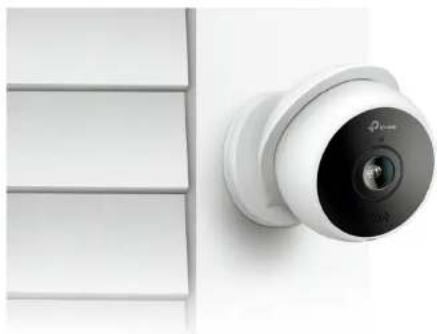
Kasa Cam Outdoor is designed to keep your home secure. A built-in siren and 2-way audio can scare away unwanted visitors. Day or night, rain or shine, Kasa Cam Outdoor protects what you love most.
- Deter Strangers - Sound the siren to keep your home safe and secure from intruders. • Capture the Moment - Watch your family from anywhere and record memorable moments.
- Have a Chat - Talk to the person at your door through the camera. • High Quality Video Day/Night - HD quality video at your fingertips that can record up to 30 feet at night with night vision. • Cloud Storage Plans - Upgrade your Kasa Care subscription plan and enjoy video recordings for up to 30 days.
- Weatherproof - With an IP65 rating, this camera will monitor in the rain and in high dust conditions.
- Easy Install - Magnetic wall mount makes for a quick DIY install. Camera can be easily adjusted for the best angle. • Watch on the Big Screen - Live stream video to your smartphone and Amazon Alexa and Google Assistant supported displays. • Activity Zone - Set high activity zones to reduce false alarms and get smarter alerts to your phone.
Appearance
Kasa Cam Outdoor has a system LED that changes color according to its status, a microphone, a USB cable and a RESET button. See the explanation below:
System LED
- Solid amber:
Rebooting
- Alternating amber and green:
SoftAP Mode
- Flashing red:
Connecting to Wi-Fi
Flashing green:
Connected to Wi-Fi
Solid green:
Bound to Cloud
- Flashing amber:
Resetting to SoftAP/Factory mode
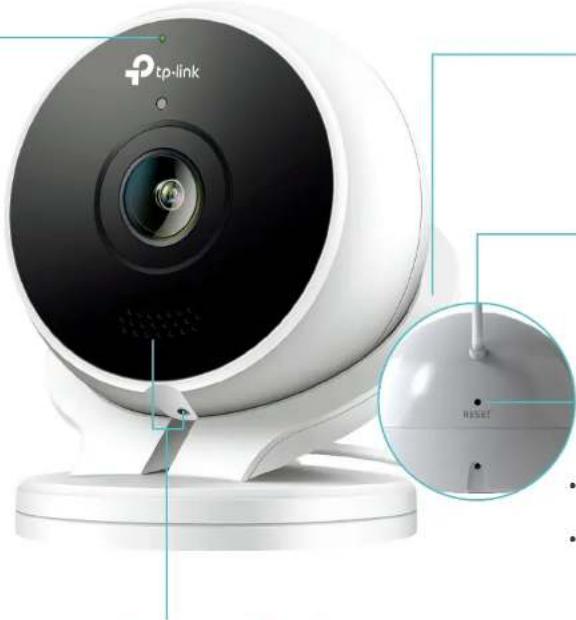
Magnetic Mount
Allows you to easily adjust the camera viewing angle (sideways, up and down).
USB Cable
Connects the power adapter provided to power the camera.
RESET Button
Tip: Remove the magnetic mount and use a pin to press the RESET button.
- Press and hold for 3 to 15 seconds: Reset to SoftAP mode
- Press and hold for over 15 seconds: Reset to Factory mode
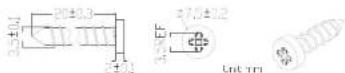
Provided mounting screws:
Speakers and Microphone
Built-in internal speakers and microphone protected by the waterproof membrane.
Warning: Do NOT insert objects into the holes!
Set Up Your Camera
Follow the steps below to get started with your new camera.
Step 1. Download Kasa
Get the Kasa Smart app from the Apple App Store or Google Play, or by scanning the QR code below.

Step 2. Log In
Open the app, and log in with your TP-Link ID. If you don't have an account, create one first.
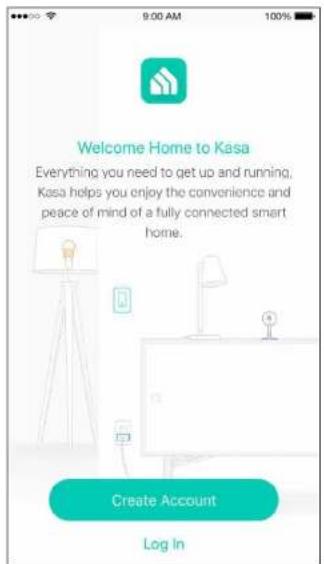
Step 3. Start Setup
Tap the +button in the Kasa app and select Cameras > Kasa Cam Outdoor.
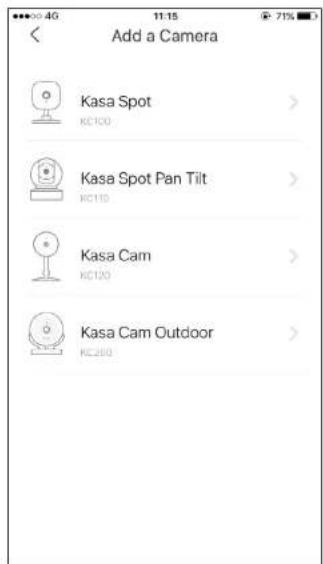
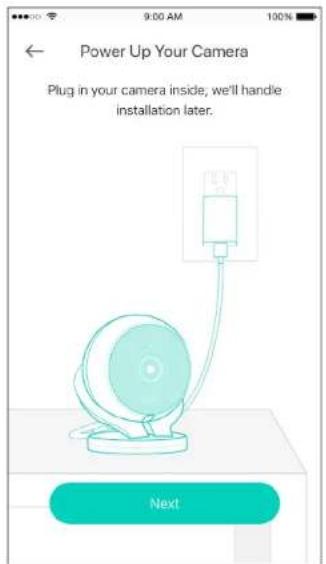
Step 4. Set up Indoors
Follow app instructions to set up the camera indoors.
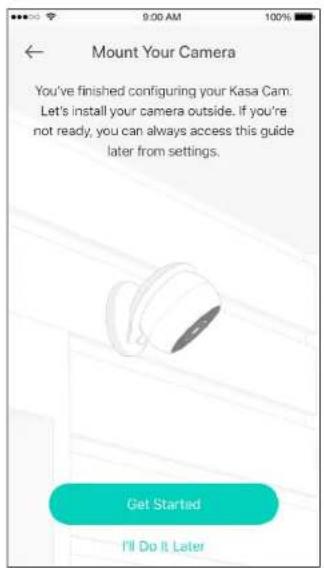
Step 5. Install Outdoors
Follow mounting instructions in the app to finish installation outdoors.
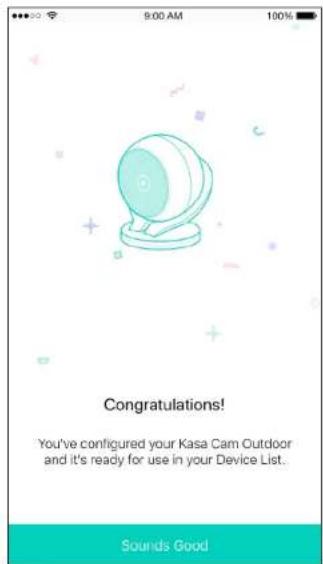
Enjoy!
Your camera is ready for use in your device list.
View Your Camera
After initial setup is complete, you can view your camera from anywhere.
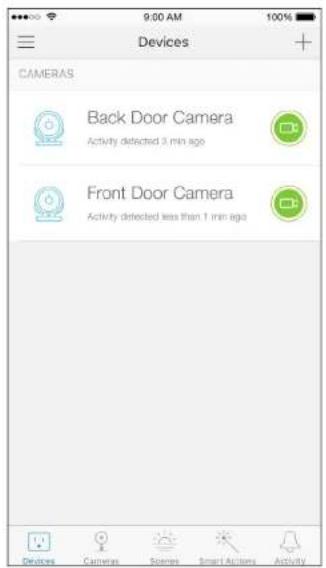
View Smart Devices List
Go to the Devices page, then you can view the list of all your cameras and any other smart devices if any.
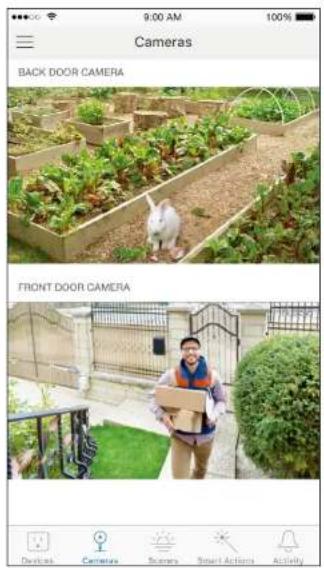
View Cameras List
Go to the Cameras page, then you can view the list of all your cameras.
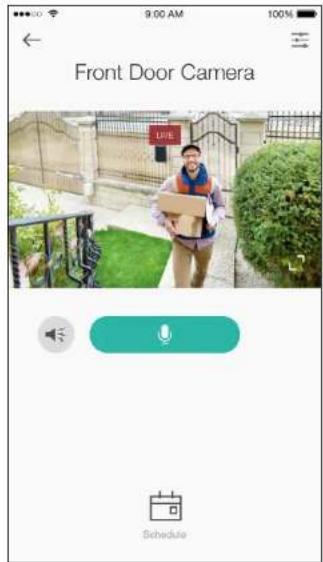
View Live Video
Tap a camera on the Devices or Cameras page, then you can view the live video, talk to a person near the camera, sound the siren to scare away intruders, and more.
Configure Your Camera
On the live video page, you can configure your camera to meet various needs.
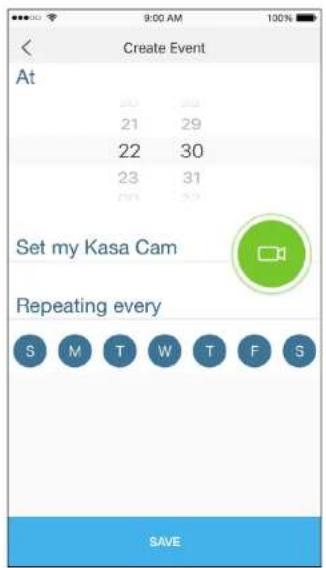
Set Schedule
Tap on the live video page, then you can schedule an automatic On/Off event for your camera to simplify your daily routine.
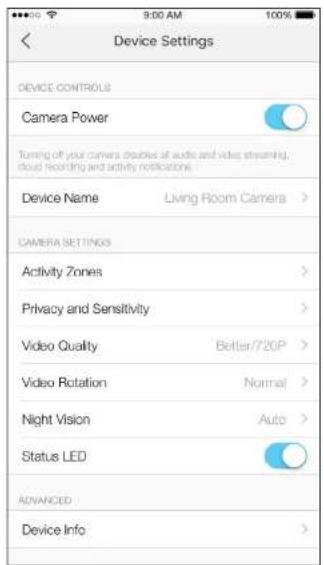
Change Camera Settings
Tap on the live video page, then you can view and change camera settings.
Check Activity Notifications
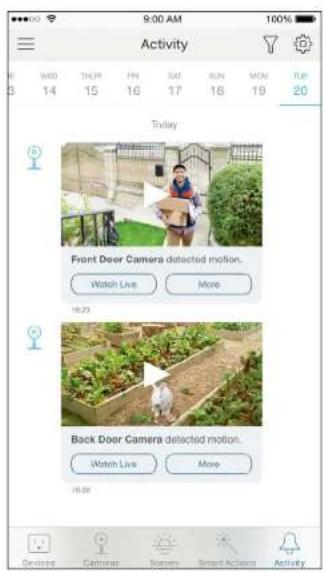
When you receive an activity notification, you can check the live video immediately, or check the recordings at any time.
Check Activity History
Go to the Activity page, then you can view the activity clips that your camera records.
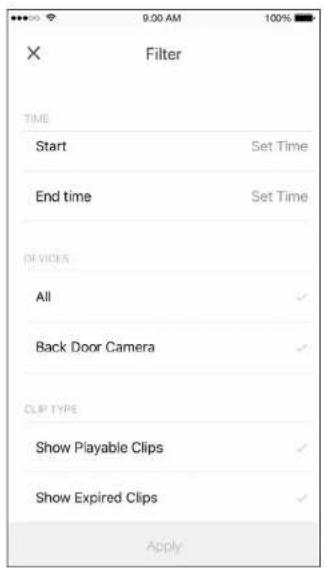
Filter Activity Clips
Tap 📋 on the Activity page, then you can filter activity clips according to your needs.
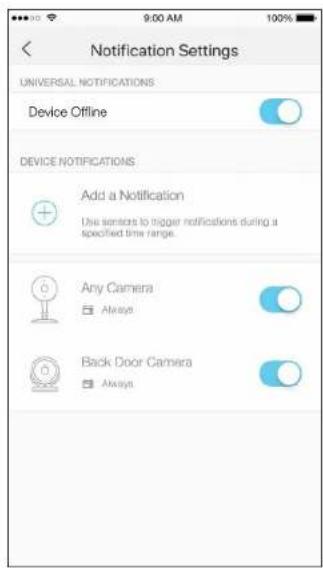
Change Notification Settings
Tap 📍 on the Activity page, then you can view and change notification settings.
Work with Other Smart Home Products
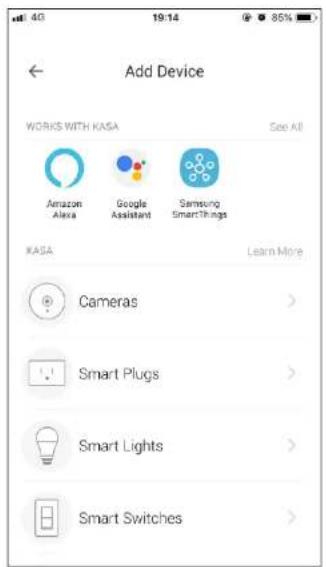
You can control your camera together with other smart home products from TP-Link, Amazon Alexa, Google Assistant, and more. Tap the + button on the Devices page, and add more TP-Link devices or other devices that work with Kasa.
Authentication
COPYRIGHT & TRADEMARKS
Specifications are subject to change without notice. TP-Link is a registered trademark of TP-Link Technologies Co., Ltd. Other brands and product names are trademarks or registered trademarks of their respective holders.
No part of the specifications may be reproduced in any form or by any means or used to make any derivative such as translation, transformation, or adaptation without permission from TP-Link Technologies Co., Ltd. Copyright © 2019 TP-Link Technologies Co., Ltd. All rights reserved.
FCC compliance information statement

Product Name: Kasa Cam Outdoor
Model Number: KC200
| Component Name | Model FCC Identifier number | |
| AC Power Adapter DSA-5PFU1-05 FCA 050100 NA | ||
Responsible Party:
TP-Link USA Corporation, d/b/a TP-Link North America, Inc.
Address: 145 South State College Blvd. Suite 400, Brea, CA 92821
Website: http://www.tp-link.com/us/
Tel: +1 626 333 0234
This equipment has been tested and found to comply with the limits for a Class B digital device, pursuant to part 15 of the FCC Rules. These limits are designed to provide reasonable protection against harmful interference in a residential installation. This equipment generates, uses and can radiate radio frequency energy and, if not installed and used in accordance with the instructions, may cause harmful interference to radio communications. However, there is no guarantee that interference will not occur in a particular installation. If this equipment does cause harmful interference to radio or television reception, which can be determined by turning the equipment off and on, the user is encouraged to try to correct the interference by one or more of the following measures:
- Increase the separation between the equipment and receiver.
- Connect the equipment into an outlet on a circuit different from that to which the receiver is connected.
- Consult the dealer or an experienced radio/TV technician for help.
This device complies with part 15 of the FCC Rules. Operation is subject to the following two conditions:
- This device may not cause harmful interference.
- This device must accept any interference received, including interference that may cause undesired operation. Any changes or modifications not expressly approved by the party responsible for compliance could void the user's authority to operate the equipment.
Note: The manufacturer is not responsible for any radio or TV interference caused by unauthorized modifications to this equipment. Such modifications could void the user's authority to operate the equipment.
FCC RF Radiation Exposure Statement
This equipment complies with FCC RF radiation exposure limits set forth for an uncontrolled environment. This device and its antenna must not be co-located or operating in conjunction with any other antenna or transmitter.
"To comply with FCC RF exposure compliance requirements, this grant is applicable to only Mobile Configurations. The antennas used for this transmitter must be installed to provide a separation distance of at least 20 cm from all persons and must not be co-located or operating in conjunction with any other antenna or transmitter."
We, TP-Link USA Corporation, has determined that the equipment shown as above has been shown to comply with the applicable technical standards, FCC part 15. There is no unauthorized change is made in the equipment and the equipment is properly maintained and operated.
Issue Date: 2019-10-22
FCC compliance information statement
Product Name: AC Power Adapter
Model Number: DSA-5PFU1-05 FCA 050100
Responsible Party:
TP-Link USA Corporation, d/b/a TP-Link North America, Inc.
Address: 145 South State College Blvd. Suite 400, Brea, CA 92821
Website: http://www.tp-link.com/us/
Tel: +1 626 333 0234
This equipment has been tested and found to comply with the limits for a Class B digital device, pursuant to part 15 of the FCC Rules. These limits are designed to provide reasonable protection against harmful interference in a residential installation. This equipment generates, uses and can radiate radio frequency energy and, if not installed and used in accordance with the instructions, may cause harmful interference to radio communications. However, there is no guarantee that interference will not occur in a particular installation. If this equipment does cause harmful interference to radio or television reception, which can be determined by turning the equipment off and on, the user is encouraged to try to correct the interference by one or more of the following measures:
- Increase the separation between the equipment and receiver.
- Connect the equipment into an outlet on a circuit different from that to which the receiver is connected.
- Consult the dealer or an experienced radio/TV technician for help.
This device complies with part 15 of the FCC Rules. Operation is subject to the following two conditions:
- This device may not cause harmful interference.
- This device must accept any interference received, including interference that may cause undesired operation.
Any changes or modifications not expressly approved by the party responsible for compliance could void the user's authority to operate the equipment.
We, TP-Link USA Corporation, has determined that the equipment shown as above has been shown to comply with the applicable technical standards, FCC part 15. There is no unauthorized change is made in the equipment and the equipment is properly maintained and operated.
Issue Date: 2019-10-22
CE Mark Warning

This is a class B product. In a domestic environment, this product may cause radio interference, in which case the user may be required to take adequate measures.
OPERATING FREQUENCY (the maximum transmitted power)
No restrictions exist in the use of radio frequencies or frequency bands in all EU member states and EFTA countries.
EU Declaration of Conformity
TP-Link hereby declares that the device is in compliance with the essential requirements and other relevant provisions of directives 2014/53/EU, 2009/125/EC, 2011/65/EU and (EU)2015/863.
The original EU declaration of conformity may be found at https://www.tp-link.com/en/ce
RF Exposure Information
This device meets the EU requirements (2014/53/EU Article 3.1a) on the limitation of exposure of the general public to electromagnetic fields by way of health protection.
The device complies with RF specifications when the device used at 20 cm from your body.
Canadian Compliance Statement
This device contains licence-exempt transmitter(s)/receiver(s) that comply with Innovation, Science and Economic Development Canada's licence-exempt RSS(s). Operation is subject to the following two conditions:
Radiation Exposure Statement:
This equipment complies with IC radiation exposure limits set forth for an uncontrolled environment. This equipment should be installed and operated with minimum distance 20cm between the radiator & your body.
Industry Canada Statement
CAN ICES-3 (B)/NMB-3(B)
Korea Warning Statements:
- Keep the device away from water, fire, humidity or hot environments.
- Do not attempt to disassemble, repair, or modify the device.
- Do not use damaged charger or USB cable to charge the device.
- Do not use any other chargers than those recommended
- Do not use the device where wireless devices are not allowed.
- Adapter shall be installed near the equipment and shall be easily accessible.
• Use only power supplies which are provided by manufacturer and in the original packing of this product. If you have any questions, please don't hesitate to contact us.
Please read and follow the above safety information when operating the device. We cannot guarantee that no accidents or damage will occur due to improper use of the device. Please use this product with care and operate at your own risk.
Warnings
- Operating Temperature: -20 °C-43 °C (-4°F-109°F)
- Operating Humidity: 10%-95%RH, Non-condensing
Explanation of the symbols on the product label
| Symbol Explanation | |
| DC voltage | |
| RECYCLINGThis product bears the selective sorting symbol for Waste electrical and electronic equipment (WEEE). This means that this product must be handled pursuant to European directive 2012/19/EU in order to be recycled or dismantled to minimize its impact on the environment.User has the choice to give his product to a competent recycling organization or to the retailer when he buys a new electrical or electronic equipment. | |
- USER GUIDE
- CONTENTS
- ABOUT THIS GUIDE
- CONVENTIONS
- MORE INFO
- INTRODUCTION
- APPEARANCE
- SYSTEM LED
- MAGNETIC MOUNT
- USB CABLE
- RESET BUTTON
- SPEAKERS AND MICROPHONE
- SET UP YOUR CAMERA
- STEP 1. DOWNLOAD KASA
- STEP 2. LOG IN
- STEP 3. START SETUP
- STEP 4. SET UP INDOORS
- STEP 5. INSTALL OUTDOORS
- ENJOY
- VIEW YOUR CAMERA
- VIEW SMART DEVICES LIST
- VIEW CAMERAS LIST
- VIEW LIVE VIDEO
- CONFIGURE YOUR CAMERA
- SET SCHEDULE
- CHANGE CAMERA SETTINGS
- CHECK ACTIVITY NOTIFICATIONS
- CHECK ACTIVITY HISTORY
- FILTER ACTIVITY CLIPS
- CHANGE NOTIFICATION SETTINGS
- WORK WITH OTHER SMART HOME PRODUCTS
- AUTHENTICATION
- COPYRIGHT & TRADEMARKS
- RESPONSIBLE PARTY
- FCC RF RADIATION EXPOSURE STATEMENT
- CE MARK WARNING
- OPERATING FREQUENCY (THE MAXIMUM TRANSMITTED POWER)
- EU DECLARATION OF CONFORMITY
- RF EXPOSURE INFORMATION
- CANADIAN COMPLIANCE STATEMENT
- RADIATION EXPOSURE STATEMENT
- INDUSTRY CANADA STATEMENT
- KOREA WARNING STATEMENTS
- WARNINGS
Brand : TP-LINK
Model : KC200
Category : Camera