 EasyManual
 6060 4CM W701T - Ceramic hob VC - Free user manual and instructions
Find the device manual for free 6060 4CM W701T VC in PDF.


User questions about 6060 4CM W701T VC
0 question about this device. Answer the ones you know or ask your own.
Ask a new question about this device
Download the instructions for your Ceramic hob in PDF format for free! Find your manual 6060 4CM W701T - VC and take your electronic device back in hand. On this page are published all the documents necessary for the use of your device. 6060 4CM W701T by VC.
USER MANUAL 6060 4CM W701T VC
This product has a 2-year warranty as of the date of purchase*, covering any fault resulting from a manufacturing or material defect. This warranty does not cover defects or damage resulting from incorrect installation, improper use or abnormal wear of the appliance.
*upon presentation of the sales receipt.
CONDITION DE GARANTIE
FR
Thank you for choosing this VALBERG product. Selected, tested and recommended by ELECTRO DEPOT, VALBERG brand products are easy to use, reliable and known for their impeccable quality. With this appliance, you can be sure of complete satisfaction every time you use it.
Welcome to ELECTRO DEPOT.
Visit our website: www.electrodepot.fr

Preview of the appliance
Features of the product

Using the appliance
Installation and preparation for use Use of the appliance

Useful information
Cleaning and maintenance Repair and transport
Features of the Product
IMPORTANT
Product specifications vary and your appliance may look different from those that appear in the figures below.
List of components
1 Hob
Control panel
3 Oven door handle
Oven door
5 Adjustable feet
Control panel
6 Timer
7 Function control
Oven temperature control
Hob control
Installation and preparation for use
WARNING
This appliance must be fitted by an authorised professional or qualified technician in accordance with the instructions in this manual and the applicable installation standards.
- Incorrect installation will invalidate the warranty and may result in damage or injury for which the manufacturer cannot be held liable.
- Before fitting, make sure that the local power supply conditions (voltage and current frequency and/or type and pressure of the gas) and the settings of the appliance are compatible. The setting conditions for this appliance are shown on the label.
- The laws, regulations, decrees and standards applicable in the country of installation must be observed (safety regulations, recycling in accordance with regulations, etc.).
- If the product contains guides for the removable racks (wire racks) and the user manual includes recipes like yoghurt, the wire racks must be removed and the oven must operate using the set cooking mode. Information on removing the wire rack is included in the CLEANING AND MAINTENANCE section.
Instructions for the installer
General instructions
- After removing the packaging from the appliance as well as its accessories, check the appliance for damage. If the appliance appears to be damaged, do not use it and immediately contact an authorised professional or qualified technician.
- Check that there are no combustible or flammable objects or materials, e.g. curtains, oil, cloth, etc., in the immediate vicinity.
- The worktop and furniture units surrounding the appliance must be able to withstand temperatures of over 100^ .
- This appliance must not be fitted directly above a dishwasher, refrigerator, freezer, washing machine or tumble dryer.
- The appliance can be fitted next to a furniture unit, provided that the height of the unit does not exceed the height of the hob in the installation area.
Cooker installation
- If the kitchen units are higher than the hob, there must be a gap of at least 10cm between the units and the sides of the appliance so that air can flow freely in between.
- If an extractor fan or cupboard is to be fitted above the appliance, the safety distance between the hob and the cupboard or extractor fan must respect the gap shown on the diagram below.
A (mm) Unit 420
B (mm) 650/700
Extractor fan
C (mm) Product width
D (mm) 50
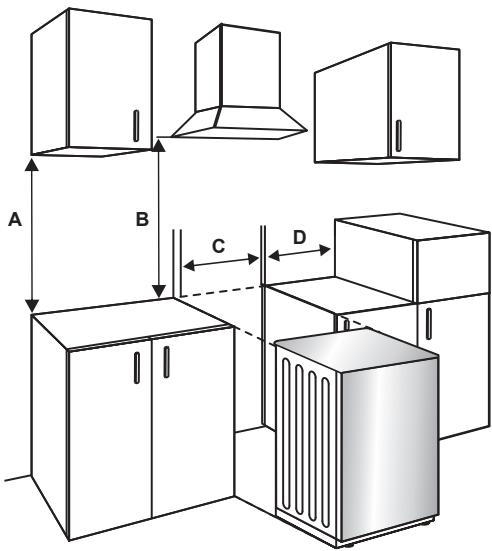
Electrical connection and safety
WARNING
This appliance must be connected to the power supply by an authorised professional or qualified technician in accordance with the instructions in this manual and the applicable installation standards.
WARNING
The appliance must be earthed.
- Before connecting to the power supply, check that the rated voltage of the appliance (marked on the nameplate of the appliance) matches the voltage of the power supply. The rated voltage of the power cable must also be at least equal to the nominal voltage of the appliance (also stated on the appliance's rating plate).
- When fitting, be sure to use appropriately insulated cables. An incorrect connection can damage the appliance. If the power cable is damaged and needs to be replaced, this should be done by a qualified person.
- Do not use adapters, power strips or extension cords.
- The power cable should be kept away from the hot parts of the appliance and should not be bent or crushed. Failure to do so may result in damage to the cable and cause a short circuit.
- If the appliance is not connected to the mains supply by a plug, fit a multi-pole isolator (with a contact spacing of at least 3mm ) in accordance with the safety regulations.
- This appliance is designed for a 220-240 V-.380-415 3N~ power supply. If your power supply is different, contact an authorised professional or qualified electrician.
- The power cable (H05VV-F) must be long enough to connect to the appliance.
- This fused disconnect switch must be easily accessible once the appliance is installed.
- Check that all connections are properly tightened.
- Attach the power cable to the terminal block and close the cover.
- The junction box connection is placed on the junction box.
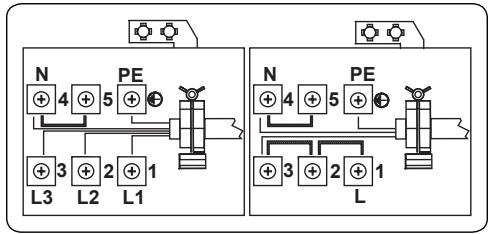
Anti-tip kit
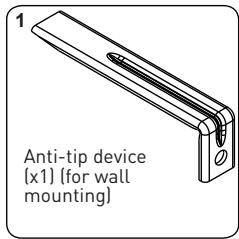
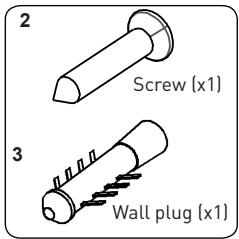
The documentation bag contains an anti-tip kit. Fasten the anti-tip device (1) to the wall using the screw (2) and the wall plug (3), in accordance with the dimensions in the illustration and table below. Adjust the height of the anti-tip device so that it is aligned with the groove on the cooker, then tighten the screw (2). Push the appliance towards the wall, making sure that the anti-tip device fits into the groove at the back of the appliance.
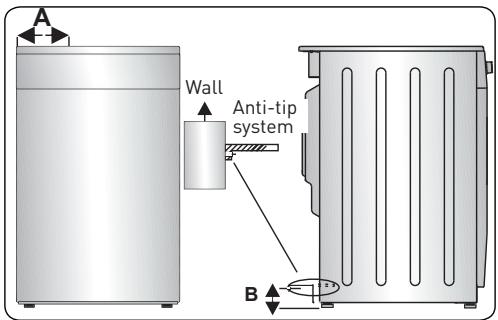
| Product dimensions (width X depth X height) (cm) | A (mm) | B (mm) |
| 60 x 60 x 90 (double cavity oven) | 297.5 | 52 |
| 50 x 60 x 90 (double cavity oven) | 247.5 | 52 |
| 90 x 60 x 85 | 430 | 107 |
| 60 x 60 x 90 | 309.5 | 112 |
| 60 x 60 x 85 | 309.5 | 64 |
| 50 x 60 x 90 | 247.5 | 112 |
| 50 x 60 x 85 | 247.5 | 64 |
| 50 x 50 x 90 | 247.5 | 112 |
| 50 x 50 x 85 | 247.5 | 64 |
Adjusting the feet
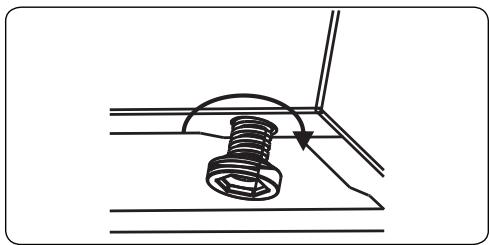
The product rests on adjustable feet. For safe operation, it is important to check that the appliance is stable. Check that the appliance is level before you start cooking. To raise the appliance, turn the feet anti-clockwise. To lower the appliance, turn the feet clockwise. The height of the appliance can be increased by up to 30mm by adjusting the feet. The appliance is very heavy and we recommend that it should be handled by at least two people. Never pull the appliance.
Using the appliance
Hob controls
Heating element
The heating element is controlled by a 6-position button.
The heating element is controlled by the corresponding controller, which must be set to the required setting. Beside each controller is a symbol that indicates which element is controlled by the controller. The on/off indicator light on the control panel indicates whether one of the heating elements is in use.
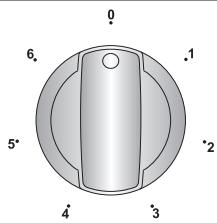
| Button position | Function |
| 0 | Off position |
| 1 | Keep warm position |
| 2-3 | Low heat position |
| 4-5-6 | Cook, sear and boil position |
IMPORTANT
The direction of rotation of the button varies depending on the product's characteristics.
Double and oval cooking zone (if available)
The double and oval cooking zone is composed of two cooking zones. To activate the outer part of a double/oval element, turn the button to the position. The two exterior zones light up. To deactivate the outer part of a double/oval element, turn the button to the Off position. The two exterior zones switch off.
Residual heat indicator (if available)
After using the hob, some of the heat will remain stored up in the ceramic surface. This is the residual heat. If the residual heat level is above +60^ , the residual heat indicator of the cooking zone concerned will light up. If the power supply to the hob is cut off while the residual heat indicator light is on, the warning light will flash when the power is restored. The display flashes until the residual heat has dropped or one of the cooking zones is activated.
Tips and advice
IMPORTANT
When the heating elements are set to the highest levels, the hot zones may switch on and off. This is because of a safety system that prevents the glass from overheating. This is normal at high temperatures, will not damage the hob and only extend cooking times very slightly.
WARNING
- Never use the hob without any cookware on the cooking zone.
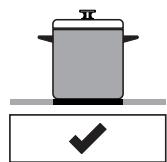
- Only use flat-bottomed pans with a thick base.
- Check that the bottom of the cookware is completely dry before placing them on the hob.
- When the cooking zone is on, it is important to check that the cookware is centred on the zone.
- To save energy, do not use cookware with a different diameter from that of the cooking zone used.
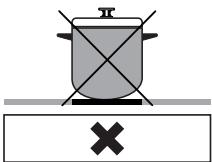
Pan with rounded bottom
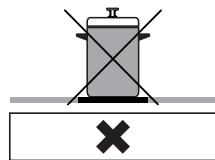
Pan is too small
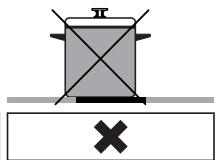
Pan is incorrectly positioned
WARNING
- Do not use cookware with a rough base, as it may damage the ceramic surface.
- If possible, always use a lid with the cookware.
- During use, the temperature of the accessible surfaces may be high. Keep children and pets away from the hob during use and until it has cooled down completely after use.
- If there is a crack on the hob, turn it off immediately and get it replaced by an authorised technician.
Oven controls
Function control
Turn the button to the symbol of the function you want. For the details of the different functions, refer to "Oven functions".
Oven temperature control
Once the cooking function is selected, turn this button to adjust the temperature. The oven temperature light turns on whenever the thermostat is working to heat the oven or maintain it at the required temperature setting.
Oven functions
- The functions of the oven may vary depending on the model of your product.
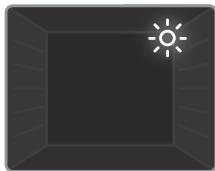
- Oven light: Only the oven light comes on. It remains on throughout the cooking process.
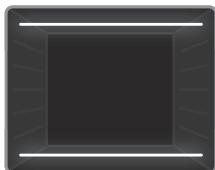
- Natural convection function: The temperature light and oven indicator light will come on and the top and bottom heating elements will start to heat up. The Static heat function emits heat that cooks the food evenly. It is ideal for pastries, cakes, pasta bakes, lasagne and pizza. It is recommended to preheat the oven for 10 minutes and to use only one level at a time in this mode.

- Bottom heat function: The temperature light and oven indicator light come on and the bottom element starts to heat up. The Bottom heat function is ideal for heating up pizzas because the heat comes from the bottom of the oven, heating the pizza from below. This function is more suited to heating up food rather than cooking it.
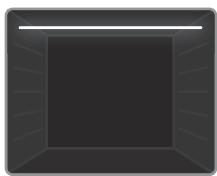
- Top heat function: The temperature light and oven indicator light come on and the top element starts to heat up. The heat coming from the top element cooks the top of the food. The Top heat function is ideal for browning food that has already been cooked and for heating up food.
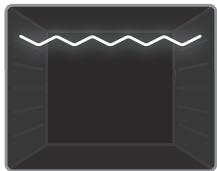
- Grill function: The temperature light and oven indicator light come on and the grill element starts to heat up. This function is used to grill and toast food placed on the upper levels of the oven. Lightly oil the wire rack with a brush to prevent food from sticking, then put the food in the centre of the rack. Always place a drip pan under the grill to catch oil or grease. Preferably preheat the oven for about 10 minutes.
WARNING
When using the grill, the oven door must be closed and the oven temperature set to 190^ C .
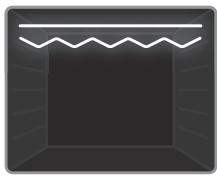
- Express Grill function: The temperature light and oven warning lights come on and the grill and top elements start to heat up. This function is recommended for grilling food more quickly over a larger surface area (e.g.: meat). Using the top level. Lightly oil the wire rack with a brush to prevent food from sticking, then put the food in the centre of the rack. Always place a drip pan under the grill to catch oil or grease. It is recommended to preheat the oven for about 10 minutes.
WARNING
When broiling, the oven door must be closed and the oven temperature set to 190^ C .
Hob
| Function | Dishes | min. | ||
| Static | Puff pastry | 1-2 | 170-190 | 35-45 |
| Cake | 1-2 | 170-190 | 30-40 | |
| Cookies | 1-2 | 170-190 | 30-40 | |
| Beef stew | 2 | 175-200 | 40-50 | |
| Grill | Chicken | 1-2 | 200 | 45-60 |
| Grilled meatballs | 4 | 200 | 10-15 | |
| Chicken | * | 190 | 50-60 | |
| Chops | 3-4 | 200 | 15-25 | |
| Steak | 4 | 200 | 15-25 |
*If available, use the roasting spit.
Using the mechanical timer
Description of the function
M
0.....100
Manual operation
With the timer setting
Manual operation
When the timer button is set to the "M" position, the oven runs continuously. When the timer button is set to the "0" position, the oven does not work.
With the timer setting
Set the required cooking time by turning the timer button to a value between 0 and 100 minutes. Once the time has elapsed, the oven will automatically turn off and an audible alarm will sound.
Accessories
Deep tray
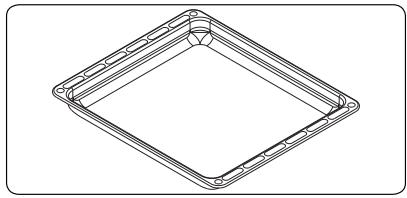
The deep tray is used to cook stews.
To position the tray properly in the cavity, place it on any rail and push it to the back.
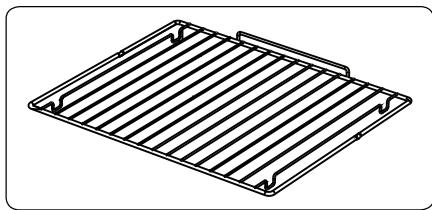
Wire rack
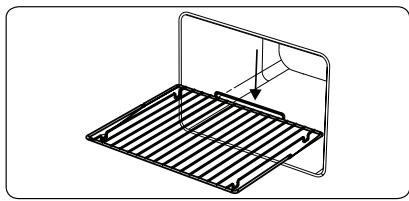
The wire mesh is used for grilling or preparing food in other containers.
WARNING
Correctly place the oven rack in the oven cavity by pushing it all the way in.
Cleaning and maintenance
Cleaning
WARNING
Turn off the appliance and let it cool down before cleaning.
General instructions
- Check that the cleaning products are suitable and recommended by the manufacturer before using them on the appliance.
- Use particle-free cream or liquid cleaners. Do not use caustic (corrosive) creams, abrasive cleaning powders, wire scrubbers or rough objects, as they may damage the surface of the cooker.
WARNING
Do not use cleaners that contain particles, as they can scratch the glass as well as the enamelled or painted parts of the appliance.
- If some liquid gets spilled, clean it up immediately to avoid damaging the parts.
WARNING
Do not use a steam cleaner to clean the appliance.
Cleaning the inside of the oven
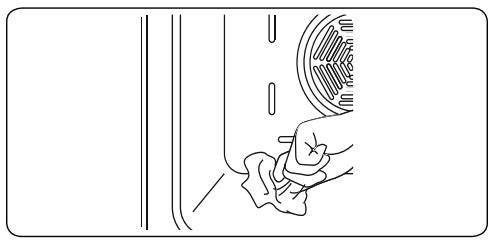
- Preferably clean the inside of the enamelled oven when it is hot.
- Wipe the oven with a soft cloth soaked in soapy water after use. Wipe the oven again with a damp cloth, then dry it.
- Occasionally, you may need to use a liquid cleaner to completely clean the oven.
Cleaning the ceramic glass
Ceramic glass can bear the weight of heavy cookware but can break if hit by blunt objects.
WARNING
Ceramic hob - If the surface is cracked, to avoid any risk of an electric shock, turn off the appliance and contact the maintenance department.
- Use cream or liquid cleaners to clean the ceramic glass, then rinse and dry thoroughly with a dry cloth.
WARNING
Do not use cleaning materials for steel products, as they could damage the glass.
- Spilled sugary food should be cleaned up immediately after the glass has cooled down.
- Dust on the surface should be cleaned using a damp cloth.
C Useful information
- Changes in the colour of the ceramic glass do not affect the structure or durability of the ceramic material and is not the result of a change in the material.
The colour of the ceramic glass can change for various reasons:
- Food getting spilled and not being cleaned from the surface.
- Using non-recommended dishes on the hob, which wear the surface down.
- Using non-recommended cleaning materials.
Cleaning the glass parts
- Clean the glass parts of the appliance regularly.
- Use a window cleaning product to clean the inside and outside of the glass parts, then rinse and dry them carefully using a dry cloth.
Cleaning the enamelled parts
- Clean the enamelled parts of the appliance regularly.
- Wipe the enamelled parts using a soft cloth dipped in soapy water. Then wipe them again with a damp cloth and dry them.
WARNING
- Do not wash the enamelled parts while they are still hot, after cooking.
- Do not leave vinegar, coffee, milk, salt, water, lemon or tomato juice on the enamelled parts for long periods of time.
Cleaning the stainless steel parts (if applicable)
- Clean the stainless steel parts of the appliance regularly.
- Wipe the stainless steel parts using a soft cloth dipped in soapy water. Then, dry them carefully using a dry cloth.
WARNING
- Do not wash the stainless steel parts while they are still hot, after cooking.
- Do not leave vinegar, coffee, milk, salt, water, lemon or tomato juice on the stainless steel parts for long periods of time.
Removing the oven door
Before cleaning the glass of the oven door, the internal glass must be removed as follows:
- Open the oven door.
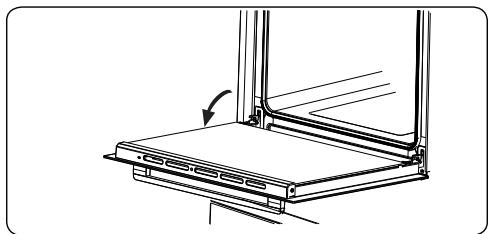
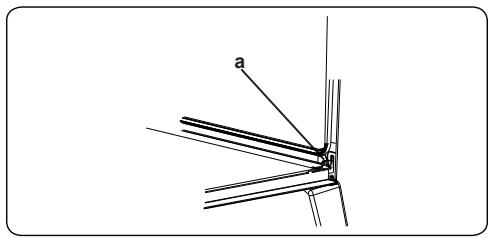
- Fully open the saddle support (a) (with a screwdriver) until it stops.
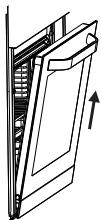
- Close the door until it is almost fully closed and remove it by pulling it towards you.
Maintenance
WARNING
This appliance should be maintained by an authorised person or qualified technician.
Replacing the oven light
WARNING
Turn off the appliance and let it cool down before cleaning.
- Remove the glass cover, then remove the bulb.
- Insert the new bulb (resistant to 300^ ) to replace the one you removed (230 V, 15 - 25 Watt, Type E14).
- Replace the glass cover. The oven is now ready to operate.
- This product contains a light source with an energy efficiency rating of G.
- The light source cannot be replaced by the end user. After-sales servicing is required.
- The included light source cannot be used for other applications.
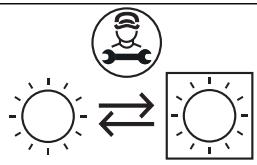
Light source replaceable by a professional
WARNING
The light is made exclusively for use in household cooking appliances. It is not suitable for lighting up a room.
Troubleshooting and transport
Troubleshooting
WARNING
If the problem persists with the appliance after following these basic repairs, contact an authorised professional or qualified technician.
| Problem | Possible cause | Solution |
| The hob or cooking zones cannot be switched on. | There is no power. | Check the fuse for the appliance in the fuse box. Check that the power supply is not cut by trying to turn on other electronic appliances. |
| The oven does not switch on. | The power supply is cut. | Check that the power supply is connected. Also check that the other kitchen appliances are working. |
| No heat is generated or the oven does not preheat. | The oven temperature setting is incorrect. The oven door is open. | Check that the oven temperature control is set correctly. |
| Uneven cooking in the oven. | The trays/racks are incorrectly positioned. | Check that the recommended temperatures and levels are being followed. Do not open the door frequently unless the food being cooked needs to be turned. Opening the door too often causes the temperature in the oven to drop, which can affect the cooking results. |
| The oven light is not working. | The bulb does not work. The power supply is cut or disconnected. | Replace the bulb according to the instructions. Check the plug is connected to the power socket. |
| The oven fan (if there is one) is noisy. | The oven trays/ racks vibrate. | Check that the oven is level. Check that no trays/racks or dishes are vibrating or touching the rear panel of the oven. |
Transport
- If the appliance has to be moved, pack it in its original packaging and cardboard box. Follow the transport guidelines indicated on the packaging. Fasten moving parts to the appliance using adhesive tap to prevent any damage during transport.
- If the original packaging is not available, use a cardboard box to protect the appliance - especially the external surfaces - from external hazards.