
H29MOBS9H - Microwave HISENSE - Free user manual and instructions
Find the device manual for free H29MOBS9H HISENSE in PDF.



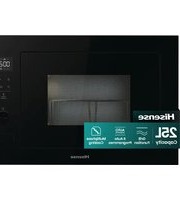
| Product type | Microwave |
| Brand | Hisense |
| Model | H29MOBS9H |
| Capacity | 29 litres |
| Microwave power | 900 W |
| Power supply | 230 V ~ 50 Hz, 1450 W |
| Frequency | 2450 MHz |
| Dimensions (W × H × D) | 495 × 291 × 401 mm |
| Net weight | Approximately 15 kg |
| Noise level | < 58 dB(A) |
| Cooking functions | Time cook, express cook (30s), auto cook (popcorn, potatoes, pizza, vegetables, beverages, my plate), multi-stage cooking |
| Defrost | By weight (100 g - 2000 g) and by time |
| Timer | Yes, up to 99 min 99 s |
| Clock | Digital display, 12-hour format |
| Memory | Up to 3 custom programs |
| Child safety | Key lock (activate by long press on STOP) |
| Power levels | 10 levels (10% to 100%) |
| Turntable | Glass, removable and dishwasher safe |
| Roller ring | Removable, cleanable with soapy water or in dishwasher |
| Maintenance | Clean interior with damp sponge and mild detergent; do not use abrasive products |
| Repairability | Call a qualified technician for any repair; do not remove the microwave protection panel |
Frequently Asked Questions - H29MOBS9H HISENSE
User questions about H29MOBS9H HISENSE
0 question about this device. Answer the ones you know or ask your own.
Ask a new question about this device
Download the instructions for your Microwave in PDF format for free! Find your manual H29MOBS9H - HISENSE and take your electronic device back in hand. On this page are published all the documents necessary for the use of your device. H29MOBS9H by HISENSE.
USER MANUAL H29MOBS9H HISENSE
Instruction manual / Microwave oven
EN 112
DEAR CUSTOMER
Noise level (Lc IEC): < 58 dB (A)
| Scelta | 10 | 9 | 8 | 7 | 6 | 5 | 4 | 3 | 2 | 1 | 0 |
| Display | PL10 | PL9 | PL8 | PL7 | PL6 | PL5 | PL4 | PL3 | PL2 | PL1 | PL0 |
| Potenza | 100% | 90% | 80% | 70% | 60% | 50% | 40% | 30% | 20% | 10% | 0% |
QUICK COOKING
BUILT-IN DIMENSIONS
RADIO INTERFERENCE
| Seleção | 10 | 9 | 8 | 7 | 6 | 5 | 4 | 3 | 2 | 1 | 0 |
| Ecrã | PL10 | PL9 | PL8 | PL7 | PL6 | PL5 | PL4 | PL3 | PL2 | PL1 | PL0 |
| Potência | 100% | 90% | 80% | 70% | 60% | 50% | 40% | 30% | 20% | 10% | 0% |
SMARTCOOKING - EXPRESS COOKING
0 (MEMORY TEST)
SMARTCOOK - QUICK COOK
| Keuze | 10 | 9 | 8 | 7 | 6 | 5 | 4 | 3 | 2 | 1 | 0 |
| Display | PL10 | PL9 | PL8 | PL7 | PL6 | PL5 | PL4 | PL3 | PL2 | PL1 | PL0 |
| Energie | 100% | 90% | 80% | 70% | 60% | 50% | 40% | 30% | 20% | 10% | 0% |
We sincerely thank you for your purchase. We believe you will soon find ample evidence that you can really rely on our products. To make the use of the appliance easier, we attach these comprehensive instruction manual.
The instructions should aid you in getting familiar with your new appliance. Please, read them carefully before using the appliance for the first time.
In any case, please make sure the appliance was supplied to you undamaged. Should you identify and transport damage, contact your sales representative or the regional warehouse from where the product was delivered. You will find the telephone number on the receipt or delivery report.
We wish you a lot of pleasure with your new household appliance.

The appliance for household use for heating food and beverages using electromagnetic energy, for indoor use only.
INSTRUCTIONS FOR USE
These instructions are intended for the user.
They describe the cooker and how to use it. They also apply to different types of appliances, therefore you may find some descriptions of functions that may not apply to your appliance.
We reserve the right to any changes and errors in the instructions for use.

Never touch the surfaces of heating or cooking appliances. They will become hot during operation. Keep children at a safe distance. There is a risk of burning!

Microwave energy & High voltage! Do not remove the cover.
WARNING! The appliance and its accessible parts become hot during use. Care should be taken to avoid touching heating elements. Children less than 8 years of age shall be kept away unless continuously supervised. Children should be supervised to ensure that they do not play with the appliance.
This appliance can be used by children aged from 8 years and above and persons with reduced physical, sensory or mental capabilities or lack of experience and knowledge if they have been given supervision or instruction concerning use of the appliance in a safe way and understand the hazards involved. Children shall not play with the appliance. Cleaning and maintenance shall not be made by children unless they are older than 8 and supervised.
Keep the appliance and its cord out of reach of children less than 8 years.
- WARNING: When the appliance is operated in the combination mode, children should only use the oven under adult supervision due to the temperatures generated; (Only for the model with grill function)
- WARNING: If the door or door seals are damaged, the oven must not be operated until it has been repaired by a competent person;
- WARNING: It is hazardous for anyone other than a competent person to carry out any service or repair operation that involves the removal of a cover which gives protection against exposure to microwave energy;
- WARNING: liquids and other foods must not be heated in sealed containers since they are liable to explode.
- Children should be supervised to ensure that they do not play with the appliance.
- Do not remove the oven's feet, and do not block the air vents of the oven.
- Only use utensils that are suitable for use in microwave ovens.
- When heating food in plastic or paper containers, keep an eye on the oven due to the possibility of ignition.
- If smoke is observed, switch off or unplug the appliance and keep the door closed in order to stifle any flames.
- Microwave heating of beverages can result in delayed eruptive boiling, therefore care must be taken when handling the container.
- The contents of feeding bottles and baby food jars shall be stirred or shaken and the temperature checked before consumption, in order to avoid burns.
- Eggs in their shell and whole hard-boiled eggs should not be heated in microwave ovens since they may explode, even after microwave heating has ended.
- When cleaning surfaces of the door, door seal, and cavity of the oven, use only mild, nonabrasive soaps or detergents applied with a sponge or soft cloth.
- The oven should be cleaned regularly and any food deposits removed.
- Failure to maintain the oven in a clean condition could lead to deterioration of the surface that could adversely affect the life of the appliance and possibly result in a hazardous situation.
- If the supply cord is damaged, it must be replaced by the manufacturer, its service agent, or similarly qualified persons in order to avoid a hazard.
- Do not let the cord hang over the edge of the table or worktop.
- Never connect this appliance to an external timer switch or remote control system in order to avoid a hazardous situation.
- Never replace the light bulb inside the oven. It must always be replaced by Hisense service.
- Do not clean the appliance with steam cleaners, high-pressure cleaners, sharp objects, abrasive cleaning agents, and abrasive sponges and stain removers.
Listed below are, as with all appliances, certain rules to follow and safeguards to assure top performance from this oven:
- Always have the glass tray, roller arms, coupling and roller track in place when operating the oven.
- Do not use the oven for any reason other than food preparation, such as for drying clothes, paper, or any other nonfood items, or for sterilizing purposes.
- Do not operate the oven when empty. This could damage the oven.
- Do not use the oven cavity for any type of storage, such a papers, cookbooks, etc.
- Do not cook any food surrounded by a membrane, such as egg yolks, potatoes, chicken livers, etc without first being pierced several times with a fork.
- Do not insert any object into the openings on the outer case.
- Do not at any time remove parts from the oven such as the feet, coupling, screws, etc.
- Do not cook food directly on the glass tray. Place food in/on proper cooking utensil before placing in the oven. IMPORTANT - COOKWARE NOT TO USE IN YOUR MICROWAVE OVEN
- Do not use metal pans or dishes with metal handles.
- Do not use anything with metal trim.
- Do not use paper-covered wire twist-ties on plastic bags.
- Do not use melamine dishes as they contain a material which will absorb microwave energy. This may cause the dishes to crack or char and will slow down the cooking speed.
- Do not use Centura Tableware. The glaze is not suitable for microwave use. Corelle Livingware closed handle cups should not be used.
- Do not cook in a container with a restricted opening, such as a pop bottle or sealed oil bottle, as they may explode if heated in a microwave oven.
- Do not use conventional meat or candy thermometers.
- There are thermometers available specifically for microwave cooking. These may be used.
- Microwave utensils should be used only in accordance with manufacturer's instructions.
- Do not attempt to deep-fry foods in this oven.
- Please remember that a microwave oven only heats the liquid in a container rather than the container itself. Therefore, even though the lid of a container is not
hot to the touch when removed from the oven, please remember that the food/liquid inside will be releasing the same amount of steam and/or spitting when the lid is removed as in conventional cooking.
- Always test the temperature of cooked food yourself especially if you are heating or cooking food/liquid for babies. It is advisable never to consume food/liquid straight from the oven but allow it to stand for a few minutes and stir food/liquid to distribute heat evenly.
- Food containing a mixture of fat and water, e.g. stock, should stand for 30-60 seconds in the oven after it has been turned off. This is to allow the mixture to settle and to prevent bubbling when a spoon is placed in the food/liquid or a stock cube is added.
- When preparing/cooking food/liquid, remember that there are certain foods, e.g. Christmas puddings, jam and mincemeat, which heat up very quickly. When heating or cooking foods with a high fat or sugar content, do not use plastic containers.
- Cooking utensils may become hot because of heat transferred from the heated food. This is especially true if plastic wrap has been covering the top and handles of the utensil. Potholders may be needed to handle the utensil.
- To reduce the risk of fire in the oven cavity:
a) Do not overcook food. Carefully attend the microwave oven if paper, plastic, or other combustible materials are placed inside the oven to facilitate cooking. b) Remove wire twist-ties from bags before placing the bag in the oven. c) If materials inside the oven should ignite, keep the oven door closed, turn the oven off at the wall switch, or shut off power at the fuse or circuit breaker panel.
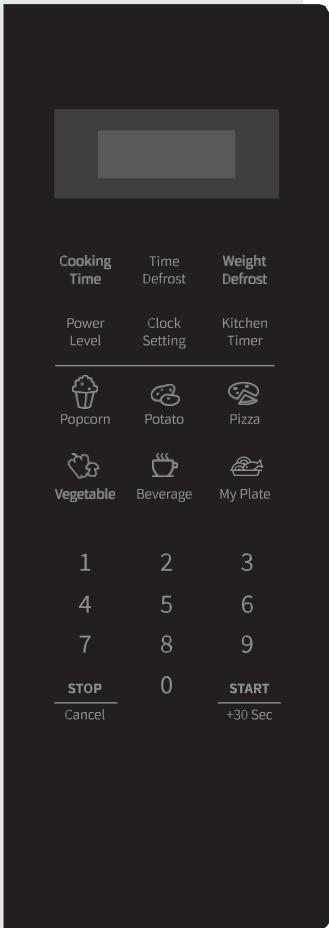
DISPLAY
Shows the clock, cooking time, and setting.
COOKING TIME
Use this key to cook food by time.
TIME DEFROST
Use this key to defrost food by time.
WEIGHT DEFROST
Use this key to defrost food by weight.
POWER LEVEL
Use this key to select the microwave power level.
CLOCK SETTING
Use this key to set the clock.
KITCHEN TIMER
Use this key to set the timer function.
ICONS
Use these keys to set time and food weight and to choose the auto menu programmes.
0-9
Use these keys to enter the cooking time and weight.
STOP/CANCEL
Use this key to defrost the food by weight.
0 (MEMORY FUNCTION)
Use this key to select the memory programmes.
START/+30 SEC
Use this key to do quick start cooking of 30 seconds, increase cooking time by 30 seconds (by each press), or confirm cooking settings.
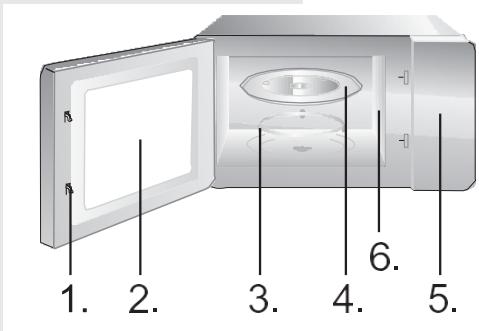
- Door Safety Lock System
- Oven Window
- Roller Ring
- Glass Tray
- Control Panel
- Wave guide (please do not remove the mica plate covering the wave guide)
CLOCK
The oven is fitted with a digital clock. When the oven is in the standby mode, the clock can be set in the 12-hour mode by pressing the Clock Setting key.
- Press the Clock Setting and the digits will flash.
- Press the Numeric (0-9) keys and enter the time. For example, to input the current time 12:30, you need to press "1", "2", "3", "0". The input hour has to be within 1-12 and the input minutes has to be within 0-59.
- Press the Clock Setting key again to complete the clock setting. ":" will start flashing. The clock setting is complete.
NOTE:
Please ensure that you have set the clock prior to use.
TIMER
Use the countdown timer to set an alarm.
- Press the Kitchen Timer key. The display will show "00:00".
- Press the Numeric (0-9) keys and enter the timer time. The longest time you can set is 99 minutes and 99 seconds.
- Press the START key to confirm the setting.
- Once the elapsed time is reached, the microwave will sound and return to its original state.
NOTE:
- When the kitchen timer is running, other functions cannot be used.
- When the microwave is not in use, this feature allows you to use the microwave as a timer.
- Please make sure the clock has been set.
COOKING
- Press the Cooking Time key. The display will show "00:00".
- Press the Numeric (0-9) keys to enter the cooking time. For example, enter the cooking time 5min by pressing "5", "0", "0".
- Press the Power key and the display will show "PL10".
- Press the Numeric (0-9) keys to enter the microwave power level. (Power level settings are shown in the table below.) For example, enter the power level by pressing "6".
- Press the START key to confirm and start cooking.
- While the microwave is in use, press the Power Level key and then press the Numeric (0-9) keys to change the microwave power level. The microwave will work with the selected power for the remaining time.
- Press the STOP/Cancel key to pause the cooking. Press the STOP/Cancel key again to cancel the setting.
NOTE:
When PLO (0%) is selected, no microwave power will be present. This setting is for deodorizing purposes only.
| Input | 10 | 9 | 8 | 7 | 6 | 5 | 4 | 3 | 2 | 1 | 0 |
| Display | PL10 | PL9 | PL8 | PL7 | PL6 | PL5 | PL4 | PL3 | PL2 | PL1 | PL0 |
| Power | 100% | 90% | 80% | 70% | 60% | 50% | 40% | 30% | 20% | 10% | 0% |
SMARTCOOK - EXPRESS COOKING
MULTI-STAGE COOKING
- Press the Numeric (1-6) keys to start the express cooking at 100% microwave power. The maximum time you can set is 6 minutes.
- Press the STOP/Cancel key to pause the cooking. Press the STOP/Cancel key again to cancel the setting.
Microwave oven allows cooking in two steps.
- Press the Cooking Time key. The display will show "00:00".
- Press the Numeric (0-9) keys to enter the cooking time. For example, enter the cooking time by pressing "7", "0", "0".
- Press the Power Level key and the display will show "PL10".
- Press the Numeric (0-9) keys to enter the microwave power level. For example, enter the microwave power level by pressing "8".
- Press the Cooking Time key. The display will show "00:00".
- Press the Numeric (0-9) keys to enter the cooking time. For example, enter the cooking time by pressing "5", "0", "0".
- Press the Power Level key once and the display will show "PL10".
- Press the Numeric (0-9) keys to enter the microwave power level. For example, enter the microwave power level by pressing "1".
- Press the START key to confirm and start cooking.
NOTE:
Defrost function can only be used in the first step. Auto menu cannot be a step in a multi-step cooking program.
For the food in the auto menu, only the type of food and the weight/amount have to be set. The oven will aid you in the setting of power and time.
For instance: If you want to cook 2 pieces of potato, please follow the steps below:
- Press the Potato key repeatedly to select the weight option of your food. Please refer to the auto-cook menu table for more information.
- Press the START key to confirm and start cooking.
| Menu | Display | Weight | Time |
| Popcorn | 50 | 50g | 0'55" |
| 100 | 100g | 2'00" | |
| Potato | 1 | 230g | 4'00" |
| 2 | 460g | 8'00" | |
| 3 | 690g | 13'00" | |
| Pizza | 100 | 100g | 0'40" |
| 200 | 200g | 1'10" | |
| 400 | 400g | 2'30" | |
| Vegetable (frozen) | 150 | 150g | 4'00" |
| 350 | 350g | 8'00" | |
| 500 | 500g | 11'00" | |
| Beverage | 1 | 120ml | 1'00" |
| 2 | 240ml | 2'00" | |
| 3 | 360ml | 3'00" | |
| My Plate (meat, side dish) | 250 | 250g | 3'30" |
| 350 | 350g | 4'30" | |
| 500 | 500g | 6'30" |
NOTE:
- For some food, you may need to turn it over during cooking to ensure it is thoroughly cooked and browns evenly.
- The density and thickness of food can affect its cooking time.
- All cooking times are approximate guides only; adjust to preferred tastes and recipes.
- Only use suitable microwavable containers and cling film in the microwave. Pierce the film with a fork before cooking.
WEIGHT (AUTO) DEFROST
The oven allows defrosting of meat, poultry, and seafood. Defrosting time and operating power will be adjusted automatically according to the preset weight. Weight of the food to be defrosted may be between 100 g and 2000 g.
- Press the Weight Defrost key and the display will show "dEF1".
- Press the numeric (0-9) keys to enter the weight. For example, enter the weight by pressing "6", "0", "0" for 600g.
- Press the START key to confirm and start cooking.
NOTE:
Large items may be frozen in the center. Therefore, to ensure even thawing, turn them over from time to time and break them into smaller pieces during defrosting.
Drain liquids during defrosting as the juices from food can get hot and cook the food.
TIME (SPEED) DEFROST
The oven also allows speed defrosting.
- Press the Time Defrost and the display will show "dEF2".
- Press the numeric (0-9) keys to enter the defrosting time. For example, enter the defrosting time by pressing "5", "3", "0" for 5 minutes and 30 seconds.
- The default microwave power level is 3 (30%), if you want to change the power level, press the Power key once and the display will show "PL3".
- Press the numeric (0-9) keys to change the microwave power level. For example, enter the microwave power level by pressing "2" for 20% power.
- Press the START key to confirm and start cooking.
NOTE:
Large items may be frozen in the center. Therefore, to ensure even thawing, turn them over from time to time and break them into smaller pieces during defrosting.
Drain liquids during defrosting as the juices from food can get hot and cook the food.
MEMORY FUNCTION
You can set the cooking procedure in the memory. You can set a maximum of 3 memories, please follow the steps below.
Example: If you want to cook the food with 80% microwave power level for 3 minutes and 20 seconds as the second memory.
- Press "0" (the Memory key) once and the display will show "1". Press "0" key again to enter the next memory programme. The display will show "2".
- Press the Time Cook key, and then enter the cooking time by pressing "3", "2", "0". The display will show "3:20".
- Press the Power key, and then select the 80% microwave power by pressing "8". The display will show "PL8".
- Press the STAR key to save the setting.
To Access Saved Cooking Memory
- Press "0" (the Memory key) repeatedly to select the saved memory programme you want. The display will show "1", "2" or "3".
NOTE:
To overwrite the saved memory programme, repeat the above steps 1-3 in the same memory programme.
If the electricity is cut off, the cooking memory is deleted.
QUICK START
Tips for using the oven
Use this function to rapidly heat (100% microwave power) or cook your food. In standby mode, press the START key and the oven will operate for 30 seconds. With each consecutive press of the START key, the operating time will be extended by 30 seconds.
NOTE:
Pressing the START key again will prolong the cooking time by 30 seconds in all programs except in automatic mode, multi-step cooking, and in the auto defrost mode.
CHILD LOCK
This function is used to prevent uncontrolled or inadvertent use of the oven by children. When the control panel is locked, the relevant icon is displayed, and all functions are disabled.
To lock the oven, press and hold the STOP key. When you hear a beep, the oven is locked, and the key symbol appears on the display unit. If the oven is locked, all keys are ineffective. To unlock the control panel, press and hold the STOP key again. When you hear a beep, the oven is unlocked.
KEYPAD SOUND SETTINGS
Use this function to mute the keypad sound (beeps).
Press and hold the "8" key until you hear two short beeps. Keypad beeps are now muted (cooking end beeps stay on).
To turn on the keypad beeps again, press and hold the "8" key until you hear two short beeps.
- Turn the oven off and remove the power plug from the wall socket before cleaning.
- Keep the inside of the oven clean. When food splatters or spilled liquids adhere to oven walls, wipe with a damp cloth. The use of harsh detergent or abrasives is not recommended.
- The outside oven surface should be cleaned with a damp cloth. To prevent damage to the operating parts inside the oven, water should not be allowed to seep into the ventilation openings.
- Do not allow the Control Panel to become wet. Clean with a soft, damp cloth. Do not use detergents, abrasives, or spray-on cleaners on the control panel.
- If steam accumulates inside or around the outside of the oven door, wipe with a soft cloth. This may occur when the microwave oven is operated under high humidity conditions and in no way indicates malfunction of the unit.
- It is occasionally necessary to remove the glass tray for cleaning. Wash the tray in warm sudsy water or in a dishwasher.
- The roller ring and oven cavity floor should be cleaned regularly to avoid excessive noise. Simply wipe the bottom surface of the oven with mild detergent, water or window cleaner and dry. The roller ring may be washed in mild sudsy water or in a dishwasher. Cooking vapors collect during repeated use but in no way affect the bottom surface or roller ring wheels. When removing the roller ring from the cavity floor for cleaning, be sure to replace it in the proper position.
- Remove odors from your oven by combining a cup of water with the juice and skin of one lemon in a deep microwaveable bowl. Microwave for 5 minutes, wipe thoroughly and dry with a soft cloth.
ENVIRONMENT
Do not throw away the appliance with the normal household waste at the end of its life, but hand it in at an official collection point for recycling. By doing this, you help to preserve the environment.
INSTALLATION
- Make sure all the packing materials are removed from the inside of the door.
- Inspect the oven after unpacking for any visual damage such as:
- Misaligned Door
- Damaged Door
- Dents or Holes in Door Window and Screen Dents in Cavity
If any of the above are visible, DO NOT use the oven.
- This Microwave Oven weighs 15 kg and must be placed on a horizontal surface strong enough to support this weight.
- The oven must be placed away from high temperature and steam.
- DO NOT place anything on top of the oven.
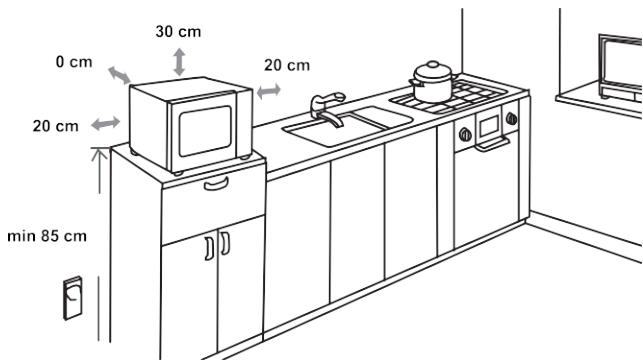
- Keep the oven at least 20 cm away from both sidewalls and 0 cm away from the rear wall to ensure correct ventilation.
- DO NOT remove the turntable drive shaft.
- As with any appliance, close supervision is necessary when used by children.
- Make sure that the AC outlet is easily accessible so that the plug can be removed quickly in an emergency. Otherwise, it should be possible to disconnect the device using a switch from the circuit. In this case, the existing provisions of the electrical safety standards are considered.
The product has to be correctly installed on an earthed socket with a single-phase AC (230 V/50 Hz).
WARNING! THIS APPLIANCE MUST BE EARTHED!
- This oven requires 1.5 kVA for its input; consultation with a service engineer is suggested when installing the oven.
CAUTION: This oven is protected internally by a 250V, 8 Amp fuse.
SPECIFICATIONS
Power consumption: 230V ~ 50Hz, 1450W
Output power: 900W
Operating frequency: 2450MHz
Outside dimensions: 495 x 291 x 401 mm
Oven Capacity 29 litres
Uncrated Weight Approx. 15 kg
Noise level. Lc < 58 dB (A)
This appliance is marked according to the European directive 2012/19/EU on Waste Electrical and Electronic Equipment (WEEE).
This guideline is the frame of a European-wide validity of return and recycling on Waste Electrical and Electronic Equipment.
MOUNTING
DIMENSIONS
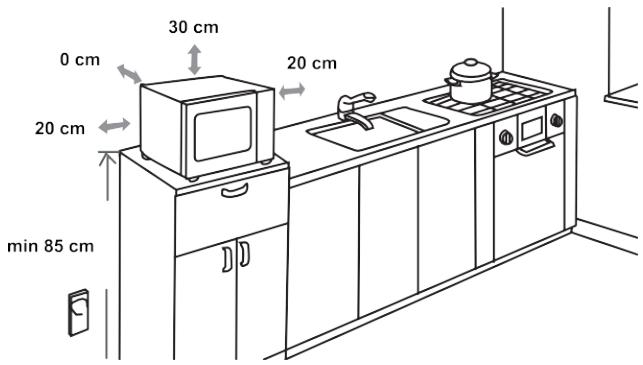
RADIO INTERFERENCE
Microwave oven may cause interference to your radio, TV, or similar equipment. When interference occurs, it may be eliminated or reduced by the following procedures.
a) Clean the door and sealing surface of the oven. b) Place the radio, TV, etc. as far away from your microwave oven as possible. c) Use a properly installed antenna for your radio, TV, etc. to get a strong signal reception.
WE RESERVE THE RIGHT TO MAKE ANY CHANGES THAT DO NOT AFFECT THE FUNCTIONALITY OF THE APPLIANCE.
- If the oven will not perform at all, the information on the display does not appear or the display disappeared:
a) Check to ensure that the oven is plugged in securely. If it is not, remove the plug from the outlet, wait 10 seconds and plug it in again securely. b) Check the premises for a blown circuit fuse or a tripped main circuit breaker. If these seem to be operating properly, test the outlet with another appliance.
- If the microwave power will not function:
a) Check to see whether the timer is set. b) Check to make sure that the door is securely closed to engage the safety interlocks. Otherwise, the microwave energy will not flow into the oven.
If none of the above rectify the situation, then contact the nearest authorized service agent.
The appliance is for household use for heating food and beverages using electromagnetic energy, for indoor use only.
GUARANTEE & SERVICE
If you need information or if you have a problem, please contact the Hisense Customer Care Centre in your country (you will find its phone number in the worldwide guarantee leaflet). If there is no Customer Care Centre in your country, go to your local Hisense dealer or contact the Service department of Hisense domestic appliances.
For personal use only!
WISHES YOU A LOT OF PLEASURE WHILE USING YOUR APPLIANCE
Hisense
life reimagined
- DEAR CUSTOMER
- (MEMORY TEST)
- INSTRUCTIONS FOR USE
- THE OVEN IS FITTED WITH A DIGITAL CLOCK. WHEN THE OVEN IS IN THE STANDBY MODE, THE CLOCK CAN BE SET IN THE 12-HOUR MODE BY PRESSING THE CLOCK SETTING KEY
- NOTE
- USE THE COUNTDOWN TIMER TO SET AN ALARM
- MICROWAVE OVEN ALLOWS COOKING IN TWO STEPS
- THE OVEN ALLOWS DEFROSTING OF MEAT, POULTRY, AND SEAFOOD. DEFROSTING TIME AND OPERATING POWER WILL BE ADJUSTED AUTOMATICALLY ACCORDING TO THE PRESET WEIGHT. WEIGHT OF THE FOOD TO BE DEFROSTED MAY BE BETWEEN 100 G AND 2000 G
- THE OVEN ALSO ALLOWS SPEED DEFROSTING
- YOU CAN SET THE COOKING PROCEDURE IN THE MEMORY. YOU CAN SET A MAXIMUM OF 3 MEMORIES, PLEASE FOLLOW THE STEPS BELOW
- TO ACCESS SAVED COOKING MEMORY
- TIPS FOR USING THE OVEN
- USE THIS FUNCTION TO MUTE THE KEYPAD SOUND (BEEPS)
- INSTALLATION
- GUARANTEE & SERVICE
- HISENSE
Brand : HISENSE
Model : H29MOBS9H
Category : Microwave