USER MANUAL Simulateur d'Aube WE
techniques ou explications.

www.connect-we.fr
MGF/WEConnect
ZI Pariest
6, rue Léon Jouhaux
77183 Croissy-Beaubourg
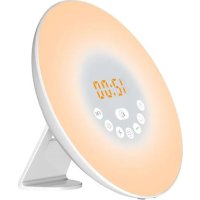
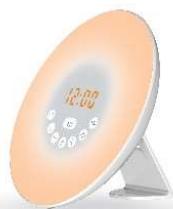
Wakeup light
User manual
WEREVLUMIERE
PRECAUTIONS OF USE
Take the time to read the instructions in the entire manual. Its content is designed to help you install and use your device as much as possible to get the most out of its features.
WARNING:
DOES NOT CONTAIN ANY USER-REPLACEABLE PART.
CONTACT THE COMPETENT STAFF IN CASE OF PROBLEMS.
WARNING
RISK OF ELECTRIC SHOCK!
DO NOT OPEN
Main Features:
- Number of LEDs: 9pcs white of 0.3W and 9pcs RGB of 0.3W
- Speaker output: 2 watts
- Touch keys
- Alarm with SNOOZE function
- 6 natural sounds for alarm
Sunrise and sunset simulation
- Digital FM Radio 88MHz - 108MHz
Time display with 3 brightness levels
Bedside lamp with 10 adjustable light intensities
- Power supply: 2 x AAA batteries (excluded) or micro USB cable (included) or EU adapter 5V (included)
Size: 170 × 170 × 93 ~mm
Package Content:
- Wakeup light
- User Manual
- 120cm USB cable
- Power supply
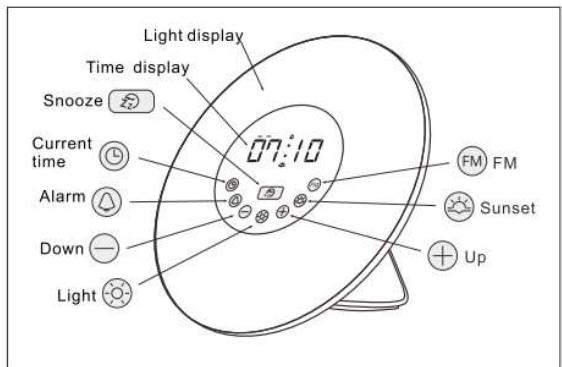
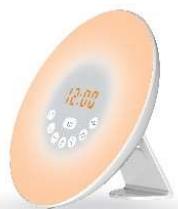
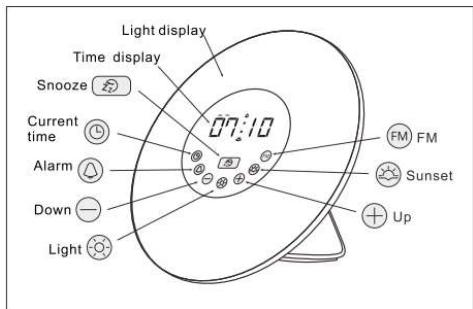
PRODUCT DISCRIPTION
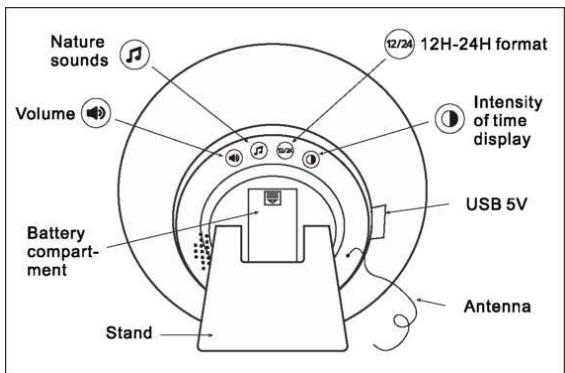
OPERATION OF THE PRODUCT
Before use
-
Install the base in the space provided
-
Plug the power cord into the power outlet.
-
Use the batteries as an emergency power source (if the power is off, and you do not have access to a computer or other source, or want to use the clock radio in another location The batteries keep your settings.)
-
To install batteries: Use two AAA batteries (not included).
o Open the battery compartment in the direction indicated by the arrow on the battery cover. o Insert two AAA batteries, in the direction of polarity, marked on the inside of the compartment. o Replace the cover.
CAUTION: If you only use the batteries as a power source, then the functions are limited:
- The clock remains displayed for 5 seconds. Press any button located on the back of the device to view it.
- All lighting functions are unavailable.
- The radio is not available.
Time setting
When connected, the time flashes automatically.
If the time is not flashing, press the clock button.
Press the button to set the hour and minutes and press the button to confirm.
This is only possible in the time setting mode and the hour indicator flashes, otherwise press the clock button again.
Each time when you unplug the power plug, the clock must be reprogrammed.
Using the device
1- Setting the mode 12-24 hours
Tap 12/24 on the back of the device.
When 12H mode is active, PM or AM appears on the display.
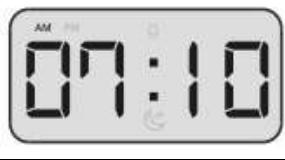
2- Intensity of the brightness of the screen
Press the brightness button ① on the display to adjust
the brightness level.
The brightness switches successively low, then high and off.
3-FM RADIO / Volume
We recommend that you fully deploy the antenna to use the radio function.
Press the button FM to enable / disable the radio. To select the desired radio frequency, press the buttons

To perform an automatic radio frequency search, press
and hold the button FM for 3 seconds.
CAUTION: The time display is not available when the radio is on. The display shows the radio frequency. You
can touch the button FM to view the time, then touch again to continue listening to the radio.
Press the volume butto n on the back of the product to adjust the volume level from 1-15.
ATTENTION: The sound level you have chosen also applies to the alarm.
4- Setting the alarm
Press the alarm button to activate/deactivate the alarm.

Appears or disappears on the clock screen.
Press and hold for 3 seconds, the alarm time indication flashes. Press the button to set the
hour and minutes and press to confirm.
The icon appears on the screen to indicate that the alarm is activated. When the alarm goes off, you can
turn off the alarm by pressing the button . It will start again tomorrow. To deactivate the alarm
permanently, press the button again. The icon disappears from the screen.
The alarm (sound and / or light) automatically turns off after 2 minutes.
5- Setting the alarm buzzer
You can switch between the 7 natural sounds or the radio as your alarm clock.
Press the button on the back of the device to select, and use the button to select from 1-7 available sounds. Press to confirm the selection. When you choose a new ringtone or radio, you will hear a preview of the alarm for 5 seconds.
When you select 7, the last station listened to will be selected as the wake-up sound. Press the button to select the volume level between 00-15.
6-Dawn simulation
The light intensity gradually increases to the level selected during the 30 minutes preceding the time of the programmed alarm.
At the alarm time, the selected ringer will be on for 2 minutes. However, if you have selected the radio as the alarm clock, the radio will not be stopped automatically after 2 minutes.
Touch to repeat after 5 minutes. It will then be triggered again for 2 minutes. The lamp stays on at the selected intensity, but the sound of the alarm stops.
Press or touch any button except to stop the alarm.
7- Set the sunset time of the sun
Touch to turn on / off the sunset mode. Appears or disappears on the clock screen.
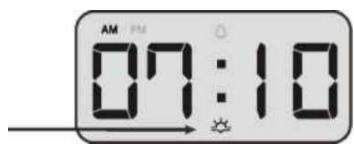
Press and hold for 3 seconds, the time indication starts flashing. Press the buttons to set the
desired hour and minute and press to confirm. 30 minutes before the programmed time, the lighting is activated at 100% brightness in any mode, then the brightness is reduced gradually before going off at the set time.
8-Lighting
Touch to activate the lighting.
Press to adjust the brightness level (1-10).
Touch again to automatically activate the changing color mode.
Press to select color: Green, Red, Blue, Purple, Orange, Indigo
Press a third time to turn off the lights.
GUARANTEE
What your warranty does not cover:
- Natural acts, such as fire or static discharge.
- Damage resulting from unauthorized repair or modification or accident.
- Damage resulting from misuse or neglect.
- A unit has been modified or integrated with other products or is used for institutional or commercial purposes.
- Improper handling or installation.

RECYCLING
This symbol indicates that this product must not be disposed of with other conventional household waste in
the European Union. To protect the environment and human health from uncontrolled waste disposal, please dispose of this device separately from household waste and it is your responsibility to dispose of it in such a way as to allow recycling to allow proper reuse of its resources. To do this, take this device to an appropriate collection point or contact the dealer if in doubt. The dealer of the product has a duty to help you dispose of the product correctly for recycling.

Do not hesitate to call our technical service ALLO
W.E. at 0892 680 414 (0.34 € / min) for any technical problems or explanations.

www.connect-we.fr
MGF/WE Connect
ZI Pariest
6, rue Léon Jouhaux
77183 Croissy-Beaubourg
lichtwekker
HANDLEIDING
WEREVLUMIERE
BESCHRIJVING VAN HET PRODUCT
WERKING VAN HET PRODUCT
Voor gebruik