 EasyManual
 PICKY12 BT - Powered speaker MYDEEJAY - Free user manual and instructions
Find the device manual for free PICKY12 BT MYDEEJAY in PDF.


User questions about PICKY12 BT MYDEEJAY
0 question about this device. Answer the ones you know or ask your own.
Ask a new question about this device
Download the instructions for your Powered speaker in PDF format for free! Find your manual PICKY12 BT - MYDEEJAY and take your electronic device back in hand. On this page are published all the documents necessary for the use of your device. PICKY12 BT by MYDEEJAY.
USER MANUAL PICKY12 BT MYDEEJAY
text_image
mydeejay® myDjiPICKY12-LED-BT (12" / 30 cm)
MANUEL DE L'UTILISATEUR / USER MANUAL
Bluetooth



natural_image
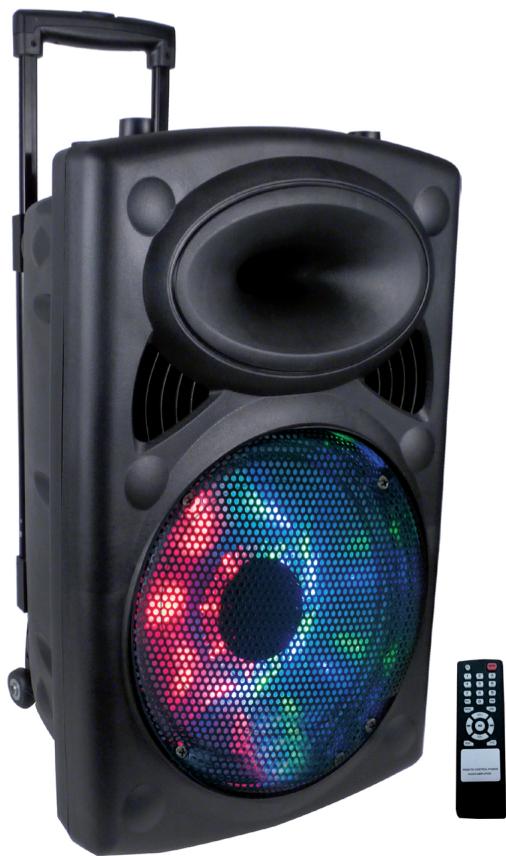
Black portable electronic device with a colorful LED display, next to a remote control (no text or symbols visible)Imported from China by
SAS Churchill
54 Avenue de Versailles
75016 Paris
France

CE
MANUEL DE L'UTILISATEUR PICKY12-LED-BT

natural_image
Black triangular warning symbol with exclamation mark (no text or numbers)Explanation of signs

The triangle containing a lightning symbol is used to indicate whenever your health is at risk (due to electrocution, for example).

An exclamation mark in a triangle indicates particular risks in handing or operating the appliance.

The hand symbol refers to useful tips and additional information on using the appliance.
Important Safety instructions and danger warnings
- Please read the manual carefully and keep it for future reference.
- All safety instructions and warnings must be adhered to. They are part of the manual and must be kept with the manual.
- Any guarantee claims are rendered invalid if damage occurs due to non-observance of these operating instructions. We assume no liability for any consequent damage.
- We assume no liability for personal injury or damage to property caused by incorrect handling or nonobservance of the safety instructions. Any guarantee claims expire in such cases.
- Unauthorized conversions and/or modifications of the appliance are not permitted for safety and licensing reasons (CE).
- The appliance is approved for operation in dry, closed rooms only. Do not operate the device nearby water, such as in bathrooms or nearby swimming pools.
- The appliance may not be exposed to extreme temperatures (< +5°C / > +35°C) in operation.
- The appliance may not be subjected to strong vibrations or heavy mechanical strain.
- The appliance may not be exposed to excessive moisture (due to dripping or sprayed water, for example).
-
Do not place any recipients filled with liquids, such as glasses or vases, on top of or directly next to the appliance. They could fall over, causing water to enter the appliance. Never pour out liquids above the appliance. Do not place any small objects, such as coins or paper clips, on the appliance since they could fall inside the appliance. You run a high risk of causing a fire or life-threatening electrocution! If any liquid or objects enter the appliance nevertheless, pull the mains plug out of the socket immediately and contact a specialist.
-
The appliance has been constructed according to protection class II (only for double insulated units without earth terminal).
- 220- 240 Vac/50 Hz mains socket may be used as source of power for the appliance. Never try to operate the appliance with any other voltage.
- Only pull the mains plug out of the socket by the intended gripping surface. Do not pull it by the cable.
- Never plug the mains plug in or out with damp or wet hands.
- Always pull the mains plug out of the mains socket:
■ Before cleaning the appliance
■ If there is a thunderstorm
■ If you will not be using the appliance for a long period of time (> 1 week)
- Electrical appliances must be kept out of the reach of children. Be particularly careful if children are present. Children are not aware of the hazards involved in handing electrical appliances improperly. Children could attempt to poke objects into the appliance. There is a life-threatening danger of electrocution.
- Do not leave the appliance unattended while operating it.
- Never place the appliance on an unstable or movable surface. Persons could be injured or the appliance damaged by it falling down.
- When using a rack, make sure it is in a stable position and is transported securely. Installation on uneven, slanted surfaces or stopping the rack abruptly during transport can result in the rack overturning or appliances falling from or out of the rack and injuring people.
- Live components can be exposed by opening covers or removing components (unless this can be done without tools). Contact points can also be live. If the appliance has to be opened in order to calibrate, service, repair or replace components or assemblies, all of its poles must be disconnected from all sources of voltage first. If the appliance has to be kept open and under voltage during maintenance or repairs, this work may only be carried out by a specialist who is familiar with the risks involved and the relevant regulations.
- Never connect the appliance directly after transferring it from a cold to a warm room. The condensation water that forms could destroy the appliance or result in an electric shock. Allow the device to reach room temperature before connecting it. Wait until the condensation water has evaporated. This can take some hours.
- Do not place any naked flames such as those of burning candles on or next to the appliance.
-
Do not place the appliance on soft surfaces such as carpets or beds. Do not cover the air vents of the appliance. Do not obstruct the air circulation with objects such as magazines, table cloths or curtains. This prevents the dissipation of heat from the appliance and can result in overheating.
-
Only use the appliance in a moderate climate, not in tropical environments.
- All persons involved in operating, installing and servicing the appliance and putting it into service must be trained and qualified accordingly and observe these operating instructions.
- Defective mains cables may only be replaced by specialists. Danger of shock hazard!
- Do not leave the packaging material lying around carelessly since it can become a source of danger for children playing with it.
- The accident prevention regulations and the regulations of the employers' liability insurance association should be observed at commercial institutions.
- If you are not sure about the correct connection or if questions arise which are not answered by the operating instructions, please do not hesitate to contact support or a specialist of your choice. Consult a specialist if you are in doubt the operating principle or the safety of the product.
FEATURES
→ BLUETOOTH
→ Built-in amp
→ Built-in USB MP3
→ Built in 1-channel VHF microphone receiver
→ Treble & Bass control
→ Mic VOL & ECHO controls
→ Master VOL control
→ MIC
→ MP3 and IPOD input
→ Built-in rechargeable battery
→ Rectractable handle & wheel.
→ Insert for mic holder on top of the box
→ Power source: AC 220-240V, 50/60Hz
POWER SUPPLY: BATTERY & AC OPERATION
- Built-in rechargeable battery and AC power. Prior to using this system for the first time, please insert the AC lead into the AC socket of the player and plug the other end on a suitable wall outlet. Make sure that the "CHARGE INDICATOR" is ON 10 hours continuously.
- Please recharge once every 6 months if you don't use the system for a longer period of time.
NOTE: Please shut down the power switch after you have finished using the system.
TO PLAY USB-DISK MP3/WMA MUSIC
- Switch power source to ON.
- Insert a USB-DISK
- Select a title and press▶
TO RECORD A MUSIC
Connect a 3.35mm stereo jack plug to the AUX input
- Plug Jack 6.35mm stereo plug a microphone into the MIC input
- Set the microphone volume, echo and the overall volume (MASTER / VOLUME).
BLUETOOTH FUNCTION
- Turn on Bluetooth using the button (1). Simply press the button 3 times to be set to Bluetooth.
- Activate the Bluetooth feature on your mobile device.
- Select BLUETOOTH from the list of devices found
- You are ready to listen to your music
TO DESACTIVE THE VOICE
Long press on the button 1 to disable the vocal confirmation
TO DISABLE "VOICE CONTROL" FUNCTION
Long press on the button 3 to disable the "voice control"
text_image
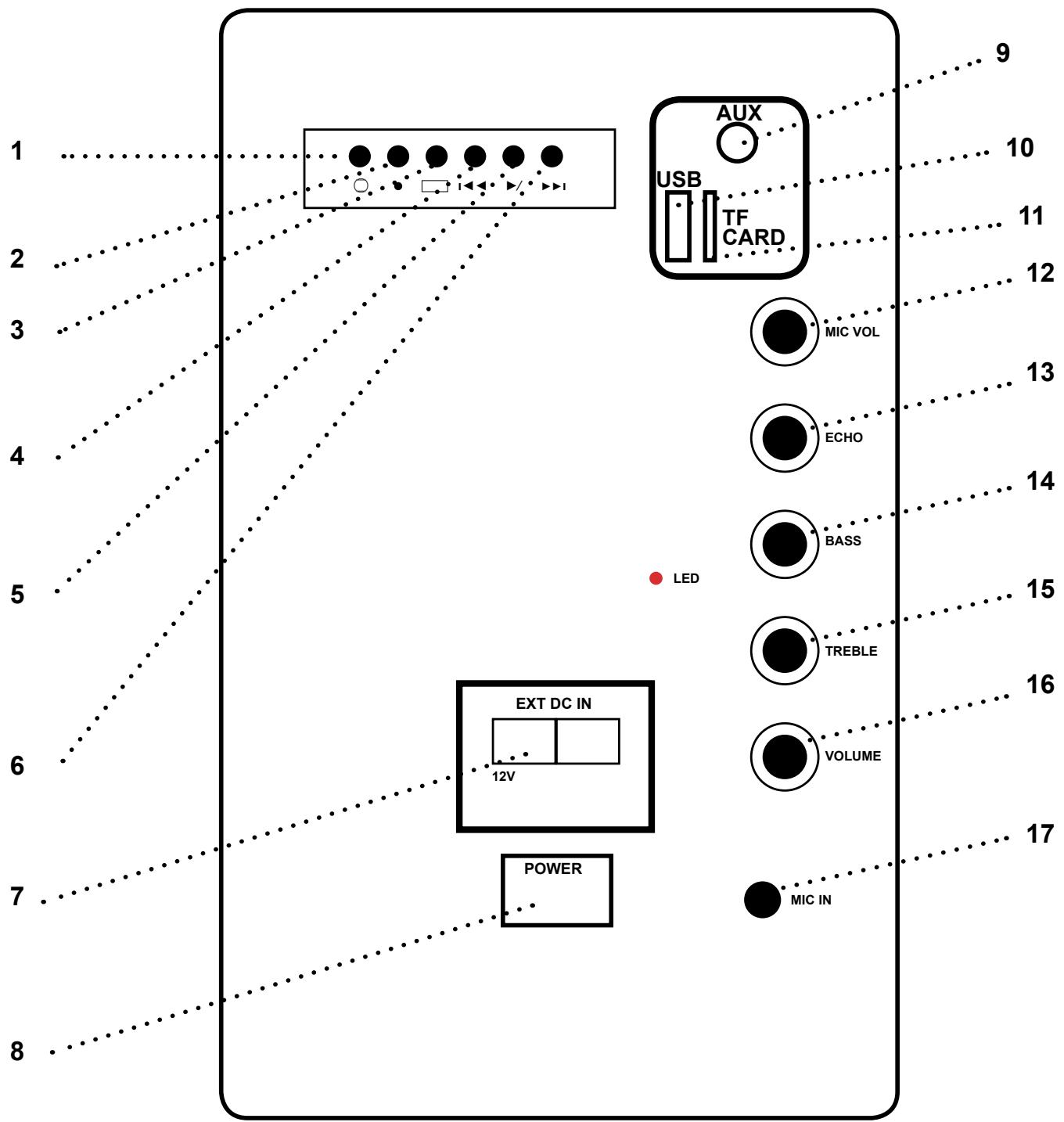
1 2 3 4 5 6 7 8 AUX USB TF CARD MIC VOL ECHO BASS LED TREBLE VOLUME POWER MIC IN 9 10 11 12 13 14 15 16 17- Input selection (Line/Bluetooth)
- Recording
- Repeat
- Before track
- Play audio
- After track
- Mains input DC fuse
- Interrupteur M/A
- iPod/MP3 input connector
- USB input
- Card SD/TF input
- Mic volum control
- Echo & MIC
- Bass control
- Treble control
- Volume/master control
- Mic input
SPECIFICATIONS PICKY12-LED-BT :
Portable sound system 12"/30cm
Max power: 700W
Frequency response: 40Hz – 20kHz
Amp power: 100W (max.)
IMPORTANT NOTE: Electric products must not be put into household waste. Please bring them to a recycling centre. Ask your local authorities or your dealer about the way to proceed.