SHARKY - Underwater camera CULLMANN - Free user manual and instructions
Find the device manual for free SHARKY CULLMANN in PDF.


User questions about SHARKY CULLMANN
0 question about this device. Answer the ones you know or ask your own.
Ask a new question about this device
Download the instructions for your Underwater camera in PDF format for free! Find your manual SHARKY - CULLMANN and take your electronic device back in hand. On this page are published all the documents necessary for the use of your device. SHARKY by CULLMANN.
USER MANUAL SHARKY CULLMANN
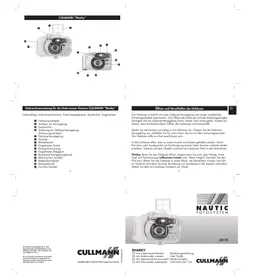
Contents of delivery: Underwater Camera, Underwater Camera Housing, Viewfinder, Wrist Lanyard
Winding Lever
2 Shutter Release Button/Lock
3 Viewfinder
4 Security Lock Button
5 T-shape Latch
6 Film counter
7 Shutter Button
Built-in Viewfinder
9 Film Rewind Handle
Built-in Flash
Film door Button
12 Flash on/off Switch
13 Battery Compartment Cover
Film Rewind Button
15 On/Off Switch
Opening and Closing of the Housing

The Housing is fastened by the latch on the side with a security lock for additional safety. To open the Housing, first push upward the security lock button, then pull the front latch piece to unhook the latch. Be careful not to let the camera fall out when opening the Housing.
Carefully place the Camera inside before closing the Housing. Hook the T-shape latch onto groove before closing the front latch piece. Once closed, push back the security lock button on top. The Housing should now be fully locked.
When the Housing is open, keep the inside dry and clean. Any grit or sand particles gathered around the Seal Ring may cause leakage to your Camera during your next dive. Dirt on the lens may appear as black spots on the pictures.
Important: Be sure your hands, arms, head, dive suit are absolutely dry before opening the Housing. If possible, change film/open Housing in an air conditioned or dry cool room. This is important to avoid condensation of moisture inside the Camera during a dive. Have a dry towel handy.
Silicone seal Ring
The "Sharky" is equipped with a main Silicone Seal Ring which does not require lubrication like traditional rubber rings. Check the Silicone Seal Ring every time you use the CULLMANN "Sharky". Make sure to keep the Seal Ring surface clean (a small piece of hair can cause leakage underwater). Do not attempt to remove the Seal Ring yourself as it is completely glued onto the Housing. Silicone will not vulcanize and therefore will not require frequent replacement. If it is cut or worn, it should be returned to the manufacturer for repair/replacement only. Proper maintenance will allow the Seal Ring to last for many years.
Viewfinder
The Viewfinder provides a quick guide for framing the object underwater. It can be removed for easy storage. If you are using the "Sharky" on land, use the built-in Viewfinder on the Camera as your pictures guide.
Installing Batteries

Open the battery compartment at the bottom of the Camera by sliding the battery cover in the direction indicated by the arrow on it. Insert two AA-size alkaline batteries with their exposing ends matching the + and - symbols on the cover of the battery compartment. Close the battery compartment by sliding it back gently. (Note that improper insertion of the batteries may damage the Camera).
If you are not using the Camera for a few days, remove the batteries. Do not store the Camera with exhausted batteries inside. Leaky batteries will damage the Camera.
Loading Film
Open the back film door by pushing the lock downwards. Insert film and ensure enough film is fed into the take-up spool. Make sure the film is flatly placed and the sprocket teeth are properly engaged with the perforations on the sides of the film. Close the back door. Turn on the Camera by sliding the front On/Off switch below the lens.
Advance the film by turning the roller until it is fully advanced and press the shutter button. Repeat this procedure to advance film to picture 1 in the film counter window. Now your Camera is ready for the first picture. Put your Camera back inside the Housing. For better pictures results, use either ISO 200 or 400 film.
Rewinding film
At the end of the roll, the film will advance no more. Never force the film to further advance as this may damage the film transport mechanism inside the Camera and void your warranty. To rewind the film, first depress Film Rewind Button on the bottom of the Camera, then lift up the Rewind Handle on top, gently rotate the Handle following the arrow direction until the film is fully rewinded. Open the back film door and unload the film. Note: Never open film door with film not fully rewinded otherwise your film will be ruined.
Built-In-Flash
Your Camera is equipped with a manual switch on Built-in Flash. To switch on the Flash, simply turn on the Flash switch at the front of the Camera. When the green light lits, the Flash is ready to use. Please note the Flash will remain on until it is turned off. (Always turn on your Flash before you enter water).
Taking pictures
1. Film Advance
Advance the film by pushing forward and backward a few times the Winding Lever until you feel more resistance and hear a clicking sound when the film is fully advanced. Push the winding Lever back to the parked position before taking pictures (note that the parked position is to the left hand side). If the Lever is not parked correctly, the Camera may misfire or take a picture without the Built-In Flash fired resulting in under exposure of that picture.
2. Using the "Sharky" Underwater
Always turn on the front power switch of the Camera and the flash switch before loading it into the Housing. If you forget to turn on the Camera, you will have to surface, dry the Housing before open it, switch on the Camera and the Flash, and close the Housing properly before submerging again.
After entering the water, gently wipe the Camera lens window to remove any air bubbles before taking any pictures. Attaching the "Sharky" to your wrist with the supplied lanyard. This will prevent the "Sharky" Camera from floating away. Approach your object slowly and remain stationary and hold the "Sharky" Camera still.
Taking pictures
Use the Viewfinder to aim at the object then depress the Shutter Release Button swiftly and completely to take a picture. Be careful not to block the Camera lens and Flash with your fingers. Advance the film to the next exposure by moving the Winding Lever as soon as a picture is taken so that you are always ready to take a picture. If a new picture will not be taken within a short time, you may consider turning the Shutter Release Button to the locking position to avoid pressing the Shutter by mistake.
For best pictures result with the standard lens and built-in flash, we recommend taking pictures of subjects in the 1,20 to 1,80 meter range underwater. Please also note that the maximum effective range of the Camera's built-in flash is about 1,80 meter underwater.
3. Using the "Sharky" on Land
The Camera has a fixed focus and will take pictures from 1,20 meter to infinity on land. You can use the Camera inside or outside the Housing. If possible, take a picture with the sun behind you. If external lighting condition appears to be insufficient, turn on the Camera Flash for better pictures result.
We recommend keeping the Camera inside the Housing as much as possible since it provides extra protection against moisture and hitting.
Maintenance
Do not leave your Camera and Housing in direct sunlight. Excessive heat will damage both the Camera and Housing.
Keep the Seal-Ring and sealing surfaces clean. Do not scratch the Seal-Ring when cleaning. No lubrication is needed. Some lubricants may actually cause damages to the Seal-Ring.
Always rinse the "Sharky" in fresh water after each use. Dry it thoroughly before storage. The Housing can be cleaned by soaking it in a mild soap solution. Do not use alcohol, gasoline, thinner or chemical detergents to clean the Housing.
Use only soft cloths in drying the Housing. Pay specials attention not to scratch the front lens when cleaning. Scratches on housing lens will result in unclear pictures.
Specification
| Type: | 35 mm viewfinder camera Item No. 45170 |
| Negativ size: | 24 × 36 mm |
| Lens: | f/ 5,6 |
| Focal length: | 30 mm |
| Shutter: | Mechanical behind-the-lens shutter |
| Depth of field: | Under water: 1 m to infinity (actual visual range) On land: 1 m to infinity (the camera can be removed from the underwater housing for on-land shots) |
| Macro photography: | The close-up kit permits close-ups within a range of 25 cm and 45 cm at 1:6 image scale. Available as an accessory, Item. No. 45192 |
| Film speed: | ISO 200/400 |
| Viewfinder: | Optical viewfinder, Sports finder (included) |
| Built-in flash: | Guide number 8/ISO 100, Recycling time approx. 6 sec. |
| External flash unit: | Available as an accessory, Item No. 45190, Guide number 20/ISO 100. Recycling time approx. 7 sec., Colour temperature 5700 K, 360 degree swivel, (4 x AA-type alkaline manganese batteries, not included) |
| Tripod mount: | For: a.) Close-up kit, Item No. 45192 b.) External flash unit, Item No. 45190 |
| Film advance: | Manual |
| Rewind: | Manual |
| Diving depth: | Water tight down to a depth of 36 meters |
| Seal: | Maintenance-free silicone seal, no lubricants, no spare rings necessary |
| Power supply: | 2x AA-type alkaline manganese batteries; not included |
| Dimensions and weight: | 152 x114 x 70 mm (wхxd), weight 420 g (with batteries) |
GB
All sizes and weights are approximat. Design modification and color deviations as compared with the illustration are possible. Technical alteration may be made without notice. Errors excepted.
CULLMANN
CULLMANN GmbH • Postfach 8 • 90575 Langenzenn • Germany