NC - Scale OKOIOBFBAMBOO - Free user manual and instructions
Find the device manual for free NC OKOIOBFBAMBOO in PDF.



| Product Type | Impedance scale with body composition measurement |
| Brand | OKOIOBFBamboo |
| Model | NC |
| Maximum Capacity | 150 kg / 330 lb / 24 st |
| Graduation | 100 g / 0.2 lb |
| Weight Units | kg, lb, st |
| Power Supply | 1 lithium battery CR2032 3V (included) |
| Main Functions | Weight, % body fat, % hydration, % muscle mass, % bone mass, kilocalories |
| User Memory | 12 profiles (gender, age, height) |
| Display | LCD screen |
| Surface for Use | Hard and flat surface (do not use on carpet) |
| Maintenance | Clean with a slightly damp cloth, do not immerse |
| Safety | Do not use by pregnant women, pacemaker wearers, etc. (see manual) |
| Spare Parts | CR2032 battery |
| Repairability | Battery replacement by user; contact customer service for other repairs |
| Operating Temperature | Not specified, store in a dry place |
| Dimensions (estimated) | 30 x 30 x 2.5 cm |
Frequently Asked Questions - NC OKOIOBFBAMBOO
User questions about NC OKOIOBFBAMBOO
0 question about this device. Answer the ones you know or ask your own.
Ask a new question about this device
Download the instructions for your Scale in PDF format for free! Find your manual NC - OKOIOBFBAMBOO and take your electronic device back in hand. On this page are published all the documents necessary for the use of your device. NC by OKOIOBFBAMBOO.
USER MANUAL NC OKOIOBFBAMBOO
- This appliance is intended for domestic household use only and should not be used for any other purpose or in any other application, such as for non-domestic use or in a commercial environment.
- This appliance can be used by children aged from 8 years and above and persons with reduced physical, sensory or mental capabilities or lack of experience and knowledge if they have been given supervision or instruction concerning use of the appliance in a safe way and understand the hazards involved. Children shall not play with the appliance. Cleaning and user maintenance shall not be made by children without supervision.
- The battery must be removed from the appliance before it is scrapped.
- The battery is to be disposed of safely.
- Batteries are to be inserted with the correct polarity.
- Exhausted batteries are to be removed from the product.
- Attention should be drawn to the environmental aspects of battery disposal. Don't throw used batteries in dustbin. Please contact your retailer in order to protect the environment.
- The batteries (batteries installed) shall not be exposed to excessive heat such as sunshine, fire or the like.
- CAUTION: Risk of explosion if battery is replaced by an incorrect type.
IMPORTANT SAFETY INSTRUCTIONS
- Always use the scale on a hard, very flat surface. DO NOT use on carpet.
- DO NOT strike, shake or drop the scale.
- Keep the scale dry.
- Keep standing still during the course of weighing.
- Avoid breaking the scale by striking the surface with a sharp object or by dropping. Store your scale horizontally; do not store it on its side. The battery should only be replaced by adults. Do not allow children to use the appliance unless the battery cover is attached.
- The body fat readings could be misleading after intensive exercise, excessive dieting or under extreme dehydration condition.
-
The body fat readings of the following people may have deviation:
Children under 10 years old or adults over 70 years old
Body builders -
This scale is not intended for use by the following groups:
> Pregnant women
Anyone with symptom of edema
Anyone on dialysis treatment
Anyone having a pacemaker or other implanted medical device.
- The body fat readings are only for reference and not for medical purpose. If the readings are beyond or below the normal level, please consult your doctor for more advice.
- Keep the scale away from strong electromagnetic field when operating it.
- Failure to properly align the battery polarity correctly can cause damage to the product and can cause a fire hazard.
The battery type used in this product is one 3V CR2032 lithium battery (supplied). This battery is located internally and readily accessible.
Remove the battery cover located on the bottom of the scale to remove the battery.
The battery must be disposed of at your local recycling point.
Remove the isolation sheet from the battery contact before use.
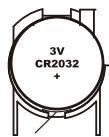
Replacing the battery
- Turn the scale over and remove the battery cover.
- Insert the battery into the battery compartment with the print facing up.
- Attach the battery cover back in place.
PRINCIPLES OF BODY FAT PERCENTAGE MEASUREMENT
Muscles, blood vessels and bones are body tissues having a high water content that conduct electricity easily. Body fat is tissue that has little electric conductivity.
This body fat scale works by bioelectrical impedance and it sends an extremely weak electrical current through your body to determine the amount of fat tissue. This weak electrical current is not felt while operating the scale.
OVERVIEW
Top part of the main unit
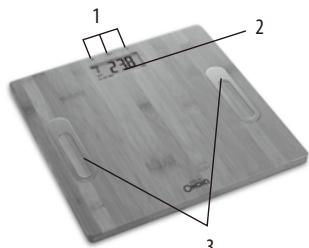
- Buttons: SE
- Display
- Electrodes
Display
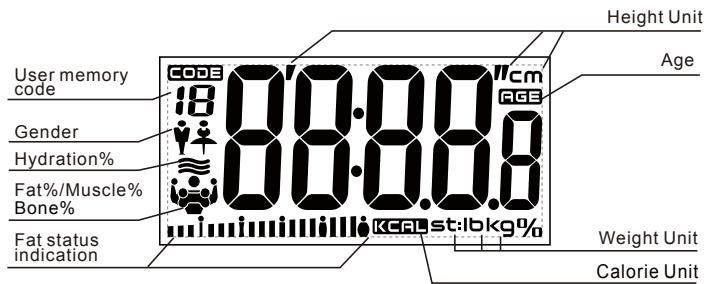
Weight unit button (on the bottom of the scale)
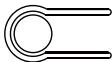
The scale will measure your weight in kilograms (kg), imperial pounds (lb) or stones (st). Repeatedly press the button to select your choice.
NOTE: If the scale is set to KG mode, height will be displayed in cm.
If set to ST or LB mode, height will be displayed in feet and inches.
SETTING THE PERSONAL DATA
The scale can store the personal data of up to twelve people. Personal data includes gender, height and age.
-
Press SET to turn on the scale.
-
The default setting will be shown and personal data code will flash on the display.
-
While the personal data code is flashing, repeatedly press / to select a personal data code.
-
Press SET to confirm.
-
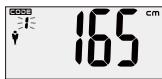
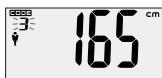
The gender icon will flash on the display.
-
While the gender icon is flashing, press / to select male (♀) or female (♂) setting. Press SET to confirm.
-
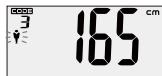
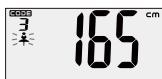
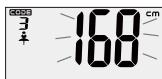
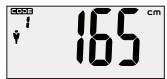
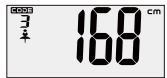
The height figures will flash on the display.
-
While the height figures are flashing, repeatedly press / to select the height.
-
Press SET to confirm.
-
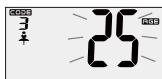
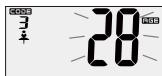
The age figures will flash on the display.
-
While the age figure are flashing, repeatedly press / to select the age.
-
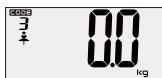
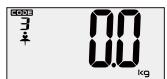
Step on the scale electrodes. The display will show "0.0 kg". You can now start taking measurements.
TAKING A MEASUREMENT
- Press SET to turn on the scale.
- The last user or default setting will be shown and the user code will flash on the display.
- While the user code is flashing, repeatedly press / to select a desired code.
-
Step on the scale electrodes. The display show "0.0 kg".
-
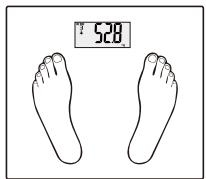
Step on the scale electrodes.
-
Make sure that you are bare foot and that the soles of your feet are clean.
- Make sure that your feet are correctly positioned on the electrodes and that you are standing with your weight evenly distributed on the platform.
-
Remain still and do not move until the measurement is complete.
-
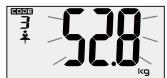
Your weight reading will be displayed first.
Once the reading is steady it will flash once.
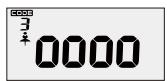
- The display will then show "0000" in a series whilst the calculation is performed and then your measurements will be displayed.
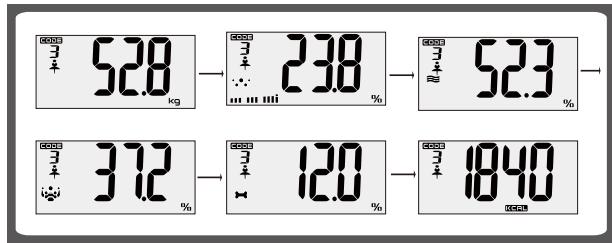
The measurements will be displayed in a cycle of body weight (e.g. 52.8kg ), fat percentage (e.g. 23.8% ), hydration percentage (e.g. 52.3% ), muscle percentage (e.g. 37.2% ), bone percentage ( 12.0% ) and kilocalorie (e.g. 1840).
The readings will be displayed in a sequence of 3 cycles, after which the scale will turn off automatically.
Notes on Viewing Measurements
After you select a desired user code to view measurements (following steps 1 to 3 above), press to display the measurements. The measurements will be displayed in a sequence of 3 cycles.
You can press / to quickly view measurements.
UNDERSTANDING YOUR READING
The fat/hydration content assessment chart below is only for reference.
| Age | Fat(Female) | Hydration(Female) | Fat(Male) | Hydration(Male) | Status | Indication |
| ≤30 | 4.0-16.0% | 66.0-57.8% | 4.0-11.0% | 66.0-61.2% | Too lean | ...i |
| 16.1-20.5% | 57.7-54.7% | 11.1-15.5% | 61.1-58.1% | Lean | ...iuii | |
| 20.6-25.0% | 54.6-51.6% | 15.6-20.0% | 58.0-55.0% | Normal | ...iuiiui | |
| 25.1-30.5% | 51.5-47.8% | 20.1-24.5% | 54.9-51.9% | Fat | ...iuiiiiiii | |
| 30.6-60.0% | 47.7-27.5% | 24.6-60.0% | 51.8-27.5% | Too fat | ...iuiiiiiii | |
| >30 | 4.0-20.0% | 66.0-55.0% | 4.0-15.0% | 66.0-58.4% | Too lean | ...i |
| 20.1-25.0% | 54.9-51.6% | 15.1-19.5% | 58.3-55.3% | Lean | ...iuii | |
| 25.1-30.0% | 51.5-48.1% | 19.6-24.0% | 55.2-52.3% | Normal | ...iuiiui | |
| 30.1-35.0% | 48.0-44.7% | 24.1-28.5% | 52.2-49.2% | Fat | ...iuiiiii | |
| 35.1-60.0% | 44.6-27.5% | 28.6-60.0% | 49.1-27.5% | Too fat | ...iuiiiiiii | |
MEASURING WEIGHT ONLY
- Step on the scale and stand still.
- The scale display will flash to indicate that the reading is accepted.
- If there is no operation for a while, the scale will automatically switch off.
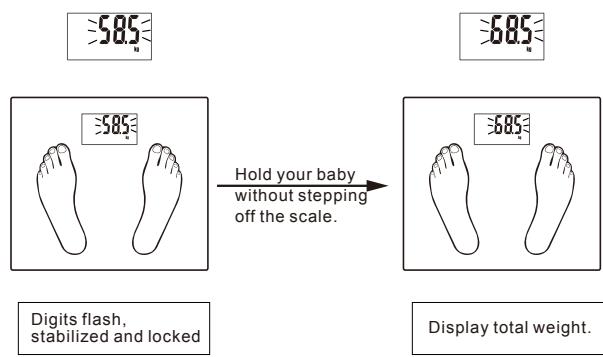
To weigh additional loading
After the reading of your weight stabilise, you can weigh additional loading. Ensure each add-on loading exceeds 2kg to get a new reading.
For example, if you want to weigh your baby, you can weigh yourself first, and then hold your baby together without stepping off the scale. Then you will get a new reading.
Deducting your weight reading from the new reading, you will get the weight reading of your baby.
ERROR DISPLAYS
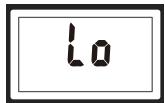
Low battery indication
Battery is running low. Replace the battery immediately.
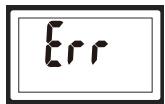
Overload indication
Weight exceeds maximum capacity.
Please step off the scale to avoid damage to the scale.
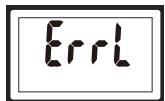
Low fat% indication
The body fat percentage is too low.
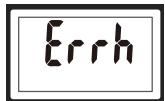
High fat% indication
The body fat percentage is too high.
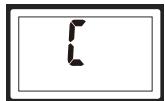
This could be due to a measurement being taken incorrectly.
Step off the scale and step on it again to repeat the measuring process.
SPECIFICATIONS
Maximum capacity: 150KG/330LB/24ST
Minimum effective capacity: 2KG/4LB
Graduation: 100g/ 0.2LB
CLEANING AND MAINTENANCE
Clean the scale with a slightly damp cloth.
DO NOT immerse the scale in water.
Never use abrasive or chemical cleaning a
If the scale is not in use for a long period of time, remove the batteries before storage.
Keep the scale in a dry and clean place.
DISPOSAL
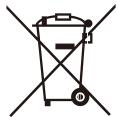
As a responsible retailer we care about the environment.
As such we urge you to follow the correct disposal procedure for the appliance and packaging materials. This will help conserve natural resources and ensure that it is recycled in a manner that protects health and the environment.
You must dispose of this appliance and its packaging according to local laws and regulations.
Because this appliance contains electronic components, the appliance and its accessories must be disposed of separately from household waste when the appliance reaches its end of life.
Contact your local authority to learn about disposal and recycling.
The appliance should be taken to your local collection point for recycling. Some collection points accept appliance free of charge.
We apologise for any inconvenience caused by minor inconsistencies in these instructions, which may occur as a result of product improvement and development.
Etablissements Rally & fils ©, 129 Avenue Gallieni, 93140 Bondy, France 04/12/2019
FR
ATTENTION
Hotline Darty France