E7900 TW BLANC - Headphones KYG - Free user manual and instructions
Find the device manual for free E7900 TW BLANC KYG in PDF.



User questions about E7900 TW BLANC KYG
0 question about this device. Answer the ones you know or ask your own.
Ask a new question about this device
Download the instructions for your Headphones in PDF format for free! Find your manual E7900 TW BLANC - KYG and take your electronic device back in hand. On this page are published all the documents necessary for the use of your device. E7900 TW BLANC by KYG.
USER MANUAL E7900 TW BLANC KYG
True Wireless Earphones

Kygo Life unites my love of music with modern Scandinavian design. The aim is to develop top-quality audio equipment that sounds amazing and looks great. Future classics that capture the euphoric feeling of my music.
Like my approach to everything, Kygo Life is driven to continually improve. So, as each product evolves it embraces the latest technology and focuses on perfecting the details until I'm absolutely happy the end result is the best it can be.
I hope that by creating new and inspiring audio experiences, you'll enjoy listening to your favourite tunes even more.

KYRRE GÖRVELL-DAHLL
Creative Director, Kygo Life
Getting Started
Congratulations on your new Kygo E7/900 earphones! Before using this product, you should read this manual and familiarize yourself with the Bluetooth functions of your mobile phone or other devices.
Introduction
The Kygo E7/900 earphones allows you to listen to your music wirelessly from your mobile phone, tablet, or other Bluetooth® enabled device. It delivers powerful and clear sound. The built-in microphone also allows you to answer calls from your phone.
Precautions
Please refer to this Users' Manual before using to ensure proper use. The contents stated herein may be modified from time to time for better service as the product properties and functions are subject to change without prior notice.
For the sound performances of the product, never use it in too cold, too hot, too dusty or humid places, especially:
- Near the heater or high temperature services or solarization.
- In hazardous locations or in places apt to fall.
- Never disassemble the combination audio.
Do not use any diluents or volatile liquids to clean your headset and make sure to use only a charger from the qualified manufacturer.
In order to avoid electric shocks and product damage, do not attempt to dismantle, repair or modify the product.
This product or its battery cannot be disposed with the household waste, therefore it must be returned to a collection point to be recycled. Please check with your local authorities for details.
Features
- Bluetooth 5.0
- Sound quality with AAC® codec
- Waterproof (IPX7)
- Microphone
- Accessories included: Freebit sport wings, Comply™ Foam ear tips and silicon tips
Basic Buttons Operation
Multifunction button (MFB)
Indicator light and MIC
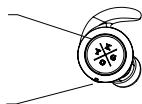
Charging indicator
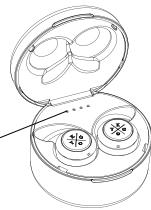
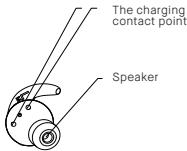
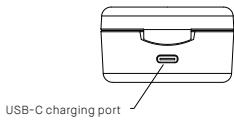
| Status | Headset performance |
| The single pairing headset (R) | After the headsets are paired with each other, the indicator light of the right headset will flash red and blue. When the headsets are paired with a device, the indicator light flashes blue once every five seconds. |
| True Wireless pairing | After the headsets are paired with each other (TWS pairing), the indicator light of the right headset will flash red and blue. When the headsets are paired with a device, the indicator light flashes blue once every five seconds. |
| Standby Mode | The indicator light of the right headset flashes blue once every 5 seconds |
| Call Mode | When in a call, the indicator light of the right headset flashes red every 5 seconds |
| Headset Charging Mode | The indicator light of the headset is red when being charged, and will turn off automatically after being fully charged |
| Charging Base Charging Mode | The indicator lights of the charging base flashes when being charged, and four lights are on after being fully charged |
| Power On State | The indicator light flashes blue for 3 times and then flashes red once every 5 seconds. |
| Power Off State | The indicator light flashes red for three times. |
| Low Voltage Alarm State | The indicator light flashes red once every 20 seconds |
Wearing guide
STEP1
Remove the headset from the charging case and choose between the included silicone or Comply™ Foam eartips and the Freebit sport wings included in the package. We suggest you test the different sizes to find the one that fits your ear best.
STEP2:
Insert the headset in your ear and slightly rotate headset until it firm.
STEP 3:
Make sure the headset is placed properly into the ear before use.
General function
Switching on / off on
METHOD 1:
In OFF MODE, press and hold headset(R) and headset(L) MFB for 2 seconds to turn on.
In ON MODE, press and hold headset(R) or headset(L) MFB for 5 seconds to turn off.
METHOD 2:
Pick up the headsets from the charging base to turn on automatically. Put them back to power off and charge the headset
True Wireless Pairing
Method 1: Pick up the two headsets from the charging base to power on and wait for 10 seconds. The two headsets will now enter auto-pairing mode and connect with each other after a few seconds. The headset (R) will blink red and blue and prompt "pairing". Then open the device's Bluetooth configurations and select "KYGO E7/900 - R".
Method 2: On OFF state, press both MFB buttons for 2 seconds to power on and wait for 10 seconds. The two headsets will now enter auto-pairing mode and connect with each other after a few seconds. The headset (R) will blink red and blue and prompt "pairing". Then open the device's Bluetooth configurations and select "KYGO E7/900 - R".
After the headset is successfully paired through method 1 or 2, the right headset prompts "pairing successful - device connected".
Reconnect
Method 1: (if the headset was placed in the case without being turned off): Pick up the headsets from the charging base to power on After a few seconds the two headsets will automatically connect with each other the headset will pair automatically with the most recently paired device within Bluetooth reach.
Method 2: (if the headset was turned off with the MFB before being put in the case): Press and hold the MFB buttons for 2 seconds to power on After a few seconds the two headsets will automatically connect with each other the headset will pair automatically with the most recently paired device within Bluetooth reach.
Note: When reconnecting the headset it will prompt "connected", "left channel" and "right channel". When it successfully connects to a device, the right headset prompts "device connected".
Adjusting the Volume
In call mode or music playing mode, short press MFB of headset(R) to increase the volume; short press MFB of headset(L) to reduce the volume.
Forward/Backward
In call mode or music playing mode, long press MFB of headset(R) for 2 seconds to next song; long press MFB of headset(L) for 2 seconds to last song.
Delete Pairing Records on the Headset
On OFFMODE state, press MFB button on both headset (L) and headset (R) for 10 seconds (OFF MODE ON MODE(2 seconds) Delete pairing records (10 seconds), until hearing the Beep voice for 3 times, and the red/blue light flashes twice at the same time.
Answering /Ending a Call Headset (R)
When call income, short press MFB of headset (R) or headset (L) to answer call; in call mode, long press MFB of headset (R) or headset (L) for 2 seconds to end a call.
Rejecting a call
Press and hold MFB of headset(R) or headset (L) for 2 seconds to reject the call, the speaker prompts "beep" twice. Please note that this function only supports mobile phones with voice dialing function.
Music Pause/Playing
On standby mode, shortly press headset (R) or headset (L) to play music.
On music playing state, double click headset (R) to PAUSE music. But headset (L) cannot pause independently.
Voice Dialing
On standby mode or music playing state, double-click the secondary ear (L) function key, which can be heard "Du".
Please note that this function only supports mobile phones with voice dialing function.
Two-call
(Only support the mobile phone which has the function of handling two phones.) When you are answering a call, there is another call coming:
- Long press and hold MFB of headset(R) for 2 seconds to end the current call and answer incoming call;
- Short press MFB of headset(R) to hold the current call and answer incoming call.
- After the second implementation, short press MFB of headset(R) to switch between two calls;
- After the second implementation, long press MFB of headset(R) for 2 seconds to end the current call, and long press MFB of headset(R) for 2 seconds to end the other call.
Note: All the above operations have to respect the precondition that Phone supported Bluetooth hands free profile V1.5 and Phones are running under call holding function (Network services) from telecom.
Battery charging
Charging Ways of Headset
The indicator light of headset is red when being charged, and will turn off automatically after being fully charged. Put the headset (L) (R) to the corresponding position in the bottom of the charging base. The earbuds charge automatically when placed in the base.
Charging Ways of Charging Base
Use the USB-C charging cable to charge. The indicator lights of the charging base flashes when being charged, and four lights are on after being fully charged. Use the USB-C cable to connect with computer.
Note 1: Check the charging device is suit to the headset or not.
Note 2: Use only the supplied USB-C charging cable to charge the headset. The use of other equipment may harm the product and cause danger.
Note 3: Do not attempt to force open the built-in battery as this could damage the headset
Note 4: A fully charged headset will lose its power automatically if left unused. It is recommended to charge the headset each three months.
Note 5: Do not leave the headset in a too hot or too cold condition. This may affect the headset's operations although it is fully charged
Note 6: Do not dispose of the headset into fire or water.
Re-connecting to Bluetooth® devices
Every time the headphone is switched on, it will connect to the nearest and the last connected device automatically.
When the headphone is in standby mode and doesn't connect to any device, short press the MFB button and it will connect to last connected device automatically.
Note: Headphones can be paired with two devices simultaneously.
Troubleshooting
| Faults | Reasons | Solutions |
| Cannot turn on | low battery protection | Charging headsets for 2-3 hours |
| Can not turn on by picking up the headset /No indicator light when headset being charged | Charging base low battery protection | Charging both the headsets and charging base for 2-3 hours |
| No sounds after pairing | Wrong pairing | Pairing again |
| The two headsets TWS pairing failure/TWS paired successful but can not find the headset(R) | Too many pairing records | Delete pairing records according to user manual. |
| Charging base without indicator light when charging | DC power supply doesn't output power | Check whether the USB-C charging line is plugged |
| Turning off automatically | Low battery | Charging headset for 2-3 hours |
| Headsets without indicator light when charging | The headsets couldn't being charged in charging base | 1)Checking headset charging inter-face whether has touched to POGO PIN of charging base and the location is correct or not. 2)Charging for charging base. |
| Headset echo | Volume is too loud or environment is noisy | Adjust the volume at phone or change a place |
| Noise in call | Environmental interference caused or distance between headset and mobile is too far | Change a place or move to close the headset and mobile |
| Low voice of the calling party | Wearing headset is wrong | Adjusting wearing position of headset |
| The headset recon- nected with mobile phone after put back to the charging base | The charging base without power, the headset will auto turn on and paired | Charging for charging base |
| Left and right earbud don't connect with each other. | Left earbud was paired first. | Delete pairing record on headset, press MFB button for 10 sec. |
Water resistance
The Kygo E7/900 are waterproof under classification IPX7. This means that the earbuds can tolerate 30 minutes submersed in water up to 1m (3 feet). The charging case is not waterproof and should not be in contact with water.
Kygo E7/900 i were tested under controlled laboratory conditions with a rating of IPX7 under IEC standard 60529. Waterproof are not permanent conditions and resistance might decrease as a result of normal wear.
Do not attempt to charge a wet headset. Liquid damage not covered under warranty.
Warning
Only use the charger approved by the manufacturer to charge the earphone.
Charge the headset if it has not been used for more than 3 months.
This device complies with Part 15 of the FCC Rules. Operation is subject to the following two conditions: (1) this device may not cause harmful interference, and (2) this device must accept any interference received, including interference that may cause undesired operation.
- Do not dispose of the battery in or close to an open fire as it may cause explosion.
Specifications
| Bluetooth Version: | Bluetooth 5.0 |
| Profiles Supported: | HSP, HFP, A2DP, AVRCP SBC, AAC® CODEC |
| Operation Range: | Up to 10 meters |
| Music Playing Time: | Up to 3 hours |
| Charging Base Supply Power for Headset Music, Play Time: | Up to 9 hours |
| Frequency response (+-3dB): | 20Hz-20kHz |
| Impedance: | 16Ω±15% |
| Driver sensitivity: | 93db/1kHz |
| Battery: | 45mAh Li-polymer Battery |
| Charging Time of Headset: | About 2 hours |
| Earphone dimensions: | L19.5×W19.5×H26 |
| Total Weight: | 60g |
- Battery life and charging time may vary, depending on the usage and device type.
Kit contents
True Wireless earphones Kygo E7/900
3 pairs of silicon tips
3 pairs of Freebit sport wings
1 pair of silicon ring
1 pair of Comply™ foam eartips
Charging case
USB-C charging cable
Manual
Komme i gang
True Wireless paring
Metode 1: Ta Øretelefonne ut av ladesstajonen for á slå dem pá, og vent i 10 sekunder. Begge Øretelefonene gár nä inn i automatisk paring og kobler til hverandre城县 noen sekunder. Øretelefon (H) begnynæ blinke rød og blättm ot hverandre für á be om «paring」. Sla d pa Bluetooth-funksjorden pa mobiltelefonen eller en annen bæbar enthem, og se fetter «KYGO E7/900 - R».
Metode 2: I AVSLÄTT MODUS holder du innate MFB-knappene i 2 sekunder for Å slå pa, sø venter du i 10 sekunder. Øretelefonene går nä inn i automatisk paring og kobler til haverandre utter noen sekunder. Øretelefon (H) begnyr Å blinke rødt og blätt om haverandre for Å be om «parsing». Slå da på Bluetooth-funksjorden på mobilitelefonen eller en annen barbar enthet, og se erter «KYGO E7/900 -R».
Nár TWS-paringen er fullfort, enten ved Metode 1 aller Metode 2, gir oreteleton (H) meldingen "pairing successful - device connected".
NORSK
Koble til på nytt
Profilersom stds: HSP,HFP,A2DP,AVRCP SBC,AACCODEC
Drivrutinens kanslighat: 93db/1kHz
Batteri: 45mAh Li-polymer-batteri