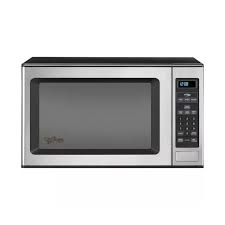
GT4175SPS - INSTALLATION 12-04 - Built-in microwave oven WHIRLPOOL - Free user manual and instructions
Find the device manual for free GT4175SPS - INSTALLATION 12-04 WHIRLPOOL in PDF.


| Product Type | Built-in Microwave Oven |
| Brand | Whirlpool |
| Model | GT4175SPS |
| Installation | Built-in, over an electric oven |
| Cutout Dimensions (W x H x D) | 64.77 x 42.55 x 57.79 cm (without flush plug) |
| Power Supply | 120 V AC, 60 Hz, 15-20 A |
| Plug Type | 3-prong grounded |
| Recommended Fuse | 15 or 20 A (time-delay recommended) |
| Included Parts | Trim kit, ducts (side, top, rear), screws, anti-tip bracket, template |
| Ducts Included | Side, top, rear (with brackets and rear bracket) |
| Anti-tip Bracket | Included, to be secured to the cavity floor |
| Certification | UL for use over electric built-in ovens |
| Oven Compatibility | 27" models: RBS275PD, GBS277PD, KEBI171D, KEBS177D ; 30" models: RBS305PD, GBS307PD, KEBI101D, KEBS107D |
| Main Material | Stainless steel (estimated) |
| Main Functions | Cooking, defrosting, reheating, timer |
| Safety | Grounding required, locking system |
| Cleaning | Exterior: soft damp cloth; interior: damp cloth |
| Warranty | Not specified in the manual |
| Repairability Index | Not provided |
| Energy Consumption | Not specified |
Frequently Asked Questions - GT4175SPS - INSTALLATION 12-04 WHIRLPOOL
User questions about GT4175SPS - INSTALLATION 12-04 WHIRLPOOL
0 question about this device. Answer the ones you know or ask your own.
Ask a new question about this device
Download the instructions for your Built-in microwave oven in PDF format for free! Find your manual GT4175SPS - INSTALLATION 12-04 - WHIRLPOOL and take your electronic device back in hand. On this page are published all the documents necessary for the use of your device. GT4175SPS - INSTALLATION 12-04 by WHIRLPOOL.
USER MANUAL GT4175SPS - INSTALLATION 12-04 WHIRLPOOL
MICROWAVE OVEN BUILT-IN TRIM KIT INSTALLATION INSTRUCTIONS
Built-In Trim Kit Models MK1170XP, MK1177XP
UL listed for use over built-in electric ovens:
27" (68.6 cm): (Y)RBS275PD, (Y)GBS277PD, KEBI171D, (Y)KEBS177D
30" (76.2 cm): (Y)RBS305PD, GBS307PD, (Y)KEBI101D, (Y)KEBS107D
INSTRUCTIONS D'INSTALLATION GARNITURE ENCASTRÉE POUR FOUR À MICRO-ONDES
INSTALLATION INSTRUCTIONS ......2
Tools Recommended....2
Parts Supplied 2
Cutout Dimensions....2
Electrical Requirements....3
Microwave Oven Preparation....3
Bottom Duct Assembly 3
Side Duct and Upper Duct Assembly 3
Anti-Tip Bracket Installation....4
Microwave Oven Placement 4
Trim Kit Frame Installation....5
SÉCURITÉ DU FOUR À MICRO-ONDES ....5
INSTRUCTIONS D'INSTALLATION ....6
Outillage recommandé....6
Pièces fournies....6
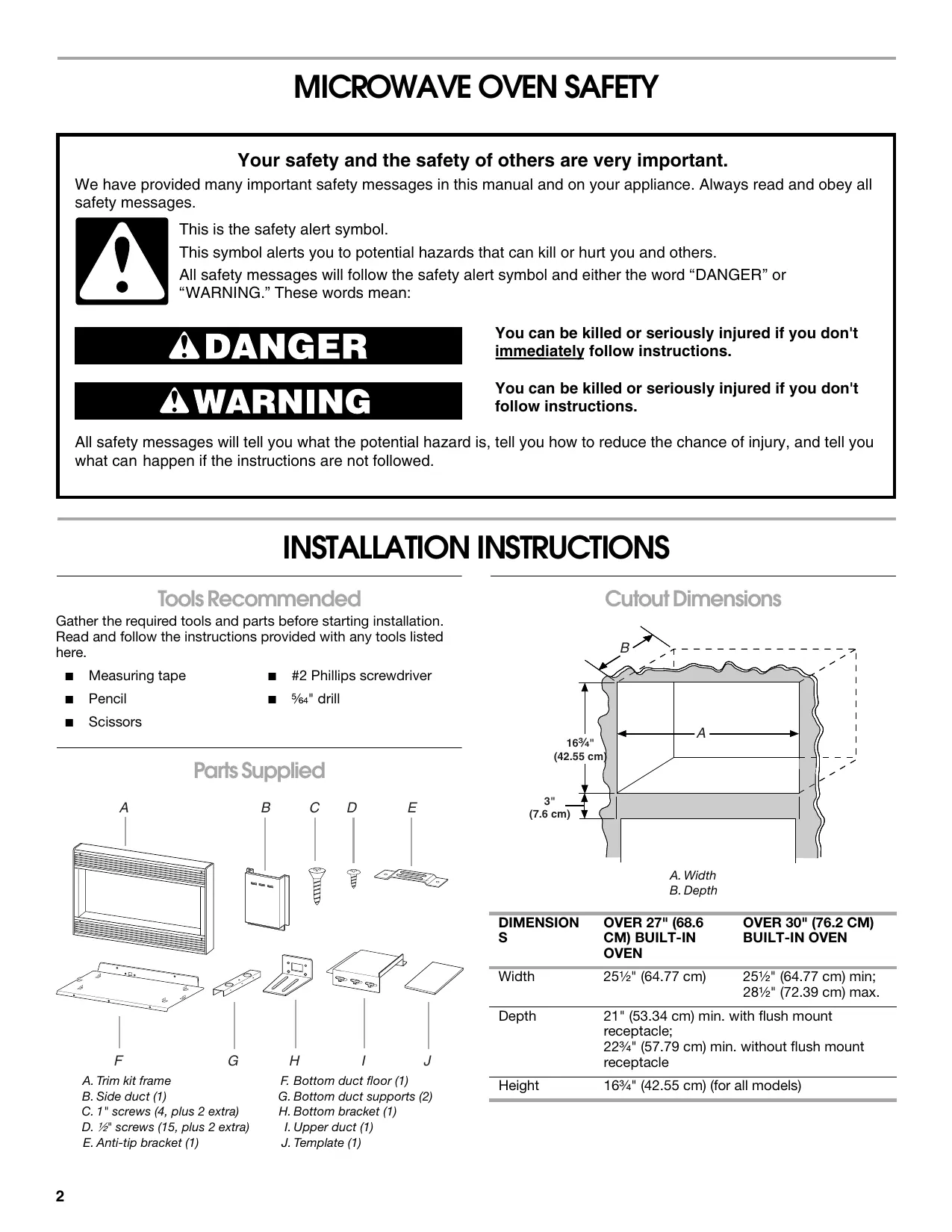
Your safety and the safety of others are very important.
We have provided many important safety messages in this manual and on your appliance. Always read and obey all safety messages.

This is the safety alert symbol.
This symbol alerts you to potential hazards that can kill or hurt you and others.
All safety messages will follow the safety alert symbol and either the word “DANGER” or “WARNING.” These words mean:
! DANGER
WARNING
You can be killed or seriously injured if you don't immediately follow instructions.
You can be killed or seriously injured if you don't follow instructions.
All safety messages will tell you what the potential hazard is, tell you how to reduce the chance of injury, and tell you what can happen if the instructions are not followed.
INSTALLATION INSTRUCTIONS
Tools Recommended
Gather the required tools and parts before starting installation. Read and follow the instructions provided with any tools listed here.
■ Measuring tape
■ #2 Phillips screwdriver
■ Pencil
■ 5/64" drill
Scissors
Parts Supplied
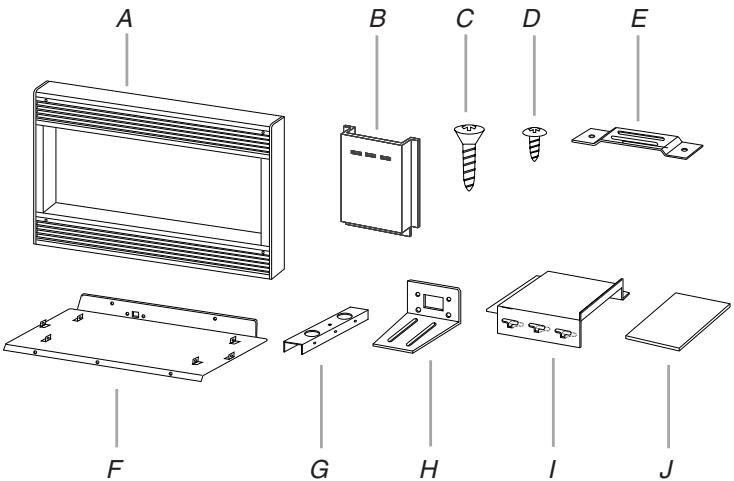
text_image
A B C D E F G H I JA. Trim kit frame
B. Side duct (1)
C. 1" screws (4, plus 2 extra)
D. 12 " screws (15, plus 2 extra)
E. Anti-tip bracket (1)
F. Bottom duct floor (1)
G. Bottom duct supports (2)
H. Bottom bracket (1)
I. Upper duct (1)
J. Template (1)
Cutout Dimensions
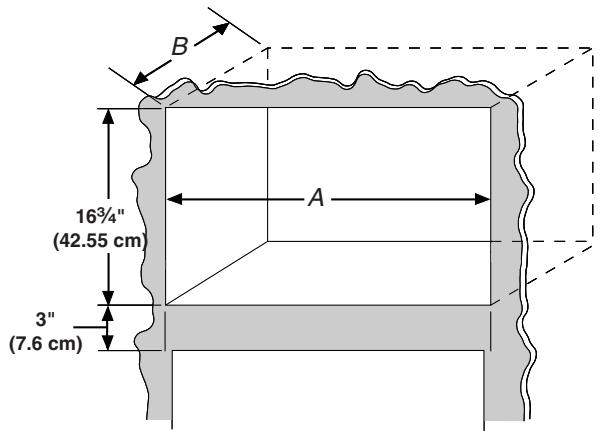
text_image
B 16¾" (42.55 cm) A 3" (7.6 cm)A. Width
B. Depth
| DIMENSION S | OVER 27" (68.6 CM) BUILT-IN OVEN | OVER 30" (76.2 CM) BUILT-IN OVEN |
| Width | 25 12 " (64.77 cm) | 25 12 " (64.77 cm) min;28 12 " (72.39 cm) max. |
| Depth | 21" (53.34 cm) min. with flush mount receptacle;22 34 " (57.79 cm) min. without flush mount receptacle | |
| Height | 16 34 " (42.55 cm) (for all models) | |
Electrical Requirements
WARNING

natural_image
Black-and-white illustration of a hand with a lightning bolt symbol and a curved line above it (no text or symbols)Electrical Shock Hazard
Plug into a grounded 3 prong outlet.
Do not remove ground prong.
Do not use an adapter.
Do not use an extension cord.
Failure to follow these instructions can result in death, fire, or electrical shock.
Observe all governing codes and ordinances. A 120-Volt, 60-Hz, AC-only, 15- or 20-amp fused electrical supply (or circuit breaker) is required. (A time-delay fuse or circuit breaker is recommended.) It is recommended that a separate circuit serving only this appliance be provided.
GROUNDING INSTRUCTIONS
■ For all cord connected appliances:
The microwave oven must be grounded. In the event of an electrical short circuit, grounding reduces the risk of electric shock by providing an escape wire for the electric current. The microwave oven is equipped with a cord having a grounding wire with a grounding plug. The plug must be plugged into an outlet that is properly installed and grounded.
WARNING: Improper use of the grounding plug can result in a risk of electric shock. Consult a qualified electrician or serviceman if the grounding instructions are not completely understood, or if doubt exists as to whether the microwave oven is properly grounded.
Do not use an extension cord. If the power supply cord is too short, have a qualified electrician or serviceman install an outlet near the microwave oven.
SAVE THESE INSTRUCTIONS
Microwave Oven Preparation
- Unplug microwave oven before proceeding with installation.
- Remove any loose items inside microwave oven.
Bottom Duct Assembly
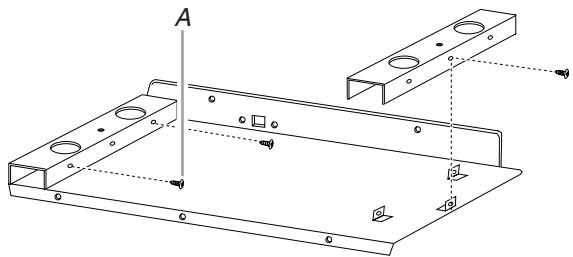
- Position supports over tabs of bottom duct floor, making sure all 3 tabs are inside each support. Align the tab holes with the screw holes on the sides of the supports. Fasten supports to bottom duct floor with six 12 " screws, as shown.
natural_image
Technical line drawing of a metal bracket assembly with mounting holes and mounting points (no text or symbols)A. 12 " screws
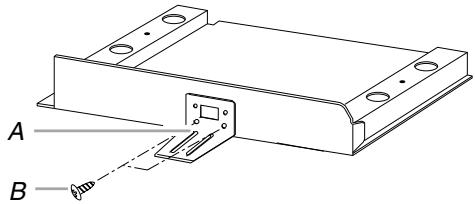
- Fasten bottom bracket to bottom duct using two 12 " screws.
(Rear view of bottom duct)
text_image
A BA. Bottom bracket
B. 12 " screws
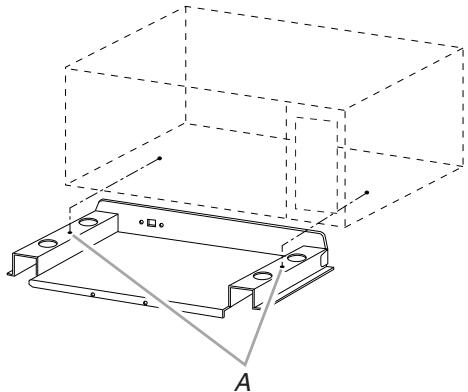
- Install bottom duct with two 12 " screws.
(Front view of microwave oven)
natural_image
Technical line drawing of a mechanical housing assembly with mounting holes and a base plate, no text or symbols presentA. 12 " screws
Side Duct and Upper Duct Assembly
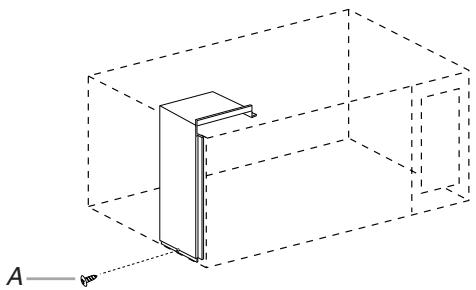
- Remove existing screw from left side of microwave oven.
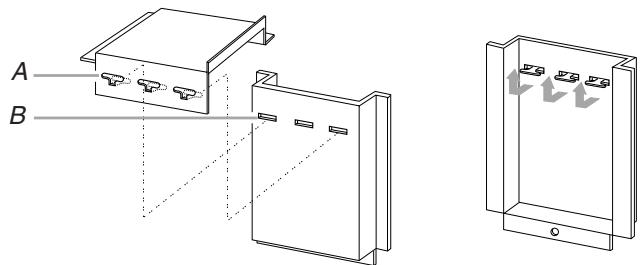
- Connect side duct to upper duct:
Insert projecting tabs of upper duct into holes of side duct. Then bend tabs upward.
text_image
A BA. Tabs of upper duct
B. Holes in side duct
NOTE: Remove any dirt or oil on microwave oven surface before ducts are attached.
- Peel off backing of double-sided tape. Attach the side duct and upper duct assembly to left side of microwave oven cabinet. Press down firmly on ducts. Fasten duct assembly to cabinet with existing screw.
natural_image
Pure 3D diagram of a vertical rectangular structure inside a cube, with no text, numbers, or symbols present.A. Existing screw
Anti-Tip Bracket Installation
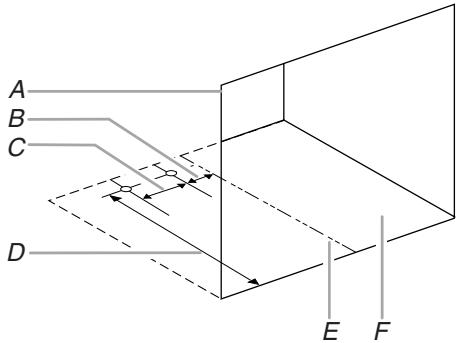
- On cutout floor, use template to mark hole centers for anti-tip bracket. Be sure to align the centerline of template to centerline of cutout floor.
(Dimensions as shown are not to scale.)
text_image
A B C D E FA. Cutout opening
D. 16 ^3/4 " (42.55 cm)
B. 1316 " (2.06 cm)
E. Centerline
C. 3" (7.62 cm)
F. Cutout floor
- Drill 2 holes for anti-tip bracket. (Use 5 164 " drill.)
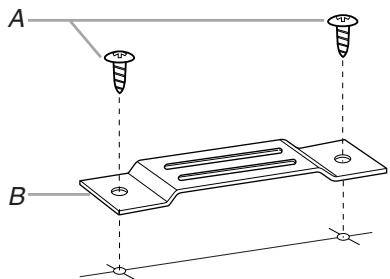
- Install anti-tip bracket onto cutout floor using two 12 " screws.
natural_image
Technical diagram of a metal bracket with two screw holes and mounting points, labeled A and B (no text or symbols present)A. 12 " screws
B. Anti-tip bracket
Microwave Oven Placement
- Slide microwave oven partway into cutout opening.
NOTE: Bottom bracket must be flat against cutout floor in order to correctly engage with anti-tip bracket.

text_image
A B CA. Bottom duct
B. Anti-tip bracket
C. Bottom bracket
- Plug in microwave oven.
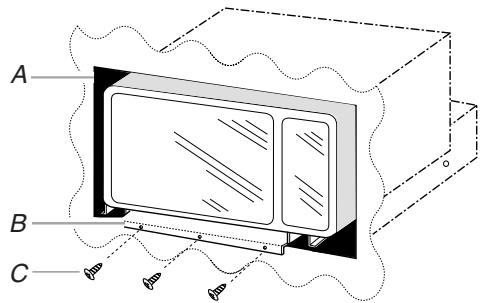
- Make sure microwave oven is centered within cutout opening and slide it into place, engaging anti-tip bracket.
- Drill pilot holes through positioning flange. (Use 564 " drill.) Then install three 12 " screws at front of bottom duct.
text_image
A B CA. Cutout opening
B. Positioning flange
C. 12 " screws
Trim Kit Frame Installation
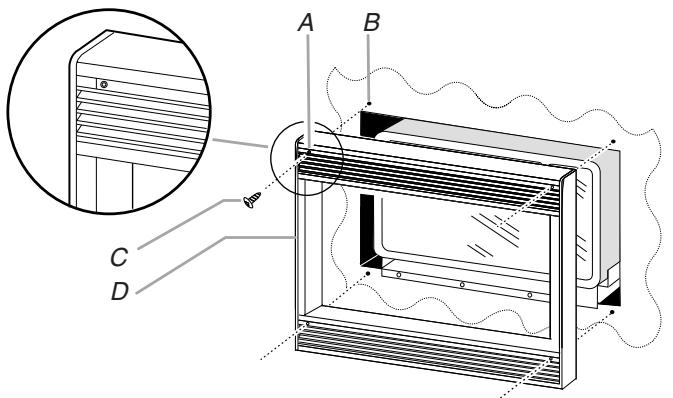
text_image
Technical diagram of a refrigerated air conditioner unit with labeled components A, B, C, D and an inset view showing internal structure.A. Mounting hole
B. Pilot hole
C. 1" screw
D. Trim kit frame
- Place trim kit frame over microwave oven.
NOTE: Trim kit frame must be oriented so that the louvers are sloping downward in the front. - Make sure the trim kit frame is level and equally centered on all 4 sides with respect to microwave oven. Mark 4 hole centers through the 4 mounting holes of trim kit frame.
- Remove trim kit frame and drill 4 pilot holes. (Use 5/64 " drill.)
- Attach trim kit frame using four 1" screws. Make sure orientation is correct as stated in Step 2.
Installation is now complete. Replace any loose items that have been removed from microwave oven cavity.
Save this installation instruction for future reference.
SÉCURITÉ DU FOUR À MICRO-ONDES
text_image
A B C D E F G H I Jnatural_image
Black-and-white illustration of a hand with a lightning bolt symbol and a curved line above it (no text or symbols)natural_image
Technical line drawing of a metal bracket assembly with mounting holes and mounting points (no text or symbols)A. Vis de 12 "
natural_image
Technical line drawing of a 3D mechanical assembly with mounting holes and a base plate, no text or symbols present.A. Vis de 12 "
natural_image
Technical line drawing of a two-port electrical enclosure with labeled components A and B, showing internal structure and mounting features (no text or symbols present)natural_image
Pure 3D diagram of a vertical rectangular block inside a cube, with no text, numbers, or symbols present.A. Vis existante
Installation de la bride antibasculement
D. 16^3/4 " (42,55 cm)
E. Axe central
natural_image
Technical diagram of a metal plate with two screw holes and mounting holes, labeled A and B (no text or symbols present)A. Vis de 12 "
B. Bride antibasculement
text_image
Technical diagram of a server rack with labeled components A, B, C, D and an inset view showing a cabinet detail.A. Trou de montage
C. Vis de 1"
B. Avant-trou
D. Cadre de garniture