W7832TMXH - Refrigerator-freezer WHIRLPOOL - Free user manual and instructions

Find the device manual for free W7832TMXH WHIRLPOOL in PDF.

WHIRLPOOL W7832TMXH - Refrigerator-freezer
📄 4 pages English EN Download 💬 AI Question 3 questions
Notice WHIRLPOOL W7832TMXH - page 1
Pick your language and provide your email: we'll send you a specifically translated version.

User questions about W7832TMXH WHIRLPOOL

3 questions about this device. Answer the ones you know or ask your own.

Ask a new question about this device

Your email remains private: it is only used to notify you if someone answers your question.

How to interpret the stars on the thermostat of the WHIRLPOOL W7832TMXH refrigerator and how to reset and adjust the temperature?
Frequently Asked Questions - 01/08/2026
Response Notice-Facile

On the WHIRLPOOL W7832TMXH refrigerator-freezer, the display of stars on the thermostat generally indicates the cold level of the freezer. Here’s how to understand and act:

Meaning of the stars on the thermostat

  • Each star corresponds to a temperature level of the freezer, ranging from 1 to 4 stars.
  • The more stars displayed, the lower the temperature, indicating a more intense cold.
  • For example, 4 stars indicate a temperature of about -18°C, ideal for long-term food preservation.

How to reset the thermostat

  • There is generally no specific reset button on this model.
  • To reset the thermostat, you can unplug the device from the electrical outlet for about 5 minutes.
  • Then plug the refrigerator back in and wait a few minutes for the displays to stabilize.

Adjusting the temperature

  • Use the buttons or the temperature selector located on the control panel to adjust the cold level.
  • For the refrigerator, the ideal temperature is generally between 3°C and 5°C.
  • For the freezer, select the number of stars corresponding to the desired temperature, 3 to 4 stars for optimal preservation (-18°C).

In summary, the stars indicate the cold of the freezer, and the adjustment is made via the control panel. In case of malfunction, a temporary power cut may help reset the device.
Respond (be the first)
Why is my Whirlpool W7832TMXH refrigerator no longer making noise and not cooling while the freezer is working?
Frequently Asked Questions - 01/08/2026
Response Notice-Facile

If your Whirlpool W7832TMXH refrigerator is no longer making noise and not cooling while the freezer is working, this generally indicates a problem with the circulation of cold air from the freezer to the refrigerator. This model uses a ventilated cooling system that relies on fans to distribute cold air between the two compartments. The absence of the typical noise from the fan or compressor is a key indicator of the problem.

First check: the Good Night function

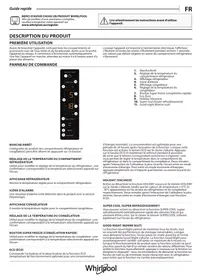
Check if the Good Night function has not been accidentally activated. This function is designed to minimize noise by reducing the compressor speed and can be activated during improper handling of the control panel. To deactivate it, press the Good Night button again (icon 10 on the control panel). The function stops after a maximum of 6 hours if needed.

Second check: air ducts and fan

The ventilated cooling system of this model circulates cold air through ducts connecting the freezer to the refrigerator. Check that these ducts are not blocked: open the refrigerator and check the air vents (usually located at the top or back). Ensure that no food, packaging, or debris is blocking these openings. Listen near these grilles to confirm if you hear the noise of the fan. If no noise comes from the fan, it may be defective.

Third check: frost accumulation

Although this model is equipped with an automatic No Frost system, it is possible that frost accumulation is blocking the main air duct. Open the freezer compartment and check for excessive frost buildup around the freezing trays or near the back wall. Unplug the appliance for 30 minutes to allow for manual defrosting if necessary, then plug it back in.

Check the temperature setting

Check that the refrigerator temperature is correctly set using the refrigerator temperature adjustment buttons (button 3 on the control panel). The refrigerator display should show a set temperature (typically between 2 and 8°C). If the display is blank or abnormal, unplug the appliance for 10 seconds and plug it back in to reset the electronic system.

If the problem persists

If, after these checks, the refrigerator still does not cool and no fan noise is heard, the internal fan or thermostat is likely defective and requires the intervention of a Whirlpool after-sales technician. Contact Whirlpool customer service mentioning the service number on the nameplate of your appliance (usually located on the back wall), and refer to the number available in your warranty booklet or on www.whirlpool.eu.

Respond (be the first)
Why doesn't my WHIRLPOOL W7832TMXH refrigerator-freezer restart after being unplugged for 15 days?
Frequently Asked Questions - 01/08/2026
Response Notice-Facile

Your WHIRLPOOL W7832TMXH refrigerator-freezer should start automatically as soon as it is plugged back in. If it does not, here are the steps to follow:

Checking the power supply: First, check that the power cord is properly plugged into a functioning outlet by testing another device on the same outlet. Ensure that the fuses or circuit breakers in your electrical system are working correctly and that none have tripped.

After plugging back in: Once the appliance is plugged back in, the display should light up and all icons should illuminate for about 1 second. After a prolonged power interruption (like 15 days without power), you may hear a humming sound during the first start-up. This is a normal operational noise indicating that the system is resetting.

Wait before use: Wait at least 4 to 6 hours after plugging back in before placing food inside. This wait is necessary for the appliance to reach the correct refrigeration and freezing temperatures.

Checking the positioning: Ensure that your appliance is placed on a flat and stable surface. A lack of level can prevent the proper functioning of the defrost water circulation system.

If after these checks the refrigerator still does not restart (the display does not light up and no sound is heard), the problem lies with the power supply or the internal electronic system. In this case, contact the authorized Whirlpool service center, providing the model W7832TMXH and the serial number found on the nameplate.

Respond (be the first)

Download the instructions for your Refrigerator-freezer in PDF format for free! Find your manual W7832TMXH - WHIRLPOOL and take your electronic device back in hand. On this page are published all the documents necessary for the use of your device. W7832TMXH by WHIRLPOOL.

USER MANUAL W7832TMXH WHIRLPOOL

MERCI D'AVOIR CHOISI UN PRODUIT WHIRLPOOL.

Manual assistant
Powered by Anthropic
Waiting for your message
Product information

Brand : WHIRLPOOL

Model : W7832TMXH

Category : Refrigerator-freezer