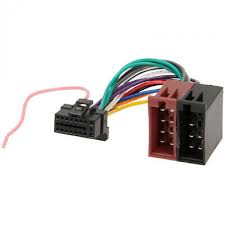
CDE-7854RM - Car radio ALPINE - Free user manual and instructions
Find the device manual for free CDE-7854RM ALPINE in PDF.


| Product type | Car radio with CD player and RDS tuner |
| Brand | ALPINE |
| Model | CDE-7854RM |
| Dimensions (W x H x D) | 178 mm x 50 mm x 155 mm |
| Front panel dimensions (W x H x D) | 170 mm x 46 mm x 18 mm |
| Weight | 1.5 kg |
| Power supply | 14.4 V DC (11-16 V permissible), negative ground |
| Fuse | 15 A |
| Maximum output power | 40 W x 4 |
| Preamp output voltage | 2 V / 10 kΩ |
| Equalizer (Bass / Treble) | ±15 dB at 30 Hz / ±10 dB at 10 kHz |
| FM tuner | Range 87.5-108 MHz, mono sensitivity 0.7 μV |
| MW tuner | Range 531-1602 kHz, sensitivity 25.1 μV/28 dB |
| LW tuner | Range 153-281 kHz, sensitivity 31.6 μV/30 dB |
| CD player | Frequency response 5-20,000 Hz, signal-to-noise ratio 95 dB, distortion 0.008%, dynamic range 95 dB |
| CD functions | Repeat (RPT), random play (M.I.X.), scan (SCAN) |
| RDS functions | AF, TP, TA, PTY, NEWS, EON, traffic information |
| Front panel | Detachable, with reset function |
| Station memory | 24 stations (6 per band FM1, FM2, MW, LW), manual or automatic |
| Audio outputs | 1 rear RCA pair (volume linked), output for motorized antenna, phone interrupt input |
| Disc compatibility | 12 cm CD, round discs only |
| Cleaning and maintenance | Wipe discs from center outward with a soft cloth; do not use non-compliant accessories |
| Safety precautions | Do not use distracting functions while driving; keep volume at a level to hear external sounds; use only on 12 V negative ground vehicle |
Frequently Asked Questions - CDE-7854RM ALPINE
User questions about CDE-7854RM ALPINE
0 question about this device. Answer the ones you know or ask your own.
Ask a new question about this device
Download the instructions for your Car radio in PDF format for free! Find your manual CDE-7854RM - ALPINE and take your electronic device back in hand. On this page are published all the documents necessary for the use of your device. CDE-7854RM by ALPINE.
USER MANUAL CDE-7854RM ALPINE
FM/MW/LW/RDS CD Receiver
- OWNER'S MANUAL Please read before using this equipment.
- BEDIENUNGSANLEITUNG Lesen Sie diese Bedienungsanleitung bitte vor Gebrauch des Gerätes.
- MODE D'EMPLOI Veuillez lire avant d'utiliser cet appareil.
- MANUAL DE OPERACIÓN Léalo antes de utilizar este equipo.
- ISTRUZIONI PER L'USO Si prega di leggere prima di utilizzare il attrezzatura.
- ANVÄNDARHANDLEDNING Innan du använder utrustningen bör du läsa igenom denna användarhandledning.

ALPINE ELECTRONICS, INC.
Tokyo office: 1-1-8 Nishi Gotanda,
Shinagawa-ku,
Tokyo 141-8501, Japan
Tel.: (03) 3494-1101
ALPINE ELECTRONICS OF AMERICA, INC.
19145 Gramercy Place, Torrance,
California 90501, U.S.A.
Tel.: 1-800-ALPINE-1 (1-800-257-4631)
ALPINE ELECTRONICS OF CANADA, INC.
Suite 203, 7300 Warden Ave. Markham,
Ontario L3R 9Z6, Canada
Tel.: 1-800-ALPINE-1 (1-800-257-4631)
ALPINE ELECTRONICS OF AUSTRALIA PTY. LTD.
6-8 Fifeways Boulevarde Keysborough,
Victoria 3173, Australia
Tel.: (03) 9769-0000
ALPINE ELECTRONICS GmbH
Kreuzerkamp 7-11 40878 Ratingen, Germany
Tel.: 02102-45 50
13 Tanners Drive, Blakelands, Milton Keynes
MK14 5BU, U.K.
Tel.: 01908-61 15 56
ALPINE ELECTRONICS DE ESPAÑA, S.A.
Portal De Gamarra 36, Pabellón 32
01013 Vitoria (Alava)-Apdo. 133, Spain
Tel.:34-45-283588
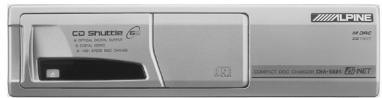
CHA-S624
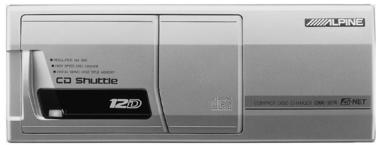

CHA-1214
CD changer for CDM-7857RB
Alpine CD Changers Give You More!
More musical selections, more versatility, more convenience.
An Alpine CD Changer adds more musical choices to your sound system. All models can be controlled from Alpine head units and deliver excellent sound quality. The CHA-S624 is a high-performance 6-disc changer with a new M DAC, Ai-NET compatibility, Optical Digital Output, 150 Disc Title Memory and CD TEXT. The CHA-1214 Ai-NET model holds 12 discs, and the CHM-S620 M-Bus model is a super-compact 6-disc changer.
Operating Instructions

WARNING
WARNING 2
CAUTION 2
PRECAUTION 2

Basic Operations
Detaching the Front Panel....4
Attaching the Front Panel ....4
Initial System Start-Up ....4
Turning Power On and Off ....4
Non Fading Pre-Out (N.F.P.) On and Off (CDM-7857RB only) ....5
Turning Loudness On/Off 5
Adjusting Source Signal Levels .... 5
Adjusting Volume/Bass/Treble/Balance (Between Left and Right)/Fader (Between Front and Rear) ....5
Radio Operation
Manual Tuning 6
Automatic Seek Tuning 6
Mono/Stereo Switching 6
Manual Storing of Station Presets 7
Automatic Memory of Station Presets ...... 7
Tuning to Preset Stations 7
RDS Operation
Setting RDS Reception Mode and Receiving RDS Stations ....8
Recalling Preset RDS Stations 8
Receiving RDS Regional (Local) Stations .....9
Receiving Traffic Information......9
PTY (Programme Type) Tuning ......9
Receiving Traffic Information While Playing CD or Radio 9
Priority News .... 10
CD Player Operation
Inserting/Ejecting Disc 11
Normal Play and Pause 11
Music Sensor (Skip)....11
Fast Forward and Backward ...... 11
Repeat Play 12
M.I.X. (Random Play) 12
Scanning Programmes ...... 12
Controlling CD Changer (Optional) (CDM-7857RB only) 12
Informations
In Case of Difficulty ...... 13
Specifications 15
Installation and Connections
Precautions 16
Installation 17
Connections 18

WARNING
The exclamation point within an equilateral triangle and "WARNING" are intended to alert the user to the presence of important operating instructions.
Failure to heed the instructions will result in severe injury or death.
DO NOT OPERATE ANY FUNCTION THAT TAKES YOUR ATTENTION AWAY FROM SAFELY DRIVING YOUR VEHICLE.
Any function that requires your prolonged attention should only be performed after coming to a complete stop. Always stop the vehicle in a safe location before performing these functions. Failure to do so may result in an accident.
KEEP THE VOLUME AT A LEVEL WHERE YOU CAN STILL HEAR OUTSIDE NOISE WHILE DRIVING.
Failure to do so may result in an accident.
MINIMIZE DISPLAY VIEWING WHILE DRIVING.
Viewing the display may distract the driver from looking ahead of the vehicle and cause an accident.
DO NOT DISASSEMBLE OR ALTER.
Doing so may result in an accident, fire or electric shock.
USE ONLY IN CARS WITH A 12 VOLT NEGATIVE GROUND.
(Check with your dealer if you are not sure.) Failure to do so may result in fire, etc.
KEEP SMALL OBJECTS SUCH AS BATTERIES OUT OF THE REACH OF CHILDREN.
Swallowing them may result in serious injury. If swallowed, consult a physician immediately.
USE THE CORRECT AMPERE RATING WHEN REPLACING FUSES.
Failure to do so may result in fire or electric shock.
DO NOT BLOCK VENTS OR RADIATOR PANELS.
Doing so may cause heat to build up inside and may result in fire.
USE THIS PRODUCT FOR MOBILE 12V APPLICATIONS.
Use for other than its designed application may result in fire, electric shock or other injury.
DO NOT PLACE HANDS, FINGERS OR FOREIGN OBJECTS IN INSERTION SLOTS OR GAPS.
Doing so may result in personal injury or damage to the product.

CAUTION
The exclamation point within an equilateral triangle and "CAUTION" are intended to alert the user to the presence of important operating instructions.
Failure to heed the instructions can result in injury or material damage.
HALT USE IMMEDIATELY IF A PROBLEM APPEARS.
Failure to do so may cause personal injury or damage to the product. Return it to your authorized Alpine dealer or the nearest Alpine Service Centre for repairing.

PRECAUTIONS
Temperature
Be sure the temperature inside the vehicle is between +60°C (+140°F) and -10°C (+14°F) before turning your unit on.
Moisture Condensation
You may notice the CD playback sound wavering due to condensation. If this happens, remove the disc from the player and wait about an hour for the moisture to evaporate.
Damaged Disc
Do not attempt to play cracked, warped, or damaged discs. Playing a bad disc could severely damage the playback mechanism.
Maintenance
If you have problems, do not attempt to repair the unit yourself. Return it to your Alpine dealer or the nearest Alpine Service Station for servicing.
Never Attempt the Following
Do not grip or pull out the disc while it is being pulled back into the player by the automatic reloading mechanism.
Do not attempt to insert a disc into the unit when the unit power is off.
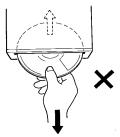
Inserting Discs
Your player accepts only one disc at a time for playback. Do not attempt to load more than one disc.
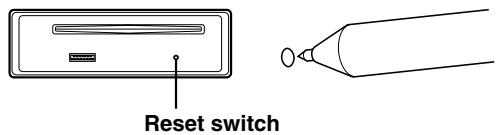
Make sure the label side is facing up when you insert the disc. Your player will automatically eject any disc that is inserted incorrectly. If the player continues to eject a correctly inserted disc, push the Reset switch (located behind the detachable front panel) with a pointed object such as a ball-point pen.
Playing a disc while driving on a very bumpy road may result in skips, but this will not scratch the disc or damage the player.
New Discs
As a protective measure to prevent the CD from jamming, the CD player will automatically eject discs with irregular surfaces or inserted incorrectly. When a new disc is inserted into the player and ejected after initial loading, using your finger, feel around the inside of the centre hole and outside edge of the disc. If you feel any small bumps or irregularities, this could inhibit proper loading of the disc. To remove the bumps, rub the inside edge of the hole and outside edge of the disc with a ball-point pen or other such instrument, then insert the disc again.
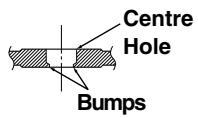
Centre Hole
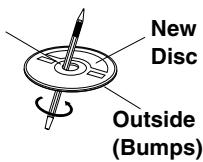
Irregular Shaped Discs
Be sure to use round shape discs only for this unit and never use any special shape discs.
Use of special shape discs may cause damage to the mechanism.

Installation Location
Make sure the CDM-7857RB/CDE-7855RB/CDE-7854RM/CDE-7854R/CDE-7853R will not be installed in a location subjected to:
- Direct sun and heat
• High humidity and water - Excessive dust
• Excessive vibrations
Handling the Detachable Front Panel
- Do not expose to rain or water.
- Do not drop or apply shock.
Correct Handling
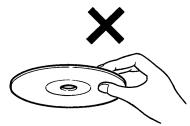
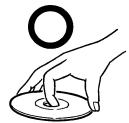
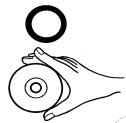
Do not drop the disc while handling. Hold the disc by its edge so that no fingerprints are left on the surface. Do not affix tape, paper, or gummed labels to the disc. Do not write on the disc.
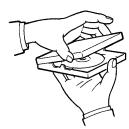
INCORRECT
CORRECT
CORRECT
Disc Cleaning
Fingerprints, dust, or soil on the surface of the disc could cause the CD player to skip. For routine cleaning, wipe the playing surface with a clean, soft cloth from the centre of the disc to the outer edge. If the surface is heavily soiled, dampen a clean, soft cloth in a solution of mild neutral detergent before cleaning the disc.
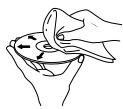
Disc Accessories
There are various accessories available on the market for protecting the disc surface and improving sound quality. However, most of them will influence the thickness and/or diameter of the disc. Using such accessories can cause the disc to be out of standard specifications and may create operational problems. We recommend not using these accessories on discs played in Alpine CD players.
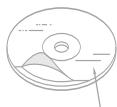
Transparent Sheet
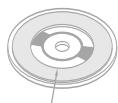
Disc Stabilizer
Basic Operations
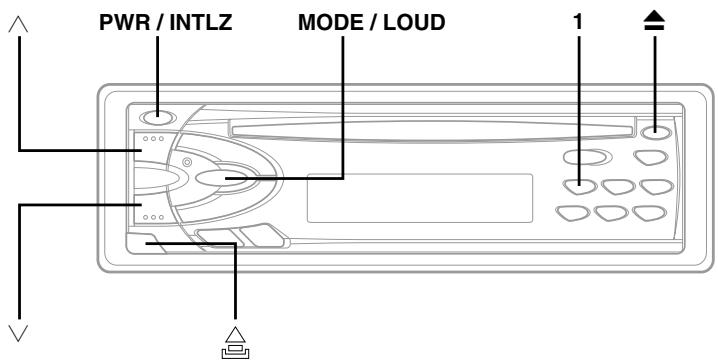
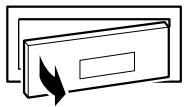
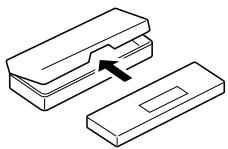
Detaching the Front Panel
1 Press the PWR (Power) button to turn off the power.
2 Press the △ (Release) button at lower left corner until the front panel pops out.
3 Grasp the left side of the front panel and pull it out.
NOTES
- The front panel may become hot in normal usage (especially the connector terminals), this is not malfunction.
- To protect the front panel, place it in the supplied carrying case.
Attaching the Front Panel
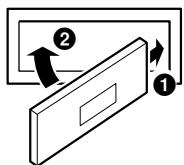
1 First, insert the right side of the front panel into the main unit. Align the groove on the front panel with the projection on the main unit.
2 Push the left side of the front panel until it locks firmly into the main unit.
NOTE
Before attaching the front panel, make sure that there is no dirt or dust on the connector terminals and no foreign object between the front panel and the main unit.
- Controllable with Remote Control (CDM-7857RB only)
This unit can be controlled with an optional Alpine remote control. For details, consult your Alpine dealer.
- Connectable to Remote Control Interface Box (CDM-7857RB only)
You can operate this unit from the vehicle's control unit when an Alpine Remote Control Interface Box (optional) is connected. For details, contact your Alpine dealer.
Initial System Start-Up
1 When operating the unit for the first time after installation or after the vehicle's battery has been disconnected and reconnected, set the volume level to its minimum, then remove the detachable front panel.
There is a small hole behind the front panel. Press the Reset switch mounted behind the small hole with a ball-point pen or any other pointed object.
Turning Power On and Off
1 Press the PWR (Power) button to turn on the unit.
NOTE
The unit can be turned on by pressing any other button except the eject ▲ button.
The volume level gradually increases to the previous level you were listening to before the unit was turned off.
Press the PWR button again to turn off the unit.
Non Fading Pre-Out (N.F.P.) On and Off (CDM-7857RB only)
Use the N.F.P. On mode when a non-fading signal would be most effective. For example, to drive an amplifier with a low-pass filter for the subwoofer.
1 Press and hold the Eject (▲) button for at least 3 seconds with the unit turned on.
With each press, N.F.P. is toggled On or Off.
N.F.P. ON:
In this position, the Front Pre-Output will not be affected by the fader. This is ideal for driving a subwoofer amplifier.
N.F.P. OFF:
Returns to normal fader mode.
NOTES
- Initial mode is "N.F.P. OFF."
- Set the N.F.P. to OFF unless the subwoofer is used.
Turning Loudness On/Off
Loudness introduces a special low- and high-frequency emphasis at low listening levels. This compensates for the ear's decreased sensitivity to bass and treble sound.
1 Press and hold the LOUD button for at least 2 seconds to activate or deactivate the loudness mode. The display shows "LOUD" when the loudness mode is activated.
Adjusting Source Signal Levels
If the difference in volume level between the CD player and FM radio is too great, adjust the FM signal level as follows.
1 Press and hold the INTLZ button for at least 3 seconds.
2 Press the Preset 1 button to select the FM signal level HI (High) or LO (Low) to make the signal levels between the FM band and CD player closer.
3 Press the INTLZ button to cancel the adjusting mode.
Adjusting Volume/Bass/Treble/ Balance (Between Left and Right)/ Fader (Between Front and Rear)
1 Press the MODE button repeatedly to choose the desired mode.
Each press changes the modes as follows:

NOTE
If the or button is not pressed in 5 seconds after selecting the BASS, TREBLE, BALANCE and FADER modes, the unit automatically sets in the VOLUME mode.
2 Press the ∨ and ∧ buttons until the desired sound is obtained in each mode.
NOTE
The BASS and TREBLE settings for each source (FM, MW (LW) and CD) will be automatically memorized whenever the settings are changed.
Radio Operations
Manual Tuning
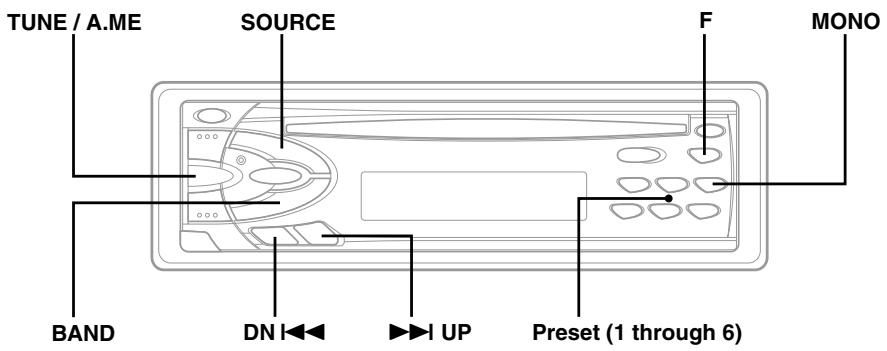
1 Press the SOURCE button to select the radio mode.
2 Press the BAND button repeatedly until the desired radio band is displayed. Each press changes the band:
→ FM1 → FM2 → MW → LW
3 Press the TUNE button repeatedly until "DX SEEK" and "SEEK" disappear from the display.
NOTE
The initial mode is DX SEEK.
4 Press the DN I◀◀ or ▶▶▶ UP button to move downward or upward one step respectively until the desired station frequency is displayed.
Automatic Seek Tuning
1 Press the SOURCE button to select the radio mode.
2 Press the BAND button repeatedly until the desired radio band is displayed.
Each press changes the band:
→ FM1 → FM2 → MW → LW
3 Press the TUNE button to illuminate the DX and SEEK indicators in the display.
The SEEK indicator illuminates only for a few seconds. With the DX mode activated, both strong and weak stations will be tuned in the Auto-Seek operation.
Press again to return to the local mode. The DX indicator will turn off and the SEEK indicator will illuminate for a few seconds. Now, only strong stations will be tuned.
4 Press the DN I◀◀ or ▶▶▶ UP button to automatically seek a station downward or upward respectively.
The unit will stop at the next station it finds. Press the same button again to seek the next station.
Mono/Stereo Switching
1 Press the F button.
The F button changes to green (CDM-7857RB/CDE-7855RB/CDE-7854R/CDE-7853R), orange (CDE-7854RM).
2 "ST" indicator appears when a stereo FM station is tuned in.
Press the MONO button to switch from stereo to monaural FM reception. This will help in reducing the noise of weak FM Stereo broadcasts. In the monaural mode, the MO indicator appears. Press the MONO button again to return to the stereo mode.
3 Press the F button to activate the normal mode. The F button returns to red.
Manual Storing of Station Presets
1 Select the radio band and tune in a desired radio station you wish to store in the preset memory.
2 Make sure that the F button lights red, then press and hold any one of the preset buttons (1 through 6) for at least 2 seconds until the station frequency on the display blinks.
3 Press the Preset button into which you wish to store the station while the frequency display is blinking (within 5 seconds).
The display stops blinking once the station has been memorized. The display shows the band, preset No. with a triangle (≡) and station frequency memorized.
4 Repeat the procedure to store up to 5 other stations onto the same band.
To use this procedure for other bands, simply select the band desired and repeat the procedure.
A total of 24 stations can be stored in the preset memory (6 stations for each band; FM1, FM2, MW and LW).
NOTE
If you store a station in a preset memory which already has a station, the current station will be cleared and replaced with the new station.
Automatic Memory of Station Presets
1 Press the BAND button repeatedly until the desired radio band is displayed.
Each press changes the band:
→ FM1 → FM2 → MW → LW
2 Press and hold the A.ME button for at least 2 seconds.
The tuner will automatically seek and store 6 strong stations in the selected band in order of signal strength.
The frequency on the display continues to change while the automatic memory is in progress.
When the automatic memory has been completed, the tuner goes to the station stored in the preset location No. 1.
NOTE
If no stations are stored, the tuner will return to the original station you were listening to before the auto memory procedure began.
Tuning to Preset Stations
1 Press the BAND button repeatedly until the desired band is displayed.
Each press changes the band:
→ FM1 → FM2 → MW → LW
2 Make sure that the F button lights red, then press the station preset button that has your desired radio station in memory.
The display shows the band, preset number with a triangle and frequency of the station selected.
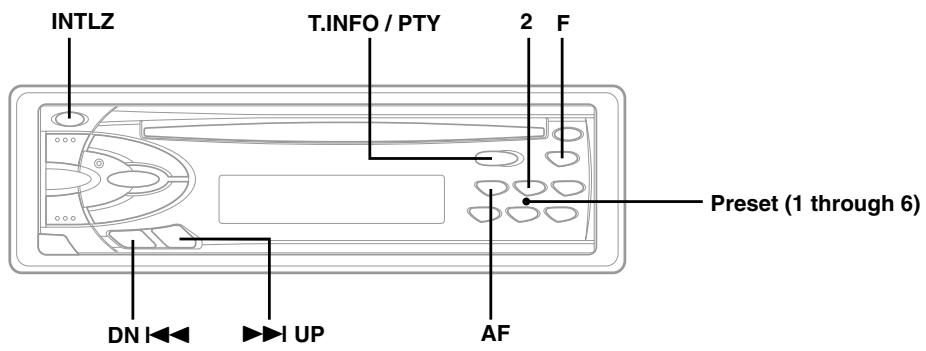
Setting RDS Reception Mode and Receiving RDS Stations
The RDS (Radio Data System) is a radio information system using the 57 kHz subcarrier of regular FM broadcast. The RDS allows you to receive a variety of information such as traffic information, station names, and to automatically re-tune to a stronger transmitter that is broadcasting the same programme.
1 Press the F button.
The F button changes to green (CDM-7857RB/CDE-7855RB/CDE-7854R/CDE-7853R), orange (CDE-7854RM).
2 Press the AF button to activate the RDS mode.
3 Press the DN I◀◀ or ▶▶▶ UP button to tune in the desired RDS station.
NOTE
When the BAND button is pressed and held for more than 2 seconds while a station name is displayed, the display shows the station frequency for 5 seconds.
When the RDS station signal received has become weak:
- AF seek mode, press and hold the AF button for at least 2 seconds to have the unit automatically seek a stronger station in the AF (Alternative frequencies) list.
If there is no AF station, the display shows "SEEK END."
4 Press the AF button again to deactivate the RDS mode.
5 Press the F button to activate the normal mode. The F button returns to red.
Tips
The RDS digital data includes the followings:
PI Programme Identification
PS Programme Service Name
AF List of Alternative Frequencies
TP Traffic Programme
TA Traffic Announcement
PTY Programme Type
EON Enhanced Other Networks
Recalling Preset RDS Stations
1 Press the F button.
The F button changes to green (CDM-7857RB/CDE-7855RB/CDE-7854R/CDE-7853R), orange (CDE-7854RM).
2 Press the AF button to activate the RDS mode. The display shows "AF" when the RDS mode is activated.
3 Press the F button to activate the normal mode. The F button returns to red.
4 Make sure that the F button lights red, then press the preset location button in which your desired RDS station is preset.
If the preset station's signal is weak, the unit automatically searches and tunes to a stronger station in the AF (Alternative Frequencies) list.
5 If the preset station and the stations in the AF list cannot be received:
The unit searches again for a station in the PI (Programme Identification) list.
If there are still no stations receivable in the area, the unit displays the frequency of the preset station and the preset indicator disappears.
If the signal level of the Regional (Local) station being tuned becomes too weak to receive, press the same preset location button to tune in a Regional station in other district.
NOTE
For presetting the RDS stations, refer to the Radio Operation section. The RDS stations can be preset in the F1 and F2 bands only.
Receiving RDS Regional (Local) Stations
1 Press and hold the INTLZ button for at least 3 seconds to activate the setting mode.
2 Press the Preset 2 button to turn on or off the REG (Regional) mode.
In the REG OFF mode, the unit automatically keeps receiving the related local RDS station.
3 Press the INTLZ button to deactivate the setting mode.
Receiving Traffic Information
1 Press the T.INFO button repeatedly until the T.INFO indicator appears in the display.
2 Press the DN I◀◀ or ▶▶I UP button to select your desired traffic information station. When a traffic information station is tuned in, the TP indicator lights up.
Traffic information is heard only when it is being broadcast. If traffic information is not being broadcast, the unit is set in the standby mode. When a traffic information broadcast begins, the unit automatically receives it and the display shows "TRF-INFO" for a few seconds and returns to the PS display.
When the traffic information broadcast is over, the unit will automatically set in the standby mode.
NOTES
- If the traffic information broadcast signal falls below a certain level, the unit remains in the receiving mode for 1 minute. If the signal remains below a certain level for over 1 minute, the "T.INFO" indicator blinks.
- If you do not want to listen to the traffic information being received, lightly press the T.INFO button to skip that traffic information message. The T. INFO mode will remain in the ON position to receive the next traffic information message.
- If the volume level is changed while receiving traffic information, the changed volume level will be memorized. When traffic information is received next time, the volume level will be automatically adjusted to the level memorized.
PTY (Programme Type) Tuning
1 Press and hold the PTY button for at least 2 seconds to activate the PTY mode.
The Programme Type of the station being currently received will be displayed for 5 seconds.
- If there is no receivable PTY broadcast, "NO PTY" will be displayed for 5 seconds.
- If no RDS station can be received, the display shows "NO RDS."
NOTE
If no button is pressed within 5 seconds after pressing the PTY button, the PTY mode will be automatically cancelled.
2 Press the DN I◀◀ and ▶▶I UP buttons within 5 seconds after activating the PTY mode to choose the desired programme type while the PTY (programme type) is being displayed. Each press scrolls the programme type by one.
-LIGHT M ← CLASSICS → OTHER M- - - - - - - - - - - - - - - - - - - - - - - - - - - - - - - - - - - - - - - - - - - - - - - - - - - - - - - - - - - - - - - - - - - - - - - - - - - - - - - - - - - - - - - -
3 Press the PTY button within 5 seconds after selecting the programme type to start searching for a station in the selected programme type. The chosen programme type indicator blinks during searching and lights when a station is found.
If no PTY station is found, "NO PTY" will be displayed for 2 seconds.
Receiving Traffic Information While Playing CD or Radio
1 Press the T.INFO button repeatedly until the T.INFO indicator appears in the display.
2 Press the DN I◀◀ and ▶▶I UP buttons to select a traffic information station if necessary.
- When a traffic information broadcast starts, the unit automatically mutes the CD player/changer or the regular FM broadcast.
- When the traffic information broadcast finishes, the unit automatically returns to the original source play before the traffic information broadcast began.
When traffic information stations cannot be received:
In the tuner mode:
When the TP signal can no longer be received for over 1 minute, the "T.INFO" indicator blinks. In the CD mode:
When the TP signal can no longer be received, the traffic information station of another frequency will be selected automatically.
NOTE
The receiver is equipped with the EON (Enhanced Other Networks) function in order to keep track of additional alternate frequencies to the AF list. The EON indicator appears while an RDS EON station is being received. If the station being received does not broadcast the traffic information, the receiver automatically tunes in the related station that broadcasts the traffic information when it occurs.
3 Press the T.INFO button to deactivate the Traffic Information mode.
The T.INFO indicator disappears.
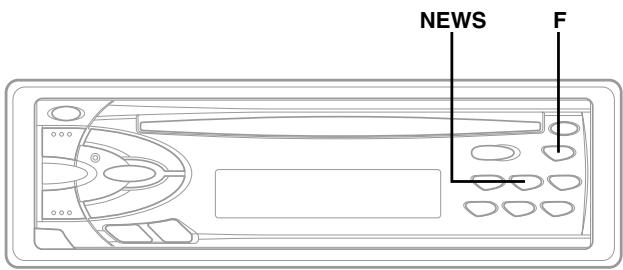
Priority News
This function allows you to preset to give priority to the News programme. You will never miss the News programme as the unit automatically gives priority to the News programme whenever it begins broadcasting, and interrupts the programme you are currently listening. This feature is functional when your unit is set to a mode other than the LW and MW modes.
1 Press the F button.
The F button changes to green (CDM-7857RB/CDE-7855RB/CDE-7854R/CDE-7853R), orange (CDE-7854RM).
2 Press the NEWS button to activate the PRIORITY NEWS mode.
"NEWS" lights up in the display.
- To disable the PRIORITY NEWS function, press the NEWS button.
NOTE
In the PRIORITY NEWS function, unlike in the T.INFO function, the volume does not increase automatically.
3 Press the F button to activate the normal mode. The F button returns to red.
CD Player Operation
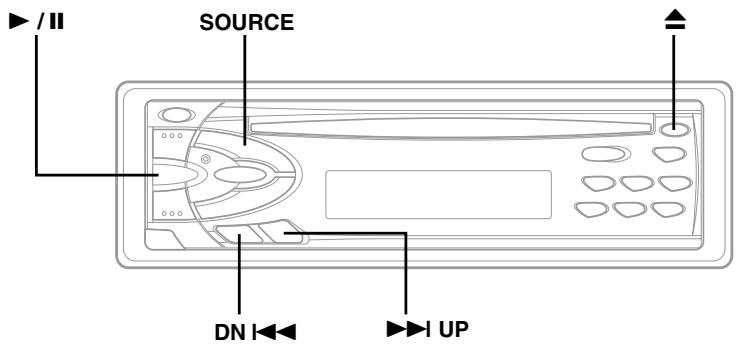
Inserting/Ejecting Disc
1 Insert a CD half way into the slot with the label side facing up. The player automatically draws the disc into the disc compartment.
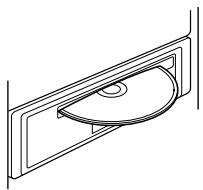
The Disc indicator appears to show that a disc is loaded.
NOTE
Three-inch (8cm) CD's cannot be used (CDM-7857RB only).
2 Press the Eject ▲ button when you want to eject the CD.
NOTES
- If the CD is not removed for several seconds after it has been ejected, the player automatically draws the CD into the compartment to protect the CD.
- Only compact discs containing the mark shown can be used.

Normal Play and Pause
1 Insert a CD. The CD player begins playback from the first track on the disc.
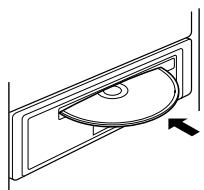
The display shows the track number and elapsed time of the track being played. When the last track is played back the player returns to the first track and begins playback from that point.
2 If a disc is already loaded in the CD player, press the SOURCE button to select the CD mode.
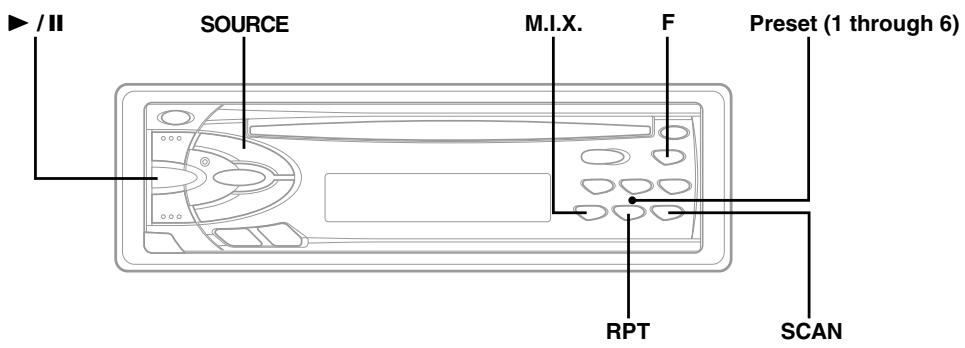
3 Press the ▶/II button to start CD play.
4 Press the ▶/□ button to temporarily stop CD playback.
To resume playback, press the ▶/□ button again.
Music Sensor (Skip)
1 Momentarily press the DN I◀◀ button once during CD play to return to the beginning of the current track. If you wish to access a track further back, repeatedly press until you reach the desired track.
Press the ▶▶▶ UP button once to advance to the beginning of the next track. If you wish to access a track further ahead, press repeatedly until the desired track is reached.
NOTE
The music sensor feature is functional in the play or pause mode.
Fast Forward and Backward
1 Press and hold the DN ◀◀◀ or ▶▶▶ UP button to quickly move backward or forward until you reach the desired section of the track.
CD Player Operation
Repeat Play
1 Press the RPT button to play back repeatedly the track being played.
The RPT indicator appears and the track will be played repeatedly.
Press the RPT button again to deactivate the repeat play.
NOTE
If a CD Changer is connected and the RPT ALL mode is selected, the unit repeatedly plays back all tracks on the disc selected.

NOTE
In case a 6-disc CD changer is connected (CDM-7857RB only):
Press the F button to change to green, then go to step 1.
Press the F button to return to the normal mode.
The F button returns to red.
M.I.X. (Random Play)
1 Press the M.I.X. button in the play or pause mode. The M.I.X. indicator will illuminate and the tracks on the disc will be played back in a random sequence. After all the tracks on the disc have been played back once, the player will begin a new random sequence play until the M.I.X. mode is cancelled.
To cancel M.I.X. play, press the M.I.X. button again.
NOTE
In case a 6-disc CD changer is connected
(CDM-7857RB only):
Press the F button to change to green, then go to step 1.
Press the F button to return to the normal mode.
The F button returns to red.
Scanning Programmes
1 Press the SCAN button to activate the Scan mode.
The first 10 seconds of each track will be played back in succession.
To stop scanning, press the SCAN button to deactivate the Scan mode.
NOTE
In case a 6-disc CD changer is connected (CDM-7857RB only):
Press the F button to change to green, then go to step 1.
Press the F button to return to the normal mode.
The F button returns to red.
Controlling CD Changer (Optional) (CDM-7857RB only)
If an optional Alpine 6-disc CD Changer is connected to the 8-pin DIN connector (M-Bus) of the CDM-7857RB, you can control the CD Changer using the CDM-7857RB.
NOTE
The CD controls on the CDM-7857RB for the CD Changer operation are functional only when the CD Changer is interconnected with the CDM-7857RB.
1 Press the SOURCE button to activate the CD Changer.
The display shows "Shuttle", the disc number and track number.
NOTE
To start play or pause play, press the ▶/■ button.
2 Make sure that the F button lights red, then press the Preset buttons to select the desired disc loaded in the CD Changer.
Informations
In Case of Difficulty
If you encounter a problem, please review the items in the following checklist. This guide will help you isolate the problem if the unit is at fault. Otherwise, make sure the rest of your system is properly connected or consult your authorized Alpine dealer.
Basic
No function or display.
• Vehicle's ignition is off.
- If connected following instructions, the unit will not operate with the vehicle's ignition off.
- Improper power lead connections.
- Check power lead connections.
- Blown fuse.
- Check the fuse on the battery lead of the unit; replace with the proper value if necessary.
- Internal micro-computer malfunctioned due to interference noise etc.
- Press the Reset button with a ball-point pen or other pointed article.
Radio
Unable to receive stations.
- No antenna or open connection in cable.
- Make sure the antenna is properly connected; replace the antenna or cable if necessary.
- You are in a weak signal area.
- Make sure the tuner is in the DX mode.
- If the area you are in is a primary signal area, the antenna may not be grounded and connected properly.
- Check your antenna connections; make sure the antenna is properly grounded at its mounting location.
- The antenna may not be the proper length.
- Make sure the antenna is fully extended; if broken, replace the antenna with a new one.
Unable to tune stations in the seek mode.
Broadcast is noisy.
- The antenna is not the proper length.
- Extend the antenna fully; replace it if it is broken.
• The antenna is poorly grounded. - Make sure the antenna is grounded properly at its mounting location.
CD
CD Player/Changer not functioning.
- Out of operating temperature range +50°C (+120°F) for CD.
- Allow the vehicle's interior (or trunk) temperature to cool.
CD playback sound is wavering.
- Moisture condensation in the CD Module.
- Allow enough time for the condensation to evaporate (about 1 hour).
CD insertion not possible.
- The CD is already in the CD player.
- Eject the CD and remove it.
- The CD is being improperly inserted.
- Make sure the CD is being inserted following instructions in the Owner's Manual.
Unable to fast forward or backward the CD.
• The CD has been damaged.
- Eject the CD and discard it; using a damaged CD in your unit can cause damage to the mechanism.
CD playback sound skips due to vibration.
- Improper mounting of the unit.
- Securely re-mount the unit.
- Disc is very dirty.
- Clean the disc.
- Disc has scratches.
- Change the disc.
CD playback sound skips without vibration.
- Dirty or scratched disc.
- Clean the disc; damaged disc should be replaced.
Error displays (built-in CD player only)
- Mechanical error
- Press the ▲ button. After the error indication disappears, insert the disc again. If the above-mentioned solution does not solve the problem, consult your nearest ALPINE dealer.
Informations
Indication for CD Changer
HI TEMP
- Protective circuit is activated due to high temperature.
- The indicator will disappear when the temperature returns to within operation range.
ERROR - 01
- Malfunction in the CD Changer.
- Consult your Alpine dealer. Press the magazine eject button and pull out the magazine.
Check the indication. Insert the magazine again. If the magazine cannot be pulled out, consult your Alpine dealer.
• Magazine ejection not possible. - Press the magazine eject button. If the magazine does not eject, consult your Alpine dealer.
ERROR - 02
• A disc is left inside the CD Changer.
- Press the Eject button to activate the eject function. When the CD Changer finishes the eject function, insert an empty CD magazine into the CD Changer to receive the disc left inside the CD Changer.
NO MAGZN
- No magazine is loaded into the CD Changer.
- Insert a magazine.
NO DISC
- No indicated disc.
- Choose another disc.
FM TUNER SECTION
| Tuning Range | 87.5 – 108.0 MHz |
| Mono Usable Sensitivity | 0.7 μV |
| Alternate Channel Selectivity | 80 dB |
| Signal-to-Noise Ratio | 65 dB |
| Stereo Separation | 35 dB |
MW TUNER SECTION
| Tuning Range | 531 – 1,602 kHz |
| Sensitivity (IEC Standard) | 25.1 μV/28 dB |
LW TUNER SECTION
| Tuning Range | 153 – 281 kHz |
| Sensitivity (IEC Standard) | 31.6 μV/30 dB |
CD SECTION
| Frequency Response | 5 – 20,000 Hz ( ± 1 dB) |
| Wow & Flutter (% WRMS) | Below measurable limits |
| Total Harmonic Distortion | 0.008% (at 1 kHz) |
| Dynamic Range | 95 dB (at 1 kHz) |
| Signal-to-Noise Ratio | 95 dB |
| Channel Separation | 85 dB (at 1 kHz) |
GENERAL
| Power Requirement | 14.4 V DC(11–16 V allowable) |
| Maximum Power Output | |
| CDM-7857RB | 44 W × 4 |
| CDE-7855RB/CDE-7854RM/ | |
| CDE-7854R/CDE-7853R | 40 W × 4 |
| Output Voltage | 2 V/10k ohms |
| Bass | ±15 dB at 30 Hz |
| Treble | ±10 dB at 10 kHz |
| Weight | 1.5 kg (3 lbs. 5 oz) |
CHASSIS SIZE
| Width | 178 mm (7") |
| Height | 50 mm (2") |
| Depth | 155 mm (6-1/8") |
NOSEPIECE SIZE
| Width | 170 mm (6-3/4") |
| Height | 46 mm (1-13/16") |
| Depth | 18 mm (11/16") |
Due to continuous product improvement, specifications and design are subject to change without notice.
Installation and Connections
Before installing or connecting the unit, please read the following and pages 2 and 3 of this manual thoroughly for proper use.
⚠ Warning
MAKE THE CORRECT CONNECTIONS.
Failure to make the proper connections may result in fire or product damage.
USE ONLY IN CARS WITH A 12 VOLT NEGATIVE GROUND.
(Check with your dealer if you are not sure.) Failure to do so may result in fire, etc.
BEFORE WIRING, DISCONNECT THE CABLE FROM THE NEGATIVE BATTERY TERMINAL.
Failure to do so may result in electric shock or injury due to electrical shorts.
DO NOT ALLOW CABLES TO BECOME ENTANGLED IN SURROUNDING OBJECTS.
Arrange wiring and cables in compliance with the manual to prevent obstructions when driving. Cables or wiring that obstruct or hang up on places such as the steering wheel, gear lever, brake pedals, etc. can be extremely hazardous.
DO NOT SPLICE INTO ELECTRICAL CABLES.
Never cut away cable insulation to supply power to other equipment. Doing so will exceed the current carrying capacity of the wire and result in fire or electric shock.
DO NOT DAMAGE PIPE OR WIRING WHEN DRILLING HOLES.
When drilling holes in the chassis for installation, take precautions so as not to contact, damage or obstruct pipes, fuel lines, tanks or electrical wiring. Failure to take such precautions may result in fire.
DO NOT USE BOLTS OR NUTS IN THE BRAKE OR STEERING SYSTEMS TO MAKE GROUND CONNECTIONS.
Bolts or nuts used for the brake or steering systems (or any other safety-related system), or tanks should NEVER be used for installations or ground connections. Using such parts could disable control of the vehicle and cause fire etc.
KEEP SMALL OBJECTS SUCH AS BATTERIES OUT OF THE REACH OF CHILDREN.
Swallowing them may result in serious injury. If swallowed, consult a physician immediately.
DO NOT INSTALL IN LOCATIONS WHICH MIGHT HINDER VEHICLE OPERATION, SUCH AS THE STEERING WHEEL OR GEARSHIFT.
Doing so may obstruct forward vision or hamper movement etc. and results in serious accident.
Caution
HAVE THE WIRING AND INSTALLATION DONE BY EXPERTS.
The wiring and installation of this unit requires special technical skill and experience. To ensure safety, always contact the dealer where you purchased this product to have the work done.
USE SPECIFIED ACCESSORY PARTS AND INSTALL THEM SECURELY.
Be sure to use only the specified accessory parts. Use of other than designated parts may damage this unit internally or may not securely install the unit in place. This may cause parts to become loose resulting in hazards or product failure.
ARRANGE THE WIRING SO IT IS NOT CRIMPED OR PINCHED BY A SHARP METAL EDGE.
Route the cables and wiring away from moving parts (like the seat rails) or sharp or pointed edges. This will prevent crimping and damage to the wiring. If wiring passes through a hole in metal, use a rubber grommet to prevent the wire's insulation from being cut by the metal edge of the hole.
DO NOT INSTALL IN LOCATIONS WITH HIGH MOISTURE OR DUST.
Avoid installing the unit in locations with high incidence of moisture or dust. Moisture or dust that penetrates into this unit may result in product failure.
Precautions
- Be sure to disconnect the cable from the (−) battery post before installing your CDM-7857RB/CDE-7855RB/CDE-7854RM/CDE-7854R/CDE-7853R. This will reduce any chance of damage to the unit in case of a short-circuit.
- Be sure to connect the colour coded leads according to the diagram. Incorrect connections may cause the unit to malfunction or damage to the vehicle's electrical system.
- When making connections to the vehicle's electrical system, be aware of the factory installed components (e.g. on-board computer). Do not tap into these leads to provide power for this unit. When connecting the CDM-7857RB/CDE-7855RB/CDE-7854RM/CDE-7854R/CDE-7853R to the fuse box, make sure the fuse for the intended circuit of the CDM-7857RB/CDE-7855RB/CDE-7854RM/CDE-7854R/CDE-7853R has the appropriate amperage. Failure to do so may result in damage to the unit and/or the vehicle. When in doubt, consult your ALPINE dealer.
- The CDM-7857RB/CDE-7855RB/CDE-7854RM/CDE-7854R/CDE-7853R uses female RCA-type jacks for connection to other units (e.g. amplifier) having RCA connectors. You may need an adaptor to connect other units. If so, please contact your authorized ALPINE dealer for assistance.
- Be sure to connect the speaker (−) leads to the speaker (−) terminal. Never connect left and right channel speaker cables to each other or to the vehicle body.
IMPORTANT
Please record the serial number of your unit in the space provided below and keep it as a permanent record. The serial number plate is located on the bottom of the unit.
SERIAL NUMBER:
INSTALLATION DATE:
INSTALLATION TECHNICIAN:
PLACE OF PURCHASE:
1
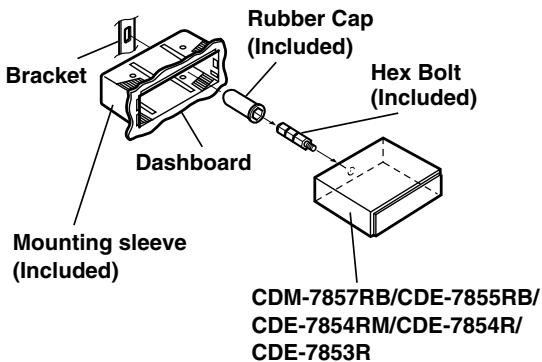
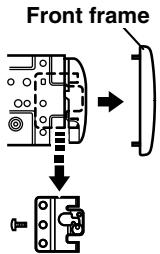
Remove the Detachable Front Panel (refer to page 4). Slide mounting sleeve from main unit (see Removal Procedure below). Slide the mounting sleeve into the dashboard.
2
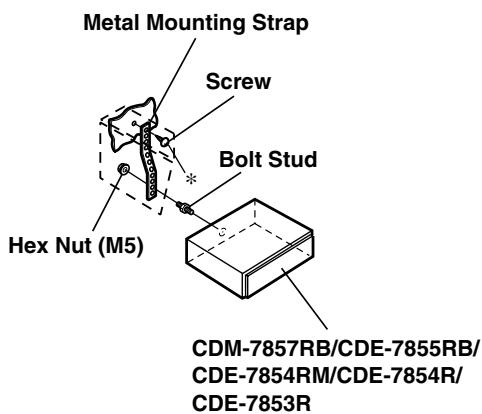
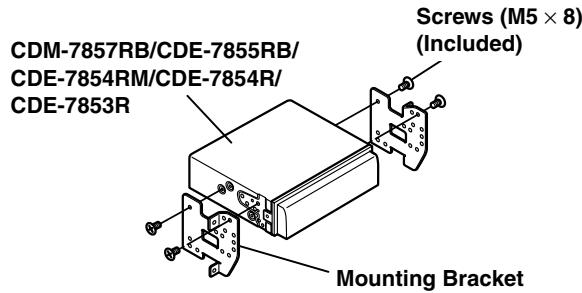
When your vehicle has the Bracket, mount the long hex bolt onto the rear panel of the CDM-7857RB/CDE-7855RB/CDE-7854RM/CDE-7854R/CDE-7853R and put the Rubber Cap on the hex bolt. If your vehicle does not have the Mounting Support, reinforce the head unit with the metal mounting strap (not supplied). Connect all the leads of the CDM-7857RB/CDE-7855RB/CDE-7854RM/CDE-7854R/CDE-7853R according to details described in the CONNECTIONS section.
NOTE
For the screw *, provide a proper screw to the chassis installing location.
3
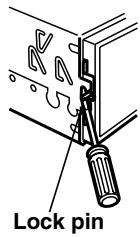
Slide the CDM-7857RB/CDE-7855RB/CDE-7854RM/CDE-7854R/CDE-7853R into the dashboard. When the unit is in place, make sure the locking pins are fully seated in the down position. This can be done by pressing firmly in on the unit while pushing the locking pin down with a small screwdriver. This ensures that the unit is properly locked and will not accidentally come out from the dashboard. Install the Detachable Front Panel.
Removal
1 Remove the detachable front panel.
2 Use a small screwdriver (or similar tool) to push the locking pins to the "up" position (see Fig. 3). As each pin is unlocked, gently pull out on the unit to make sure it does not re-lock before unlocking the second pin.
3 Pull the unit out, keeping it unlocked as you do so.
Installation and Connections
Connection
![graph TD A["Antenna"] --> B["ISO Antenna Plug"] B --> C["To vehicle phone"] B --> D["To amplifier or equalizer"] B --> E["To power antenna"] E --> F["Ignition Key"] F --> G["Battery"] G --> H["DIN Connector PIN Configuration (CDM-7857RB only)."] H --> I["Green"] H --> J["Rear Left"] H --> K["White"]…](/content/2019/10/31162/images/27eceaacd70f0e80aacc240a701c5471de6829f768d7198c2f59335edb6d2f37.jpg)
| No. | OUTPUT | MODEL | OUTPUT SPECIFICATION |
| 11 | Front | CDM-7857RB | Not linked with volume operation.(Refer to Operating Instructions, page 5) |
| 11 | Rear | CDE-7855RB/CDE-7854RM/CDE-7854R/CDE-7853R | Linked with volume operation. |
| 12 | CDM-7857RB |
① Antenna Receptacle
Connect to the supplied ISO antenna converter plug.
② Audio Interrupt In Lead (Pink/Black)
Connect this lead to the Audio Interface output of a cellular phone which provides ground shorting when a call is received.
If a device having the interrupt feature is connected, audio will be automatically muted whenever the interrupt signal is received from the device.
③ Remote Turn-On Lead (Blue/White)
Connect this lead to the remote turn-on lead of your amplifier or signal processor.
④ Switched Power Lead (Ignition) (Red)
Connect this lead to an open terminal on the vehicle's fuse box or another unused power source which provides (+) 12V only when the ignition is turned on or in the accessory position.
⑤ Power Antenna Lead (Blue)
Connect this lead to the +B terminal of your power antenna, if applicable.
NOTE
This lead should be used only for controlling the vehicle's power antenna. Do not use this lead to turn on an amplifier or a signal processor, etc.
⑥ Fuse Holder (15A)
⑦ Battery Lead (Yellow)
Connect this lead to the positive (+) post of the vehicle's battery.
⑧ ISO Power Supply Connector
⑨ Ground Lead (Black)
Connect this lead to a good chassis ground on the vehicle. Make sure the connection is made to bare metal and is securely fastened using the sheet metal screw provided.
⑩ Remote Control Interface Connector (CDM-7857RB only)
To remote control interface box.
⑪ Front Output/NFP RCA Connectors (CDM-7857RB only)
RED is right and WHITE is left.
⑪ Rear Output RCA Connectors (CDE-7855RB/CDE-7854RM/CDE-7854R/CDE-7853R only) RED is right and WHITE is left.
⑫ Rear Output RCA Connectors (CDM-7857RB only)
RED is right and WHITE is left.
⑬ DIN Connector (CDM-7857RB only)
Connect this to the DIN connector on the CD changer.
⑭ DIN Extension Cable
NOTE
Older Alpine CD changer came with standard, straight type DIN connectors. In installations where an L-type connector would simplify installation, the Alpine 491002 Adaptor can be used (sold separately).
⑮ Power Supply Connector
⑯ ISO Connector (Speaker Output)
⑰ Left Rear (+) Speaker Output Lead (Green)
⑱ Left Rear (−) Speaker Output Lead (Green/Black)
⑲ Left Front (+) Speaker Output Lead (White)
⑳ Left Front (−) Speaker Output Lead (White/Black)
②1 Right Front (−) Speaker Output Lead (Grey/Black)
②2 Right Front (+) Speaker Output Lead (Grey)
⑳ Right Rear (−) Speaker Output Lead (Violet/Black)
⑳ Right Rear (+) Speaker Output Lead (Violet)
⑲ RCA Extension Cable (sold separately)
②6 ISO Antenna Convertor Plug
To prevent external noise from entering the audio system.
Locate the unit and route the leads at least 10cm away from the car harness.
- Keep the battery power leads as far away from other leads as possible.
- Connect the ground lead securely to a bare metal spot (remove the coating if necessary) of the car chassis.
- If you add an optional noise suppressor, connect it as far away from the unit as possible. Your Alpine dealer carries various Alpine noise suppressors, contact them for further information.
- Your Alpine dealer knows best about noise prevention measures so consult your dealer for further information.
Händlerstemple
Tips der Polizei:
- LIGHT M ← CLASSICS → OTHER M -
DIMENSIONS DU CHASSIS

- FM/MW/LW/RDS CD RECEIVER
- 2015 TOTAL DEGREE
- 160+ PDS-8000 DAC CHINA
- ALPINE CD CHANGERS GIVE YOU MORE
- OPERATING INSTRUCTIONS
- WARNING
- BASIC OPERATIONS
- RADIO OPERATION
- RDS OPERATION
- CD PLAYER OPERATION
- INFORMATIONS
- INSTALLATION AND CONNECTIONS
- DO NOT OPERATE ANY FUNCTION THAT TAKES YOUR ATTENTION AWAY FROM SAFELY DRIVING YOUR VEHICLE
- KEEP THE VOLUME AT A LEVEL WHERE YOU CAN STILL HEAR OUTSIDE NOISE WHILE DRIVING
- MINIMIZE DISPLAY VIEWING WHILE DRIVING
- DO NOT DISASSEMBLE OR ALTER
- USE ONLY IN CARS WITH A 12 VOLT NEGATIVE GROUND
- KEEP SMALL OBJECTS SUCH AS BATTERIES OUT OF THE REACH OF CHILDREN
- USE THE CORRECT AMPERE RATING WHEN REPLACING FUSES
- DO NOT BLOCK VENTS OR RADIATOR PANELS
- USE THIS PRODUCT FOR MOBILE 12V APPLICATIONS
- DO NOT PLACE HANDS, FINGERS OR FOREIGN OBJECTS IN INSERTION SLOTS OR GAPS
- CAUTION
- HALT USE IMMEDIATELY IF A PROBLEM APPEARS
- PRECAUTIONS
- TEMPERATURE
- MOISTURE CONDENSATION
- DAMAGED DISC
- MAINTENANCE
- NEVER ATTEMPT THE FOLLOWING
- INSERTING DISCS
- NEW DISCS
- IRREGULAR SHAPED DISCS
- INSTALLATION LOCATION
- HANDLING THE DETACHABLE FRONT PANEL
- CORRECT HANDLING
- DISC CLEANING
- DISC ACCESSORIES
- DETACHING THE FRONT PANEL
- NOTES
- ATTACHING THE FRONT PANEL
- NOTE
- INITIAL SYSTEM START-UP
- TURNING POWER ON AND OFF
- NON FADING PRE-OUT (N.F.P.) ON AND OFF (CDM-7857RB ONLY)
- TURNING LOUDNESS ON/OFF
- ADJUSTING SOURCE SIGNAL LEVELS
- ADJUSTING VOLUME/BASS/TREBLE/ BALANCE (BETWEEN LEFT AND RIGHT)/ FADER (BETWEEN FRONT AND REAR)
- RADIO OPERATIONS
- MANUAL TUNING
- AUTOMATIC SEEK TUNING
- MONO/STEREO SWITCHING
- MANUAL STORING OF STATION PRESETS
- AUTOMATIC MEMORY OF STATION PRESETS
- TUNING TO PRESET STATIONS
- SETTING RDS RECEPTION MODE AND RECEIVING RDS STATIONS
- TIPS
- RECALLING PRESET RDS STATIONS
- RECEIVING RDS REGIONAL (LOCAL) STATIONS
- RECEIVING TRAFFIC INFORMATION
- PTY (PROGRAMME TYPE) TUNING
- RECEIVING TRAFFIC INFORMATION WHILE PLAYING CD OR RADIO
- WHEN TRAFFIC INFORMATION STATIONS CANNOT BE RECEIVED
- PRIORITY NEWS
- INSERTING/EJECTING DISC
- NORMAL PLAY AND PAUSE
- MUSIC SENSOR (SKIP)
- FAST FORWARD AND BACKWARD
- REPEAT PLAY
- M.I.X. (RANDOM PLAY)
- SCANNING PROGRAMMES
- CONTROLLING CD CHANGER (OPTIONAL) (CDM-7857RB ONLY)
- IN CASE OF DIFFICULTY
- BASIC
- NO FUNCTION OR DISPLAY
- RADIO
- UNABLE TO RECEIVE STATIONS
- UNABLE TO TUNE STATIONS IN THE SEEK MODE
- BROADCAST IS NOISY
- CD
- CD PLAYER/CHANGER NOT FUNCTIONING
- CD PLAYBACK SOUND IS WAVERING
- CD INSERTION NOT POSSIBLE
- UNABLE TO FAST FORWARD OR BACKWARD THE CD
- CD PLAYBACK SOUND SKIPS DUE TO VIBRATION
- CD PLAYBACK SOUND SKIPS WITHOUT VIBRATION
- ERROR DISPLAYS (BUILT-IN CD PLAYER ONLY)
- INDICATION FOR CD CHANGER
- HI TEMP
- ERROR - 01
- ERROR - 02
- NO MAGZN
- NO DISC
- ⚠ WARNING
- MAKE THE CORRECT CONNECTIONS
- BEFORE WIRING, DISCONNECT THE CABLE FROM THE NEGATIVE BATTERY TERMINAL
- DO NOT ALLOW CABLES TO BECOME ENTANGLED IN SURROUNDING OBJECTS
- DO NOT SPLICE INTO ELECTRICAL CABLES
- DO NOT DAMAGE PIPE OR WIRING WHEN DRILLING HOLES
- DO NOT USE BOLTS OR NUTS IN THE BRAKE OR STEERING SYSTEMS TO MAKE GROUND CONNECTIONS
- DO NOT INSTALL IN LOCATIONS WHICH MIGHT HINDER VEHICLE OPERATION, SUCH AS THE STEERING WHEEL OR GEARSHIFT
- HAVE THE WIRING AND INSTALLATION DONE BY EXPERTS
- USE SPECIFIED ACCESSORY PARTS AND INSTALL THEM SECURELY
- ARRANGE THE WIRING SO IT IS NOT CRIMPED OR PINCHED BY A SHARP METAL EDGE
- DO NOT INSTALL IN LOCATIONS WITH HIGH MOISTURE OR DUST
- IMPORTANT
- REMOVAL
- CONNECTION
- TO PREVENT EXTERNAL NOISE FROM ENTERING THE AUDIO SYSTEM
- TIPS DER POLIZEI
Brand : ALPINE
Model : CDE-7854RM
Category : Car radio