
TA-FB930R - Amplifier SONY - Free user manual and instructions
Find the device manual for free TA-FB930R SONY in PDF.


| Product type | Integrated stereo amplifier |
| Brand | Sony |
| Model | TA-FB930R |
| Dimensions (W x H x D) | 430 x 150 x 410 mm |
| Weight | 10.3 kg |
| Power supply | AC 230 V, 50/60 Hz |
| Power consumption | 210 W |
| Output power (DIN) | 120 W + 120 W (4 ohms, 1 kHz) / 80 W + 80 W (8 ohms, 1 kHz) |
| Total harmonic distortion | Less than 0.008% (at 10 W) |
| Frequency response | PHONO: RIAA curve ±0.5 dB (20 Hz-20 kHz); TUNER/CD/AUX/TAPE: 7 Hz-100 kHz (+0/-3 dB) |
| Signal-to-noise ratio | PHONO: 94 dB; other inputs: 105 dB |
| Speaker impedance | 4-16 ohms (A or B); 8-16 ohms (A+B) |
| Main functions | Input selection (CD, Tuner, Phono, Aux, Tape1/DAT, Tape2/MD), tone controls (Bass, Treble, Balance), Loudness, Subsonic filter, Source Direct, EON Link, headphone jack, speaker selection A/B, Tape Monitor |
| Maintenance and cleaning | Clean with a soft cloth lightly dampened with a mild detergent solution. Do not use abrasive pads, scouring powder, or solvents (alcohol, gasoline). |
| Safety | Do not expose to rain or moisture. Keep the cabinet closed. Unplug during prolonged inactivity. Have maintenance done by qualified personnel. |
| Spare parts and reparability | Contact an authorized Sony dealer for any repairs. The power cord must be replaced by a competent technician. |
| Included accessories | Remote control RM-S316, Sony R6 (AA) batteries x 2 |
| General information | User manual (31 pages) available for download. Applicable models: TA-FB930R and TA-FB730R. |
Frequently Asked Questions - TA-FB930R SONY
User questions about TA-FB930R SONY
0 question about this device. Answer the ones you know or ask your own.
Ask a new question about this device
Download the instructions for your Amplifier in PDF format for free! Find your manual TA-FB930R - SONY and take your electronic device back in hand. On this page are published all the documents necessary for the use of your device. TA-FB930R by SONY.
USER MANUAL TA-FB930R SONY
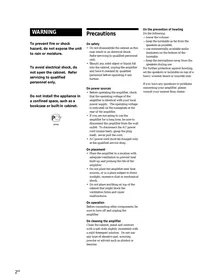
To avoid electrical shock, do not open the cabinet. Refer servicing to qualified personnel only.
Do not install the appliance in a confined space, such as a bookcase or built-in cabinet.
Precautions
On safety
- Do not disassemble the cabinet as this may result in an electrical shock. Refer servicing to qualified personnel only.
- Should any solid object or liquid fall into the cabinet, unplug the amplifier and have it checked by qualified personnel before operating it any further.
On power sources
- Before operating the amplifier, check that the operating voltage of the amplifier is identical with your local power supply. The operating voltage is indicated on the nameplate at the rear of the amplifier.
- If you are not going to use the amplifier for a long time, be sure to disconnect the amplifier from the wall outlet. To disconnect the AC power cord (mains lead), grasp the plug itself; never pull the cord.
- AC power cord must be changed only at the qualified service shop.
On placement
- Place the amplifier in a location with adequate ventilation to prevent heat built-up and prolong the life of the amplifier.
- Do not place the amplifier near heat sources, or in a place subject to direct sunlight, excessive dust or mechanical shock.
- Do not place anything on top of the cabinet that might block the ventilation holes and cause malfunctions.
On operation
Before connecting other components, be sure to turn off and unplug the amplifier.
On cleaning the amplifier
Clean the cabinet, panel and controls with a soft cloth slightly moistened with a mild detergent solution. Do not use any type of abrasive pad, scouring powder or solvent such as alcohol or benzine.
On the prevention of howling
Do the following: —lower the volume. -keep the turntable as far from the speakers as possible. —use commercially available audio insulators on the bottom of the turntable. -keep the microphone away from the speakers during use.
For further protection against howling, set the speakers or turntable on top of a heavy wooden board or concrete slab.
If you have any questions or problems concerning your amplifier, please consult your nearest Sony dealer.
Welcome!
Thank you for purchasing the Sony Integrated Stereo Amplifier. Before operating the amplifier, please read this manual thoroughly and retain it for future reference.
About This Manual
The instructions in this manual are for models TA-FB930R and TA-FB730R. Check your model number by looking at the rear panel of your amplifier. The TA-FB930R is the model used for illustration purposes unless stated otherwise. Any difference in operation is clearly indicated in the text, for example, "TA-FB930R only."
Conventions
- Instructions in this manual describe the controls on the amplifier. For details on the remote buttons control, see "Remote Button Descriptions" on page 11.
- The following icon is used in this manual:
Indicates hints and tips for making the task easier.
TABLE OF CONTENTS
Getting Started
Hookup Overview 4 Audio Component Hookups 4 Speaker System Hookups 5 Mains Lead Hookups 6
Listening to the Music 7 Recording 9
Additional Information
Troubleshooting 10
Specifications 10
Rear Panel Descriptions 11
Remote Button Descriptions 11
Unpacking
Check that you have received the following supplied items:
- Remote commander (remote) (1) RM-S316
- Sony batteries R6 (size-AA) (2)
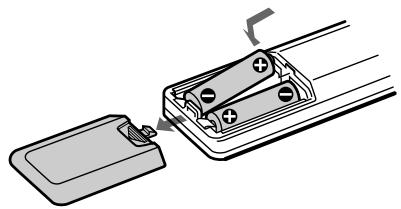
Inserting batteries into the remote
Insert two R6 (size-AA) batteries, matching the + and - on the batteries with the markings inside the battery compartment. When using the remote, point it at the remote control sensor on the amplifier.

When to replace batteries
With normal use, the batteries should last for about 6 months. When the remote no longer operates the amplifier, replace all the batteries.
Notes
- Do not leave the remote near an extremely hot or humid place.
- Do not drop any foreign object into the remote casing, particularly when replacing the batteries.
- Do not expose the remote sensor to direct sunlight or lighting equipment. Doing so may cause a malfunction.
- If you don't use the remote for an extended period of time, remove the batteries to avoid possible damage from battery leakage and corrosion.
Hookup Overview
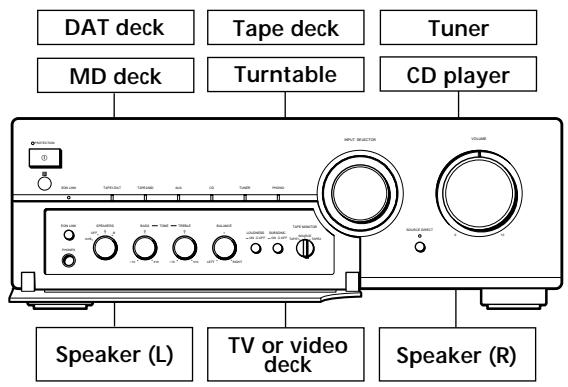
The amplifier allows you to connect and control the following audio components. Follow the hookup procedure indicated for each component that you want to connect.
To learn the location and name of each jack, see "Rear Panel Descriptions" on page 11.
Before you get started
- Turn off the power to all components before making any connections.
- Do not connect the mains leads of the various components until all connections are completed.
- Use the audio connecting cords supplied with each component for hooking up with the amplifier. Purchase and use optionally available cords as required.
- Be sure to make connections firmly to prevent hum and noise.
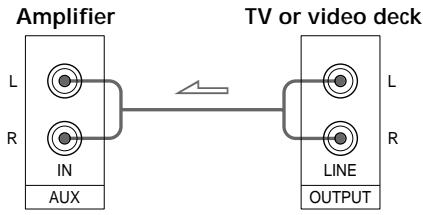
- When connecting an audio connecting cord, be sure to match the R (right) and L (left) jacks of the amplifier to the R and L jacks on the other components.
Audio Component Hookups
Overview
Here you learn how to connect your audio components to the amplifier.
What cords will I need?
Audio connecting cord (not supplied) (2 for each tape deck, DAT deck, or MD deck; 1 for other components)

Hookups
The arrow → indicates signal flow.
CD player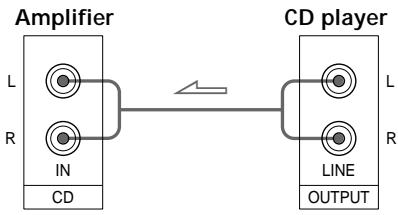
Tuner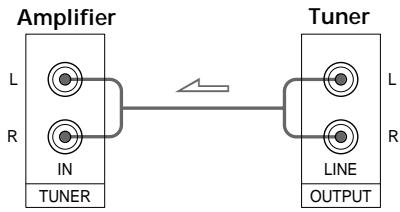
Tape deck, DAT deck, or MD deck
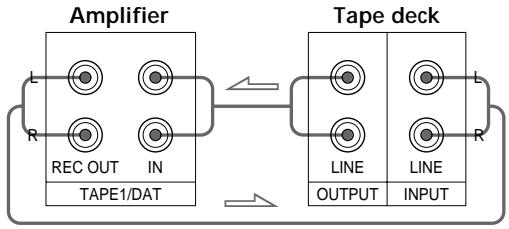
Use the configuration above to connect the OUTPUT and INPUT jacks of:
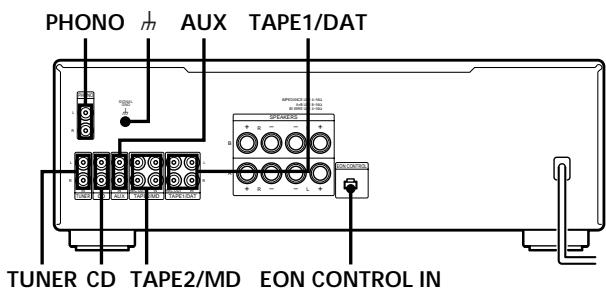
-a tape deck or DAT deck to the TAPE1/DAT jacks. -a tape deck or MD deck to the TAPE2/MD jacks.
Turntable
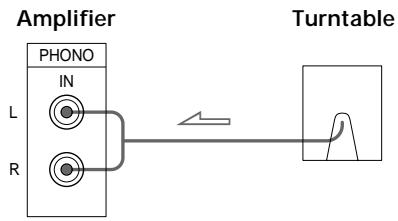
Note
To prevent hum, connect the earth lead to SIGNAL GND (H) on the amplifier.
TV or video deck
EON CONTROL
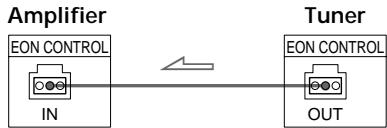
If your tuner is equipped with an EON CONTROL OUT terminal, connect it to the EON CONTROL IN terminal on the amplifier to allow use of the EON (Enhanced Other Networks) function of the RDS (Radio Data System) (see page 8).
Speaker System Hookups
Overview
Here you learn how to connect speakers to the amplifier. You can connect two pairs of speakers, SPEAKERS A and B.
Note that the SPEAKERS A terminals comprise the bottom row of the SPEAKERS terminals.
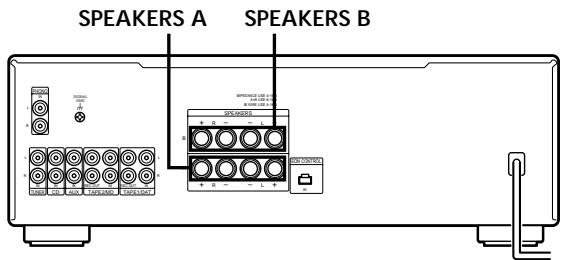
What cords will I need?
Speaker cord (not supplied) (1 for each speaker)
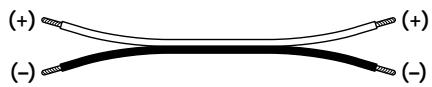
Twist the stripped ends of the cord about 10 mm. Be sure to match the speaker cord to the appropriate terminal on the components: + to + and - to -. If the cords are reversed, the sound will be distorted and will lack bass.
Hookups

Connecting to bi-wire system speakers
Since the two pairs of speaker terminals on your amplifier, SPEAKERS A and B, can provide simultaneous speaker output, you can use them to connect a bi-wire speaker system. To drive both speaker systems simultaneously, set SPEAKERS to A + B
To select the speaker system A or B, set SPEAKERS to A or B. To drive both speaker systems simultaneously, set SPEAKERS to A+B.
Note
Use speakers with a nominal impedance of 4 to 16 ohms. When outputting at the same time to two speaker systems, use speakers with a nominal impedance of 8 to 16 ohms.
Mains Lead Hookups
Connecting the mains lead
Connect the mains lead from this amplifier and from your audio/video components to wall outlets.

You can power other components through AC OUTLET on the amplifier. By connecting other audio components to AC OUTLET on the amplifier, you can supply power to the connected components through the amplifier and turn them all on or off when you turn the amplifier on or off.
Caution
Make sure that the total power consumption of all components connected to the outlets on the amplifier does not exceed 100 watts. Do not connect electrical home appliances such as an electric iron, fan, TV, or other high-wattage appliances to these outlets.
Note
Separate the mains lead, audio connecting cords, and speaker cords. Noise or sound deterioration may occur when audio connecting cords are in contact with the mains lead, or when the mains lead or speaker cords are placed near the tuner's loop aerial or aerial wire.
Listening to the Music
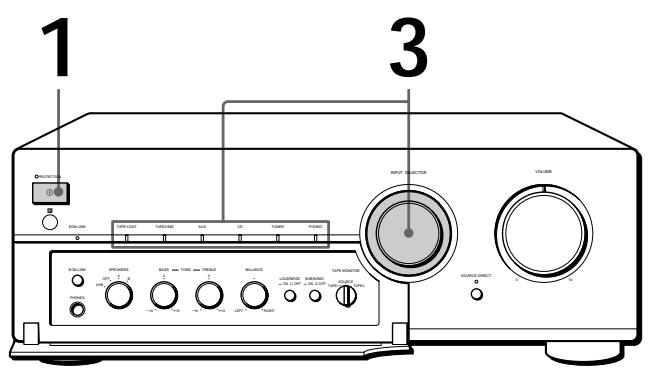
TA-FB930R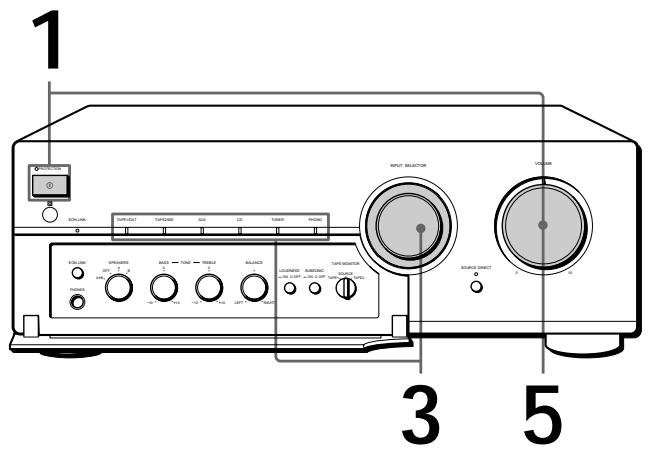
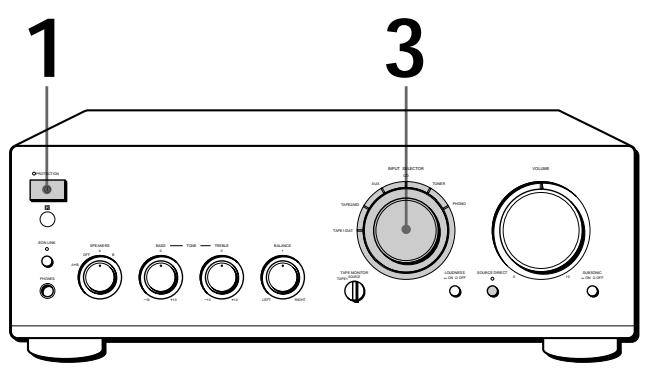
TA-FB730R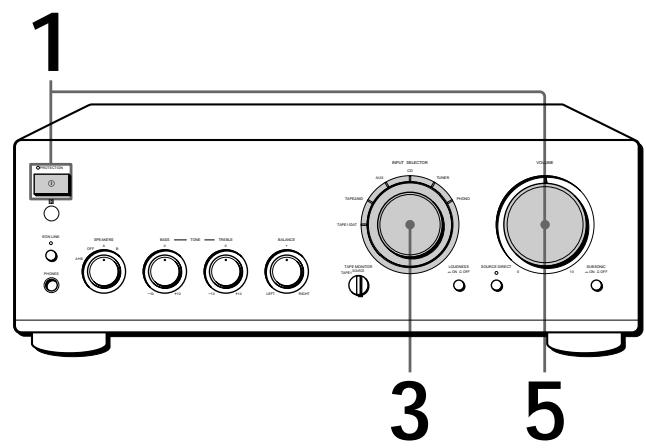

To listen through the headphones
Connect the headphones to PHONES and set SPEAKERS to OFF.

To listen directly to the input signal
Press SOURCE DIRECT so that the indicator lights up. Since the circuits of TONE controls, BALANCE control, LOUDNESS button, and SUBSONIC button are bypassed, you cannot adjust bass, treble, the balance, reinforce the bass and treble, or reduce subsonic noise components while listening to a source directly.
Note
Avoid high speaker output at which the sound is distorted. High-frequency distortion may damage the tweeters.
1 Press ① to turn on the amplifier and turn VOLUME fully anticlockwise to prevent damaging the speakers with excessive output. The PROTECTION indicator lights up, then goes off. 2 Turn on the programme source you want to listen to. 3 Set INPUT SELECTOR to the respective programme source. The indicator for the programme source lights up.
| To listen to a | Turn INPUT SELECTOR for |
| Record | PHONO |
| Radio broadcast | TUNER |
| Compact disc | CD |
| Source connected to AUX | AUX |
| Source connected to: | |
| —TAPE1/DAT | TAPE1/DAT |
| —TAPE2/MD | TAPE2/MD |
4 Start the programme source.
5 Adjust the volume by turning VOLUME.
| To | Press or turn |
| Adjust the bass | BASS |
| Adjust the treble | TREBLE |
| Adjust the balance | BALANCE |
| Reinforce the bass and treble at low listening level | LOUDNESS |
| Reduce subsonic noise components created by warped records, etc. | SUBSONIC |

What is the Enhanced Other Networks (EON)?
One convenient RDS service is "Enhanced Other Networks" (or "EON").
This allows the unit to automatically switch to a programme type of your choice when one starts in your broadcast area.
To receive the Enhanced Other Networks (EON) programmes
When your amplifier is connected to a Sony tuner with the EON CONTROL system, the amplifier switches to any EON programme that is broadcast in your EON area, and switches back to the last selected programme source when the programme ends.
TA-FB930R EON LINK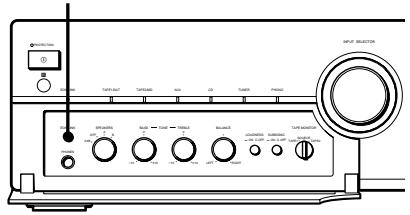
TA-FB730R EON LINK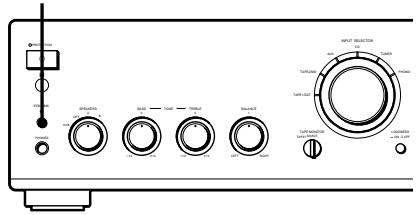
1 Make sure that the amplifier and the tuner are connected through the EON CONTROL terminals (see page 5).
2 Press EON LINK so that the indicator lights up.
Whenever an EON programme starts on the radio frequency that your tuner is set to, you will receive it.
To cancel EON reception
Press EON LINK again so that the indicator goes off.
Notes
- If you select another programme source while receiving an EON programme, EON reception ends. However, as long as the EON LINK indicator lights up, you can receive EON programmes automatically.
- Make sure to cancel EON reception before starting to record since an EON programme may interfere with your recording.
- If you activate the Tape Monitor function (see page 9) while the EON LINK indicator is lit, the indicator goes off and you cannot receive EON programmes. If this happens, deactivate the Tape Monitor function so that the indicator lights up again.
Recording
TA-FB930R
TA-FB730R

You can record the same source on two recording components at the same time

You can monitor the recorded sound (Tape Monitor function)
You can monitor the recorded sound if the tape deck you are recording on has separate playback and recording heads.
To monitor the sound, set TAPE MONITOR to TAPE1 or TAPE2.
Note that on the TA-FB730R, you can monitor only the sound being recorded from the TAPE1/DAT jacks.
Note
Before you begin recording, press the EON LINK button to turn off the EON LINK indicator (see page 8).
1 Press ① to turn on the amplifier. 2 Turn on the programme source you want to record. 3 Select the programme source that you want to record by turning INPUT SELECTOR.
The indicator for the programme source lights up.
| To record a | Set INPUT SELECTOR to |
| Record | PHONO |
| Radio broadcast | TUNER |
| Compact disc | CD |
| Source connected to AUX | AUX |
| Source connected to: | |
| —TAPE1/DAT | TAPE1/DAT |
| —TAPE2/MD | TAPE2/MD |
4 Prepare the recording component for recording, then start recording. 5 Start playing the programme source.
Troubleshooting
If you experience any of the following difficulties while using the amplifier, use this troubleshooting guide to help you remedy the problem. Should any problem persist, consult your nearest Sony dealer.
No sound output.
→ Connect the audio connecting cords firmly. → Connect the amplifier and other audio components correctly. → Turn INPUT SELECTOR to the appropriate programme source. → Make sure the speaker wires are correctly connected to the SPEAKERS A terminals (on the bottom row) and SPEAKERS B terminals (on the top row). Make sure the proper selection is made on the SPEAKERS control (A, B, A+B, or OFF).
No audio from one channel or unbalanced speaker output.
→ Turn BALANCE to adjust the balance. → Check the speaker and input connections of silent channel.
Weak bass or treble.
→ Adjust the TONE controls. → Change speaker positions or room conditions to eliminate obstructions in sound path.
Distorted sound.
Improperly selected input signal. Insufficient input capacity of speakers. Lower the volume.
Lack of bass or ambiguity in instrument positions.
Speaker cord and terminal polarity are reversed. Reconnect the cords with correct polarity.
Hum or noise.
Ground the turntable system (see page 5). Connect the audio connecting cords firmly. The amplifier is picking up interference from a TV set. Move the amplifier away from the TV set or turn the TV set off.
The remote does not function.
Remove any obstructions between the remote control sensor on the amplifier and the remote. Point the remote towards the remote sensor on the front of the amplifier. The remote is too far from the amplifier. Move closer to the amplifier. Replace the batteries in the remote.
The PROTECTION indicator lights up and/or sudden loss of audio.
Check if a short-circuit has occurred. Turn off the amplifier and check the connected components and speakers.
Specifications
Amplifier section
DIN power output
TA-FB930R: 120 W + 120 W (4 ohms at 1 kHz)
80 W + 80 W (8 ohms at 1 kHz)
TA-FB730R: 100W + 100W (4 ohms at 1kHz )
60W + 60W (8 ohms at 1kHz )
Total harmonic distortion
Less than 0.008% (at 10 W output)
Frequency response
PHONO (20 Hz - 20 kHz): RIAA equalization curve ±0.5 dB
TUNER, CD, AUX, TAPE1/DAT, TAPE2/MD:
7Hz - 100kHz-3+0dB
S/N (network A)
PHONO
TA-FB930R: 94 dB
TA-FB730R: 90 dB
TUNER, CD, AUX, TAPE1/DAT, TAPE2/MD: 105 dB
Output voltage/impedance
REC OUT 1, 2: 150mV , 1 kilohm
PHONES: 10 mW (at 8 ohms)
Speakers impedance
4-16 ohms, 8-16 ohms (SPEAKERS A+B)
Damping factor
100 (8 ohms, 1 kHz)
General
System
Power amplifier: Pure-complementary SEPP OCL power amplifier with all stages directly coupled
Preamplifier: Low-noise, equalizer amplifier
Power requirements
230 V AC, 50/60 Hz
Power consumption
TA-FB930R: 210 W
TA-FB730R: 180 W
Dimensions (approx.) (w/h/d)
TA-FB930R: 430 × 150 × 410 mm
TA-FB730R: 430 × 150 × 405 mm
incl. projecting parts and controls
Mass (approx.)
TA-FB930R: 10.3 kg
TA-FB730R: 8.6 kg
Supplied accessories
See page 3.
Design and specifications are subject to change without notice.
Rear Panel Descriptions
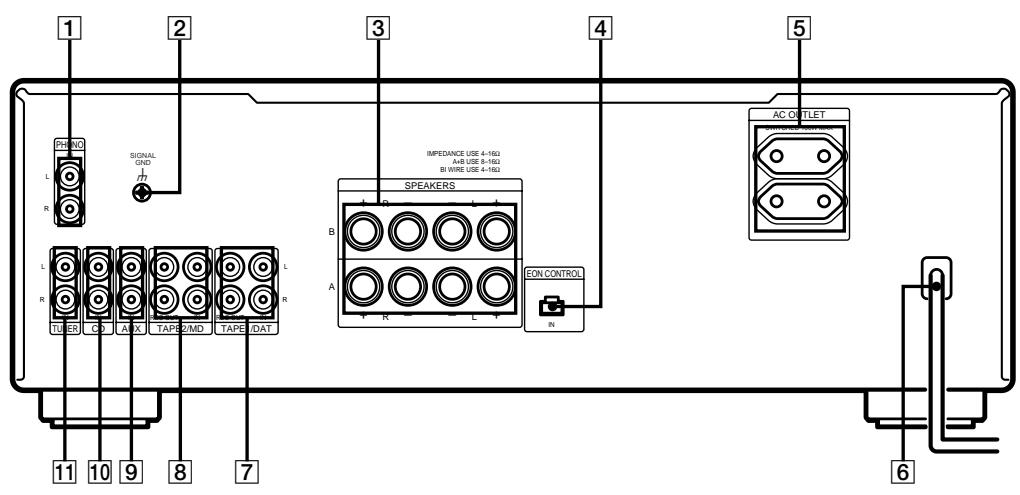
1 PHONO 2 m (SIGNAL GND) 3 SPEAKERS A/B 4 EON CONTROL IN 5 AC OUTLET 6 Mains lead
7 TAPE1/DAT 8 TAPE2/MD 9 AUX 10 CD TUNER
Remote Button Descriptions
You can use the supplied remote to control other Sony audio components equipped with the E (remote control sensor) mark.
| Remote Button(s) | For operating the | Function |
| FUNCTION CD | Amplifier | Selects input signal from the CD jacks. |
| TUNER | Amplifier | Selects input signal from the TUNER jacks. |
| PHONO | Amplifier | Selects input signal from the PHONO jacks. |
| TAPE1/DAT | Amplifier | Selects input signal from the TAPE1/DAT jacks. |
| TAPE2/MD | Amplifier | Selects input signal from the TAPE2/MD jacks. |
| AUX | Amplifier | Selects input signal from the AUX jacks. |
| TUNER | ||
| PRESET +/- | Tuner | Scans and selects preset stations. |
| Remote Button(s) | For operating the | Function |
| CD ▷ | CD player | Starts playback. |
| II | CD player | Pauses playback. |
| ■ | CD player | Stops playback. |
| I←/→I | CD player | Locates tracks (AMS*). |
| D.SKIP | CD player | Skips a disc (for CD player equipped with a multi-disc changer). |
| MD ▷ | MD deck | Starts playback. |
| II | MD deck | Pauses playback. |
| ■ | MD deck | Stops playback. |
| I←/→I | MD deck | Locates tracks. |
| TAPE DECK A/B <|/|> | Deck A or B | Starts playback. |
| ■ | Deck A or B | Stops all tape operations. |
| ←/→ | Deck A or B | Fast-forwards or rewinds the tape. |
| VOL +/- | Amplifier | Controls the volume. |
*Automatic Music Sensor
WARNING
- PRECAUTIONS
- ON SAFETY
- ON POWER SOURCES
- ON PLACEMENT
- ON OPERATION
- ON CLEANING THE AMPLIFIER
- ON THE PREVENTION OF HOWLING
- WELCOME
- ABOUT THIS MANUAL
- CONVENTIONS
- TABLE OF CONTENTS
- GETTING STARTED
- LISTENING TO THE MUSIC 7 RECORDING
- ADDITIONAL INFORMATION
- UNPACKING
- INSERTING BATTERIES INTO THE REMOTE
- WHEN TO REPLACE BATTERIES
- NOTES
- HOOKUP OVERVIEW
- BEFORE YOU GET STARTED
- AUDIO COMPONENT HOOKUPS
- OVERVIEW
- HOOKUPS
- TURNTABLE
- NOTE
- TV OR VIDEO DECK
- EON CONTROL
- SPEAKER SYSTEM HOOKUPS
- CONNECTING TO BI-WIRE SYSTEM SPEAKERS
- MAINS LEAD HOOKUPS
- CONNECTING THE MAINS LEAD
- CAUTION
- LISTENING TO THE MUSIC
- WHAT IS THE ENHANCED OTHER NETWORKS (EON)
- TO RECEIVE THE ENHANCED OTHER NETWORKS (EON) PROGRAMMES
- TO CANCEL EON RECEPTION
- RECORDING
- TROUBLESHOOTING
- NO SOUND OUTPUT
- WEAK BASS OR TREBLE
- DISTORTED SOUND
- HUM OR NOISE
- THE REMOTE DOES NOT FUNCTION
- SPECIFICATIONS
- DIN POWER OUTPUT
- TOTAL HARMONIC DISTORTION
- FREQUENCY RESPONSE
- S/N (NETWORK A)
- PHONO
- OUTPUT VOLTAGE/IMPEDANCE
- SPEAKERS IMPEDANCE
- DAMPING FACTOR
- GENERAL
- SYSTEM
- POWER REQUIREMENTS
- POWER CONSUMPTION
- DIMENSIONS (APPROX.) (W/H/D)
- MASS (APPROX.)
- SUPPLIED ACCESSORIES
- REAR PANEL DESCRIPTIONS
- REMOTE BUTTON DESCRIPTIONS
- WARNING
Brand : SONY
Model : TA-FB930R
Category : Amplifier