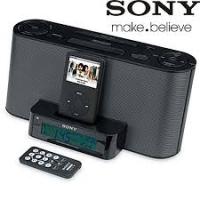
ICF-C1IPMK2 - Alarm clock radio SONY - Free user manual and instructions
Find the device manual for free ICF-C1IPMK2 SONY in PDF.


Pick your language and provide your email: we'll send you a specifically translated version.
| Product type | Radio alarm clock with iPod dock |
| Brand | Sony |
| Model | ICF-C1IPMK2 |
| Dimensions (W x H x D) | 300 x 130 x 139 mm |
| Weight (with battery) | Approx. 1.9 kg |
| Main power supply | 230 V AC, 50 Hz |
| Backup power supply | CR2032 lithium battery (3 V DC) |
| Remote control battery | CR2025 lithium battery |
| Radio bands | FM (87.5 – 108 MHz) and AM (530 – 1611 kHz) |
| Speaker | Approx. 5.1 cm (2 inches) diameter |
| Output power | 3 W + 3 W (harmonious distortion 10 %) |
| Alarm functions | Dual alarm (A and B), radio, buzzer or iPod modes; snooze up to 40 minutes |
| Sleep timer | Adjustable from 15 to 90 minutes in 15-minute increments |
| Time setting | Automatic time zone setting, automatic DST update |
| Display | 24-hour clock, date, adjustable brightness (3 levels) |
| iPod/iPhone compatibility | iPod nano, iPod touch, iPod classic, iPhone (with dock connector) |
| Auxiliary audio input | AUDIO IN jack (3.5 mm mini-jack) for external equipment |
| Sound effect | MEGA Xpand (sound field expansion) |
| Maintenance and cleaning | Clean with a soft cloth moistened with a neutral detergent solution |
| Safety | Do not expose to moisture; do not block ventilation openings; use specified battery |
| Supplied accessories | Remote control, audio cable, AM loop antenna |
Frequently Asked Questions - ICF-C1IPMK2 SONY
How to set the clock and date?
Press CLOCK for at least 2 seconds. Set the year with TIME SET +/-, then press CLOCK to confirm. Repeat for month, day, and time. The clock starts at 0 seconds after setting the minutes.
How to set the alarm?
Press ALARM SET A (or B) for a few seconds. Use TIME SET +/- to set the hour, minutes, alarm mode (RADIO, BUZZER or iPod), and volume. Press ALARM SET A after each step. To activate the alarm, press ALARM SET A to display the ALARM A indicator.
How to replace the backup battery?
Keep the unit plugged in. Remove the screw of the battery compartment on the bottom of the unit. Insert a new CR2032 battery with the ⊕ side facing up. Replace the compartment and screw. Do not unplug the unit during replacement, otherwise the time will reset.
Why does the clock display 0:00 after a power outage?
The backup battery is low or dead. Replace the battery with a new CR2032. If the problem persists, contact a Sony dealer.
How to use the iPod with this alarm clock?
Place the iPod in the dock connector on the front. Adjust the rear support. Press ▶/■ to start playback. You can also use the iPod controls or the remote control. Charging of the iPod starts automatically.
How to set the time zone?
Press TIME ZONE for at least 2 seconds. The zone number blinks. Use TIME SET +/- to select your zone (0, 1 or 2). Press TIME ZONE to confirm. By default, zone 1 corresponds to Central European time.
How to disable automatic daylight saving time adjustment?
Press both CLOCK and ALARM DISPLAY simultaneously for at least 2 seconds. The DST indicator disappears. To reactivate, repeat the same operation.
What to do if the alarm does not sound?
Check that the alarm is activated (ALARM A or B indicator is lit). If the mode is RADIO or iPod, make sure the volume is set. For iPod alarm, ensure the iPod is properly connected and powered on.
How to use the sleep timer?
Press SLEEP when the unit is on. Each press changes the duration: 90, 60, 30, 15 minutes. The unit turns off automatically after the selected time.
How to clean the unit?
Use a soft cloth slightly moistened with a neutral detergent solution. Do not use solvents or abrasive products. Unplug the unit before cleaning.
User questions about ICF-C1IPMK2 SONY
0 question about this device. Answer the ones you know or ask your own.
Ask a new question about this device
No questions yet. Be the first to ask one.
Download the instructions for your Alarm clock radio in PDF format for free! Find your manual ICF-C1IPMK2 - SONY and take your electronic device back in hand. On this page are published all the documents necessary for the use of your device. ICF-C1IPMK2 by SONY.
USER MANUAL ICF-C1IPMK2 SONY
Operating Instructions
Mode d'emploi
DREAM MACHINE
There is a tactile dot on the VOL ^+
/ , and PRESET + button.