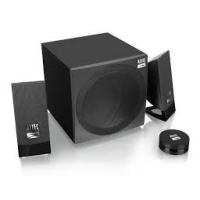
LOZENGE 2.1 - Speaker ALTEC LANSING - Free user manual and instructions
Find the device manual for free LOZENGE 2.1 ALTEC LANSING in PDF.


| Product type | 2.1-channel audio speaker system (subwoofer + two satellites) |
| Total RMS power | 40 W (2 x 10 W satellites + 20 W subwoofer) |
| Frequency response | 50 Hz - 18 kHz |
| Satellite speakers | 2.5" (tweeters) - 4 Ω each |
| Subwoofer speaker | 5" (woofer) - 8 Ω |
| Power supply | DC 18 V / 2 A (power adapter included) |
| Power adapter | Input AC 100-240 V, 50/60 Hz, 1 A |
| Remote control | Infrared, AAA battery (3.2 V / 15 mA) |
| Audio input | 3.5 mm jack socket |
| Satellite output | RCA connectors (left/right) on the subwoofer |
| Recommended use | Indoor, temperate climate |
| Warranty | 1 year (first purchaser, against manufacturing defects) |
| Safety | Do not expose to water or flames; minimum clearance 10 cm around |
| Source compatibility | TV, CD/DVD players, MP3/MP4 players, PC, game console |
| Standby consumption | Not specified |
Frequently Asked Questions - LOZENGE 2.1 ALTEC LANSING
User questions about LOZENGE 2.1 ALTEC LANSING
0 question about this device. Answer the ones you know or ask your own.
Ask a new question about this device
Download the instructions for your Speaker in PDF format for free! Find your manual LOZENGE 2.1 - ALTEC LANSING and take your electronic device back in hand. On this page are published all the documents necessary for the use of your device. LOZENGE 2.1 by ALTEC LANSING.
USER MANUAL LOZENGE 2.1 ALTEC LANSING
To avoid possible hearing damage, do not listen at high
audio volume for long periods of time.


©2014 Altec Lansing/AL Infinity, LLC.
All rights reserved.
ALTEC, ALTEC LANSING, the Altec
Lansing logo are marks of Altec
Lansing/AL Infinity LLC.
ALTEC
LANSING


AL-SND340F-001
USER MANUAL
Safety Instruction
Read these safety instructions before using your device and store them for possible future reference.
- If the charger cord is damaged, have it repaired by the manufacturer, its service department or a similarly qualified person in order to avoid any hazard.
- The power supply must be replaced by a new one in case of malfunction, because this power supply is not repairable.
- The socket-outlet shall be installed near the equipment and shall be easily accessible
- The charger is not intended for use by persons (including children) with reduced physical, sensory or mental capacity. Persons who have not read the manual, unless they have received explanations by a person responsible for their safety and supervision should not use this unit.
Children should be monitored to ensure that they do not play with the charger. - The charger should always be readily accessible.
- The device should not be exposed to dripping or splashing water.
- No objects filled with liquids such as vases shall be placed on the device.
- Always leave a minimum distance of 10cm around the unit to ensure sufficient ventilation.
- Open flame sources, such as candles, should not be placed on top of the device.
climate.
- At full volume, prolonged listening to the audio device may damage the user's hearing and cause hearing troubles (temporary or permanent deafness, hearing drone, tinnitus, hyperacusis).
We recommend not to listen to the audio device at high audio volume and no more than one hour per day at medium audio volume. - CAUTION: Danger of explosion if battery is incorrectly replaced or not replaced by the same type or equivalent.
The battery should not be exposed to excessive heat such as sunshine, fire or similar. - Different types of batteries, new and used batteries should not be mixed.
- The battery must be installed according to the polarity.
- If the battery is worn, it must be removed from the product.
- The battery must be disposed of safely. Always use the collection bins provided (check with your dealer) to protect the environment.
Warranty Conditions
-
This product is guaranteed for 1 year against defects in manufacturing or assembly.
-
This guarantee only applies to the primary purchase by the end user. It does not cover issues related to improper handling by the user. Proof of purchase is required in order to render the warranty valid.
The warranty does not cover problems associated
withinproper use, whether it is a result of negligence, processing, failure to store properly (excessive heat or humidity), improper installation or unauthorized repairs.
- The manufacturer is contractually required to repair or replace the defective product. ALTEC is under no financial obligation to pay any amount in excess of that paid by the end user.
Reasons for warranty exclusions:
Expired warranty period
No proof of purchase
Visible damage / breakage
- Oxidation
- Improper use
- Use of non-approved accessories
Product altered, repaired or modified by an unauthorized third party
- Missing or altered serial number
Warranty voided due to broken or altered packaging
- Damage due to accident, neglect, improper maintenance/care or force majeure
- Damage due to the installation of third-party software or a virus.
Installation and user guidance
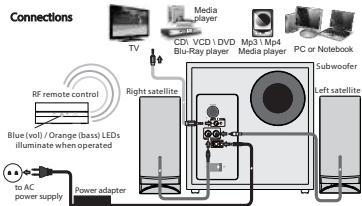
- Connect the satellites to the left and right RCA outputs at the rear panel of the subwoofer.
- Place both satellites on extreme sides of the listening position.
- The subwoofer can be placed on the floor and near the playback device.
- Connect the playback device to the rear 3.5mm stereo input with the included signal cable.
- The playback device such as CD/DVD. Mp3 / Mp4 player or TV can be connected to the speaker system.
- Last, connect the AC power adapter to the rear of the subwoofer and to the AC power supply source. Please ensure the AC power supply matches the power requirement printed at the rear panel.
- For the remote control, please ensure a fresh battery is correctly loaded.
Technical specifications
Total Power: 40 Watt RMS
Power distribution: 10 Watt x 2 + 20 Watt
Frequency response: 50Hz - 18kHz
Tweeter type: 2.5"
Tweeter impedance: 4 Ohm
Woofer type: 5"
Woofer impedance: 8 Ohm
Power supply: DC 18V=2A
Adaptor: INPUT AC 100-240V 50 / 60Hz 1A
OUTPUT DC 18V=2A
Remote control power supply: 3.2V = 15mA
(AAA battery)
The European directive 2002/96/EC on Waste Electrical and Electronic Equipment (WEEE), requires that old household electrical appliances must not be disposed of in the normal unsorted municipal waste stream. Old appliances must be collected separately in order to optimize the recovery and recycling of the materials they contain, and reduce the impact on human health and the environment. The crossed out "wheeled bin" symbol on the product reminds you of your obligation, that when you dispose of the appliance, it must be separately collected.


To avoid possible hearing damage, do not listen at high audio volume for long periods of time.
MARKET MAKER BRAND LICENSING
Product features, specifications and appearances are subject to change without notice
©2014 Altec Lansing/AL Infinity, LLC.
All rights reserved.
ALTEC, ALTEC LANSING, the Altec
Lansing logo are marks of Altec
Lansing/AL Infinity LLC.