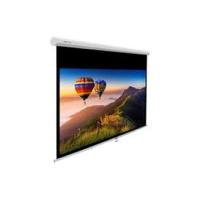
170 - Projection screen INSMAN - Free user manual and instructions
Find the device manual for free 170 INSMAN in PDF.


| Product type | Manual projection screen |
| Screen type | Matte white, PVC surface |
| Gain | 1.0 |
| Viewing angle | 150° |
| Screen treatments | Anti-yellowing, antistatic, anti-fluting |
| Housing material | White lacquered steel |
| Installation type | Wall or ceiling (mounting hardware not included) |
| Ring load capacity | Greater than 25 kg |
| Deployment mode | Manual pull |
| Locking function | Automatic in deployed position |
| Screen maintenance | Dry cloth or soft bristle brush |
| Usage precautions | Do not fold, do not touch the surface, avoid insects and debris |
| Cleaning prohibited | Chemicals, liquids |
| Warranty | Repair or replacement by INSTAAL upon presentation of proof of purchase |
| After-sales service | Contact the place of purchase or the authorized local distributor |
Frequently Asked Questions - 170 INSMAN
User questions about 170 INSMAN
0 question about this device. Answer the ones you know or ask your own.
Ask a new question about this device
Download the instructions for your Projection screen in PDF format for free! Find your manual 170 - INSMAN and take your electronic device back in hand. On this page are published all the documents necessary for the use of your device. 170 by INSMAN.
USER MANUAL 170 INSMAN
INSTAAL ACCESSORIES & CO
INSMAN
ÉCRAN MANUEL MANUAL SCREEN
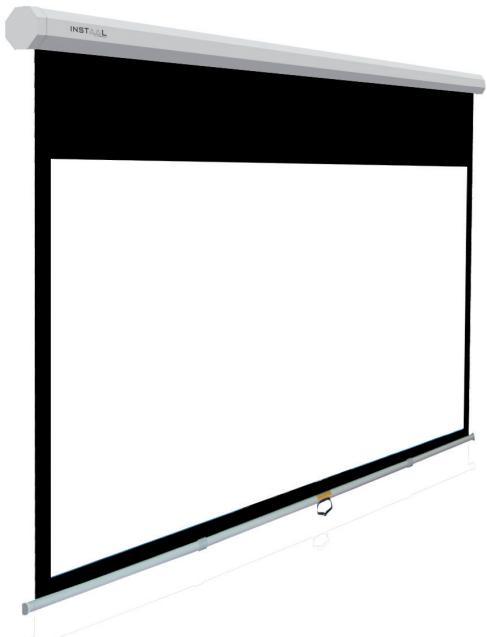
MODE D'EMPLOI
Thank you for choosing our projection screen. Please read the manual carefully before use.
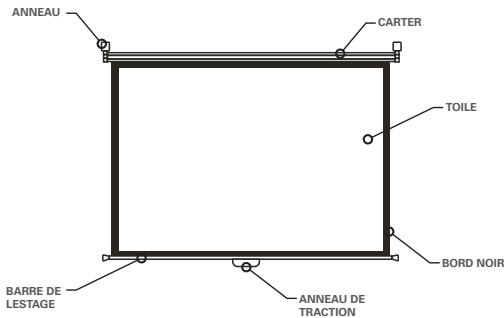
I. INSTALLATION
Thank you for choosing our INSTAAL screen. All our screens have passed a strict quality inspection before delivery. Please read this manual carefully to ensure proper use.
- Unpack the screen carefully, and make sure it is in good condition. Check that all the accessories are packed inside the carton.
- Choose a suitable place for installation. Moving parts (weight bar) must be installed higher than 2 cm above the floor.
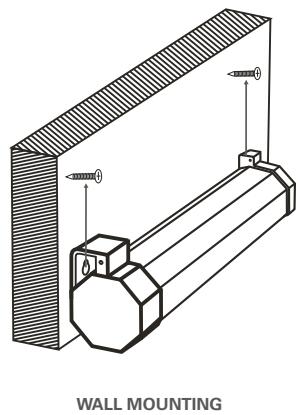
- Refer to the below figure to fix the screen on the wall or on the ceiling (screws and brackets are not provided). The distance between the screws must be equal to the one between the 2 rings and they should be at the same level. The rings must be strong enough to load more than 25kg
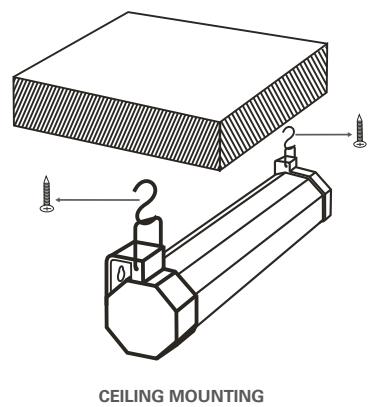
II. OPERATING
Hold tightly the pulling ring and pull down the screen slowly. Stop when the black border comes out (or where you want to stop). The screen should lock automatically. If not, repeat the operation. After use, release the screen to make it roll back up in the casing.
III. PRECAUTIONS FOR USE
- Do not fold the screen.
- Do not hang anything on the screen when rolled down.
- Do not put your fingers inside the casing when rolling up.
-
Dirt and scratches can damage the quality of the screen, please pay attention to these points :
-
Do not touch the surface of the screen with your hands
- Do not draw on the screen
- Do not scratch the screen with hard and sharp objects that can cause damage
-
Do not use chemicals to wash the screen surface
-
Do not spill liquids on the screen.
- Keep the screen away from fire or high temperature.
- Make sure there are no bugs or any debris on the screen before rolling it back up.
- To remove dirt from the screen, use a soft cloth and a soft skin brush and gently rub.
- To roll down the screen, pull slowly and vertically. Do not force. Stop pulling as soon as the black border is completely out of the casing or if the screen is jammed or injured.
- After use, roll back up the screen in the case to protect it. If you won't use the screen for a long time, please take the screen off the wall or ceiling and put it back in its box.
IV. SPECIFICATIONS
| Fabric | White matt, PVC surface projection |
| Gain | 1.0 |
| Directivity | 150°, no shine point |
| Treatments | Anti-yellowing, antistatic, anti-warping |
| Case | White lacquered steel |
This product is warranted for one year from the date of purchase. If the product becomes defective due to faulty materials or workmanship within the warranty period, please return the complete unit to your local service center with the invoice prepaid transportation charge by yourself.
This warranty DOES NOT apply to :
- break down due to usage of incompatible spare parts
- normal wear and torn parts, cord, plug, chuck, charger, switch, bearing housing, gear
- brackets and accessories
- unauthorized repair, alteration, modification
- damage caused by foreign objects, substances, accidents, obvious misuse, abuse, neglect and improper applications.
Details may vary from country to country. Please consult the local service center for more details, we reserve the right to change the terms of warranty without prior notice..
FOR YOUR RETENTION
| CUSTOMER COPY | ||
| NAME Mr. □Miss □Mrs □ | ||
| ADDRESSTEL. NO.: | ||
| PRODUCT MODEL | SERIAL NO. OR DATE CODE | |
| DATE OF PURCHASE | INVOICE / RECEIPT NO. | |
| DEALER'S NAMETEL. NO.: | ||
INSTAAL is a registered trademark of
AVINDUSTRY
www.av-industry.com